
Thread
Bad Smell from Duo 230
Yup, I recently recapped two PowerBook 230 Duos which both of them had major capacitor leakage. One of them sadly decided to quit working shortly afterwards, I believe that it was probably because of capacitor leakage.
You can quickly check for the leakage by simply lifting the keyboard. If the small SMD cap on the left side is leaking, then you know that the others are on their way.
Below I provided a quick diagram of affected capacitors. One of them is already removed.
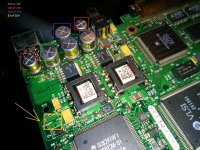
You can quickly check for the leakage by simply lifting the keyboard. If the small SMD cap on the left side is leaking, then you know that the others are on their way.
Below I provided a quick diagram of affected capacitors. One of them is already removed.
There are 4 T8 (or T7) Torx Screws at the bottoms of the case.
Here's Apple's technical notes on taking one apart. This applies to all the Duo's since they use the same case.
http://tim.id.au/laptops/apple/powerbook/powerbook_200_series.pdf
To replace the caps, you need to remove the logic board from the case, the area is too small to work with the logic board inside the case.
And TechKnight - the Apple Certified 50 pound Sledge Hammer is for repairing Worthless Windows PCs. }
Here's Apple's technical notes on taking one apart. This applies to all the Duo's since they use the same case.
http://tim.id.au/laptops/apple/powerbook/powerbook_200_series.pdf
To replace the caps, you need to remove the logic board from the case, the area is too small to work with the logic board inside the case.
And TechKnight - the Apple Certified 50 pound Sledge Hammer is for repairing Worthless Windows PCs. }