
Thread
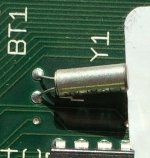
Another SE/30... Y1 resistor (?)
Y1 something? Sorry, but you have a bad case of a battery leakage. You definitely should clean this board AASP and then look for damaged components. Also the picture is too blurred to be any good.
If the board is not too damaged, you can then proceed with recap. Clean the board first with soapy water and then with isopropyl alcohol a few times.
I hope that you'll be able to get it running, but this picture doesn't look too promising.
If the board is not too damaged, you can then proceed with recap. Clean the board first with soapy water and then with isopropyl alcohol a few times.
I hope that you'll be able to get it running, but this picture doesn't look too promising.
Yes... of these things I am aware. Y1 is the little space just below the rightmost part of the battery holder. [

Once I clean the board completely (and also parts of the metal on the case, and the logic board shield) I will still need to replace whatever Y1 is.
And to that effect... never mind; apologize for the apparent repost.
https://68kmla.org/forums/index.php?/topic/13231-help-my-se30s-battery-exploded-and-so-did-c12-an-y1/
Once I clean the board completely (and also parts of the metal on the case, and the logic board shield) I will still need to replace whatever Y1 is.
And to that effect... never mind; apologize for the apparent repost.
https://68kmla.org/forums/index.php?/topic/13231-help-my-se30s-battery-exploded-and-so-did-c12-an-y1/
I really appreciate it. (Not to spam this thread, but can you offer any ideas for my increasingly pathetic-looking PB 5300 and its ... according to the eBay seller... 'not new' battery lol...? - https://68kmla.org/forums/index.php?/topic/24649-powerbook-5300c-battery-rebuild-sorta/&do=findComment&comment=258779)
While there are probably better removal liquids, I am a big fan of vinegar. Its cheap and you can get it anywhere. And it sits on the boards for a long time (does not flash off). It does not do a great job at some of the hard stains from the acid, but it removes corrosion very well. Such as the green stuff on chipset legs, etc. Odds are you already have some, so its worth using as a first shot. A soak at 30 minutes will help with most. Rinse well.
I don't know what vinegar you're in the habit of using but white wine vinegar (mostly with a toothbrush) was very effective for a lot of the corrosion - within minutes, and the minor corrosion on some of the RAM within seconds.
I also noticed weird, minor burnt-looking marks around some of the holes in the small RAM SIMMs. I don't know if it's clear in the picture.
Sadly I broke off C12 and pad. Otherwise, I'm going to test it with all the other original components, I think. The analog board looks good as does the CRT. I powered it on without the logic board and everything sounded fine
I also noticed weird, minor burnt-looking marks around some of the holes in the small RAM SIMMs. I don't know if it's clear in the picture.
Sadly I broke off C12 and pad. Otherwise, I'm going to test it with all the other original components, I think. The analog board looks good as does the CRT. I powered it on without the logic board and everything sounded fine
I put some on heavily and let it soak then I too use a tooth brush to scrub and clean. I do this around all caps as well. You will want to rinse well, vinegar is acidic. So I use warm water, a few drops of dish soap and a paint brush to scrub the entire board. You will want to remove socketed chips (photograph first). Then I use a hair dryer for initial water removal followed by a space heater to dry completely. I occasionally blow into the ports/PDS slot to get any water out then back in front of the heater. If you have hard water, you will have to use distilled water for rinsing instead. This is my method, there are others of course.
There is some corrosion under SIM 1 and some more persistent corrosion elsewhere that I'm going to leave for the night. Then I'm going to use rubbing alcohol for the acid (unless you/anyone has better ideas) - I'll probably need to desolder the battery tray. I've been waiting on $0.99 solder from China for a few months. I'll take more pictures tomorrow.
That's a nice early-ish production SE/30 board.
Cleaning: Never had to deal with battery corrosion like this, but if it helps, what I do is... I spray boards with foaming industrial Simple Green (no coloring), let it sit for ten minutes, rinse under a faucet for sheeting action, then pour about a 1/4-1/2 gallon of distilled water on it, then rinse with 99% isopropyl. Everyone has their own method. Mine is based mostly on economy, you ideally shouldn't rinse a PCB under a faucet, but my hope is that the relatively cheap distilled water chased by alcohol pushes away most of the crap from the tap water because I don't let the tap water rest on the board. I can attest to this method working very well so far on about ten Macs and about as many Tek scopes, but again, I've never had to deal with that level of battery corrosion. The vinegar sounds good though, I may experiment with that.
Back to your board, if it was the later bright green version with white plastics, I'd pass on this much work trying to revive it. The one you have is a much more sturdy board and more likely to suffer the cleaning that you're doing.
Cleaning: Never had to deal with battery corrosion like this, but if it helps, what I do is... I spray boards with foaming industrial Simple Green (no coloring), let it sit for ten minutes, rinse under a faucet for sheeting action, then pour about a 1/4-1/2 gallon of distilled water on it, then rinse with 99% isopropyl. Everyone has their own method. Mine is based mostly on economy, you ideally shouldn't rinse a PCB under a faucet, but my hope is that the relatively cheap distilled water chased by alcohol pushes away most of the crap from the tap water because I don't let the tap water rest on the board. I can attest to this method working very well so far on about ten Macs and about as many Tek scopes, but again, I've never had to deal with that level of battery corrosion. The vinegar sounds good though, I may experiment with that.
Back to your board, if it was the later bright green version with white plastics, I'd pass on this much work trying to revive it. The one you have is a much more sturdy board and more likely to suffer the cleaning that you're doing.
Thanks a lot. I have 91% Isopropyl, which I'd been using. I take your point about distilled water. I wasn't so diligent with the board (I'll post updated pics in a day or two). I had been using tap water (this is my first experiment and I got the SE/30 precisely for this reason [my SE is entirely original except for the miniscribe and I suspect it'll eventually need service]).
I've been cleaning the casing of my Powerbook 5300c battery also and I suspect (per Unity's notes also) that the continued presence of what I think is something related to corrosion is because of the use of tap water. Though it may just be discoloration.
I've been cleaning the casing of my Powerbook 5300c battery also and I suspect (per Unity's notes also) that the continued presence of what I think is something related to corrosion is because of the use of tap water. Though it may just be discoloration.
I did another pass at the logic board today. I desoldered the battery holder. Honestly the board might be unsalvageable but I think the physical damage is minimal. However, at the moment it's missing a few components - Y1 (that piezzo), D1 and possibly D2 and C12. Anyway, out of curiosity I hooked it all up and turned it on. I also put a floppy in because I think the HD might be dead. It wasn't initializable inside my 7100/66 but the terminator resistors might have burned out or something.
The floppy drive makes a short single sound (like a writing sound) which I assume just means power is flowing to the bus (or whatever it's called). The screen doesn't come on and it won't eject the disk which suggests it's not getting to the ROM. I took out the smaller 4 of the 8 RAM SIMMS to no effect.
Okay I was typing this message while debugging. I accidentally hit the CRT control board and popped the little glass nub. That triggered a gas-rushing-out sound. I'm assuming I'm done here... (?)
The floppy drive makes a short single sound (like a writing sound) which I assume just means power is flowing to the bus (or whatever it's called). The screen doesn't come on and it won't eject the disk which suggests it's not getting to the ROM. I took out the smaller 4 of the 8 RAM SIMMS to no effect.
Okay I was typing this message while debugging. I accidentally hit the CRT control board and popped the little glass nub. That triggered a gas-rushing-out sound. I'm assuming I'm done here... (?)
Hmm, if you smashed the CRT neck and let the vacuum out, you're really out of luck on that SE/30  . You would need a new tube, but you'll also need to replace it and then do an adjustment.
I also been there, done that. You probably left the CRT board on? I did that, so it was really easy to smash it. I was just unplugging a yoke connection or something and when it got loose, my hands flew towards the CRT neck. Sadly it was a very low hours green phosphor XT screen, which is even more rare than a monochrome compact Mac CRT.
Now I ALWAYS take the CRT board off first, before doing any work.
. You would need a new tube, but you'll also need to replace it and then do an adjustment.I also been there, done that. You probably left the CRT board on? I did that, so it was really easy to smash it. I was just unplugging a yoke connection or something and when it got loose, my hands flew towards the CRT neck. Sadly it was a very low hours green phosphor XT screen, which is even more rare than a monochrome compact Mac CRT.
Now I ALWAYS take the CRT board off first, before doing any work.
Okay disregard above. Moving back to the actual topic thread - the SE. When I turned the board on, nothing unusual happened. I could hear the floppy power but it couldn't get to the ROM. That's because the only obviously (and I stress that - obviously) damaged components are D1, Y1, the battery casing, and C12. Those are all around the ROM and I choose to believe for the moment that that and some lingering acid/corrosion are the primary culprits.
So D1 is some sort of TSM chip... can that be replaced? Will something like this do for Y1: http://www.amazon.com/32-768KHz-32-768k-Quartz-Crystal-Oscillator/dp/B00NQ8AU30/ref=sr_1_fkmr2_3?ie=UTF8&qid=1423992437&sr=8-3-fkmr2&keywords=piezoelectric+crystal+32.768+kHz? And how do I find just that one capacitor. Sorry I'm reading our Classicmac2.pdf guide and I just genuinely don't understand.
So D1 is some sort of TSM chip... can that be replaced? Will something like this do for Y1: http://www.amazon.com/32-768KHz-32-768k-Quartz-Crystal-Oscillator/dp/B00NQ8AU30/ref=sr_1_fkmr2_3?ie=UTF8&qid=1423992437&sr=8-3-fkmr2&keywords=piezoelectric+crystal+32.768+kHz? And how do I find just that one capacitor. Sorry I'm reading our Classicmac2.pdf guide and I just genuinely don't understand.
So this is sort of the current state of that previous corrosion. Let me see if I can do a before-after.
I was also unaware of the need to desocket chips before washing... live and learn... And either I or more likely someone else and possibly also I have corrosion issues with the Video ROM (UK6). I hadn't realized that when the board powered up (which it does) something should have been happening with the (green) screen.
I was also unaware of the need to desocket chips before washing... live and learn... And either I or more likely someone else and possibly also I have corrosion issues with the Video ROM (UK6). I hadn't realized that when the board powered up (which it does) something should have been happening with the (green) screen.
Let me take a slightly different track. What is the bare minimum needed in the way of components - assuming the traces are okay - to get a disk to eject? And to get something to show up on the screen?
I need some baseline debugging environment. [Again, no expert but the traces don't look terrible to me. I also cleaned the vias.]
I need some baseline debugging environment. [Again, no expert but the traces don't look terrible to me. I also cleaned the vias.]
And: I think if there's a RAM issue, it'd be with SIM 1, where there's still a little corrosion under - I think. Can the screen start without RAM in SIM 1? Can it start without any RAM? It may also be a ROM issue -the ROM looks like it had water spilled on it although I don't know that that did any real damage to the chips or circuit.
Is there really no barebones guide/tutorial for this? For instance... how would I know if the 68030 is fried?
And actually, are there any good guides to dishwashing? I'm probably close to that point. I've used a good deal of vinegar, rubbing alcohol, scrubbing bubbles and distilled water. There are still some problem spots.
Is there really no barebones guide/tutorial for this? For instance... how would I know if the 68030 is fried?
And actually, are there any good guides to dishwashing? I'm probably close to that point. I've used a good deal of vinegar, rubbing alcohol, scrubbing bubbles and distilled water. There are still some problem spots.
This is pushing the edge of my knowledge and probably safety. I tested the voltage in a few places on the board:
(I didn't control for polarity so I'm just listing voltages)
Disk Port Pins 7/8 - 12V
Pin 5 (the 5V) - Nothing
UK4/6 both 5V
UC8 - 12 V
C1 - 5V
C3 - 5V
C4 - 5V
C5 - 5V
C6 - 0.5V
C7 - 5V
C8 - 5V
C9 - Nothing
C11 - 5V
C12 - Nothing
C13 - Nothing
So unless "nothing" indicates bad trace wires/soldering pads and not busted capacitors, this definitely needs a recap. The question is is that preventing the screen/ROM from engaging...?
I also pick up voltage (maybe a little less than 5V; at the moment I'm doing this somewhat manually - or digitally in the denotative sense...) at both the RAM and ROM, which is a tentatively good sign.
C9 and C13 are involved in Horizontal Sweep (C12 is also in that circuit - a dampener) I think. So perhaps their failure prevents the screen from working. However that shouldn't affect the ROM (?). I'm concerned that recapping will just give me a blank albeit phosphorescent screen with no processor or ROM activity.
(I didn't control for polarity so I'm just listing voltages)
Disk Port Pins 7/8 - 12V
Pin 5 (the 5V) - Nothing
UK4/6 both 5V
UC8 - 12 V
C1 - 5V
C3 - 5V
C4 - 5V
C5 - 5V
C6 - 0.5V
C7 - 5V
C8 - 5V
C9 - Nothing
C11 - 5V
C12 - Nothing
C13 - Nothing
So unless "nothing" indicates bad trace wires/soldering pads and not busted capacitors, this definitely needs a recap. The question is is that preventing the screen/ROM from engaging...?
I also pick up voltage (maybe a little less than 5V; at the moment I'm doing this somewhat manually - or digitally in the denotative sense...) at both the RAM and ROM, which is a tentatively good sign.
C9 and C13 are involved in Horizontal Sweep (C12 is also in that circuit - a dampener) I think. So perhaps their failure prevents the screen from working. However that shouldn't affect the ROM (?). I'm concerned that recapping will just give me a blank albeit phosphorescent screen with no processor or ROM activity.