
Thread
Color Classic no power issue debunked!
I figured I would share this, Uniserver found the bad connection, and I looked at the couple CC boards I have here and one of them had the exact same issue.
Ill take pictures of the actual issue, and the fix a little bit later.
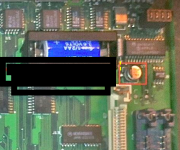
But attached is a picture that Uniserver has drawn up.
Basically, one of the traces to the CUDA chip crystal oscillator rots out, and breaks the crystal connection to one of the load capacitors on the bottom of the board, and sometimes the CUDA chip itself.
So, if the CUDA chip doesnt have a clock pulse, Well, its not going to power on or keep time/ADB.
In the diagram, youll see a dashed yellow line. Thats the trace that breaks. Well, one of them.
Ill take pictures of the actual issue, and the fix a little bit later.
But attached is a picture that Uniserver has drawn up.
Basically, one of the traces to the CUDA chip crystal oscillator rots out, and breaks the crystal connection to one of the load capacitors on the bottom of the board, and sometimes the CUDA chip itself.
So, if the CUDA chip doesnt have a clock pulse, Well, its not going to power on or keep time/ADB.
In the diagram, youll see a dashed yellow line. Thats the trace that breaks. Well, one of them.
I recently got around to looking at a CC I got last year that needed a recap. I removed all the capacitors and noticed a lot of leakage around them, so I painstakingly removed nearby chips, cleaned underneath, and checked all nearby vias to make sure all the pads and vias were still good and connected. To check the vias, I simply checked continuity between the components on each side of the board that were connected through the via.
Sure enough, the only via I found that was broken was the same one from techknight's diagram above. Nice work uniserver and techknight! Here is a closer picture:
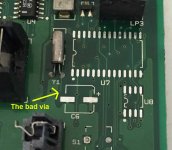
As you can see, that via is about as close as you can get to a capacitor, so it's not surprising that it rots out. Here's the fix I did on the bottom of the board:
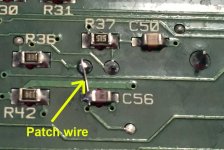
I just completed the recap and fix this evening, and now the Color Classic is up and running!
Sure enough, the only via I found that was broken was the same one from techknight's diagram above. Nice work uniserver and techknight! Here is a closer picture:
As you can see, that via is about as close as you can get to a capacitor, so it's not surprising that it rots out. Here's the fix I did on the bottom of the board:
I just completed the recap and fix this evening, and now the Color Classic is up and running!

 . Cheers to Doug .
Must have had a cold solder joint on one of my ICs.
Checked the voss in that area, they all checked out good so I decided to just touched up all the joints on all the ICs before removing any of them. Now it turns on.
Need to throw an hd in the machine to actually function test it, but cursor moves around at least
Checked the voss in that area, they all checked out good so I decided to just touched up all the joints on all the ICs before removing any of them. Now it turns on.
Need to throw an hd in the machine to actually function test it, but cursor moves around at least
The CC doesn't need a PRAM battery to boot. I didn't have one installed when I tested mine. (if you have one installed and it's dead, it might be wise to remove it though...)
I don't know of any other common points, but there are a lot of vias by C6. If you're really patient, my picture above with the chips removed shows where all the traces go. You could cross-reference this with the bottom of the board to verify all connections that are made through those vias. That's what I did -- I took a picture of the top and bottom and slowly tested every via.
Oh, just saw your new reply...nice, congrats! If you're comfortable doing so, it might be wise to remove them anyway...U7 had some gunk underneath from the capacitor leakage that felt good to clean up.
I don't know of any other common points, but there are a lot of vias by C6. If you're really patient, my picture above with the chips removed shows where all the traces go. You could cross-reference this with the bottom of the board to verify all connections that are made through those vias. That's what I did -- I took a picture of the top and bottom and slowly tested every via.
Oh, just saw your new reply...nice, congrats! If you're comfortable doing so, it might be wise to remove them anyway...U7 had some gunk underneath from the capacitor leakage that felt good to clean up.
Thanks for the reply Doug,
I did flush the chips with acetone and wipe the area up. I may remove the chips later, but I have a few other boards I'm working on simultaneously.
I actually have what I believe is a different revision of the CC board I want to break back out and tackle now.
This other one powers up immediately when the switch is flipped, but the mouse doesn't work. I'm thinking the ADB is shorter some how.
I did flush the chips with acetone and wipe the area up. I may remove the chips later, but I have a few other boards I'm working on simultaneously.
I actually have what I believe is a different revision of the CC board I want to break back out and tackle now.
This other one powers up immediately when the switch is flipped, but the mouse doesn't work. I'm thinking the ADB is shorter some how.
So grey screen and no mouse, I got one that does that, it's not Adb issue if it was you would still see the mouse pointer and it will still boot up, Soon I will have my scsi2sd bus powered mod figured out. It will be nice to pop on any Mac and boot it up from external scsi port. Thinking 7.5.5
If there is a hard drive I it, it does boot up. Otherwise it's gray screen with flashing floppy and pointer in the top left.
It boots itself on regardless if a keyboard is attached or not. So for some reason it isn't waiting for the power button on the KB to be pressed.
I replaced the caps on it months ago and initially thought I fixed it when I heard he boot chime, but quickly realized the pointer didn't move. Then I noticed it just booted straight up even without a keyboard attached.
It boots itself on regardless if a keyboard is attached or not. So for some reason it isn't waiting for the power button on the KB to be pressed.
I replaced the caps on it months ago and initially thought I fixed it when I heard he boot chime, but quickly realized the pointer didn't move. Then I noticed it just booted straight up even without a keyboard attached.
I just got a Color Classic which had the same problem--could hear a PSU noise when turning on the hard power, but no response to the keyboard power button. The caps actually don't look that bad (much better than my SE/30 in original condition) but I started looking at the vias around the crystal.
The via that dougg3 highlighted is fine on my board, but the one just to the left of it was corroded on the bottom of the board (pretty weird!). It's pretty obvious on that right side of C56.
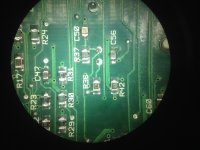
Luckily that via just goes to ground, I added a wire to the battery ground terminal and now it starts up!
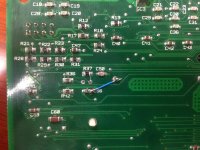
The via that dougg3 highlighted is fine on my board, but the one just to the left of it was corroded on the bottom of the board (pretty weird!). It's pretty obvious on that right side of C56.
Luckily that via just goes to ground, I added a wire to the battery ground terminal and now it starts up!
The Y2 component (it is a crystal, right?) fell off my Color Classic board some time with in the last 5 years and is now lost. I would like to buy one. Anyone know where I can get one (new or used) I know how to solder. ThanksI recently got around to looking at a CC I got last year that needed a recap. I removed all the capacitors and noticed a lot of leakage around them, so I painstakingly removed nearby chips, cleaned underneath, and checked all nearby vias to make sure all the pads and vias were still good and connected. To check the vias, I simply checked continuity between the components on each side of the board that were connected through the via.
Sure enough, the only via I found that was broken was the same one from techknight's diagram above. Nice work uniserver and techknight! Here is a closer picture:
BrokenVia.jpg
As you can see, that via is about as close as you can get to a capacitor, so it's not surprising that it rots out. Here's the fix I did on the bottom of the board:
BrokenViaPatch.jpg
I just completed the recap and fix this evening, and now the Color Classic is up and running!
jack
OK . Thanks. I have replaced this board with a Color Classic II board. I thought I would use my original color classic logic board to try to do a re cap my self. That way, if I screw it up, I will still be running my color classic II board.
But I do not know what that part is, and if I can buy a new on on, say, Mouser or Allied electronics.
Can you tell me what it is and what I should search for? It is the crystal right?
Thanks
jack
But I do not know what that part is, and if I can buy a new on on, say, Mouser or Allied electronics.
Can you tell me what it is and what I should search for? It is the crystal right?
Thanks
jack
It's definitely a crystal. The only identifying info I can find on mine is: "S3238E", which when I google brings up other threads including one you participated in over on AppleFritter. A thread over here indicates the SE/30 uses the same crystal, and according to schematics I've seen that crystal is 32.768 KHz. This is a very common frequency used for real-time clocks so it's no surprise that it's 32.768 KHz.
This will be a crystal you can find at any supplier. Just search for a through-hole 32.768 KHz crystal. You'll see plenty of results that look just like the original (cylindrical can, radial). The unfortunate thing is that I can't find anything about the original part number, so I don't know the details about the load capacitance of the crystal. Typically you're supposed to match the load capacitance to the circuit. You might just have to guess and hope it works (it will probably be fine).
This will be a crystal you can find at any supplier. Just search for a through-hole 32.768 KHz crystal. You'll see plenty of results that look just like the original (cylindrical can, radial). The unfortunate thing is that I can't find anything about the original part number, so I don't know the details about the load capacitance of the crystal. Typically you're supposed to match the load capacitance to the circuit. You might just have to guess and hope it works (it will probably be fine).
yup and unlike in this thread "https://68kmla.org/forums/index.php?/topic/24193-repairing-se30-battery-acid-damage-whats-on-d1-and-d2-and-crystal-speed/"
the Color Classic needs that Clock to the EGRET, or else it will not power up.
the Color Classic needs that Clock to the EGRET, or else it will not power up.