

Thread
Apple Imagewriter II Restoration
Welp, Another project on the table. Just picked up an Imagewriter II from Scott, And as expected, there are definitely a few things with these beasts that need attention.
1. You guessed it. Capacitors, Capacitors, Capacitors! A few of these just started to leak, while others appeared ok. But I decided to change every single one of them.
Getting this little bugger apart is definitely NOT easy. it takes quite a bit of thought, but eventually i did it.
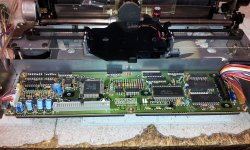
First and foremost, Here is the driver board:
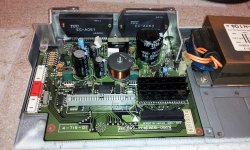
This basically is the Power Supply/Driver board. few things to note here, the two Sanyo-Panasonic proprietary STK-based power output ICs. Made for toshiba of course with thier own part number, but ive seen and changed enough of these to know exactly what they are. The one on the right is the voltage regulator output IC, and the one on the left is the stepper motor driver output IC.
This is the worrisome part, Even though these printers appaer to be fairly reliable, These power-pack ICs are definitely NOT known for reliability, So the first order of business is to recap this thing, and do some routine maintanance to keep these ICs cool and running under optimum conditions. Any slight variation, these ICs tend to fry themselves. If they do, well, its game over.
These ICs were used notoriously in integrated stereo amplifiers, and projection TV convergence applications, and some old tube-type RCA sets used them in the power supply, and they were known for failure. Ive changed a plenty.
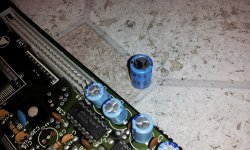
So enough of that, You can probably see some spooge leaking from the left most tall capacitor, so they all gotta go!
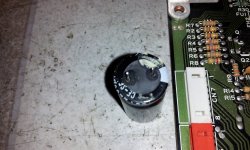
Removed the cap, and shown the leakage.
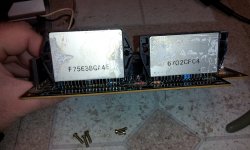
Now here: I decided to remove the heatsink again, for routine service and mainanance of the STK power pack ICs. And the heatsink compound was dried and and crusty! Time to clean them up and re-grease the ICs. This will increase the service life drastically.
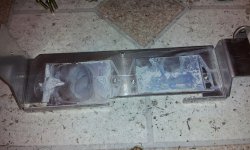
Here is the shot of the digital control board for the printer, and all of its capacitors that need replaced as well. Again, one of these caps had some spooge too!
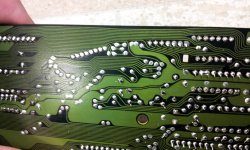
and the solder joints on this board were really rickety. I touched most of them up already before I took this photo, but you can see clearly the ones I didnt and how bad they are.
This is undoubtedly the result of being in storage/outside/basement where constant moisture, and heating cooling cycles took place causing metal fatigue. Had to be fixed!
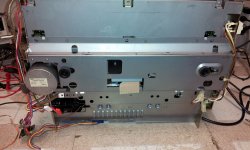
Oh and here is the undershot of the chassis:
More to come! as I dive into the thing mechanically. I may even retrobright the case too, because it is piss yellow, Even all the way through the plastic in the inside as well, which further proves my theory of environmental storage.
1. You guessed it. Capacitors, Capacitors, Capacitors! A few of these just started to leak, while others appeared ok. But I decided to change every single one of them.
Getting this little bugger apart is definitely NOT easy. it takes quite a bit of thought, but eventually i did it.
First and foremost, Here is the driver board:
This basically is the Power Supply/Driver board. few things to note here, the two Sanyo-Panasonic proprietary STK-based power output ICs. Made for toshiba of course with thier own part number, but ive seen and changed enough of these to know exactly what they are. The one on the right is the voltage regulator output IC, and the one on the left is the stepper motor driver output IC.
This is the worrisome part, Even though these printers appaer to be fairly reliable, These power-pack ICs are definitely NOT known for reliability, So the first order of business is to recap this thing, and do some routine maintanance to keep these ICs cool and running under optimum conditions. Any slight variation, these ICs tend to fry themselves. If they do, well, its game over.
These ICs were used notoriously in integrated stereo amplifiers, and projection TV convergence applications, and some old tube-type RCA sets used them in the power supply, and they were known for failure. Ive changed a plenty.
So enough of that, You can probably see some spooge leaking from the left most tall capacitor, so they all gotta go!
Removed the cap, and shown the leakage.
Now here: I decided to remove the heatsink again, for routine service and mainanance of the STK power pack ICs. And the heatsink compound was dried and and crusty! Time to clean them up and re-grease the ICs. This will increase the service life drastically.
Here is the shot of the digital control board for the printer, and all of its capacitors that need replaced as well. Again, one of these caps had some spooge too!
and the solder joints on this board were really rickety. I touched most of them up already before I took this photo, but you can see clearly the ones I didnt and how bad they are.
This is undoubtedly the result of being in storage/outside/basement where constant moisture, and heating cooling cycles took place causing metal fatigue. Had to be fixed!
Oh and here is the undershot of the chassis:
More to come! as I dive into the thing mechanically. I may even retrobright the case too, because it is piss yellow, Even all the way through the plastic in the inside as well, which further proves my theory of environmental storage.
Oh, in case you were wondering, this is a 1986 model. I know these ran up to 1996 if I am not mistaken? The much newer ones likely wont have these issues, YET.
And... Nobody cares! YAAAAY.
BTW this imagewriter doesnt have the screenprint on the plastic. it has just the apple logo, and doesnt say Apple Imagewriter II. So a very early version.
BTW this imagewriter doesnt have the screenprint on the plastic. it has just the apple logo, and doesnt say Apple Imagewriter II. So a very early version.
I never actually owned an Imagewriter II, just an original model that came with a Mac 512k. When we had an Apple IIc, we used a Grappler C adapter to connect a parallel printer to the serial port and it had the option to emulate an Imagewriter.
Anyway, I think the later units used a simplified power supply. They certainly were lighter and less tank like. If you are interested in information on the expansion connector, I have the technical reference for this printer and for the LQ. Oddly the IW II manual has close to zero hardware information, while the LQ book details how to make an expansion card.
Anyway, I think the later units used a simplified power supply. They certainly were lighter and less tank like. If you are interested in information on the expansion connector, I have the technical reference for this printer and for the LQ. Oddly the IW II manual has close to zero hardware information, while the LQ book details how to make an expansion card.
I had one that came with our family's Apple //e. Worked fine. Excellent job on the restoration.
I always preferred the original Imagewriter. The later R2-D2 version always seemed more prone to paper feed problems in my experience.
Nice work on your restoration!
Nice work on your restoration!
I care. I just don't stop by every day.

Thank you for posting this. I have an IWII which I have not turned on in a while, and after seeing this I will probably open and inspect it at the least, before trying to operate it again. Even if the caps haven't leaked, there's a very good chance that the heat sink grease has dried out.
My best friend left the thing to me in his will, so it's precious to me, beyond what an IWII would normally merit.
I recently serviced a later model ImageWriter II and it was a hell of a job to do. The Apple service manual is not very clear in my opinion. Every electric motor has a service point for oil.
I'll get a ribbon for it but I don't think I'll use it much.
I can't wait for the final result.
I'll get a ribbon for it but I don't think I'll use it much.
I can't wait for the final result.
Well I never have taken one apart before. This is the first one, and its an early model.
So, its definitely not easy. But i have disassembled things that were MUCH harder to do. Photocopier anyone? Or... an automotive 6-disc changer mechanism. Ugh...
The project is just waiting on me to get my act together for retrobrighting, then i have to lube the mechanism. Oh, and the ribbon is in the mail.
So, its definitely not easy. But i have disassembled things that were MUCH harder to do. Photocopier anyone? Or... an automotive 6-disc changer mechanism. Ugh...
The project is just waiting on me to get my act together for retrobrighting, then i have to lube the mechanism. Oh, and the ribbon is in the mail.
There was not much of a difference in Apple ImageWriter IIs. The rollers tend to go dry and back then was to remove them and wipe them down with baby oil to restore it. There used to be a "trick" on the Computer User Groups' News Letters on taking the rollers out and sanding down the hard crud that the rubber made when it dries out - that never worked! Also the fuse in the leg that had the power plug blows out on some of them.
I like the ImageWriter IIs because they can print in color with a special Color Ribbon but the ribbon was expensive and only lasts a short time. The ImageWriter were quieter though. Great for long print outs of code!
I like the ImageWriter IIs because they can print in color with a special Color Ribbon but the ribbon was expensive and only lasts a short time. The ImageWriter were quieter though. Great for long print outs of code!
I don't know if I'd have the passion to restore an ImageWriter II, so props techknight for doing yours
Why? The countless, sleepless nights waiting for it to print in "high quality" mode for submitting assignments in high school for the next day. That screech, and that painfully slow printing speed that didn't result in terribly good output anyhow.
Why? The countless, sleepless nights waiting for it to print in "high quality" mode for submitting assignments in high school for the next day. That screech, and that painfully slow printing speed that didn't result in terribly good output anyhow.
The maximum quality was a whopping 160x144dpi. To get that 144 vertical dpi, the printer had to do two passes. I remember waiting forever for banners to print in Print Shop. I would do them at school during lunch time and many times I was late to class waiting for one to finish up. It was still faster then printing them at home, mostly because of the cursed Grappler C and the painfully slow Panasonic KX-1080i we had. Plus the Grappler liked to randomly barf midway through print jobs.
I know black ribbons are readily available for these, but are the color ones still being made? I know ribbons for the IW LQ are impossible to find now.
I know black ribbons are readily available for these, but are the color ones still being made? I know ribbons for the IW LQ are impossible to find now.
They seem to still be around. Quick Google search found a few.
Incidentally, if someone's looking for an LQ ribbon, I think I saw one at WeirdStuff. The picture of it rings a bell. I'm gonna swing by hopefully on my way home from work.
Incidentally, if someone's looking for an LQ ribbon, I think I saw one at WeirdStuff. The picture of it rings a bell. I'm gonna swing by hopefully on my way home from work.
So.. No love for the IW II then? I see....
Well only reason why I want to restore it, because I still have the original box. Plus I dunno, I just have a liking to that printer. Sure its a slow-ass dot-matrix, but they are awesome for banners!
Well only reason why I want to restore it, because I still have the original box. Plus I dunno, I just have a liking to that printer. Sure its a slow-ass dot-matrix, but they are awesome for banners!
I love the IWII, I just don't currently own one.
Aha! I did see one. I found a color LQ ribbon.
A few years ago I had to print out a boarding pass for a flight. The ink cartridges in the inkjet printer I had said they were empty even though they were barely a few months old and had only been used to print a few (less than ten) pages. I was furious and swore to never buy an inkjet printer or cartridge ever again.
I pulled out an old ImageWriter II which I found in the trash many years before, dusted it off, connected it to an RS-232 port, found some Ghostscript drivers for OS X, connected it and printed. Even though the ribbon had sat for probably a decade since it was last used, it created a passable boarding pass. It never even occurred to me that any part of the printer wouldn't just work.
Amazon helped me find a box of five brand new, sealed black ribbons for less than $20, shipping included.
If it didn't make enough noise to wake the neighbors, I'd use it more often. It's a great printer.
I pulled out an old ImageWriter II which I found in the trash many years before, dusted it off, connected it to an RS-232 port, found some Ghostscript drivers for OS X, connected it and printed. Even though the ribbon had sat for probably a decade since it was last used, it created a passable boarding pass. It never even occurred to me that any part of the printer wouldn't just work.
Amazon helped me find a box of five brand new, sealed black ribbons for less than $20, shipping included.
If it didn't make enough noise to wake the neighbors, I'd use it more often. It's a great printer.
I'm glad to see this project taking place!! Ribbons are still readily available. Look hard and you can find color ribbons for under $5 a pop. I also fond a guy selling black ribbons at the Vintage Computer Festival in NJ last year for a buck each.
They did make these printers through 1996. The earliest models don't have ImageWriter II written on them; only the platinum (early 1987-1996) models have it. There are actually two models of the platinum version (earlier ones are heavier and have the cable port in a different location) but they do pretty much the same thing. The internals are different though.
They did make these printers through 1996. The earliest models don't have ImageWriter II written on them; only the platinum (early 1987-1996) models have it. There are actually two models of the platinum version (earlier ones are heavier and have the cable port in a different location) but they do pretty much the same thing. The internals are different though.
Well this thread would be for the early version, I assume.
I dont have a later version to teardown to see how its designed.
I dont have a later version to teardown to see how its designed.
I'm quite fond of mine. I have the cut-sheet feeder, which is very cool, and probably back in the late 90s I tracked down the MacPalette II print driver for it so that I could get millions of colors out of the four color ribbon.
The images are pretty good. When you consider the hardware they're coming from, the images are amazing.
I decided to fire it up today! Well, I believe one or two of the top pins arnt firing, So i need to figure out why that is.
the pin driver circuitry is potted in epoxy, so that route isnt going to be an easy task, itll be easier if I just trace down the continuity between the drive head, and the board through the ribbon cable to make sure there are on breaks there.
the pin driver circuitry is potted in epoxy, so that route isnt going to be an easy task, itll be easier if I just trace down the continuity between the drive head, and the board through the ribbon cable to make sure there are on breaks there.
Techknight… Looks like I have to do mine as well… Thanks for the advice.. I've got a few.. plus the original image writers.. so that's my next project as well… capacitors are just a pain in the neck!!!! I plan on storing my TAM's for a long period of time.. I know the SMD caps are fine now but I don't want to pull them out in 10-20 years and find they have leaked… suggestions??? Should I recap them??
Matt
Matt
Yep because I found one starting to leak on my TAM. It was one closest to the heat sources.
Here we go. Print head is now functioning correctly.
I had to soak it in alcohol and clean all the spooge out of the pin guides.
Before:
After:
I had to soak it in alcohol and clean all the spooge out of the pin guides.
Before:
After:
Heh. Beat me to it. I was going to suggest that. The pins get stuck as residue dries out and turns into something between glue and paper machier.
Yea i figured that had something to do with it.
Only thing left to do now, is lube up the key joints in the mechanism, and then retrobright it.
Then itll be good as new.
Only thing left to do now, is lube up the key joints in the mechanism, and then retrobright it.
Then itll be good as new.
If you need a torture test, I can dump a printout at 160x144dpi.... in color.... that you can feed via serial.
Hey this isn't strictly relevant but this guy has just reposted an ad from at least a month ago... I don't know if anyone's interested. I'm pretty sure he hasn't tested it, so it could be a repository for parts if it's in even worse shape. I have no printers so I'd go for it if it weren't so big.
http://cnj.craigslist.org/sys/4887034432.html
http://cnj.craigslist.org/sys/4887034432.html
The attached dump is raw output from an Apple IIgs application, it should print out a picture in color at 160x144dpi. It is an 8-bit binary file since it contains image data.
If possible, can you scan the page with a flatbed and post it here, I want to compare it with something here.
iwdump.zip
If possible, can you scan the page with a flatbed and post it here, I want to compare it with something here.
iwdump.zip