

Thread
Macintosh Classic II blank screen after recap
I just acquired a mint condition Classic II. It was described that it shows only checkerboard pattern.
When I got it, it powered on and it showed checkerboard without chime. The HD also starts.
Then I recapped it, but now the screen remains blank, also without chime. The logic board was in good shape, with none of the leakage damage. All of the caps were, however, leaking beneath when I lifted them. I used tantalums as replacements. I also checked for the solder splash and the broken traces, but I found no problems.
So what now? Perhaps an analog board problem? What should I try?
Thanks
When I got it, it powered on and it showed checkerboard without chime. The HD also starts.
Then I recapped it, but now the screen remains blank, also without chime. The logic board was in good shape, with none of the leakage damage. All of the caps were, however, leaking beneath when I lifted them. I used tantalums as replacements. I also checked for the solder splash and the broken traces, but I found no problems.
So what now? Perhaps an analog board problem? What should I try?
Thanks
well Mitch, there is an eaten via or trace some where its usually in the area where the onboard ram is soldered on.
all it takes is one broke eaten trace. look closely.
all it takes is one broke eaten trace. look closely.
I agree with Uniserver, I recapped my Classic II that I found in the trash, and now it boots up but no audio but that's fine for me for now. When I have the chance I'll try to fix the audio.
But look over your work, you might have to solder a cap or two and exam the area. Also checked if you shorted something out around the cap.
But look over your work, you might have to solder a cap or two and exam the area. Also checked if you shorted something out around the cap.
It is an Enhanced Audio revision Logic board. I checked the traces around the caps and found no breaks. I also ran a diode meter through the ceramic caps at the bottom, and found two that are shorted to ground. These are C18 and C40. They are both connected to the ground plane at the one side. I don't know if they're supposed to be like that or they are really shorted.
Does the Classic II even has any onboard RAM? Any ideas where the traces are most likely eaten?
Does the Classic II even has any onboard RAM? Any ideas where the traces are most likely eaten?
know this is obvious, but did you give the board a good wash
I had similar problem on a SE30. removed all old capps, washed, recapped, washed again and when powered up ...zip
after 2 days with a magnifying glass could not find anything wrong .was going to give up
-
so with nothing to loose I washed it again with toothbrush and alcohol .
lo and behold she powered up perfect. I don't know if it was some electrelite or a tiny solder ball..........but it worked
-
might be worth a try
I had similar problem on a SE30. removed all old capps, washed, recapped, washed again and when powered up ...zip
after 2 days with a magnifying glass could not find anything wrong .was going to give up
-
so with nothing to loose I washed it again with toothbrush and alcohol .
lo and behold she powered up perfect. I don't know if it was some electrelite or a tiny solder ball..........but it worked
-
might be worth a try
My board is an early "prototype" Classic II, where it has 4 EPROM chips on sockets instead of ROM chips, and has if I remember correctly it has 4MB on the motherboard above the RAM SIM Sockets - 4 X 441000 chips (4bit x 1mb).
The caps should (not always but they do) go to ground.
The caps should (not always but they do) go to ground.
You might want to get a set of traditional ROM chips for your Classic II, Elfen. Eventually, one way or another, those EPROM chips will degrade. In another 10 years they will probably be useless, if EPROM chips from the 80's are any indication.
I've removed all the "new" caps to inspect the traces under a magnifying glass. I checked almost all of them for continuity and found no broken traces. I was a bit sloppy when removing old caps, so I scratched the board one or two times near the caps, but even these nearby traces are intact.
I also checked other traces and found nothing visible broken or eaten away. As I said before, this board has no leakage damage.
Perhaps something else? I really want to get this board working, since the Classic II Enhanced rev. boards are rare.
I've snapped some pictures of my board. Perhaps could somebody see better where should I do more checks.
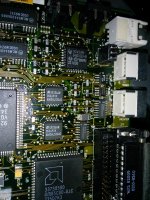
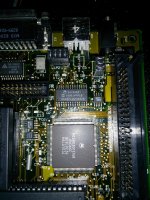
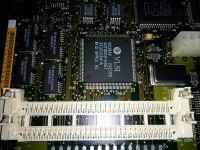
I also checked other traces and found nothing visible broken or eaten away. As I said before, this board has no leakage damage.
Perhaps something else? I really want to get this board working, since the Classic II Enhanced rev. boards are rare.
I've snapped some pictures of my board. Perhaps could somebody see better where should I do more checks.
wow that board looks nice and clean.
I've soldered the new caps, but it is still dead as a dodo. I probed a using an oscilloscope around the board, but found no activity, just voltages sitting there. Only the oscillators seem to be running...
After about 15 minutes, only the CPU and the VLSI chip got a bit warm, other chips were cold. The power supply looks okay, as I get 5.00V and 11,92V.
So far I am in a dead end, and don't know where else to check. The traces look all good, even on the bottom side.
I also own a SE/30, can I swap the logic boards with Classic to see if the Classic's II Analog Board works?
After about 15 minutes, only the CPU and the VLSI chip got a bit warm, other chips were cold. The power supply looks okay, as I get 5.00V and 11,92V.
So far I am in a dead end, and don't know where else to check. The traces look all good, even on the bottom side.
I also own a SE/30, can I swap the logic boards with Classic to see if the Classic's II Analog Board works?
Nope. Brightness circuits on Classics are different.
If the CPU or databus was dead, you would still get a checkerboard as the video generation is done purely in logic.
If you get a black screen then you have analog board issues. Or serious logic board failure.
If the RESET line is stuck low, you wont get anything either.
If the CPU or databus was dead, you would still get a checkerboard as the video generation is done purely in logic.
If you get a black screen then you have analog board issues. Or serious logic board failure.
If the RESET line is stuck low, you wont get anything either.
I figured that. SE/30 has manual brightness adjustment.
I borrowed another Classic II from a friend and swapped logic boards. My analog board is fine, as I booted it up with friend's logic board. So my logic board is clearly completely dead, as it also won't start in his Classic II. It also shows blank screen.
The only thing I can imagine is that I fried the logic board with ESD when I recaped it or it was already too far gone even before a recap.
RESET line... hmmm, if I only knew where to check it...
I borrowed another Classic II from a friend and swapped logic boards. My analog board is fine, as I booted it up with friend's logic board. So my logic board is clearly completely dead, as it also won't start in his Classic II. It also shows blank screen.
The only thing I can imagine is that I fried the logic board with ESD when I recaped it or it was already too far gone even before a recap.
RESET line... hmmm, if I only knew where to check it...
Ok, I got the 68030 pinout and traced the reset line. It is being pulled low.
maybe cap goo leaked under the reset switch causing a short, you do have four caps right there next to it.
have you immersed the board in hot water, and scrubbed it with a brush and soap? then give it a hot rinse… then a good blast off with the air compressor… it looks clean but looks can be deciving.
i'v had STRAY CAP GOO cause me many issues in the past...
have you immersed the board in hot water, and scrubbed it with a brush and soap? then give it a hot rinse… then a good blast off with the air compressor… it looks clean but looks can be deciving.
i'v had STRAY CAP GOO cause me many issues in the past...
also looking at your pictures again.. looks like some of the cap pads look to be partially lifted.. you better check continuity from the pad to the trace and the nearest connection.
also maybe post current pictures of your board right now… with the caps on.
also maybe post current pictures of your board right now… with the caps on.
my most favorite tool that i use to scrape traces is this…
hakko desoldering heater cleaner, of all things...

hakko desoldering heater cleaner, of all things...
Thanks. The board was super clean to begin with no visible goo damage. There was very slight leakage under some of the caps when lifted, but no corrosion. I cleaned now the board about 3 times, the last time I left it in isopropyl alcohol overnight and then dried it. None of the pads are lifted, I've checked the continuity a few times to nearby traces, and it they're all good.
So far, I've traced the reset line from the CPU to the two VLSI chips, a 341S0851 chip near the CPU, to a SCSI controller and to sound chip. It gets pulled to 0.19V. I've tried pulling it up via a 1K resistor to a 5V VCC, but it didn't change a thing.
So I guess one of the chips must be the problematic. Also when measuring the reset line to the ground, it looks like it is charging a capacitor, as the resistance goes up. It is about 300 ohms at the start.
EDIT:
I rememmbered that I originally soldered wrong capacitor to the C15, as insetad of 1uF 50V, I've used 10uF 16V. Perhaps this fried something? Also all the tantalums are new and checked with capacitance and ESR meter so they are all within spec.
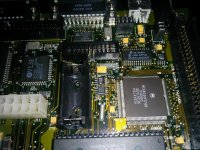
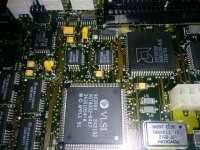
So far, I've traced the reset line from the CPU to the two VLSI chips, a 341S0851 chip near the CPU, to a SCSI controller and to sound chip. It gets pulled to 0.19V. I've tried pulling it up via a 1K resistor to a 5V VCC, but it didn't change a thing.
So I guess one of the chips must be the problematic. Also when measuring the reset line to the ground, it looks like it is charging a capacitor, as the resistance goes up. It is about 300 ohms at the start.
EDIT:
I rememmbered that I originally soldered wrong capacitor to the C15, as insetad of 1uF 50V, I've used 10uF 16V. Perhaps this fried something? Also all the tantalums are new and checked with capacitance and ESR meter so they are all within spec.
also if you popped the roms out make sure they went back in right.
u22 - 341-0257
u23 - 341-0261
u22 - 341-0257
u23 - 341-0261
Roms are in correct places... I've pulled them a few times and the pins are like brand new.
Also found out if I leave the board long enought powered off, when turned on, the reset line will jump to a 3.2V for a second and then drop to 0.2V..
Also found out if I leave the board long enought powered off, when turned on, the reset line will jump to a 3.2V for a second and then drop to 0.2V..
I was looking at the hot air gun on my desk for some time now. And I figured, prehaps is the sound IC dead, as I soldered the wrong capacitor. So I took it off. The problem however, presisted.
Then I pulled the U10 (EGRET, 341S0851) and now the reset line isn't stuck anymore.
Finally some progress!!!
The monitor turns on now and I get a checkerboard pattern.
Then I pulled the U10 (EGRET, 341S0851) and now the reset line isn't stuck anymore.
Finally some progress!!!
The monitor turns on now and I get a checkerboard pattern.
yes, and if you have a junk LC-II laying around you could borrow parts. EGRET etc
also stupid question… when you test the board,do you do it with the case on?
sometimes those Reset interrupt fingers can cause you issue.
also stupid question… when you test the board,do you do it with the case on?
sometimes those Reset interrupt fingers can cause you issue.
I have a dead LC III logic board with major battery leakage. I'll swap the EGRET.
What this EGRET even does? ADB and stuff? Should the board boot to the insert disk icon without this chip?
I tested the board with the case removed. Sometimes I tested it without even the board in the computer, held just by piece of cloth agains the bottom rails.
EDIT: Found a list of what Egret and other chips do. Also there is a list of a computers using SWIM chip, that sometimes goes in the Mac Portables.
http://www.mess.org/mess/driver_info/mac_technical_notes
What this EGRET even does? ADB and stuff? Should the board boot to the insert disk icon without this chip?
I tested the board with the case removed. Sometimes I tested it without even the board in the computer, held just by piece of cloth agains the bottom rails.
EDIT: Found a list of what Egret and other chips do. Also there is a list of a computers using SWIM chip, that sometimes goes in the Mac Portables.
http://www.mess.org/mess/driver_info/mac_technical_notes
i have good news, i have a dead screen classic (enhanced sound) II here, i took off the EGRET and like 4 legs fell off of it.. it was rotted out.
cleaned up all the pads, and soldered on a EGRET from a dead LC-III and it works now… the only problem now is the sound is dead…
so i guess i will work on that. darn cap goo!.
cleaned up all the pads, and soldered on a EGRET from a dead LC-III and it works now… the only problem now is the sound is dead…
so i guess i will work on that. darn cap goo!.
I swapped the EGRET with the one from the LC III, but I have the same error. The reset line gets pulled low and nothing happens.
So perhaps is also this EGRET chip dead, but I suspect a problem somewhere else.
So perhaps is also this EGRET chip dead, but I suspect a problem somewhere else.
what error?
you can remove the ASC chip, that controls reset..
also remove U1 U2 cap goo ooooozes in those and rots em up.
you can remove the ASC chip, that controls reset..
also remove U1 U2 cap goo ooooozes in those and rots em up.
also it has no vram… it uses ram… looks like U14 ram chip can go bad(from cap goo). good news is the ram chips on the same LC3 Donor board are the same.
Thanks. I'll do that. ASC chip is which one? Hmm, would the bad ram cause blank screen error?
To clear what I've written before: the EGRET chip is not the culprit, as when I swapped it with the one from LCIII, it didn't help at all (I got blank screen). However without the EGRET, I get checkerboard.
Hope that clears it.
I'll post results.
To clear what I've written before: the EGRET chip is not the culprit, as when I swapped it with the one from LCIII, it didn't help at all (I got blank screen). However without the EGRET, I get checkerboard.
Hope that clears it.
I'll post results.
oh the sound chip is U4
I removed the U1, U2 and U4. Also removed the U14 RAM chip. There is no cap goo damage. See the attached pic how clean the traces are
Still the reset line gets stuck on and I get blank screen.
I believe that something connected to the U10 Egret chip must be shorted as without the Egret chip it shows the checkerboard.
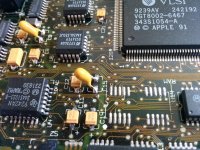
Still the reset line gets stuck on and I get blank screen.
I believe that something connected to the U10 Egret chip must be shorted as without the Egret chip it shows the checkerboard.