Thread
PowerBook 3400c Repair Stories
I'm hoping this can be a repository for specific repair help/information for the Powerbook 3400c. Macdrone has been doing sort of research/experimentation on repairing some of his logic boards. I now have two 3400c's and various associated stuff.
First off, at least for me, is the power board. The two I have whine when plugged in. The one I just got has the caps light come on when plugged in, and a sort of speaker pop that my other one does also. So I'd bet the 'new' one also has power board issues, although I'm hoping it doesn't. Based on visual inspection, I had assumed some of my rectangular ceramic (i think?) [C2 and C4, and C27-C29] caps had gone but Macdrone suggested C49 and C15 - the big and little cylindrical ones on the top.
I'll report back when I get the new 3400c. And I'll report back again when I'm able to get a new soldering iron.
First off, at least for me, is the power board. The two I have whine when plugged in. The one I just got has the caps light come on when plugged in, and a sort of speaker pop that my other one does also. So I'd bet the 'new' one also has power board issues, although I'm hoping it doesn't. Based on visual inspection, I had assumed some of my rectangular ceramic (i think?) [C2 and C4, and C27-C29] caps had gone but Macdrone suggested C49 and C15 - the big and little cylindrical ones on the top.
I'll report back when I get the new 3400c. And I'll report back again when I'm able to get a new soldering iron.
I got the second PB 3400c today. The battery was still in (both, actually). When plugged in, it'd make the popping (probably speaker) sound and sometimes the screen's charging-light would come on.
I promptly disassembled it, removed the PRAM battery (which was not dead). There was a little bit of very confined corrosion but in general the board is in fantastic condition. I cleaned the corroded area with scrubbing bubbles for maybe an hour, washed it with distilled water and used a hairdryer on cold. I put the board back in the case and it chimed. However, it shut down immediately following the chime.
There's still a whine in the power board, and I can smell what I can only assume is my first definitive whiff of dying caps. At the moment (after debugging for a few hours - with it chiming consistently) it is no longer chiming. However, subsequent to that I have gotten the screen to flash a bunch of times. I think these are all power board issues, but I do not yet know.
The two cylindrical cap replacements came from Mouser today but I don't have my new soldering iron yet. I am, however, excited to get an in theory definitively-working power board. [i'm now also certain the eBay power board did not work.]
I promptly disassembled it, removed the PRAM battery (which was not dead). There was a little bit of very confined corrosion but in general the board is in fantastic condition. I cleaned the corroded area with scrubbing bubbles for maybe an hour, washed it with distilled water and used a hairdryer on cold. I put the board back in the case and it chimed. However, it shut down immediately following the chime.
There's still a whine in the power board, and I can smell what I can only assume is my first definitive whiff of dying caps. At the moment (after debugging for a few hours - with it chiming consistently) it is no longer chiming. However, subsequent to that I have gotten the screen to flash a bunch of times. I think these are all power board issues, but I do not yet know.
The two cylindrical cap replacements came from Mouser today but I don't have my new soldering iron yet. I am, however, excited to get an in theory definitively-working power board. [i'm now also certain the eBay power board did not work.]
That was a slightly inaccurate description. It would chime, and I could soft reset, but it would shut down within 5 seconds of chime. The first time it might have actually restarted itself after shut down. I attribute these to the power board because over the course of the evening (and the machine was only on for a cumulative probably 5 minutes if that) the board seems to have progressively stopped working. Hopefully it isn't the logic board breaking.
Actually that conclusion is partly also based on the fact that my other power board does nothing. It whines, sometimes seems to turn the charge light on but it flickers and then dies. Unfortunately I removed the capacitors on the original power board I had.
Actually that conclusion is partly also based on the fact that my other power board does nothing. It whines, sometimes seems to turn the charge light on but it flickers and then dies. Unfortunately I removed the capacitors on the original power board I had.
Hi, did you attempt to fire it up straight after putting water on the board? Even with a hairdryer used I'd put it in a warm dry spot in the house and not touch it for a few days. I had a 3400c what also had a cracking speaker problem, sound overall wasn't good. I'd strip it down to basics - no battery, check the DC jack is properly seated, remove the RAM module, HD. Often a lot of early Mac repair and troubleshooting need not involve replacing the caps and components first thing, contrary to popular belief.
The 3400c/Kanga is one of my favourite retro portables - I love the sound quality they put out, and they are solid with enough grunt to run OS 8/9 well.
JB
Thanks for the response. I didn't fire it up right away but I didn't let it thoroughly dry per se (I really went at it with the hairdryer - very thoroughly - including opening that plastic glued to the PCMCIA enclosure) for probably a half hour or so and then dabbed with paper towels.
At the moment it's just the screen, logic board, power board, and fan [which has yet to turn on...]. I had alternated using the battery out of curiosity and because some people have reported issues powering on without even a dead battery but that's not the case here.
What do you mean by the DC jack being properly seated? As in soldered properly? Or positioned properly?
I'll leave it off overnight and look again tomorrow afternoon but I really think the problem (at least at this level of debugging) is situated in the power board. It whines. Even more than me.
At the moment it's just the screen, logic board, power board, and fan [which has yet to turn on...]. I had alternated using the battery out of curiosity and because some people have reported issues powering on without even a dead battery but that's not the case here.
What do you mean by the DC jack being properly seated? As in soldered properly? Or positioned properly?
I'll leave it off overnight and look again tomorrow afternoon but I really think the problem (at least at this level of debugging) is situated in the power board. It whines. Even more than me.
With or without the PRAM battery, actually, it chimes infrequently and only through the speaker panel; but it comes on most of the time - not always. It's worth noting that my 5300c came with a messed up power board and it would boot most of the time but not always.
I can soft reset it with no chime. There's no pointer. I can't flash PRAM.
The fan still doesn't come on. I swapped them (I think again) to no effect. Then I looked at the label, which reads 5v, and I wonder if that's indicative of a voltage problem on the board. Would the screen come on if that were the case?
Anyway I'm not sure what to make of the screen and chime with no pointer. The manual just says replace logic board...
I can soft reset it with no chime. There's no pointer. I can't flash PRAM.
The fan still doesn't come on. I swapped them (I think again) to no effect. Then I looked at the label, which reads 5v, and I wonder if that's indicative of a voltage problem on the board. Would the screen come on if that were the case?
Anyway I'm not sure what to make of the screen and chime with no pointer. The manual just says replace logic board...
Also the HD spins before the screen powers on. I get no impression the floppy module does anything - but that may just mean it's not getting to a disk check - which should probably have been obvious since there's no pointer or flashing disk. The CD module spins and can eject.
I've never gone this far into debugging. I'm going to replace the caps on the power board tomorrow when the soldering iron hopefully arrives, but I'm increasingly concerned this is a logic board issue; any thoughts on what to try if anything?
I've never gone this far into debugging. I'm going to replace the caps on the power board tomorrow when the soldering iron hopefully arrives, but I'm increasingly concerned this is a logic board issue; any thoughts on what to try if anything?
I know this is a totally different ROM, and I know nothing about Macbooks so I don't even know if this info is correct, but there's no way, right... ? https://www.ifixit.com/Answers/View/70171/%5BSOLVED%5D+Startup+chime,+no+boot,+white+screen+of+death
The HD in the machine definitely works. I read it on my G4; actually my PC also. It wouldn't boot the G4, but I don't think they boot natively to OS 9 (which is installed), right [without Classic Mode I mean]? So it's not possible that there's a "white screen of death" simply because the HD was first not in and then possibly not bootable?
My understanding of the Old World ROM is that the disk icon should eventually show up - or at least the pointer. But the symptoms he's described [aside from the power / power board issues] are identical...
The HD in the machine definitely works. I read it on my G4; actually my PC also. It wouldn't boot the G4, but I don't think they boot natively to OS 9 (which is installed), right [without Classic Mode I mean]? So it's not possible that there's a "white screen of death" simply because the HD was first not in and then possibly not bootable?
My understanding of the Old World ROM is that the disk icon should eventually show up - or at least the pointer. But the symptoms he's described [aside from the power / power board issues] are identical...
Link you've posted to refers to resetting the SMC (system management controller), which is analogous with Intel Macs - kind of like resetting the PRAM/CUDA on pre-Intel Macs. Not what you're looking for.
How complete are your two 3400c, and why does one have missing caps on the power board? Without getting the whole gist of what you're trying to do, I'd strip down both machines and choose the best parts from each, to create one machine from two. You might have luck working out which LCD is "good" as white screens suggest LCD failure. Bench test away, bare motherboard (insulated underneath to prevent shorts), as soon as you get that flashing disk icon you know you're in business.
EDIT: going back to my last post, DC jack = they often become loose and require resoldering.
JB
How complete are your two 3400c, and why does one have missing caps on the power board? Without getting the whole gist of what you're trying to do, I'd strip down both machines and choose the best parts from each, to create one machine from two. You might have luck working out which LCD is "good" as white screens suggest LCD failure. Bench test away, bare motherboard (insulated underneath to prevent shorts), as soon as you get that flashing disk icon you know you're in business.
EDIT: going back to my last post, DC jack = they often become loose and require resoldering.
JB
Well the thrust of that link has to do with some obscure [or he's wrong because this make little sense to me] issue with a dead HD preventing any booting and the flashing disk. The symptoms he describes are identical; and although the solution doesn't make sense to me, I figure it can't hurt to try... [can I install a bootable OS 9 through my G4?]
I pulled (twisted) the cylindrical (SMD?) caps off one of the three boards I have in prep for recapping it per a suggestion from Macdrone. The other two have caps. One works; the other doesn't. They both whine.
I have stripped both machines but I'm not at the real 'rebuilding' stage yet [yes I got the two to mix and match, more or less]. Both screens work fine although the latch is broken on one, and it's more beat up, so I'll be using the other.
I'm afraid you're talking to a real amateur. Bench test? I have tested the voltage in some places on the other motherboard but not on the 'working' one yet. Even if I had the schematics I don't know enough about what this problem represents. I assume it gets to ROM... the keyboard works... I assume it's doing a memory test. I don't know...
I pulled (twisted) the cylindrical (SMD?) caps off one of the three boards I have in prep for recapping it per a suggestion from Macdrone. The other two have caps. One works; the other doesn't. They both whine.
I have stripped both machines but I'm not at the real 'rebuilding' stage yet [yes I got the two to mix and match, more or less]. Both screens work fine although the latch is broken on one, and it's more beat up, so I'll be using the other.
I'm afraid you're talking to a real amateur. Bench test? I have tested the voltage in some places on the other motherboard but not on the 'working' one yet. Even if I had the schematics I don't know enough about what this problem represents. I assume it gets to ROM... the keyboard works... I assume it's doing a memory test. I don't know...
I've gotten the pointer to pop up. Neither trackpad will move the pointer, but an ADB mouse will [ADB port - check], and the trackpads will move the pointer with the ADB mouse plugged in [wtf...?]. I was able to and did flash the PRAM but that didn't really affect the symptoms.
Additionally, the CD and Floppy module both power on. The CD makes spinning/reading noises but I don't know what the module is supposed to sound like [12x]. Interestingly, when a floppy is inserted at the gray/pointer screen, it sounds like it attempts to read it indefinitely. When inserted prior to power-on, it just makes a single noise [it's not a click but I can't do better than that description].
The manual offers this advice for this symptoms set: Hear startup tones? [it chimes every time now] > Normally? [yes] > Gray screen with pointer? [yes] > Boot to desktop? [no] > Flashing question mark? [no]:
1) Boot with extension off; 2) Boot with Disk Tools Update Driver [what driver...??]; 3) Replace HD [variably none or working one; no difference]; 4) Replace logic board...
The pointer came up after a very thorough washing with scrubbing bubbles, spraying it with the spray extension on my sink, then pouring distilled water, then dabbing with paper towels, then hairdrying, then leaving it overnight wrapped in a paper towel. I'm in the process of washing the other board as thoroughly. My thought was that - particularly based on smell - there may have been a residual alkaloid effect of the scrubbing bubbles.
Additionally, the CD and Floppy module both power on. The CD makes spinning/reading noises but I don't know what the module is supposed to sound like [12x]. Interestingly, when a floppy is inserted at the gray/pointer screen, it sounds like it attempts to read it indefinitely. When inserted prior to power-on, it just makes a single noise [it's not a click but I can't do better than that description].
The manual offers this advice for this symptoms set: Hear startup tones? [it chimes every time now] > Normally? [yes] > Gray screen with pointer? [yes] > Boot to desktop? [no] > Flashing question mark? [no]:
1) Boot with extension off; 2) Boot with Disk Tools Update Driver [what driver...??]; 3) Replace HD [variably none or working one; no difference]; 4) Replace logic board...
The pointer came up after a very thorough washing with scrubbing bubbles, spraying it with the spray extension on my sink, then pouring distilled water, then dabbing with paper towels, then hairdrying, then leaving it overnight wrapped in a paper towel. I'm in the process of washing the other board as thoroughly. My thought was that - particularly based on smell - there may have been a residual alkaloid effect of the scrubbing bubbles.
Actually preemptive follow-up: I don't understand Apple's manual advice - how can you boot without extensions with no disk-icon [i.e. without an actual boot process] - same with the disk suggestion.
I'd be much obliged if someone could potentially explain what definitively works given this info; and precisely what the 'boot' process is from power on to splash screen, say [because I get everything the disk icon on - at least enough to work through issues that concern that]. The screen-on, which is preceded by what must be hardware tests, takes a while [though I don't know how long it's supposed to take]. The floppy symptom suggests that it may be stuck in some sort of check or test or diagnostic process, but again I don't know enough about the mechanics of the pre-software hardware checks.
I'd be much obliged if someone could potentially explain what definitively works given this info; and precisely what the 'boot' process is from power on to splash screen, say [because I get everything the disk icon on - at least enough to work through issues that concern that]. The screen-on, which is preceded by what must be hardware tests, takes a while [though I don't know how long it's supposed to take]. The floppy symptom suggests that it may be stuck in some sort of check or test or diagnostic process, but again I don't know enough about the mechanics of the pre-software hardware checks.
I admire you getting in elbows deep into fixing your Macs, but you just seem to be jumping the gun a little too early and doing all the things I'd consider a "last resort" first and basically digging your own hole. I've never had to wash a board and only do cap replacements when necessary (I'll see a few and do the lot, but not on every machine if it works without issue).
Why not just get a reliable, working Mac first and play around with the feel of the OS/hardware and its intricacies? Sounds like you need a functional machine that will answer a lot of your troubleshooting questions asked above. Something like a Wallstreet, Lombard, Pismo Powerbook would be ideal if you like portable Macs.
JB
Why not just get a reliable, working Mac first and play around with the feel of the OS/hardware and its intricacies? Sounds like you need a functional machine that will answer a lot of your troubleshooting questions asked above. Something like a Wallstreet, Lombard, Pismo Powerbook would be ideal if you like portable Macs.
JB
Your point is very valid. I lack patience, and it is a problem, particularly in an electronics-related respect. In this case, I let the board sit overnight after a brief second washing and much more thorough drying [which I think may have been the problem]. Now we're back to the consistent chime, gray screen and pointer.
I'm not sure I can get the answers I need in a working machine, and I don't want to break another machine to do so - I don't even know if I could control that well enough to answer any of my questions that way.
In this case I used no heat options in the dishwasher [but it was noticeably hot when I took it out just after the wash cycle] so I assumed it got too hot anyway. However, it maxes out, according to the manual, at 105 F. So it must have been residual moisture. Having said that my goal is a working 3400c, so leaving it with a gray screen/pointer is not an acceptable outcome to me. [Meaning I basically saw this as a last resort - there's only one cap that I think might be replaceable on the logic board - but me trying to do that might be more risky than the dishwasher so I made a value judgment.]
I'm not sure I can get the answers I need in a working machine, and I don't want to break another machine to do so - I don't even know if I could control that well enough to answer any of my questions that way.
In this case I used no heat options in the dishwasher [but it was noticeably hot when I took it out just after the wash cycle] so I assumed it got too hot anyway. However, it maxes out, according to the manual, at 105 F. So it must have been residual moisture. Having said that my goal is a working 3400c, so leaving it with a gray screen/pointer is not an acceptable outcome to me. [Meaning I basically saw this as a last resort - there's only one cap that I think might be replaceable on the logic board - but me trying to do that might be more risky than the dishwasher so I made a value judgment.]
Lol. Disregard.
No disk at all with CD module, flashing disk with HD, it booted from floppy [wrong OS, hence message].
At some point it stopped displaying the flashing QM. I let it sit and it then went back to doing it. I suspect either overheating or capacitance issues. Iron was delayed so will recap power board hopefully Monday. Then I'll find out if the machine is too prone to overheating to be useful.
It looks like the CD module may be broken, which is too bad. Not sure about the HD, though it wouldn't boot my G4 tower either - and it forced the 5300c to shut down or restart, which was odd.
No disk at all with CD module, flashing disk with HD, it booted from floppy [wrong OS, hence message].
At some point it stopped displaying the flashing QM. I let it sit and it then went back to doing it. I suspect either overheating or capacitance issues. Iron was delayed so will recap power board hopefully Monday. Then I'll find out if the machine is too prone to overheating to be useful.
It looks like the CD module may be broken, which is too bad. Not sure about the HD, though it wouldn't boot my G4 tower either - and it forced the 5300c to shut down or restart, which was odd.
For documentation purposes, the issue with the disk icon not popping u,p when the screen and cursor would, was located in a CMOS chip. Now I'm having problems with the HD port and trackpad. It's possible they are at least partly power related but I think there are issues with a row of two cups in the lower left part of the board.
That pic is not of the same board - and the chip intended from that pic is the Sony. I think this board's chip is a Hyundai.
The two TI chips may be partly at fault for the HD issues.
That pic is not of the same board - and the chip intended from that pic is the Sony. I think this board's chip is a Hyundai.
The two TI chips may be partly at fault for the HD issues.
Check the HD and trackpad ribbon, connector and reseat all. You need to reseat both cables quite firmly and ensure the latch goes down properly. The trackpad is just an ADB device so if an external mouse works it's probably just the cable.
Try another 2.5" IDE HD (or a PCMCIA to CF adapter card - the 3400 will boot off it)
Good to hear you got further with it, and patience grasshopper Anything "washed" needs 5+ days sitting in a sunny spot in your house (or in front of a ducted heater vent) to be considered fully dry. Hair dryer isn't enough.
Try another 2.5" IDE HD (or a PCMCIA to CF adapter card - the 3400 will boot off it)
Good to hear you got further with it, and patience grasshopper
Anything "washed" needs 5+ days sitting in a sunny spot in your house (or in front of a ducted heater vent) to be considered fully dry. Hair dryer isn't enough.I think you may be right. [it's worth noting I had removed and replaced (i.e. reseated) everything way prior to this so if there's a connectivity issue it's deeper or more latent.] One of the HD ribbons partially recognized one drive. The other didn't recognize either. I washed one and now it doesn't seem to do anything. How do I possibly find a compatible cable...? [is it a semi-standard interface? http://www.ebay.com/itm/Apple-PowerBook-G4-A1139-IDE-Hard-Drive-Connector-Cable-821-0393-A-632-0358-01-/131269505354/ http://www.ebay.com/itm/Apple-PowerBook-G4-A1010-Hard-Drive-Connector-Cable-632-0178-A-/161632541772]
As for the trackpad. I was expressing astonishment that it sometimes worked with the ADB mouse. It very infrequently works without but I get the impression there's a disconnect between port connectivity and the controller. To wit, when I seat it very firmly, it freezes both the external mouse and trackpad. When it worked intermittently I think it wasn't seated as well. I've tried this with two trackpads and my 5300's trackpad [i don't know if it worked]. So I think it may be an issue with the port.
The CD drive I don't know. I took it apart fully and found white gunk which I choose to believe was mayonnaise or moisturizer or something. I cleaned it and reassembled and now it seems to work even less [but this may also be a power issue; I don't know]. There's a great tutorial out there on rebuilding the 1400's modules. But it also says replacing the 3400 CD module is probably impossible. So that may just be a bust because I doubt I'll find a cheap one.
PCMCIA to CF adapter's in the mail; the Cardbus one I have is only Windows-compatible. The PCMCIA eject board also broke apart so I'll have to try and resolder it. But that was one thought - that I could probably get away with using a Cardbus USB card [been in the mail for weeks...] and a PCMCIA>CF SSD (essentially) assuming that my or any USB wifi dongles will work with OS 9 [none work, it turns out]. That also assumes I figure out how to fix the trackpad.
(Oh, per the IDE issue. Those two TI chips are bus transceivers. My concern over them is little white particulates between the pins. They likely control the IDE bus, so the cable might be a red herring.)
[sorry one last thought. I used both power boards today also and the effects were a bit different. The one I use less frequently couldn't even get to the flashing disk with the HD plugged in. I don't know enough about HDs power usage, but let's just say it seemed clear that some of the symptoms I'm getting may be power-based; so still waiting on the soldering iron.]
As for the trackpad. I was expressing astonishment that it sometimes worked with the ADB mouse. It very infrequently works without but I get the impression there's a disconnect between port connectivity and the controller. To wit, when I seat it very firmly, it freezes both the external mouse and trackpad. When it worked intermittently I think it wasn't seated as well. I've tried this with two trackpads and my 5300's trackpad [i don't know if it worked]. So I think it may be an issue with the port.
The CD drive I don't know. I took it apart fully and found white gunk which I choose to believe was mayonnaise or moisturizer or something. I cleaned it and reassembled and now it seems to work even less [but this may also be a power issue; I don't know]. There's a great tutorial out there on rebuilding the 1400's modules. But it also says replacing the 3400 CD module is probably impossible. So that may just be a bust because I doubt I'll find a cheap one.
PCMCIA to CF adapter's in the mail; the Cardbus one I have is only Windows-compatible. The PCMCIA eject board also broke apart so I'll have to try and resolder it. But that was one thought - that I could probably get away with using a Cardbus USB card [been in the mail for weeks...] and a PCMCIA>CF SSD (essentially) assuming that my or any USB wifi dongles will work with OS 9 [none work, it turns out]. That also assumes I figure out how to fix the trackpad.
(Oh, per the IDE issue. Those two TI chips are bus transceivers. My concern over them is little white particulates between the pins. They likely control the IDE bus, so the cable might be a red herring.)
[sorry one last thought. I used both power boards today also and the effects were a bit different. The one I use less frequently couldn't even get to the flashing disk with the HD plugged in. I don't know enough about HDs power usage, but let's just say it seemed clear that some of the symptoms I'm getting may be power-based; so still waiting on the soldering iron.]
Interesting thread. I have a 3400c/240 too sitting in the closet. never could solve the problem...
here is the thread if of some interest :
https://68kmla.org/forums/index.php?/topic/22541-powerbook-3400c240-problem/
here is the thread if of some interest :
https://68kmla.org/forums/index.php?/topic/22541-powerbook-3400c240-problem/
Interesting. You had no corrosion damage. So I got mine to move from gray screen to flashing image by dishwashing the board. Personally I think the culprit is a CMOS chip on the underside. I posted a pic. As for the ADB controller, which I'm increasingly certain is the mouse problem, I don't know. I think they're two chips on the front of the board but I don't know what to do.
However, it's worth noting this: I have three power boards of which two are currently usable. The one I mostly use is the one that yields the symptoms above. The other one usually boots only to the gray screen - no cursor - and no flashing disk. However, that one that rarely works - when it does - seems to make the ADB devices work (badly) - whereas the one that mostly works doesn't seem to do anything with ADB.
In other words, there's a slight possibility some of these issues are related to your power board. Both the power boards I have are no doubt slightly off in terms of voltage and/or current. Hopefully I can recap my third power board today and I'll update on symptoms.
However, it's worth noting this: I have three power boards of which two are currently usable. The one I mostly use is the one that yields the symptoms above. The other one usually boots only to the gray screen - no cursor - and no flashing disk. However, that one that rarely works - when it does - seems to make the ADB devices work (badly) - whereas the one that mostly works doesn't seem to do anything with ADB.
In other words, there's a slight possibility some of these issues are related to your power board. Both the power boards I have are no doubt slightly off in terms of voltage and/or current. Hopefully I can recap my third power board today and I'll update on symptoms.
Also I recapped my power board. I find no indication it works better than the others. I think there may be minor issues with the power boards but that mostly the power issues are located in the logic board. I've mostly found the power boards respond to issues with the logic board. The one I just recapped makes more noise than one of the others. And though it works [maybe they all work] if the issue is in the boards, I don't think it's in the SMD caps.
So I'm pretty sure the ADB problem is related to one or maybe two tiny components on the underside of the board just behind the ADB port if moving from the edge of the board. I think they're bidirectional capacitors because there's no polarity indication (on the board or a band on the component) and because they look like very small ceramic capacitors.
In any event this is on a semi-indefinite hiatus. I noticed gunk on this little capacitor so I removed it and am having trouble putting it back on. If that doesn't work I'll replace the slightly larger slightly less reddish-brown one immediately to its right [facing the edge of the board]. I'll update in a few months, probably.
If I hadn't created some likely shorts I would test it to see if it functions the same without the component.
In any event this is on a semi-indefinite hiatus. I noticed gunk on this little capacitor so I removed it and am having trouble putting it back on. If that doesn't work I'll replace the slightly larger slightly less reddish-brown one immediately to its right [facing the edge of the board]. I'll update in a few months, probably.
If I hadn't created some likely shorts I would test it to see if it functions the same without the component.
Btw, I have Kanga too, witch is almost the same machine.
It has that sound problem. Runs and start Ok, but if I leave it plugged on the the power block for a while (like for a night), then wake it, then sound would go.
Or the speakers would do strange KrrrKrrr noises. Then if I reboot, chime is replaced by a loud KrrrrrrrKrrrrrKrrrr ... Have to leave it shutdown for couple of days to have sound correctly again.
Anyone knows this problem ?
About that ADB problem, could it come from the ADB mouse being unpluged while the Mac is running ? I know it's BAD to do that.
It has that sound problem. Runs and start Ok, but if I leave it plugged on the the power block for a while (like for a night), then wake it, then sound would go.
Or the speakers would do strange KrrrKrrr noises. Then if I reboot, chime is replaced by a loud KrrrrrrrKrrrrrKrrrr ... Have to leave it shutdown for couple of days to have sound correctly again.
Anyone knows this problem ?
About that ADB problem, could it come from the ADB mouse being unpluged while the Mac is running ? I know it's BAD to do that.
The Kanga power boards are the same and the motherboards are mostly the same. I'm not 100% sure why those noises but I think it's a capacitor issue. As you've noted, when you leave it plugged in for a while it's more likely to do this. When I recapped the one cylindrical cap on my motherboard and the two on the power board, it mostly stopped. I mostly use a non-recapped power board so I forget if it totally stopped. But I have noticed it sometimes recurs on the non-recapped power board only when the PRAM battery or the battery are plugged in. So I think it's definitely an electrical issue, and probably with the capacitors on the motherboard - but it may be the result of electrical issues with the power board (and possibly its capacitors). It's also possible there's something wrong with the speakers. Or there may be multiple problems that yield similar symptoms.
No, I never plugged in or unplugged anything from this ADB port while the computer had power to it. I used to do that all the time (15 years ago) and never had a problem. Actually I did that a few months ago between my SE and PM 7100, before I was aware of the warning against that. But short-term, in my experience, hot plugging/unplugging wouldn't yield this symptom. In the long-term? Maybe. I don't know what happens to ADB over time with hot-plugging. And I wasn't the original owner of this computer so it's possible - though it seems a little odd someone would be using the ADB port on a 1997- laptop a lot. Who knows?
No, I never plugged in or unplugged anything from this ADB port while the computer had power to it. I used to do that all the time (15 years ago) and never had a problem. Actually I did that a few months ago between my SE and PM 7100, before I was aware of the warning against that. But short-term, in my experience, hot plugging/unplugging wouldn't yield this symptom. In the long-term? Maybe. I don't know what happens to ADB over time with hot-plugging. And I wasn't the original owner of this computer so it's possible - though it seems a little odd someone would be using the ADB port on a 1997- laptop a lot. Who knows?
Brief follow-up. I got a Kanga from Uniserver which is mostly great, but it also has speaker buzz issues. Kanga and 3400c - despite having the same manual which lists cross-compatible hardware part numbers (APNs) - isn't actually the same. I can't speak too much on that but I tried to replace the two side ... things - that cover the hinges and go up to the trackpad panel. Those are different. The heatsink is different. I haven't poked around inside the Kanga much more yet.
As for the speaker buzz... I don't know. Someone in an article about a totally different model mentioned grounding issues... I replaced the speaker/brightness panel to no effect. The bottom side of the panel is actually different so I had to swap that out. I have one more speaker panel to test. I also just tried headphones for the first time and there's no buzz through the speaker port - suggesting it's an issue with the panel - either the speakers themselves or the connection or the board's circuitry specific to that panel.
** (Good illustration; I was about to swap out the Kanga's power board for one of the 3400c's... but they have different listed part numbers (3400c: 820-0748-A; Kanga: 820-0949-A))
As for the speaker buzz... I don't know. Someone in an article about a totally different model mentioned grounding issues... I replaced the speaker/brightness panel to no effect. The bottom side of the panel is actually different so I had to swap that out. I have one more speaker panel to test. I also just tried headphones for the first time and there's no buzz through the speaker port - suggesting it's an issue with the panel - either the speakers themselves or the connection or the board's circuitry specific to that panel.
** (Good illustration; I was about to swap out the Kanga's power board for one of the 3400c's... but they have different listed part numbers (3400c: 820-0748-A; Kanga: 820-0949-A))
[Recapping the power board (on the Kanga) did not affect the speaker buzz - neither did swapping out the speakers. The ... I don't know what it is 'board' inside the speaker panel looked dirty but not damaged. I guess I could clean one of my spares and swap it in eventually to see if that helps.]
yeah the hinges have been reinforced by two metal pieces on the kanga, so the two plastic pieces that cover the hinges must cover a bigger volume compare to the 3400c. Must have been modified too. Good thing is that palmrest and trackpad are interchangeable, did it recently.
You mention a board inside the screen panel,behind the lcd on a metal frame if I remember right, isn't this the inverter ?
As for the noise, as I mentioned before, noticed it appeared after the PB being plugged to power for while. So I thought maybe it as to do with a bad battery charged... I placed some tape on the battery contacts so now it can't charge. Will see if there is any change.
You mention a board inside the screen panel,behind the lcd on a metal frame if I remember right, isn't this the inverter ?
As for the noise, as I mentioned before, noticed it appeared after the PB being plugged to power for while. So I thought maybe it as to do with a bad battery charged... I placed some tape on the battery contacts so now it can't charge. Will see if there is any change.
(Good info on the trackpad/palmrest being replaceable, by the way. The keyboard, as far as I can tell, is also replaceable (swapped it out last night). The keyboard that came with the Kanga had a bad caps lock light and faulty "=" and "[" keys. The speaker panel is likely also replaceable with the earlier 3400c one [632-0072-00] - but I think the later 3400c one uses the same one as Kanga [632-0072-A].
[it's crazy that the manual makes no mention of any of this. I guess I would infer either a) it was released after all 3400c's were switched to the parts that would be used in Kanga (so that nothing in stock with Apple at the time would have been for the older 3400c's without specific request, maybe) or B) the electronics components are actually all compatible. The only thing it'd scare me to test that on is the power board, because the bus speeds are different. I don't know if that matters.])
The plastic pieces, I'm not sure if they're actually a different size, but on the 3400c, there are like cross/plus plastic bits around the dowel that goes into the hinges; on the Kanga it's just the dowel, so the 3400c's plus/cross thing won't fit. I thought about cutting them off (since I have two sets) but then you're right they may not actually be the right size.
[it's crazy that the manual makes no mention of any of this. I guess I would infer either a) it was released after all 3400c's were switched to the parts that would be used in Kanga (so that nothing in stock with Apple at the time would have been for the older 3400c's without specific request, maybe) or B) the electronics components are actually all compatible. The only thing it'd scare me to test that on is the power board, because the bus speeds are different. I don't know if that matters.])
The plastic pieces, I'm not sure if they're actually a different size, but on the 3400c, there are like cross/plus plastic bits around the dowel that goes into the hinges; on the Kanga it's just the dowel, so the 3400c's plus/cross thing won't fit. I thought about cutting them off (since I have two sets) but then you're right they may not actually be the right size.
Ok, So I pulled out my non-working 3400s stack :
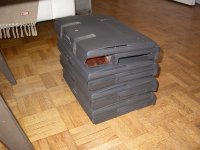
Prepare for an all album of 240Mhz boards ,the part you've asked on the board ,
First two picts is one that would boot only to the chime, although it looks relatively clean.
From the third pict it's one very corroded , but the machine would boot to a grey screen only.
Top:
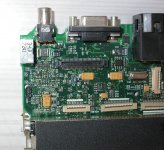
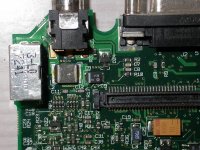
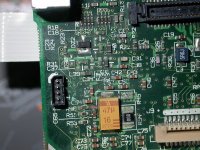
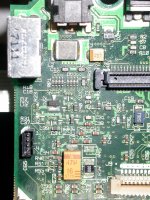
Under:
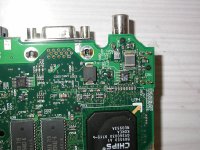
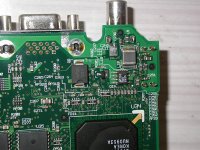
And this is a repair I've done on a trackpad button, just a piece of aluminum :
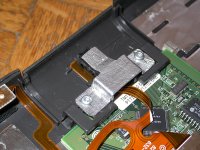
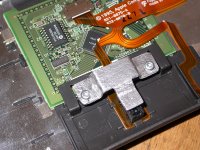
This is the added consolidation piece added to the hinges on the Kanga, that I was mentioning earlier. Shouldn't be too difficult to do in aluminum too :
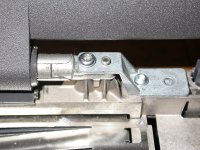
Hi,
I got the Kanga as non working: black screen, no start chime, but HD spinning a while (using known good power adapter).
And: when I put in a PC formated empty disk, it's ejected after a while as normal.
A known good PMCIA-CF adapter card doesn't start it.
As I have a working 3400, I changed display, speaker panel and keyboard for a test: nothing but silent noise from the speakers.
PMU reset: same noise.
I also used the PRAM battery from the 3400, but meanwhile it could have been empty.
So I changed these parts back and the 3400 still works (thanks to Apple!).
What I saw: the little PMCIA board inside (for ejecting) lied on the logic board, pins broken.
Next I tested the Kanga's HD with an IDE-USB adapter on my current Mac:
the HD spinned very slow and only short and in this case I always use a two-way USB cable, for getting more power to the HD.
And boing! The HD bombed my Mac!
It's definitely defective.
So I supposed, the harddisk also may have damaged the PMU board.
Now I got a NOS PMU board for the Kanga in UK. I'm living in Austria, the Kanga is from New York.
Today evening I plan to use the new PMU board and I'll know more, I hope.
So I'm praying, that the logic board is still alive!
I got the Kanga as non working: black screen, no start chime, but HD spinning a while (using known good power adapter).
And: when I put in a PC formated empty disk, it's ejected after a while as normal.
A known good PMCIA-CF adapter card doesn't start it.
As I have a working 3400, I changed display, speaker panel and keyboard for a test: nothing but silent noise from the speakers.
PMU reset: same noise.
I also used the PRAM battery from the 3400, but meanwhile it could have been empty.
So I changed these parts back and the 3400 still works (thanks to Apple!).
What I saw: the little PMCIA board inside (for ejecting) lied on the logic board, pins broken.
Next I tested the Kanga's HD with an IDE-USB adapter on my current Mac:
the HD spinned very slow and only short and in this case I always use a two-way USB cable, for getting more power to the HD.
And boing! The HD bombed my Mac!
It's definitely defective.
So I supposed, the harddisk also may have damaged the PMU board.
Now I got a NOS PMU board for the Kanga in UK. I'm living in Austria, the Kanga is from New York.
Today evening I plan to use the new PMU board and I'll know more, I hope.
So I'm praying, that the logic board is still alive!
Yes I did it:
I swapped the PMU board, but that didn't help. Wasted money!
I tested with a known good PowerBook harddisk with system (and a CF-IDE adapter afterwards), disconnected PRAM battery, fan, keyboard and Trackpad.
I forget to mention, that I always have a clear good startup chime.
So the chime comes, when I connect the AC adapter and I can hear the harddisk spinning for 2 seconds, silence for 3 seconds and so on many times, but after a while the PowerBook shuts down and I have to start it again.
What next to test? Logic board looks good, but maybe that little broken PMCIA board did anything cruel to the logic board?
Or should I wait for the next Kanga?
Hmm...
I swapped the PMU board, but that didn't help.
Wasted money! I tested with a known good PowerBook harddisk with system (and a CF-IDE adapter afterwards), disconnected PRAM battery, fan, keyboard and Trackpad.
I forget to mention, that I always have a clear good startup chime.
So the chime comes, when I connect the AC adapter and I can hear the harddisk spinning for 2 seconds, silence for 3 seconds and so on many times, but after a while the PowerBook shuts down and I have to start it again.
What next to test? Logic board looks good, but maybe that little broken PMCIA board did anything cruel to the logic board?
Or should I wait for the next Kanga?
Hmm...
Galgot - thank you very much! I have to start working on my /200 board again; getting the solder off has proven pretty challenging. I'm assuming none of those boards specifically have ADB problems, btw? Nice job on the trackpad repair, also.
MikeatOSX, if you leave it on long enough with the fan disconnected it'll probably overheat and shut itself down. If it's definitely not that, what exactly happens if you just leave it on with the flashing disk? The broken PCMCIA board probably didn't do anything to the board, although if the 4-pronged connector is still connected to the board you might remove it; I guess there's a very small chance of a short, but I don't think it matters. Are you just tossing HDs in or are you trying to install to them through the Kanga? What happens when you boot from an install CD/disk tools floppy and just leave it on? Does it still shut itself down? It's also possible I'm misunderstanding your issues - the above was a somewhat diffuse description.
MikeatOSX, if you leave it on long enough with the fan disconnected it'll probably overheat and shut itself down. If it's definitely not that, what exactly happens if you just leave it on with the flashing disk? The broken PCMCIA board probably didn't do anything to the board, although if the 4-pronged connector is still connected to the board you might remove it; I guess there's a very small chance of a short, but I don't think it matters. Are you just tossing HDs in or are you trying to install to them through the Kanga? What happens when you boot from an install CD/disk tools floppy and just leave it on? Does it still shut itself down? It's also possible I'm misunderstanding your issues - the above was a somewhat diffuse description.
I don' t think ADB is completely broken on these. The first one , non-corroded nice looking, was from a 3400c with a broken screen that i managed to boot with another screen before the board itself failed. Mouse was fine.
Second one , very corroded, i never managed to boot it completely. It chimes, goes to the grey screen, and sometime it can start to boot on pc card, then fails. When it does, a plugged mouse would move the cursor very erraticaly.
Second one , very corroded, i never managed to boot it completely. It chimes, goes to the grey screen, and sometime it can start to boot on pc card, then fails. When it does, a plugged mouse would move the cursor very erraticaly.
Interesting. Random thought. I think with the second problem I know what you mean - sometimes my broken board (when it worked) would boot to gray screen and sometimes to HD (past gray screen) seemingly at random. I eventually noticed that the HD would boot it every time if I connected something to the SCSI port in the back. I can't remember if I actually put a CD drive/HD in the enclosure I'd connect or if it's just the act of connecting something to the port. If you ever have time I'd be very curious if you find something similar.
HD and CF-Card were installed on a PB3400c - no way to install it on the Kanga, which is showing a black screen only.The fan was disconnected for a short time only for testing purposes.
The Kanga is reading a Mac boot disc several times and then stops, same as with the HD, with CF-IDE adapter I can hear or see anything of course - this adapter has no led.
PMCIA CF Adapter Boot-CF also don't do anything. So I cleaned contacts with special computer contact spray, waited the necessary time and put all things together.
The only new thing is the sleeping led, which appears sometimes, when I do a PMU reset.
And the starting chime always appears as if the Kanga were ok.
Yeah and the bottom gets warm!

Sorry, English is not my native language.

Nor worries on the English.
* If you're going to leave the replacement screen in whatever - it's just useful for debugging to see some screen. VGA out?
* (Ok on fan; I didn't think that was the reason it would shut down, just wanted to make sure; mine never shut down with fan disconnected - for like hours)
* Don't worry about the sleep LED (for now).
* The boot disk (floppy/CD? both?) makes the computer stop responding (freezes/crashes?)? Do you have a) a different floppy module, b ) a different CD module, c) an external SCSI enclosure/CD/HD?
- It's actually possible what I said to Galgot might work a little for you - try booting anything when you have a SCSI device/enclosure/cable (maybe) plugged into the port in the back. **
If it cannot boot from any floppies or CDs then you need to start going through normal debugging - http://tim.id.au/laptops/apple/powerbook/powerbook_3400c.g3.pdf- starting where it says "Troubleshooting". I apologize I could not find a German (German?) manual quickly. Basically RAM reseating, various cable issues - but based on what you've said I don't think that's the problem with any of this.
** The best analogy, albeit imperfect, for my observation is that it's kind of like 'jumpstarting.' Or, to steal from Amiga, Kickstarting.
* If you're going to leave the replacement screen in whatever - it's just useful for debugging to see some screen. VGA out?
* (Ok on fan; I didn't think that was the reason it would shut down, just wanted to make sure; mine never shut down with fan disconnected - for like hours)
* Don't worry about the sleep LED (for now).
* The boot disk (floppy/CD? both?) makes the computer stop responding (freezes/crashes?)? Do you have a) a different floppy module, b ) a different CD module, c) an external SCSI enclosure/CD/HD?
- It's actually possible what I said to Galgot might work a little for you - try booting anything when you have a SCSI device/enclosure/cable (maybe) plugged into the port in the back. **
If it cannot boot from any floppies or CDs then you need to start going through normal debugging - http://tim.id.au/laptops/apple/powerbook/powerbook_3400c.g3.pdf- starting where it says "Troubleshooting". I apologize I could not find a German (German?) manual quickly. Basically RAM reseating, various cable issues - but based on what you've said I don't think that's the problem with any of this.
** The best analogy, albeit imperfect, for my observation is that it's kind of like 'jumpstarting.' Or, to steal from Amiga, Kickstarting.
Yes I have absolutely everything to test. I‘m a Mac user since 1992 and didn't give away anything.
And yes, I have all service sources for all Macs, but the Kanga / 3400 service source didn‘t help me.
I‘ve already tested with a PB 3400 display for several hours, no success.
Hmm. :-/
I‘m a Mac user since 1992 and didn't give away anything.And yes, I have all service sources for all Macs, but the Kanga / 3400 service source didn‘t help me.
I‘ve already tested with a PB 3400 display for several hours, no success.
Hmm. :-/
I don't want to suggest you do anything that will harm the Kanga - particularly because I think it'll be difficult to find a new logic board - but at this point I would take the board out, put it back in with nothing but the PMU and try to start it. If/when that doesn't work I would (personally) start to clean the board. I don't know what you used for the 5300 cleanup but I (at Unity's suggestion) have started usually with Rubbing Alcohol (Isopropyl) and Vinegar, and then something called Scrubbing Bubbles (http://www.amazon.com/Scrubbing-Bubbles-Fresh-Scent-Aerosol/dp/B00HY51IIM/) and then distilled water and then thorough drying. I forget what caused my 3400c to start powering on the display but I think it was a journey to the center of the dishwasher. However, these are also considered extreme options.
You could try reassembling the all thing , and leave it unpowered but plugged to power brick for a night.
My Kanga was not booting one time, I think it was after changing the HD, no chime, nothing. Just the green light on top of the screen.
Left it a night plugged to power, next morning it booted. Go figure...
Maybe the PMU needs to powered for a while to be completely resetted .
What you could try too, see if it's booting on openfirmware (alt-cmd-o-f), then if so type "reset-all" and see if it boot normally.
Edit: will try that trick of plugging a SCSI device to boot tomorow...
My Kanga was not booting one time, I think it was after changing the HD, no chime, nothing. Just the green light on top of the screen.
Left it a night plugged to power, next morning it booted. Go figure...
Maybe the PMU needs to powered for a while to be completely resetted .
What you could try too, see if it's booting on openfirmware (alt-cmd-o-f), then if so type "reset-all" and see if it boot normally.
Edit: will try that trick of plugging a SCSI device to boot tomorow...
The connectors won't fit. So no. There are probably also a slew of other incompatibilities.
But also if both VGA and a working 3400c screen don't work (I'm not sure actually about the 3400c screen compatibility but I would bet they are compatible), then it's probably not a screen/display issue.
But also if both VGA and a working 3400c screen don't work (I'm not sure actually about the 3400c screen compatibility but I would bet they are compatible), then it's probably not a screen/display issue.
Progress : Just tried that SCSI trick, now the corroded 240Mhz board boots on a Zip. But unfortunately no ADB nor trackpad control, nothing.
So I get on the desktop and can do nothing ;/ Note the internal drive doesn't show up on the desktop too...
Tried the same thing with the non-corroded but non-working 240Mhz board. No joy. I still get the chime, but nothing else, just black screen.
So I get on the desktop and can do nothing ;/ Note the internal drive doesn't show up on the desktop too...
Tried the same thing with the non-corroded but non-working 240Mhz board. No joy. I still get the chime, but nothing else, just black screen.
Yeah I've already "worked" on these enough time. In that stack there are ,
- a 200Mhz working fine but no ADB, so i don't care much about it cause i already have two fully working 3400c/200s.
- a dead 200Mhz with no screen.
- a 240Mhz , booting only on a Zip, and with no ADB and trackpad.
- a 240Mhz, non booting at all, just the chime.
Tried swapping boards, PMUs, all that… to get a working 240Mhz, no joy.
So they are my spare parts store now .
I've already "worked" on these enough time. In that stack there are ,- a 200Mhz working fine but no ADB, so i don't care much about it cause i already have two fully working 3400c/200s.
- a dead 200Mhz with no screen.
- a 240Mhz , booting only on a Zip, and with no ADB and trackpad.
- a 240Mhz, non booting at all, just the chime.
Tried swapping boards, PMUs, all that… to get a working 240Mhz, no joy.
So they are my spare parts store now .
So that's very similar to the status of my repair board. Last thing I was doing was trying to replace little caps that hopefully regulate ADB - hence my request for the photos.
And Macdrone... not to be rude but don't you have the boards that you are still repairing?
And Macdrone... not to be rude but don't you have the boards that you are still repairing?


Well Macdrone I just meant that until either of us has successfully repaired a catastrophically damaged 3400c, I don't see any reason to stockpile boards that we can't clearly repair.
If I hadn't screwed up the solder job initially the ADB problem might have a solution. MikeatOSX, are you like an expert at soldering? Because if you're willing to risk harming the board I can show you my thoughts on the ADB issue; but I don't know if fixing that will actually work.
If I hadn't screwed up the solder job initially the ADB problem might have a solution. MikeatOSX, are you like an expert at soldering? Because if you're willing to risk harming the board I can show you my thoughts on the ADB issue; but I don't know if fixing that will actually work.
I did much soldering (TV, amplifier, radio etc.) BEFORE I bought my first computer (Amiga 500) 26 years ago.
And then I swapped one hobby with the new one.
Years later the parts became smaller and smaller...
I have everything I need for good soldering, but I have to overcome myself, when it's necessary to solder.
And then I swapped one hobby with the new one.
Years later the parts became smaller and smaller...
I have everything I need for good soldering, but I have to overcome myself, when it's necessary to solder.
Continuation of the story...
As I have to do more testing with the "sleeping beauty" (the Kanga), I created two NEW working backup battery packs mixing the old PowerBook 3400 & Kanga batteries connectors with the new Ebay 181762181041 batteries:
Using a sharp knife I removed the plastic sheath and soldered the original cables to the new batteries (red is + !). Then I wrapped insulating tape around the whole pack.
I did not put the batteries back to the original place (brightness & speaker grill), instead I put it in the hard drive bracket as I replaced the hard drive by a Compact Flash - IDE adapter and so there is enough place for the backup battery now.

As I have to do more testing with the "sleeping beauty" (the Kanga), I created two NEW working backup battery packs mixing the old PowerBook 3400 & Kanga batteries connectors with the new Ebay 181762181041 batteries:
Using a sharp knife I removed the plastic sheath and soldered the original cables to the new batteries (red is + !). Then I wrapped insulating tape around the whole pack.
I did not put the batteries back to the original place (brightness & speaker grill), instead I put it in the hard drive bracket as I replaced the hard drive by a Compact Flash - IDE adapter and so there is enough place for the backup battery now.
I created a topic about that battery and mentioned the polarity issue... I put the batteries back in their original place beneath the speaker panel but putting it in the HD case is clever. However, you know you can just pull the connectors off of the 80mAh batteries and pop the old PRAM battery's connector on the new one - which is what I've done.
(https://68kmla.org/forums/index.php?/topic/24904-ppc-powerbook-pram-battery-sources/)
(https://68kmla.org/forums/index.php?/topic/24904-ppc-powerbook-pram-battery-sources/)
BTW: I tested the Kanga again with an original Kanga boot CDR and it seems, the Kanga is booting to desktop, because it's reading very long from the CD-Rom and then sits there waiting (it seems).
But again black display AND no display via external video connector.
I also tested booting from external PowerBook (3400 in dock mode and vice versa): the Kanga looks once to the 3400 and that's it.
As you can see on the picture above, the old Kanga backup battery is in lousy shape (0,3 volts). I suppose it leaked, but I don't see anything bad on the upper side of the logic board.
Do you think, the lower side could look bad?
But again black display AND no display via external video connector.
I also tested booting from external PowerBook (3400 in dock mode and vice versa): the Kanga looks once to the 3400 and that's it.
As you can see on the picture above, the old Kanga backup battery is in lousy shape (0,3 volts). I suppose it leaked, but I don't see anything bad on the upper side of the logic board.
Do you think, the lower side could look bad?
You should not have a PRAM battery in the machine if it is not working properly (I forgot what this thread was about). Yes your batteries are in surprisingly bad shape lol. Well ... if that corrosion was exposed (if there was no green plastic covering the cells) then there almost certainly is corrosion somewhere on the board. On one of mine the main corrosion was underneath/inside the PCMCIA enclosure. It's hard to see without removing the board. But be careful and do what makes you comfortable.
Continuation:
So I took apart the Kanga and found a small PRAM battery leaking (see pic).
But where is the big damage? You can see both sides of the logic board in high resolution here:
http://www.mediafire.com/download/bjeydd98bbl8j24/PowerBook+G3+Kanga+Logic+Board.jpg
The fact is:
The PowerBook G3 Kanga starts with a fat start chime.
Boot-CD, CF-IDE adapter (with LED) and floppy-disk seem to boot the Kanga, as I suppose watching the LEDs.
I tested 2 working power supply boards.
I connected my PowerBook 3400c in SCSI Dock-mode with the Kanga and vice versa and there are only very short contacts once per boot.
I also tested with a naked board (Logic board, display, power supply board, CF-IDE adapter).
The display still stays dark.
An external monitor connected to the video port still stays dark.
The PB 3400c display connected to the Kanga stays dark.
When I got the Kanga, I found the little PCMCIA Switch Board broken and loose on the logic board with several very small metal parts.
The hard disk was in a lousy shape and bombed my actual Mac when connected to it.
So I think some parts of the logic board feeding the display and I/O ports are damaged. So probably I have to use this Kanga as spare parts warehouse. Hmm.
Thanks for listening.

So I took apart the Kanga and found a small PRAM battery leaking (see pic).
But where is the big damage? You can see both sides of the logic board in high resolution here:
http://www.mediafire.com/download/bjeydd98bbl8j24/PowerBook+G3+Kanga+Logic+Board.jpg
The fact is:
The PowerBook G3 Kanga starts with a fat start chime.
Boot-CD, CF-IDE adapter (with LED) and floppy-disk seem to boot the Kanga, as I suppose watching the LEDs.
I tested 2 working power supply boards.
I connected my PowerBook 3400c in SCSI Dock-mode with the Kanga and vice versa and there are only very short contacts once per boot.
I also tested with a naked board (Logic board, display, power supply board, CF-IDE adapter).
The display still stays dark.
An external monitor connected to the video port still stays dark.
The PB 3400c display connected to the Kanga stays dark.
When I got the Kanga, I found the little PCMCIA Switch Board broken and loose on the logic board with several very small metal parts.
The hard disk was in a lousy shape and bombed my actual Mac when connected to it.
So I think some parts of the logic board feeding the display and I/O ports are damaged. So probably I have to use this Kanga as spare parts warehouse. Hmm.
Thanks for listening.
The short story is that I don't know... I will have to look over all of this but even then that's super weird. I assume you've tried reseating the cable a bunch of times.
One thing I do notice is that in the 6 vias right above the label "U4", at least two still have corrosion in them. Is there damage on the bottom right around the chip labeled 341S0433 or around C438/C439? (that's under the board - might be the pic)
There's corrosion near C25 on the top of the board as well and C77.
One thing I do notice is that in the 6 vias right above the label "U4", at least two still have corrosion in them. Is there damage on the bottom right around the chip labeled 341S0433 or around C438/C439? (that's under the board - might be the pic)
There's corrosion near C25 on the top of the board as well and C77.
Then it's a board problem for sure. You need to clean the remaining corrosion (pretty much broadly the area between the power connector and the PCMCIA enclosure. I again recommend foaming Scrubbing Bubbles if that exists in Austria. That's what brought my board back to life. But techknight may be right - the vias may be rotted out.
Alkyl dimethyl benzyl ammonium chloride ... 0.096%
Octyl decyl dimethyl ammonium chloride ... 0.072%
Dioctyl dimethyl ammonium chloride ... 0.036%
Didecyl dimethyl ammonium chloride ... 0.036%
Inert ingredients ... 99.760%
So basically it's various compounds of ammonium chloride and then 'other' - which might just be water and carbon dioxide mostly.
But MikeatOSX, perhaps you can find something similar that is cheaper.
(Totally forgot to edit the previous post... my bad...)
Octyl decyl dimethyl ammonium chloride ... 0.072%
Dioctyl dimethyl ammonium chloride ... 0.036%
Didecyl dimethyl ammonium chloride ... 0.036%
Inert ingredients ... 99.760%
So basically it's various compounds of ammonium chloride and then 'other' - which might just be water and carbon dioxide mostly.
But MikeatOSX, perhaps you can find something similar that is cheaper.
(Totally forgot to edit the previous post... my bad...)
OK. Thanks!
So let‘s see…
BTW: Here's a new version of the Kanga logic board pic with some labeling.
Could not edit the old post.
http://www.mediafire.com/download/cb2726zofowbqkg/PowerBook_G3_Kanga_Logic_Board_HiRes.jpg
Mike
So let‘s see…
BTW: Here's a new version of the Kanga logic board pic with some labeling.
Could not edit the old post.
http://www.mediafire.com/download/cb2726zofowbqkg/PowerBook_G3_Kanga_Logic_Board_HiRes.jpg
Mike
Is there a size cap on uploading photos? It's not a big deal it's just somewhat awkward to keep downloading.
Also, your board's main damage is surprisingly far to the right. I've pointed out (above) some damage farther left, but just keep in mind that whole area (like the upper left quarter) probably needs to be clean.
Also, your board's main damage is surprisingly far to the right. I've pointed out (above) some damage farther left, but just keep in mind that whole area (like the upper left quarter) probably needs to be clean.
I got a new PowerBook 3400c/200 (my second) - the Kanga must wait some more days, as it has more bugs.
So the 3400c was said to have a buggy keyboard, nearly all keys don't work...
The truth was, the PRAM battery leaked and dripped down around the keyboard connections. So I disassembled the whole PB, additionally repairing some different bugs (missing rear feet and feet housing etc.).
Then I carefully cleaned the board, keyboard connectors and flex cables. After that the keyboard worked 90 percent. So I swapped it with a 5300 keyboard and now only 3 rightmost keys don't work.
One of them is the return key, arrrrrrgh!!
So, do you have any ideas, what to do now?
So the 3400c was said to have a buggy keyboard, nearly all keys don't work...
The truth was, the PRAM battery leaked and dripped down around the keyboard connections. So I disassembled the whole PB, additionally repairing some different bugs (missing rear feet and feet housing etc.).
Then I carefully cleaned the board, keyboard connectors and flex cables. After that the keyboard worked 90 percent. So I swapped it with a 5300 keyboard and now only 3 rightmost keys don't work.
One of them is the return key, arrrrrrgh!!
So, do you have any ideas, what to do now?
[(I agree with Techknight, but As a note - Is the 5300 keyboard fully compatible with the 3400c? (just as a warning - i don't think i'd personally leave it in there permanently - but i'm not 100% sure about compatibility, but I don't think they are - it also may not matter much. They are labeled differently in the 5300 and 3400c manuals, respectively [i think the Kanga keyboard may also be labeled differently]).]
As a note - Is the 5300 keyboard fully compatible with the 3400c? (just as a warning - i don't think i'd personally leave it in there permanently - but i'm not 100% sure about compatibility, but I don't think they are - it also may not matter much. They are labeled differently in the 5300 and 3400c manuals, respectively [i think the Kanga keyboard may also be labeled differently]).]To replace the keyboard connector would be a bad thing.
I found the keyboard compatibility here:
http://www.welovemacs.com/9223109.html
I found the keyboard compatibility here:
http://www.welovemacs.com/9223109.html
I‘m proud to say: the Kanga is working again!

What I did:
I used a Scratch Brush
http://www.amazon.com/Scratch-Brush-Fiberglass-Colors-vary/dp/B0019V18D2/ref=pd_bxgy_469_img_y
first to remove the verdigris and then water and after that Isopropyl alcohol.
But the most important tool was a magnifying glass and very good light. :
Didn‘t realize, that my eyes went older...
So thanks for your help!
Next to do: still the PB 3400c and several 5300 … :rambo: