
Thread
Widget drive
I own a "former Macintosh XL". Just a case and monitor. I would like to restore it. Now it looks like mission impossible ...... but I just started.
This week I bought a Widget HD. It arrived and I realized .... where to begin.
First the disk.
I would like to know if the disk is working.
Is it possible to connect it to the motherboard of a 128k or a 512k?
Or is it possible just to power it up?
Does anyone have some kind of instruction what to do?
This week I bought a Widget HD. It arrived and I realized .... where to begin.
First the disk.
I would like to know if the disk is working.
Is it possible to connect it to the motherboard of a 128k or a 512k?
Or is it possible just to power it up?
Does anyone have some kind of instruction what to do?
"Just a case and monitor" - no logic board then? It's just an empty case?
From what I understand, the Wiget is a parallel hard drive, so it's not usable on a Mac.
You might want to ask on the LisaList, where most of the knowledgable Lisa people seem to hang out: https://groups.google.com/forum/#!forum/lisalist
From what I understand, the Wiget is a parallel hard drive, so it's not usable on a Mac.
You might want to ask on the LisaList, where most of the knowledgable Lisa people seem to hang out: https://groups.google.com/forum/#!forum/lisalist
You can't use it on any other computer other than a Lisa 2/10. You could power it up but be prepared for the sound of jet engine taking off. Other than seeing if it spins up, there's no real reason to test it unless you have all of the other parts including the logic board/CPU/memory and I/O board in place. That will be the true test of the hard drive.
I've powered up a Widget standalone to ensure that it was passing its internal tests (there's a video on youtube) but beyond that you require ALL of the guts of a Lisa to do much else. My 2/5 will recognize it as a hard drive but either because of a ROM incompatibility or additional problems with my own drive, if the bus pokes at it the drive simply resets.
Formatting until recently was only possible through the LOS/Macworks installer. More recently however the Basic Lisa Utility also added support for formatting and disk exercising functions.
Formatting until recently was only possible through the LOS/Macworks installer. More recently however the Basic Lisa Utility also added support for formatting and disk exercising functions.


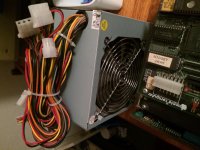
Have tested it today. Disk doesn't seem to spin up. Currents are ok. See:
https://youtu.be/ZxKsA2q0vOI
Only a green light blinks and becomes green
https://youtu.be/ZxKsA2q0vOI
Only a green light blinks and becomes green
You may have a "stuck brake". Take a look at this document: https://ia801808.us.archive.org/14/items/AppleLisa_RepairSunGuideDC/AppleLisa_RepairSunGuideDC.pdfand navigate to page 27 of 48.
Good luck.
Good luck.
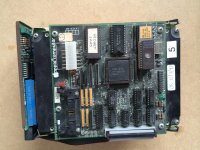
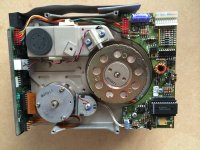
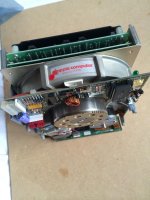
My borrowed widget drive also makes loud click-clack sounds when powered on and off. I assume that's normal?
The guy who I borrowed the Lisa from said initially the drive didn't spin at all. But he physically turned the disk a few times with some tool (sorry, I don't know the details), and after that it started working.
The guy who I borrowed the Lisa from said initially the drive didn't spin at all. But he physically turned the disk a few times with some tool (sorry, I don't know the details), and after that it started working.
Does the drive spindle spin freely by hand? It's possible that stiction is the issue. If it's stuck, try forcing it to turn. You've got nothing to lose because your stuck anyway.. literally.
If it's not that than you either don't have power to the motor connected properly or your motor is gone, unfortunately.
The other issue I've had with Widgets is the internal lens has come loose. I had to open my drive and try to glue it back in place. The drive was a write-off after that.
If it's not that than you either don't have power to the motor connected properly or your motor is gone, unfortunately.
The other issue I've had with Widgets is the internal lens has come loose. I had to open my drive and try to glue it back in place. The drive was a write-off after that.
Mine had the same problem. Many years of no use meant the bearings were stiff. You applied power and quickly gave the spindle a little twist before the motor drivers burned out. I left my drive sitting for a few hours to work the grease around the bearings again and it hasn't had issues starting up since.
While you have an earlier revision drive and I have no idea how its startup differs, here's what you should be expecting out of a Widget.
https://www.youtube.com/watch?v=9_tuvrEtdfU
Also, I would put a piece of electrical tape over the quartz window on that EPROM. All you need is a good shot of direct sunlight or a camera flash to scramble a bit or two.
While you have an earlier revision drive and I have no idea how its startup differs, here's what you should be expecting out of a Widget.
https://www.youtube.com/watch?v=9_tuvrEtdfU
Also, I would put a piece of electrical tape over the quartz window on that EPROM. All you need is a good shot of direct sunlight or a camera flash to scramble a bit or two.
First BIG Success!!!! I got it spinning!
Just by rotating it counterclockwise for some time. I could feel it rolling better and better. Then I switched on power and it started running. Even the brake came lose after 15 seconds, just like it should.
But... I'm not there.. No luck in trying this again. It remains still... :'( Just one time.......but I made video's.
Maybe it should try to clean the inner side of the motor, but I didn't see any documentation about this.
See my movies on YouTube:
Lisa Widget drive started for the first time in years
http://youtu.be/v-OR4VrnNbU
Lisa widget starting up part 2
https://youtu.be/5MeaBP2g37U
Lisa Widget starting up part 3
http://youtu.be/23Aw2moTSuA
Just by rotating it counterclockwise for some time. I could feel it rolling better and better. Then I switched on power and it started running. Even the brake came lose after 15 seconds, just like it should.
But... I'm not there.. No luck in trying this again. It remains still... :'( Just one time.......but I made video's.
Maybe it should try to clean the inner side of the motor, but I didn't see any documentation about this.
See my movies on YouTube:
Lisa Widget drive started for the first time in years
http://youtu.be/v-OR4VrnNbU
Lisa widget starting up part 2
https://youtu.be/5MeaBP2g37U
Lisa Widget starting up part 3
http://youtu.be/23Aw2moTSuA
If you get it going again, let it run for a while, especially in different orientations.
Apocryphal tales say that ProFile drives that screech like a banshee "get better" after running upside down for a while, since the lubricant works its way back into the bearings.
Don't know if that's true, but you don't have much to lose at this point.
Apocryphal tales say that ProFile drives that screech like a banshee "get better" after running upside down for a while, since the lubricant works its way back into the bearings.
Don't know if that's true, but you don't have much to lose at this point.

On your video, I never hear the brake release. After the drive comes to speed - about 5 seconds or so, you should hear a "clunk" as the brake releases and then the drive should start to seek. When it seeks, it will make very distinctive "squeak" noises.
I don't know if the lack of brake release is because you are only providing power to the drive, and not any data signaling from the Lisa.
I think this has been covered, but you can read about adjusting the brake in Pina's book.
I don't know if the lack of brake release is because you are only providing power to the drive, and not any data signaling from the Lisa.
I think this has been covered, but you can read about adjusting the brake in Pina's book.
Inside the Widget is a glass scale used for head position feedback. The scale is attached with glue and 30 years later on many Widgets the glue has failed. This commonly results the glass breaking causing all kinds of issues, the worst of is tiny fragments of glass loose inside the enclosure. I fear the screeching noise you hear is due the glass causing a head crash…
Rick
Rick
BREAKING NEWS!!!!
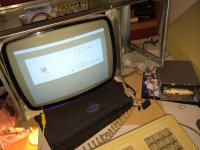
With some spare parts I could test my Widget drive. And.... It is alive!!! The Lisa boots up nicely from it. So my efforts to revive it a succes!
See pictures:
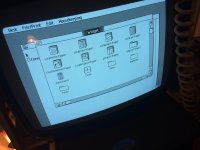
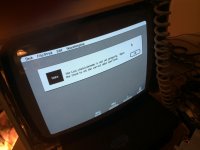
I will report later about the "spare parts". I will also start a new subject about a new disk. That doesn't boot......
With some spare parts I could test my Widget drive. And.... It is alive!!! The Lisa boots up nicely from it. So my efforts to revive it a succes!
See pictures:
I will report later about the "spare parts". I will also start a new subject about a new disk. That doesn't boot......
Here are some more pictures. Side panels are off. I'm cleaning the plastic.
My desk has not much space ....
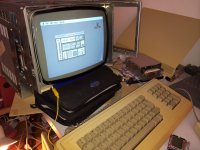
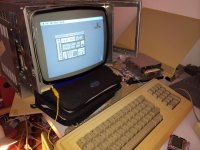
View attachment 6614
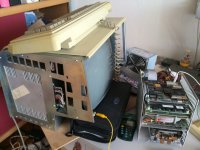
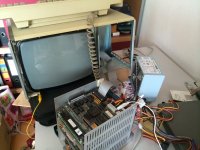
My desk has not much space ....
View attachment 6614
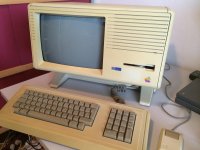
Ok. A nice video to end this topic! I have build in the widget drive. It still gets its power form an external PSU. A plain normai cheap power unit from an old computer. I ripped of all the extra wires and made a custom plug. Just with some glue and ductape.
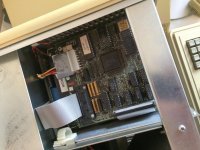
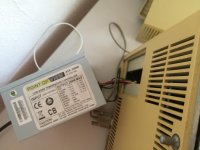
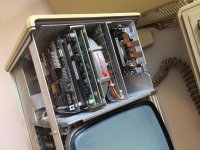
I first switch on the hard disk and then the Lisa. Works fine:
http://www.youtube.com/watch?v=ZboBCbx62us
The disk was revived bij turning it manually for a long time so the grease around the bearings softened.
But to see if it really worked I needed a working Lisa. I acquired one with a defective disk, floppy drive and video board. I used the other parts, like CPU, IO and memory cards to revive my own.
But to see if it really worked I needed a working Lisa. I acquired one with a defective disk, floppy drive and video board. I used the other parts, like CPU, IO and memory cards to revive my own.
hey at least you got it working.
The lisa is one of those machines that I don't have any attachment to, and its up in the air whether I would own one or not.
I think I will leave the Lisa collecting to the purists because if I had one I would hotrod the hell out of it.
The lisa is one of those machines that I don't have any attachment to, and its up in the air whether I would own one or not.
I think I will leave the Lisa collecting to the purists because if I had one I would hotrod the hell out of it.
There is nothing wrong with a "hotrod" Lisa. I have 3 "SuperLisa's" and there is continued new Lisa hardware development. The Lisa is an open-architecture system that was designed to be enhanced (like the Apple 2 line), adding to the system does not make it any less a Lisa.
Rick
If you want more power in a Lisa you would like my MISA or LACINTOSH.
https://68kmla.org/forums/index.php?/topic/25212-is-it-a-lisa-is-it-a-macintosh/
I wonder if I could attach a SE/30 motherboard to it.
https://68kmla.org/forums/index.php?/topic/25212-is-it-a-lisa-is-it-a-macintosh/
I wonder if I could attach a SE/30 motherboard to it.