

Thread
Pretty Great Pismo Conquest
I haven't posted in quite a while, but I thought that this recent conquest was worth posting. I have been thinking about converting my collection to a more New World/Laptop oriented collection to save space; and as a result I have been patrolling Craigslist to look for some good deals. I found a computer recycler that I had not stumbled into before, and I decided to give them a call.
To cut to the chase, I went there and found that they had a 500Mhz Pismo for $40! It was in pretty solid shape (no cracks, no pink tint, no major defects), but it was also pretty dirty/missing the IR port cover, so I got the price down to $33! It was in a nasty laptop bag (will be tossed), but it included the original charger, install disk, and even the paperwork! I wiped the 9.0.4 install and installed 10.4, and now I am posting on it! I definitely see why these laptops are so well regarded in the PPC community!
I'm planning to buy a Wireless G card to support modern WiFi and max out the ram if I can find a decently priced stick 512MB. I think i'll turn this into my main portable (I actually don't have any other), it handles internet pretty darn well
-Yeager
Question: I'm considering putting a m-sata SSD/PATA adapter in this because I think this HD is on its last legs, has anybody tried this before? I've searched around, but it seems that the only confirmed successes are in Powerbook G4s.
To cut to the chase, I went there and found that they had a 500Mhz Pismo for $40! It was in pretty solid shape (no cracks, no pink tint, no major defects), but it was also pretty dirty/missing the IR port cover, so I got the price down to $33! It was in a nasty laptop bag (will be tossed), but it included the original charger, install disk, and even the paperwork! I wiped the 9.0.4 install and installed 10.4, and now I am posting on it! I definitely see why these laptops are so well regarded in the PPC community!
I'm planning to buy a Wireless G card to support modern WiFi and max out the ram if I can find a decently priced stick 512MB. I think i'll turn this into my main portable (I actually don't have any other), it handles internet pretty darn well
-Yeager
Question: I'm considering putting a m-sata SSD/PATA adapter in this because I think this HD is on its last legs, has anybody tried this before? I've searched around, but it seems that the only confirmed successes are in Powerbook G4s.
Excellent news, Yeager. Congrats on the Pismo find. $33 is of course a very good deal even with the small number of issues you mention. The closest I've come to a Pismo is a 400Mhz Lombard. 
In response to your question about the hard drive, there are a few people who've posted about IDE SSDs. They're likely great, but they tend to cost more than their SATA counterparts. I opted for a different option, which is an IDE to CompactFlash converter. I bought a 32GB CF card for it (make sure it's branded as having UDMA). Plugged it in, and as they say, 'Bob's your uncle'. It works perfectly. It's silent, faster than the HDD and not so fast that the speed of an SSD is wasted on a slow IDE transfer speed (though the CF card I bought reads and writes at a rate far higher than the ATA transfer rate of my Lombard). And it was cheap - the adapter is about $3 and the CF card can be had for about $20.
In response to your question about the hard drive, there are a few people who've posted about IDE SSDs. They're likely great, but they tend to cost more than their SATA counterparts. I opted for a different option, which is an IDE to CompactFlash converter. I bought a 32GB CF card for it (make sure it's branded as having UDMA). Plugged it in, and as they say, 'Bob's your uncle'. It works perfectly. It's silent, faster than the HDD and not so fast that the speed of an SSD is wasted on a slow IDE transfer speed (though the CF card I bought reads and writes at a rate far higher than the ATA transfer rate of my Lombard). And it was cheap - the adapter is about $3 and the CF card can be had for about $20.
Thanks for the info! The Pismo and the Lombard are almost the same, so I would have purchased either one 
Have you done any throughput tests with the new Compact Flash SSD? I have considered it, but I would prefer to do whatever is faster (or whatever works), because it seems that I could go for either for similar cost.
I ran into a new problem today. I charged the charged to 3700 mah with only 77 load cycles, but it will only get to about 90% and then go asleep with the battery showing one blinking LED. If I go into System Profiler it now states that the battery has no cycles and that the full charge capacity is a very large negative number. Does or anyone know if there is a good way to reset the battery?
Have you done any throughput tests with the new Compact Flash SSD? I have considered it, but I would prefer to do whatever is faster (or whatever works), because it seems that I could go for either for similar cost.
I ran into a new problem today. I charged the charged to 3700 mah with only 77 load cycles, but it will only get to about 90% and then go asleep with the battery showing one blinking LED. If I go into System Profiler it now states that the battery has no cycles and that the full charge capacity is a very large negative number. Does or anyone know if there is a good way to reset the battery?
It's probably just dead.
Honestly a good UDMA CF card is likely to be faster than the IDE channel in those machines. I don't see throughput being an issue.
Yeager,
Do you live in the Twin Cities? This Pismo sounds very similar to one I set up for the Free Geek in Minneapolis, all the way down to the bag, paperwork and install disk.
Same batch had a nice 667Mhz DVI Ti, but I need to swap in a working optical drive.
Do you live in the Twin Cities? This Pismo sounds very similar to one I set up for the Free Geek in Minneapolis, all the way down to the bag, paperwork and install disk.
Same batch had a nice 667Mhz DVI Ti, but I need to swap in a working optical drive.
New Apple batteries on eBay right now for $80, alas, that's the best deal I have seen in awhile. These batteries got scarce... Great machines though. I need to try one with a cf card install soon too.
On the current battery, try 2-3 charge and discharge cycles. If then you still can't get it through boot on that battery it is no go.
Yes I do, you must be the Mac guy they were talking aboutYeager,
Do you live in the Twin Cities? This Pismo sounds very similar to one I set up for the Free Geek in Minneapolis, all the way down to the bag, paperwork and install disk.
Same batch had a nice 667Mhz DVI Ti, but I need to swap in a working optical drive.
 So you are the one who installed Internet Explorer on it? Too bad the 667Mhz Titanium wasn't out there, I looked at the 867Mhz that they had in the store, but it didn't seem to be in the best of shape (bottom case was a little too scuffed up for my liking). The Titanium is the next laptop on my list. How nice is that 667Mhz?
I have gone through several discharge cycles on the battery, and it seems that it has a small capacity, but enough to keep ram contents while plugging it in elsewhere. I saw the battery on eBay, but $80 is a lot to spend on a laptop that cost only $33! However, I did score a Motorola wireless G card on eBay for $2, and it has better security than a standard Airport card.
Has anyone tried a M-sata to PATA adapter on one of these? I'm looking at prices for compact flash cards, and it seems that I could get more storage for the same amount of money with M-sata.
Thanks for all the help!
-Yeager
Some pics:
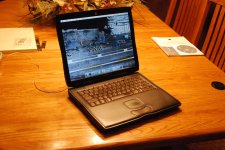
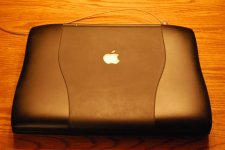
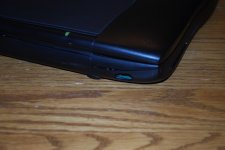
Yeager,
Yup, that's probably me, though there are a couple other guys who work the Mac side as well. You can't pin IE on me- that's what Apple had as the default browser on the included restore disk I had contemplated putting a newer OS on that guy, but if we get the original media for the Macs, general policy is to install that, and let the end user decide if they want a change.
I swapped the optical in the 667 for another, and it also did not work. Seems odd that two would be bad. Both would accept a disk, then grind around seeking for a while, then spit the disk out. I have one more "organ donor" machine to provide a third drive. We'll see how that goes. I plan to spend the afternoon there Thursday, so I should know more after that. The machine looks pretty good otherwise, and it has a decent battery. If it's something you are interested in, PM me and I'll ask them to hold it for you to inspect under your name.
Yup, that's probably me, though there are a couple other guys who work the Mac side as well. You can't pin IE on me- that's what Apple had as the default browser on the included restore disk
I had contemplated putting a newer OS on that guy, but if we get the original media for the Macs, general policy is to install that, and let the end user decide if they want a change.I swapped the optical in the 667 for another, and it also did not work. Seems odd that two would be bad. Both would accept a disk, then grind around seeking for a while, then spit the disk out. I have one more "organ donor" machine to provide a third drive. We'll see how that goes. I plan to spend the afternoon there Thursday, so I should know more after that. The machine looks pretty good otherwise, and it has a decent battery. If it's something you are interested in, PM me and I'll ask them to hold it for you to inspect under your name.
It is definitely a really cool nonprofit. I was just giving you a hard time about IE, I've used a whole lot of OS 9 in my day I thought it was pretty cool that it had the original operating system installed, but I wanted something a little more modern.
I would love to buy a nice Titanium G4, but I really need to get rid of some of my desktops before I expand my collection. That is pretty weird about the optical drive, hopefully you'll be able to fix it.
I thought it was pretty cool that it had the original operating system installed, but I wanted something a little more modern.I would love to buy a nice Titanium G4, but I really need to get rid of some of my desktops before I expand my collection. That is pretty weird about the optical drive, hopefully you'll be able to fix it.
It's a shame about the batteries. They are scarce now. Every now and then you'll see an untested one on the 'Bay in the $20 range, but that's about it. The onldy other option is rebuilding one, which I have not attempted. A year ago, they were much more plentiful. Now there are tons of Wallstreet batteries, though. Go figure.
Well, if there are so many cheap Wallstreet batteries around, maybe if they use the same type cells as the Lombard/Pismo battery, one can just cannibalize a couple of those and rebuild some?
That's a good way to do it cheaply, no?
c
That's a good way to do it cheaply, no?
c
C, perhaps, but not for me, I have read about the many things that can go wrong with that. But, those with more experience in battery work may want to try it.
I'm nursing my remaining Pismo batteries along as best I can...they are a dying breed!
I'm nursing my remaining Pismo batteries along as best I can...they are a dying breed!
I have two batteries for my 520c, one is dead, the other (from 1999) holds a two hour charge. Go figure.
Makes me miss my old Pismo. It was my first laptop and vintage Mac I ever got, in 2008 when I was 9 years old.
I was a stupid kid and I took off the heat sink, and then it started smoking. We had to toss it but I was smart for once and kept the keyboard, battery, HDD, and DVD drive.
Hopefully one day I will find a Pismo missing parts for cheap and get it working again.
I was a stupid kid and I took off the heat sink, and then it started smoking. We had to toss it but I was smart for once and kept the keyboard, battery, HDD, and DVD drive.
Hopefully one day I will find a Pismo missing parts for cheap and get it working again.
I've looked into rebuilding the battery, it seems that it is quite difficult and not very feasible for long term usage. At least the power adapter isn't huge I might try to snag a NIB battery in the future, one will show up on eBay every once in a while for $20. I'm pretty bummed out that I didn't do the proper preservation measures to my Wallstreet's battery before I stored it, now it won't charge.
Thanks for all the help!
I might try to snag a NIB battery in the future, one will show up on eBay every once in a while for $20. I'm pretty bummed out that I didn't do the proper preservation measures to my Wallstreet's battery before I stored it, now it won't charge.I definitely agree, I really like mine!
Thanks for all the help!
A long time ago when I had one, I got an IDE to ribbon IDE and used an SSD from an HP Netbook. The SSD was essentially a cruddy flash-based SSD (maybe around 20MB/s) which hooked via ribbon cable (same type as the iPod's with hard drives) to the internal IDE. I just let it sit there and it drew power from the 44-pin ATA cable. It was faster than the hard drive, but only just. It did well booting with OS 9, but due to a low-end flash it took forever for OS X to boot.
If you want, you can track them down. They have 4 large chips, an ATA controller and a LIF connector that accepts a ribbon cable (single-sided). Then you just need to get a LIF/ZIF to 44-pin ATA 2.5" adapter and hang that off. I would say the CF-Flash card would probably work better. Getting the 200x - 300x would definitely get you the best speed, but you are looking at $80 USD last time I checked. I was curious about using one for a camera that I was using (A professional video camera that did 1080p and used either SATA-II SSDs or dual CF-Flash cards that were either UHS-class or 300x in a RAID-0 Config. I opted to get an HDV Sony HDR-FX1 3-CCD 1080i
with MiniDV HD and a FireStore hard drive unit with battery since it was about $3k cheaper ($900 vs $3800 which I dropped into building a Dual LGA-2011v3 16-core Xeon system with DDR4 ECC RDIMMs)
If you want, you can track them down. They have 4 large chips, an ATA controller and a LIF connector that accepts a ribbon cable (single-sided). Then you just need to get a LIF/ZIF to 44-pin ATA 2.5" adapter and hang that off. I would say the CF-Flash card would probably work better. Getting the 200x - 300x would definitely get you the best speed, but you are looking at $80 USD last time I checked. I was curious about using one for a camera that I was using (A professional video camera that did 1080p and used either SATA-II SSDs or dual CF-Flash cards that were either UHS-class or 300x in a RAID-0 Config. I opted to get an HDV Sony HDR-FX1 3-CCD 1080i
with MiniDV HD and a FireStore hard drive unit with battery since it was about $3k cheaper ($900 vs $3800 which I dropped into building a Dual LGA-2011v3 16-core Xeon system with DDR4 ECC RDIMMs)
Thanks for the info! I am trying to decide on whether it is worth it to spend the money on the upgrade, but from what I have seen it seems that PATA to M-SATA would be the cheapest route. I may be confused as to what you are proposing though.
Thanks for all the help!
Thanks for all the help!
Mmh, Pismo.
I had one for a few years. You lucked out getting a Pismo instead of a TiBook. They make great Mac OS 9 machines and the main (only?) advantages of a PowerBook G4 for all intents and purposes is the slightly larger display. (For that, an 867 or 1000MHz version with the 1280x854 display is nice, compared to the earlier 1152x768 version.)
Back when I had the two giant NewerTech batteries in my Pismo and I was also hyper-miling it, I used to put a CF card in a PCMCIA reader (Sandisk used to make one that works well) or boot Mac OS 9 off of a USB stick, disable the internal hard disk, and turn the backlights off, then just type things into an AppleWorks document. The system got somewhere between 14 and 19 hours doing this. It was great at NaNoWriMo write-ins, unfortunately the hinges on mine got loose and the display developed some lines, plus one of the batteries randomly kicked the bucket.
I can't possibly recommend Mac OS 9 enough for that machine. It'll be faster, it'll be more secure on the Internet, it'll look better on the screen, and Mac OS 9 is a lot easier on the disk, making an SD or compact flash card in an IDE adapter a much more practical option than with Mac OS X.
I had one for a few years. You lucked out getting a Pismo instead of a TiBook. They make great Mac OS 9 machines and the main (only?) advantages of a PowerBook G4 for all intents and purposes is the slightly larger display. (For that, an 867 or 1000MHz version with the 1280x854 display is nice, compared to the earlier 1152x768 version.)
Back when I had the two giant NewerTech batteries in my Pismo and I was also hyper-miling it, I used to put a CF card in a PCMCIA reader (Sandisk used to make one that works well) or boot Mac OS 9 off of a USB stick, disable the internal hard disk, and turn the backlights off, then just type things into an AppleWorks document. The system got somewhere between 14 and 19 hours doing this. It was great at NaNoWriMo write-ins, unfortunately the hinges on mine got loose and the display developed some lines, plus one of the batteries randomly kicked the bucket.
I can't possibly recommend Mac OS 9 enough for that machine. It'll be faster, it'll be more secure on the Internet, it'll look better on the screen, and Mac OS 9 is a lot easier on the disk, making an SD or compact flash card in an IDE adapter a much more practical option than with Mac OS X.
To date I still rate my Pismo as the single best laptop of any description I have ever had the pleasure of using... they are rugged, were quite fast in the day, and still quite usable now for everyday surfing and minor tasks, and the battery life available from the Lombard and Pismo is pretty much unrivalled... In it's prime, I could easily get 12 hours out of a fully charged set of batteries in mine. And the ease with which everything interchanges, the ease of disassembly and reassembly for servicing or upgrade is unmatched... and 15 years on, they are still beautiful, sleak, stylish machines that do not look in the slightest bit dated.
Definitely a product that has aged gracefully... and to get a 500mhz one for that kind of cash, you have done well.
Definitely a product that has aged gracefully... and to get a 500mhz one for that kind of cash, you have done well.
I just recently picked up a Pismo... it runs great but the palm rest area is kind of beat up. I haven't looked into replacing it, but it seems you say it's pretty easy to deal with if I want to replace it?And the ease with which everything interchanges, the ease of disassembly and reassembly for servicing or upgrade is unmatched... and 15 years on, they are still beautiful, sleak, stylish machines that do not look in the slightest bit dated.
Agreed. Pismos are nice machines. Mine started out as a 400 MHz machine, but I found a WORKING 500 MHz module with *512* MB of RAM for $5! I used it for awhile in 2010-2011 (secondary to my 2009 MBP), but then lent it to a friend for awhile. When I got it back, I couldn't really get back in the mood, mostly because it's now too slow (it was marginal in 2011 as it was; I tried using it last year at school, and it chugged along so slowly I couldn't stand it.)
Incidentally, I like collecting various models, but I have no particular favorite right now (if pressed, I suppose I'd say the G3 iMacs).
c
Incidentally, I like collecting various models, but I have no particular favorite right now (if pressed, I suppose I'd say the G3 iMacs).
c
It is pretty simple, but I would recommend downloading the teardown manual from PBMedic in any case just to be sure you don't accidentally break anything as it can be a little fiddly splitting the base unit open.
I have one of these in my 1GHZ TiBook: http://www.ebay.com/itm/KingSpec-PATA-IDE-44Pin-2-5-64GB-MLC-SSD-drive-for-Desktop-Laptop-IBM-Asus-A6JC-/261504082711?pt=LH_DefaultDomain_0&hash=item3ce2dba317
Works great and the performance is very good indeed.
Comparison between the old Apple branded 4200rpm 60gb Fujitsu drive and the KingSpec SSD (done in Quickbench in Mac OS 9.2.2):
QuickBench™ 1.5 Test Results File
©2000 Intech Software Corp.
Test file created on måndag 13 april 2015 at 10.23.11
Test Volume name: TiBook
Xfer Size Sequential Read Sequential Write Random Read Random Write
1 KByte 3.411 MB/sec 2.426 MB/sec 1.857 MB/sec 312.061 KB/sec
2 KBytes 7.564 MB/sec 4.135 MB/sec 4.906 MB/sec 839.490 KB/sec
4 KBytes 13.255 MB/sec 6.229 MB/sec 9.009 MB/sec 1.542 MB/sec
8 KBytes 21.732 MB/sec 18.051 MB/sec 15.735 MB/sec 2.741 MB/sec
16 KBytes 32.363 MB/sec 22.642 MB/sec 25.173 MB/sec 4.574 MB/sec
32 KBytes 42.785 MB/sec 30.366 MB/sec 35.792 MB/sec 10.280 MB/sec
64 KBytes 50.751 MB/sec 33.986 MB/sec 45.415 MB/sec 14.562 MB/sec
128 KBytes 52.365 MB/sec 36.791 MB/sec 49.323 MB/sec 21.194 MB/sec
256 KBytes 55.020 MB/sec 39.262 MB/sec 53.337 MB/sec 28.463 MB/sec
512 KBytes 56.209 MB/sec 39.043 MB/sec 55.471 MB/sec 33.220 MB/sec
1 MByte 57.024 MB/sec 40.762 MB/sec 56.702 MB/sec 36.713 MB/sec
QuickBench™ 1.5 Test Results File
©2000 Intech Software Corp.
Test file created on söndag 12 april 2015 at 19.24.30
Test Volume name: PowerBook G4
Xfer Size Sequential Read Sequential Write Random Read Random Write
1 KByte 159.380 KB/sec 4.083 MB/sec 70.915 KB/sec 3.804 MB/sec
2 KBytes 9.051 MB/sec 8.906 MB/sec 8.747 MB/sec 7.936 MB/sec
4 KBytes 15.440 MB/sec 14.944 MB/sec 7.124 MB/sec 12.724 MB/sec
8 KBytes 24.293 MB/sec 24.809 MB/sec 722.198 KB/sec 21.945 MB/sec
16 KBytes 8.864 MB/sec 32.230 MB/sec 17.853 MB/sec 31.157 MB/sec
32 KBytes 16.304 MB/sec 44.270 MB/sec 2.438 MB/sec 43.223 MB/sec
64 KBytes 21.526 MB/sec 49.631 MB/sec 4.941 MB/sec 51.781 MB/sec
128 KBytes 16.207 MB/sec 52.605 MB/sec 7.980 MB/sec 52.064 MB/sec
256 KBytes 16.026 MB/sec 10.666 MB/sec 9.076 MB/sec 20.633 MB/sec
512 KBytes 15.742 MB/sec 18.357 MB/sec 12.177 MB/sec 11.653 MB/sec
1 MByte 16.050 MB/sec 16.498 MB/sec 14.389 MB/sec 12.243 MB/sec
I've been thinking about getting one of these for my Alu G4 15" HR, or something similar. my only issue is drive space-- I have a LOT of programs installed on that 10.4.11 install from when the Alu started life as a TiBook 500. I will never ever regret trading the one for the other. ever.
Something along the lines of the 128GB model, also a Kingspec drive, goes for $75. as I'm not made of money I can only dream about this.
I have a WD2500BEVE scorpio blue drive I've been meaning to wipe and reinstall something onto since the laptop it was in is no longer relevant, and I'd want to drop that in the G4 first, I think. I really like my G4 and it has really good battery life.
on a more topic-appropriate note, I have a Wallstreet PDQ 233 with 512MB of RAM that I dropped a 60GB fujitsu into, just because it was what I had laying around. 9.2.2 is amazingly fast on it.
Something along the lines of the 128GB model, also a Kingspec drive, goes for $75. as I'm not made of money I can only dream about this.
I have a WD2500BEVE scorpio blue drive I've been meaning to wipe and reinstall something onto since the laptop it was in is no longer relevant, and I'd want to drop that in the G4 first, I think. I really like my G4 and it has really good battery life.
on a more topic-appropriate note, I have a Wallstreet PDQ 233 with 512MB of RAM that I dropped a 60GB fujitsu into, just because it was what I had laying around. 9.2.2 is amazingly fast on it.
I put a really cheap chinese pata ssd in my pismo last week and it works great. It was on ebay for £27, shipped. The brand is Zheino. And only £3 more than the pismo cost me!
I used a generic Asian mSATA-to-PATA adapter to put a 64 GB Micron mSATA SSD in a Pismo. (The SSD from the 'Bay might well be a rip-off - say 50/50) I just basically assumed everything would work fine and it did. Initialized and partitioned the drive with OS 9.1 and installed the OS. The restart went flawlessly and Oh, So Quietly. Restarted again with the OSX 10.4 Install CD, installed same, restarted and went thru' all of the Apple hoops without a hitch. Again, Oh, So Quietly.
After a bit of use for the OSs to figure themselves out I have not done any benchmarking but the 'Book seems much more responsive in either OS 9 or X.
FWIW, YMMV,
AichEss
After a bit of use for the OSs to figure themselves out I have not done any benchmarking but the 'Book seems much more responsive in either OS 9 or X.
FWIW, YMMV,
AichEss
The silence of an ssd is amazing. Before the chime, you have that anxious second wondering if the beast has in fact powered on.
One advantage of an ssd would be warranty. They usually come with 3 years or more. Though whether a warranty based in hk is worth anything here, i don't know.
I see someone is selling batteries for the lombard and pismo through amazon at the moment-- the price doesn't seem too crazy, though still more than double what the whole computer sells for :-/
One advantage of an ssd would be warranty. They usually come with 3 years or more. Though whether a warranty based in hk is worth anything here, i don't know.
I see someone is selling batteries for the lombard and pismo through amazon at the moment-- the price doesn't seem too crazy, though still more than double what the whole computer sells for :-/