
Thread
DIP switch settings for Mac to VGA adapter
A year or two ago, I remember seeing a big list someone had to put together of all the common brands of Mac to VGA adapter, and a link to the instructions with DIP switch settings for each one. I can't remember where I saw it, though, and Google isn't leading me to it. Anyone remember this list, and know where it is?
Thanks!
Thanks!
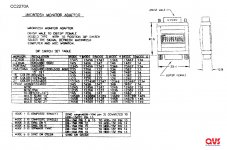
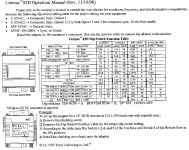
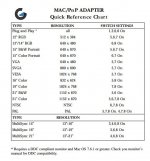
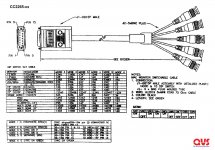
This is for my new IIgs system, trying to get it working with the Dell 2001FP monitor's VGA input, which might not even be possible due to the scan rate. NJRoadfan suggested it might work if I set the VGA adapter to the multisync setting.
I have three different Mac to VGA adapters, and it turns out one of them is the Griffin MacPNP that you linked first. I tried the multisync settings using those instructions, but no love from the IIgs. I guess I'll stick with the composite video input for now. It works OK, even if the resolution isn't the greatest.
I have three different Mac to VGA adapters, and it turns out one of them is the Griffin MacPNP that you linked first. I tried the multisync settings using those instructions, but no love from the IIgs. I guess I'll stick with the composite video input for now. It works OK, even if the resolution isn't the greatest.
I can confirm this adapter works with the IIgs and with my 15.75khz RGB capable CRTs, I don't have any LCDs here that I can test with that ability.
http://www.belkin.com/support/dl/f3h1381revised.pdf
I had to fiddle with switches 5, 6 and 7 if I recall. This adapter appears to have a sync splitter inside of it to split composite sync to H+V sync. the rotary knob and the rest of the switches should have no effect on the IIgs as it doesn't use the sense pins like a Mac does. I have the knob at 0 and switches 1-4 off, 8 on.
Pinout for the IIgs port is here: https://support.apple.com/kb/TA36688?locale=en_US
Pinout for Centris/Quadra is here: https://support.apple.com/kb/TA47448?locale=en_US&viewlocale=en_US
Looking at that, your Mac to VGA adapter may not connect IIgs pin 3 to anything, you may have to wire IIgs pin 3 to VGA pin 13. Most VGA monitors will take composite sync on their H sync line. If not, wire IIgs pin 3 to VGA pin 14 as well.. If that STILL doesn't work, the last ditch effort is a sync splitter. Amiga users don't have to worry about this as that machine outputs composite along with seperate horizontal and vertical sync signals.
http://www.belkin.com/support/dl/f3h1381revised.pdf
I had to fiddle with switches 5, 6 and 7 if I recall. This adapter appears to have a sync splitter inside of it to split composite sync to H+V sync. the rotary knob and the rest of the switches should have no effect on the IIgs as it doesn't use the sense pins like a Mac does. I have the knob at 0 and switches 1-4 off, 8 on.
Pinout for the IIgs port is here: https://support.apple.com/kb/TA36688?locale=en_US
Pinout for Centris/Quadra is here: https://support.apple.com/kb/TA47448?locale=en_US&viewlocale=en_US
Looking at that, your Mac to VGA adapter may not connect IIgs pin 3 to anything, you may have to wire IIgs pin 3 to VGA pin 13. Most VGA monitors will take composite sync on their H sync line. If not, wire IIgs pin 3 to VGA pin 14 as well.. If that STILL doesn't work, the last ditch effort is a sync splitter. Amiga users don't have to worry about this as that machine outputs composite along with seperate horizontal and vertical sync signals.
Later Macs did output composite sync, so an adapter for one will work with the IIgs too, the biggest difference being the output scan rate. The Multisync 1 and II (I own the latter) were swiss army monitors, they would take H+V, composite, or sync on green without a problem! Apple was pretty loose with the DB-15 video connector in the early days, but seems to have standardized it for the most part with the 040 machines onwards.
The Sony Multiscan was an alternative for some applications.
These monitors persisted for a long time but were not sold to the public. Owing to burn out, manufacturers of hospital equipment, industrial control systems etc shipped replacements for very expensive kit. My Multisync 1 (industrial spec, rectangular case) was used on a stock exchange according to text burned into its screen.