
Alright... finally got an AC adapter. Looks like this adventure isn't over yet, though-- yet more problems await.
Firstly, I guess the screen got damaged in transit or something. The top right corner of the screen has a rectangular spot that's totally blank. I thought it might be loose or something, so I took the display apart and found that if I apply pressure near it, roughly the bottom right corner of the "box", it turns yellow for a bit but then reverts back to black. Fixable or just a totally dead spot? The box shape seems odd to me. (Pics attached)
Other problem... I can't seem to get it to boot from an external SCSI drive connected via HDI30 adapter. I have a 2GB disk with System 7.5.5 on it and some utilities, including Internal HD Format (I want to erase the drive that came with it and install fresh, because it's full of crap)... but it seems to completely ignore it. Tried the usual cmd-opt-shift-del, etc, PRAM clear, PMU reset. Doesn't work with this drive, or an AppleCD 600i I tried to rig up. I checked IDs and termination as well. The drive works on my Quadra 800. I tried pulling the internal drive to force it to try booting off SCSI. I also can't check if it's picking up anything from the install that came on the machine because not only does it not have any SCSI tools, but it doesn't even have the Apple CD extension. And the floppy drive's dead.
Gets weirder though. While messing with this, twice in a row, I got the ? Disk icon, then it seemed to access the external and I got a Sad Mac (00000F/000003) which confused me. Trying it again, things went back to how they were before (Just the ? Disk) and THEN on one boot it did a full out Chimes of Death with a blank screen. Couldn't get it to boot. Then it suddenly booted again, but of course back to the ? Disk. And now, still trying, it hasn't Sad Mac'd again, but then it stopped booting again. Unplugged it for a few seconds, now it boots again. Bad PRAM battery? Where is it anyway? I didn't see it anywhere on the board. I pulled the main battery because it's not looking so healthy (lovely blue flakes on the connector...)
Might take you up on that spare 150, this one could be a lost cause. Although it does have a 20MB Duo memory card inside, so I got that out of it!
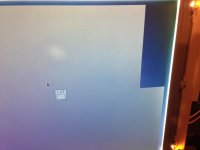
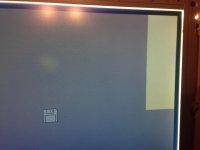
Firstly, I guess the screen got damaged in transit or something. The top right corner of the screen has a rectangular spot that's totally blank. I thought it might be loose or something, so I took the display apart and found that if I apply pressure near it, roughly the bottom right corner of the "box", it turns yellow for a bit but then reverts back to black. Fixable or just a totally dead spot? The box shape seems odd to me. (Pics attached)
Other problem... I can't seem to get it to boot from an external SCSI drive connected via HDI30 adapter. I have a 2GB disk with System 7.5.5 on it and some utilities, including Internal HD Format (I want to erase the drive that came with it and install fresh, because it's full of crap)... but it seems to completely ignore it. Tried the usual cmd-opt-shift-del, etc, PRAM clear, PMU reset. Doesn't work with this drive, or an AppleCD 600i I tried to rig up. I checked IDs and termination as well. The drive works on my Quadra 800. I tried pulling the internal drive to force it to try booting off SCSI. I also can't check if it's picking up anything from the install that came on the machine because not only does it not have any SCSI tools, but it doesn't even have the Apple CD extension. And the floppy drive's dead.
Gets weirder though. While messing with this, twice in a row, I got the ? Disk icon, then it seemed to access the external and I got a Sad Mac (00000F/000003) which confused me. Trying it again, things went back to how they were before (Just the ? Disk) and THEN on one boot it did a full out Chimes of Death with a blank screen. Couldn't get it to boot. Then it suddenly booted again, but of course back to the ? Disk. And now, still trying, it hasn't Sad Mac'd again, but then it stopped booting again. Unplugged it for a few seconds, now it boots again. Bad PRAM battery? Where is it anyway? I didn't see it anywhere on the board. I pulled the main battery because it's not looking so healthy (lovely blue flakes on the connector...)
Might take you up on that spare 150, this one could be a lost cause. Although it does have a 20MB Duo memory card inside, so I got that out of it!