Home Forums 68kMLA TAM
Thread

TAM

68kMLA Hardware 119 posts May 18, 2015 to Jun 7, 2015
How we doing people

Spent yesterday galavanting all over the country ... did 300 miles

-

and it resulted in the following finds

-

a mac classic 2 and Toshiba laptop and a zenith data systems super sport
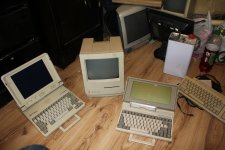
IMG_6354.JPG

oh.........here is the other yoke I picked up

-------------

.....................
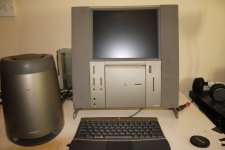
IMG_6353.JPG

what a score................I got me a TAM baby!!!!!!!!!!!!!!!!!!!...............Oh happy day

-

The tam is not working..........I know nothing about them.

-

took off back cover had a quick look. Main battery (there the square black ones that are velcrowd in position) looks ok. No leakage.

I cant see any other batteries..........but I have not had time to look at it.

-

the caps look like the typical aluminium caps that leak on all the other macs.

-

REALLY REALLY  want to get this going

-

any advice on where to begin folks

-

cheers

Congrats on your TAM find :) Of course it will probably need caps...Did you try the reset button on the logic board?

hi 360 alaska

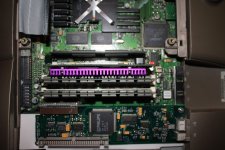
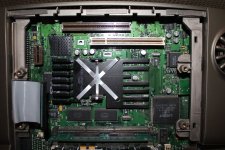
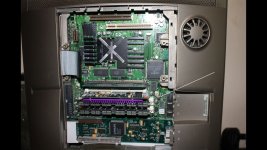
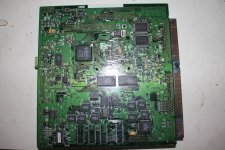
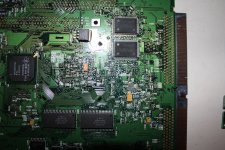
took a few pics of the mainboard

is the reset button the one outlined with the white line

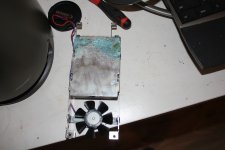
Got a bad scare when I first looked inside this....the harddrive was half covered with the typical green decay of an acid leak. I took out the harddrive and whatever it is , is only on the harddrive. The motherboard appears to be fine...no acid green horror!!!!!

-

still trying to get the HD out of its frame.....is there a battery in that harddrive somewhere!!
IMG_6357.JPG

IMG_6358.JPG

IMG_6359.JPG

IMG_6355000.jpg

ah jasus nooooooooooooooo

-

looking at those pictures I can see green on all the via's under where the battery was

-

noooooooooooooooooooooooooooooooooooooooooo

I don't think the TAM is impossible to fix. But I bet the back of the board is a mess.

ok - have to have a go at this thing so

-

is it true that acetone neutralizes the acid decay?

-

plan on talking out the board and washing the bejasus out of it with acetone

-

do a full recap

-

and hope for the best!!

That's the button, If you end up needing a logic board I believe there are a few that will swap in... Also, is that a G3 cache slot accelerator? those are pretty rare!

Nice find! I'm sorry to hear about the corrosion, though.

It might be repairable, but in the worst case, if you need a new logic board, I think like 360alaska said, you can get one form a different but related model and put it in there.

I think a 6400 board will fit?

c

got it apart lads. - found a great guide online

-

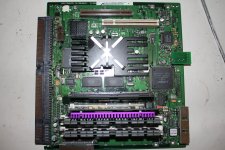
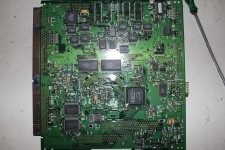
heres what the bones of this tam looks like

-

its not good!!!

-

see the green INSIDE the rom slot -aaarrggghhhhh!!!!

-

again....if I wash this in acetone will that stop any further decay by the acid.............if not then what is the best way to stop the decay..........
IMG_6366.JPG

IMG_6367.JPG

IMG_6370.JPG

IMG_6371.JPG

IMG_6372.JPG

IMG_6373.JPG

IMG_6374.JPG

IMG_6375.JPG

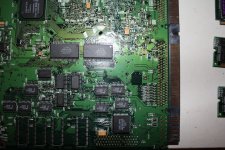
just had a good look at the main board with my magnifying glass - on the back of the board there is corrosion but I don't see any compoinents missing. Will have to go very very easy with the toothbrush.........and from my experience on se30's with minimal acid leaks id say this is toast!!!.

-

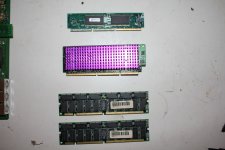
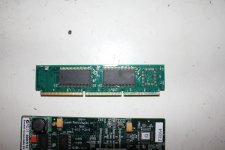
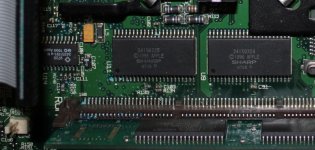
there is a cache slot on it 360alaska .........I have no idea what is plugged into it....all I can say is that its the card with the pink heatsink!!! - what does it do?

-

I guess finding tam motherboards for sale is naon impossible.....will start looking at the 6400 board you mention

-

ah dam it...........I hate those dam batteries

-

i

The card with the heat sink is a Sonnet 400Mhz accelerator. They are quite rare. They came in 300/400/500Mhz. The 500's are really tough to find. 

I would clean that ROM slot but I don't think the ROM chip is required for the unit to work... I don't recall having any in my units. 

I know where you can get TAM boards. They aren't cheap but they are available. 

thanks for the reply haplain.

-

im going to clean the whole board then recap it.

-

I read somewhere that when you wash  the board in acetone in stops any futher decay from the acid. Is this true.

if not.....what is the best way to stop the decay

water and soap?......acetone first?....something else??

-

there are tam boards available.....well that might be an option alright

-

cheers

Hello,

I'm not sure able acetone. I do know that vinegar will neutralize the acid but not entirely sure about acetone. I would do vinegar and water mixture (50/50) then rinse with just water and maybe some rubbing alcohol. 

Hap

thanks haplain - will do the vinegar.........jasus im gonna stink!!

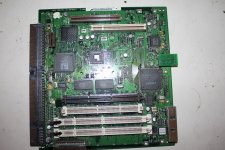
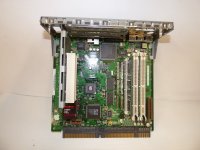
I'm pretty sure that it's a 5500/6500 Logic board

It is but it has some special pieces for the sound connectors that the 5400/6400 board(s) don't have. 

I looked and from what I can see the 6500 board would only need slight modifications, The scsi port is removed and the audio ports are removed and replaced with the small board on the TAM LB...
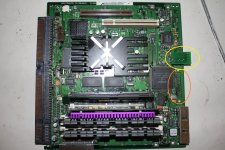
6500.JPG

post-2246-0-99190600-1431977222.jpg

gave it a good wash - vinegar/water 50/50, then the usual water and washing up liquid

it looks allot better

-

there is still some green , but allot of the via's that were all green now show some shiny solder

-

will have to leave it till tomorrow -

-

heres hoping!
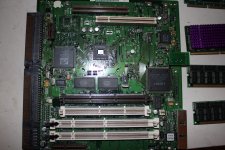
IMG_6376.JPG

IMG_6377.JPG

IMG_6378.JPG

IMG_6379.JPG

IMG_6380.JPG

Focus on that rom slot and it might work, you might not even need that rom since the 6500 doesn't but I'm not sure...

Don't understand why it would work without the rom!!!

Does it have another onboard?

-

off to bed for me

-

sure I had to film the teardown

-

good luck people

-

I know where you can get TAM boards. They aren't cheap but they are available. 
Hey hap,

is that from that place in the Netherlands?  I've been keenly looking for a CS slot riser card for years, but even he doesn't have them.  If you ever come across one, please let me know.

Nice score falen5 - I wouldn't go too overboard with the cleaning (and let it dry for a few days in a sunny location, not just one), or worry about caps.  Hoping you will get more life out of it.  You should also check the sub/PSU cord for any damage, and do a multimeter check to check power is actually getting through :)   The 6500 board could be modified to fit, once you desolder some connectors and I'm betting the TAM's sound PCB is a straight drop in once soldered.  Then all you are missing is the startup chime, but since the 6500 and TAM ROM are exactly the same, I'm betting it's a resistor placement on the board that sets the unique TAM startup chime.

Also, just as a minor point on the chemistry, if vinegar neutralizes it, then its an alkaline substances eating the board, not an acid, you can't neutralize an acid with an acid (at least not in the purest sense of the phrasing)

Don't understand why it would work without the rom!!!

Does it have another onboard?

-

off to bed for me

-

sure I had to film the teardown

-

good luck people

-

yes, it does have two on board roms:

Capture.JPG

These two guys are what the 6500 uses to boot so I'm thinking it might work without that rom simm...

It WILL work without that ROM SIMM for sure.

It WILL work without that ROM SIMM for sure.
I wonder if it will have a different gestalt without that rom sim though, maybe it will identify itself as a 6500?

There is no ROM SIMM for the TAM, never was unless proto.

Good theory on the ROM with startup chime. I can not say, but falen5 I think has the skills to swap ROM chips if needed.

There is no ROM SIMM for the TAM, never was unless proto.

Good theory on the ROM with startup chime. I can not say, but falen5 I think has the skills to swap ROM chips if needed.
His has a rom simm, yours doesn't?

It's not a rom simm , it should be cache card, which with a G3 upgrade should be removed. Maybe that's why it was put away and didn't work in the first place.

Rom simm and cache cards use the same slot on those boards. In fact my 6500 says rom/cache slot.

how we doing people - finally got home to have a go at starting this thing up

-

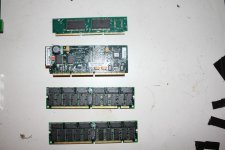
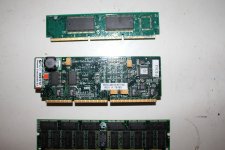
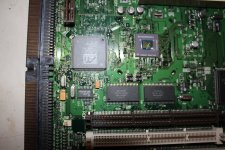
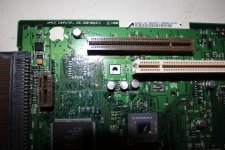
as for the rom's etc etc ....heres a few snaps of the board.

-

Ive never had a tam before so I make no claims. But the board says rom , cache, and drams - I don't know!

-

anyway will try to put it together and see what happens. If it powers up ill try it with and without the rom.....just to see if there is a difference.

-

all I can think is that there must be some reason apple put a separate rom in this

-

oh...the guy I bought it from in Dublin told me that he bought it while over in the states, and was so impressed with the sound he shipped it back home to Ireland. So its a  TAM from America and not a European version. Best find in ages...I bought the TAM and the classic 2 from him for 200 euro - weh hey!

1.JPG

IMG_6382.JPG

IMG_6383.JPG

IMG_6384.JPG

IMG_6385.JPG

The part number shows its a G3 ROM? I wonder if someone thought it was or is needed for the upgrade card? I never heard of that if so. And like I said, the TAM never shipped with its own ROM card.

Check to make sure the Bose unit has the appropriate power voltage selected. Sounds like it probably does but always good to check. Keep us posted and my fingers are crossed for you. 

first thing I checked haplain..............don't want any explosions

-

still some 'green' on the main board - my eyes are going bad...quickly...I only see the green in the pictures.

-

will give the board a wash in acetone, dry it out, and plug it in

-

fingers crossed

The part number shows its a G3 ROM? I wonder if someone thought it was or is needed for the upgrade card? I never heard of that if so. And like I said, the TAM never shipped with its own ROM card.
And the plot thickens... The funny thing is that the 6500 board has the pads for the rom but not the socket?

Ya, the 5500 & 6500 are the same board as the TAM, just with modifications. My guess for the TAM having the ROM slot installed is given the unique nature of the machine. Its pretty common for Macs, even the PowerPCs, to have a ROM slot but no ROM intended for it. Being what the TAM was, it may have been a safety net thing.

Yeah, I mean... I would say keep it in since it came with it :)

Nearly all of my TAM's which is a gaggle at this point, came with the chip but I don't have them in. They work without any issues. Given the corrosion, I wouldn't install it as it could cause more issues than doing anything positive. 

just tried to power it up ........no joy

-

zip!!

-

tried it with / without rom and cache card....nothing

-

im flying blind here people.............how do I turn it on!!!!!!!!!

-

I have no pram battery installed. I found the power button on the rear, left hand side, next to the main cable from the subwoffer

-

I see no activity of any kind, no led's, no sounds.............

-

what is the correct start up procedure.............hit the power button on the rear and then hit the top right key on keyboard

-

mmmmmmmmmmm...................will it even start without a pram battery at all??

-

I didn't bother connecting the cd drive , the hard drive or the network card ......im pretty sure ive connected everything else

-

should there be an led on somewhere to show life...anything.............it is as dead as my hairline!

-

heelllppppp

found a similar battery from a lciii or something - same connector

-

tired it....still nothing

-

caps don't look good...........many have an upwards pointing dimple in the top...........

-

can I test the subwoffer for power on that big round connector?.....surely there would be 5 ,7 or 12 volts coming from it ?

Doesn't need a PRAM battery to work/start. You can just press the power button on the back of the unit OR on the keyboard. 

There is a CUDA reset button on the board you should press before you try to start it up. Sounds like it has a cap issue which might be the culprit.

just metered out the subwoofer cable and nothing -

-

should there be some signal coming from the powersupply to the machine ?

-

ive tried the reset and nothing

-

think ill just do a full recap before anything else

-

later

I never got around to re-capping mine yet. You might be the first to re-cap one if you do.

I would check the power supply first, its fuse, etc...

By the way, the power supply is not auto-switching. Maybe I missed where you said you checked it, but if not check it.

edit: There should be 5v standby power from the supply I would think. I can check mine later if needed.

hi unity. Yep I made sure its on 230 volts - the guy I bought it from told me about that as well.

-

ive opened up the subwoffer.......dam difficult......its held together with screws and double sided sticky tape

-

the sticky tape is all around top rubber and all the inside is lined with some other soft tape - avoid rattels from the bass I guess.

-

it looks like a standard power supply with a audio amp board on the side.

-

this subwoffer was dropped at some stage of its life. There is a 2 inch crack in the plastic cover on one side, and as I began to open it 2 of the screws turned, but the plastic they were screwed into was broken off inside and was turning with the screw.

-

I got it open without any futher damage.

-

-

there is no sound from the power supply of any kind when I plug it in. usually there is a quit hum or something. I know the thing is in sleep mode waiting for the computer to switch it on......bit this thing looks dead to me

-

there must be a fuse inside that power supply, and seems it has obviously had a knock... im thinking the fuse has been dislodged

-

heres a few pics

-

whats your thoughts people

IMG_6387.JPG

IMG_6388.JPG

IMG_6389.JPG

IMG_6390.JPG

IMG_6391.JPG

IMG_6392.JPG

IMG_6393.JPG

IMG_6394.JPG

took out the powersupply and the bose audio board

-

not really much to it - looks like a standard powersupply with a output to plug in your monitor

-

ha ha ......caught ya apple... hiding power ports!!!    be jasus

-

gonna open the powersupply to see if there is a loose or blown fuse

IMG_6395.JPG

IMG_6396.JPG

IMG_6397.JPG

IMG_6398.JPG

IMG_6399.JPG

Yeah check the fuse and there isn't much on the Bose board to go wrong with from my understanding. 

finally got into the powersupply - was covered with some foamy tape crap - had to cut through it

-

but anyway............found the fuse....6.3 amp   250 volt

-

and its dead!!!!!!!!!!!!

-

great stuff

-

in with a good one and slap this thing back together!!!

IMG_6400.JPG

IMG_6401.JPG

found a 250volt 8amp fuse in my external scsi.........that would be ok yeh?

Good finding - no, I'd match the fuse with same.  Note there is a green LED on the underside of the sub that'll tell you if powered

just had an explosion from the power supply......holy %^^%$£

-

8 amp fuse ...black and dead.

-

a few caps black and dead

-

at least I didn't have the tam plugged into it

-

darn

new plan.......new power supply......ive blown the hell out of the old one

-

just checked and there are simmilar powersupplys on ebay.....but with different wiring

-

seems I have this blown powersupply with the correct wiring......I could just get a new one and move over the wiring

-

heres a link to one for sale

-

http://www.ebay.ie/itm/Delta-Electronics-DPS-150GB-A-Apple-614-0039-150W-Power-Supply-150-Watt-/141661288905?pt=LH_DefaultDomain_0&hash=item20fbabb9c9

-

different apms........

-

dam it!!!!!!!!

-

IMG_6402.JPG

IMG_6404.JPG

IMG_6407.JPG

IMG_6408.JPG

IMG_6410.JPG

YIKES! Good luck man. I've got some of those PSU's out to be looked at and they are pretty special. Let me know what you can do with a swap as I might need that here at some point.

people..............im depressed

-

im gonna talk to the lepracauns.......................

-

as father jack would say........FECK!!!!

Well, Usually when a fuse blows. 90% of the time that doesnt mean stick a new one in it and try again.

they blow for a reason. Well, now you found out the hard way. Think twice!

Most likely had a shorted FET, or bridge or something. coulda found it before swapping the fuse. 

In my opinion, the Power supply is a modified 6500 unit.

I was given a Powermac 6500 and only kept the Logic board, wiring and PSU because they all were close to the TAM's one.

I think  the plug and wiring from the PSU should be the only difference.

Damn! Sorry to hear that. As technight said there is a reason. I am just surprised the fuse did not simply blow again.

The guy with all the parts in The Netherlands is on this site: http://www.xs4trade.net/index.php?cPath=1_5_22. I refurbished 2 TAM's in my time. I've got a lot of software and manuals, did a lot of research but I always worked on TAM's that worked. What you're doing is a whole different ball game. Good luck. If you ever get it to work and if you need software: just contact me. You need a driver for the crescendo card i.e. I've got it. And whatever you do; don't try to install OSX. It will damage your TAM. 

As long as we're talking TAMs, if anyone has the pen/pencil set from the TAM that they want to sell, let me know. I think that's the one piece I'm missing from the "set".

Sadly don't have any extra of those but have a proto TAM I'm considering selling. It's a pretty neat machine. 

Are you sure? People always claim they have a complete set but in my experience almost everyone has lost some bits and pieces. :)

I have 1 brand new in box set so I know it's all there. Even have the receipt for it. 

The proto TAM components but really in great shape and an awesome machine. 

how we doing people.........9 hours in work to calm down

-

I thought seems the board had an acid leak, that might have caused a short and blown the psu......so went to try another....pity it was 8 amp and not 6.3 like the one that was in it.

-

that's why I did not plug in the tam......was not sure what would happen. I have it on film (the dam thing going bang) and you can see how I was about to plug it in ...on my lap.....and then opted to

put it on the table for fear of what actually happened............just as well I did....I could of been in hospital with some serious burns........ in some serious places !!!

-

its not the end of the world.

-

im ordering another psu.........its for a pc...but if the board is the same I plan on swapping the wiring from the dead psu to the new one.

-

took out the blown components, looks like 4 caps and what I think is a rectifer

-

rest of the components look 'non exploded'

-

might be worth ordering up these parts and some correct fuses. Why is the board covered in that white glue?. is it to keep parts still?, stop ratteling?.....heat dispersion

-

looks bad.........but ill give it a wash and see how it comes up. Looking at the soot on the board it seems that it moved away from these components. There does not appear to be any other visible damage anywhere else

-

any advice is very welcome at this stage

IMG_6431.JPG

IMG_6432.JPG

IMG_6433.JPG

IMG_6434.JPG

IMG_6435.JPG

IMG_6436.JPG

IMG_6437.JPG

actually done some research. The 2 small caps are varistors. The chip is a rectifier. I took the rubber covers off the 2 varistors and managed to get the serial numbers. The second one has its lower section (between the 2 pins) blown out completely,   far worse than the first. The switch for selecting 230v/110v wires are soldered in amongst these varistors.  I made sure it was on 230 volt.

-

thinking about it... the guy who sold it to me made a point of telling me about this even though he had it set.........   Ive bought many things with switchable voltage but have never had a case where I was told about the 230volt switch 2 or 3 times.

-

he sold it to me for 150 knowing if I got it working it could get 1/2 grand......................starting to think he knew more that he said........

-

anyway I have the values of all the blown parts............will order them up.....along with a bucket of 6.3amp fuses.

-

with the correct fuse it should not explode again? ....or could it............maybe a 4 amp fuse would be better.

-

gave it a wash and it appears that it was the 2 varistors , rectifier and maybey the 2 470uf caps that blew.

-

feck it....will buy the similar board and if it is too different to this one then hopefully it will have these components

-

washed.JPG

To be honest, wrong voltage setting is what I though caused this. But I am not too knowledgable on such things. I did check your voltage switch location and while your supply is not the same as mine, relative to mine it would be in the correct 230v position.

This sucks :(

just spotted something in the previous pictures I posted here.

-

on the previous page (3) look at the 2 pictures I took where I got out the fuse. In the picture on the right... look at the left side of the picture...under the caps.........

-

the board has a light layer of black soot...........that's before I plugged it in!!!!!!!!!!!

-

and the guy I bought it from ,pointed out to me, more than once about it being switched to 230volt

-

he blew it when he brought it back from the states.........that's why the fuse was blown..........

-

I got it , found a blown fuse.......didn't look for anything else, put in an 8amp fuse and blew it up again.

-

I did the exact same thing on one of my 128k's about 2 years ago.....its on here somewhere

-

and I got the exact same result

-

come on Stephen in Dublin...........if your reading this...own up.........you plugged it in at 110 didn't you!!!!!!

-

weh hey

You are right, cant miss it now. Its been blown before. By replacing the fuse, you just doubled up on the damage again even with the right voltage set. Ouch!

right voltage unity but an 8 amp fuse..........ouch is right!!

-

is there any hope in replacing the blown parts and it ever working again?..........I have no idea what so ever what other damage this might have caused elsewhere

Same supply as a 6500 as mentioned, or at least looks the same. My concerns at this point would be damage to the Bose audio board in the power supply as well as damage to the TAM. I am basing this on the previous owner powering it up under 110. Hard to say what made it down the line.

If it was me, I would hunt down a different supply. I think someone linked to one above. Probably the safest bet. But others may know how far the damage can go.

never thought of that unity......he probably did have it plugged in.............saying that when I blew my 128k I was finished all work  and it was  all together (board connected, drives , everything). After blowing power board I  replaced with good board, tested it and everythinmg else was allright.

-

ive been sitting here trying to figure out what to do. Ill go with your advice...new similar model and hope the boards are the same....although the amps on the 12+ on the psu on ebay is lower than on mine.

-

cheers man

the MOVs are designed to clamp on overvoltage. The previous attempt may have shorted them out when the fuse blew. 

Soon as you powered it up again, it just finished off the MOVs. 

Measure the pads where the main filter caps go, and check the resistance. IF there are no shorts there, its safe to power up without the MOVs as long as the voltages are set right. 

unity - been looking at the 614-0039   model and  614-0060 - cant see any difference....still don't know what to do

-

techknight - thanks for the info - appreciate it - but as usual I havnt a dam clue what MOV's are - are they the varistors?.  main filters are the big 470uf caps?...just checked for a short and no beep on either 470uf caps.

-

what about the rectifier.....it looks like it has a burn mark on the back......could I do damage by trying it again.....is there a way to check if it is ok with just a multimeter?

-

looking at the rest of the psu I have the feeling it is ok...no proof...just a feeling......I think the power got no further than the damaged components

-

the brother in cork has promised me an osiloscope...and said he would show me how to use it.....

edit - metal oxide varistor....mov.......im becoming too dam lazy and asking too many questions.........google is awesome .....sorry for the laziness people

parts ordered

The bridge rectifier is probably ok. Did you test it with the diode check on the DMM? If its ok then its safe to throw it back in, throw the filter caps back in and another fuse. It looks like the rectifier just got blasted with soot from the MOVs, thats all. 

it should take off and work. 

will do - ordered 2 new 470uf caps and 10 x 6.3 amp fuses........uk......will have them next Tuesday id say

-

this thing is gonna sing I tell ya

-

thanks for everyones help...................so far!

heres the vid of the sub woffer tear down, fuse, and bang. the bang is at 17:20

Is there no Maplin's near you? Pain having to go through mail-order for those small bits and pieces. Did you try http://ie.rs-online.com/web/ ? Next day delivery, based in Dublin.

Hope you'll get it going!

hi genie - good to hear ya - I basically buy nothing from Ireland based on principle......irish retailers charge 3 times the price for everything...............for no reason but greed and that the irish are too stupid to pay it

-

rant over

-

weh hey!

Techknight - you sir..........are a genius

-

powersupply alive

-

tam..powering up.............display all garbage..........no sound..........still problems

-

starting a full recap of the motherboard

-

big thank you for everyones help so far.......

-

o god I love this stuff

-

Techknight - you sir..........are a genius

-

-
(me expressing nonchalant look with arms-crossed expressing:) yeap yeap yeap.... I know ;)  

heres half of today - and fair play to techknight

-

Congrats on the rebuilt.

Great!

still not there with this tam

Did a recap of the motherboard and it is still the same - bad display, no sound, no control from front panel and harddrive wont spin up

-

ive checked all the caps to make sure they are all right but the tam is exactly the same as it was before the recap

-

to be honest I don't think it needed the recap yet - but sure anyway its done

-

have gone over the machine time and time again but I am at a loss as to the problem

-

I am trying to power it on with just 1 ram simm, no cache and no rom simm

-

going over the motherboard with a magnifying glass I discovered that C113 is missing. It was located directly under the battery and looks like it was an acid victim

I have no way of knowing what its value was or how important it was.

You can still see green on the traces under where the battery was

-

however when I turn it on even though the display is all messed up, after 10 seconds I get the flashing disc icon....that means that much of the board must be good. It boots from a floppy but stops during boot and gives an error - probally wrong system on the floppy - I can use the mouse, even though the screen is all messed up,  to eject the floppy

-

is there and schematics of the tam? - how would I get the value of c113?

-

dam acid leaks!!!! - starting to wonder if it is indeed too late for this board. Also it stops powering up after 5 or 6 powerups. You have to disconnect it for 20 min before it will start again

-

man this thing has truly wrecked my head. Tam = lovely machine to look at but a devil to work on. Just opening that powersupply took a whole day

c113.JPG

IMG_6440.JPG

IMG_6441.JPG

IMG_6442.JPG

IMG_6444.JPG

Check the display cable and area. Also, try booting it with the rom.

hey falcon

check both ends of display cable - checked connectors - all look good and clean.

with that rom installed I get no display at all just the green light

I have not heard this machine chime at all

-

there is something critically wrong and all I can see is the missing c113

Do not install that ROM or upgrade processor card.

hey unity. Why would that rom of been in it anyway. It will only show a display with one ram simm installed and nothing else. Will try the 2 rams but cant see it making any difference. Wont be trying the rom again

-

theres allot of green decay from acid on there

-

today I removed the big board that the power supply feeds into. It has allot of connections, checked them all, couldn't see any signs of damage/decay on anything. Removed all the other boards as well ......couldn't find anything wrong. Thinking of removing everything from the plastic housing so it would be easier to work on. Its difficult having to reassemble so much , everytime you want to test it.

-

there is no consistency in powering up..........different sounds, sometimes no display etc etc

-

tams are dam difficult

I can find no reason for that ROM to be in there. As far as I know, its not needed for the upgrade card.

So keep it as basic as you can to see if you can get it going. By the way, I never heard of a TAM yet with bad caps. That is not saying they do not exist, they are rare machines, but I have yet to hear about one needing a re-cap. Mine works fine with no re-cap. Although I want to get it done. So I think maybe your issue is more with corrosion than anything. Which is not bad news since you can cob together a replacement board.

I did quickly check your caps. Polarity seems good. I wish you had another board to test in it.

have to agree with you unity. When I began removing the caps there was plenty of electrolyte coming out of them. And after the full recap the machine was exactly the same

it made no difference what so ever. Pretty disappointed after the 4 hours I spent doing it

-

that missing c113...........I take it , its a  capacitor ........I could take a cap that looks the same from a dead board and see what it does.....but I have no idea of the values ..........probally not a good idea

-

other than that im thinking acid corrosion.............all I can do with that is meter it out and with no similar board or schematic.....im done for

-

have to get another board ...........till then im stuck!!

just uploaded the recap video

Some info on the ROM slot.

http://appletam.ning.com/forum/topics/rom-slot-on-tam

Also I will go check mine, C113 may not be populated.

Also I wonder if a L2 cache is needed to boot. When one upgrades, one takes out that cache.

I will go try all this out now and let you know.

cheers unity - appreciate it. I know nothing of the tam, its upgrades......I don't even know what cpu is in this thing.

-

ment to say...the pictures I posted above... the missing c113 is in the first picture - center of the shot. It looks like the pads are gone, and on the left it looks like part of the trace all crushed up

-

this thing is very very small.........don't know if I would even be able to install a replacement

C113 is indeed populated. Its ceramic, like others, so I can not say the value. Apple seems to stick to a common group though on boards.  So it may be like others such as C118. It does look like the pads are gone. Scratch the material to verify if its copper. Usually when pads are gone the substrate is more of a tan color. Those look darker. The only good thing is that I dont see traces from it, just two via. If so, one could glue a cap in place then use small wire to reach the vias. Would not have to even be covered wire.

I pulled the cache, it still booted without it. So in your case, make sure the ROM and cache are empty. At least you can rule them out.

I would also try just one DIMM slot at a time, which I think you did.

If you are getting a green light, I think your power supply is fine.

Also for the record, and verification, mine did boot with no battery. Which I now pulled and will toss after seeing this :(

I am not well versed on checking stuff on boards, but if you need me to check anything else I am more than willing to do so.

hey unity - thanks for the helpful info.

again I agree with all you say.

Im thinking of removing c118, measuring its value, finding something similar , and as you said glue it in situ and run wires to the 2 vias

-

cant honestly see 1 cap causing such problems.........then again I change fuses and plug things in without checking !!

-

cant think of anything else to check.....except the voltages coming from the power supply.

-

maybey there was more damage done than it appears.

-

and yes - swap that battery out...........I didn't think the plastic batteries leaked..........but this one did and with more time there would of been nothing left

-

ill post some pictures of the battery that came out of it .............

-

cheers people

Heres a few pictures people of the battery that leaked all over this TAM

-

I opened it up and you can clearly see the acid.... its all over the place. My fingers were covered with the stuff!


This battery is called a Rayvac or RayOvac.................................................but if this one leaked........**********BE WARNED**********

-

cheers

IMG_6445.JPG

IMG_6447.JPG

IMG_6448.JPG

IMG_6449.JPG

IMG_6450.JPG

IMG_6451.JPG

IMG_6452.JPG

IMG_6453.JPG

IMG_6454.JPG

IMG_6455.JPG

IMG_6456.JPG

IMG_6457.JPG

IMG_6460.JPG

Mine is the same brand. I think all the black boxed batteries in Macs are Rayovac.

One cap maybe could. Until ruled out, hard to say if its the issue or now. You could try to trace where it goes but you may have a better chance winning a plane ticket to Mars.

You dont have a 5500/6500 laying around do you?

Question. You mentioned the light comes on.

Do you get a startup chime?

After pressing power, how long until it comes on?

I just noticed that my light comes on but not right away. The TAM chimes then its still about a second before it comes on. Like the light is almost a hardware check indicator more than an actual power light.

edit: After pulling the cache again my TAM failed to boot. I had to re-seat the RAM and it boots fine now.

With the battery pulled, I can get 2-10 seconds between the chime and the light coming on on my TAM. 

Hey falen: 

Take a look at my photo. I circled areas that need tested for continuity checks. Especially the ones in the bottom corner coming from that IC. 

Also the capacitor is an 0.1 UF. 

post-2246-0-49075400-1432493371.jpg

have had no chime to date..........just strange sounds, clicks, noise, static...when floppy inserted noise matches the floppys activity

-

power/green light comes on sometimes, other times, I get green light, and display, sometimes no display

-

the green led on the sub woffer only comes on when the tam is turned on

-

when I hit the power I get no light for about 4 or 5 seconds.... will check it tomorow

-

head wrecked from tam.......enough for now....time for beer......work tomorrow.......dam!!

techknight - good call. Will have a look at them tomorrow. Just a continuity test between 2 via's on a single trace - will do

-

0.1uf - that's great to know - will install new one tomorow

-

that chip at the bottom of the picture is the rage ii graphics chip. The legs of the chip were coated in some corrosion from the acid. With a magnifying glass allot of them looked to be shorting

-

I have spent a hell of allot of time cleaning that chips legs with acetone, a toothbrush and flushing the legs clean. Spent 30min with a magnifying glass and a pin going between each leg

.

But the display has not changed one bit since the first time I got it going.

-

nothing has changed ...even after a full recap

-

but ill have another look tomorrow............what ever it is it has to be 1 or 2 or 3 small problems for the machine to be flashing the disc icon

If thats the RAGE IC, thats why your video is scrambled. 

those traces I pointed out, there are some opens. 

You need to go over all of the traces that show "discoloration" wiht a magnifier. Youll find one or two open. 

I deal with this consistently on the macintosh portables. The traces that are super light green as I had pointed out, are almost always 100% open circuit. 

well it says Ati 3d Rage II techknight........but from now on its the 20th anniversary UE8 by the looks of things

thinking and googleing about it, im going to take out the board and cover the acid damaged area with 3to1 baking soda mixture to kill any remaining acid.  let it soak into it for a day or 2

-

even though I have washed this board over and over I rekon there is still some active acid there......eating at the traces

-

it kills me to see these beautiful machines dying such stupid deaths!

Well I cant advise that being a good idea or not... 

But, I do know that the trace damage will need patch wires on the ones that are open circuit. 

If all else fails, sourcing a 6500/300 board, desoldering various connectors to make it fit, etc, would be a good project.  The baking sode mixture sounds like a bad idea IMO, and for three days?  Just clean the board with isopropyl alcohol spray + contact cleaner.

Hearing buzzing matching system functions is the TAM buzz. Means your audio isn't toast, but something is stopping it from producing sound.

You dont have a 5500/6500 laying around do you?
I agree, those are pretty cheap are not really sought after, will try at least for testing purposes.

an update people

First off- ive created a new profile as I couldn't change my name falen5.

I have done nothing with the TAM   since last Tuesday week.......because I packed up the new job in the multi national after 4 weeks......too old for all that stress....so not very popular with herself!!!!

-

instead ive decided to go fulltime at the Macs for the simple reason I love working on these machines and at this stage I have every Mac except the apple 1 and Lisa

-

as for the TAM I have a 6500 board on the way thanks to the kind help of one of the users on the forum here.

-

Still building the website and im not good with websites at all......but its getting there.

-

hopefully by the time the 6500 arrives herself will let me play with my Macs again!

Fair play to you! Stress is bad alright...hope it works out for you...what's your job description now? Messing around with Macs...nice one!

well im a fulltime musician for the last 15 years - I gig fri,sat and sun usually. that's a nice job..you get paid for doing something you love and people thank you........that never happens in a factory...to them you are as good as your last mistake and all you do is make someone else rich......no thanks!!!

-

yeh genie  now im a fulltime mac messer....well I have been for that last few years anyway......just get such a kick when I hear that chime

mp.ls