

Thread
Quesse Total Systems PDS accelerator for SE
I bought one of these and a Lapis DPD card for $23 last week, and there appears to be very little information about them out there. Looks like a 20 MHz 030 and 68882, with four RAM slots. But next to the CPU is another big socket of about the same size, and i can't guess what is supposed to be there. Maybe some other 68k support chip? Also I wonder about how much RAM this thing can use. I will guess it is no SE/30 but it probably improves upon the 4NB on board, else they would not have bothered. I can hardly wait to try it. Any SE gurus?
I think I know where this is going! Yes, I do - which I found on the side of the road. It is decent. I wonder whether the PCBs need to be directly placed or I can angle them up a little. Looks like I will need to find out! Also I am still annoyed that I bought a license for VueScan and the author refused to provide the OS 9 version. I got around it though.
Thank you for the (implied) tip, Comrade Doctor Bunsen! Can one upload images here? I don't recall seeing it done on 68kmla. Of course I will crop and compress to a decent size.
Thank you for the (implied) tip, Comrade Doctor Bunsen! Can one upload images here? I don't recall seeing it done on 68kmla. Of course I will crop and compress to a decent size.
It has been difficult to get any decent pictures of this nice pile of boards. The chips and connectors made them not flat enough for my scanner. Then I finally found my crappy old digital camera - but either it or its batteries are borked. So I photographed the stuff with my phone, and the results are not as detailed as I would like.
The Quesse upgrade was shipped to me attached to its host SE logic board. The blue card is a DPD card which was included, one of the connector pins is broken and will be replaced once I can find some here. The PCBs on the angled metal bit with the jacks are obviously the video output. The Quesse upgrade and Lapis DPD cards are both very bowed. The Quesse has a 40 MHz crystal on board and a 20 MHz 68030. The smaller socket next to it I am sure is for a 20 MHz 68882. But the other socket? There is another large socket to the left of the 030 with a different pinout, no idea what it is for. Under this board is a large socket which looks like it could drop into a 68000 socket, maybe an upgrade option for Macs without a PDS?
Nice deal, being basically a complete 030 computer for $21, needing only a disk drive, PSU, and monitor. I would be grateful if anybody can explain or point out more information about any of this stuff. I will try to post better pics when I can.
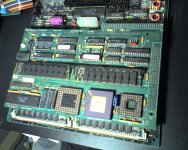
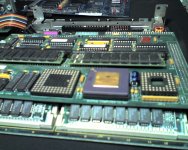
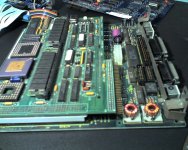
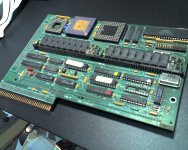
The Quesse upgrade was shipped to me attached to its host SE logic board. The blue card is a DPD card which was included, one of the connector pins is broken and will be replaced once I can find some here. The PCBs on the angled metal bit with the jacks are obviously the video output. The Quesse upgrade and Lapis DPD cards are both very bowed. The Quesse has a 40 MHz crystal on board and a 20 MHz 68030. The smaller socket next to it I am sure is for a 20 MHz 68882. But the other socket? There is another large socket to the left of the 030 with a different pinout, no idea what it is for. Under this board is a large socket which looks like it could drop into a 68000 socket, maybe an upgrade option for Macs without a PDS?
Nice deal, being basically a complete 030 computer for $21, needing only a disk drive, PSU, and monitor. I would be grateful if anybody can explain or point out more information about any of this stuff. I will try to post better pics when I can.
I have nothing on the technical side of things to add.
However I love looking at pics of old hardware. I love how the sockets and chips look, the PCB wiring and so on. Todays tech boards just don't look as populated or badass as those pics you just posted.
My guess is the same as yours for the smaller socket: a 6882 FPU upgrade. The other socket I have no clue.
However I love looking at pics of old hardware. I love how the sockets and chips look, the PCB wiring and so on. Todays tech boards just don't look as populated or badass as those pics you just posted.
My guess is the same as yours for the smaller socket: a 6882 FPU upgrade. The other socket I have no clue.
I agree that there is something about the ceramic and gold of old ICs which screams "QUALITY!". A cheap computer-routed PCD with a few BGAs, or worse - blob chips - is hardly inspiring. I especially love funky VLSIs, like on my DECtalk card here. But my electric bill does mostly prefer the newer electronics.
I tried doing scans again with adjustments for height, light, etc but no luck.
So I decided to install this stuff and test it out. The inside of my SE was easier to manage than i expected. The Quesse 030 upgrade easily fits on the logic board.
The Lapis DPD though, is impossible. The tolerances of it fitting look like they could barely happen, but trying for almost two hours I was unable to get them to fit. It is clever: On the back of the processor upgrade there is a 64 pin ribbon connector. This is a PDS passthrough. At the expansion slot, the video output jacks get screwed in from outside, fastened to a bracket and PCB on the inside. This PCB connects via the 64 pin ribbon to the 030, and has a regular PDS connector also. The Lapis display card fits to this second PDS and rests atop the floppy drives. The video output from the display card connects to the expansion port card via a 16 pin ribbon connector. Where it all doesn't quite fit for me is the 64 pin ribbon connector, there is simply not enough clearance between the logic board and chassis for it to fit there. I know it is an ugly fix, but if I dremel away a strip of metal it would fit without any problems. So I left the Lapis card out, as I haven't now an appropriate monitor anyway.
No fireworks! The system does appear to be accelerated. I don't see anything like a "System Profiler" so I don't really know what is happening in there. Memory still reads as 4 MB, but I don't know whether those are the SIMMs on the logic board or on the upgrade. I ran a few MIDI apps and those appear more responsive. Lastly I started MCL 2.0, which used to take about a minute to start previously, and instead started within a few seconds. I like it so far.
I will open it again soon once I obtain a FPU chip and show how it fits together. I am entertaining a perverse notion that if I don't find a dual page display, that I should hang the iisi NuBus adaptor out of the expansion slot instead. It would look interesting with my SampleCell strapped to its back!
So I decided to install this stuff and test it out. The inside of my SE was easier to manage than i expected. The Quesse 030 upgrade easily fits on the logic board.
The Lapis DPD though, is impossible. The tolerances of it fitting look like they could barely happen, but trying for almost two hours I was unable to get them to fit. It is clever: On the back of the processor upgrade there is a 64 pin ribbon connector. This is a PDS passthrough. At the expansion slot, the video output jacks get screwed in from outside, fastened to a bracket and PCB on the inside. This PCB connects via the 64 pin ribbon to the 030, and has a regular PDS connector also. The Lapis display card fits to this second PDS and rests atop the floppy drives. The video output from the display card connects to the expansion port card via a 16 pin ribbon connector. Where it all doesn't quite fit for me is the 64 pin ribbon connector, there is simply not enough clearance between the logic board and chassis for it to fit there. I know it is an ugly fix, but if I dremel away a strip of metal it would fit without any problems. So I left the Lapis card out, as I haven't now an appropriate monitor anyway.
No fireworks! The system does appear to be accelerated. I don't see anything like a "System Profiler" so I don't really know what is happening in there. Memory still reads as 4 MB, but I don't know whether those are the SIMMs on the logic board or on the upgrade. I ran a few MIDI apps and those appear more responsive. Lastly I started MCL 2.0, which used to take about a minute to start previously, and instead started within a few seconds. I like it so far.
I will open it again soon once I obtain a FPU chip and show how it fits together. I am entertaining a perverse notion that if I don't find a dual page display, that I should hang the iisi NuBus adaptor out of the expansion slot instead. It would look interesting with my SampleCell strapped to its back!
Your third paragraph broke my brain a little. Is there both an SE PDS slot and an 030 PDS slot available, or does the Quesse board take up the SE PDS, and present an 030 PDS?? If the "passthrough" is an SE PDS, the IIsi Nubus adapter won't work (nor any other 030 PDS card).
I really do not know, at this stage. Do the PDS slots look any different? I need to compare what signals are present. My guess is that the second PDS is interfacing with the 030, so it is not really passing through to the same bus. For now I will get a pinout and when I open it again in a week or two try tracing the connections on the board.
Also I was up late working on both my SE and my SE/30 so my recollection is a bit jumbled.
Also I was up late working on both my SE and my SE/30 so my recollection is a bit jumbled.
If that is, or is anything like, a Total Systems Gemini Accelerator for the SE, you're going to need the init/whatchamacallit OS level tweak to allow the SE to address the add'l Ram as Virtual Memory. IIRC, those cards could do something like 32 MB of RAM on the SE and, ISTR, they were available with either an '020 OR an '030 on board!
One of my NYMUG friends had a similar accelerator, possibly the Gemini, that's how I came by that bit of info about the VM scheme. That was his main machine until he bought a used Duo 230 & DuoDock, which I later bought from him to replace my PB100.
Is the Brand Name on a sticker or etched away with the traces on the PCB? The Gemini Accelerator was a brand name for a board from an OEM and available from other mail order houses as well. It was paired with either a Lapis Card for Grayscale or Panasonic's SE Interface Card for B&W. I've still got the manual and the NuBus card for my Panasonic 19" TPD.
What connector is on the Lapis Card? Panasonic's Single Bit NuBus Video Interface Card for the PanaPro M19M2 has a DB-9 connector. It's sitting in front of me, date etched on the card is 1988. I don't have the Monitor, it was lost in the Storage Room Disaster. I don't remember if it still worked and was retired when I finally got my first color monitor, a Radius 19" IntelliColorTPD, which did finally die. I held onto the Panasonic for retirement as a shallow depth TPD MacQuarium Hack.
That's all the info I can dredge up from my sleepy noggin or from the Magic Boxen™ after just one cup of coffee, I'm almost certain I've got tearsheets of the Total Systems ad in my files.
Gotta run right now, but check to see if your card is listed in the Accelerator Comparison Scans I may have added to the other article/advert scans that I've posted somewhere in the Peripherals Forum (?).
TTFN
edit: check for The Gauge Series in the Peripherals Links Project, that utility suite will do most everything the System Profiler can do and much more.
One of my NYMUG friends had a similar accelerator, possibly the Gemini, that's how I came by that bit of info about the VM scheme. That was his main machine until he bought a used Duo 230 & DuoDock, which I later bought from him to replace my PB100.
Is the Brand Name on a sticker or etched away with the traces on the PCB? The Gemini Accelerator was a brand name for a board from an OEM and available from other mail order houses as well. It was paired with either a Lapis Card for Grayscale or Panasonic's SE Interface Card for B&W. I've still got the manual and the NuBus card for my Panasonic 19" TPD.
What connector is on the Lapis Card? Panasonic's Single Bit NuBus Video Interface Card for the PanaPro M19M2 has a DB-9 connector. It's sitting in front of me, date etched on the card is 1988. I don't have the Monitor, it was lost in the Storage Room Disaster. I don't remember if it still worked and was retired when I finally got my first color monitor, a Radius 19" IntelliColorTPD, which did finally die. I held onto the Panasonic for retirement as a shallow depth TPD MacQuarium Hack.
That's all the info I can dredge up from my sleepy noggin or from the Magic Boxen™ after just one cup of coffee, I'm almost certain I've got tearsheets of the Total Systems ad in my files.
Gotta run right now, but check to see if your card is listed in the Accelerator Comparison Scans I may have added to the other article/advert scans that I've posted somewhere in the Peripherals Forum (?).
TTFN
edit: check for The Gauge Series in the Peripherals Links Project, that utility suite will do most everything the System Profiler can do and much more.

I don't remember (or never knew) the size/pinout, but could the extra socket be for a PMMU chip? If the upgrade was designed to work with either a 68030 or a 68020, then they might have provided a socket for the PMMU, for the case where one is using the 68020. And naturally the socket would always be empty when using a 68030.
The PMMU would have been a 68851.
I find it interesting that jsarchibald's board is missing a forty pin chip and supporting chip next to it, but CJ's board has those two. CJ, what are the markings on the chip in the lower left corner? Forty pinners like that were often serial controllers (85C30), floppy controllers (SWIM or WD37C65), or SCSI controllers (53C80). No reason why an SE would need any of those though.
Perhaps this upgrade is meant to be usable in more than the SE, or versions built on the same circuit board... A 128KE or 512KE upgrade might benefit from having a SCSI chip on board.
The PMMU would have been a 68851.
I find it interesting that jsarchibald's board is missing a forty pin chip and supporting chip next to it, but CJ's board has those two. CJ, what are the markings on the chip in the lower left corner? Forty pinners like that were often serial controllers (85C30), floppy controllers (SWIM or WD37C65), or SCSI controllers (53C80). No reason why an SE would need any of those though.
Perhaps this upgrade is meant to be usable in more than the SE, or versions built on the same circuit board... A 128KE or 512KE upgrade might benefit from having a SCSI chip on board.
Hey, the thread lives! Yes, it is a nice card. Within the past year I saw one go on ebay NIB, with all the extras and then some, but I was not able to get it.
From what I have read suggests these "Total Systems" and Gemini accelerators are the same.
I have got my printer apart and need to get to bed, but I will open my SE again over the next day and try to help with those questions
From what I have read suggests these "Total Systems" and Gemini accelerators are the same.
I have got my printer apart and need to get to bed, but I will open my SE again over the next day and try to help with those questions
Yes, the PCB looks like it was designed to be really multi-purpose. The DIP headers underneath suggest that one could also socket it into a Plus. My init says:
GemStart 3.0 for the 20MHz Gemini
Use FPU for SANE (off)
Instruction Cache (on)
Data Cache (on)
Startup Animation (on)
Memory: Has 4MB of 32-bit RAM
Has 1MB SIMMs
Options: Has 68030 built-in MMU
ROM copied to RAM
Hey, ROM in RAM means this is a "new world" SE! :lol: It also has a button marked "fool applications", which opens a file browser. I guess this is to patch for applications which might not like the 030. I wish my Atari Falcon had this feature. I haven't bothered to add more RAM or FPU, because I have not used the SE as much as I'd like, I have no money, and it runs nicely as it is now. But I probably will upgrade it someday. My next big upgrade was supposed to be SSD hard drive, but it hasn't worked out yet.
On the board is etched: TOTAL SYSTEMS - QUESSE COMPUTER CO INC - PCB #80042 - MADE IN USA - COPYRIGHT 1989 There is a sticker with: S/N 04232
It appears that I have temporarily lost the display card, doubtless in one of the many silver ESD bags around here. IIRC it says "Lapis" on the card and had a DB-9 output. I do not have any viable monitors to test it with.
Thanks for the tip. Next time I am doing an install-fest for the SE, I might well try this.
I didn't remember anything about the Gemini being KillyKlip enabled. That'd make one BOSS 128k! :approve:
I've got the Manual for the PanaPro 19" TPD . . . somewhere around here . . . :
IIRC, it has all the information about the SE Interface Card and the timings for the CRT.
I wouldn't be at all surprised if it isn't, along with your Lapis Card, a CRT/Card Combo Hack/Clone of the Hercules Graphics Card which enabled both pages, or more likely several chunks of pages in the memory space of the PC to be displayed. Since every pixel was uniquely addressable by this awesome PC Graphics Hack, it was probably possible to put them anywhere on the PanaPro's 19" CRT. Being Monochrome, the CRT's Phosphor Latency could have been tweaked to allow these cards to continually map the Herculese' single page output across the "standard" TPD pixelmap and interlaced to appear more "stable" than the paged scan rate would be.
I'd put money on the Lapis Card's being a hack of the Hercules InColor Card EGA Emulation allowing for 4 bit Grayscale output to the same inexpensive PanaPro TPD!
Very cool, but mired in ye olde 5v TTL World, which might actually ba a good thing. I'll bet someone, somewhere, has done a TTL TPD -> SVGA or Mac TPD conversion in hardware at some point!
I'd bet that someone, somewhere, could retro-hack this sort of TTL TPD output hack into a 60 Hz VGA input on a modern LCD. The Hercules Hack ought to allow for an inexpensive 720p or 1080p Grayscale 3PD NuBus/PDS Card to be designed!
Color might be a possibility too! 8-o
That someone would certainly not be myself, but . . . }
I've got the Manual for the PanaPro 19" TPD . . . somewhere around here . . . :
IIRC, it has all the information about the SE Interface Card and the timings for the CRT.
I wouldn't be at all surprised if it isn't, along with your Lapis Card, a CRT/Card Combo Hack/Clone of the Hercules Graphics Card which enabled both pages, or more likely several chunks of pages in the memory space of the PC to be displayed. Since every pixel was uniquely addressable by this awesome PC Graphics Hack, it was probably possible to put them anywhere on the PanaPro's 19" CRT. Being Monochrome, the CRT's Phosphor Latency could have been tweaked to allow these cards to continually map the Herculese' single page output across the "standard" TPD pixelmap and interlaced to appear more "stable" than the paged scan rate would be.
I'd put money on the Lapis Card's being a hack of the Hercules InColor Card EGA Emulation allowing for 4 bit Grayscale output to the same inexpensive PanaPro TPD!
Very cool, but mired in ye olde 5v TTL World, which might actually ba a good thing. I'll bet someone, somewhere, has done a TTL TPD -> SVGA or Mac TPD conversion in hardware at some point!
I'd bet that someone, somewhere, could retro-hack this sort of TTL TPD output hack into a 60 Hz VGA input on a modern LCD. The Hercules Hack ought to allow for an inexpensive 720p or 1080p Grayscale 3PD NuBus/PDS Card to be designed!
Color might be a possibility too! 8-o
That someone would certainly not be myself, but . . . }
Ahh, your hacks are as ambitious as always!
I asked around about these displays, and people mostly suggested that all of the video cards had their own freaky timing and format. If it is really Hercules EGA would be neat, though I would probably prefer a single page without the interlace. If you have the monitor timings, please do post them! Where I live I don't typically find good monitors to experiment with, and prefer not to ship old ones because of cost and fragility. I don't want color, but a hacked grayscale medical monitor would be nice.
Thanks, I like your terminology, most of the old gang like eudimorphodon/gorgonops and Dr. Bob, back in the day, have kept reminding me that I'd need EE street cred to pull off most of them . . .
. . . I would . . . along with a LOT more programming chops than I have . . . but I keep hoping somebody will pick up the gauntlet and actually do one of the waaayyyyy over the top notions I've tossed out there! [
 ] ]'>
] ]'>One of the companies I Beta Tested CAD/CAM Hardware/Software for way back when, actually stole an Idea I casually mentioned for a hack that I was planning to develop when they bought me a nice dinner (and a few drinks) at one of the Sign Company Conventions and implemented its function into the next hardware rev. of their stepper driver cards!
I made them give me TWO of those packages to play with! :approve:
BTW, I'll GLADLY loan my NuBus PanaPro Interface Card/Manual to anybody who wants to play around with this one! IIRC the Driver is in the DeclROM. I'll confirm that when I find the manual again!
< swerves back on topic >
A 13" High Resolution RGB Display coupled with a Grayscale TPD/FPD was the "standard" early DTP Workstation. That was the most common solution proposed by the < sneers a bit [}
] ]'> > Consultants back in the NYMUG day.< HA! Know It All = KIA! :lol: >
How common are the old Medical WorkStation CRTs? The only ones I've seen on craigslist have been newer LCD technology. I practically drool on myself every time I see pics of one of the 2-3 LCD Stock Trader Rigs posted. [
 ] ]'>
] ]'>And I often wish I had taken the time to develop some coding chops. Anyway, even more rare than people with technical skill are those such as yourself who can see the possibilities.Thanks, I like your terminology, most of the old gang like eudimorphodon/gorgonops and Dr. Bob, back in the day, have kept reminding me that I'd need EE street cred to pull off most of them . . .. . . I would . . . along with a LOT more programming chops than I have . . . but I keep hoping somebody will pick up the gauntlet and actually do one of the waaayyyyy over the top notions I've tossed out there! [
Sounds like it could be useful for a PCB plotter/router!
Sounds good. I have recently bought my first oscilloscope (Tek 2215 - mostly for audio), and some service manuals for old monitors so I can read up on how they are supposed to work.A 13" High Resolution RGB Display coupled with a Grayscale TPD/FPD was the "standard" early DTP Workstation. That was the most common solution proposed by the < sneers a bit [}
How common are the old Medical WorkStation CRTs? The only ones I've seen on craigslist have been newer LCD technology. I practically drool on myself every time I see pics of one of the 2-3 LCD Stock Trader Rigs posted. [
How common are Medical monitors? No idea. I have seen CRTs and LCDs, just whatever was there when I was looking. True there do seem to be more LCDs. A couple years ago I found somebody in PA with two cheap four-foot Trinitrons, but they required pickup and I had no way to do it...
OHMYGODOMIGODOHMYGOD!!!!!!!!!!!!!!!!!!!!!!!!!!!!!!!!!! 8-o
=8-b . . . . . . . . . . . . . . . . . . . . . . . . . . . . . . . . .
If ANYONE, EVER, spots ANYTHING even remotely like this anywhere near south-central PA . . . get in touch w/Tom Owad, 'fritter's honcho!
Not to mention posting it here for another comrade to snatch up! :approve:
< comes out of shock just enough to head to the shower for work . . . with a very wet nightshirt :I >