Thread
does anyone know...
Does anyone know the Default Device Handler Identification for a basic ADB mouse? or where I can find a table of Handler ID's
Thanks
Thanks
yea I have read those from front to back, the second one if you go digging says its $01, but does not go into any detail other than "buy this book"
I am going to use $01 i guess, but it would be nice to see the apple defaults, so maybe I can use a later edition mouse handler without writing my own device handler
I also cant find a table of acceptable timing, what little tidbits apple tosses out there are no where near what i am seeing on my SE, the basic guidelines I got from a microchip application note dont really match up either ie attn "should" be 800us or around there, but my SE puts it at 640us
I respect how spiffy 1 wire serial was back in the day when adb was made, but to me looking at it, its way overcomplicated due to the no-clock flag system, especially since they had to invent a use for the already there extra wire (what was sooooo bad about having a serial clock! why couldnt they put the power on via the mcu in the device, like everyone else did it?, why is their own timing not matching what little their doc's tell me!)
so yea I am making a ps/2 to adb converter but after all this fussing around I am seriously guessing its compatibility over the spectrum of machines since I cant seem to find any data, except buy the mac book (for 25$)
I am going to use $01 i guess, but it would be nice to see the apple defaults, so maybe I can use a later edition mouse handler without writing my own device handler
I also cant find a table of acceptable timing, what little tidbits apple tosses out there are no where near what i am seeing on my SE, the basic guidelines I got from a microchip application note dont really match up either ie attn "should" be 800us or around there, but my SE puts it at 640us
I respect how spiffy 1 wire serial was back in the day when adb was made, but to me looking at it, its way overcomplicated due to the no-clock flag system, especially since they had to invent a use for the already there extra wire (what was sooooo bad about having a serial clock! why couldnt they put the power on via the mcu in the device, like everyone else did it?, why is their own timing not matching what little their doc's tell me!)
so yea I am making a ps/2 to adb converter but after all this fussing around I am seriously guessing its compatibility over the spectrum of machines since I cant seem to find any data, except buy the mac book (for 25$)
haha! I found the timing specs in the IIGS Hardware Reference 
Cool! Now I don't need to rummage thru GttMFH:Second Edition!
yes you do! I still do not know what device handlers are available :approve:
I would think the people persons involved in these projects:
http://kbdbabel.org/
http://xdb2usb.husak.com.pl/en/
Would be the best people to talk to, especially the first one. The second one is an adb-usb adapter. If adb decoding can be done, surely encoding can't be that much harder. Why not just disassemble an adb device and snoop on the communications or something?
http://www.retards.org/library/technology/computers/apple/macintosh/software/docs/inside_macintosh/ADB_Manager.pdf
Page 5-29 covers writing a device handler. This too maybe?
http://code.google.com/p/imate-osx/wiki/DevelopingANewADBDriver
It's for OS X, but maybe there might be useful info somewhere.
http://kbdbabel.org/
http://xdb2usb.husak.com.pl/en/
Would be the best people to talk to, especially the first one. The second one is an adb-usb adapter. If adb decoding can be done, surely encoding can't be that much harder. Why not just disassemble an adb device and snoop on the communications or something?
http://www.retards.org/library/technology/computers/apple/macintosh/software/docs/inside_macintosh/ADB_Manager.pdf
Page 5-29 covers writing a device handler. This too maybe?
http://code.google.com/p/imate-osx/wiki/DevelopingANewADBDriver
It's for OS X, but maybe there might be useful info somewhere.
care to donate one?
also I have no interest in writing a handler, just need the addresses of the default apple types
but thanks

right now i am fiddling with software on the avr, I can read the command byte sent by the mac sorta, but its really dirty and has low success rates
Just out of interest, what are you working on?
Ditto! :?:
Check your PMs, BTW!
Check your PMs, BTW!
It was interesting reading about the ADB to USB converter. But I'd be more interested in going the other way and be able to use the same keyboard to control both a modern and a 68k Mac.
ps2 kb / mouse to adb adapter
once I get the adb Stuff down it should be pretty easy to go any way to any thing , but ps/2 for right now cause its much simpler
Neat. Did you check out kbdbabel?
Are you wanting to switch from one machine to the other on the fly, and thinking that you need a USB keyboard and a USB KVM/switchbox? You could use an ADB switchbox instead, downstream of the converter.
As long as it's an ADB keyboard, what's stopping you? I'm using an ADB AppleDesign keyboard on my Quicksilver G4 right now.
Are you wanting to switch from one machine to the other on the fly, and thinking that you need a USB keyboard and a USB KVM/switchbox? You could use an ADB switchbox instead, downstream of the converter.
mk I just wasted nearly 45 min cussing cause I could not get this setup to send me a debug flag just to find out it was my oscope probe being a putz
so yes you can get a ok set of scope probes from china for less than 20$ with free shipping, but dont take off the spring hook ends cause you will never get them set back on right and they like to wiggle loose, wasting your time
anyway here is a pic
kinda hard to tell whats going on, but on the bread board (the white thing with all the crap on it) the left side under the probe is a attiny84 avr microcontroller hooked up to the mac se's adb port (sitting on the floor) on the right side is a led display so I can output whatever the attiny see's (in 1 byte binary) for debugging, the smaller board on the top left is a bare bones arduino which is acting like a avrisp programmer, which is connected to a PC via serial port so I can wite program data to the tiny's storage
Also you can see a 20$ craftsman multimeter (not the best I have owned but no toy by any means) and a small part of my oscilloscope (that I really wish was a logic analyzer, but at least its got a digital mode with a few KB storage, which would have been retarded expensive back in 1987 when it was made)
not shown is the ps/2 connections, there are 2 of them and the attiny is already fat n happy with those devices and they function perfectly, course I am using someone elses lib so it darn well better lol
sofar with regards to mcu resources I have ps/2 kb and mouse fully working and adb sometimes halfway working, with that going I have about 3k of space used out of the 8k available on the tiny, and I am sucking down about 200KB out of the 512 available memory, though since I have more than enough I will be using a good chunk of it for keyboard scan code conversion in ram vs database for performance and ease of coding
finally I have ~512k of eprom storage on the chip, as a last thing I am planning to write a little simple application for the mac so you can set different settings for the devices, IE 100cpi vs 200cpi mouses, standard vs Enhanced keyboard, and maybe absolute pointing device support, but all of that is at the end of a very long list-o-crap
at the moment Id just be happy to get a mouse working
so yes you can get a ok set of scope probes from china for less than 20$ with free shipping, but dont take off the spring hook ends cause you will never get them set back on right and they like to wiggle loose, wasting your time
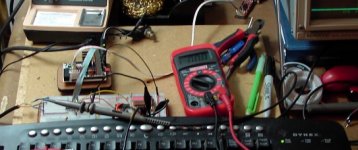
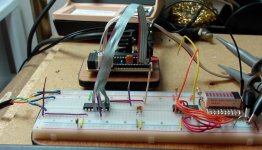
anyway here is a pic
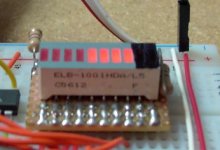
kinda hard to tell whats going on, but on the bread board (the white thing with all the crap on it) the left side under the probe is a attiny84 avr microcontroller hooked up to the mac se's adb port (sitting on the floor) on the right side is a led display so I can output whatever the attiny see's (in 1 byte binary) for debugging, the smaller board on the top left is a bare bones arduino which is acting like a avrisp programmer, which is connected to a PC via serial port so I can wite program data to the tiny's storage
Also you can see a 20$ craftsman multimeter (not the best I have owned but no toy by any means) and a small part of my oscilloscope (that I really wish was a logic analyzer, but at least its got a digital mode with a few KB storage, which would have been retarded expensive back in 1987 when it was made)
not shown is the ps/2 connections, there are 2 of them and the attiny is already fat n happy with those devices and they function perfectly, course I am using someone elses lib so it darn well better lol
sofar with regards to mcu resources I have ps/2 kb and mouse fully working and adb sometimes halfway working, with that going I have about 3k of space used out of the 8k available on the tiny, and I am sucking down about 200KB out of the 512 available memory, though since I have more than enough I will be using a good chunk of it for keyboard scan code conversion in ram vs database for performance and ease of coding
finally I have ~512k of eprom storage on the chip, as a last thing I am planning to write a little simple application for the mac so you can set different settings for the devices, IE 100cpi vs 200cpi mouses, standard vs Enhanced keyboard, and maybe absolute pointing device support, but all of that is at the end of a very long list-o-crap
at the moment Id just be happy to get a mouse working
I've got a Silicon Valley Bus Company product called the KeyStone that's WAY more simple than what you're cobbling together. Do you want some piccies of the PCB? IIRC, when I got mine, it was for:
PC Serial Mouse & Original PC KBD Connectors -> ADB
The only problem with KVMing it was that you'd need to run ADB Reset whenever switching to another Mac (you'd need an expensive KVM with KBD/Mouse emulators onboard to get around that simply fixed prob.) to get the "ADB" devices (mostly the mouse) to perform w/o flakiness.
http://www.tifaq.org/mice/accessories.html#Silicon%20Valley%20Bus
I didn't scour their site for info, I doubt they still produce it, but they might be as helpful to you as they were to me if you were to ask one of their engineers VERY nicely. I think it must be a much bigger company now than it was back in the day, but it might be worth a shot to ask for any old ADB info (maybe even a lil' source code that they've got on floppy somewhere) they don't intend to use anymore. [] ]'>
PC Serial Mouse & Original PC KBD Connectors -> ADB
The only problem with KVMing it was that you'd need to run ADB Reset whenever switching to another Mac (you'd need an expensive KVM with KBD/Mouse emulators onboard to get around that simply fixed prob.) to get the "ADB" devices (mostly the mouse) to perform w/o flakiness.
http://www.tifaq.org/mice/accessories.html#Silicon%20Valley%20Bus
I didn't scour their site for info, I doubt they still produce it, but they might be as helpful to you as they were to me if you were to ask one of their engineers VERY nicely. I think it must be a much bigger company now than it was back in the day, but it might be worth a shot to ask for any old ADB info (maybe even a lil' source code that they've got on floppy somewhere) they don't intend to use anymore. [
] ]'>
yea some pics would be cool
also you have to consider that 90% of that is debug, right now the i/o hardware consists of 1 ic and 2 decoupling caps, everything is being handled with software (and this is more about making it not having one)
today I have it constantly locking on to 00111100 (device 3 mouse, talk send, register 0 user input) which is the first command directly after the init sequence, so i am missing 8 polls
so I need to shorten my startup sequence (or settle and hardcode the timing data)
also you have to consider that 90% of that is debug, right now the i/o hardware consists of 1 ic and 2 decoupling caps, everything is being handled with software (and this is more about making it not having one)
today I have it constantly locking on to 00111100 (device 3 mouse, talk send, register 0 user input) which is the first command directly after the init sequence, so i am missing 8 polls
so I need to shorten my startup sequence (or settle and hardcode the timing data)
Probably this goes in the "I'm building my own... Stupid" category but I can attest that the old adapters from Omniview called the Omniview PS/2 MAC Adapter work very well.
I use 3 of them to hook my B&W G3's and Beige G3's to my Compaq 8 port PS2 KVM.. That way I have a ps/2 PC keyboard and a Microsoft Optical Wheel Mouse controlling the mass of machines under my desk. The newer version of the adapter even supports right click in OS9 which was EXTREMELY strange to notice happen for the first time.
Back in the day when I was developing what would later become part of the Nintendo Wii controller(1995) technology I had an ADB Gravis gamepad with some killy clips off of it and interfaced to the free space joystick. I don't think anything like this free space mouse that was working on my bench was ever released though mainstream. The big thing though is it is exactly the same method you are doing which is great. They used a PIC microcontroller. During debugging I used a small app that sniffed the ADB stream directly in software so I did a LOT of poking around in that data long ago.. Probably not much help now, but it sounds like you are definitely in the right direction.
Good luck!
I use 3 of them to hook my B&W G3's and Beige G3's to my Compaq 8 port PS2 KVM.. That way I have a ps/2 PC keyboard and a Microsoft Optical Wheel Mouse controlling the mass of machines under my desk. The newer version of the adapter even supports right click in OS9 which was EXTREMELY strange to notice happen for the first time.
Back in the day when I was developing what would later become part of the Nintendo Wii controller(1995) technology I had an ADB Gravis gamepad with some killy clips off of it and interfaced to the free space joystick. I don't think anything like this free space mouse that was working on my bench was ever released though mainstream. The big thing though is it is exactly the same method you are doing which is great. They used a PIC microcontroller. During debugging I used a small app that sniffed the ADB stream directly in software so I did a LOT of poking around in that data long ago.. Probably not much help now, but it sounds like you are definitely in the right direction.
Good luck!
Well (thanks btw) ADB has not changed since you have used it, and I very basicly deal with pic's, to the point where I can understand whats going on and transpose it to tools I am more familiar with, I just like atmel better, microchip never fails to piss me off though their products are outstanding (their doc's are ass backwards)
so any notes you may have are most welcome
so any notes you may have are most welcome
YUP! I got mine back from the rugger's setup and I now use it with a KVM to switch between HP_Mini/22"1080p and any three other Macs. The 466DA is a PITA about using anything switched except the video, but the ADB Macs just love the wireless KBD/Mouse and the 1080p centers/renders whatever the old macs throw at it (@60Hz) to fill the screen top to bottom at the proper aspect ratio.
When I was looking at doing multiple KBD Hacking, my approach was to use a standard KBD switch matrix output as the input for EPROMs translation to the Matrix inputs for several different KBD controllers attached to the different systems and acting as those "emulators" missing from my current KVMs.
That ought to be easy to do over serial with the new PIC toys available.
Why not just use the bare bones arduino to handle the keyboards? It's probably a fair bit more capable than the attiny and you can program it without an additional piece of hardware.
only difference tween the tiny and the arduino is memory space which I dont need, and program space (which I am using 1kb less than half of the tiny's space), io pins(have enough extra now), and hardware capabilities like hardware ttl serial, which if I get desperate 1 quick command enables jtag
also the arduino sits on my desk all the time, so no big deal there
turdley even if I wanted to use the arduino the 2 second bootloader gets in the way, by the time that starts up your into a ton of polls since system startup, using a "near zero" bootloader gets you into about the 16 range @ 8mhz, using no bootloader @ 8mhz I am syncing up with the signal at 9 polls in, for hardware that is usually sitting there anyway
as I replace arduino code with standard avrgcc code I am currently syncing up with the signal 7 adb polls in, and there is a lot of things still to work on, including structure and flow, I need to hit like max 2 polls in before the keyboard is required to respond, # 3 is the mouse, then I have lots of free time
if I get cheap about it I can just add 3 parts and crank it from 8MHz to 16-20MHz in seconds
edit: also keep in mind this is currently sampling the signal from the mac host and synthesising a response, before I go adding more stuff I may write a new core and use precalculated tolerances, this is the way the original hardware handled it, well that and lots of assembly code
also the arduino sits on my desk all the time, so no big deal there
turdley even if I wanted to use the arduino the 2 second bootloader gets in the way, by the time that starts up your into a ton of polls since system startup, using a "near zero" bootloader gets you into about the 16 range @ 8mhz, using no bootloader @ 8mhz I am syncing up with the signal at 9 polls in, for hardware that is usually sitting there anyway
as I replace arduino code with standard avrgcc code I am currently syncing up with the signal 7 adb polls in, and there is a lot of things still to work on, including structure and flow, I need to hit like max 2 polls in before the keyboard is required to respond, # 3 is the mouse, then I have lots of free time
if I get cheap about it I can just add 3 parts and crank it from 8MHz to 16-20MHz in seconds
edit: also keep in mind this is currently sampling the signal from the mac host and synthesising a response, before I go adding more stuff I may write a new core and use precalculated tolerances, this is the way the original hardware handled it, well that and lots of assembly code
actually it means device 0 talk register 3, its the very first command the mac sends when starting up, and after rearranging my startup and and speeding up code I can now start the mac, which also starts the mcu, sample the native adb signal for timing (within 8 microseconds), calculate all the timing needed, and decode the command byte before it hits the second poll every time
|)
next its just a matter of waiting for the command I want to respond to and tell it YES there is a mouse / kb here (talking to the mac ought to be fun), once I get stuff talking its just going to get easier, then I can deal with sissy stuff like "collision"
|)
next its just a matter of waiting for the command I want to respond to and tell it YES there is a mouse / kb here (talking to the mac ought to be fun), once I get stuff talking its just going to get easier, then I can deal with sissy stuff like "collision"
Oh joy joy joy
3 things came in today to further the progress of this project greatly
1 had snagged a appropriate for my SE mouse for ~6 bucks on ebay which arrived in the mail
2 also in the mail was "codename Elvis", some good info on ADB that filled in a couple holes provided by a member here
3 and in my PM's was another member of the army offering some old software to poke around with the adb bus from the mac side
thanks guys!
|)
3 things came in today to further the progress of this project greatly
1 had snagged a appropriate for my SE mouse for ~6 bucks on ebay which arrived in the mail
2 also in the mail was "codename Elvis", some good info on ADB that filled in a couple holes provided by a member here
3 and in my PM's was another member of the army offering some old software to poke around with the adb bus from the mac side
thanks guys!
|)
I hope you'll be posting schematics and code at some point?
schematics are trivial in this case( I am up to 5 components not counting connectors and debug), code is the beast of it and once I have it functioning in a basic manor, then yes there will be a release where more can have input, and access
I am planning on a non commercial use only share alike blah blah open source thing on google projects or something, but that is the furthest thing from my mind, right this second it is why my 140us delay gets triggered 6ms late :-/
I am planning on a non commercial use only share alike blah blah open source thing on google projects or something, but that is the furthest thing from my mind, right this second it is why my 140us delay gets triggered 6ms late :-/
Yeah, ok. Code isn't going to be very useful if it doesn't work. 
yea not much has progressed, I have halted the project until the end of this week, there is a "usb" contest on instructables and darnit I never win that pocket knife! so I am trying again, though I will be done with that project in a couple days its good to take a break once n a while and come back with some fresh eyes (and maybe a new leatherman and defiantly a usb nes game pad as that is the contest entry)
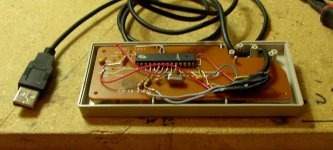
a mostly functioning nes pad <> usb (its working, just need to add delay code cause its really fast)
course the goal is to shove that crap inside the nes pad, but I have a little bit of rep to live up
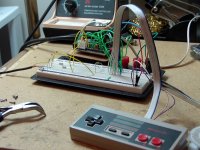
course the goal is to shove that crap inside the nes pad, but I have a little bit of rep to live up
done, once I write this up it will be nearly july, so I can continue the ADB project for retrochallenge