

Thread
Performa MIDI Help
I am trying to load some samples onto a flash card in my Alesis QS6.1 synth. Documentation says I can go serial port (Mac) to serial port (Alesis). The included software OMS and Midi Manager don't seem to quite get as far as they need to, and I get the error message that the Performa can't communicate with the synth. Are there any other MIDI managers for OS 7.1 that will route my .wav files through the serial port to the synth?
This has been agonizing, but it's kinda fun working with an old Mac again...thanks in advance!!!
-Jason
This has been agonizing, but it's kinda fun working with an old Mac again...thanks in advance!!!
-Jason
Morning. Yawn.
Moved into Software, seeing as that seems to be the main thrust of the problem.
While I am familiar with MIDI on older Macs, I haven't used it for several years. I don't think you are supposed to be running OMS and Apple MIDI Manager together - one or the other. There should be other members along with more suggestions soon.
Moved into Software, seeing as that seems to be the main thrust of the problem.
While I am familiar with MIDI on older Macs, I haven't used it for several years. I don't think you are supposed to be running OMS and Apple MIDI Manager together - one or the other. There should be other members along with more suggestions soon.
Sorry. I saw Performa and I got click-happy. It's actually a Performa 575. Indeed I tried OMS separately from Midi Manager. Both looked promising at first, but couldn't cut the mustard in communicating with the keyboard. Maybe going from the serial port to a MidiMan MacMan and to the keyboard's midi ports? I'm midilliterate. Thanks for the input!
Make sure that the Mac's serial port is set to Standard MIDI Interface in OMS Setup and check the clock speed if there is a choice. 1MHz would be the best start. If an external device is emulating a MIDI Interface it still has to provide the clock. Check your keyboard's menu settings.
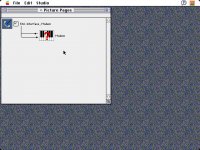
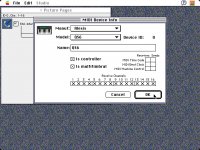
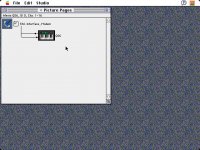
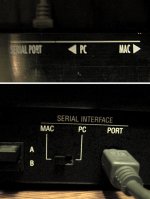
Yes, that would be the one. One position means "Mac/PC", ie, use the serial port. The other position means use the MIDI ports. It's not a switch between "Mac" and "PC". It's confusing and mildly retarded, but that's the way those mid-90s MIDI instruments with serial ports were labelled.
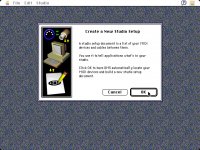
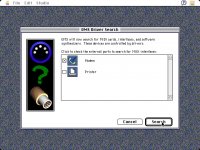
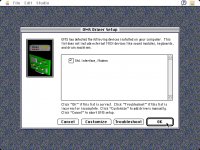
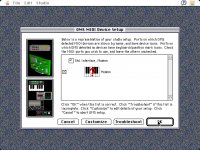
Sad to say, that's not the trick. It is, indeed a PC/Mac switch. Changing it over to 'PC' resulted in nothing showing up in the OMS Driver Setup window (reference my 3rd pic above). When switched to 'Mac' I get the Std. Interface, Modem icon and description (as seen above). Maybe this is a glimmer of being on the right path. (?) I wish it said Midi Interface, Modem. By the by, on the same screen, I did try the 'customize' button. I got an option of changing the 'Std. Interface, Modem' to something called 'MIDI Time-Piece Modem' but couldn't get it to create a path to the keyboard (agreed, my current path to my keyboard is not much better, but at least I get a purdy icon).
Thanks in advance for your impending solution...subliminalmessage
Jason
Thanks in advance for your impending solution...subliminalmessage
Jason
I was tinkering...and found some other options that I didn't know existed. The documentation on this junk is so incomplete. Assigning the modem port to Alesis QS MIDI somethingoranother gets me reallllllly close. It automatically sets up as a QS7, though. I'm needing it to be a QS6. Is it possible that they didn't even include the QS6's description in the software? Rrrrrrgh.
Now I need to fix this:
"The modem port is not available for MIDI. It is in use by another application."
(After a port becomes available, open the OMS MIDI dialog or switch applications for OMS to notice.
But I have no other applications running. Something else causing conflict?
New error messages give me sick feeling that we're getting closer.
Shanksh!
"The modem port is not available for MIDI. It is in use by another application."
(After a port becomes available, open the OMS MIDI dialog or switch applications for OMS to notice.
But I have no other applications running. Something else causing conflict?
New error messages give me sick feeling that we're getting closer.
Shanksh!
Any chance this could be related to the serial port arbiter extension thing on some older macs, or maybe even if you might have Appletalk ON but not meaning to? Might also be an IAC thing holding the port open.
I'm guessing Appletalk has grabbed the port, in which case make sure you go and turn that off if you haven't, and also make sure you set your desktop printer to something for sure not on your free port. Sometimes a serial direct printer can setup shop there and show that way.
Very interesting problem you have here.
I'm guessing Appletalk has grabbed the port, in which case make sure you go and turn that off if you haven't, and also make sure you set your desktop printer to something for sure not on your free port. Sometimes a serial direct printer can setup shop there and show that way.
Very interesting problem you have here.
There's a known fault where Appletalk will seize control of a serial port and refuse to let it go, even after disabling, switching off, or removing Appletalk services altogether. You have to either trash the preference file for Appletalk and I think one other and reboot, or download a script or small app that takes care of that. I am a little vague on the details, sorry. Hopefully this will ring a bell for someone else, or further searching will reveal an answer.
Tried trashing prefs. Tried trashing all prefs. Disabled some unnecessary extensions, too. Zapped PRAM. Changed cables. Nothin' doin'. I did find a 'Reset Serial Channel' app, but I have to transfer it over to a zip disk or floppy so I can get it on the Performa. After that, I'm at a loss of what to do. Thanks for all your help, fellas. Let me know if you have any other brainstorms.
Can't find a 7.5.1 updater. I have the 7.5.3 updater, but it won't work without a previous 7.5.0, 7.5.1 or 7.5.2. So I need to find a way to get from 7.1 to 7.5.1 somehow. I've been looking for hours. Found alot of dead links and 7.5.3's, so I'm going to bed. G'night.
With much help and support, 3 Macs, 2 Zip Drives, a flash drive and even a floppy, I'm sunk. Still get the "port in use" error. Got an app called Port Peep that says the port is available. I'm thinking this isn't even possible anymore. Any serial-to-midi, USB-to-midi things anyone has had success with? Or an otherwise way to write data onto the flash card?
It's definitely possible Despair not. Find that serial fixer thingy (I only wish I could remember the name, sorry)
Did you try searching?
Did you try searching?
My Appletalk is currently inactive, and my old Performa doesn't feature an Ethernet port. Only serial printer, serial modem, serial keyboard and SCSI. The Port Peek app did have a force open and force close feature, but that didn't change anything. I'm wondering if you're thinking of the "Reset Serial Channel" application. I did find it, but it's not even opening, I only get an error type -192, which I understand to be a 'resource not found' error.
Egad, thou hast re-stoked my eternal flame of Mac hope, yet I'm still stuck...I shall forge on...<...brave, brave Sir Robin...>
Feel free to pelt me with nuggets of wisdom at your leisure....
Jason K
Egad, thou hast re-stoked my eternal flame of Mac hope, yet I'm still stuck...I shall forge on...<...brave, brave Sir Robin...>
Feel free to pelt me with nuggets of wisdom at your leisure....
Jason K
IGNORANCE IS BLISS. I decided to force the serial port open/closed another time. Set up a new OMS profile but still got the same message. "Serial Port in use by another application."
So, I did what any self-respecting Macophile would do...I decided to ignore it. Went to SoundBridge loaded up my file, and whaddaya know. It's working.
I don't know why the error message comes up, maybe port is in use by another application other than the modem? Maybe port is in use by OMS (thank you Captain-Mac-Obvious)?
I don't know why...and frankly, I don't care...my Mac is doing what I knew it could...delivering the goods.
Thank you to beachycove, Graham Hinton, QuadSix50, Paralel and Kallikak.
In the godsend category, thanks to ppuskari. Your empathy and assistance were nothing short of miraculous.
A Mac-tacular thanks goes out to your friend and mine...Bunsen!
He stuck with me through it all. Never giving up. Never without creative input. My guardian angel of tech-support. If it wasn't for Bunsen, I would have put my Mac back in storage and given up.
Bunsen, I don't see myself coming down under anytime soon, but I vow to buy a Fosters for our local Aussie in your honor.
I know I'm not at the Academy Awards™...but I've seen too many forums where things just trail off. No acknowledgement. No thanks.
So to all who maintain and contribute to this forum....
Thanks.
Sincerely,
Jason K
So, I did what any self-respecting Macophile would do...I decided to ignore it. Went to SoundBridge loaded up my file, and whaddaya know. It's working.
I don't know why the error message comes up, maybe port is in use by another application other than the modem? Maybe port is in use by OMS (thank you Captain-Mac-Obvious)?
I don't know why...and frankly, I don't care...my Mac is doing what I knew it could...delivering the goods.
Thank you to beachycove, Graham Hinton, QuadSix50, Paralel and Kallikak.
In the godsend category, thanks to ppuskari. Your empathy and assistance were nothing short of miraculous.
A Mac-tacular thanks goes out to your friend and mine...Bunsen!
He stuck with me through it all. Never giving up. Never without creative input. My guardian angel of tech-support. If it wasn't for Bunsen, I would have put my Mac back in storage and given up.
Bunsen, I don't see myself coming down under anytime soon, but I vow to buy a Fosters for our local Aussie in your honor.
I know I'm not at the Academy Awards™...but I've seen too many forums where things just trail off. No acknowledgement. No thanks.
So to all who maintain and contribute to this forum....
Thanks.
Sincerely,
Jason K
