

Thread
Apple SC20 Problem
Hello once again:
Amidst the degrading display problem I have been having with my SE, I can safely say that my 512ke/Plus hybrid is working perfectly, as if it were almost brand new. Nevertheless, there is a problem.
The fellow that I purchased the computer from finally found the external hard drive for it, and the ImageWriter II printer, which was combined as a package. Altogether, I spent about $40 on this unique system.
To get to the point, the Apple SC20 drive, which has OS 6.0.4 installed on it, and a host of other programs, such as Word, Excel, Adobe Illustrator 88, MacPaint, etc. boots the Plus (I get the glorious happy Mac/Welcome to Macintosh), however, when I get to loading the desktop, the Plus crashes (Sorry, a system error occurred, ID Number= 02).
I have tried the drive on my SE, and it works perfectly (I can access the data on the drive, etc.). However, I must restart the computer to run 6.0.4, as I have 7.1 on the SE, and as we all know, we cannot have two systems running simultaneously, unless we have a program like Switcher (I do, but the boot disk no longer works; I get an error -39 message when I try to open the program from the floppy).
There are moments where I can boot the Mac Plus from a boot disk, then have the SC drive appear on the desktop. But get this, when I open it, no icons appear (although it recognizes that software is on the hard disk; about 6 files, or so).
I have an interrupt switch on the Plus (a great feature by the way), but I have been unsuccessful in overriding the System bomb (I get a whole bunch of 0's appear on the dialog box).
Any help, of course, will be greatly appreciated.
Amidst the degrading display problem I have been having with my SE, I can safely say that my 512ke/Plus hybrid is working perfectly, as if it were almost brand new. Nevertheless, there is a problem.
The fellow that I purchased the computer from finally found the external hard drive for it, and the ImageWriter II printer, which was combined as a package. Altogether, I spent about $40 on this unique system.
To get to the point, the Apple SC20 drive, which has OS 6.0.4 installed on it, and a host of other programs, such as Word, Excel, Adobe Illustrator 88, MacPaint, etc. boots the Plus (I get the glorious happy Mac/Welcome to Macintosh), however, when I get to loading the desktop, the Plus crashes (Sorry, a system error occurred, ID Number= 02).
I have tried the drive on my SE, and it works perfectly (I can access the data on the drive, etc.). However, I must restart the computer to run 6.0.4, as I have 7.1 on the SE, and as we all know, we cannot have two systems running simultaneously, unless we have a program like Switcher (I do, but the boot disk no longer works; I get an error -39 message when I try to open the program from the floppy).
There are moments where I can boot the Mac Plus from a boot disk, then have the SC drive appear on the desktop. But get this, when I open it, no icons appear (although it recognizes that software is on the hard disk; about 6 files, or so).
I have an interrupt switch on the Plus (a great feature by the way), but I have been unsuccessful in overriding the System bomb (I get a whole bunch of 0's appear on the dialog box).
Any help, of course, will be greatly appreciated.
The drive is formatted differently for a Plus and an SE which have different interleave schemes. Which was this formatted for? I wouldn't expect these kinds of problems but anything is possible. There could also be extensions in the System folder incompatible with the Plus. Also, check the termination. The Plus has no internal Termination, but the SE does. So there could be a number of issues contributing to this problem.
Hello Mac 128:
I managed to get the files on the SC20 to appear on the Plus. All I had to do was create a new 800k boot disk with the System folder installed on the SC20 drive. Now the Plus boots to 6.0.4 (on the floppy), and recognizes the files on the hard drive. However, I do not want to rely on floppies in order to boot the computer, hence why I got the SC20 drive. How do I instruct the Plus to boot from the hard drive, instead of the floppy (the hard drive will not properly mount without a floppy; I get a system bomb ID=02 when I do so)?
In regards to termination, I have a terminator plugged in to the back of the SC20. There are no problems with it.
I managed to get the files on the SC20 to appear on the Plus. All I had to do was create a new 800k boot disk with the System folder installed on the SC20 drive. Now the Plus boots to 6.0.4 (on the floppy), and recognizes the files on the hard drive. However, I do not want to rely on floppies in order to boot the computer, hence why I got the SC20 drive. How do I instruct the Plus to boot from the hard drive, instead of the floppy (the hard drive will not properly mount without a floppy; I get a system bomb ID=02 when I do so)?
In regards to termination, I have a terminator plugged in to the back of the SC20. There are no problems with it.
The most obvious step is to replace the system folder on the hard drive with the one off the floppy. If that still doesn't work then I would backup the HD and reformat it on the Plus ... Assuming you don't want to use it on the SE in the future - different interleave. Then re-install the system from your floppy and if it boots up correctly, re-install the content to the disk.
In regards to Mac 128's comment, the system folder I put on the floppy was the system folder originally installed on the hard drive. The information I put on the disk was the system file (of course), chooser, background, startup disk, and a couple of other things but it does not come to mind right now. For some reason, HD setup was not installed on the hard drive, so I could not include that with the new startup floppy.
To give some background information on the hard drive, the individual I bought it from originally used the drive as his startup disk for his 87 Mac SE, which had the dual 800k drive setup. The SC20 is even labeled "MAC SE." Furthermore, I read over the comments made about speed. Since I have tried the SC20 on both the 512ke/Plus hybrid, and the SE, there are no improvements in the amount of time it takes for the disk to mount. As a matter of fact, the drive is pretty quick in response (considering there are about 230 files on it). The only exception would have to be with the SE, since I have to boot it first in 7.1, then restart the computer to have it boot in 6.0.4 on the SC20 (but that does not bother me).
In regards to backup, I have version 1.1 of Retrospect (with its original box & manuals too!), and naturally I do intend to archive, and duplicate everything I have on the drive in case it happens to fail.
Then that suggests to me the disk formatting interleave is the problem. The SCSI disk drivers were very finicky in those days. There's plenty of utility software developed after the SE which is not compatible with the Plus. And 230 files is nothing. Try writing large files to and from the disk and you'll notice a difference on the Plus. Obviously there IS a difference since you cannot boot from it on the Plus.
I don't really understand that one. Why do you have to boot into 7.1 on the SE? Just boot off the external drive directly by selecting it in the startup disk control pane (Also something the Plus can't do). Alternately you could get either System Picker or System Switcher which allow you to hold down a specific key combo during startup and chose which drive to startup from. Apple+shift+option+delete was the way to bypass the internal drive in later systems but no sure if that was supported in 7.1.
Hello Mac 128:
Thanks for the reply.
In regards to 7.1, since my SE has an internal 40MB hard drive, when I boot it from a cold start, the internal hard drive immediately kicks in (although the SC20 is hooked up to the SE's SCSI port, and is switched on). Since the SC20 does not mount onto the hard drive (probably because of the system folder that has 6.0.4 installed, because all of my previous external SCSI drives- like my Jasmine Direct 80, which no longer works- were able to mount onto the desktop, but did not have a system folder installed, only programs), my only alternative is to reboot the SE. After that, the SE begins communicating with the SC20.
I have heard the horror stories about these drives randomly crashing, and so forth. I do have intentions of cleaning the innards (from the looks of the back of the cooling fan, its quite dusty), however I would require instructions as to how to effectively open the case without causing any cosmetic damage (I noticed there were no screws at the bottom, or on the sides).
BTW, it was not my intention to sound like I had God-knows-what amount of files. My external 500GB drive for my MBP has over 2 million files (most are Word & Podcast files) backed up on it, so naturally 230 would seem to be a fairly decent amount of files, especially for an almost 25-year-old Apple drive. Nevertheless, the programs that are on it are interesting, and worth keeping for my vintage 512ke/Plus hybrid.
Thanks for the reply.
In regards to 7.1, since my SE has an internal 40MB hard drive, when I boot it from a cold start, the internal hard drive immediately kicks in (although the SC20 is hooked up to the SE's SCSI port, and is switched on). Since the SC20 does not mount onto the hard drive (probably because of the system folder that has 6.0.4 installed, because all of my previous external SCSI drives- like my Jasmine Direct 80, which no longer works- were able to mount onto the desktop, but did not have a system folder installed, only programs), my only alternative is to reboot the SE. After that, the SE begins communicating with the SC20.
I have heard the horror stories about these drives randomly crashing, and so forth. I do have intentions of cleaning the innards (from the looks of the back of the cooling fan, its quite dusty), however I would require instructions as to how to effectively open the case without causing any cosmetic damage (I noticed there were no screws at the bottom, or on the sides).
BTW, it was not my intention to sound like I had God-knows-what amount of files. My external 500GB drive for my MBP has over 2 million files (most are Word & Podcast files) backed up on it, so naturally 230 would seem to be a fairly decent amount of files, especially for an almost 25-year-old Apple drive. Nevertheless, the programs that are on it are interesting, and worth keeping for my vintage 512ke/Plus hybrid.
I was able to open my HD20SC housing after spending about 1.5 hours on it. I took so much time because I wasn't sure exactly where to apply pressure on the plastic tabs that hold it together. I should have taken photos of the process so others could do the job more easily. Sorry about that. But what I can say is that it can be done. As I recall, I had to use 2 flat-head screw drivers to slowly open the case, bit by bit.
Here are a couple photos of my HD20SC sitting beneath my SE/30:


And here is the SCSI hard drive mechanism I used to swap out the stock drive:
http://www.flickr.com/photos/66071596@N00/527548551/
Lastly, I would like to add that I put a resistor in line with the fan. That reduces it's speed and overall cooling, but once you peer inside the HD20SC housing, you will see that the drive will definitely be cool enough with a lower fan speed (and perhaps even no fan at all). I reduced the fan speed with the resistor in order to reduce the noise. In the stock condition, the fan is louder than even a loud hard drive!
In regards to JDW's comment, I have an 80 meg Quantum drive, which was probably designed for an SE/30, or a Classic II. I am not sure if it works, as I have not tested it out in a while (it was supposed to be a replacement for the internal 40 meg Lacie drive I have in my SE, but that never happened).
Although I would like to keep the SC20 with its stock 20-meg drive, can I potentially swap the 20-meg with the 80 (just to see if it works)?
Thanks again for the replies.
Yes, you can use any 50-pin drive, of any byte-size. You simply have to note that System 6.x can only see up to 2GB on hard drives. But since 80MB < 2GB you can certainly use your drive with any OS your Mac supports.
The only thing you have to watch is TERMINATION. You can often terminate newer SCSI drives using a jumper on the drive itself. Older drives don't offer that, so you will need to use an external SCSI terminator. If you don't terminate the drive, it won't work at all or won't work reliably. And this goes without saying but I'll say it anyway. If you terminate the drive using a jumper on the drive itself, you do not need any terminator on the external SCSI port of the HD20SC. Just terminate it once (either internally or externally).
The only thing you have to watch is TERMINATION. You can often terminate newer SCSI drives using a jumper on the drive itself. Older drives don't offer that, so you will need to use an external SCSI terminator. If you don't terminate the drive, it won't work at all or won't work reliably. And this goes without saying but I'll say it anyway. If you terminate the drive using a jumper on the drive itself, you do not need any terminator on the external SCSI port of the HD20SC. Just terminate it once (either internally or externally).
To begin, this Apple Discussions thread talks about "double termination," which is what I was warning against:
http://discussions.apple.com/message.jspa?messageID=2748302
Obviously, if you put more than one device on the external SCSI connector of the PLUS, you will have to terminate the first and last device. But my previous post here was written under the assumption that the HD20SC would be the only external SCSI device attached, hence it needs only 1 instance of termination (either via jumper on the drive itself, or a terminator connector block externally attached to the HD20SC). This page shows a photo of the "Centronics" terminator connector that I've been talking about, which attaches externally to the HD20SC (and many other external SCSI hard drives):
http://www.jagshouse.com/plusharddrive.html
As to "termination power," you're right about the Plus NOT supplying it. However, most Apple SCSI drives provide it so they can work on the Plus:
http://lowendmac.com/tech/termination.shtml
With that said, I've not verified this myself because I don't have a Plus.
In the past, I always preferred to use Active Terminators because they supplied termination only when needed:
http://www.welovemacs.com/scs-term.html
It therefore would be good to test the following 3 conditions (all with the HD20SC being the only item in the external SCSI chain):
1) Jumper based termination on the drive mechanism itself (if the drive offers it).
2) A "passive" Centronics terminator externally placed on the HD20SC.
3) An "active" Centronics terminator externally placed ont he HD20SC.
http://discussions.apple.com/message.jspa?messageID=2748302
Obviously, if you put more than one device on the external SCSI connector of the PLUS, you will have to terminate the first and last device. But my previous post here was written under the assumption that the HD20SC would be the only external SCSI device attached, hence it needs only 1 instance of termination (either via jumper on the drive itself, or a terminator connector block externally attached to the HD20SC). This page shows a photo of the "Centronics" terminator connector that I've been talking about, which attaches externally to the HD20SC (and many other external SCSI hard drives):
http://www.jagshouse.com/plusharddrive.html
As to "termination power," you're right about the Plus NOT supplying it. However, most Apple SCSI drives provide it so they can work on the Plus:
http://lowendmac.com/tech/termination.shtml
With that said, I've not verified this myself because I don't have a Plus.
In the past, I always preferred to use Active Terminators because they supplied termination only when needed:
http://www.welovemacs.com/scs-term.html
It therefore would be good to test the following 3 conditions (all with the HD20SC being the only item in the external SCSI chain):
1) Jumper based termination on the drive mechanism itself (if the drive offers it).
2) A "passive" Centronics terminator externally placed on the HD20SC.
3) An "active" Centronics terminator externally placed ont he HD20SC.
Hi JDW:
I've got an external terminator, which I place into the top SCSI port on the SC20 (I prefer using the bottom port to hookup to the Plus for some reason). I will take your advise on the other terminators you mentioned, of course.
I will see about transferring the 20 meg drive with the 80 when I have time, and I will let you know what comes of it.
Since you mentioned that the maximum memory for an external hard drive on a Mac running System 6 is 2GB, what is the maximum for 7.1? I tried hooking up my 9GB Avid external drive to my SE, but I got a sad Mac instead (that was probably the first time I ever saw a sad Mac appear on any classic mac; it looks so weird).
I've got an external terminator, which I place into the top SCSI port on the SC20 (I prefer using the bottom port to hookup to the Plus for some reason). I will take your advise on the other terminators you mentioned, of course.
I will see about transferring the 20 meg drive with the 80 when I have time, and I will let you know what comes of it.
Since you mentioned that the maximum memory for an external hard drive on a Mac running System 6 is 2GB, what is the maximum for 7.1? I tried hooking up my 9GB Avid external drive to my SE, but I got a sad Mac instead (that was probably the first time I ever saw a sad Mac appear on any classic mac; it looks so weird).
System 7 allows between 4GB and 2TB, depending on the version of 7 you use:
http://support.apple.com/kb/TA27115?viewlocale=en_US
http://support.apple.com/kb/TA27115?viewlocale=en_US
I opened up the SC20 last night, and cleaned the inside with a PC vacuum cleaner. It was not as dusty as I thought it would be, but it still required a cleaning.
I have intentions of replacing the original 20 meg drive with an 80 meg Quantum drive to see if the Quantum drive works, and to fix this startup error. I noticed that it is housing a 5.25" Seagate drive. How would I go about removing this drive, and properly housing the Quantum drive (since it is a standard 3" drive)?
I have provided pictures of the SC20 (after cleaning), and the Plus & SE.
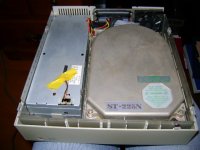
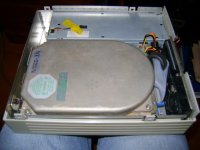
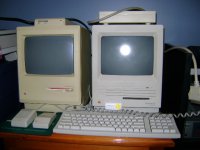
I have intentions of replacing the original 20 meg drive with an 80 meg Quantum drive to see if the Quantum drive works, and to fix this startup error. I noticed that it is housing a 5.25" Seagate drive. How would I go about removing this drive, and properly housing the Quantum drive (since it is a standard 3" drive)?
I have provided pictures of the SC20 (after cleaning), and the Plus & SE.
Maybe I can help. Herb Johnson did a wonderful description on how to open that kind of case: http://www.retrotechnology.com/herbs_stuff/hd20_open.html
Are you sure that 5.25" drive is only 20MB? Typically the 5.25" form factor drive was for the 120MB model (this is based on Apple service manuals). I am really surprised to see 5.25" 20MB drive as Apple had a deal on the 3.5" drives they were putting in the SEs at the time. Hard to believe they would go outside their deal, unless demand was that high.
As far as replacing it, have you removed it yet? The housing was designed to accommodate both standard size drive formats, so it may be a simple matter of using the same mounting screws in a different set of holes, without any additional hardware. I have the manuals around here somewhere ... will have a look to see what's required.
As far as replacing it, have you removed it yet? The housing was designed to accommodate both standard size drive formats, so it may be a simple matter of using the same mounting screws in a different set of holes, without any additional hardware. I have the manuals around here somewhere ... will have a look to see what's required.
http://stason.org/TULARC/pc/hard-drives-hdd/seagate/ST225N-21MB-5-25-HH-SCSI1-SE.html ST-225N as seen in the picture.
Thanks for the replies.
Mac 128- I am indeed surprised that Apple used a 5.25" drive in the SC (not SE) series. I know for a fact (and I am sure that all of you know) that the Profile series used the 5.25" Winchester drives. I was expecting to find a standard Lacie, or Quantum drive in the SC, as they were commonly used with compacts that had the HD feature built-in. Nevertheless, this would explain why the SC20 is heavier than my now-deceased Jasmine Direct 80.
In regards to removing the HD, no I have not attempted that just yet, as I do not want to cause any potential damage to the unit, and I was curious to see what replies I would get on the 68k forum. A question though- the screws that are on the top case of the Seagate HD- are they there to remove the top cover of the drive itself, or to remove it from the housing of the SC20? I was thinking of removing the jumper cables as an attempt to loosen the HD, but it is tightly wedged near the SCSI connector ports.
Personally, I have never seen a 120 meg Apple SCSI drive. They probably didn't sell well, as most built-in HDs by that time could store over 80 megs of information, so the need for an external SCSI drive would not have been a great necessity to complete/store daily work projects.
Mac 128- I am indeed surprised that Apple used a 5.25" drive in the SC (not SE) series. I know for a fact (and I am sure that all of you know) that the Profile series used the 5.25" Winchester drives. I was expecting to find a standard Lacie, or Quantum drive in the SC, as they were commonly used with compacts that had the HD feature built-in. Nevertheless, this would explain why the SC20 is heavier than my now-deceased Jasmine Direct 80.
In regards to removing the HD, no I have not attempted that just yet, as I do not want to cause any potential damage to the unit, and I was curious to see what replies I would get on the 68k forum. A question though- the screws that are on the top case of the Seagate HD- are they there to remove the top cover of the drive itself, or to remove it from the housing of the SC20? I was thinking of removing the jumper cables as an attempt to loosen the HD, but it is tightly wedged near the SCSI connector ports.
Personally, I have never seen a 120 meg Apple SCSI drive. They probably didn't sell well, as most built-in HDs by that time could store over 80 megs of information, so the need for an external SCSI drive would not have been a great necessity to complete/store daily work projects.
If you unscrew those screws on the top cover of the drive you'll let the magic smoke out. Don't do it.
5.25 inch drives like that are secured in the same way as the more modern varieties, meaning it either has four screws run into the sides of it (about a half inch away from the bottom), or it's secured with screws going up from the baseplate into vertical holes in the bottom. I've never seen an SC20 enclosure in the flesh before, but I'd try flipping it over and seeing if there are four screw heads arranged in an outline around where the drive is. If that's not the case the enclosure may have a "false bottom" shelf the drive is sitting on, and you'll have to figure out how the Chinese puzzle goes together.
I'll just mention this "because", but... computer surplus places still often carry generic SCSI drive cases in both 3.5 and 5.25 inch sizes. (half-height 5.25 enclosures housing CD-ROM drives are particularly common. You can usually easily adapt those to hold a hard disk with a suitable adapter sled. You might also find cases with tape drives in them that will do.) You might want to leave your antique as it is and get a new enclosure for your modern drive.
As another aside, I have to say I'm impressed to see a working Seagate ST-225. The MFM version was dirt common in PCs... almost thirty years ago.