

Thread
I have diagnosed my problem (as much as possible)...
I know now that my Mac 128k has either a bad connection between the deflection yoke cable and the motherboard or at worst the deflection yoke cable is shot. The CRT tries to come on, but we get the most annoying single vertical line issue. Everything else works as much as can be tested (I want to get the CRT going again before I start buying accessories.) With that said, I can't do anything with a soldering iron except kill what I am trying to work on. The Mac 128k in question is a serial number F4410PM0001, and it's previous owner used it until the deflection yoke connector gave out. The C1 capacitor works, the low-voltage fuse doesn't have issues, I am not getting any symptoms that the flyback transformer is at fault, so three of the four things check out (AS MUCH AS I CAN TEST THEM.) The one weird thing is, slapping the side of the Mac doesn't revive it, making me think (based on everything I can read, if I had Larry Pina's books I couldn't SUCCESSFULLY do what I need done) the yoke connector itself has gone.
You might say, why buy a real Macintosh 128k (the RAM chips are all the originals based on what they say on them) when you can't do soldering? Well, because unlike most people my age, I USE newer computers but ACTUALLY ENJOY the classics; I got the 128k for $25 because the former owner wanted it gone pronto, and even though it was the 803rd made on the 41st week (October 7th) of 1984 in Fremont, California; it still had the original Macintosh logo on the back even though it was made a month after the 512k was introduced. The seller said it was the same case (both sides) it had came with to the person he was selling it for, so I doubt someone swapped back cases, because the amount of yellowing is equal on both halves of the case.
The PRAM battery has been removed, so there is no corrosion from the battery compartment. The computer does the boot-up ding, accesses the floppy, everything is good except the yoke connector cable (since slapping the Mac in the yoke connector's location has 0 effect whatsoever.
I don't want to wimp out and use Mini vMac. "There ain't nothing like the real thing, baby" the song goes.
I am willing to pay a not-insignificant amount of money if someone could take care of the replacing the yoke connector for me and then checking to see if it works. (PM me for details)
Sorry for the long post in the utmost, but I didn't want you to be mad that I gave insufficient information.
You might say, why buy a real Macintosh 128k (the RAM chips are all the originals based on what they say on them) when you can't do soldering? Well, because unlike most people my age, I USE newer computers but ACTUALLY ENJOY the classics; I got the 128k for $25 because the former owner wanted it gone pronto, and even though it was the 803rd made on the 41st week (October 7th) of 1984 in Fremont, California; it still had the original Macintosh logo on the back even though it was made a month after the 512k was introduced. The seller said it was the same case (both sides) it had came with to the person he was selling it for, so I doubt someone swapped back cases, because the amount of yellowing is equal on both halves of the case.
The PRAM battery has been removed, so there is no corrosion from the battery compartment. The computer does the boot-up ding, accesses the floppy, everything is good except the yoke connector cable (since slapping the Mac in the yoke connector's location has 0 effect whatsoever.
I don't want to wimp out and use Mini vMac. "There ain't nothing like the real thing, baby" the song goes.
I am willing to pay a not-insignificant amount of money if someone could take care of the replacing the yoke connector for me and then checking to see if it works. (PM me for details)
Sorry for the long post in the utmost, but I didn't want you to be mad that I gave insufficient information.
Update:
Left out an "M" in the 128k's serial number; it's F4410PMM0001.
I dutifully entered it into the M0001 Registry.
I can't get to Canada anytime soon, so the fellow who lives in Ontario who knows a vintage TV repairman who is in every way except geographical distance perfect to fix my problem is indeed unfortunately ruled out due to geographical distance and its related after-effects.
I hope these other three pieces of information will complete the puzzle.
Thanks so much and have a great day!
Left out an "M" in the 128k's serial number; it's F4410PMM0001.
I dutifully entered it into the M0001 Registry.
I can't get to Canada anytime soon, so the fellow who lives in Ontario who knows a vintage TV repairman who is in every way except geographical distance perfect to fix my problem is indeed unfortunately ruled out due to geographical distance and its related after-effects.
I hope these other three pieces of information will complete the puzzle.
Thanks so much and have a great day!
Hi Quicksilver mac:
I just noticed your thread, so I figured I would advise you of my past experience.
The 512ke, which was upgraded to an 87 Plus, began suffering from some sort of video distortion everytime I turned it on. A flicker here, a garbled character there, things like that. After two days of owning this unique computer, suddenly the flickering when out of control (the image on the display was shrinking & growing), so naturally I switched off the computer using my Kensington Mac System Saver. After two minutes, I switched it back on, and low-and-behold a bright vertical line appeared on the screen (thank Christ is was not a fine vertical line, or else the damn thing may have caught fire).
Naturally, I was pissed off, and I advised the seller, who claimed that everything was in working condition (cosmetic appearances are deceiving). Although he refused to reimburse me for repairs, he did give me an Apple SC20 drive (see the post on that one), an ImageWriter II, and a host of other software discs for this computer.
Long story short- I went to this TV tech, whom I have known for close to 10 years. Previously, he had completed some service work on my Panasonic AG-1980 duplicator, and my JVC HR-D725U VCR. Both units are fine now, and the cost of repair was fairly inexpensive (about $80 w. tax for both units) in comparison to other repair shops, who charge $60+ just to look at the damn things. He knew what the problem was right away, and replaced about 4 capacitors (the original ones were 850v; he gave me 870s, which were all manufactured by GE). He also relubricated the Kensington cooling fan, which had begun to seize, free of charge, in addition to the 800k floppy drive (his wife is a bit of a Mac nut, and insisted that he treat this vintage Mac properly).
Bottom line- the capacitors on your 128k need to be replaced. Check to see if they are 850v. If they are, they are probably the original caps, and have basically completed their life cycle. Naturally, look for leaks, and cracks. The heat generated from the CRT in the 128 may have caused damage to other vital components. I would definitely advise getting a hold on a Kensington System Saver. It does work.
I hope this helps. If you are unable in finding a TV repair centre in your area, look for a vintage computer user group. They are out there.
I just noticed your thread, so I figured I would advise you of my past experience.
The 512ke, which was upgraded to an 87 Plus, began suffering from some sort of video distortion everytime I turned it on. A flicker here, a garbled character there, things like that. After two days of owning this unique computer, suddenly the flickering when out of control (the image on the display was shrinking & growing), so naturally I switched off the computer using my Kensington Mac System Saver. After two minutes, I switched it back on, and low-and-behold a bright vertical line appeared on the screen (thank Christ is was not a fine vertical line, or else the damn thing may have caught fire).
Naturally, I was pissed off, and I advised the seller, who claimed that everything was in working condition (cosmetic appearances are deceiving). Although he refused to reimburse me for repairs, he did give me an Apple SC20 drive (see the post on that one), an ImageWriter II, and a host of other software discs for this computer.
Long story short- I went to this TV tech, whom I have known for close to 10 years. Previously, he had completed some service work on my Panasonic AG-1980 duplicator, and my JVC HR-D725U VCR. Both units are fine now, and the cost of repair was fairly inexpensive (about $80 w. tax for both units) in comparison to other repair shops, who charge $60+ just to look at the damn things. He knew what the problem was right away, and replaced about 4 capacitors (the original ones were 850v; he gave me 870s, which were all manufactured by GE). He also relubricated the Kensington cooling fan, which had begun to seize, free of charge, in addition to the 800k floppy drive (his wife is a bit of a Mac nut, and insisted that he treat this vintage Mac properly).
Bottom line- the capacitors on your 128k need to be replaced. Check to see if they are 850v. If they are, they are probably the original caps, and have basically completed their life cycle. Naturally, look for leaks, and cracks. The heat generated from the CRT in the 128 may have caused damage to other vital components. I would definitely advise getting a hold on a Kensington System Saver. It does work.
I hope this helps. If you are unable in finding a TV repair centre in your area, look for a vintage computer user group. They are out there.
Bless your heart for responding to my poor issue and trying to help me! I had Googled everything I could (looked at over 40 pages on all the searches that would yield more than 40 pages and all the pages on anything less, and in the process of my research, including downloading the classicmacs2.pdf file, it indicated that out of 100% of common problems with black and white compact Macs, the chance that multiple capacitors could be bad without looking obviously bad as you state is .1% or something like that. As I stated, not a single capacitor on the analog board (or what ones are on the digital board) look obviously bad, and without wanting to kill my poor 128k in the process of fixing it, I couldn't find out that it was bad without having any bulging whatsoever on either side (I am referring to the infamous capacitor C1 and the capacitor on the other side of the brightness adjustment grommet-thing here.)
Who would have known a capacitor would fail without looking obviously bad (especially not more than one?) Thanks for the advice and now I have to find someone who can test capacitors without getting shocked by the voltage (like your excellent repair-person.) I knew someone would know something on here.
Thanks so much and have a blessed day!
Who would have known a capacitor would fail without looking obviously bad (especially not more than one?) Thanks for the advice and now I have to find someone who can test capacitors without getting shocked by the voltage (like your excellent repair-person.) I knew someone would know something on here.
Thanks so much and have a blessed day!
The capacitors in my Plus, when inspected by the TV tech, looked like they were brand new (he showed me what he was going to replace before he completed the task). He looked for leaks, cracks, etc., but nothing like that had occurred. The J1 connector was loose, so after replacing the caps, he tightened it. Honestly, this computer has been behaving like it just got off the assembly line. I keep it running for 30 minutes three days a week just to exercise the analog board. It would be foolish to keep it off indefinitely, then expect it to suddenly work (we're talking about a fragile Plus here, not a workforce SE, which I own as well).
The documentation on Google is a hit, and miss at times. Guys like Bunsen, tomlee, Osgeld, etc. are pretty resourceful, and have been maintaining vintage Macs a lot longer than I have (I only started 5 years ago). Talk to them. See if you can ship the 128k to them to have it fixed. Otherwise, when you are in Ontario, send me a PM, and I will introduce you to my TV tech.
The documentation on Google is a hit, and miss at times. Guys like Bunsen, tomlee, Osgeld, etc. are pretty resourceful, and have been maintaining vintage Macs a lot longer than I have (I only started 5 years ago). Talk to them. See if you can ship the 128k to them to have it fixed. Otherwise, when you are in Ontario, send me a PM, and I will introduce you to my TV tech.
As I'm sure you have read, the most common problem for the then vertical line following the startup bong, is a crack in the solder joints at location L2, C1, or J1 (or combination thereof), unless it's smoking, which yours is not. Simply reflowing the solder joint may be all that is required, something anyone reasonably competent with a soldering iron should be capable. For an immediate fix that's all you may need, not a TV expert. However, given your limited skills and desire not to learn them, you should definitely keep looking for a local repairshop, as sooner or later something bigger Is going to die.
The problem may well turn out to be a bad C1 which does not show visible symptoms, but at least you will have eliminated the simplest steps as a cause. Also, pull apart the J1 connector and look for burning, as the connector or cable may need to be replaced. Replacing the cable is certainly an easy repair too. But once again, the C1 is the easiest part to replace on the 128K Mac. You do not an expert for that either, again any handy teenager with a soldering iron can replace that one quite easily. An ad placed in your local Craigslist will probably bring a few respectable offers.
One thing you should be capable of is adjusting your voltages to optimal settings, this alone will help stave off the inevitable as long as possible. This requires no special skills, just a screwdriver and multimeter, as Tom Lee's wonderfully helpful PDF has already informed you.
The problem may well turn out to be a bad C1 which does not show visible symptoms, but at least you will have eliminated the simplest steps as a cause. Also, pull apart the J1 connector and look for burning, as the connector or cable may need to be replaced. Replacing the cable is certainly an easy repair too. But once again, the C1 is the easiest part to replace on the 128K Mac. You do not an expert for that either, again any handy teenager with a soldering iron can replace that one quite easily. An ad placed in your local Craigslist will probably bring a few respectable offers.
One thing you should be capable of is adjusting your voltages to optimal settings, this alone will help stave off the inevitable as long as possible. This requires no special skills, just a screwdriver and multimeter, as Tom Lee's wonderfully helpful PDF has already informed you.
Capacitors are the number one culprit of most older Macintosh issues. Getting handy with the soldering iron is always beneficial, but rest assured there are plenty of folks out there to help if you need it. We have several on this forum who re-cap logic boards (not sure if they'd do analog boards) and I'm sure if you have a friend in an electronics field who was around when these older machines were popular you'd be fine too.
This brings me to a suggestion for the soldering gurus out there--why not make some how-to videos for these forums or perhaps our wiki?
This brings me to a suggestion for the soldering gurus out there--why not make some how-to videos for these forums or perhaps our wiki?
youtube videos made about the subject would help tremendously. Then the wiki you could embed the youtube videos into the articles.
I already started a little "macbench" video series on my youtube channel, but I havent had the time to make any more video episodes though.
I already started a little "macbench" video series on my youtube channel, but I havent had the time to make any more video episodes though.
Thank you to the most recent people to help me. I would be more than willing to learn, except when I try to do just about anything like de-soldering and soldering things it winds up killing the computer in question. I did find out from another thread that there are these "tritanium" or some such capacitors which can be bad but not have the telltale symptoms. I appreciate that I have gotten different opinions as I indeed believed the yoke connector was and still is the most likely thing, but if my capacitors are indeed that tritanium stuff the original responder could be right. God helped me find a miracle man who has offered to at least look at it and see if it is within his range of repair capabilities; which he is well experienced with CRTs of various kinds and how power and related things like horizontal deflection get to them when they are malfunctioning.
I am curious to know what else could go wrong and how to buy myself as much time as possible (I am with any luck going to get the 128k diagnosed to determine which of the two most likely issues is actually the issue, or if they're both bad [i sure hope not...]
I mean, I have it unplugged and turned off. Will that prolong the Mac 128k's time before it gets worse? Or should I have it plugged in? Thank you for your help! (I was helping my mother with an estate sale of my Grandmother's estate (she passed away in 2008 and we're about to lose the house if we don't pay the taxes, which we're trying to have the sale to get the money...)
Thank everyone for continuing to care and I have also to say that unless the individual memory chips have been replaced-that part I can't tell-the label on the logic board says it's an original 128k, just like the back case backs up, and it was supposedly made well after the 512k was introduced, being made the week of October 7th versus September 10th...)
I am curious to know what else could go wrong and how to buy myself as much time as possible (I am with any luck going to get the 128k diagnosed to determine which of the two most likely issues is actually the issue, or if they're both bad [i sure hope not...]
I mean, I have it unplugged and turned off. Will that prolong the Mac 128k's time before it gets worse? Or should I have it plugged in? Thank you for your help! (I was helping my mother with an estate sale of my Grandmother's estate (she passed away in 2008 and we're about to lose the house if we don't pay the taxes, which we're trying to have the sale to get the money...)
Thank everyone for continuing to care and I have also to say that unless the individual memory chips have been replaced-that part I can't tell-the label on the logic board says it's an original 128k, just like the back case backs up, and it was supposedly made well after the 512k was introduced, being made the week of October 7th versus September 10th...)
And also, what should I adjust the voltage to? From the seller I got it from, he said that the person who gave it to him to sell (supposedly!) didn't fiddle with the voltage switch. I read in that same document that if the voltage wasn't fiddled with (which from all the information I have, it wasn't; and the voltage screw socket isn't anything but right on dead center. If that's the case, how far should I adjust it? The PDF indicated that I shouldn't try it unless it was off dead center, and I am still not in a mood to kill my poor 128k further trying to fix it. I apologize so sincerely, but I liberate 68k Macs, unfortunately not repair them when the things to check don't seem to be bad (although as updated information comes in, I definitely try to add that to my diagnosis.
Bless you so much and have a great day,
Alex Harris
Bless you so much and have a great day,
Alex Harris
The original Mac was just called the Apple Macintosh, which had 128KB of RAM. Then, 8 months later, when the 512K came out, the original model was re-designated the 128K, so users knew which model they had. So, the back case of the original Mac just says Macintosh, and the newer 128Ks say Macintosh 128K.
Using the serial number, there are a few websites out there that help decode exactly what your model was built as. My upgraded Mac Plus has a serial number ending in M0001WP, which tells me it was originally a 512K before the upgrade. By checking this, you should know where it was made, the year, and the model when it left the factory.
Using the serial number, there are a few websites out there that help decode exactly what your model was built as. My upgraded Mac Plus has a serial number ending in M0001WP, which tells me it was originally a 512K before the upgrade. By checking this, you should know where it was made, the year, and the model when it left the factory.
I searched on Google, but the only serial number decoding website I was able to find spat out the information I linked to at the beginning of my post (It was the 803rd made in Fremont California in the 41st week of 1984, which puts it around a month after the 512k came out (the week of October 7th is supposedly when it was made, while the 512k came out on September 10th. Low End Mac at least said the 512k started production in 1984, but yet my on my Mac 128k both halves of the outer case are yellowed the exact same amount, which is very little considering it is now officially 26 years old-and the logic board and rear bucket both say they're original 128k parts based on a comparison of what's on my logic board to what an original 128k would have); but yet it was supposedly made well after the 512k came online. I am wondering, did they use up the remaining stock of original 128k cases and logic boards even after the 128k was branded the 128k? If you could provide links to the other two serial number decoding websites you mentioned. I used the one here: "http://macfaq.org/serial.html".
Thank you so much for helping me out!
Alex Harris
Thank you so much for helping me out!
Alex Harris
Sounds like you have a Mac 128K which is branded as a 128K. These were sold alongside the 512K for a while, and if yours was made in 1984, this would make a lot of sense. I think the 128K was sold at least well into 1985.
This link might assist, and is also the Mac Registry if you wish to add yours:
http://baseportal.com/cgi-bin/baseportal.pl?htx=/Mac128/M0001_Registry
Also note, your serial number should end in M0001 for the original, or M0001P for the 128K (I think). My 512K is WP.
This link might assist, and is also the Mac Registry if you wish to add yours:
http://baseportal.com/cgi-bin/baseportal.pl?htx=/Mac128/M0001_Registry
Also note, your serial number should end in M0001 for the original, or M0001P for the 128K (I think). My 512K is WP.
Indeed my friend, I sure did put it on there as soon as I actually found out where they put the actual serial number (it took me sleeping on it before I found it was in the same place as the serial number on the Mac SE I once owned but a long time ago started Sad Macing and I unfortunately had to let it go. Once I found out it was in that place, I plopped her in there and I even put that while the primary use was indeed general use (once I get the CRT to deflect horizontally again) it's whole secondary purpose in life is to relieve stress. It is a great relief to me to have a 128k, which I can honestly say if any other compact I came across had the screen burn-in and the horizontal deflection issue both I could have never justified liberating it. But, since it was a Mac 128k made in the USA and it was an original M0001, for $25 (which it's in way better condition than one thread I looked at some of the Macs on eBay in there, or else it wouldn't be here even with it being an (as far as I can tell) original 128k. I mean, this thread may be obsolete, but I found it amazing to compare my 128k to some of the compacts people were buying and selling on eBay during this thread's run: "http://68kmla.org/forums/viewtopic.php?f=7&t=4202&start=175".
I mean, someone removed my 128k's PRAM battery before any issues developed, the floppy drive at least tries to work (I bought off of eBay a 400K floppy with a System Folder to fully test it with once I get the screen going fully, the inserting and ejecting process is smooth, silky and problem free); as far as I can tell without successfully getting the CRT going it has the original 128k logic board and not the retroactive 128k/512k combo board, and I also need the CRT going to see just how much memory it has (if it's been upgraded at all, someone would have had to desolder all the 128k chips and put 512k chips in on a wholesale replacement, there is no piggybacking of the memory upgrade on the original 128k chips at all).
As far as I can tell, until my Christmas money gets here, all we have left to do is take it by some nice fellow I finally found who unlike everyone locally I had talked to before, is at least willing to take a look and see what's what, and if he can indeed fix it, to give me an estimate (since I don't want my 128k to get worse in shipping, I was heavily looking for someone local to me who would be willing to look at it, and this person is, praise God...)
Thank you all for showing an interest in my post and have a great day all!
I mean, someone removed my 128k's PRAM battery before any issues developed, the floppy drive at least tries to work (I bought off of eBay a 400K floppy with a System Folder to fully test it with once I get the screen going fully, the inserting and ejecting process is smooth, silky and problem free); as far as I can tell without successfully getting the CRT going it has the original 128k logic board and not the retroactive 128k/512k combo board, and I also need the CRT going to see just how much memory it has (if it's been upgraded at all, someone would have had to desolder all the 128k chips and put 512k chips in on a wholesale replacement, there is no piggybacking of the memory upgrade on the original 128k chips at all).
As far as I can tell, until my Christmas money gets here, all we have left to do is take it by some nice fellow I finally found who unlike everyone locally I had talked to before, is at least willing to take a look and see what's what, and if he can indeed fix it, to give me an estimate (since I don't want my 128k to get worse in shipping, I was heavily looking for someone local to me who would be willing to look at it, and this person is, praise God...)
Thank you all for showing an interest in my post and have a great day all!
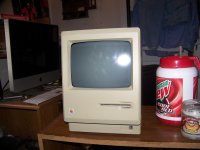
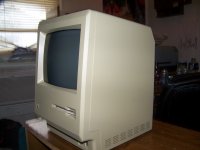

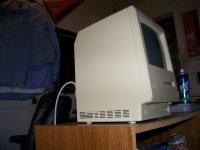
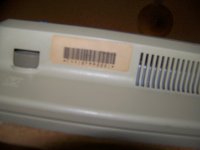
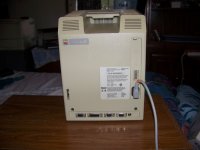
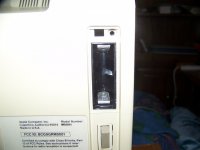
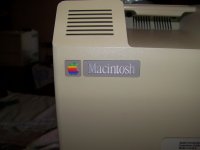
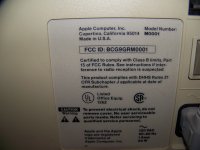
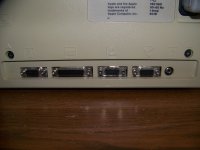
The inside has been periodically blown out, so it has been opened before; but I do honestly think it's gotten more yellowed in the roughly two and a half weeks since I've purchased the 128k xx( (got it on Craigslist for Chattanooga, TN for $25, which is an absolute steal compared to eBay's super-inflated prices.
Thanks for looking and have a great day!
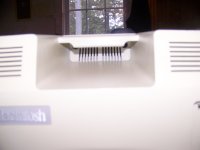
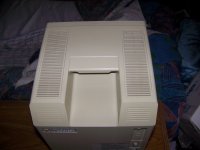
Thanks for looking and have a great day!
OK, now that I have shown the pictures and given the information, how can it be that I have a 128k that was bought after the 512k was released (October 7th was the week my 128k was produced but the 512k was made starting on September 10th). How can it be that I have an evenly yellowed (so therefore there has been no rear bucket case swap) and the logic board matches the description of it as a pre-512k Macintosh. So now, what can I do about how I have an original Macintosh 1 month seemingly too late? How did this happen? It supposedly should be a post-512k 128k, but the rear bucket, front serial number, internal logic board all match up to be an original Macintosh.
Once again, did I get a "using up the last of the old parts" Macintosh or is something else the case? Explanations on this second question would be so greatly appreciated (since I may have a way to fix my original issue...)
Once again, did I get a "using up the last of the old parts" Macintosh or is something else the case? Explanations on this second question would be so greatly appreciated (since I may have a way to fix my original issue...)
This post is mind-numbing. Your question is not clear, but I think you are asking why does the rear bucket label only say "Macintosh" when it was manufactured a month after the 512K was released? Is that about right? In which case if you check the M0001 Registry, you'll find the 128K labels do not appear until well after the 512K was released. The label did not change overnight, the exact reasons are unknown. It could well be that the Mac was selling poorly at that point and they decided not to throw out their stock of bucket labels and print new ones to save money. It's also possible given their tight supply chain that Jobs simply made the decision that the label not change on the original 128K, and only when he got distracted with internal control of the company, did marketing make the decision To revise the label because there may have been confusion in the market place. Regardless, it is perfectly normal for a 128K Mac to have the original label through the end of 1984 and even later.
The one picture you did not post or make clear is that of the logic board. If it is an original single part number 630-0101 (not the dual hybrid 630-0101/630-0118), there are a number of explanations for this, the least of which is they exhausted their supply of the original board stock prior to assembling 128K boards from the limited supply of initial 512K boards which would have been dedicated to getting the highly awaited 512K Macs out the door. Another explanation could be that the board was swapped at some point since the hybrid boards were much easier to upgrade to 512K.
So no real mystery here.
The one picture you did not post or make clear is that of the logic board. If it is an original single part number 630-0101 (not the dual hybrid 630-0101/630-0118), there are a number of explanations for this, the least of which is they exhausted their supply of the original board stock prior to assembling 128K boards from the limited supply of initial 512K boards which would have been dedicated to getting the highly awaited 512K Macs out the door. Another explanation could be that the board was swapped at some point since the hybrid boards were much easier to upgrade to 512K.
So no real mystery here.
Bless you kind sir for correctly deciphering my second question! The part number does indeed check out as the original 128k board and I had no idea that my guess was so correct! All I had before was a guess, now I have expert information. Thank you again for deciphering my question in the way I was trying to ask it-I just didn't know it took "THAT" long to start producing 128k/512k hybrid boards, rear buckets, and serial numbers. I appreciate you so much enlightening me that my guess was correct!
God bless you and have an EXCELLENT day for living up to your well-earned name!
Alex Harris
God bless you and have an EXCELLENT day for living up to your well-earned name!
Alex Harris
While we're at it, I wanted to inform everybody that I had an old Apple II "MousePaint" mouse and it hooked up to the 128k and did everything I could get it to do with the horizontal deflection issue (which primarily is ejecting the boot floppy I bought for it.) I have not noticed any problems from using the Apple II MousePaint mouse, and wanted to know if it could be a usable backup mouse or if it would permanently injure the 128k to use it like a 5.25" floppy would.
I am curious to know if anyone else who has a M0001 model Mac (original Macintosh, 128k, 512k, 512ke, Plus, or some combination thereof with all the degrees of upgrading that were possible) have used a MousePaint Apple II mouse with their Macintosh and if so, was there any difference between it and a Lisa mouse or a standard M0001 Mac mouse? I will buy an official keyboard and mouse once I get the screen issue fixed, but in the meantime want to be able to test the machine as effectively as possible.
Final portion: The MousePaint mouse came to me missing its mouse ball and locking ring, but I had a very early Apple Desktop Bus Mouse I and it had the proper size mouse ball and proper size locking ring. As I had tons of others, losing this one wasn't too big a deal, especially to revive an Apple II MousePaint mouse.
(And yes, it does have the beige color of the Apple IIe/IIe Enhanced but with a beige mouse button instead of dark grey, which Google spat back was an Apple II MousePaint mouse...
Thanks everybody and have a blessed day!
Alex Harris
I am curious to know if anyone else who has a M0001 model Mac (original Macintosh, 128k, 512k, 512ke, Plus, or some combination thereof with all the degrees of upgrading that were possible) have used a MousePaint Apple II mouse with their Macintosh and if so, was there any difference between it and a Lisa mouse or a standard M0001 Mac mouse? I will buy an official keyboard and mouse once I get the screen issue fixed, but in the meantime want to be able to test the machine as effectively as possible.
Final portion: The MousePaint mouse came to me missing its mouse ball and locking ring, but I had a very early Apple Desktop Bus Mouse I and it had the proper size mouse ball and proper size locking ring. As I had tons of others, losing this one wasn't too big a deal, especially to revive an Apple II MousePaint mouse.
(And yes, it does have the beige color of the Apple IIe/IIe Enhanced but with a beige mouse button instead of dark grey, which Google spat back was an Apple II MousePaint mouse...
Thanks everybody and have a blessed day!
Alex Harris
QuicksilverMac2001, try using the search function. Many of these questions have been covered by this forums knowledgeable members.
viewtopic.php?f=16&t=3551&p=38461&hilit=Applemouse
viewtopic.php?f=6&t=975&start=0&hilit=Applemouse
viewtopic.php?f=16&t=3551&p=38461&hilit=Applemouse
viewtopic.php?f=6&t=975&start=0&hilit=Applemouse
God helped me find someone with soldering skills in my neck of the woods, and who would do it for an excellent price. $25 for the 128k and $55.99 for the repair since you nice folks had helped me successfully diagnose the causes of the issue (both the C1 and opposite side of the adjustment next to C1 capacitors AND the yoke connector solder joints were bad it turns out. Got them fixed, got the 128k buttoned back up properly (the person doing the soldering didn't put the digital board back in place properly and I had to reseat the analog board after reseating the digital board), and it works as well as it can without a keyboard or mouse (I'm hoping I don't have to pay inflated eBay prices for the proper 128K/512K/512Ke keyboard and mouse; if anyone could sell me a Pantone 453 128K/512K/512Ke keyboard with proper cable and mouse for less than $150 I could get that as a Christmas present [don't mean to offend anyone; we are believers in my house.])
Since it didn't let me attach the video, I have 3 photos captured from the video:
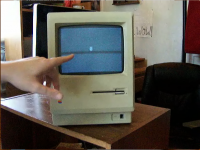
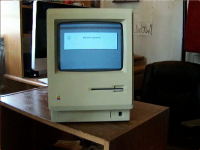
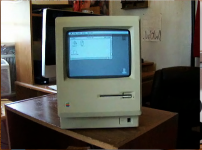
Again, for those who are critical of 128k units from eBay for ridiculous prices, this is anything but that, being a 128k sourced from Craigslist for Chattanooga (my home town) for $25 that was sold by someone who was downsizing their living accommodations due to the recession and repaired locally for $55, so it is definitely different.)
I really wanted to share my good fortune with you guys since you helped me get it running for an acceptable price, and also since I would like to see if anyone can offer a period keyboard and mouse for $150 for a Christmas gift!
Blessings most,
QuicksilverMac2001 (Alexander Harris)
Since it didn't let me attach the video, I have 3 photos captured from the video:
Again, for those who are critical of 128k units from eBay for ridiculous prices, this is anything but that, being a 128k sourced from Craigslist for Chattanooga (my home town) for $25 that was sold by someone who was downsizing their living accommodations due to the recession and repaired locally for $55, so it is definitely different.)
I really wanted to share my good fortune with you guys since you helped me get it running for an acceptable price, and also since I would like to see if anyone can offer a period keyboard and mouse for $150 for a Christmas gift!
Blessings most,
QuicksilverMac2001 (Alexander Harris)
How much exercise should a Mac 128k be given before it would be considered over-stressed? I want to use the 128k, but also don't want to stress it out and have to pay for un-necessary repairs?
I just thought some of the brilliant minds on here might be able to answer that question based on their 128k usage.
Blessings most,
Alexander Harris (QuicksilverMac2001)
I just thought some of the brilliant minds on here might be able to answer that question based on their 128k usage.
Blessings most,
Alexander Harris (QuicksilverMac2001)
Don't worry about over-stressing the Mac. It's old, and it's probably been unused for a long time, so it wouldn't be a surprise if another capacitor gave out, but using it won't shorten its life noticeably more than leaving it turned off. It's not useful for current work, so you won't be running it 24/7 anyway. My much-abused and hot-rodded original Mac is still in use a couple of hours a week and hasn't worn out yet, though it's needed that yoke connector and the flyback transformer and C1 resoldered where heat cycling cracked the original solder. A cooling fan like a Fanny Mac or a System Saver is a good idea.
As for the Apple II mouse, if the plug on the mouse fits the mouse jack on the back of the Mac, it's OK. They were identical except for color, and the Apple II versions were several colors, not all the "one official color scheme" listed on a certain well-known Apple website. You can't believe everything you read on the internet. Your Mac is exactly what you thought it was in your first post. Good price, and a good save of a classic Mac!
As for the Apple II mouse, if the plug on the mouse fits the mouse jack on the back of the Mac, it's OK. They were identical except for color, and the Apple II versions were several colors, not all the "one official color scheme" listed on a certain well-known Apple website. You can't believe everything you read on the internet. Your Mac is exactly what you thought it was in your first post. Good price, and a good save of a classic Mac!
My 128k, once I got it running, has been running almost perfectly for almost 9 months now. I have gotten peripherals for it (a M0110 keyboard with a separate cable, M0100 mouse-a Platinum example, but with matching holder, I haven't seen any more of those), a PRAM battery, a pair of OS floppies with System 1.1 Finder 1.1g and System 2.0 Finder 4.1, with the applications MacWrite, MacPaint, and TeachText that came on the System 1.1 Finder 1.1g floppy, and MacDraw that came on the System 2.0 Finder 4.1 floppy. I got a copy of Macintosh Repair and Upgrade Secrets-with the Test Pattern Generator floppy disk, an Apple carrying case, an ImageWriter original with manual, 2 ribbons, and with a separate cable; and I just got a deal on an official Apple external 400k floppy drive.
I sure do love what the 128k with what all I have for it can do, I am looking forward to it doing even more with the external floppy drive, but I don't understand why I can't drag the floppy in the internal floppy drive (which is right now my only drive) to the Trash. Is that a feature introduced in an OS beyond what a stock 128k can run? I thought I remembered hearing that the 128k could do the drag floppies to the Trash and it will eject the floppy perfectly.
Do I need dual floppy drives for that? I couldn't find a satisfactory explanation, but I can't see the forest for the trees pretty much ever.
I will post updated pictures once the floppy drive is here and working.
I sure do love what the 128k with what all I have for it can do, I am looking forward to it doing even more with the external floppy drive, but I don't understand why I can't drag the floppy in the internal floppy drive (which is right now my only drive) to the Trash. Is that a feature introduced in an OS beyond what a stock 128k can run? I thought I remembered hearing that the 128k could do the drag floppies to the Trash and it will eject the floppy perfectly.
Do I need dual floppy drives for that? I couldn't find a satisfactory explanation, but I can't see the forest for the trees pretty much ever.
I will post updated pictures once the floppy drive is here and working.