
Thread
Pismo Airport WPA issues
Hey guys
So I have this problem, I have a G4 500Mhz Pismo, running 10.4.11. When ever I try connecting to the wifi at home it will report I have entered the wrong password, which I know isn't the case. I've run the latest update 10.4.11 combo, which I understand fixes this problem. But it's not done anything for me. The airport card works fine with WPA encryption on my GF's router, so i know WPA works on this laptop. But when I try using it at home on my own router, for some reason it will not connect. I've tried setting it to WPA TKIP or WPA auto, it used to work before we had our broadband upgraded. Which involved our router/modem being replaced with a new model. In the past on the Superhub v1, I just had to disable WPS and the Pismo would log in without a problem. But this new unit seems different, its setup for WPA encryption with WPS disabled, but still the Pismo tells me I'm entering the wrong password.
Now I realise this is a long shot, as it is unlikey anyone on here will be using the same router/modem as me, but I thought there might be a possibility that someone has had WPA issues with their Pismo.
I've tried wiping the keychains, manually creating a connection in preferences and telling OSx to connect to the preferred network, but nothing works.
If anyone has any thoughts, I'd love to hear them. I'm reaching the point where I've exhausted all my options and I'm thinking the only solution will be to replace the router.
So I have this problem, I have a G4 500Mhz Pismo, running 10.4.11. When ever I try connecting to the wifi at home it will report I have entered the wrong password, which I know isn't the case. I've run the latest update 10.4.11 combo, which I understand fixes this problem. But it's not done anything for me. The airport card works fine with WPA encryption on my GF's router, so i know WPA works on this laptop. But when I try using it at home on my own router, for some reason it will not connect. I've tried setting it to WPA TKIP or WPA auto, it used to work before we had our broadband upgraded. Which involved our router/modem being replaced with a new model. In the past on the Superhub v1, I just had to disable WPS and the Pismo would log in without a problem. But this new unit seems different, its setup for WPA encryption with WPS disabled, but still the Pismo tells me I'm entering the wrong password.
Now I realise this is a long shot, as it is unlikey anyone on here will be using the same router/modem as me, but I thought there might be a possibility that someone has had WPA issues with their Pismo.
I've tried wiping the keychains, manually creating a connection in preferences and telling OSx to connect to the preferred network, but nothing works.
If anyone has any thoughts, I'd love to hear them. I'm reaching the point where I've exhausted all my options and I'm thinking the only solution will be to replace the router.
No, it is definitely WPA as I know the old airport cards only support that and WEP.
I've had the Superhub's wifi set to WPA-Auto and WPA-PSK but neither seem to actually get me online. I had issue with the model of hub before, but i discovered it was the WPS feature. After it was disabled the Pismo went on fine. When we got the new Superhub2, i went in and disabled the WPS first thing. But it's only now that I've tried using my Pismo.
I've had the Superhub's wifi set to WPA-Auto and WPA-PSK but neither seem to actually get me online. I had issue with the model of hub before, but i discovered it was the WPS feature. After it was disabled the Pismo went on fine. When we got the new Superhub2, i went in and disabled the WPS first thing. But it's only now that I've tried using my Pismo.
Is your router set up exactly like your GF's in every single itty bitty detail?
You have the router wireless set to accommodate 802.11b?
You have the correct wireless channel set?
My Pismo will not/cannot configure the gen 5 & later Apple base stations.
Incidentally the Apple AirPort card will do WPA2 Personal with anything later than OS X 10.2.8.
You have the router wireless set to accommodate 802.11b?
You have the correct wireless channel set?
My Pismo will not/cannot configure the gen 5 & later Apple base stations.
Incidentally the Apple AirPort card will do WPA2 Personal with anything later than OS X 10.2.8.
The two routers are different, because my gf is on ADSL and at home we are on 100mb broadband. Her router is pretty basic, but both the Pismo and my G4 Ibook work like a charm. Up until upgrading to 100mb, we had a Superhub v1, but because we upgraded, they had to give us a gigabit router / modem. It looks physically identically to the old one and the software looks the same to, with the exception that they've removed WEP from the list of encryptions. The access points have different names, but encryption wise they are both set up to use WPA. Specifically so the older machines will continue to work.
The Superhub will let me setup guest hotspots, so I've even setup an unsecure hotspot for test purposes. As one would imagine, the Pismo locked on straight away with no issue. But as soon as I set the hotspot to WPA-PSK or WPA-Auto, it would stop working.
I'm not using an Apple Base station, but that doesn't mean that the new modem they have given me is some how incompatible with the Pismo. Though I have other old windows machines that use WPA and seem to work fine with our WIFI.
My Airport card is using Firmware 9.52, I dont know if that is the latest for this card. I had noticed that WPA2 was listed but I just assumed OS X was listing me all the encryptions, not necesseraly what my laptop could do. Thanks for the tip, up until now everything I'd read, led me to think the original airport cards only supported WEP and WPA.
The Superhub will let me setup guest hotspots, so I've even setup an unsecure hotspot for test purposes. As one would imagine, the Pismo locked on straight away with no issue. But as soon as I set the hotspot to WPA-PSK or WPA-Auto, it would stop working.
I'm not using an Apple Base station, but that doesn't mean that the new modem they have given me is some how incompatible with the Pismo. Though I have other old windows machines that use WPA and seem to work fine with our WIFI.
My Airport card is using Firmware 9.52, I dont know if that is the latest for this card. I had noticed that WPA2 was listed but I just assumed OS X was listing me all the encryptions, not necesseraly what my laptop could do. Thanks for the tip, up until now everything I'd read, led me to think the original airport cards only supported WEP and WPA.
Hi,
i'm using a D-Link USB 2.0 Cardbus Card and an Edimax WLAN Nano Stick with my Pismo (OS X 10.4) with WPA2 etc. (bought them from Ama***):
http://www.edimax.com/edimax/merchandise/merchandise_detail/data/edimax/global/wireless_adapters_n150/ew-7811un
http://www.dlink.com/-/media/Consumer_Products/DUB/DUB%20C2/Datasheet/DUB_C2_Datasheet_EN_UK.pdf
Driver Edimax (OS X 10.4):
http://www.edimax.ru/images/Image/Driver_Utility/Wireless/NIC/EW-7811Un/7811Un_MacOS10.4.X_Driver_1003_UI_1.7.9.zip
For OS X 10.3 and 10.4 no driver is needed for the D-Link USB 2.0 card.
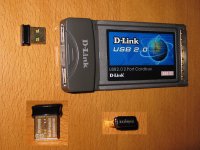
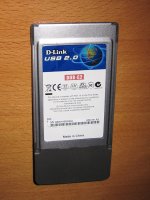
i'm using a D-Link USB 2.0 Cardbus Card and an Edimax WLAN Nano Stick with my Pismo (OS X 10.4) with WPA2 etc. (bought them from Ama***):
http://www.edimax.com/edimax/merchandise/merchandise_detail/data/edimax/global/wireless_adapters_n150/ew-7811un
http://www.dlink.com/-/media/Consumer_Products/DUB/DUB%20C2/Datasheet/DUB_C2_Datasheet_EN_UK.pdf
Driver Edimax (OS X 10.4):
http://www.edimax.ru/images/Image/Driver_Utility/Wireless/NIC/EW-7811Un/7811Un_MacOS10.4.X_Driver_1003_UI_1.7.9.zip
For OS X 10.3 and 10.4 no driver is needed for the D-Link USB 2.0 card.

Could you possibly post some info on your airport card?
As all the sources i have read, say it only supports upto WPA-TKIP, there are even some threads on 68kmla, with users encountering the same issues as me.
Here is a thread on the apple site, which mirrors a lot of other sites online.
https://discussions.apple.com/thread/1353596?tstart=0
If there is way to get WPA2 out of the original Airport card, i'd love to hear about it
As all the sources i have read, say it only supports upto WPA-TKIP, there are even some threads on 68kmla, with users encountering the same issues as me.
Here is a thread on the apple site, which mirrors a lot of other sites online.
https://discussions.apple.com/thread/1353596?tstart=0
If there is way to get WPA2 out of the original Airport card, i'd love to hear about it
UPDATE
After working on this a little further, I've concluded the Virgin Media Superhub2 and the airport card simply aren't going to talk to one another. Not while ever WPA security is enabled. Seeing as the Superhub2 allows me to setup more then one hotspot, I have now setup a secondary access point, with a hidden SSID and MAC filtering. So far everything is working fine, though I would have liked some level of encryption.
One alternative is to put the Superhub2 in modem mode and hook a more capable router up to it. That way eliminating this huge faff I've been having.
The joys of keeping all tech working!
After working on this a little further, I've concluded the Virgin Media Superhub2 and the airport card simply aren't going to talk to one another. Not while ever WPA security is enabled. Seeing as the Superhub2 allows me to setup more then one hotspot, I have now setup a secondary access point, with a hidden SSID and MAC filtering. So far everything is working fine, though I would have liked some level of encryption.
One alternative is to put the Superhub2 in modem mode and hook a more capable router up to it. That way eliminating this huge faff I've been having.
The joys of keeping all tech working!
:I :I :I :'( Oh, dear. I was so very certain the AirPort card supports WPA2. I was also so very WRONG.
WPA it is for setting up/administering the network. It will, however, join some WPA2 Personal networks.
The screenshot is from the G4 desktop/non-AirPort wireless I use to administer the network. The Pismo joins this network but the AirPort Admin Utility there shows only WPA and it cannot access the base station even with the correct password.
Mea culpa.
AichEss
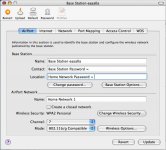
WPA it is for setting up/administering the network. It will, however, join some WPA2 Personal networks.
The screenshot is from the G4 desktop/non-AirPort wireless I use to administer the network. The Pismo joins this network but the AirPort Admin Utility there shows only WPA and it cannot access the base station even with the correct password.
Mea culpa.
AichEss
I know that is an option, but I don't really want something poking out the side of the PCMCIA slot. It's finicky I know, but I'd be worried about snapping it off or damaging it. At the moment I have a second, hidden hotspot, using mac filtering. It only has the Pismo's mac address stored, so thats the only machine that can get online.
The combo 10.4.11 update does that, once installed it will allow WPA but not WPA2 on the original Airport card. Some of the research I've done over the past month, seems to suggest that the original Airport cards are also very picky when it comes to none Apple routers. Apparently some of them handle wifi encryption in a way that the cards dont like. Which can lead to problems like I've been having.
The only solutions are see for Powerbook owners are
A. Go USB and reap the benefits of the extra ports and the WPA2 encryption, thus bringing your machine inline with more modern tech in the house.
B. If keeping your machine original is important to you, find a router that is backwards compatible, that will support WPA encryption in a way that works with your existing Airport cards. Alternatively, use MAC filtering with a hidden hotspot, but be aware that a resourceful nerd can still clone your MAC address and gain access to your network if they have a mind to do so. I keep a close eye on my router and the connected IP addresses, just in case.
The only solutions are see for Powerbook owners are
A. Go USB and reap the benefits of the extra ports and the WPA2 encryption, thus bringing your machine inline with more modern tech in the house.
B. If keeping your machine original is important to you, find a router that is backwards compatible, that will support WPA encryption in a way that works with your existing Airport cards. Alternatively, use MAC filtering with a hidden hotspot, but be aware that a resourceful nerd can still clone your MAC address and gain access to your network if they have a mind to do so. I keep a close eye on my router and the connected IP addresses, just in case.