Thread
Conquest Two: PowerBook G3 (Pismo)
And Pismo makes Two.
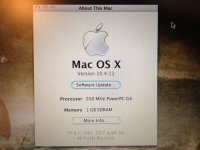
This is the second conquest in the series, first being the iPod minis I picked up last week. I found this on eBay listed as "For Parts or Not Working" and purchased it with the hope of repairing it.
Apple PowerBook (FireWire)
400MHz PowerPC G3 Processor
320MB RAM (256 + 64)
30GB HDD
ATI Rage Mobility 128 8MB
DVD-ROM Drive
Mac OS X Tiger 10.4.4

(Click to Enlarge)
To my surprise, it also came with an Apple "Yoyo" 45w Power Adapter despite the auction specifically stating it wouldn't be included. No power on situation, spent the morning stripping it down, reseating the Sound/DC Board, reseated the processor, reseated the power supply board and disconnected the PRAM battery (computer won't boot with it connected) and it started up just fine. Took the opportunity to tighten up all the screws and stiffen the body a little while I had it apart.
Overall condition is quite good, some small scuffs and it needs some rubber feet, but it's in otherwise great shape. Will hopefully be able to upgrade it to a 40GB HDD with 512MB RAM depending on density, and i'll be installing an AirPort card as well. Ideally i'll have it running a combination of Mac OS 9.2 and Mac OS X Panther.
Best of all, the inclusion of the Power Adapter now allows me to power up and repair my Wallstreet G3 as well.
Should be a fun little machine. Looking forward to using it.
This is the second conquest in the series, first being the iPod minis I picked up last week. I found this on eBay listed as "For Parts or Not Working" and purchased it with the hope of repairing it.
Apple PowerBook (FireWire)
400MHz PowerPC G3 Processor
320MB RAM (256 + 64)
30GB HDD
ATI Rage Mobility 128 8MB
DVD-ROM Drive
Mac OS X Tiger 10.4.4

(Click to Enlarge)
To my surprise, it also came with an Apple "Yoyo" 45w Power Adapter despite the auction specifically stating it wouldn't be included. No power on situation, spent the morning stripping it down, reseating the Sound/DC Board, reseated the processor, reseated the power supply board and disconnected the PRAM battery (computer won't boot with it connected) and it started up just fine. Took the opportunity to tighten up all the screws and stiffen the body a little while I had it apart.
Overall condition is quite good, some small scuffs and it needs some rubber feet, but it's in otherwise great shape. Will hopefully be able to upgrade it to a 40GB HDD with 512MB RAM depending on density, and i'll be installing an AirPort card as well. Ideally i'll have it running a combination of Mac OS 9.2 and Mac OS X Panther.
Best of all, the inclusion of the Power Adapter now allows me to power up and repair my Wallstreet G3 as well.
Should be a fun little machine. Looking forward to using it.
The Pismo should do 1GB RAM (512mb x 2) so RAM density should not be a problem (unlike the Wallstreet).
It is funny sometimes what you expect to recieve in a listing and what actually shows up. I am a member of the Thinkpad forum (forum.thinkpad.com) were a member was ditching a few machines for parts/repairs just for shipping else they get recycled. His listing stated no HD's, might be dead, etc but I wanted an A22M he had so I snagged it. The unit arrived in very good shape other then a keyboard that needed major cleaning. It had a speedy 40GB HD installed (empty), 2 x 256MB PC100 (hard to find low density SODIMM), had 3 OEM A20M restore CDs for NT4/Win2k/Win98, original power brick, and the screen was the better 15" 1400x1050 TFT with no flaws. Not bad for $11 shipping and it works just fine and looks almost new when cleaned up. I did have to replace the main battery as it will not charge and I replaced the keyboard from a parts machine (too lazy to clean the original) but otherwise it was all good (CMOS battery was still good). Now you can compre this to what you find on ebay being in "good condition" and when you get it it looks like a truck ran over it and will not boot.
Sometimes you get lucky.
It is funny sometimes what you expect to recieve in a listing and what actually shows up. I am a member of the Thinkpad forum (forum.thinkpad.com) were a member was ditching a few machines for parts/repairs just for shipping else they get recycled. His listing stated no HD's, might be dead, etc but I wanted an A22M he had so I snagged it. The unit arrived in very good shape other then a keyboard that needed major cleaning. It had a speedy 40GB HD installed (empty), 2 x 256MB PC100 (hard to find low density SODIMM), had 3 OEM A20M restore CDs for NT4/Win2k/Win98, original power brick, and the screen was the better 15" 1400x1050 TFT with no flaws. Not bad for $11 shipping and it works just fine and looks almost new when cleaned up. I did have to replace the main battery as it will not charge and I replaced the keyboard from a parts machine (too lazy to clean the original) but otherwise it was all good (CMOS battery was still good). Now you can compre this to what you find on ebay being in "good condition" and when you get it it looks like a truck ran over it and will not boot.
Sometimes you get lucky.
Cheers, had a bit of an intermittent boot issue, sometimes it would boot, sometimes it wouldn't and would just beep 4 times (Bad ROM Checksum). Some contact cleaner across the CPU card connector seems to have cleared that right up. Running like a dream now, but still subject to improvements. Will be installing the AirPort card soon, along with the added RAM and the bigger/better HDD, need to adjust the focus pot on the DVD-ROM drive and fix one of the tabs that locks the keyboard into the body as well as it's come loose. I'll seek out some replacement black rubber feet soon as well. Already replaced the thermal compound on the CPU as the old stuff wasn't transferring heat well.
Battery is completely dead, may have to try and re-cell it later on for added mobility.
Battery is completely dead, may have to try and re-cell it later on for added mobility.
Couple of points:
1. Where can black rubber feet best be found? I resorted to using little dots of "plumbers' goop" on mine, because I couldn't buy anything like the proper part for less than a king's ransom.
2. Pismo batteries, on the other hand, seem to be available new for $40-50-ish on eBay these days, which is about as cheap as it gets. Unlike Wallstreet batteries, which can be cussedly finicky, the Pismo's seem to be blessedly robust. I'd recommend ordering one of the $40-50 ones if you've money to spend.
Having said #2, mind you, I recently took the cells from a Wallstreet battery, cut away the number needed (the Wallstreet has more cells), and popped them in a Pismo battery case. Almost no soldering was required, except for the relatively small matter of reconnecting the wiring to the circuitry. Works perfectly. You could probably do the same with most any LiIon battery pack of recent vintage if you have access to a spare.
1. Where can black rubber feet best be found? I resorted to using little dots of "plumbers' goop" on mine, because I couldn't buy anything like the proper part for less than a king's ransom.
2. Pismo batteries, on the other hand, seem to be available new for $40-50-ish on eBay these days, which is about as cheap as it gets. Unlike Wallstreet batteries, which can be cussedly finicky, the Pismo's seem to be blessedly robust. I'd recommend ordering one of the $40-50 ones if you've money to spend.
Having said #2, mind you, I recently took the cells from a Wallstreet battery, cut away the number needed (the Wallstreet has more cells), and popped them in a Pismo battery case. Almost no soldering was required, except for the relatively small matter of reconnecting the wiring to the circuitry. Works perfectly. You could probably do the same with most any LiIon battery pack of recent vintage if you have access to a spare.
Couldn't repair the optical drive, it never seems to be able to seek the data on the disc. Will need to find a replacement Pismo optical drive as my current solution (an Intel iMac slot loader drive) leaves a nice opening in the side of the case that i'm not particularly fond of.
Also seems to be finicky still. No boot, I push power, the Caps Lock light comes on, but that's it. If I remove the Processor and reseat it, the machine boots. Has worked every time so far. May need to get a can of CRC and clean the contacts on the processor, or would the fact it has no PRAM battery contribute to this problem?
Also seems to be finicky still. No boot, I push power, the Caps Lock light comes on, but that's it. If I remove the Processor and reseat it, the machine boots. Has worked every time so far. May need to get a can of CRC and clean the contacts on the processor, or would the fact it has no PRAM battery contribute to this problem?
No the Pismo works fine with the PRAM battery disconnected, obviously with no time saved/other PRAM settings. I've found that plugging the PRAM connector back in while the machine is powered up can "jumpstart" it again and it'll charge up, so you can use it normally without having to unplug.
I recently fixed a PB Ti 667Mhz which had the 3 - 4 flashing LED/beeps at startup, by cleaning the RAM contacts with electronic cleaning solvent spray. It only ever used to start up 1 out of 20 times before this repair. So I'd suggest going over the CPU daughtercard contacts, and motherboard with similar stuff, and checking for any damage. If you push down hard on the CPU, does it boot then? That's been my way of diagnosing many a dodgy PC/Mac laptop - the old "press or bend here firmly" can bring many flaky machines back to life, for a moment.
JB
Pressing down doesn't do it, but a full reseat does. Still not sure as to why that is though.
Has to be said, on a sidenote, i'm quite liking this Slot Load drive in the Pismo... may have to mod up a faceplate for it. In the mean time, still need to find a Lombard/Pismo optical drive, CD or DVD, doesn't matter it just needs to be compatible.
Has to be said, on a sidenote, i'm quite liking this Slot Load drive in the Pismo... may have to mod up a faceplate for it. In the mean time, still need to find a Lombard/Pismo optical drive, CD or DVD, doesn't matter it just needs to be compatible.
Most tray loading drives seem to work in a Pismo. I have a few dead pismo drives come through my hands, and I was lucky enough to have a few parts PC laptops. I took the optical drives, popped them into the pismo cage, put them in, and they worked great!
Some drives do not function at full capacity (i.e. Quanta DVD/CDRW Combo only worked as a DVD/CD drive, no RW). The DVDRW and other combo drives seemed to work fine. Most of the time the existing faceplate works but is ugly.
Note, I have not put the pismo faceplate on any of the drives I have. I just leave them as is.
Some drives do not function at full capacity (i.e. Quanta DVD/CDRW Combo only worked as a DVD/CD drive, no RW). The DVDRW and other combo drives seemed to work fine. Most of the time the existing faceplate works but is ugly.
Note, I have not put the pismo faceplate on any of the drives I have. I just leave them as is.
You'll probably have to find a drive from about the same era, I'm guessing it'll most likely be a Matsushita (Panasonic). Whether that faceplate will fit newer drives of the same vendor I don't know...a few months back I gave a Matsushita DVD drive (pulled from a dead Acer TravelMate) to a mate with a Lombard. The drive works just perfectly, and can even burn CDs and DVDs after he ran Patchburn on it, but despite both it and the original Lombard drive both being Matsushita drives, the faceplate still doesn't fit.
You can rather use a modern one, here is a link to a Toshiba SD-R6472 DVD and burner connected to a pismo, the original faceplate was even reused.
http://www.sterpin.net/uk/dvd8pismouk.htm
No huge modifications needed (small welding done to force it to master -pins 45 and 47) good use of patchburn to get it supported and some glue for the finish pismo look. :approve:
I've finally had a chance to sit down with the PowerBook G3 again. Both Mac OS X Panther and Mac OS 9.2 are running from the primary partition, although i'm considering a repartition of the HDD to allow for fast multi-booting on startup as the Startup Disk control panel is becoming tedious.
At the moment though, i'm spending time getting reacquainted with Mac OS 9. Specifically iTunes 2. I've copied a few hundred of my tracks to the PowerBook and must say that these old machines have seriously good audio circuitry. Using a set of external earbuds connected to the G3 outperforms the sound quality coming out of the MacBook with the same set of earbuds. The sound is clearer at the top end, with minimal distortion. The low end is deeper with more presence. It's almost like i'm hearing the entire waveform, not just the samples that make it through the modern Intel DSP, it's a real treat to the senses.
It becomes more and more apparent that this purchase was a good one.
I almost remember why I became interested in Apple machines to begin with. Over the years i've lost a lot of the look and feel I came to love as the computer becomes less of a passion, a joy to use, and rather a tool that only ever seems to do very little towards enjoyment of user experience. My iMac G3 had it, and this Pismo has it.

Keep in mind folks that I will be looking to purchase a genuine PowerBook G3 Pismo optical drive module at some point. The idea of modifying another slot load drive is tempting, but i'd rather keep the machine as clean and genuine as possible. The slot load Pioneer drive in there currently (from an iMac Core Duo) works, and I like the slot load mechanism, but the face plate is the big issue.
For those interested in current specs, it still has the 400MHz G3 Processor and the ATI Rage Mobility 128. Memory is 512MB in a 256 + 256 configuration. Hard Drive is a 40GB Toshiba as the old 30GB Hitachi was making some awful clicking sounds during use. It's been completely stripped down, cards and connectors reseated, components cleaned. Thermal paste renewed (used Apple Genuine ShinEtsu MicroSi compound). Battery is toast, as in it charges but only lasts about 10 seconds off the battery, but i'll replace it or re-cell it soon. LCD hinges are good, a small amount of play (although it feels like loose screws rather than a bad clutch), so I may open it up, tighten the screws and regrease the assembly soon as well.
At the moment though, i'm spending time getting reacquainted with Mac OS 9. Specifically iTunes 2. I've copied a few hundred of my tracks to the PowerBook and must say that these old machines have seriously good audio circuitry. Using a set of external earbuds connected to the G3 outperforms the sound quality coming out of the MacBook with the same set of earbuds. The sound is clearer at the top end, with minimal distortion. The low end is deeper with more presence. It's almost like i'm hearing the entire waveform, not just the samples that make it through the modern Intel DSP, it's a real treat to the senses.
It becomes more and more apparent that this purchase was a good one.
I almost remember why I became interested in Apple machines to begin with. Over the years i've lost a lot of the look and feel I came to love as the computer becomes less of a passion, a joy to use, and rather a tool that only ever seems to do very little towards enjoyment of user experience. My iMac G3 had it, and this Pismo has it.

Keep in mind folks that I will be looking to purchase a genuine PowerBook G3 Pismo optical drive module at some point. The idea of modifying another slot load drive is tempting, but i'd rather keep the machine as clean and genuine as possible. The slot load Pioneer drive in there currently (from an iMac Core Duo) works, and I like the slot load mechanism, but the face plate is the big issue.
For those interested in current specs, it still has the 400MHz G3 Processor and the ATI Rage Mobility 128. Memory is 512MB in a 256 + 256 configuration. Hard Drive is a 40GB Toshiba as the old 30GB Hitachi was making some awful clicking sounds during use. It's been completely stripped down, cards and connectors reseated, components cleaned. Thermal paste renewed (used Apple Genuine ShinEtsu MicroSi compound). Battery is toast, as in it charges but only lasts about 10 seconds off the battery, but i'll replace it or re-cell it soon. LCD hinges are good, a small amount of play (although it feels like loose screws rather than a bad clutch), so I may open it up, tighten the screws and regrease the assembly soon as well.
What kind of Wallstreet is that? I or II? Mine is a II 300mhz. With the 1mb cache it flys under 9, only feeling its age if I try to do iMovie/Qtime Pro or something intense like that. I'm eager for my RAM to arrive; however, mine also has a dead drive. Once I get a drive though, it will be running MintPPC. It has a bit of screen yellowing, and only in the lower left, which makes it more annoying being in only one spot.
I'm not sure to be honest. 233MHz I believe? 14.4" display. Needs a fair bit of work, no battery, no optical drive, crack in the top case around the PC Card slot, trackpad is no longer adhered to the top case... list goes on. However it does power on and it does boot.
Had to reseat the processor card in the Pismo again. Needs a screw to hold the heatsink down I think, and possibly some CRC Contact Cleaner for the processor socket.
Cory had a great suggestion for the optical drive faceplate issue before in the IRC channel. Throw in a second battery. For some reason that idea had slipped my mind but considering it needs a new battery anyway, it couldn't hurt to keep the second as a means of blanking off the bay where the ODD would normally be (plus I can keep the slot load optical drive for when I actually need it, win/win).
Had to reseat the processor card in the Pismo again. Needs a screw to hold the heatsink down I think, and possibly some CRC Contact Cleaner for the processor socket.
Cory had a great suggestion for the optical drive faceplate issue before in the IRC channel. Throw in a second battery. For some reason that idea had slipped my mind but considering it needs a new battery anyway, it couldn't hurt to keep the second as a means of blanking off the bay where the ODD would normally be (plus I can keep the slot load optical drive for when I actually need it, win/win).
I picked up my battery for $39 shipped. It works great and have been sitting here for near-30 minutes and it's at 94%. It's a 6600mah battery. I think I counted close to 5-6 hours under OS X yesterday from a full charge. I can give you the name of the seller. it works awesomely and would recommend
Cheap enough, and it comes from america and not china. I will see if they ship internationally, or I could get it and re-send it to you if you want!
Cheap enough, and it comes from america and not china. I will see if they ship internationally, or I could get it and re-send it to you if you want!
May have to take you up on the battery offer, but it's a case of when, just been through a house move so I'm a bit strapped for cash at the moment.
Bit if a development, went to test the fan earlier today. Lifted the connector and it just fell apart, wires pulled out of the connector block completely. Fortunately managed to find the same style connector block on the microphone cable of one of my dead iMacs, swapped it with the broken one and it's as good as new, wouldn't even tell it had been repaired.
Also gave the processor connectors a clean with alcohol, refitted the processor to no avail, it still won't power up consistently. I'll reseat it again later and see how it goes.
Bit if a development, went to test the fan earlier today. Lifted the connector and it just fell apart, wires pulled out of the connector block completely. Fortunately managed to find the same style connector block on the microphone cable of one of my dead iMacs, swapped it with the broken one and it's as good as new, wouldn't even tell it had been repaired.
Also gave the processor connectors a clean with alcohol, refitted the processor to no avail, it still won't power up consistently. I'll reseat it again later and see how it goes.
Problem Found. 
My processor card is bent.
I have no idea how it's possible for a card to bend, but it has. Possibly by heat, possibly as a result of the heatsink, it's hard to say. All I know is that the damn card is bent, and it's causing the connection between it and the logic board to be intermittent.
Long story short, unless I can figure out how to straighten a printed circuit board, or I can find a processor card at a relatively cheap price, this Pismo will be nothing more than a show piece, which is a shame considering I would really like to use it. I mean, it still works, and I can get it to boot successfully, but not consistently, and there is a visible curve of the processor daughtercard's printed circuit board (particularly around the CPU connector).
If I intend to replace it, i'll have to order it from the USA which is not always an option.
Failing that, I currently have the CPU under pressure with foam EMI pads between it and the upper heat shield, which is so far giving me a consistent boot. Whether or not it will continue to boot consistently or help the CPU straighten over time is yet to be seen.
EDIT: Still booting... huh. Maybe dodgy repairs aren't that bad after all. Have to see how it plays out after a night of being powered down and started up.
My processor card is bent.
I have no idea how it's possible for a card to bend, but it has. Possibly by heat, possibly as a result of the heatsink, it's hard to say. All I know is that the damn card is bent, and it's causing the connection between it and the logic board to be intermittent.
Long story short, unless I can figure out how to straighten a printed circuit board, or I can find a processor card at a relatively cheap price, this Pismo will be nothing more than a show piece, which is a shame considering I would really like to use it. I mean, it still works, and I can get it to boot successfully, but not consistently, and there is a visible curve of the processor daughtercard's printed circuit board (particularly around the CPU connector).
If I intend to replace it, i'll have to order it from the USA which is not always an option.
Failing that, I currently have the CPU under pressure with foam EMI pads between it and the upper heat shield, which is so far giving me a consistent boot. Whether or not it will continue to boot consistently or help the CPU straighten over time is yet to be seen.
EDIT: Still booting... huh. Maybe dodgy repairs aren't that bad after all. Have to see how it plays out after a night of being powered down and started up.
It shouldn't be difficult to find a replacement CPU. An affordable option may be this $10 + Shipping option. It should only cost about $10 to ship by international letter mail (it cost me $7 to ship some duo RAM to Australia to a fellow 68kmla member).
The replacement 400MHz Processor should be shipping out of New York soon. The PowerBook now fails to power up completely on account of the fact that the system is dependent on having a CPU installed for even the most basic of operations, such as spinning up drives or fans.
Once it arrives, it should work perfectly again.
Once it arrives, it should work perfectly again.
Pismo parts are very plentiful on the 'bay, you can find almost everything you need at a fairly reasonable price.
Tony ZZ on eBay (no relation) has fast shipping, good communication, fair prices. He also has a nice supply of batteries (original Apple ones) that he gives assessment of condition so you can price-match to what you need. I have had good luck with Apple batteries, many of them still hold a charge quite well. Expect to pay at least $30-35 for a battery with decent runtime.
Get that Pismo humming again! They are my daily workhorses, I started buying 'em about a year ago and couldn't stop.
Good luck!
Tony ZZ on eBay (no relation) has fast shipping, good communication, fair prices. He also has a nice supply of batteries (original Apple ones) that he gives assessment of condition so you can price-match to what you need. I have had good luck with Apple batteries, many of them still hold a charge quite well. Expect to pay at least $30-35 for a battery with decent runtime.
Get that Pismo humming again! They are my daily workhorses, I started buying 'em about a year ago and couldn't stop.
Good luck!
It does need a new battery, although it's working sufficiently from AC at the moment. The optical drive is somewhat of a problem, since I swapped in an Intel Mac slot load superdrive it's had no issues reading discs, but has lost most of its factory originality, and the open electronics on the side don't make for a good view. I'd like to get another drive to slot in there, even if it's non-functional and just for the sake of keeping it clean. I can slide in the slot loader if need be for data access.
I dismantled the LCD housing and tested the hinges yesterday. At the hinge they have only 3 to 5 degrees of play, which isn't bad at all. At the top of the LCD this translates to noticeable play in the display assembly, but the clutches are very tight otherwise and can hold the display open with minimal effort. I'm satisfied that they're serviceable, if I can inject some machine oil into them to extend the life before they even begin to wear out then i'll do that before the machine goes back together.
I love the sound hardware in this machine. It could be the placebo effect in play, but the sound hardware almost has a distinct warmth that reaches clear highs and deep, bassy lows, all of which come together to leverage the hardware in the Sennheisers I have connected to it to make music sound noticeably better.
Possibly my only gripe with the machine, albeit a minor one, is how the fit and finish holds up after so many years. It's become a bit creaky, with the odd minor panel gap from its years of use, something that could probably be fixed quite easily with some internal padding or a sealer. However it's not getting any worse and it's arguably one of the better examples out there, so there's fairly little to complain about.
Overall, i'm looking forward to getting the replacement processor. The old one was cooked, but i'm certain that the rest of the machine is working, so it should be an excellent machine when it's complete.
I dismantled the LCD housing and tested the hinges yesterday. At the hinge they have only 3 to 5 degrees of play, which isn't bad at all. At the top of the LCD this translates to noticeable play in the display assembly, but the clutches are very tight otherwise and can hold the display open with minimal effort. I'm satisfied that they're serviceable, if I can inject some machine oil into them to extend the life before they even begin to wear out then i'll do that before the machine goes back together.
I love the sound hardware in this machine. It could be the placebo effect in play, but the sound hardware almost has a distinct warmth that reaches clear highs and deep, bassy lows, all of which come together to leverage the hardware in the Sennheisers I have connected to it to make music sound noticeably better.
Possibly my only gripe with the machine, albeit a minor one, is how the fit and finish holds up after so many years. It's become a bit creaky, with the odd minor panel gap from its years of use, something that could probably be fixed quite easily with some internal padding or a sealer. However it's not getting any worse and it's arguably one of the better examples out there, so there's fairly little to complain about.
Overall, i'm looking forward to getting the replacement processor. The old one was cooked, but i'm certain that the rest of the machine is working, so it should be an excellent machine when it's complete.
I second Tony ZZ's recommendation. I bought a 128MB module, 4.8GB HD, and rubber feet from him for my 333MHz Lombard, and everything arrived well packaged and was quick (probably because I'm 85 miles east of Toledo).
I love my Lombard... I use it for older games and programs my 1.25 Dual MDD tower and 1.42 eMac can't run.
I love my Lombard... I use it for older games and programs my 1.25 Dual MDD tower and 1.42 eMac can't run.
The replacement CPU was lost before it left the supplier. Unfortunately the repair of the PowerBook G3 has been delayed once again. However i've decided to switch sources for the part this time to avoid any repeat occurrences, so hopefully this time around we may actually see some progress.
I understand some members here have offered G3 parts, I haven't forgotten about those offers, I chose to purchase one from eBay as i'd ordered the part during the time when I couldn't post here.
I understand some members here have offered G3 parts, I haven't forgotten about those offers, I chose to purchase one from eBay as i'd ordered the part during the time when I couldn't post here.
None of my eBay Pismos have cost more than $75, and most had working batteries and AC adapters. Keep looking. There is a 500mhz one on there now with no price reserve that looks clean. RAM is cheap, about $25 for a 512MB stick.
Or, this one...
http://www.ebay.com/itm/G3-PowerBook-APPLE-14-1-Laptop-500MHz-512MB-20GB-Complete-Vintage-Working-/260911378994?pt=Apple_Laptops&hash=item3cbf87b232
Or, this one...
http://www.ebay.com/itm/G3-PowerBook-APPLE-14-1-Laptop-500MHz-512MB-20GB-Complete-Vintage-Working-/260911378994?pt=Apple_Laptops&hash=item3cbf87b232
Thanks a lot guys, all this talk of Pismos made me buy this:
http://www.ebay.com.au/itm/180776251821?ssPageName=STRK:MEWNX:IT&_trksid=p3984.m1439.l2649
Now you'll have to speak to my wife and explain whatyou made me do! You should all be ashamed of yourselves! :lol:
http://www.ebay.com.au/itm/180776251821?ssPageName=STRK:MEWNX:IT&_trksid=p3984.m1439.l2649
Now you'll have to speak to my wife and explain whatyou made me do! You should all be ashamed of yourselves! :lol:
Steve Jobs once described fitting a G3 processor as standard to as to "put a killer engine in this car", alluding to the newly introduced iMac's advantage over its Celeron powered competitors. It proved to be a sound move and sure enough, a killer engine it certainly turned out to be.
So I have no issue in saying in such a context that the PowerBook G3 Pismo is now prepped and ready for its engine transplant, courtesy of PowerbookMedic. A replacement processor daughtercard from a donor system is currently on its way from the United States to Australia, meaning that after 20 months of no action from the Pismo, it should only be a few days before it's returned to service.
I opted to keep the 400MHz processor in place instead of upgrading to the faster and more expensive 500MHz variant. The memory is a dual 256MB module configuration for a combined total of 512MB and the Pismo's 40GB hard disk drive, on loan to one of my other PowerBooks, will be returned to the Pismo during the reassembly. It has a Pioneer Slot Load DVD-RW drive in the secondary bay, which is confirmed functional. An 802.11b AirPort card has been fitted. The entire system has been stripped and cleaned, the hinge clutch packs have been inspected for slack and lubricated as necessary and the fan cable has a connector block from a 2006 iMac to replace the older, brittle and cracking connector.
Still to be attended to is a PowerBook Weight Saving Device or a custom made slot load faceplate, a re-cell of the battery pack and replacement of the rubber feet on the base. Does anyone know if feet from a Wallstreet will fit or can be modified to fit? I'll have to source aftermarket replacements if not.
I'm looking forward to having one of my favourite classic Macs functioning again. It's been way too long!
To everyone that recommended eBay, I did not ignore your advice, but I had considered and placed an order for the replacement parts only to find that most prefer not to sell to buyers with no to little activity, and I'm not exactly active on eBay. I decided to proceed with the order from a storefront retailer instead and gained a 12 month warranty on the parts in the process.
So I have no issue in saying in such a context that the PowerBook G3 Pismo is now prepped and ready for its engine transplant, courtesy of PowerbookMedic. A replacement processor daughtercard from a donor system is currently on its way from the United States to Australia, meaning that after 20 months of no action from the Pismo, it should only be a few days before it's returned to service.
I opted to keep the 400MHz processor in place instead of upgrading to the faster and more expensive 500MHz variant. The memory is a dual 256MB module configuration for a combined total of 512MB and the Pismo's 40GB hard disk drive, on loan to one of my other PowerBooks, will be returned to the Pismo during the reassembly. It has a Pioneer Slot Load DVD-RW drive in the secondary bay, which is confirmed functional. An 802.11b AirPort card has been fitted. The entire system has been stripped and cleaned, the hinge clutch packs have been inspected for slack and lubricated as necessary and the fan cable has a connector block from a 2006 iMac to replace the older, brittle and cracking connector.
Still to be attended to is a PowerBook Weight Saving Device or a custom made slot load faceplate, a re-cell of the battery pack and replacement of the rubber feet on the base. Does anyone know if feet from a Wallstreet will fit or can be modified to fit? I'll have to source aftermarket replacements if not.
I'm looking forward to having one of my favourite classic Macs functioning again. It's been way too long!
To everyone that recommended eBay, I did not ignore your advice, but I had considered and placed an order for the replacement parts only to find that most prefer not to sell to buyers with no to little activity, and I'm not exactly active on eBay. I decided to proceed with the order from a storefront retailer instead and gained a 12 month warranty on the parts in the process.
Well, the PowerBook CPU arrived. The system now powers on, chimes and begins loading the Mac OS. I can hear drive activity and the volume adjustment tones as I hit the volume keys. However I have no video. Not just backlight, but absolutely no video.
It worked before I placed it into storage. The only part that has been changed is the processor card. I have reset the PRAM and PMU. Still nothing. I'm attempting to test with an external display but don't get anything there either, although I could be doing this incorrectly and not entering Clamshell mode correctly.
EDIT: Fixed it. One of the pins in the processor connector block was slightly bent. After managing to get it absolutely dead straight, the system now displays video on both the internal and external displays.
It worked before I placed it into storage. The only part that has been changed is the processor card. I have reset the PRAM and PMU. Still nothing. I'm attempting to test with an external display but don't get anything there either, although I could be doing this incorrectly and not entering Clamshell mode correctly.
EDIT: Fixed it. One of the pins in the processor connector block was slightly bent. After managing to get it absolutely dead straight, the system now displays video on both the internal and external displays.
Good work. I was going to offer a 400mhz daughter board (for the cost of postage from UK) if you needed it, but it seems not.
I currently have a 400mhz, 450 (overclocked 400, being used at the moment in my Pismo, running stably), but I'm waiting for a G4 daughter board from the US, so won't be needing the 400.
If you still feel the need you can have the board as a spare, plus I believe there's 768mb RAM on the G4 if you'd like it (the RAM, not the G4 8-o )
Cheers
Hugh
I currently have a 400mhz, 450 (overclocked 400, being used at the moment in my Pismo, running stably), but I'm waiting for a G4 daughter board from the US, so won't be needing the 400.
If you still feel the need you can have the board as a spare, plus I believe there's 768mb RAM on the G4 if you'd like it (the RAM, not the G4 8-o )
Cheers
Hugh

400MHz PowerPC G3. 512MB RAM. 40GB Hard Drive. ATI Rage Mobility 128. AirPort Wireless Networking. Pioneer Slot Load DVD-RW 8x SuperDrive. Dual Boot between Mac OS 9.2 and Mac OS X Tiger.
This is the PowerBook G3 Pismo in a nutshell. It's an absolutely beautiful machine. My favourite feature by far is the audio hardware as it's so rich and warm, but clear, the product of old school audio hardware engineering. It's a very warm machine, a friendly and inviting machine. I likened it to sitting at a fine wooden desk under the warm glow of a desk lamp with a vinyl on in the background. It's certainly a computer with character.
I think in the coming days and weeks I will attempt to use the PowerBook more often, perhaps use it as a dedicated workspace for that novel I had been intending to write for much too long. I think it would suit it quite nicely.
Now all I need are four rubber feet and either a battery (functional or not), a weight saving device or an optical drive to blank the right bay, which looks incomplete with the addition of the slot load drive. As I asked, does anyone know if Wallstreet feet can be fitted or modified to fit? I have a few spares already if so.
Hugh: I'll certainly keep it in mind. I wouldn't mind a spare. Only issue is at the moment I'm in between jobs so I need to watch what I spend on shipping or anything else for that matter. Hopefully things will settle fairly shortly though.