

Thread
Looking for the MacPaint "Woodcut" file
Anyone have the MacPaint Woodcut file they can link to? I'd love to be able to display it again on my Mac.

I too have been looking for this. I found one in one of the old HyperCard 1.x example/demo stacks, but it's cropped just a bit.
I'm sure I have it. I'll post it to mobile me / iCloud or whatever it's called, but first I have to:
1. Dig deep in the closet for my big box of old floppies and find MacPaint.
2. Dig out and fire up some old Mac with a floppy drive and find the picture.
3. Get it on the network and copy the file to a modern Mac, but not so modern that it doesn't do AppleTalk.
4. Send the file to my public folder.
So it may take a day or so. I'll post back when it's on line.
1. Dig deep in the closet for my big box of old floppies and find MacPaint.
2. Dig out and fire up some old Mac with a floppy drive and find the picture.
3. Get it on the network and copy the file to a modern Mac, but not so modern that it doesn't do AppleTalk.
4. Send the file to my public folder.
So it may take a day or so. I'll post back when it's on line.
Rock on!
Here's a web-based copy:
http://www.folklore.org/StoryView.py?project=Macintosh&story=MacPaint_Gallery.txt
but you'll need to convert it back to pict format for MacPaint.
http://www.folklore.org/StoryView.py?project=Macintosh&story=MacPaint_Gallery.txt
but you'll need to convert it back to pict format for MacPaint.
Will be happy to have that file as well.
OK. Took many tries before I found a chain of Macs that could read a 400K disk and write to mobile me. 520c floppy -> HD -> ethernet -> Cube (OS9) -> reboot Cube (OS X) -> Mini -> internet. Things that didn't work included 128K (upgraded) which couldn't AppleTalk with OS 9, Wallstreet whose Finder crashed and trashed the HD when the 400K floppy was inserted in the drive, and a couple of other miscarriages. 
So the file along with other early MacPaint files, including several Thunderscan'd images, is here:
https://public.me.com/henryspragens in 68K Mac Software/MacPaintGraphics/japan
I'd forgotten that the first MacPaint didn't have scroll bars on the paint window to move around a large image. We think of scroll bars as always part of the Mac interface.
So the file along with other early MacPaint files, including several Thunderscan'd images, is here:
https://public.me.com/henryspragens in 68K Mac Software/MacPaintGraphics/japan
I'd forgotten that the first MacPaint didn't have scroll bars on the paint window to move around a large image. We think of scroll bars as always part of the Mac interface.
What format is "japan" in? It looks like a data fork only?
it is MacPaint image, click on icon to download the folder and it zips it so files do not corupt, you can open it with preview app
thanks for sharing the files Henry!
thanks for sharing the files Henry!
It's a MacPaint "pict" file. Open it with MacPaint, or on a modern Mac, select it in the Finder and hit the spacebar or use Preview. Not many modern apps support the old file formats. Tried to open one of your old MacWrite docs lately? The only reason Finder supports pict is Steve wanted to show that Snow Leopard could still display the first Mac docs, and he used QuickLook to show the Woodcut picture at WWDC a couple of years ago. Preview won't open a MacDraw pict or a MacWrite doc.
Ah, okay. For some reason the hex dump looked odd.
Downloaded yesterday.
Very nice, thank you for sharing.
Amazing how a 16 Ko file can be so beautiful, today we are just talking in Mo or Go.
Very nice, thank you for sharing.
Amazing how a 16 Ko file can be so beautiful, today we are just talking in Mo or Go.
QuickTime.
Thanks so much. That's just awesome!

Nice spread...
Thanks. That's not even the half of it! My collection grows all the time. I have a pair of AppleDesign speakers and matching Apple CD300 in the mail today. Can't wait to get home!
A long time ago, I emailed Susan Kare to ask if she actually still had the Japanese lady. She replied that she no longer had the file, despite a cropped version of it existing on her website, http://kare.com. The above user whose "me" site was no longer active sent me a copy of the MacPaint file entitled "japan" which appeared to be the real deal. Now a GIF, "woodblock" as it's titled in ads and on the MacPaint manual, is finally here in its pixel-perfect Susan Kare-style. Even though the Japanese lady is copyrighted to Apple Computer, Inc., disseminate it! But please give any archival credit to Henry Spragens who had the foresight to keep the original file and transfer it.

Nice, do you have the original .pct? It seems to be down.
its so funny because it can take a few steps sometimes when you want some data from some vintage media or vintage computer.
i would like a set of other famous/popular mac paint images
i would like a set of other famous/popular mac paint images
If you have something specific in mind, I can convert them for you.
Does anyone have contact for Esther Travis? She was by far one of the best MacPaint artists of the 80s. Her work was featured in the old Macintosh Bibles.
I saw a tiger MacPaint one time, have never seen it again. I'm sure it was in a magazine or something when I saw it but its been a long time. I was a teen back then so I could be way off.
This one?
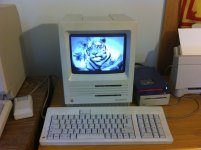
I have it on a disk somewhere. I'll have to look for it. I think it came on a HyperCard disk. (But don't quote me on that.)
I have it on a disk somewhere. I'll have to look for it. I think it came on a HyperCard disk. (But don't quote me on that.)
Now that's purty
Omg omg omg that is it!!!!!!!!! You rock! That would be great if you can find it.
There is also one of an old country road.
I think you're talking about this one....
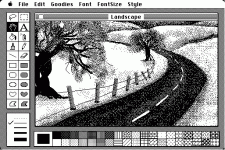
I'll have to see if I can find it. I don't think I have that one. I may have to find a jpg or png that someone posted and convert it.
I'll have to see if I can find it. I don't think I have that one. I may have to find a jpg or png that someone posted and convert it.
Here's the tiger one. (png for reference.) The MacPaint file is in the attached zip.
I can't find the Landscape one.

Tiger macpaint file.zip
I can't find the Landscape one.
Tiger macpaint file.zip