
Thread
Apple IIc doesn't format/duplicate
My recently acquired Apple IIc read disks perfectly but when I try to format or duplicate disks (with ProDos v1.1.1 or 1.0.2), after the normal drive noise (like start-up one), I get this error message:
4356- A=0C X=60 Y=0C P=30 S=DA
and the red drive light remains lit.
I tried different double side double density disks (the same I use for Commodore 64 and Atari 800XL).
4356- A=0C X=60 Y=0C P=30 S=DA
and the red drive light remains lit.
I tried different double side double density disks (the same I use for Commodore 64 and Atari 800XL).
Thank you guys.
I think my Apple IIc has memory problems.
If I use ProDOS User's Disk (for 64K Apple IIe) instead of Apple System Utilities (for 128K Apple IIe and IIc) I am able to format and copy disks (DSDD).
I've done David's Basic save and load test too.
Moreover, do you think those moving pixels (top right and bottom center) on screen are normal? They are always in those positions.
Loading ProDOS 1.0.2 (instead of 1.1.1) I get the error message you see.
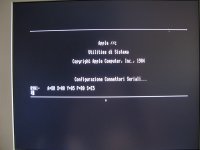
I think my Apple IIc has memory problems.
If I use ProDOS User's Disk (for 64K Apple IIe) instead of Apple System Utilities (for 128K Apple IIe and IIc) I am able to format and copy disks (DSDD).
I've done David's Basic save and load test too.
Moreover, do you think those moving pixels (top right and bottom center) on screen are normal? They are always in those positions.
Loading ProDOS 1.0.2 (instead of 1.1.1) I get the error message you see.
Thanks to ADTPro http://adtpro.sourceforge.net/ I was able to use two test programs.
Master Diagnostics IIc gives "010C – A=BF X=60 Y=00 P=35 S=5E" when I test auxiliary 64K of RAM.
Apple IIc Diagnostics gives "main logic board RAM test failed".
Master Diagnostics IIc gives "010C – A=BF X=60 Y=00 P=35 S=5E" when I test auxiliary 64K of RAM.
Apple IIc Diagnostics gives "main logic board RAM test failed".
mcdermd,
I've tried your method of placing a RAM chip over a soldered-on chip on my Apple IIc.
I have many chips but I am unsure if they are compatible and if they are OK.
What should happen when I place a good chip over a soldered one?
Testing the same soldered chip with my different chips, sometimes I get garbage on screen and sometimes nothing happens.
I've tried your method of placing a RAM chip over a soldered-on chip on my Apple IIc.
I have many chips but I am unsure if they are compatible and if they are OK.
What should happen when I place a good chip over a soldered one?
Testing the same soldered chip with my different chips, sometimes I get garbage on screen and sometimes nothing happens.
Hm. I've used this method with a few old Atari computers. I used a known good replacement DRAM chip and carefully placed it over the old chip, making sure all of the legs contacted properly. If there is only one bad RAM chip on the board, you can find it by hopping the good chip over all of the others one by one until it passes testing. Alternately, you can get a full replacement set and remove them one by one until you find the problem chip(s).
If you've got the time, iron and a sucker, I'd just order a whole new set of chips and do them all at once.
If you've got the time, iron and a sucker, I'd just order a whole new set of chips and do them all at once.
Jameco sells these for a buck a piece.
Thanks but what should happen when I place a good chip over a soldered one?
Testing the same soldered chip with my different chips, sometimes I get garbage on screen and sometimes nothing changes.
I think nothing should change when a good chip is placed over a good soldered chip.
Are you sure that this method works on Apple IIc?
Testing the same soldered chip with my different chips, sometimes I get garbage on screen and sometimes nothing changes.
I think nothing should change when a good chip is placed over a good soldered chip.
Are you sure that this method works on Apple IIc?
I've never tried it on an Apple II but I don't see why it would not work.
On the Ataris I've done this with, placing a good chip over a bad chip will "repair" the bad chip and allow it to boot. If you have any doubts, just desolder and replace them all and you'll be positive the RAM is good.
On the Ataris I've done this with, placing a good chip over a bad chip will "repair" the bad chip and allow it to boot. If you have any doubts, just desolder and replace them all and you'll be positive the RAM is good.