
Thread
DVD writer for G3 PowerBook?
I altered several Pismo DVD modules into DVD/CD Writer (one with Slot-in). This worked very well and I can use it in my Lombard too.
It's impossible with Wallstreet / PDQ and Original PowerBook G3 (Kanga) as they have specific modules.
http://home.comcast.net/~macdan/ebms.html
It's impossible with Wallstreet / PDQ and Original PowerBook G3 (Kanga) as they have specific modules.
http://home.comcast.net/~macdan/ebms.html
I took a look at your site, I'm not to bother about a DVD writer (would be nice tho), a CD writer, DVD reader would be perfectly fine. I just want a drive that I can use the original facia with. So that the Pismo looks like it should do.
Could you recommend a drive? I think I spotted one on your list, but thought it wise to ask first
haemogoblin, I have some pictures now. 
I‘ve assembled 4 different DVD/CD R/W for my Pismos and the Lombard (and I have some more different drives to test ….):
Matsushita UJ-845B my lovely slot-in burner, which is recognized by everything and boots into OS 9 and OS X (with "C") and the Pismo "sees" a UJ-845S
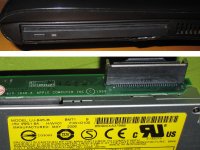
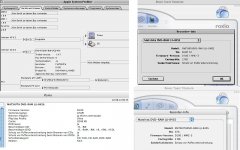
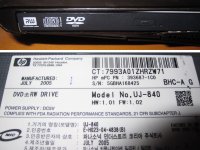
Matsushita UJ-840 boots into OS 9 and OS X (with "C"):
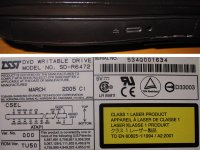
Toshiba Samsung SD-R6472 boots into OS 9 and OS X (with "C") with original Pismo face plate:
Samsung SN-S082D boots into OS 9 and OS X (with "C") after firmware update FW SH02:
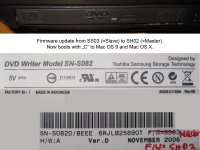
Master is necessary for booting with "C".
Firmware link:
http://www.tsstodd.com/eng/firmware/fwdownload/?functionvalue=list&product=SDWI&model=SN-S082D&searchText=S082&pTop=0&mTop=0&tabIdx=1
Here are more links:
http://www.xlr8yourmac.com/PB_G3/oem_combo_drives/build_guide/build_combo_drive.html
http://www.powerbook-fr.com/dossiers/dvd_region_free_en_article30.html
I‘ve assembled 4 different DVD/CD R/W for my Pismos and the Lombard (and I have some more different drives to test ….):
Matsushita UJ-845B my lovely slot-in burner, which is recognized by everything and boots into OS 9 and OS X (with "C") and the Pismo "sees" a UJ-845S
Matsushita UJ-840 boots into OS 9 and OS X (with "C"):
Toshiba Samsung SD-R6472 boots into OS 9 and OS X (with "C") with original Pismo face plate:
Samsung SN-S082D boots into OS 9 and OS X (with "C") after firmware update FW SH02:
Master is necessary for booting with "C".
Firmware link:
http://www.tsstodd.com/eng/firmware/fwdownload/?functionvalue=list&product=SDWI&model=SN-S082D&searchText=S082&pTop=0&mTop=0&tabIdx=1
Here are more links:
http://www.xlr8yourmac.com/PB_G3/oem_combo_drives/build_guide/build_combo_drive.html
http://www.powerbook-fr.com/dossiers/dvd_region_free_en_article30.html
MikeatOSX - Thank you for posting those pictures, I think I know which drive I'm getting now. The Samsung SD-R6472 is a no brainer, it used the existing fascia plate, which is exactly what I wanted.
Some of the other do look pretty good, better then I'd expected actually. It's great that you've been able to test a selection of drives on the Pismo and certainly handy for me! It has made finding a replacement drive a lot easier.
I've two more Pismo's in the attic, but they both have the stock optical drives inside. So not much point taking one of those, if I'm going to replace the drive in my main Pismo. Then it's going to be an upgrade, not a like for like swap
Some of the other do look pretty good, better then I'd expected actually. It's great that you've been able to test a selection of drives on the Pismo and certainly handy for me! It has made finding a replacement drive a lot easier.
I've two more Pismo's in the attic, but they both have the stock optical drives inside. So not much point taking one of those, if I'm going to replace the drive in my main Pismo. Then it's going to be an upgrade, not a like for like swap
I did a new assembling last night using a supernumerary Pismo DVD-Rom module:
this time it‘s a Matsushita UJ-845-C slot-in burner from a Windows laptop with faceplate. Mac OS X and OS 9 "see" this module as UJ-845-D. [:O] ]'>
H/W=01 FW=D100 - same as my UJ-845B (S), but this time a got a SLAVE module and so it could‘t boot with the "C" key (emergency boot), but only via Startup-Disk panel etc.
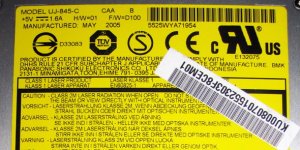
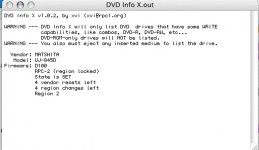
Firmware is okay, but it's a pain in the a** to alter the firmware 2 times on a Windows laptop, until I would get a UJ-845-S Master.
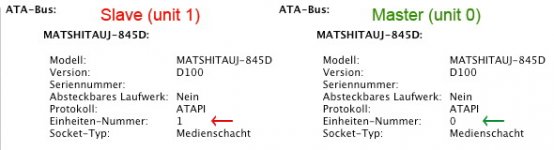
So I took the short way, using the soldering trick from http://www.sterpin.net/uk/dvd8pismouk.htm

This forces the CD/DVD-ROM from slave to master.

So I've gotten what I wanted (sorry some german text, but the important text parts are unique):
[8D]
No practical way that I can see. I disassembled my 20x CDrom module to discover it does not contain a replaceable drive. One would have to adapt the power/data connector from the module into a standard connection, then cram a drive in too. A drive won't fit, not to mention the adapter. My external SCSI CD-RW has quelled the need for me to scheme further thus far.
Just want to make people aware of this.
I bought myself a Toshiba SD-R6472, believing the original drive fascia would fit on it. I came to install it today and it does not work! So unless my drive is different to the one in the photo on page 1 of this thread, I would advise caution.
I bought myself a Toshiba SD-R6472, believing the original drive fascia would fit on it. I came to install it today and it does not work! So unless my drive is different to the one in the photo on page 1 of this thread, I would advise caution.
I provided the link
http://www.sterpin.net/uk/dvd8pismouk.htm
in my posts, where the author used a Toshiba SD-R6472.
So I bought one (BTW: I bought many different non Toshiba SD-R6472 which didn't fit).
One side of the faceplate fitted immediately and on the second side I had to cut a little bit and glued it together. Ready.
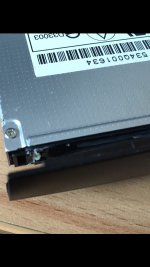
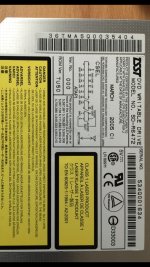
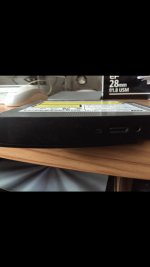
So for you I teared the faceplate off now and made a picture:
I hope you have the same version etc. of the Toshiba SD-R6472.
http://www.sterpin.net/uk/dvd8pismouk.htm
in my posts, where the author used a Toshiba SD-R6472.
So I bought one (BTW: I bought many different non Toshiba SD-R6472 which didn't fit).
One side of the faceplate fitted immediately and on the second side I had to cut a little bit and glued it together. Ready.
So for you I teared the faceplate off now and made a picture:
I hope you have the same version etc. of the Toshiba SD-R6472.
Hey there
MikeatOS does this look like what you have?
Here are the image of the drive
https://drive.google.com/file/d/14vNo10RVIcvs0x-Z_MlTuvOAcAMPi7EIrw/view?usp=sharing
https://drive.google.com/file/d/1G06-dz-7DWWL9Y0Y1i4yGY984QzbzAH34A/view?usp=sharing
MikeatOS does this look like what you have?
Here are the image of the drive
https://drive.google.com/file/d/14vNo10RVIcvs0x-Z_MlTuvOAcAMPi7EIrw/view?usp=sharing
https://drive.google.com/file/d/1G06-dz-7DWWL9Y0Y1i4yGY984QzbzAH34A/view?usp=sharing
