

Thread
design ideas for a SD-card floppy emulator
I know the idea of a floppy emulator for compact Macs (using SD cards or similar media) has been discussed here before, but as far as I know, none exists. Maybe that means I'm the guy who should design one. I've spent a fair bit of time studying the details of the IWM and the floppy disk data encoding, and I understand enough to think that the project is feasible. Here are a couple of thoughts on what such an emulator would look like and how it would work.
DB-19
The emulator would be a small PCB with a DB-19 connector, that plugs directly into the floppy port. No cables required. It looks like finding a source for DB-19 connectors will be very difficult, though, so it might be necessary to make one somehow. None of the usual electronics supplies like Digi-Key have DB-19 connectors, and the few places on the web that do advertise them only have solder cup terminated connectors intended for making cables. And even those places look old and out of date, making me question whether they actually still have DB-19 connectors in stock.
Storage
My original idea was to put an SD card socket on the emulator, so you could fill the card with disk images using your PC, then put the card into the emulator. The main drawback is that not everyone has an SD card reader on their PC. Better would be a USB connector, and when connected to the PC the emulator would appear as a generic mass storage device. In that case, the actual storage still might be an SD card, or it could be generic flash ROM, or battery-backed RAM. I'm unsure if this would require worrying about wear-leveling and making a flash driver, though.
Supported formats
The emulator would support 400K and 800K disk images in raw or DiskCopy 4.2 format. Maybe later it could also support 1.4MB formats, but that would require studying the SWIM design instead of IWM. And anyway if your Mac supports 1.4MB disks, it's probably easier to just make them on a modern PC or Mac. The emulator would not support "super disks" larger than a real physical disk, because the floppy driver in the Mac's ROM would not be able to use them. Although maybe this could be worked around with some kind of custom init that replaces the ROM floppy driver...
Number of disks
The emulator would only emulate a single external disk drive. This is a bummer, but the floppy connector is only designed to connect to a single drive, and there are no pins for the Mac to select a specific drive or give a unique ID to a drive. Again, maybe this could be worked around with a custom floppy driver replacement and some non-standard use of the floppy data lines...
Read/Write
Both read and write operations would be supported. Read would probably be a lot easier to implement first, so the initial prototype would likely be read-only.
Variable Speed
The Mac 400K/800K drive was a variable speed drive, unlike PC floppy drives. This is why PC floppy drives are physically unable to read/write 400K or 800K floppies. For the purposes of emulation, though, I don't think this matters at all. The emulator would ignore the drive RPM control signal coming from the Mac. The actual data rate is still constant, I believe. And even if it's not constant, I think I can still work with it.
Implementation
The emulator would consist of an Atmel AVR microcontroller and SD card socket. The AVR would need about 12KB of internal RAM. The ATmega1284P looks good. A pre-existing SD-card FAT-reader library would be used to search the card for files with the .dsk extension, and read data chunks from them.
The AVR would use the 9 control/data lines on the floppy connector (documented by Apple) to communicate with the Mac, acting like a normal floppy drive. It would internally maintain the position of a virtual disk head, defined by the current track number and rotational position within the track. Track-to-track in/out movement of the virtual head would be performed by the Mac, using the control lines. When the emulator was instructed to step to a new track, it would load the data for the corresponding sectors from the SD card into a RAM buffer. This data would be GCR-encoded on the fly, and appropriate sector headers, lead-ins, lead-outs, checksums, and sync bytes would also be generated. The result would be a byte-for-byte replica of the low-level data format for that track on a real floppy disk.
Virtual rotational movement through the track would happen automatically, at a fixed rate (I think it's 1 bit per 2 microseconds). When the Mac requested a read, the emulator would return the data at whatever rotational position was current. The Mac software would keep reading data until the sector it wanted came into position, just like for a real floppy. When the Mac requested a write, the emulator would overwrite data at whatever rotational position was current. This data would be GCR-decoded on the fly, headers/checksums/etc thrown-away, and the actual sector data written back to the SD card.
Your thoughts? Does this sound like a sensible plan?
DB-19
The emulator would be a small PCB with a DB-19 connector, that plugs directly into the floppy port. No cables required. It looks like finding a source for DB-19 connectors will be very difficult, though, so it might be necessary to make one somehow. None of the usual electronics supplies like Digi-Key have DB-19 connectors, and the few places on the web that do advertise them only have solder cup terminated connectors intended for making cables. And even those places look old and out of date, making me question whether they actually still have DB-19 connectors in stock.
Storage
My original idea was to put an SD card socket on the emulator, so you could fill the card with disk images using your PC, then put the card into the emulator. The main drawback is that not everyone has an SD card reader on their PC. Better would be a USB connector, and when connected to the PC the emulator would appear as a generic mass storage device. In that case, the actual storage still might be an SD card, or it could be generic flash ROM, or battery-backed RAM. I'm unsure if this would require worrying about wear-leveling and making a flash driver, though.
Supported formats
The emulator would support 400K and 800K disk images in raw or DiskCopy 4.2 format. Maybe later it could also support 1.4MB formats, but that would require studying the SWIM design instead of IWM. And anyway if your Mac supports 1.4MB disks, it's probably easier to just make them on a modern PC or Mac. The emulator would not support "super disks" larger than a real physical disk, because the floppy driver in the Mac's ROM would not be able to use them. Although maybe this could be worked around with some kind of custom init that replaces the ROM floppy driver...
Number of disks
The emulator would only emulate a single external disk drive. This is a bummer, but the floppy connector is only designed to connect to a single drive, and there are no pins for the Mac to select a specific drive or give a unique ID to a drive. Again, maybe this could be worked around with a custom floppy driver replacement and some non-standard use of the floppy data lines...
Read/Write
Both read and write operations would be supported. Read would probably be a lot easier to implement first, so the initial prototype would likely be read-only.
Variable Speed
The Mac 400K/800K drive was a variable speed drive, unlike PC floppy drives. This is why PC floppy drives are physically unable to read/write 400K or 800K floppies. For the purposes of emulation, though, I don't think this matters at all. The emulator would ignore the drive RPM control signal coming from the Mac. The actual data rate is still constant, I believe. And even if it's not constant, I think I can still work with it.
Implementation
The emulator would consist of an Atmel AVR microcontroller and SD card socket. The AVR would need about 12KB of internal RAM. The ATmega1284P looks good. A pre-existing SD-card FAT-reader library would be used to search the card for files with the .dsk extension, and read data chunks from them.
The AVR would use the 9 control/data lines on the floppy connector (documented by Apple) to communicate with the Mac, acting like a normal floppy drive. It would internally maintain the position of a virtual disk head, defined by the current track number and rotational position within the track. Track-to-track in/out movement of the virtual head would be performed by the Mac, using the control lines. When the emulator was instructed to step to a new track, it would load the data for the corresponding sectors from the SD card into a RAM buffer. This data would be GCR-encoded on the fly, and appropriate sector headers, lead-ins, lead-outs, checksums, and sync bytes would also be generated. The result would be a byte-for-byte replica of the low-level data format for that track on a real floppy disk.
Virtual rotational movement through the track would happen automatically, at a fixed rate (I think it's 1 bit per 2 microseconds). When the Mac requested a read, the emulator would return the data at whatever rotational position was current. The Mac software would keep reading data until the sector it wanted came into position, just like for a real floppy. When the Mac requested a write, the emulator would overwrite data at whatever rotational position was current. This data would be GCR-decoded on the fly, headers/checksums/etc thrown-away, and the actual sector data written back to the SD card.
Your thoughts? Does this sound like a sensible plan?
Sounds like an awesome plan to me! This could be really useful as a way to get data to/from the older Macs with the floppy port. I know you probably already know about the FAT implementations for microcontrollers out there, but just thought I'd point a few out:
http://elm-chan.org/fsw/ff/00index_e.html
http://elm-chan.org/fsw/ff/00index_p.html
I noticed on your link it says a 400k external drive can be connected to some of the models, and an 800k external drive can be connected to some of the other models. Are you saying that you will emulate both of those drives depending on which type of disk is present? (Sorry if I'm talking nonsense, I really know nothing about these external drives at all)
Also, what about the Hard Disk 20? I noticed that it hooks into the floppy connector. I also found this website:
http://www.mac512.com/macwebpages/hd20.htm
Which had a link to a file that lets a Mac 128k or 512k use 800k disks and the Hard Disk 20. Unfortunately the link is now broken but I'm sure a Google search would turn up the file again. Anyway I don't know about how technically possible it would be to emulate the HD20. Maybe it's crazy difficult, I don't know -- just thought I'd point it out!
http://elm-chan.org/fsw/ff/00index_e.html
http://elm-chan.org/fsw/ff/00index_p.html
I noticed on your link it says a 400k external drive can be connected to some of the models, and an 800k external drive can be connected to some of the other models. Are you saying that you will emulate both of those drives depending on which type of disk is present? (Sorry if I'm talking nonsense, I really know nothing about these external drives at all)
Also, what about the Hard Disk 20? I noticed that it hooks into the floppy connector. I also found this website:
http://www.mac512.com/macwebpages/hd20.htm
Which had a link to a file that lets a Mac 128k or 512k use 800k disks and the Hard Disk 20. Unfortunately the link is now broken but I'm sure a Google search would turn up the file again. Anyway I don't know about how technically possible it would be to emulate the HD20. Maybe it's crazy difficult, I don't know -- just thought I'd point it out!
I wonder if there would be any way to 're-architect' a FlashPath adapter to properly emulate an actual 800K or 1.4M floppy disk, rather than needing the custom drivers?
Although your idea would be great for any range of system that supports the Apple floppy plug. I'm imagining you'd do something like add a small control panel (and possibly simple number LCD?) to choose which floppy image you want to mount? Would the floppy-type be controlled by switch (either hardware or via the control panel) or would it do it based on the floppy image?
If you could have it do a 'daisy-chain' emulation of both a floppy and an HD20, that would be great for some systems, too.
But I'm suggesting way more than is reasonable coming from someone who would be of no help whatsoever.
(Oooh, last bug: if you DO get this figured out, making one for the PowerBook 100/Duo floppy plug would be great, too!)
Although your idea would be great for any range of system that supports the Apple floppy plug. I'm imagining you'd do something like add a small control panel (and possibly simple number LCD?) to choose which floppy image you want to mount? Would the floppy-type be controlled by switch (either hardware or via the control panel) or would it do it based on the floppy image?
If you could have it do a 'daisy-chain' emulation of both a floppy and an HD20, that would be great for some systems, too.
But I'm suggesting way more than is reasonable coming from someone who would be of no help whatsoever.
(Oooh, last bug: if you DO get this figured out, making one for the PowerBook 100/Duo floppy plug would be great, too!)
I've seen a few people here say the HD20 interface is undocumented and unknown, so unfortunately I think HD20 emulation is out of the question. That would be awesome though! What I think is more plausible (but still difficult) is to essentialy roll my own high-capacity disk on the floppy port using the same technique as the HD20. You'd boot from a normal floppy which would contain an INIT with a replacement disk driver. Then this replacement disk driver would talk to a high capacity disk on my floppy emulator. There's no reason to specifically emulate an HD20. However, I suspect writing a full-on disk driver for an OS that I know little about would be pretty tough.
Yeah, the emulator would also have an LCD screen and some buttons for selecting which disk image to insert. And it would recognize when the Mac "ejected" the virtual disk.
I could be wrong here, but I think an 800K drive still works on a 400K Mac, but only for reading 400K disks. So I was assuming the emulator would always act like an 800K drive, but the disk driver in the ROM of the 400K-equipped Macs would only ever request sectors from side 0. And so if you inserted an 800K disk image, you'd get whatever behavior you'd see if you put a real 800K disk in a 400K drive. Which is to say it wouldn't work, and would eject it.
I had never heard of FlashPath before, so I had to look that one up. Interesting!
Yeah, the emulator would also have an LCD screen and some buttons for selecting which disk image to insert. And it would recognize when the Mac "ejected" the virtual disk.
I could be wrong here, but I think an 800K drive still works on a 400K Mac, but only for reading 400K disks. So I was assuming the emulator would always act like an 800K drive, but the disk driver in the ROM of the 400K-equipped Macs would only ever request sectors from side 0. And so if you inserted an 800K disk image, you'd get whatever behavior you'd see if you put a real 800K disk in a 400K drive. Which is to say it wouldn't work, and would eject it.
I had never heard of FlashPath before, so I had to look that one up. Interesting!
Two thoughts:
- Take a DB-25 and cut it down
- Two single-row connectors (IC pin strips?) glued together
I think if it makes development easier and/or cheaper, at least for version 1, it's not unreasonable to ask the end user to wear the cost of a generic USB card reader. What they save on a simpler custom device from you should more than cover the cost.
Agreed.
I think it's been generally agreed around here that avoiding custom ROMs and INITs is the path of least pain for both the developer and the end user :approve: For starters, it leaves open the possibility of making the new device bootable.
Getting a little fancy here, but would it be possible to have a character LCD that can display the floppy's name as well as the image's number? Although I guess that is slightly redundant, as the name would show up on the Mac once the floppy is mounted.
The technical details of your plan, where they don't go straight over my head, sound spot on
One other thought, possibly for v.2: if the device can emulate two drives and mount 2 floppy images at once, that could save a lot of (virtual) disk swapping. For example, it would enable drag and drop of files between images on the Mac end. IIRC (and I'm sure I'll be corrected shortly if I'm wrong) it is possible to have two external drives at once on the floppy port.
Of course!
That's what I was thinking as well.Could that be a SWIM-equipped Mac feature? If you look at the floppy drive pinout I linked in my original post, I can't see how it could possibly address more than one external drive. Also the IWM documentation only mentions a single bit than can be set to choose the internal or external drive, so if more drives are possible I must have overlooked something.
I see where you're coming from on the HD 20. Besides, only a handful of models support it and it looks like System 6 and higher don't support it either. Yeah, making a driver for custom stuff would be tough too. Well, I think the floppy emulator by itself is extremely cool anyway! Very awesome idea especially as 400/800k disks are going to be harder and harder to come by (or are they already?)
Very awesome idea especially as 400/800k disks are going to be harder and harder to come by (or are they already?)
Working drives certainly are.
The Mac SE can operate three floppy drives: two internal and one external. There might be some interesting information hidden behind that fact.
Bolded .txt not present in GttMFH2E's .txt, I added formatting for clarity's sake . . .
. . . or tried to do so!

< tangent mode >
Personally, I'd MUUUUUCH rather see the time and effort of developing an FDD emulator spent on developing a fast IDE <-> SCSI interface that supports at least Two Drives, one would be a stationary SD as internal HDD setup. The other would be an actual FDD/Floppy Disk hardware hack.
A MicroSD card would be installed into a standard Floppy Disk, backwards (as opposed to installation in an SD adapter) underneath the sliding metal cover, with the edge connectors exposed to contacts in the hacked FDD Mechanism when the Floppy is dropped into position and the data gate cover is auto-magicly opened. We've all got dead reading mechanisms in working FDD Housings and corrupted Floppies up the 'ole wazoo!
By turning Floppies into removable MicroSD media adapters for use in adapted borken Drives, we could then print
 Custom Floppy Labels in full color now, in this InkJet printer infested era, and have a physical I/O interface . . .
that harks back to 1984 . . . }
. . . with the Mac equivalent of retro Vinyl Album Cover Graphics! :approve:
. . . not to mention all that extra cubic that'll become available in those Big@$$ FDD Cases! :b&w:
Have the fixed SD Card show up as a HDD Icon and have the Floppy mounted MicroSD show up on the desktop as a SuperHighDensity Floppy Icon. No 1.44 MB limit with all the warm-n-fuzzy feelings of having a "floppy drive" to pop a "floppy disk" in-n-out! [
 ] ]'>
] ]'>< /tangent mode >
So it goes . . .
 )
)
I starting looking at this a couple of years ago.
I posted about what I found here.
viewtopic.php?t=12002
I never had time to continue perusing it. Hopefully there is some helpful information there.
I posted about what I found here.
viewtopic.php?t=12002
I never had time to continue perusing it. Hopefully there is some helpful information there.
Your research was one of the first things I looked at! Definitely helpful.
I'm not going to have any time to work on this yet either, at least not until I finish the main Plus project, but it's interesting to think about.
I'm not going to have any time to work on this yet either, at least not until I finish the main Plus project, but it's interesting to think about.
I just stumbled into this thread, searching for what's been done in this area. I also took a look at this HD20 thread.
Forgive if this is a naive question, but: all of the discussion has been about a dedicated device. Has there been no work or research done into a software disk emulator running on a newer, more capable Mac, connected via cable? Such a thing is quite commonplace in the Atari 8-bit world, via SIO2PC. But I'm no I/O expert; perhaps an Atari 800 is a much, much simpler beast to fool than a 68k Mac.
Or is it simply that AppleShare already makes native file sharing possible, and the real desire is to build a device into which you can swap physical media, such as SD cards (or floppies hacked to hold SD cards)? Myself, I would think it would be highly desirable to be able to mimic, in software and replaceable hardware, a floppy or hard drive.
Am I just a fool?
Forgive if this is a naive question, but: all of the discussion has been about a dedicated device. Has there been no work or research done into a software disk emulator running on a newer, more capable Mac, connected via cable? Such a thing is quite commonplace in the Atari 8-bit world, via SIO2PC. But I'm no I/O expert; perhaps an Atari 800 is a much, much simpler beast to fool than a 68k Mac.
Or is it simply that AppleShare already makes native file sharing possible, and the real desire is to build a device into which you can swap physical media, such as SD cards (or floppies hacked to hold SD cards)? Myself, I would think it would be highly desirable to be able to mimic, in software and replaceable hardware, a floppy or hard drive.
Am I just a fool?
This floppy concept would be fabulous if the Mac OS will register "floppies" with capacities larger than 1.44MB.
A 2GB SD card which plugs into the floppy port and has an adaptor for a Duo/PB1xx series would be fabulous...but probably asking too much.
Otherwise, a SCSI -> CF probably is a better project, but then you can't "eject" it without shut down.
What really would be nice would just be like a PDS "dump port" where you can just pull data in as fast as it can -- but if the FDD route works, if it did, you're still going to be r/w at ~12KB/sec.
Plug a floppy in now, copy something and ask what you'd be gaining from that...
A 2GB SD card which plugs into the floppy port and has an adaptor for a Duo/PB1xx series would be fabulous...but probably asking too much.
Otherwise, a SCSI -> CF probably is a better project, but then you can't "eject" it without shut down.
What really would be nice would just be like a PDS "dump port" where you can just pull data in as fast as it can -- but if the FDD route works, if it did, you're still going to be r/w at ~12KB/sec.
Plug a floppy in now, copy something and ask what you'd be gaining from that...
The problem with CF->SCSI (which already exists, by the way,) is that it excludes non-SCSI machines.
A device that emulates a floppy plus a high-capacity device, where the floppy image holds the driver for the high-cap device, is "best". But also hardest to implement, as it means either writing an INIT, or reverse engineering the HD20 protocol and emulating that.
A device that emulates a floppy plus a high-capacity device, where the floppy image holds the driver for the high-cap device, is "best". But also hardest to implement, as it means either writing an INIT, or reverse engineering the HD20 protocol and emulating that.
Why not create a SCSI device that enables your SD Card or USB drive to mimic a ZIP Drive. There are plenty of drivers and built in OS support in later models for the ZIP.
Floppies are overrated, slow and low capacity, ZIP is 100 or 200 MB and a much faster interface.
What do you think of having your Floppy Emulator setup work over a serial connection for the macs w/o external floppy ports a/o have the ZIP Emulator work over serial as well as the SCSI Port to service all Compacts and NuBus Architecture 68k & PPC Macs?
Dunno, just spitballin! :-/
Floppies are overrated, slow and low capacity, ZIP is 100 or 200 MB and a much faster interface.
What do you think of having your Floppy Emulator setup work over a serial connection for the macs w/o external floppy ports a/o have the ZIP Emulator work over serial as well as the SCSI Port to service all Compacts and NuBus Architecture 68k & PPC Macs?
Dunno, just spitballin! :-/
It seems like it'd be an awful lot of work to re-implement something that has been done well, several times, already.
For instance, http://hxc2001.free.fr/floppy_drive_emulator/. HxC has an excellent SD floppy emulator that works on a bunch of platforms. It'd probably be straight forward to adapt it to use on the Mac.
- Alex
For instance, http://hxc2001.free.fr/floppy_drive_emulator/. HxC has an excellent SD floppy emulator that works on a bunch of platforms. It'd probably be straight forward to adapt it to use on the Mac.
- Alex
Yeah, the HxC emulator is a nice product, but can't be adapted to the Mac, or at least not without some hardware changes. I looked at the design and started a discussion about it on their forums. The Mac floppy interface is fundamentally different, and uses 4 address lines to read/write the drive registers. The Shugart floppy model in HxC has no drive registers, and all the control and data signals are carried on individual lines.
My admittedly vague plan is to first make a stand-alone emulator for a regular 800K floppy and release it. Then hopefully someone with more Mac software-development experience could write a custom "large disk" INIT that you load from the emulated 800K floppy, and that uses the emulator to load larger disk images.
Right, that's pretty much my thinking. My main motivation is to provide some way to bootstrap Macs with an 800K floppy drive when the owner has no 800K floppies. A SCSI disk emulator would be cool as well, but the oldest Macs lack SCSI, and SCSI to CF adapters already exist.
My admittedly vague plan is to first make a stand-alone emulator for a regular 800K floppy and release it. Then hopefully someone with more Mac software-development experience could write a custom "large disk" INIT that you load from the emulated 800K floppy, and that uses the emulator to load larger disk images.
I agree that would be nice, and I don't see any reason why it wouldn't work. It would be more complex to design though-- you'd need to implement some kind of USB interface for the host PC side, and write a host-side disk image management program for each OS (Mac, Windows, Linux). I see that as a feature that could be added to the stand-alone emulator later, providing an alternative or replacement for the SD card.
There are a few "quirks" of the Mac floppy drive that would make it somewhat nontrivial to adapt the exact device you linked to (although probably doable almost solely with software changes) yes, this has been done before. (The reason the HxC emulator *has* been adapted to so many hardware platforms is that it implements the standard Shugart floppy drive interface and control protocols. Which the Mac does not use, but yes, with software changes and *possibly* a small hardware change the device could probably handle it.) The closest match with an existing device is probably the "SVD":
http://www.thesvd.com/SVD/
which already supports the Apple II with an adapter. With more memory and some software changes to understand the "statefulness" of Macintosh disk drives this device would probably already work. The reason this doesn't already exist in the Mac community has been far more a lack of "interested expertise" than any inherent difficulty in interfacing with the IWM. Yes, it's proprietary, but it's also simple and for an Apple-proprietary device extensively documented.
The "oddness" of the Mac drive probably does justify making a new device (which could also work on Apple II computers), but it does all come down to someone actually *doing* it. (Which I'm sure "Bigmessowires" is capable of, should he choose to do so.)
(EDIT: Beaten to the punch by the interested party. Oh well.)
If said individual has a 512K, I'm guessing they have some sort of auxiliary Mac to support it. I would not own a slew of PCs and a single 512K -- PCs can't read 800KB floppies and networking will be a real drag.
Said Mac could be like a IIsi, which has a built in floppy drive and thusly can read & write 800KB and 1440KB floppies. And run PC Exchange, so there. And run a Ethernet cable, although file transfer will most likely be through FTP.
I wouldn't cater to a market that can't sustain itself. A 512K these days is a lone, lone fella. No SCSI, so no hard drive. Nobody else except old Macs can read 800KB floppies. HD20? Yeah, but you're not going to be file transferring with that. There's one on eBay but it's 490$, so there -- you may have the money for that, but why not just get like a IIcx or Quadra? Cheaper and gets the job done.
Best? A model that has a built-in floppy drive and can run OS X, so you can network with Windows with SMB. Like a Power Macintosh G3 333MHz -- toss 10.2.8 and Mac OS 9 on it (The Internal drive might take 800KB floppies, I have no idea.) Besides you can just put tape over the left rear hole on a 1.44MB floppy and reformat it, and bam. There's your 800KB disk. Next?
There.
Welllll, except for the part about the 800k drive in your compact not liking to write reliably to such a disk, as I understand it. But that's the thinking I've come around to. If and when I get my hands on a compact, just having the 8100 right next door for sharing over the wire or swapping floppies will have to do.
Getting pretty tired of armchair quarterbacks raining on this parade tbh. Just google bigmessofwires - heck, search on these forums - to get an idea who you're messing with. BMOW has solid reasons for this project, and a more than adequate track record to pull it off.
Now, if anyone has any helpful suggestions ...
Now, if anyone has any helpful suggestions ...
Hehe, that's fine if people have other ideas about how the floppy emulator ought to work, I don't have any monopoly on good ideas. My motivation is to build something cool that interests me, and would be personally useful, and also dovetails with my other Mac project. From a practical/business standpoint it may well make more sense to repurpose an emulator from another platform, or do a SCSI emulator instead. But in the final account, those projects don't really interest me and this one does.
Life is full of coincidences, because I had actually just started some real work on this project yesterday, before I even saw that the thread here had been revived. Here's a short progress report.
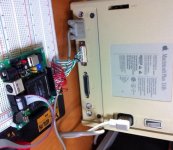
Using one of the DB-19 connectors that I purchased a few weeks back, I rigged up a cable to connect the Mac's external floppy port to a breadboard. Then I dug out an old CPLD board I built for another long-forgotten project, and wired all the floppy lines to the board's I/O connector. The board is powered by the +5V from the floppy port.
This particular board has an Altera EPM7128S CPLD, which is so old that it actually runs at 5V (newer CPLDs run at 3.3V or below). That's great for this purpose, because 5V is what the Mac provides and is also the voltage level on the Mac floppy data lines.
So far, I've built a successful blank disk emulator. It identifies itself as an 800K drive to the Mac, initially with no disk. Reading and writing of the interval drive registers works, as well as stepping the drive head. The PWM signal that tells the Mac the current drive motor RPM speed also works. By pushing a button on the board, you can "insert" a disk into the drive, but the disk is blank (it contains all 1's).
If you push the button while the Mac is waiting for a boot disk, it thinks about it for a minute, then "ejects" the disk and shows the X-disk icon on the screen. If you boot from a regular floppy disk in the internal drive, then push the button to insert an external disk, the Mac asks "This disk is unreadable. Do you want to initialize it?" If you say yes, the Mac responds "Initialization failed! The disk is write-protected!"
As you can see it's not very exciting yet, but it's a good start.
My motivation is to build something cool that interests me, and would be personally useful, and also dovetails with my other Mac project. From a practical/business standpoint it may well make more sense to repurpose an emulator from another platform, or do a SCSI emulator instead. But in the final account, those projects don't really interest me and this one does.Life is full of coincidences, because I had actually just started some real work on this project yesterday, before I even saw that the thread here had been revived. Here's a short progress report.
Using one of the DB-19 connectors that I purchased a few weeks back, I rigged up a cable to connect the Mac's external floppy port to a breadboard. Then I dug out an old CPLD board I built for another long-forgotten project, and wired all the floppy lines to the board's I/O connector. The board is powered by the +5V from the floppy port.
This particular board has an Altera EPM7128S CPLD, which is so old that it actually runs at 5V (newer CPLDs run at 3.3V or below). That's great for this purpose, because 5V is what the Mac provides and is also the voltage level on the Mac floppy data lines.
So far, I've built a successful blank disk emulator. It identifies itself as an 800K drive to the Mac, initially with no disk. Reading and writing of the interval drive registers works, as well as stepping the drive head. The PWM signal that tells the Mac the current drive motor RPM speed also works. By pushing a button on the board, you can "insert" a disk into the drive, but the disk is blank (it contains all 1's).
If you push the button while the Mac is waiting for a boot disk, it thinks about it for a minute, then "ejects" the disk and shows the X-disk icon on the screen. If you boot from a regular floppy disk in the internal drive, then push the button to insert an external disk, the Mac asks "This disk is unreadable. Do you want to initialize it?" If you say yes, the Mac responds "Initialization failed! The disk is write-protected!"
As you can see it's not very exciting yet, but it's a good start.
Not very exciting? Au contraire! That's superb.
Not very exciting? Au contraire! That's superb.
+1!!!!!!
I think I need some MacsBug help. I've implemented more of the floppy emulator hardware, but to debug it as it's running, I need MacsBug on my Mac Plus.
I installed MacsBug 6.5.3, and when I boot (using System 6.0. 8) it says "MacsBug Installed". The first two or three times I tried it, pressing the debugger switch popped me into MacsBug, and I viewed the command help and set a breakpoint. But ever since then, pressing the debugger switch just locks up the Mac. I've rebooted half a dozen times, done a full power off/on cold boot, and reinstalled MacsBug again, but I've never been able to get it to work again after those first few times.
Anyone know where I can get an older version of MacsBug, preferably one that's from about the same time at the Mac Plus (1986)? The MacsBug 6.5.3 I have is from the PowerPC era, and maybe it's support for System 6 and the Mac Plus isn't so great. I checked all the usual download sites, but couldn't find anything except versions 6.5 and 6.6.
I installed MacsBug 6.5.3, and when I boot (using System 6.0. 8) it says "MacsBug Installed". The first two or three times I tried it, pressing the debugger switch popped me into MacsBug, and I viewed the command help and set a breakpoint. But ever since then, pressing the debugger switch just locks up the Mac. I've rebooted half a dozen times, done a full power off/on cold boot, and reinstalled MacsBug again, but I've never been able to get it to work again after those first few times.
Anyone know where I can get an older version of MacsBug, preferably one that's from about the same time at the Mac Plus (1986)? The MacsBug 6.5.3 I have is from the PowerPC era, and maybe it's support for System 6 and the Mac Plus isn't so great. I checked all the usual download sites, but couldn't find anything except versions 6.5 and 6.6.
Ugh. Things have taken a major turn for the worse, and it's not looking good for this project.
For MacsBug, I discovered that whenever it's first invoked, or maybe whenever I first set a breakpoint, it actually modifies the System file. I don't know what it's doing, but I can see the timestamp on the file changed. Thereafter, whenever I push the debugger switch, the Mac just freezes up. If I replace the System file with another (good) one, then I can enter MacsBug again with the debugger switch.
Even if I could find a solution for that, the bigger problem is that breakpoints in ROM routines basically don't work. MacsBug will let you set them, but it warns you it will be slow. I would estimate the Mac runs at least 1000 times slower (not an exaggeration) with a ROM breakpoint enabled. It took more than 10 minutes to draw a dialog box. This is because the 68000 CPU doesn't have hardware breakpoints-- breakpoints in RAM can be achieved by patching the code in memory, but breakpoints in ROM require the debugger to single step through the code, checking the address after every instruction, and that's S-L-O-W.
It also seems that even if you can wait 10 minutes, breakpoints in ROM routines don't even get hit. I set a breakpoint on one of the ROM floppy routines I'm pretty certain must be called when I insert my emulated disk, but it went all the way to the "do you want to initialize?" dialog box without ever hitting my breakpoint.
This leaves me without any way to debug what's going wrong with my floppy emulator, and why the Mac doesn't load sector data from it. So... I'm not sure how I can go forward from here.
For MacsBug, I discovered that whenever it's first invoked, or maybe whenever I first set a breakpoint, it actually modifies the System file. I don't know what it's doing, but I can see the timestamp on the file changed. Thereafter, whenever I push the debugger switch, the Mac just freezes up. If I replace the System file with another (good) one, then I can enter MacsBug again with the debugger switch.
Even if I could find a solution for that, the bigger problem is that breakpoints in ROM routines basically don't work. MacsBug will let you set them, but it warns you it will be slow. I would estimate the Mac runs at least 1000 times slower (not an exaggeration) with a ROM breakpoint enabled. It took more than 10 minutes to draw a dialog box. This is because the 68000 CPU doesn't have hardware breakpoints-- breakpoints in RAM can be achieved by patching the code in memory, but breakpoints in ROM require the debugger to single step through the code, checking the address after every instruction, and that's S-L-O-W.
It also seems that even if you can wait 10 minutes, breakpoints in ROM routines don't even get hit. I set a breakpoint on one of the ROM floppy routines I'm pretty certain must be called when I insert my emulated disk, but it went all the way to the "do you want to initialize?" dialog box without ever hitting my breakpoint.
This leaves me without any way to debug what's going wrong with my floppy emulator, and why the Mac doesn't load sector data from it. So... I'm not sure how I can go forward from here.
Probably not the vintage you are looking for, but a slightly older version (6.2.2): http://ge.tt/8958iY9
Macsbug 6.2.2 would probably be your best bet, since 6.2 came out in 1991. And I can't seem to find anything older.
The "Wayback Machine" has a copy of Apple's "MacsBug Reference and Debugging Guide 6.2"
http://web.archive.org/web/19991013202110/http://developer.apple.com/tools/debuggers/MacsBug/Documentation/MacsBugRef_6.2.pdf
Yeah, too bad about the slow breakpoints. Seems like Apple would of had a faster way of debugging hardware...
The "Wayback Machine" has a copy of Apple's "MacsBug Reference and Debugging Guide 6.2"
http://web.archive.org/web/19991013202110/http://developer.apple.com/tools/debuggers/MacsBug/Documentation/MacsBugRef_6.2.pdf
Yeah, too bad about the slow breakpoints. Seems like Apple would of had a faster way of debugging hardware...