

Thread
"Hackintoshed" ATOMs & OS9 . . .
. . . do any of them run OS9 under X and how well do they do so? :?:
If the answer is "no," what Rainbow OS Emulator will run acceptably on a Dual Core ATOM NetTop Mobo, under what OS? :?:
HEH! }
If the answer is "no," what Rainbow OS Emulator will run acceptably on a Dual Core ATOM NetTop Mobo, under what OS? :?:
HEH! }
If you mean in terms of using Shapeshifter, just as well as any other ~ 1.6Ghz CPU, ie. rather well! The issue with Shapeshifter has always been poor video performance and some stuttering, but overall it's pretty good. Basilisk II also comes up trumps.
JB
JB
I have absolutely ZERO Mac Emulator experience, what OS do they run under?
Are they each an OS in their own right?
Will they co-exist equally well with X & ubuntu installed and can I avoid installing/running any version of DOS or Windows?
Except maybe SoftPC and MSDOS for DOS! }
Are they each an OS in their own right?
Will they co-exist equally well with X & ubuntu installed and can I avoid installing/running any version of DOS or Windows?
Except maybe SoftPC and MSDOS for DOS! }
http://www.emaculation.com/doku.php
For System 6-7 go with Mini vMac. It emulates a Mac Plus.
For 8/9 go with Sheepshaver.
MiniVmac is easy to set-up, sheepshaver takes a while. I believe both have Linux packages available. Mini vMac might even be in your repos.
But most important:

For System 6-7 go with Mini vMac. It emulates a Mac Plus.
For 8/9 go with Sheepshaver.
MiniVmac is easy to set-up, sheepshaver takes a while. I believe both have Linux packages available. Mini vMac might even be in your repos.
But most important:
Yes
Have a look at http://emaculation.com/doku.php - plenty of How-To examples for setting up Mac emulation. Linux builds of SheepShaver and Basilisk II are available.
They're not "OSes in their own right", they're just applications. To use them you need a ROM image and a disk image (which is just a data file that acts as the hard disk for the running machine). You install the application, point it at the ROM and disk image, and you're off.
Both SheepShaver (PowerPC, runs up to 9.0.4) and BasiliskII (68k, runs up to 8.1) work fine under Linux, and I'd actually argue they're better under Linux than they are under either OS X *or* Windows. (Simply because Linux/X11 is the native development platform, the other versions are ports.) But any will work. Your Mac emulation can run inside a window or if you're so inclined you can let it occupy the full screen, and both BasikiskII and Sheepshaver have a feature that allows you to map a virtual drive inside the emulated machine to a directory on the host filesystem, allowing you to drag and drop files between the two systems.
Googling something like "Sheepshaver Ubuntu" will net you plenty of resources for setting up the emulators if the links already thrown out are not enough. Really the only requirement is that you need a ROM image from a supported Mac (although in the case of SheepShaver and OSes newer than 8.5 you can usually use the New World ROM image that comes on the installation disk) and installation media or images for a supported OS. (Which can make Sheepshaver a little bit of a pain because it has a hard limit of 9.0.4. 9.1 or newer disks *will not and will probably never will work*.)
As for performance, both Basilisk and Sheepshaver are faster than any "real" 68k Mac on even fairly slow CPUs. (I've been using BasiliskII almost since its introduction around 1999, and even right after the introduction of their first JIT CPU emulation core a 166Mhz Cyrix machine could benchmark about 80% as fast as a Quadra 605. With the older interpretive core a Pentium was closer to an LC, which obviously was a huge difference.) I haven't benchmarked an Atom but my vague guess based on how fast SheepShaver is on the slower machines I have used it on is that an Atom should easily be somewhere in the 603e-early G3 ballpark. (Faster on some things, slower on others, your mileage may vary, etc, etc.)
My main beef with SheepShaver is that it has relatively poor compatibility. A lot of things cause it to simply freeze up. In fact, you could run Copland on it and not tell the difference. 
Basilisk II isn't bad, but isn't PowerPC.
I have SheepShaver on my BeBox but it's abysmally slow. Classilla will run but at a glacial pace. I'm still periodically hacking the source to make it build on my AIX POWER6 ("world's fastest Power Mac").
Basilisk II isn't bad, but isn't PowerPC.
I have SheepShaver on my BeBox but it's abysmally slow. Classilla will run but at a glacial pace. I'm still periodically hacking the source to make it build on my AIX POWER6 ("world's fastest Power Mac").
I hear that complaint about SheepShaver, but I've just never seen it. Granted I don't use classic Mac programs much, but I've never found SheepShaver on Linux much if any less reliable than a real Mac running OS 9. :^bMy main beef with SheepShaver is that it has relatively poor compatibility. A lot of things cause it to simply freeze up. In fact, you could run Copland on it and not tell the difference.
(The last OS X build I played with was buggy as a bait store, however.)
Gorgonops, this has an aspire one in it(the blue bars), it is one of the earlyish 120GB HDD XP ones. I know it is not sheepshaver though.
http://www.poopr.org/images/84i45pzj51oyitwyu09.png
http://www.poopr.org/images/84i45pzj51oyitwyu09.png
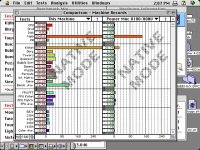
Here's a screenshot of Speedometer 4.0 results from a slow-by-today's standards workstation. (A first-edition 2006 Mac Pro with the downgraded 2.0 Ghz CPUs, running 64 bit Ubuntu. SheepShaver's running MacOS 7.5.5, which I realize is a little weird. The results with 9.0.4 are similar, however.) According to this:
http://lowendmac.com/benchmarks/speedo4.shtml
They make it about as fast as 400Mhz G4 Powerbook. Thus the off-the-cuff "G3 ballpark" estimate for an Atom.
http://lowendmac.com/benchmarks/speedo4.shtml
They make it about as fast as 400Mhz G4 Powerbook. Thus the off-the-cuff "G3 ballpark" estimate for an Atom.
It sounds like Sheepsaver/ubuntu & X will be my OS mix of choice.
I'm building a cross between the idiotic, totally unexpandable, Cube, the Mac Mini and something on the order of the Quadra 700's form factor. I've got a great Compaq Front Bezel, in gloss black, with flip down bezels that're marked for the the drives in the box, a DVD R/W-CD/RW and a DVD/CD Player. It has a floppy Bezel that'll work with a ZIP Drive, a full Card Reader Section & USB/Firewire/analog AV.
The bezel's top curve matches the curve on the corners of the case side covers. Those are Quicksilver colored 12" Mac/iBook top covers . . . with backlit Rainbow Logos!
Not a bad end for a curbed POS! }
I'm building a cross between the idiotic, totally unexpandable, Cube, the Mac Mini and something on the order of the Quadra 700's form factor. I've got a great Compaq Front Bezel, in gloss black, with flip down bezels that're marked for the the drives in the box, a DVD R/W-CD/RW and a DVD/CD Player. It has a floppy Bezel that'll work with a ZIP Drive, a full Card Reader Section & USB/Firewire/analog AV.
The bezel's top curve matches the curve on the corners of the case side covers. Those are Quicksilver colored 12" Mac/iBook top covers . . . with backlit Rainbow Logos!
Not a bad end for a curbed POS! }
X? Friends don't let friends throw their lives away on a completely idiotic waste of time Hackintosh. Sure you wanna do that, huh?
Nothing wrong with Hacintoshes. My main machine (in terms of hours usage) is a HacBook nano (as I like to call it) which is an Acer Aspire A150, just recently upgraded from 10.5 + XPsp2 on a 160GB HDD to 10.6 + W7 on a 750GB. I've been using my Acer ever since the 1st Mac Air was announced, and before it was available in Australia.
As long as you are prepared to ensure that all appropriate "drivers" are available, or just use a known working recipe, they are fine.
The HacBook will never replace the real Apple loves of my life, but it is a cheap reliable utility machine that I don't hesitate to chuck in my bag on the run. My next ultra light machine will probably be a recent 2011 11" MBA (with 10.6), now that Apple have got the specs vs price mostly sorted out.
As long as you are prepared to ensure that all appropriate "drivers" are available, or just use a known working recipe, they are fine.
The HacBook will never replace the real Apple loves of my life, but it is a cheap reliable utility machine that I don't hesitate to chuck in my bag on the run. My next ultra light machine will probably be a recent 2011 11" MBA (with 10.6), now that Apple have got the specs vs price mostly sorted out.
I just want to try out an emulator so I'll have a Rainbow OS on my MacMidTowerHack & X will only be on there for kicks.
I'll probably only really only use ubuntu on it, but with backlit Rainbow Apples on the sides OS 9.0.4 seems to be in order.
But this is to be the expandable Mac Mini/MacMidi that was never released in the y2k era.
When did X stop supporting OS9?
I'll probably only really only use ubuntu on it, but with backlit Rainbow Apples on the sides OS 9.0.4 seems to be in order.
But this is to be the expandable Mac Mini/MacMidi that was never released in the y2k era.
When did X stop supporting OS9?
Classic support available upto OSX 10.4.11 on PPC. OSX 10.5+ no Classic, including PPC systems

There's your answer
*snicker* Hey, I played all the way through "Lemmings" on it without a problem. Is there anything else classic MacOS is good for?
All my old CAD CAM (Dongled), Graphic Design, Productivity and BookKeeping Apps run under OS 9.
I'm NOT upgrading them to X, what worked fine 10 years ago is good enough for me now!
I'm NOT upgrading them to X, what worked fine 10 years ago is good enough for me now!
Dongles are very likely going to be a problem for an emulator. (Any emulator, which means *any* way to run OS 9 programs on Intel hardware.) What form is the dongle? Serial? USB? There's possibly a chance it'll work if it goes on a serial port (if you cook up an adapter cable and jump through the hoops to configure Sheepshaver so it can access a physical serial port), but no OS 9 emulator allows direct access to USB bus devices.
It's a serial port dongle and I only need it to run the plotter from a "plotter server" like my P6360/Crescendo G3.
I can set up the jobs on any of my y2k era Macs or my QS '02. Like I said, the emulator is just for Rainbow Logo Correctness! :approve:
I can set up the jobs on any of my y2k era Macs or my QS '02. Like I said, the emulator is just for Rainbow Logo Correctness! :approve:
If you need to find drivers for a hackintosh, I would try the Insanelymac forums, they have a lot of custom drivers for quite a few things that have no support under vanilla OS X.
Granted I gave up on Hackintosh around mid 2009, and haven't looked back since, but it was interesting to see Leopard running on a Compaq notebook.
Granted I gave up on Hackintosh around mid 2009, and haven't looked back since, but it was interesting to see Leopard running on a Compaq notebook.
Like I said, it'll basically be an ubuntu box, X and Sheepshaver will be on there for S#!$-N-GIGGLES!
Dumb@$$ Cat Names! It's almost as stupid as the PowerBook G3 No-Naming Nonsense! :
Thanks for that tidbit, which feline release would 10.4.11 be? :?:Classic support available upto OSX 10.4.11 on PPC. OSX 10.5+ no Classic, including PPC systems
Dumb@$$ Cat Names!
It's almost as stupid as the PowerBook G3 No-Naming Nonsense! :
10.0b - Kodiak
10.0 - Cheetah
10.1 - Puma
10.2 - Jaguar "Stunning, Cunning, Always Running"
10.3 - Panther
10.4 - Tiger
10.5 - Leopard
10.6 - Snow Leopard
10.7 - Lion
10.0 - Cheetah
10.1 - Puma
10.2 - Jaguar "Stunning, Cunning, Always Running"
10.3 - Panther
10.4 - Tiger
10.5 - Leopard
10.6 - Snow Leopard
10.7 - Lion
Just to reiterate, in case there's any confusion, 10.4.x on Intel *does not include Classic*, so finding an ancient guide for Hackintoshing said first (public) x86 MacOS doesn't help in a quest to run OS 9 software.
I'm sure you know already, just... making sure since you asked.
Hence: Sheepshaver, Ubuntu & X!
So if I wanted to Hackintosh my Dell Latitude D430 so that it could dual boot Windows XP or OSX, and I am very ignorant about Hackintoshes -- where should I start?
Is there a place that actually lays things out in order and makes it clear where to download whatever bits I might need? I have legitimate copies of Tiger, Leopard and Snow Leopard on hand to start with.
When I try reading some of the websites/forums about this it always seems like I'm in for a long research project of reading this bit here, and that bit there, and substantial uncertainty about exactly what needs to be downloaded and installed.
Or is that latter paragraph just the nature and state of going the Hackintosh route?
Is there a place that actually lays things out in order and makes it clear where to download whatever bits I might need? I have legitimate copies of Tiger, Leopard and Snow Leopard on hand to start with.
When I try reading some of the websites/forums about this it always seems like I'm in for a long research project of reading this bit here, and that bit there, and substantial uncertainty about exactly what needs to be downloaded and installed.
Or is that latter paragraph just the nature and state of going the Hackintosh route?
IIRC, coius would be a good source of info on, I hate to misuse the term for a non-hardware hack, "Hackintoshing" CORE & ATOM systems.
I used to run 10.5 on my old E1200@3.2GHz&Rad3850 rig and I have installed it(but do not actually use it) on my previous notebook(aspire one) as well as current AMD based notebook and current AMD based desktop.
What olepigeon suggests is what you want. but be sure to use the forum and wiki instead of the odd hardware listing thing on the main site.
What olepigeon suggests is what you want. but be sure to use the forum and wiki instead of the odd hardware listing thing on the main site.
The site that Olepigeon pointed me at lead me to one called OSXLatitude which is especially for folks putting OSX on their Dell Latitudes and the D430 seems to be an especially favored model. Thank you Olepigeon!
I haven't read through all of it, but assuming it's still around when I'm ready, I think everything I need is available at that site.
I really like the D430. It's a couple of generations back now, but it still has a Core2Duo even if it does only run at 1.33 GHz. The shape and feel is just really nice.
I picked up an E4300, the next corresponding model, with a 2.4GHz C2D. But I still like the D430 better. It's just nicer feeling ergonomically.
On the tech side, the D430 uses a PATA/ZIF 1.8" drive and has no built-in optical drive. The E4300 is slightly larger (fraction of an inch) in every dimension, a little heavier, and has the optical drive built-in. The E4300 also uses a standard SATA 2.5" hard drive, so it's much easier and cheaper to expand that, but I still like the D430 better.
Both models are coming off of leases and such right now and are widely available on Ebay.
Oh, so the thing that caused me to buy a Dell laptop? I wanted to get rid of the giant tower PC which was running my chip programmer and replace it with a laptop, and I wanted a fairly recent laptop. But I needed a parallel port. Both of these Dell models have docking stations with parallel ports on the dock.
So with a docked Dell laptop, I have a compact machine I can use to drive my Chip programmer (parallel port) or a modern FPGA development system (USB port) or a microcontroller development system.
The D430 works great with the chip programmer. I haven't tried the E4300 yet, because the docking station for the E is still too expensive.
I haven't read through all of it, but assuming it's still around when I'm ready, I think everything I need is available at that site.
I really like the D430. It's a couple of generations back now, but it still has a Core2Duo even if it does only run at 1.33 GHz. The shape and feel is just really nice.
I picked up an E4300, the next corresponding model, with a 2.4GHz C2D. But I still like the D430 better. It's just nicer feeling ergonomically.
On the tech side, the D430 uses a PATA/ZIF 1.8" drive and has no built-in optical drive. The E4300 is slightly larger (fraction of an inch) in every dimension, a little heavier, and has the optical drive built-in. The E4300 also uses a standard SATA 2.5" hard drive, so it's much easier and cheaper to expand that, but I still like the D430 better.
Both models are coming off of leases and such right now and are widely available on Ebay.
Oh, so the thing that caused me to buy a Dell laptop? I wanted to get rid of the giant tower PC which was running my chip programmer and replace it with a laptop, and I wanted a fairly recent laptop. But I needed a parallel port. Both of these Dell models have docking stations with parallel ports on the dock.
So with a docked Dell laptop, I have a compact machine I can use to drive my Chip programmer (parallel port) or a modern FPGA development system (USB port) or a microcontroller development system.
The D430 works great with the chip programmer. I haven't tried the E4300 yet, because the docking station for the E is still too expensive.