

Thread
Video Adapter Docs Scan Dump
I've tried to collect some prime examples of Mac Video Adapters and Adapter Cables along with the Documentation for them over the past 20 years or so.
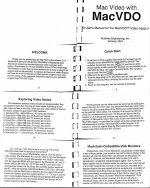
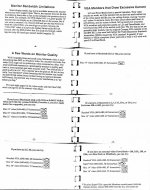
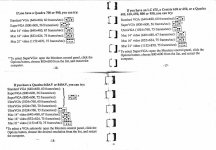
A question came up about a four DIP Switch adapter, this is the only similar adapter that I've found. The small pamphlet's pages were compiled using a photo copier back in the day, so pretty they ain't, but hopefully a bit helpful to my comrades.
MacVDO
_______________________________________________________________________________________
More to follow:
A question came up about a four DIP Switch adapter, this is the only similar adapter that I've found. The small pamphlet's pages were compiled using a photo copier back in the day, so pretty they ain't, but hopefully a bit helpful to my comrades.
MacVDO
_______________________________________________________________________________________
More to follow:
Here are scans of all the adapters that I had readily available in my Mac Video Drawer, I've got Documentation of most of them and Documentation for several that are scattered about on Macs hither, thither and yon. [ ] ]'>
] ]'>
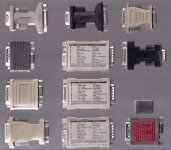
Notice the DA-19 <-> DA-19 ENHANCE branded "Liberty Adapter," I haven't found a use for it yet, but it's pretty darn
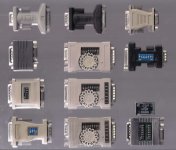
I also have a handful of DB-15 <-> 3, 4 & 5 BNC Mac Cables.
My favorite is a 4 BNC <-> DB-15 that has a 4 DIP switch, Resolution Setting Dongle attached at the Mac end.
I did a few Docs scans while I was at it, but they need some work before they're ready to post.
] ]'>Notice the DA-19 <-> DA-19 ENHANCE branded "Liberty Adapter," I haven't found a use for it yet, but it's pretty darn
I also have a handful of DB-15 <-> 3, 4 & 5 BNC Mac Cables.
My favorite is a 4 BNC <-> DB-15 that has a 4 DIP switch, Resolution Setting Dongle attached at the Mac end.
I did a few Docs scans while I was at it, but they need some work before they're ready to post.
Neat. I have the gray one on the top left.
Back in 2001 I took a networking course. The instructor said he had a 15" monitor he was going to toss and offered it to anyone who wanted it. I said I'd take it. He went and grabbed it out of his car. To my surprise it was an old Apple monitor with the adapter attached to the cable. I thought that was a pretty neat score.
Back in 2001 I took a networking course. The instructor said he had a 15" monitor he was going to toss and offered it to anyone who wanted it. I said I'd take it. He went and grabbed it out of his car. To my surprise it was an old Apple monitor with the adapter attached to the cable. I thought that was a pretty neat score.
Damn you, Frog! }
I have a Miro 6-switch that's not listed yet, including documentation. And i just bought a new one, not yet clear wich maker, but according to the description it has documentation as well:
http://www.ebay.de/itm/261170673685
Should arrive soon. Do you guys accept photographs instead of scans? Might even find a sheet of acrylic glass to properly flatten the documentation. The scanner is hidden under a heap of stuff. :I
I have a Miro 6-switch that's not listed yet, including documentation. And i just bought a new one, not yet clear wich maker, but according to the description it has documentation as well:
http://www.ebay.de/itm/261170673685
Should arrive soon. Do you guys accept photographs instead of scans? Might even find a sheet of acrylic glass to properly flatten the documentation. The scanner is hidden under a heap of stuff. :I
The one from ebay metioned earlier. If you are in europe and you need one, get it. It's cheap and worked instantly with my 19 inch HP 1955 TFT (Ebay, 20 Euros) and with a C610, Q650, LC475 running 7.5.5. I guess others should work too. Use the 21" Multisync setting in Mode 1, that way you can switch between resolutions using the monitor applet. While there, disable gamma correction, it's not needed.
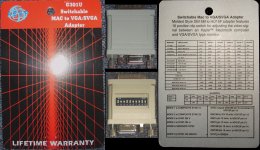
Finally. My 13" Mac CRT days are over! :approve:
Edit #1: Works also flawless with a modern LG Flatron IPS224 22" Full HD IPS TFT
Finally. My 13" Mac CRT days are over! :approve:
Edit #1: Works also flawless with a modern LG Flatron IPS224 22" Full HD IPS TFT
Another adapter, this time Miro branded. It sucks. I wish i hadn't payed 10 Euros for it.
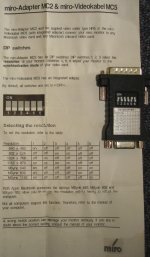
Here is a quick table of what worked with a modern display, the LG Flatron IPS224 22" TFT, wich you can get for about 150 Euros at Amazon:
I also tested another display, a HP 1955 19" TFT, wich in it's documentation claims to support Mac modes 832x642 and 1152x870 and even a Sun mode. However, with this adapter it didn't work at all.
It works fine with another adapter and i can recommend the display. It's very cheap, you can get it used at Ebay for 20 Euros. The robust VESA-Stand (with pivot) is worth it alone. I only wish i had the 17" model, wich electronically is the same, but in a smaller display.
Here is a quick table of what worked with a modern display, the LG Flatron IPS224 22" TFT, wich you can get for about 150 Euros at Amazon:
Code:
Miro MC2, MacOS 7.5.5, LG IPS224 TFT

          Q650 C610 P475 IIsi
640 x 480    +    -¹   -    +
832 x 642    +    +    -    -
1024 x 768   +    +    -    -
1152 x 870   +    +    -    -
Msync  640   -    -²   -    +
Msync  832   -    -    -    +³
Msync 1152   -    -²   -    +³

+) Works!
-) Monitor stays blank, thinks no signal is there
¹) Monitor says out of Spec
²) Until MacOS starts, then it goes blank
³) 640 x 480 onlyIt works fine with another adapter and i can recommend the display. It's very cheap, you can get it used at Ebay for 20 Euros. The robust VESA-Stand (with pivot) is worth it alone. I only wish i had the 17" model, wich electronically is the same, but in a smaller display.
Localized and fixed . . .
. . . what frog? [}] ]'>
http://allrecipes.com/recipe/caramelized-frog-legs/
. . . what frog? [}
] ]'>http://allrecipes.com/recipe/caramelized-frog-legs/
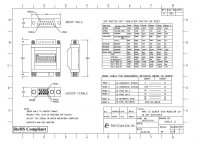
i have two Unimac Fly adapters with a single row of Dip switches, it really works on every mac i have with my dell something something 15" LCD panel. They all seem to do 60Hz 640x480 or sometimes 1024x768 when you tell the adapter to do so, even the ones with onboard video.

Manuals for Belkin MacVGA adapters.
http://www.belkin.com/support/dl/f3h1381revised.pdf
http://cache-www.belkin.com/support/dl/mac-vga_9_dipswitches.pdf
Belkin also made a HDI45 to VGA adapter for the Powermac x100 series using the dial and dipswitch style controls that the first F3H1381 manual shows.
http://www.belkin.com/support/dl/f3h1381revised.pdf
http://cache-www.belkin.com/support/dl/mac-vga_9_dipswitches.pdf
Belkin also made a HDI45 to VGA adapter for the Powermac x100 series using the dial and dipswitch style controls that the first F3H1381 manual shows.