

Thread
Macintosh SE/30 Faint chime and no video, possible short on +5V
Hello
The Analog board is OK, I used another SE Board to test it and it works fine, I also installed the board in another SE/30 and it still shows the same issue: faint chime and no video (screen is totally black)
This seems to be a very early revision board, with the yellow-band capacitors.
I was looking at UE8 and I noticed that the resistance between +5V and GND is about 56 Ohms, which seems too low.
I then removed the capacitors and washed the board, now the resistance on J12 and UE8 is about 35 Ohms.
Soon I will solder new capacitors on the board, and measure the resistance again.
after washing the board (with the old caps still in place) The board produced a very faint chime, reset and interrupt also worked: I could hear the chime when I press reset and the sad mac tone when I press interrupt.
Once I recap the board, I will connect it to a Floppy drive and I'll see if it trie to read it.
Before I started working on the board, I took some photos, here are a few of them
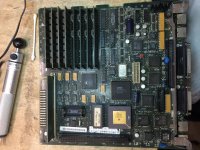
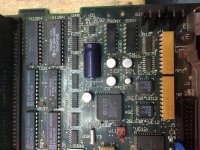
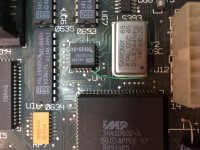
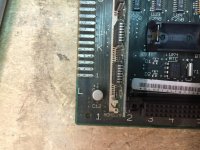
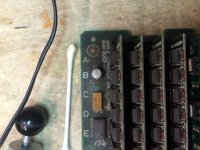
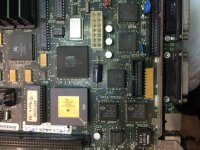
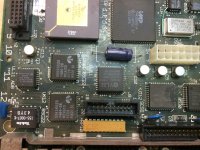
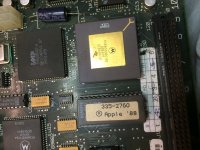
The Analog board is OK, I used another SE Board to test it and it works fine, I also installed the board in another SE/30 and it still shows the same issue: faint chime and no video (screen is totally black)
This seems to be a very early revision board, with the yellow-band capacitors.
I was looking at UE8 and I noticed that the resistance between +5V and GND is about 56 Ohms, which seems too low.
I then removed the capacitors and washed the board, now the resistance on J12 and UE8 is about 35 Ohms.
Soon I will solder new capacitors on the board, and measure the resistance again.
after washing the board (with the old caps still in place) The board produced a very faint chime, reset and interrupt also worked: I could hear the chime when I press reset and the sad mac tone when I press interrupt.
Once I recap the board, I will connect it to a Floppy drive and I'll see if it trie to read it.
Before I started working on the board, I took some photos, here are a few of them
Update!
just finished the recap, now the chime is loud and clear.
It seems like the machine is not booting from its hard drive
looking at the floppy port, +5 is 5.00V, +12 is 12.23V but -12V is 0.03V.
EDIT:
I hooked up an external SuperDrive with a copy of the NAD in it, apart from the "blip" that makes after you turn on the system, it does nothing.
just finished the recap, now the chime is loud and clear.
It seems like the machine is not booting from its hard drive
looking at the floppy port, +5 is 5.00V, +12 is 12.23V but -12V is 0.03V.
EDIT:
I hooked up an external SuperDrive with a copy of the NAD in it, apart from the "blip" that makes after you turn on the system, it does nothing.
The video roms are not the problem, I swapped them and both SE's still show the same problems.
Swapping the roms was one of the things I've tried, I found out that sometimes, the roms in a ceramic package loose their content. (I've spent ages troubleshooting an IBM XT Clone only to find this out...)
UE8 is a new part, it is a SN74LS166AD from TI, I bought it here
Swapping the roms was one of the things I've tried, I found out that sometimes, the roms in a ceramic package loose their content. (I've spent ages troubleshooting an IBM XT Clone only to find this out...)
UE8 is a new part, it is a SN74LS166AD from TI, I bought it here
I found out that the interrupt key produces a sad mac chime only if you press it after the startup chime, if you wait more that 6-10 seconds it does nothing
on the other hand, the reset button always works
I tried the same thing with the other board (the one with half video) and no matter when you press it (with no drives hooked up), it always makes a sad mac chime (that ends with 13, if I remember correctly)
on the other hand, the reset button always works
I tried the same thing with the other board (the one with half video) and no matter when you press it (with no drives hooked up), it always makes a sad mac chime (that ends with 13, if I remember correctly)
The screen remains all black, the analog board is good (tested with another SE and the half-video SE/30, the one in the other thread)
The "slower" tone only happened once, after rebooting the machine it came back as usual
I also replaced one of the Bourns filters, RP2 if I recall correctly (desoldering it was quite a pain) but it still doesn't boot
So, At this point I'm still stuck with black screen + no boot
The "slower" tone only happened once, after rebooting the machine it came back as usual
I also replaced one of the Bourns filters, RP2 if I recall correctly (desoldering it was quite a pain) but it still doesn't boot
So, At this point I'm still stuck with black screen + no boot
Feel around on the chips. see if the SCSI, SWIM is getting excessively hot.
the PALs and the SCC will get really warm. thats normal.
Bourns are easy to test. The end pins are grounded, and the middle pins should be high resistance. If you get low ohms to nearly a short on any other pin besides the outer pins, the Bourns is bad.
the PALs and the SCC will get really warm. thats normal.
Bourns are easy to test. The end pins are grounded, and the middle pins should be high resistance. If you get low ohms to nearly a short on any other pin besides the outer pins, the Bourns is bad.
Also note, the video circuit in the SE/30 will run all by itself regardless of what the BUS is doing... period. It will draw on the screen, the default state of the VRAM. Different brands of VRAM draw different initial patterns. Simasimac is created by only 1 type of RAM, while zebra stripes are created by a different brand of RAM. NEC vs TI. I think.
So, if you get black screen, the video circuit is bad and needs troubleshooting. in my EXPERIENCE, the #1 cause was the VRAM itself. Second to the PALs. if the PALs are bad, it will prevent the machine from booting as well, especially if its holding up the BUS which could also cause no video, as they are also used at refreshing the screen with whatever contents are in VRAM.
there 5 PALs. Find the one that is common to the video generation, and also attaches to some control lines on the main data bus. That would be where I would start.
So, if you get black screen, the video circuit is bad and needs troubleshooting. in my EXPERIENCE, the #1 cause was the VRAM itself. Second to the PALs. if the PALs are bad, it will prevent the machine from booting as well, especially if its holding up the BUS which could also cause no video, as they are also used at refreshing the screen with whatever contents are in VRAM.
there 5 PALs. Find the one that is common to the video generation, and also attaches to some control lines on the main data bus. That would be where I would start.