
Thread
SE/30 booting off CF success

Bam. It was an ordeal getting HD Toolkit to run on this setup, as it requires 7.5.3. 500k a second is surprising, and quite a bit less than the SE/30 should be capable of. This same flash card setup did 5 megs/second on my 840av with 1500 operations. Still, the access time and seek time are quite nice, and it boots extremely fast.
Anybody have any tips as to how to speed the transfer speed up?.
It seems you haven't read through this recent discussion yet:
viewtopic.php?f=7&t=17047
Even though it's time consuming, you'll find a lot of info by going through most all the posts. And at the end, you will see my repeated call for benchmarks other than the FWB. I suggest you run the Norton System Info benchmark and then post the results.
viewtopic.php?f=7&t=17047
Even though it's time consuming, you'll find a lot of info by going through most all the posts. And at the end, you will see my repeated call for benchmarks other than the FWB. I suggest you run the Norton System Info benchmark and then post the results.

Norton corroborates the results. I've timed large file transfers, too. There's a very real and unexplained 530k/sec transfer limit.
None of the few jumper settings on the 7720u and CF adapter are relevant to this problem, either. Not sure where to take it from here.
Thank you for testing with Norton. Well, all I can say is that other claim "it FEELS faster" than a regular spinning platter hard drive. But if that is true, then I would expect to see scientific evidence of such in the form of drive benchmarks that reveal "why" it FEELS faster! Because all I see is evidence that shows CF cards to be MUCH SLOWER!
When I was working a lot on my SE/30 with a 7200RPM SCSI drive in it, I noticed a *large* gain in sequential transfer speed by upgrading to the 7.5.5 Drive Setup drivers instead of HD SC Setup. There might be some notes about that on my website, I'm not sure.
If you're running 7.5.5 on that SE/30, try updating the hard disk driver with patched Drive Setup and see if the figures improve.
If you're running 7.5.5 on that SE/30, try updating the hard disk driver with patched Drive Setup and see if the figures improve.
TylerEss, success! The CF card, when initialized with HDT was limited to 500k/sec. After I initialized it with the patched version of Apple HD SC Setup (located at ftp://grijan.cjb.net:21000/macintosh/Software/Utilities/hd_sc_setup_735-patched.sea.bin) and updated the disk driver, transfer speed jumped to 1700k/sec. Take a look:

I wonder if this would also work for the aztec monster drives in that other thread...
I wonder if this would also work for the aztec monster drives in that other thread...
Initializing the drive with a patched drive setup results in a very fast drive, but it's too unstable to use for anything besides benchmarks. Every time I've tried to install or copy anything, it spews bus errors. I've compared all the drive settings I could find in HDT for both slow and fast formatted volumes, and they're identical.
I'll take another swing at this in the morning.
I'll take another swing at this in the morning.
Most recently, after formatting the flash drive with Apple HD SC setup and trying to copy ~3mb of Monkey Island to the drive:
Sorry, a system error occurred.
"Finder"
address error
After this the CF card is hosed, to the extent that it prevents booting. Then I stick it into my canon SLR, reformat it, reinsert it into the mac, and start over. Use of the apple driver seems to be fatal after few seconds of writing. The HDT driver is at least functional, if slow.
Sorry, a system error occurred.
"Finder"
address error
After this the CF card is hosed, to the extent that it prevents booting. Then I stick it into my canon SLR, reformat it, reinsert it into the mac, and start over. Use of the apple driver seems to be fatal after few seconds of writing. The HDT driver is at least functional, if slow.
I have two ideas, neither of which may be the right ones.
Did you switch to HD SC Setup (as you linked) or Drive Setup?
Drive Setup is the newer of the two, and is the driver that improved the disk access speed in my SE/30 with a 7200RPM SCSI drive.
If you tried with HD SC Setup, I'd try again with Drive Setup.
This and this may be of some help.
Cheers!
Did you switch to HD SC Setup (as you linked) or Drive Setup?
Drive Setup is the newer of the two, and is the driver that improved the disk access speed in my SE/30 with a 7200RPM SCSI drive.
If you tried with HD SC Setup, I'd try again with Drive Setup.
This and this may be of some help.
Cheers!
I've tried both Apple HD SC Setup and Drive Setup 1.6.
I'm much closer to solving this now. The issue is in how Drive Setup is patched with device settings so it recognizes the flash drive.
Using ResEdit, I would open Drive Setup and add a device entry called "SANDISK,*", which would then make DriveSetup recognize the device as compatible. This new entry is given a blob of hexadecimal gibberish that is usually borrowed from a different device in the list. I used the settings for a generic quantum scsi drive. This failed. Generic IBM settings failed. Generic seagate settings failed.
It wasn't until I used the drive settings for a generic ATA drive that my flash card could be used (even though it's connected to a SCSI bridge). However, the drive is now very slow again.
I then discovered that opening Drive Setup 2.X with Resedit allowed me to interpret what the hexadecimal blob means. Each drive definition has the following editable settings:
Driver ID - 48
AltDriver - 200
SCIC ID - 0
DrvrOptions - 0
TibType - 1
Blind Type - 0
Option Bits - 1024
Poll Byte - 0
HasPage30 - 0
Default - 0
Password Type - 0
Num Cmds - 7
The key settings seem to be Driver, Blind Type, Option Bits, and Num Cmds. "Option Bits" looks like multiple settings encoded into a single number.
I'm much closer to solving this now. The issue is in how Drive Setup is patched with device settings so it recognizes the flash drive.
Using ResEdit, I would open Drive Setup and add a device entry called "SANDISK,*", which would then make DriveSetup recognize the device as compatible. This new entry is given a blob of hexadecimal gibberish that is usually borrowed from a different device in the list. I used the settings for a generic quantum scsi drive. This failed. Generic IBM settings failed. Generic seagate settings failed.
It wasn't until I used the drive settings for a generic ATA drive that my flash card could be used (even though it's connected to a SCSI bridge). However, the drive is now very slow again.
I then discovered that opening Drive Setup 2.X with Resedit allowed me to interpret what the hexadecimal blob means. Each drive definition has the following editable settings:
Driver ID - 48
AltDriver - 200
SCIC ID - 0
DrvrOptions - 0
TibType - 1
Blind Type - 0
Option Bits - 1024
Poll Byte - 0
HasPage30 - 0
Default - 0
Password Type - 0
Num Cmds - 7
The key settings seem to be Driver, Blind Type, Option Bits, and Num Cmds. "Option Bits" looks like multiple settings encoded into a single number.
Spartacus,
When you open "FWB Configure" application and press on large "Control" button on the right and then go to "Edit Mode Pages" and open Parameter Nr. 2 window, what does it show?
See attached example below. Your parameters probably will be different, since mine is UW LVD drive on Adaptec.
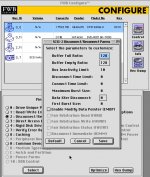
When you open "FWB Configure" application and press on large "Control" button on the right and then go to "Edit Mode Pages" and open Parameter Nr. 2 window, what does it show?
See attached example below. Your parameters probably will be different, since mine is UW LVD drive on Adaptec.
I just had a Chat session with Ben at OWC regarding their LEGACY series SSDs. I thought it would be relevant to our discussion here. Ben said that vintage Mac owners in the past have used this formatter/driver for use on their SSDs (for example, when used on a PowerBook G3 Wallstreet running OS 8 ), and have experienced a noticeable performance boost:
http://eshop.macsales.com/item/Intech%20Software/STCDHD/
However, he could not tell me if those customers ran any benchmarks, nor did he say how they rated that performance, other than to say "it feels faster than a spinning platter drive."
Since it is clear that the driver and driver settings have a bearing on performance, and seeing the default settings produce lackluster performance (as evidenced by your benchmark speed reports here), it may be worth trying SpeedTools to see what happens.
http://eshop.macsales.com/item/Intech%20Software/STCDHD/
However, he could not tell me if those customers ran any benchmarks, nor did he say how they rated that performance, other than to say "it feels faster than a spinning platter drive."
Since it is clear that the driver and driver settings have a bearing on performance, and seeing the default settings produce lackluster performance (as evidenced by your benchmark speed reports here), it may be worth trying SpeedTools to see what happens.

Or just try this to see if it solves the performance problems, without needing to spend more time tweaking unknown settings:
http://www.intechusa.com/HDInfo.html
http://www.intechusa.com/HDInfo.html
Since this thread is focused on flash drive solutions for our vintage Macs, I felt this would be appropriate.
Last night I commented on OWC's blog about their Black Friday 2011 specials. I noticed that they had specials on all their SATA SSDs but none on their "Legacy" IDE/ATA edition SSDs that are for vintage Macs. Having recently acquired some old PB G3 Wallstreets, I also commented about discounts on batteries too. Today, Grant at OWC kindly replied that he would take my words under consideration.
So as to not let this chance die (for truly, I am only one man asking about this), I wanted to post here to encourage those of you interested to reply in kind. Specifically, if you've ever pondered putting a true SSD, not just a CF card, in your vintage Mac, now is the time to seek out a discount and do it! I would therefore strongly encourage you to post a comment on OWC's blog if you would be encouraged to buy an OWC SSD if they offered a good enough discount on them.
Here's the Black Friday Blog:
http://blog.macsales.com/12693-holiday-deals-from-owc/comment-page-1#comment-49219
And here are the 3 product pages I mentioned in my comment on the OWC blog...
40GB Legacy 2.5" SSD:
http://eshop.macsales.com/item/OWC/SSDMLP040/
PB G3 Wallstreet PRAM Battery:
http://eshop.macsales.com/item/NewerTech/PRAMPBG3WS/
PB G3 Wallstreet Main Battery:
http://eshop.macsales.com/item/NewerTech/BAPLLIWSRS/
And while pondering whether or not to post a comment there, keep in mind, "Ask and ye shall receive!"
Thanks!
Last night I commented on OWC's blog about their Black Friday 2011 specials. I noticed that they had specials on all their SATA SSDs but none on their "Legacy" IDE/ATA edition SSDs that are for vintage Macs. Having recently acquired some old PB G3 Wallstreets, I also commented about discounts on batteries too. Today, Grant at OWC kindly replied that he would take my words under consideration.
So as to not let this chance die (for truly, I am only one man asking about this), I wanted to post here to encourage those of you interested to reply in kind. Specifically, if you've ever pondered putting a true SSD, not just a CF card, in your vintage Mac, now is the time to seek out a discount and do it! I would therefore strongly encourage you to post a comment on OWC's blog if you would be encouraged to buy an OWC SSD if they offered a good enough discount on them.
Here's the Black Friday Blog:
http://blog.macsales.com/12693-holiday-deals-from-owc/comment-page-1#comment-49219
And here are the 3 product pages I mentioned in my comment on the OWC blog...
40GB Legacy 2.5" SSD:
http://eshop.macsales.com/item/OWC/SSDMLP040/
PB G3 Wallstreet PRAM Battery:
http://eshop.macsales.com/item/NewerTech/PRAMPBG3WS/
PB G3 Wallstreet Main Battery:
http://eshop.macsales.com/item/NewerTech/BAPLLIWSRS/
And while pondering whether or not to post a comment there, keep in mind, "Ask and ye shall receive!"
Thanks!
But, Spartacus, the write speed is still significantly slower than an old spinning platter hard drive. I read that part of your report and I am still quite curious as to the technical reason WHY. If one contends that such is the limitation of the CF card itself, then logically one would expect to see different throughput scores when you try different CF cards (some fast, some slow). But if you test various CF cards and if the WRITE performance remains locked at that unusually slow 500kB/s, then I would be led to suspect that even the HD Speed Tools driver is not tuned to accelerate Write speed, at least not on flash disks for some unknown reason.
In practical terms, you will probably get more benefits from the fast READ speeds anyway, so you can always tell yourself, "the slow Write Speed doesn't bother me much." Even so, I am still curious about that point and would like to hear the thoughts of other technically minded people as to why this may be the case, and what, if anything, could be done to fix it.
In practical terms, you will probably get more benefits from the fast READ speeds anyway, so you can always tell yourself, "the slow Write Speed doesn't bother me much." Even so, I am still curious about that point and would like to hear the thoughts of other technically minded people as to why this may be the case, and what, if anything, could be done to fix it.
The HDST driver, in combination with a CF card and an Acard SCSI-IDE bridge delivers more or less the same performance as a spinning platter HDD behind the same SCSI-IDE bridge. This is true for a G3 Powermac, but not for the SE/30: http://68kmla.org/forums/viewtopic.php?f=7&t=17047&start=82
The very same CF card with the very same HDST driver and the very same SCSI-IDE bridge shows better performance when used with a Macintosh that has a more performant SCSI bus. Both read and write performance reach the same level.
Summary:
(1) The bottleneck for write performance is not in the CF card itself. The very same card gives better results when combined with a faster Macintosh host.
(2) And it is not in the SCSI-IDE bridge itself, neither the AztecMonster nor the AEC-7720U. The very same bridges show better results when combined with a faster Macintosh host.
(3) The SE/30 SCSI bus itself is not the bottleneck, too. The very same SE/30 shows better results with a real spinning-platter SCSI HDD.
Do you agree so far?
Then, the limitation seems to be in the combination of Macintosh SCSI bus and SCSI-IDE bridge.
What do you think?
I've long thought it was the IDE-SCSI interface slowing things down. I just couldn't prove it. I still can't. But if we had a true SCSI SSD to test, that would give us much more evidence. But as far as I know, such drives don't exist. Even OWC's SSDs are either SATA or ATA/IDE.
From what I've observed, the four factors are the scsi-ide bridge, the scsi bus, the driver, and cpu speed. All other things being equal:
1) An IDE drive and an IDE CF card exhibited equal performance problems when used with the bridge
2) The choice of driver made a profound difference in speed.
3) Using a slow HDT driver, transfer speed jumped from 500k to 800k with the addition of a 50mhz daystar powercache.
4) A faster machine (quadra 840av, in my case) has fewer issues with the CF drive (the performance difference is still there, just smaller)
At this point I'm convinced it's just a matter of driver optimization for the nuances of a scsi-ide bridge. A poorly optimized driver would show the most symptoms with a narrow, slow SCSI bus and a slow CPU.
1) An IDE drive and an IDE CF card exhibited equal performance problems when used with the bridge
2) The choice of driver made a profound difference in speed.
3) Using a slow HDT driver, transfer speed jumped from 500k to 800k with the addition of a 50mhz daystar powercache.
4) A faster machine (quadra 840av, in my case) has fewer issues with the CF drive (the performance difference is still there, just smaller)
At this point I'm convinced it's just a matter of driver optimization for the nuances of a scsi-ide bridge. A poorly optimized driver would show the most symptoms with a narrow, slow SCSI bus and a slow CPU.
One should not expect wonders from an old NCR 53C80 SCSI chip.
http://support.apple.com/kb/TA29470?viewlocale=en_US
http://support.apple.com/kb/TA29470?viewlocale=en_US
This is a repeat of the same old thing numerous people have cited time and time again. But such arguments slap logic right in the face.
It's not about slow SCSI chips in the SE/30!! If we can get 1700kb/s READ and 1700kb/s WRITE with a spinning platter drive on an SE/30 that has that slow SCSI chip, can one then argue that "it's the SCSI chip!" when a CF card gets 1700kb/s READ but only 500kb/s WRITE? Poppycock! I say no!
You can tell me that the SCSI chip in the SE/30 limits the maximum READs and WRITEs to 1700kb/s. I will accept that based on the benchmark evidence I've seen. But that does not explain why the "slow SCSI chip" would limit the speed of SSDs to much less than 1700kb/s! Don't compare the SE/30's SCSI chip with any other Mac. We know it's slower than other Macs. But that is irrelevant to this discussion! We are focused on the SE/30's SCSI chip, and we know the upper limits of the throughput it allows. Therefore, the fastest throughput is what we must focus on.
Putting it another way, the benchmark speeds of spinning platter drives in an SE/30 have become our "reference standard" because we are not seeing any "faster" benchmark speeds from SSDs (even if some contend the SSDs "feel" faster). Therefore, it doesn't matter if the SE/30 has a slow SCSI chip. It doesn't matter if the SCSI chip in the SE/30 is slower than other Macs. None of that matters. What matters is this. How fast are the READs and WRITEs of the fastest spinning platter hard drives when used internally to the SE/30? (From what I can see, it's about 1700kb/s max for READ & WRITE.) And then what is the maximum READ and WRITE speed of the best SSD in the SE/30? (From what we have seen with the Intech HD Speed Tools driver, its about 1700kb/s for READ, but only 500kb/s for WRITE, on a particular SSD setup). So if the upper WRITE speed limit is 1700kb/s for this "slow SCSI chip" why then does a flash drive get only 500kb/s WRITE speed? You cannot argue with me that "it is the slow SCSI chip"!
So as you can see, the SCSI chip is not the limiter of READ/WRITE throughput insofar as our reference standard is a spinning platter drive that we know to get a max of 1700kb/s for READ and WRITE, versus slower WRITE speeds on SSDs tested thus far. Hence, the most logical course of action is to focus our time and energy on the real potential sources of the slow-down:
a) The SSD itself (we've not yet tried an OWC SSD, but the CF cards tested here seem to indicate it's not the SSD itself)
B) The IDE-to-SCSI interface of the SSD (which is what we've started to ponder recently)
c) The software drivers (which I've long thought was the root cause of the slowdown, and we can see Intech HD SpeedTools did max out the READ throughput!)
So it's not about a "slow SCSI chip." Nor can it be about the CPU of the SE/30 either, for reasons I stated above. It's all about (a), ( B) and/or ©.
Plan © has partly been implemented already. You can see that if you read through previous posts. OWC recommended HD Speed Tools to me for use with their own SSDs, so I posted about that here, Spartacus then tried it out and found it sped up his CF card READ performance. So as you can clearly see, that part of the plan has been implemented, at least on the hardware Spartacus owns.
Plans (a) and ( B) are things we are all doing or wanting to do here. I myself have just been trying to influence OWC to be more fair on their LEGACY SSD pricing so I can then buy a couple and begin testing of my own. Those are IDE drives though, not SCSI. So I would need to use an IDE-to-SCSI interface on one to make it work in an SE/30. And that's where the experimentation will come in, to see if that IDE-to-SCSI interface is the bottleneck. But if I connect an OWC SSD via a generic IDE-to-SCSI interface and find that both READ and WRITE speeds are hitting our experimental maximum of 1700kb/s, then I must conclude that either something is better about the OWC SSD versus a standard CF card (which makes logical sense because a CF card is technical NOT an SSD), or it could just be a coincidence of my choice in the IDE-to-SCSI adapter.
But the point of my previous post was the the SCSI chip is largely irrelevant if we are comparing oranges to oranges. Since this thread is entitled "SE/30" I have been focused on that. And although testing on non-SE/30 machines isn't a bad thing, any benchmarks on those other Macs will not be directly comparable with the SE/30 benchmarks in terms of raw performance. Indeed the SE/30 is slower than most because of its slow SCSI chip. However, I don't see the SCSI chip in the SE/30 as having anything to do with limiting the WRITE speed of an SSDs in light of the fact that same SCSI chip is not limiting the speed of a regular spinning platter hard drive.
Plans (a) and ( B) are things we are all doing or wanting to do here. I myself have just been trying to influence OWC to be more fair on their LEGACY SSD pricing so I can then buy a couple and begin testing of my own. Those are IDE drives though, not SCSI. So I would need to use an IDE-to-SCSI interface on one to make it work in an SE/30. And that's where the experimentation will come in, to see if that IDE-to-SCSI interface is the bottleneck. But if I connect an OWC SSD via a generic IDE-to-SCSI interface and find that both READ and WRITE speeds are hitting our experimental maximum of 1700kb/s, then I must conclude that either something is better about the OWC SSD versus a standard CF card (which makes logical sense because a CF card is technical NOT an SSD), or it could just be a coincidence of my choice in the IDE-to-SCSI adapter.
But the point of my previous post was the the SCSI chip is largely irrelevant if we are comparing oranges to oranges. Since this thread is entitled "SE/30" I have been focused on that. And although testing on non-SE/30 machines isn't a bad thing, any benchmarks on those other Macs will not be directly comparable with the SE/30 benchmarks in terms of raw performance. Indeed the SE/30 is slower than most because of its slow SCSI chip. However, I don't see the SCSI chip in the SE/30 as having anything to do with limiting the WRITE speed of an SSDs in light of the fact that same SCSI chip is not limiting the speed of a regular spinning platter hard drive.
For those that have successfully implemented a CF replacement, I am very keen on gaining some insight.
So far I have tried unsuccessfully to get my SE/30 to recognise my CF card.
I've tried the following methods:
1) Mounting the CF on the external SCSI port (the disk is not recognised by the OS)
2) Cloning a known bootable disk on CCC and mounting the CF internal SCSI port (the question mark disk appears when I boot up)
Any tips? Will mounting the CF internally as a secondary drive work? What am I doing wrong? :?:
So far I have tried unsuccessfully to get my SE/30 to recognise my CF card.
I've tried the following methods:
1) Mounting the CF on the external SCSI port (the disk is not recognised by the OS)
2) Cloning a known bootable disk on CCC and mounting the CF internal SCSI port (the question mark disk appears when I boot up)
Any tips?
Will mounting the CF internally as a secondary drive work? What am I doing wrong? :?: What adapter are you using?
If you have formatted it on an OS X machine, it will not have the low-level drivers installed to run on a machine of that age, unless you check the box for "Intall OS 9 drivers" in Disk Utility - and, IIRC, later versions of OS X removed even that. My suggestion would be to format it from the SE/30 with the patched version of Apple Disk Tool, or with Lido, HD Toolkit, etc. The patched version of the Apple formatter is required to detect and format drives that do not have Apple-certified ROMs.
Similarly, I have my doubts that CCC will do what you need.
ie, you get an error message saying the above, and asking if you want to format it? That would be the expected behaviour.
If you have formatted it on an OS X machine, it will not have the low-level drivers installed to run on a machine of that age, unless you check the box for "Intall OS 9 drivers" in Disk Utility - and, IIRC, later versions of OS X removed even that. My suggestion would be to format it from the SE/30 with the patched version of Apple Disk Tool, or with Lido, HD Toolkit, etc. The patched version of the Apple formatter is required to detect and format drives that do not have Apple-certified ROMs.
Similarly, I have my doubts that CCC will do what you need.
Bunsen,
I don't know what I'm doing wrong, I know it is possible, but I can't get it to work? :?:
http://synack.net/~bbraun/idecf.html
http://synack.net/~bbraun/ridsce.html
What I meann by the OS does not recognise the CF is that it does even show up on the screen nor does it show up when I scan the SCSI bus for it, it's like it's not there, I've tried to troubleshoot using the different SCSI IDs, but to no avail, it's like it can't find the CF! :?:
I don't know what I'm doing wrong, I know it is possible, but I can't get it to work? :?:
http://synack.net/~bbraun/idecf.html
http://synack.net/~bbraun/ridsce.html
What I meann by the OS does not recognise the CF is that it does even show up on the screen nor does it show up when I scan the SCSI bus for it, it's like it's not there, I've tried to troubleshoot using the different SCSI IDs, but to no avail, it's like it can't find the CF! :?:
You need CF cards that identify themselves to the host as fixed media drives, not removable. I quote from the product page for an active converter called TrueIDE (which may help you if it is less expensive than getting the right CF cards):
Also, as described at your first link:
Of course, find out whether your existing cards are able to work in fixed mode first, before replacing them or buying this. If they can, that's not the problem.
Also, as described at your first link:
While my experience doesn't help improve things, it may be interesting to note. I have an 8GB Seagate branded Micro-Drive (spinning platter drive, not flash) which I formatted and then installed OS 9, and then I put it in a PCMCIA adapter and inserted that into my PowerBook G3 Wallstreet PDQ. I can select it as a boot drive using Startup Disk, but my Wallstreet won't boot from it at all. Perhaps this relates to what Bunsen was saying?
Thanks for trying to help me Bunsen, I appreciate it!
The CF card I am using is a Transcend Industrial CF150 4Gb, according the company's website, has true IDE mode and Ultra DMA Mode. I switched the jumper setting on the I-O Data SCSI to IDE adapter from PIO to UDMA mode as per Jumper Settings Reference. But still it is not read by the system. :?:
I have the jumper settings as follows:
Pin 1 Y (SCSI ID)
Pin 2 N (SCSI ID)
Pin 3 N (SCSI ID)
Pin 4 Y (SCSI-1 Mode)
Pin 5 Y (SCSI-1 Mode)
Pin 6 N (SCSI-1 Mode)
Pin 7 Y (DMA ATA Transfer Mode)
Pin 8 N (Flash ROM)
Pin 9 N (Internal SCSI Termination)
The CF card I am using is a Transcend Industrial CF150 4Gb, according the company's website, has true IDE mode and Ultra DMA Mode. I switched the jumper setting on the I-O Data SCSI to IDE adapter from PIO to UDMA mode as per Jumper Settings Reference. But still it is not read by the system. :?:
I have the jumper settings as follows:
Pin 1 Y (SCSI ID)
Pin 2 N (SCSI ID)
Pin 3 N (SCSI ID)
Pin 4 Y (SCSI-1 Mode)
Pin 5 Y (SCSI-1 Mode)
Pin 6 N (SCSI-1 Mode)
Pin 7 Y (DMA ATA Transfer Mode)
Pin 8 N (Flash ROM)
Pin 9 N (Internal SCSI Termination)
Just a quick update of my progress on my SE/30 CF journey for those that are following this thread. :beige: :b&w:
I disconnected the internal HDD of my SE/30(A) (that is known to be readable and bootable) and mounted as an external drive on the SE/30( B) SCSI bus, but it still does not read it.
The problem is either with:
Try and buy terminating resistors? Try and buy this dual drive internal SCSI cable?
:beige: :b&w:I disconnected the internal HDD of my SE/30(A) (that is known to be readable and bootable) and mounted as an external drive on the SE/30( B) SCSI bus, but it still does not read it.
The problem is either with:
- 1) SCSI termination (the HDD does not have built in termination)
2) SCSI DB-25 and 50-Pin connector (though they are just cables and adapters, what could go wrong?)
Try and buy terminating resistors? Try and buy this dual drive internal SCSI cable?
Did you change the SCSI ID of the (A) drive? If both it and the internal ( B) drive are on the same ID, they will clash.
Have you tried:
Different SCSI external cables.
Different SCSI external cases.
Checking that the rear SCSI plug on the SE/30 is firmly attached to the motherboard SCSI connector?
No. But if you can tell me HOW to accomplish that, I will certainly give it a try. (Microdrives are the size of CF cards. The only way I can get it to work in my PC Card slot is because I have a CF to PCMCIA adapter. And the only reason I had that adapter was because I once used CF cards with my Newton 2100.)
Well, that was yet another reason why I posted what I did -- in hopes someone might be able to answer that question for me!
But based upon my inability to boot from the Microdrive while in the PC card slot of the Wallstreet, I must assume the answer is "no." I'd like to be proven wrong though!You can absolutely boot a WallStreet from the PCMCIA adpater! I do it all the time!
Any of you that have watched my Mac 512K videos know that I'm using a WallStreet as my bridge machine. It boots up from a 8 Gig CF card in a 16-bit PCMCIA adapter. Works just fine, and is slightly faster that the old internal Hard Drive was. In fact, I removed the internal drive, and my WallStreet is silent!
I've wanted to get a 32-bit CardBus adpater (which Wall Street was the first to support), which should speed things up considerably. The 16-bit PCMCIA adpater is nothing more than a "Slug".
Any of you that have watched my Mac 512K videos know that I'm using a WallStreet as my bridge machine. It boots up from a 8 Gig CF card in a 16-bit PCMCIA adapter. Works just fine, and is slightly faster that the old internal Hard Drive was. In fact, I removed the internal drive, and my WallStreet is silent!
I've wanted to get a 32-bit CardBus adpater (which Wall Street was the first to support), which should speed things up considerably. The 16-bit PCMCIA adpater is nothing more than a "Slug".
I would like to know more specifics of how you are accomplishing that. Because as I said in my previous post in this thread, using an 8GB Seagate Microdrive via PCMCIA card adapter does NOT work to boot my Wallstreet. Perhaps it was just in how it must be formatted? Because like I said, I can format my MicroDrive and install OS 9 on it AND I can see it in the Startup Disk control panel, but upon restart my Wallstreet refuses to boot off the MicroDrive and instead boots off the internal ATA hard drive.
JDW,
I didn't do anything special to accomplish this. Just slapped the 8 Gig CF card into the slug, and inserted it into the PowerBook. I partitioned it with Drive Setup. I think I've used both 8.6 and 9.1 version of the tool.
If you're having issues booting from the PCMCIA slot, I would first try zapping the PRAM, then deleting the startup disk preference file.
I didn't do anything special to accomplish this. Just slapped the 8 Gig CF card into the slug, and inserted it into the PowerBook. I partitioned it with Drive Setup. I think I've used both 8.6 and 9.1 version of the tool.
If you're having issues booting from the PCMCIA slot, I would first try zapping the PRAM, then deleting the startup disk preference file.
For those that have been following this thread know that I've been attempting to boot my pigeon pair of SE/30s from CF for a while now. I'm pleased to report that I've successfully done so. :beige: :b&w: 
I decided to put together my experience so that others can try it themselves.
Hardware
The jumper settings on the SCSI to IDE adapter are:
Pin 1 Y (SCSI ID 1)
Pin 2 N (SCSI ID)
Pin 3 N (SCSI ID)
Pin 4 Y (SCSI-1 Mode)
Pin 5 Y (SCSI-1 Mode)
Pin 6 N (SCSI-1 Mode)
Pin 7 Y (DMA ATA Transfer Mode)
Pin 8 N (Flash ROM)
Pin 9 N (Internal SCSI Termination)
More detail of the jumper settings can be found here.
The CF-SSD when all setup looks like this:

Mounting the CF-SCSI Drive
You need a Mac that can run Mac OS 7, 8 or 9 with a CD-ROM drive containing the software listed below, (you can use floppies, I didn't, because I don't own any). Other people have used an external SCSI drive like Syquest or Apple SC to format their CF cards but I could not find one so I used a Power Macintosh 7200/120 instead!
Software
Tips
Finally, here is a screenshot from my Macintosh SE/30 with the 4 CF-SSD Volumes:

:beige: :b&w: I decided to put together my experience so that others can try it themselves.
Hardware
- CF card Transcend Industrial CF150 4Gb (Details here)
- I-O DATA R-IDSC SCSI to IDE adapter (this is the most important component of the entire project), I'm indebted to the Rob Braun who wrote some very useful material on this subject, you will find his pages linked here and here.
- You also need a IDE to CF adapter, anything will do, I got mine from eBay for $2 and a Molex power Y-splitter.
The jumper settings on the SCSI to IDE adapter are:
Pin 1 Y (SCSI ID 1)
Pin 2 N (SCSI ID)
Pin 3 N (SCSI ID)
Pin 4 Y (SCSI-1 Mode)
Pin 5 Y (SCSI-1 Mode)
Pin 6 N (SCSI-1 Mode)
Pin 7 Y (DMA ATA Transfer Mode)
Pin 8 N (Flash ROM)
Pin 9 N (Internal SCSI Termination)
More detail of the jumper settings can be found here.
The CF-SSD when all setup looks like this:
Mounting the CF-SCSI Drive
You need a Mac that can run Mac OS 7, 8 or 9 with a CD-ROM drive containing the software listed below, (you can use floppies, I didn't, because I don't own any). Other people have used an external SCSI drive like Syquest or Apple SC to format their CF cards but I could not find one so I used a Power Macintosh 7200/120 instead!
Software
- StuffIt (to unstuff the files)
- Disk copy 6 (to create and open disk images)
- Harddisk formatting software, I used FWB Harddisk toolkit 1.6, others have successfully used Patched Apple Tools and Rob Braun recommends Lido 7.
Tips
- Formatting the drive can take a while, especially if your CF card is large
- I partitioned the formatted CF card into 4 equal partitions, the first partition is the one your Mac will read by default.
- Don't use Mac OS X to format your CF card.
Finally, here is a screenshot from my Macintosh SE/30 with the 4 CF-SSD Volumes:
Can you provide a reference to a 1700kb/s write drive for an SE/30, and what write test it's able to hit that with? I've tried 10k and 15k RPM SCSI disks, and in my experience, they range from ~300kb/s at 1kb writes to ~1200kb/s at 256kb writes on the SE/30, with the same disk in a G4 with a PCI SCSI card gets ~1700kb/s at 1kb writes up to ~3500kb/s at 256kb writes.
Sorry about that. I wasn't thinking clearly. And thank you for point that out.
I just now ran QuickBench 2.0 (part of Intech Hard Disk SpeedTools 3.6) on my SE/30 (with a 50MHz DiiMO accelerator installed), under OS 7.5.5:

I tested the following hard drive mechanism, mounted inside an Apple Hard Disk 20SC SCSI enclosure:

Reads are faster than Writes, as you can see. WRITES peaked at 1.4MB/s while READS peacked at nearly 1.8MB/s. I ran the same benchmark 3 times and the results were largely the same each time.
(By the way, for those of you using QuickBench, I highly recommend the Numerical View on the SE/30, since if you do the Line graph, you cannot see the colors and no one has any idea what the lines mean.)
I am now trying to optimize my CF card as well using an AztecMonster. It seems like the biggest variable in upping the performance when I am installing the drivers is to enable or disable "blind writes". If blind writes are enabled, performance goes up to the SE/30's max capability for reads, but writes become unstable. If blind writes are disabled, read performance goes down to ~600kB/s speeds and writes even lower. I am using a disk utility called CharisMac Anubis Plus.
Anyone have ideas here on how to get better stability with blind writes enabled?
Anyone have ideas here on how to get better stability with blind writes enabled?
AFAIK, none that is advertised. If you're getting 600KB/s with polled transfers, you've got a relatively slow card, as a SanDisk UltraII with the Apple HD SC Setup's driver can exceed that with 4KB blocks, increasing to twice that speed with 128KB and greater transfer sizes. Even if your card is fast enough for most writes, you may find that when wear leveling kicks in, the card's transfer speeds drop way down for a short period of time causing blind transfers to go sideways.
For SCSI controllers that don't support hardware handshaking, you'll not just experience issues with reads causing hangs and general instability, but data on the CF card will probably be corrupted. When doing a blind write, when the controller isn't ready and the driver writes to it, those bits are lost. They never make it to the SCSI bus and subsequently the card, but the driver thinks they did, reporting success to the higher levels. Same thing with reads, when doing blind reads, if the bits aren't ready and you do the read, you're reading garbage.
So, you could be reading garbage because the SCSI controller wasn't ready, or it could be because garbage was written to the card and the read was successful.
Even though your microdrive CF card seems to be doing OK, it's only a matter of time before corruption and instability creep in. For these older SCSI controllers, it's not really a good idea to be doing blind transfers with data that matters. Or at the very least, it needs to be verified, the overhead of which usually nullifies the performance advantage of using blind transfers.
For SCSI controllers that don't support hardware handshaking, you'll not just experience issues with reads causing hangs and general instability, but data on the CF card will probably be corrupted. When doing a blind write, when the controller isn't ready and the driver writes to it, those bits are lost. They never make it to the SCSI bus and subsequently the card, but the driver thinks they did, reporting success to the higher levels. Same thing with reads, when doing blind reads, if the bits aren't ready and you do the read, you're reading garbage.
So, you could be reading garbage because the SCSI controller wasn't ready, or it could be because garbage was written to the card and the read was successful.
Even though your microdrive CF card seems to be doing OK, it's only a matter of time before corruption and instability creep in. For these older SCSI controllers, it's not really a good idea to be doing blind transfers with data that matters. Or at the very least, it needs to be verified, the overhead of which usually nullifies the performance advantage of using blind transfers.
Maybe I should elaborate on instability. It is what iamspartacus saw where the write benchmarking will not proceed due to an unexplained error. Also, when copying files over to the CF drive, the finder will say there is a write error. So in a way there is some checking going on for the system to know. It's not like I copy a file over and then try to open it and it is unreadable. I copied over a whole system folder over to the microdrive with blind writes enabled and have been able to boot with it several times.
The other card I am using is a maxell 8GB 400X UDMA CF card, which at least on paper should be equivalent to a SanDisk Extreme (60MB/s). You would think most current mid-grade cards would be able to max out the SE/30 SCSI bus (read and write) in benchmarking without messing around with the drivers, but it seems like no one has been successful so far.
I did do a boot comparison (OS 7.1) between the microdrive and maxell and the maxell won at 27.6 vs 32.2 seconds.
The other card I am using is a maxell 8GB 400X UDMA CF card, which at least on paper should be equivalent to a SanDisk Extreme (60MB/s). You would think most current mid-grade cards would be able to max out the SE/30 SCSI bus (read and write) in benchmarking without messing around with the drivers, but it seems like no one has been successful so far.
I did do a boot comparison (OS 7.1) between the microdrive and maxell and the maxell won at 27.6 vs 32.2 seconds.
There's a driver Verify operation that the Finder uses to verify the write. Interestingly, this verify operation is independent of read & write at the driver level, in case a device has the ability to verify data contents more efficiently than simply reading the data back off the media and doing a compare. Imagine all those Finder copies to bad floppies where it was able to write the data to the floppy, but since the floppy is bad, the data is actually garbage.
So, that's why you're seeing errors reported. However, not all reads & writes are verified. And not all reads & writes will fail, it's the luck of the draw, that's what makes it such a terrible idea to be using blind transfers on these old SCSI controllers. Eventually, something will do a write without verify and the write will fail and you've got corruption. It's possible this is happening even with the error being detected, since creating a new file alters the filesystem metadata, requiring writes which AFAIK are not verified. Finder writes the data to the file, which is verified and catches an error. Then, if the Finder deletes the file, that requires more filesystem metadata changes, again unverified AFAIK. Each write on the system is an opportunity for failure when using blind transfers.
On newer SCSI controllers, it's great! You take advantage of hardware handshaking, it's faster, reliable, and it reduces the CPU utilization required to poll the SCSI controller for availability.
Once you've managed to copy a System to the drive successfully, actually booting doesn't really do much in the way of writes, so I'd expect booting to be fine, at least initially. Through eventual use, it's possible you'll get filesystem metadata corruption that would prevent booting, or, depending on what failed when & where, you may develop other symptoms. Who knows? That's the nature of intermittent failures, and why intermittent failures are so much worse than consistent failures IMO.
For your CF card, one thing I've noticed between "fast" consumer grade cards, and the more expensive "extreme" or professional grade cards is with wear leveling. Frequently the "fast" consumer grade cards might really be fast some or even most of the time, but with sustained writes, wear leveling will kick in and while the card is rearranging its self, operations are suddenly slow. When it's done, things pick up again. Wear leveling can kick in with any write operation, I just notice it more with sustained writes more than shorter writes. When using these cards as primary storage on faster, more modern systems it's more pronounced, and you'll notice the entire system hiccup from time to time when this happens. The higher end cards seem to have better controllers capable of doing wear leveling in the background with minimal effect on sustained transfers. I can't say this is your problem, it is merely one behavior I have observed, and in my experience it is a common behavior. YMMV, of course.
So, that's why you're seeing errors reported. However, not all reads & writes are verified. And not all reads & writes will fail, it's the luck of the draw, that's what makes it such a terrible idea to be using blind transfers on these old SCSI controllers. Eventually, something will do a write without verify and the write will fail and you've got corruption. It's possible this is happening even with the error being detected, since creating a new file alters the filesystem metadata, requiring writes which AFAIK are not verified. Finder writes the data to the file, which is verified and catches an error. Then, if the Finder deletes the file, that requires more filesystem metadata changes, again unverified AFAIK. Each write on the system is an opportunity for failure when using blind transfers.
On newer SCSI controllers, it's great! You take advantage of hardware handshaking, it's faster, reliable, and it reduces the CPU utilization required to poll the SCSI controller for availability.
Once you've managed to copy a System to the drive successfully, actually booting doesn't really do much in the way of writes, so I'd expect booting to be fine, at least initially. Through eventual use, it's possible you'll get filesystem metadata corruption that would prevent booting, or, depending on what failed when & where, you may develop other symptoms. Who knows? That's the nature of intermittent failures, and why intermittent failures are so much worse than consistent failures IMO.
For your CF card, one thing I've noticed between "fast" consumer grade cards, and the more expensive "extreme" or professional grade cards is with wear leveling. Frequently the "fast" consumer grade cards might really be fast some or even most of the time, but with sustained writes, wear leveling will kick in and while the card is rearranging its self, operations are suddenly slow. When it's done, things pick up again. Wear leveling can kick in with any write operation, I just notice it more with sustained writes more than shorter writes. When using these cards as primary storage on faster, more modern systems it's more pronounced, and you'll notice the entire system hiccup from time to time when this happens. The higher end cards seem to have better controllers capable of doing wear leveling in the background with minimal effect on sustained transfers. I can't say this is your problem, it is merely one behavior I have observed, and in my experience it is a common behavior. YMMV, of course.

Here is another update to performance tweaking. I did a format with Intech Speed Tools and was able to get stable fast read speeds, but write speeds are still slow. The results I am guessing are similar to Iamspartacus' results. I have not seen anything in the way of further under the hood tweaking for the program. The only options are the ones I find here:

The options available don't have any appreciable impact on the benchmark. Here it is:

I guess this is the best compromise so far for performance. I am thinking either the drivers for this application need to be further tuned, or faster CF cards are needed to brute-force speed gains for writes.
The options available don't have any appreciable impact on the benchmark. Here it is:
I guess this is the best compromise so far for performance. I am thinking either the drivers for this application need to be further tuned, or faster CF cards are needed to brute-force speed gains for writes.
Hi all, I'm new to this forum, and have just started reading this thread and am fascinated by it. I would love to try this myself.
Are these I-O DATA R-IDSC SCSI to IDE adapters readily available? Looking at their site, it looks like they are discontinued. Does anyone have any idea where one can be obtained from?
I did see one on ebay, but it was going for $280 USD (buy it now). That seems a little... um... steep. Is that what I can expect to have to pay for one of these?
My apologies if this has been covered elsewhere in the topic/forum.
Thanks,
brayne
Are these I-O DATA R-IDSC SCSI to IDE adapters readily available? Looking at their site, it looks like they are discontinued. Does anyone have any idea where one can be obtained from?
I did see one on ebay, but it was going for $280 USD (buy it now). That seems a little... um... steep. Is that what I can expect to have to pay for one of these?
My apologies if this has been covered elsewhere in the topic/forum.
Thanks,
brayne
brayne,
I-O DATA adapters aren't easy to come by, but Acard adapters are still made, plus the price for new adapters really isn't all that bad. Check them out:
http://www.acard.com/
I use many in all sorts of different machines such as VAXen, Amigas, m68k Macs and PowerMacs. I've never had a problem with any of them once they're up and running.
I-O DATA adapters aren't easy to come by, but Acard adapters are still made, plus the price for new adapters really isn't all that bad. Check them out:
http://www.acard.com/
I use many in all sorts of different machines such as VAXen, Amigas, m68k Macs and PowerMacs. I've never had a problem with any of them once they're up and running.
bbruan, I think you are onto something here. I have been looking into industrial flash cards and SLC based flash CF cards and they seem to be better performers [~1.6MB read and ~.5MB/s write], but only an incremental improvement. Being designed for embedded systems, they might be paying attention to more OS-like use than dumping data to and from the card like a camera would. I would like to try out some obscure ones, but the $/GB is not very favorable.
I/O benchmarks: http://www.tomshardware.com/reviews/compactflash-600x-memory-card,2562-9.html
bbruan, I think you are onto something here. I have been looking into industrial flash cards and SLC based flash CF cards and they seem to be better performers [~1.6MB read and ~.5MB/s write], but only an incremental improvement. Being designed for embedded systems, they might be paying attention to more OS-like use than dumping data to and from the card like a camera would. I would like to try out some obscure ones, but the $/GB is not very favorable.
I/O benchmarks: http://www.tomshardware.com/reviews/compactflash-600x-memory-card,2562-9.html
I take most benchmarks with a grain of salt. They can be useful for comparing things, but if a system "feels" faster but benchmarks lower, what really matters? The benchmark numbers or how the system feels? A more real world benchmark for disk performance can be done manually with a stopwatch. Time a few cold boots, copy a large file, load a few disk intensive applications. Time the sort of stuff you actually *do* regularly when you use the computer. The result is more meaningful than a synthetic benchmark.