
Thread
Floppy Emu: an SD Card Floppy Emulator
After a lot of tinkering, my Macintosh 400K/800K floppy emulator is finally ready! Yesterday I got read-only floppy emulation working from an SD card, in a rough approximation of the originally intended design. That makes it possible to download disk images of classic Mac software from the web, copy them to an SD card, and load them onto a Mac Plus or other Macintosh using the Floppy Emu.
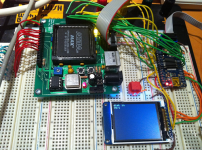
You can use the emulator to boot a Mac, or boot from a normal disk and then mount the emulated floppy to copy files from it. I even copied an emulated disk using Disk Copy 4.2 on a Mac Plus, and explored all the sectors using FEdit, so I'm pretty confident that it's working right.
Unlike other floppy emulators that I know of, Floppy Emu uses an on-the-fly sector retrieval technique instead of a track-at-a-time technique. This technique only requires a single 512 byte buffer, enough for one sector. After the data bytes from a sector have been sent to the Mac, the microcontroller loads the next sector from the SD card, which takes about 2 milliseconds. On a real floppy the sector-to-sector padding is only about 0.25 milliseconds, but it turns out that the Mac is tolerant of much longer inter-sector delays as long as you keep sending it $FF sync bytes between sectors.
In its current form, Floppy Emu appears 3x slower than a real floppy disk, but I think that's due to a bug rather than the SD card overhead. Using Disk Copy 4.2, I was able to read an entire 800K floppy in 41 seconds, and an emulated version of that same floppy in 2 minutes 10 seconds. As best as I can tell, the difference is due to some kind of bug that’s triggering the Mac’s retry mechanism. The display screen shows the emulated active track and side in real-time, so I can see that after every few tracks read during disk copying, the drive seeks down to track 0, then all the way back up to the track where it left off. This looks like some kind of mechanism for coping with unexpected data: the Mac concludes the drive isn’t where it thought it was, so it resyncs by returning to a known location (track 0) and then continuing.
My next steps are to pretty this up a little, add some basic UI for selecting disk images from the SD card, and fix the bug that's causing the retry slowdowns. After that, implementing write support for emulated floppies will be the next task. That will require a different micontroller and different technique than the one used currently.
More details are on my blog if anyone's interested.
/edit/ Also available: the development thread, Design ideas for a floppy drive emulator. - Bunsen /
Question to the 68kmla.org community? How important do you think write support is for something like this? I plan to implement it eventually, but it may be a big challenge. Is there enough value in a read-only floppy emulator?
You can use the emulator to boot a Mac, or boot from a normal disk and then mount the emulated floppy to copy files from it. I even copied an emulated disk using Disk Copy 4.2 on a Mac Plus, and explored all the sectors using FEdit, so I'm pretty confident that it's working right.
Unlike other floppy emulators that I know of, Floppy Emu uses an on-the-fly sector retrieval technique instead of a track-at-a-time technique. This technique only requires a single 512 byte buffer, enough for one sector. After the data bytes from a sector have been sent to the Mac, the microcontroller loads the next sector from the SD card, which takes about 2 milliseconds. On a real floppy the sector-to-sector padding is only about 0.25 milliseconds, but it turns out that the Mac is tolerant of much longer inter-sector delays as long as you keep sending it $FF sync bytes between sectors.
In its current form, Floppy Emu appears 3x slower than a real floppy disk, but I think that's due to a bug rather than the SD card overhead. Using Disk Copy 4.2, I was able to read an entire 800K floppy in 41 seconds, and an emulated version of that same floppy in 2 minutes 10 seconds. As best as I can tell, the difference is due to some kind of bug that’s triggering the Mac’s retry mechanism. The display screen shows the emulated active track and side in real-time, so I can see that after every few tracks read during disk copying, the drive seeks down to track 0, then all the way back up to the track where it left off. This looks like some kind of mechanism for coping with unexpected data: the Mac concludes the drive isn’t where it thought it was, so it resyncs by returning to a known location (track 0) and then continuing.
My next steps are to pretty this up a little, add some basic UI for selecting disk images from the SD card, and fix the bug that's causing the retry slowdowns. After that, implementing write support for emulated floppies will be the next task. That will require a different micontroller and different technique than the one used currently.
More details are on my blog if anyone's interested.
/edit/ Also available: the development thread, Design ideas for a floppy drive emulator. - Bunsen /
Question to the 68kmla.org community? How important do you think write support is for something like this? I plan to implement it eventually, but it may be a big challenge. Is there enough value in a read-only floppy emulator?
Impressive! bigmessowires, I'm lurking your progress here and on your blog since the beginning of this project. All of this is awesome! Incredible!
But I must say that, imho, a read/write floppy emulator make more sense to me. Your read-only prototype is already unbelievable (as is all the Plus Too project), for sure! But a mean to get data easily out of our old Macs without having to mess with floppies / external hard disks / Zip / LocalTalk or whatever seems a must to me!
Again, I'm not the guy who'll design it. But if it's feasible, along the Plus Too, I would say go ahead with read/write!
But I must say that, imho, a read/write floppy emulator make more sense to me. Your read-only prototype is already unbelievable (as is all the Plus Too project), for sure! But a mean to get data easily out of our old Macs without having to mess with floppies / external hard disks / Zip / LocalTalk or whatever seems a must to me!
Again, I'm not the guy who'll design it. But if it's feasible, along the Plus Too, I would say go ahead with read/write!
Yup, I'll definitely keep working towards a read/write version. I was more wondering whether it was worth it to develop the read-only version as a separate device, since it might be easier to build or cheaper to make, and it could be ready pretty soon vs the unknown development time for a read/write version.
I'm not sure what you mean by an IDE adapter? Those Macs have SCSI ports that you could buy a SCSI to CF adapter for. The Mac II has an external floppy port so it could also use Floppy Emu, but I think the LC doesn't.
If you mean the internal floppy connector, then yes that should definitely be possible. It's the same interface, just with a different physical connector. I'm not sure how you'd run the cable outside the Mac's case, but you could probably rig up something.
.
I'm not sure what you mean by an IDE adapter? Those Macs have SCSI ports that you could buy a SCSI to CF adapter for. The Mac II has an external floppy port so it could also use Floppy Emu, but I think the LC doesn't.
If you mean the internal floppy connector, then yes that should definitely be possible. It's the same interface, just with a different physical connector. I'm not sure how you'd run the cable outside the Mac's case, but you could probably rig up something.
Here's a possibly silly thought-
Would it be feasible to control the mcu from the host Mac via say zterm? That might make the LCD redundant, and allow an invisible "stealth" installation on the internal floppy connector. One would need to have zterm on the Mac already ...
or
have the FlopEmu default to the first image, and have a bootable system with zterm on there.
I note that you have a nice colour GLCD on your prototype. Is that just one you had handy? I was thinking the final could maybe use something cheaper, like those 1-bit mono Nokia knockoffs? Also suitably retro
Would it be feasible to control the mcu from the host Mac via say zterm? That might make the LCD redundant, and allow an invisible "stealth" installation on the internal floppy connector. One would need to have zterm on the Mac already ...
or
have the FlopEmu default to the first image, and have a bootable system with zterm on there.
I note that you have a nice colour GLCD on your prototype. Is that just one you had handy? I was thinking the final could maybe use something cheaper, like those 1-bit mono Nokia knockoffs? Also suitably retro
Yes, I only used that display for the prototype because it happens to have an SD card socket on the back, and I already had left over from another project. The 1-bit Nokia display clone was exactly what I had in mind. Actually I was thinking to make the display optional, with a couple of status LEDs or something for feedback if you don't want to pay for a display.
Probably not zterm, but some kind of custom software on the Mac could theoretically be used to view and select disk images. I think the HxC Floppy Emulator works that way, with a host-side control tool for the Amiga and Atari ST. Really there are a ton of cool things that could be done from the software end, like a custom disk driver to enable disks larger than a real floppy, or multiple disks from a single device. That's not really where my experience or interest lies though. I'm hoping that if I get some working hardware out there along with good documentation, somebody else might be interested in the software hacking part.
Probably not zterm, but some kind of custom software on the Mac could theoretically be used to view and select disk images. I think the HxC Floppy Emulator works that way, with a host-side control tool for the Amiga and Atari ST. Really there are a ton of cool things that could be done from the software end, like a custom disk driver to enable disks larger than a real floppy, or multiple disks from a single device. That's not really where my experience or interest lies though. I'm hoping that if I get some working hardware out there along with good documentation, somebody else might be interested in the software hacking part.
OK, I think I've fixed the bug that was causing all the retries and reseeks to track zero, bloating the read times. Now it reads through an entire floppy image without any retries-- hooray! But it's still slower than a real floppy: 57 seconds to read a 800K disk, vs 41 for a real floppy in my most recent test.
I'm wondering if this has something to do with how the sectors are interleaved and organized on a real floppy. On my emulated floppy, the sectors in each track appear in consecutive ascending order, and every time the drive steps or switches sides, it jumps to the first sector on that track. I'm wondering if real floppies are formatted with a 2:1 interleave, so sectors appear in order like 0 4 1 5 2 6 3 7 instead of 0 1 2 3 4 5 6 7. I also seem to remember reading somewhere that a real floppy offsets the location of the first sector in each track from the location of the first sector in the previous track.
There are a bunch of tricks like that which can help reduce the number of times the disk must make a complete rotation before the Mac reads all the sectors from a track, basically trying to match the access pattern of the Mac with the organization of the sectors on the disk. In a perfect world, the Mac would always read all the sectors from a track in one pass, with the disk only making a single rotation. My debug info shows this does happen with my emulated floppy, but only rarely. With a real floppy this should be rare too, because it would require the lucky chance of a read operation beginning just as the first sector of the track approached the read head. With a random starting position, two rotations of the disk should always be enough to read the whole track, assuming the Mac is fast enough to keep up. But my debug info shows that most of the time, it takes about three "rotations" of the emulated disk to read a whole track. My measured disk read times of 57 vs 41 seconds make roughly a 3:2 ratio, so maybe there's something to that.
I'm wondering if this has something to do with how the sectors are interleaved and organized on a real floppy. On my emulated floppy, the sectors in each track appear in consecutive ascending order, and every time the drive steps or switches sides, it jumps to the first sector on that track. I'm wondering if real floppies are formatted with a 2:1 interleave, so sectors appear in order like 0 4 1 5 2 6 3 7 instead of 0 1 2 3 4 5 6 7. I also seem to remember reading somewhere that a real floppy offsets the location of the first sector in each track from the location of the first sector in the previous track.
There are a bunch of tricks like that which can help reduce the number of times the disk must make a complete rotation before the Mac reads all the sectors from a track, basically trying to match the access pattern of the Mac with the organization of the sectors on the disk. In a perfect world, the Mac would always read all the sectors from a track in one pass, with the disk only making a single rotation. My debug info shows this does happen with my emulated floppy, but only rarely. With a real floppy this should be rare too, because it would require the lucky chance of a read operation beginning just as the first sector of the track approached the read head. With a random starting position, two rotations of the disk should always be enough to read the whole track, assuming the Mac is fast enough to keep up. But my debug info shows that most of the time, it takes about three "rotations" of the emulated disk to read a whole track. My measured disk read times of 57 vs 41 seconds make roughly a 3:2 ratio, so maybe there's something to that.
Slightly slower read/access times to me are acceptable. I'd be more interested in the disk image management on the SD card, preferably through a display on the reader, to drill through to, then select the required disk image.
What are the chances this could expand to a HD20 (or any size disk image) emulator? Of course as disk image size increases, then access time improvements become important again. Ahhh, the vicious circle of development prototyping.
What are the chances this could expand to a HD20 (or any size disk image) emulator? Of course as disk image size increases, then access time improvements become important again. Ahhh, the vicious circle of development prototyping.
Surprisingly, the 84 x 48 Nokia LCDs are actually cheaper than your typical 2-line text LCD, and they require fewer pins to control too. http://www.sparkfun.com/products/10168 The only downside is they all seem to have problems getting the contrast right, as it somehow varies depending on the temperature and force between the LCD and the circuit board. I have two of them, and they both change contrast if you push on the LCD frame with your finger. But for a $10 serial graphical LCD, I can overlook that.
I've got it using the Nokia LCD now instead of the color TFT, and everything is working pretty nicely for read-only emulation. I'm only able to go up to a 4 MHz data rate with the SD card, but I think that's due to my messy breadboard wiring. Viewed on the oscilloscope, the clock signal looks pretty bad, so I'm not surprised it doesn't work at higher speeds.
I'm going to start work now on a custom circuit board for this thing, which should hopefully improve the signal quality too and make faster data rates possible.
I've got it using the Nokia LCD now instead of the color TFT, and everything is working pretty nicely for read-only emulation. I'm only able to go up to a 4 MHz data rate with the SD card, but I think that's due to my messy breadboard wiring. Viewed on the oscilloscope, the clock signal looks pretty bad, so I'm not surprised it doesn't work at higher speeds.
I'm going to start work now on a custom circuit board for this thing, which should hopefully improve the signal quality too and make faster data rates possible.
Well, just for giggles, how about aiming, size-wise, to fit the PCB into an Apple external 3.5" floppy drive case? Dead drives could be updated with the new SD drive. And it's about the same size as a small project box, so one of them could be used instead where the genuine article is not available.
Hm. Speaking of which, various people on the other thread were requesting a version for the Powerbook 100 and Duo floppy port, which uses a different connector. Others mentioned internal mounting - different connector again. Is it worth designing the board such that all three connection types can be accommodated? I would be happy to help chase up dimensions etc if you wish.
Yea, and the LCD/keypad/SD card could slide out of the "slot", well if you wanted it fancy, you could make a motorized slide rail so when the mac "ejects" the disk, the display/keypad/sd assembly slides out. When a image is selected to be mounted, it slides in. LOL ok now im getting all "hollywood"
I'm planning for several different methods for connecting the Floppy Emu board to the Mac. The board itself will be about 2 x 4 inches or a little smaller, so it should definitely fit inside an old external floppy drive enclosure.
The Floppy Emu board will have a male DB-19 connector as well as a male rectangular 20-pin IDC connector (the internal floppy connector on the motherboard). So you can:
1. Plug the board straight into the Mac's external DB19 floppy port. Then it will hang off the back like a dongle.
2. Use an Apple II Unidisk/DiskII DB19 to 20-pin IDC cable, like this one. These are still available from a few sources and on eBay. I ordered the one I linked, to confirm it works, but I'm 99% sure it will. Connect the DB19 end to the external floppy port, and the IDC end to the Floppy Emu board.
3. Use the DB19 to 20-pin IDC cable from an external Apple 3.5 inch floppy drive.
4. Unplug your internal floppy drive, and use the existing internal floppy cable to connect to the board's IDC connector. I'm not sure that cable is long enough to reach outside the case, though.
5. Same as above, but use a longer 20-pin IDC cable. You can use any generic IDC cable with straight-through wiring.
The Floppy Emu board will have a male DB-19 connector as well as a male rectangular 20-pin IDC connector (the internal floppy connector on the motherboard). So you can:
1. Plug the board straight into the Mac's external DB19 floppy port. Then it will hang off the back like a dongle.
2. Use an Apple II Unidisk/DiskII DB19 to 20-pin IDC cable, like this one. These are still available from a few sources and on eBay. I ordered the one I linked, to confirm it works, but I'm 99% sure it will. Connect the DB19 end to the external floppy port, and the IDC end to the Floppy Emu board.
3. Use the DB19 to 20-pin IDC cable from an external Apple 3.5 inch floppy drive.
4. Unplug your internal floppy drive, and use the existing internal floppy cable to connect to the board's IDC connector. I'm not sure that cable is long enough to reach outside the case, though.
5. Same as above, but use a longer 20-pin IDC cable. You can use any generic IDC cable with straight-through wiring.
I've stopped working on the custom circuit board for the moment, and instead I've turned to implementing write support, since I think I won't really know exactly what hardware I need until I have a firm plan for emulating writes to the floppy.
My first plan was to use a microcontroller with a large amount of RAM, and during writes, store a whole track's worth of written sectors in RAM. Then when the Mac stepped to a new track, the emulator would use the step delay (about 4 ms) to write the RAM track buffer back to the SD card. But I did some back of the envelope math, and that's just not going to work. The SD write will take longer than the maximum allowed step time.
My new plan is to use interrupts to do two things at once. The emulator will write track N data to the SD card at the same time that track N+1 data is being received from the Mac. This will be more complicated to get working, but it won't require a large RAM buffer. I can use a more common (and cheap) microcontroller with less RAM.
One thing I discovered that surprised me is that "writes" actually consist of a long series of alternating reads and writes, switching rapidly back and forth between the two modes. This will cause some difficulty for the emulator. If the Mac wants to overwrite sectors A and B, it begins by reading the floppy, waiting until the address section for sector A is read. Then BAM, it immediately switches to write mode, and splats down a new data section on top of the old one. Then it switches back to read mode, waits for the sector B address section to be read, and switches to write mode again to replace the data section. I think I can support this in the emulator, but it will require some changes.
All in all, this project is proving to be a lot more complicated than I expected!
My first plan was to use a microcontroller with a large amount of RAM, and during writes, store a whole track's worth of written sectors in RAM. Then when the Mac stepped to a new track, the emulator would use the step delay (about 4 ms) to write the RAM track buffer back to the SD card. But I did some back of the envelope math, and that's just not going to work. The SD write will take longer than the maximum allowed step time.
My new plan is to use interrupts to do two things at once. The emulator will write track N data to the SD card at the same time that track N+1 data is being received from the Mac. This will be more complicated to get working, but it won't require a large RAM buffer. I can use a more common (and cheap) microcontroller with less RAM.
One thing I discovered that surprised me is that "writes" actually consist of a long series of alternating reads and writes, switching rapidly back and forth between the two modes. This will cause some difficulty for the emulator. If the Mac wants to overwrite sectors A and B, it begins by reading the floppy, waiting until the address section for sector A is read. Then BAM, it immediately switches to write mode, and splats down a new data section on top of the old one. Then it switches back to read mode, waits for the sector B address section to be read, and switches to write mode again to replace the data section. I think I can support this in the emulator, but it will require some changes.
All in all, this project is proving to be a lot more complicated than I expected!
If that's the case, why bother with the onboard DB-19 at all? It's going to be a little hard to read the display if the device is plugged in round the back of the Mac, and having one connector rather than two would simplify the board a little. Now that the pinout is known, people could make up their own cables if you throw an optional DB-19 in the box.
Question, What about the use of just RAM alone for read/writing? dont write to the SD card until the floppy gets the eject command therefore the entire disk image gets written, plus saving the SD card write cycles. would this work? Of course i understand if a power failure occured or something it could be tragic, but what are the odds... Then there is the whole part of battery backed RAM so if a PF does occur, the FPGA can look and see that there was a disk image last mounted, to go ahead and do an emergency save function.
Yeah, that's a definite possibility. I still haven't yet received the Apple II cable from IEC to confirm that it actually works. Their cable is also $12 + $10 shipping, and I'm not sure how many they have in stock, so I don't really want to rely on it as the only solution.
That's an interesting thought. You'd need an external RAM, since no microcontroller has anything near 800K of RAM, and you'd need a lot of microcontroller pins to drive the RAM's address and data lines. But on the other hand, it would be a little faster, and a little simpler to design. Hmm. I still think I can get it working with my current approach, but if that doesn't work out, I'll definitely look at using an external RAM.
What about an AVR Softcore, and some memory interface logic in an FPGA? DDR is cheap and easy to obtain, and i found lots of DDR memory controller cores for FPGAs. I never really knew anything about FPGAs, but your use of FPGAs in other projects including this one kinda sparked my interest to do some research, and its insane what these puppies can do.
especially in projects where I am using multiple AVRs and lots of glue logic to get work done, and every bit of that can be thrown inside an FPGA including multiple softcores (assuming the FPGA is big enough)
especially in projects where I am using multiple AVRs and lots of glue logic to get work done, and every bit of that can be thrown inside an FPGA including multiple softcores (assuming the FPGA is big enough)
Putting it all in an FPGA would be cool, and I did look briefly into that option at the start. When I eventually get around to integrating the disk controller into Plus Too, I may do exactly that. For this project, though, I decided I was more confident in getting it working with a real AVR. The AVR softcore I looked at seemed like it was only an implementation of the AVR instruction set, but not all the AVR hardware peripherals. Also the FPGA would cost $20 or more, and you'd need a configuration ROM too, so it wouldn't be any fewer parts or lower cost than a real AVR with a small CPLD. For Plus Too it might make more sense, because the FPGA will already be there anyway.
Good news! I got the Apple II cable from IEC, and did a continuity test to verify that it has all the necessary connections between the DB-19 and IDC-20 ends. I was a little worried, since it seems there's one pair of connections required for the Mac that are just unused pins on the Apple II, but the cable has them connected as needed for the Mac. Woohoo! So now there are more good options for connecting the floppy emulator.
Another update: I have write emulation kind of mostly working! It turns out that a 2011 SD card has a lot of trouble matching the write speed of a 1984 floppy disk, at least with the type of access patterns seen during floppy emulation!
I had to use a "high speed" (class 10) SDHC card in order to get write emulation to work reliably. Even then, it only works in the case of what I call normal writes, which is what you're doing when copying files in the Finder, or saving documents. This kind of write is actually a pattern of read-write-read-write to the floppy, because the Mac has to look for the sector it wants to update, before it writes the new data. The alternative is what I call continuous writes, where the Mac just blasts out an entire track's worth of data in one pass. Continuous writes are performed when a floppy is initialized, and when you do a full-disk write using a disk copy program, and maybe in some other cases I don't know about. The emulator isn't fast enough to do full disk writes, even with the class 10 SD card.
If I were smarter, I could probably figure out some fancy buffering or something to make continuous writes work, or normal writes with slower SD cards, but I'm tired and my head hurts. The whole question of write support has mushroomed into a much bigger challenge than I ever imagined, and I'm getting eager to actually build the hardware instead of running a million more tests of various buffering and updating schemes. 
More boring details and commentary at http://www.bigmessowires.com/2011/12/07/floppy-vs-sd-card-write-speeds/
I had to use a "high speed" (class 10) SDHC card in order to get write emulation to work reliably. Even then, it only works in the case of what I call normal writes, which is what you're doing when copying files in the Finder, or saving documents. This kind of write is actually a pattern of read-write-read-write to the floppy, because the Mac has to look for the sector it wants to update, before it writes the new data. The alternative is what I call continuous writes, where the Mac just blasts out an entire track's worth of data in one pass. Continuous writes are performed when a floppy is initialized, and when you do a full-disk write using a disk copy program, and maybe in some other cases I don't know about. The emulator isn't fast enough to do full disk writes, even with the class 10 SD card.
If I were smarter, I could probably figure out some fancy buffering or something to make continuous writes work, or normal writes with slower SD cards, but I'm tired and my head hurts.
The whole question of write support has mushroomed into a much bigger challenge than I ever imagined, and I'm getting eager to actually build the hardware instead of running a million more tests of various buffering and updating schemes. More boring details and commentary at http://www.bigmessowires.com/2011/12/07/floppy-vs-sd-card-write-speeds/
The site seems to have some temporary glitches the past few days, but I'm not sure why. It's up now.
There's nothing I can really do to stall the OS, beyond things that a real floppy drive would do. I can take up to 12 ms when stepping between tracks, and up to 23 ms between sectors when doing a read operation. Exceed those times, and the Mac floppy driver will report an error. I think I can make it all work, but it's not a slam dunk.
The irony is that the high-level disk API would be perfect for SD card I/O, since it views the disk as one continuous 800K range and supports block reads and writes at any position and size. But then the floppy driver translates those requests into the arcane world of tracks and sides and sectors and GCR encoding, and my emulator hardware must do the reverse translation back to a simple linear unencoded API for SD card I/O. It's like translating a book from English to Chinese to English. But since the goal is to emulate a real floppy drive using stock Mac ROMs and no special drivers, that's how it has to be.
Anyway, sorry for grousing. I'll get it figured out.
There's nothing I can really do to stall the OS, beyond things that a real floppy drive would do. I can take up to 12 ms when stepping between tracks, and up to 23 ms between sectors when doing a read operation. Exceed those times, and the Mac floppy driver will report an error. I think I can make it all work, but it's not a slam dunk.
The irony is that the high-level disk API would be perfect for SD card I/O, since it views the disk as one continuous 800K range and supports block reads and writes at any position and size. But then the floppy driver translates those requests into the arcane world of tracks and sides and sectors and GCR encoding, and my emulator hardware must do the reverse translation back to a simple linear unencoded API for SD card I/O. It's like translating a book from English to Chinese to English. But since the goal is to emulate a real floppy drive using stock Mac ROMs and no special drivers, that's how it has to be.
Anyway, sorry for grousing. I'll get it figured out.
This is a completely ignorant suggestion, but... would there be any value in using SPI RAM chips like the 23K256 as a track buffer? You'd only need a few pins and it should be substantially faster than an SD card running at up to 20Mhz. (In particular I could see making use of the sequential mode, in which reads or writes can auto-increment through the entire chip starting from an arbitrary start address.) Using this device you could cache a track on the RAM chip in its raw GCR-encoded form and refresh/flush to SD during the track stepping interval. If my completely off the cuff math is correct it looks to me like you could easily read or write the entire chip several times in 12ms. If you can code a loop that can rapidly step through the RAM chip, un-GCR the data, and shove it out to the SD card in a large block transfer in that period of time then you should be able to handle full-speed blast-a-track writes without breaking a sweat. If that sounds too short...
At its fastest speed the Mac floppy drive turns at about 600 RPM, right? That's 100ms per rotation. Does the Mac really allow only 12ms for the first valid data sector to come up following a track step? The only way it could possibly do that is if the Mac "interleaves" the starting points of tracks in a spiral pattern around the disk, which I suppose is possible, but... what about the points at which the drives' rotational speed changes? Does the Mac not allow for at least one rotation for the drive speed to stabilize? I'm just curious how long you'd *actually* have to flush and refresh your buffer if you went to track-at-a-time instead of sector-at-a-time operation. "12 ms step" sounds to me like the delay per-track to expect when moving the head across multiple tracks, not necessarily the time window for the next data sector.
At its fastest speed the Mac floppy drive turns at about 600 RPM, right? That's 100ms per rotation. Does the Mac really allow only 12ms for the first valid data sector to come up following a track step? The only way it could possibly do that is if the Mac "interleaves" the starting points of tracks in a spiral pattern around the disk, which I suppose is possible, but... what about the points at which the drives' rotational speed changes? Does the Mac not allow for at least one rotation for the drive speed to stabilize? I'm just curious how long you'd *actually* have to flush and refresh your buffer if you went to track-at-a-time instead of sector-at-a-time operation. "12 ms step" sounds to me like the delay per-track to expect when moving the head across multiple tracks, not necessarily the time window for the next data sector.
Really great work...truly emulating a drive at the fundamental level will be of great use the whole vintage Mac community, especially as 1.44mb disks become more and more unreliable. I know that my "new" 3,5" floppies are a lot less reliable than the ones I bought in the 90s were.
Would you consider expanding your work to Apple II 3.5" and 5.25" drive emulation? I suspect that would be a significant amount of work, but they are based on the same lineage (IWM vs. SWIM, I know). And, the Apple II community would love you.
- Alex
Would you consider expanding your work to Apple II 3.5" and 5.25" drive emulation? I suspect that would be a significant amount of work, but they are based on the same lineage (IWM vs. SWIM, I know). And, the Apple II community would love you.
- Alex
Thanks for the ideas. The SPI RAM might be worth looking at, if the 16K RAM in the largest AVR (ATMEGA1284) isn't enough. I think the issue with a RAM track buffer (whether internal or external RAM) is that you still need to write it back to the SD card at some point. And if that takes too long relative to the timeout values for whatever other floppy operation is happening, then the Mac will report an I/O error. You can write the whole track buffer back to the SD card as one large block transfer, which will be faster, but still might not be fast enough to fit within the allowable track step window.
As for that 12 ms figure: the Mac sets the STEP register to 0, then waits for the value to change back to 1, indicating that the step is finished and the new track is ready to be read/written. In my tests, if the STEP value doesn't change within about 12 ms, then the Mac reports a "can't step" error -75. There's some amount of time after that before the Mac actually performs a read or write, I don't know how long that is, and theoretically it could be zero. There might be some time there for drive RPM stabilization, like you said.
Once it begins a read, the Mac will wait about 23 ms for a sector address mark, then if it doesn't see one, it reports a "no address mark" error -67. The sector it reads may not be the one it wanted, of course, and in that case it will keep reading for the next sector. The sector does need to be valid, though. I considered sending a fake sector just to avoid the timeout, but if the embedded track/sector number are invalid then it reports a seek error -80. And if the embedded track/sector *are* valid, then the Mac might actually use the fake data payload, if that was the sector if was looking for.
If it's doing a continuous write operation rather than a read, then the write could begin immediately after the conclusion of the track step. In reality there's probably some delay there too, but I'm not sure how long.
As for that 12 ms figure: the Mac sets the STEP register to 0, then waits for the value to change back to 1, indicating that the step is finished and the new track is ready to be read/written. In my tests, if the STEP value doesn't change within about 12 ms, then the Mac reports a "can't step" error -75. There's some amount of time after that before the Mac actually performs a read or write, I don't know how long that is, and theoretically it could be zero. There might be some time there for drive RPM stabilization, like you said.
Once it begins a read, the Mac will wait about 23 ms for a sector address mark, then if it doesn't see one, it reports a "no address mark" error -67. The sector it reads may not be the one it wanted, of course, and in that case it will keep reading for the next sector. The sector does need to be valid, though. I considered sending a fake sector just to avoid the timeout, but if the embedded track/sector number are invalid then it reports a seek error -80. And if the embedded track/sector *are* valid, then the Mac might actually use the fake data payload, if that was the sector if was looking for.
If it's doing a continuous write operation rather than a read, then the write could begin immediately after the conclusion of the track step. In reality there's probably some delay there too, but I'm not sure how long.
Maybe, or if I ever get this working, someone else could build off of it to add Apple II support. I think the Apple II 3.5" drive actually is the same as the Macintosh drive, isn't it? Or at least very similar? I thought there already was a hardware emulator for 5.25" Apple II floppies, but I could be wrong.
More ignorant blathering:
Regarding read/write performance to/from a track buffer: Worst case a Mac is going to have... what, 24 sectors in a "cylinder", IE, front/back on a 12 sector track? (The inner tracks go as low as... eight per side/16 total?) With 512 byte sectors that means a full cylinder will need 12k transferred to/from the SD card to fill/flush the buffer. (If the data were stored as "raw GCR" in the memory buffer then obviously it would use more than 12kbytes, but we're assuming it's not stored on the SD card in that format.) So, worst case, let's say our target is to be able to load or store 12k absolutely as fast as possible. To do 12k in 12 ms would require a transfer rate just about exactly 1MB/sec. It does look like that might be not be doable on an 8 bit ATMEGA (based on a quick Google) but it appears at least that people have that well or better with faster microcontrollers so you can't really say that *in bulk* an SD card is slower than the floppy mechanism. (Also keep in mind that, for instance, if we're able to add that 23ms "wait for a sector address mark" time to the 12ms step time that alone cuts our maximum required data transfer rate from 1MB/sec to closer to 350K/sec, which again might be hard for an ATMEGA, but...)
After all, looking at the problem from the IWM side: At its rated 490Kbps-ish data transfer speed with absolutely no overhead at all the IWM theoretically needs to be fed at 61.5K-bytes-per-second non-stop. 61.5Kbytes per second should be achievable by just about any SD card I'd think, even in SPI mode. (I believe the "490kbps" includes the GCR padding, since if were all data at this rate a 512 byte sector should be read in something like 8.2 ms, not 12. So in real "byte" terms you only really need something in the ballpark of 40K per second unless you're storing the disk images in GCR format. Actually it's even less than that, since it appears that the Mac uses 2:1 sector interleave. But we'll assume worst case that you're just smearing at top speed across the disk and that the step-to-sector read time really is less than the acceptable interleave gap.) It just intuitively seems like if you can milk any better than, I don't know, maybe 100K per second or so, out of your SD card interface this should be a problem amenable to caching.
Is there any way at all for you to "multitask" reading and writing, IE, if you started a track buffer fill at a track step but weren't finished before you absolutely had to output a byte can you keep reading the SD in the background while handling the IWM data stream? Or, in the case of something like a format or other diskcopy operation, where the Mac might just start blasting write sectors out blindly without bothering to read a sector first, could you possibly opt to write those sectors straight away into the buffer and keep them there until you're again ready to flush them in the background? Perhaps you could use two cache RAM chips, one handling the "current" track and the other flushing in the background? (or pre-reading the next track if the last is already flushed?)
The ultimate solution might be a faster CPU so you can run the SD card faster, but I could understand not wanting to go there. Doing per-sector writes might still screw you if the memory controller on the SD card induces some latency (which appears to be somewhat unavoidable when doing sector transactions, since internally most SD cards natively use larger memory block sizes), so you might need to cache and block your writes regardless.
Regarding read/write performance to/from a track buffer: Worst case a Mac is going to have... what, 24 sectors in a "cylinder", IE, front/back on a 12 sector track? (The inner tracks go as low as... eight per side/16 total?) With 512 byte sectors that means a full cylinder will need 12k transferred to/from the SD card to fill/flush the buffer. (If the data were stored as "raw GCR" in the memory buffer then obviously it would use more than 12kbytes, but we're assuming it's not stored on the SD card in that format.) So, worst case, let's say our target is to be able to load or store 12k absolutely as fast as possible. To do 12k in 12 ms would require a transfer rate just about exactly 1MB/sec. It does look like that might be not be doable on an 8 bit ATMEGA (based on a quick Google) but it appears at least that people have that well or better with faster microcontrollers so you can't really say that *in bulk* an SD card is slower than the floppy mechanism. (Also keep in mind that, for instance, if we're able to add that 23ms "wait for a sector address mark" time to the 12ms step time that alone cuts our maximum required data transfer rate from 1MB/sec to closer to 350K/sec, which again might be hard for an ATMEGA, but...)
After all, looking at the problem from the IWM side: At its rated 490Kbps-ish data transfer speed with absolutely no overhead at all the IWM theoretically needs to be fed at 61.5K-bytes-per-second non-stop. 61.5Kbytes per second should be achievable by just about any SD card I'd think, even in SPI mode. (I believe the "490kbps" includes the GCR padding, since if were all data at this rate a 512 byte sector should be read in something like 8.2 ms, not 12. So in real "byte" terms you only really need something in the ballpark of 40K per second unless you're storing the disk images in GCR format. Actually it's even less than that, since it appears that the Mac uses 2:1 sector interleave. But we'll assume worst case that you're just smearing at top speed across the disk and that the step-to-sector read time really is less than the acceptable interleave gap.) It just intuitively seems like if you can milk any better than, I don't know, maybe 100K per second or so, out of your SD card interface this should be a problem amenable to caching.
Is there any way at all for you to "multitask" reading and writing, IE, if you started a track buffer fill at a track step but weren't finished before you absolutely had to output a byte can you keep reading the SD in the background while handling the IWM data stream? Or, in the case of something like a format or other diskcopy operation, where the Mac might just start blasting write sectors out blindly without bothering to read a sector first, could you possibly opt to write those sectors straight away into the buffer and keep them there until you're again ready to flush them in the background? Perhaps you could use two cache RAM chips, one handling the "current" track and the other flushing in the background? (or pre-reading the next track if the last is already flushed?)
The ultimate solution might be a faster CPU so you can run the SD card faster, but I could understand not wanting to go there. Doing per-sector writes might still screw you if the memory controller on the SD card induces some latency (which appears to be somewhat unavoidable when doing sector transactions, since internally most SD cards natively use larger memory block sizes), so you might need to cache and block your writes regardless.
Not ignorant at all. I appreciate having somebody review my logic and point out things I may have missed, since I'm not really thinking straight anymore.
One thing that maybe wasn't clear is that the ATMEGA isn't the limiting factor for the most part. It's the write speed of the SD card that's the issue. The ATMEGA can send 512 bytes to the card, one bit at a time, in about 1.5 ms. (Theoretical speed would be 512 * 8 / 4 MHz, which is 1 ms, but it's not totally efficient). Then the ATMEGA polls the SD card until the card says the write has completed. That takes anywhere from 0 to 80 ms, depending on the card, the write mode, and some random chance. Most of the time it's about 3-6 ms, but sometimes it's much longer. It's actually the variability that's a problem more than anything else.
If I try to fit that 24 sector write into the 12 ms track step window, it clearly won't fit. Even if I could also use the 23ms "wait for address mark" time, it's still not enough. Furthermore, the numbers 12 and 23 are from the Mac Plus ROM, and other Macs might use different values.
One encouraging note is that there do appear to be some substantial extra delays during floppy writes, outside of those imposed by the disk itself. In some simple tests, after stepping to a new track, I saw about 45 ms delay before the Mac switched to the other side of the disk, then about 20 ms more delay before the first byte of the first sector to write arrived. Combined, that should be enough time to complete the 24 sector multi-block write with the class 10 card, assuming it doesn't do one of its 170 ms "burps". But the class 4 card would still be totally unusable for this case.
To handle the burps, and possibly get the class 4 card working, it could maybe do something like:
- When a step to a new track occurs, immediately read the first four sectors (2K) of the new track from the SD card, and store them in RAM (about 8 ms).
- Begin a multi-block SD write of the 24 sectors (12K) from the old track
- After 12+23+?? ms, begin sending the first of the new sectors in RAM to the Mac, even if the SD write is still in progress. This would require the multitasking changes mentioned above
- Once the SD write finishes, read the remaining sectors for the new track into RAM.
With four pre-loaded sectors from the new track, the 24 sector SD write could take as long as 12+23+12+23+12+23+12+23+12+23 = 175 ms. Actually a little less, since about 8 ms of that time would be needed to read those pre-loaded sectors, so about 167 could be used for the SD write. That's still not really long enough to cover the longest class 10 burp, and not even close to long enough for the class 4 card.
A related idea would be to use a 12 sector "side buffer" instead of a 24 sector track buffer. Then you wouldn't have the 12 ms track step time to work with, but there would be less data, and two entire sides could be loaded in RAM at once using the internal RAM of an ATMEGA1284 (the 8-bit AVR with the most RAM). So it would go something like:
- When a switch to a new side occurs, immediately read the first 8 sectors (4K) of the new track from the SD card, and store them in RAM (about 16 ms).
- Begin sending the first of the new sectors in RAM to the Mac, while simultaneously reading the remaining 4 new sectors into RAM (requires multitasking).
- After all the new sectors have been read, begin a 12 sector multi-block write of the old sectors to the SD card, while simultaneously sending the new sectors from RAM to the Mac.
So I think that would work, but I'm getting a little dizzy thinking through all the possible cases. Like what if the new side is being continuously written, without being read first? Or what if the Mac steps to yet another new side/track after a few ms, without reading or writing anything, because it's just seeking to a different area of the disk? Or in the worst case, what if the new side is completely written with data and another side/track change occurs before the old side's sectors have finished being saved to SD?
Now you can see why I've been getting dizzy just trying to think all this through! :O
I appreciate having somebody review my logic and point out things I may have missed, since I'm not really thinking straight anymore.One thing that maybe wasn't clear is that the ATMEGA isn't the limiting factor for the most part. It's the write speed of the SD card that's the issue. The ATMEGA can send 512 bytes to the card, one bit at a time, in about 1.5 ms. (Theoretical speed would be 512 * 8 / 4 MHz, which is 1 ms, but it's not totally efficient). Then the ATMEGA polls the SD card until the card says the write has completed. That takes anywhere from 0 to 80 ms, depending on the card, the write mode, and some random chance. Most of the time it's about 3-6 ms, but sometimes it's much longer. It's actually the variability that's a problem more than anything else.
Right. I did some tests of a 24 sector continuous multi-block write, like would be performed when flushing a track buffer back to the SD card. This should provide the best possible SD performance. On the class 10 card, the total time was normally about 40 ms, but three times out of twenty I saw times over 170 ms. With the slower class 4 card, almost all the times were over 300 ms. So the class 10 card time is pretty close to the theoretical minimum time, given the SPI transfer rate, and would probably improve with a faster ATMEGA or faster SPI clock. But the class 4 card... ouch.
If I try to fit that 24 sector write into the 12 ms track step window, it clearly won't fit. Even if I could also use the 23ms "wait for address mark" time, it's still not enough. Furthermore, the numbers 12 and 23 are from the Mac Plus ROM, and other Macs might use different values.
Yes, it already does this to some extent, and I think this is where further improvements can be made. Currently it can receive a sector from the Mac at the same time as reading or writing from the SD card, through the use of an interrupt routine. But it can't send a sector to the Mac while also doing an SD read or write. I think I could do that, but I need to look into it a little more.
One encouraging note is that there do appear to be some substantial extra delays during floppy writes, outside of those imposed by the disk itself. In some simple tests, after stepping to a new track, I saw about 45 ms delay before the Mac switched to the other side of the disk, then about 20 ms more delay before the first byte of the first sector to write arrived. Combined, that should be enough time to complete the 24 sector multi-block write with the class 10 card, assuming it doesn't do one of its 170 ms "burps". But the class 4 card would still be totally unusable for this case.
To handle the burps, and possibly get the class 4 card working, it could maybe do something like:
- When a step to a new track occurs, immediately read the first four sectors (2K) of the new track from the SD card, and store them in RAM (about 8 ms).
- Begin a multi-block SD write of the 24 sectors (12K) from the old track
- After 12+23+?? ms, begin sending the first of the new sectors in RAM to the Mac, even if the SD write is still in progress. This would require the multitasking changes mentioned above
- Once the SD write finishes, read the remaining sectors for the new track into RAM.
With four pre-loaded sectors from the new track, the 24 sector SD write could take as long as 12+23+12+23+12+23+12+23+12+23 = 175 ms. Actually a little less, since about 8 ms of that time would be needed to read those pre-loaded sectors, so about 167 could be used for the SD write. That's still not really long enough to cover the longest class 10 burp, and not even close to long enough for the class 4 card.
A related idea would be to use a 12 sector "side buffer" instead of a 24 sector track buffer. Then you wouldn't have the 12 ms track step time to work with, but there would be less data, and two entire sides could be loaded in RAM at once using the internal RAM of an ATMEGA1284 (the 8-bit AVR with the most RAM). So it would go something like:
- When a switch to a new side occurs, immediately read the first 8 sectors (4K) of the new track from the SD card, and store them in RAM (about 16 ms).
- Begin sending the first of the new sectors in RAM to the Mac, while simultaneously reading the remaining 4 new sectors into RAM (requires multitasking).
- After all the new sectors have been read, begin a 12 sector multi-block write of the old sectors to the SD card, while simultaneously sending the new sectors from RAM to the Mac.
So I think that would work, but I'm getting a little dizzy thinking through all the possible cases. Like what if the new side is being continuously written, without being read first? Or what if the Mac steps to yet another new side/track after a few ms, without reading or writing anything, because it's just seeking to a different area of the disk? Or in the worst case, what if the new side is completely written with data and another side/track change occurs before the old side's sectors have finished being saved to SD?
Now you can see why I've been getting dizzy just trying to think all this through! :O
I am no electrical/software engineer and this is all over my head.. but what happened with the suggestion someone had about loading the fakedisk into a ram chip and just editing that.. then writing RAM contents to the card at user's discretion or during inactivity or whatever?
Did you say you were out of pins or something? (someone who does not understand what is going on here half the time trying to read through this thread for that little snippet is like... HAHAHAHAHAHA NO)
Did you say you were out of pins or something? (someone who does not understand what is going on here half the time trying to read through this thread for that little snippet is like... HAHAHAHAHAHA NO)
thats what I mentioned before.
unfortunately, it really adds to the complexity of the circuit, but again, you may have no choice. some AVRs support XRAM, and thats limited to 64k. But, you could "page" it. using another 8bit port as a chip select line controller, so in theory you could have 8 64k chips and the chip enable line of each IC is hooked to a port pin. So that would require 4 8bit ports. 2 for the addressing, 1 for data, and 1 for paging.
This will give you 512k of 64k paged RAM. So you really need something that gives you more than 4 ports to go this avenue. of course, you could use external latches/bus transcievers if your limited to only 4 ports, so the ports can be redirected to do other things while not accessing RAM. But this again adds to the complexity and slows it down because of the more steps you have to take.
unfortunately, it really adds to the complexity of the circuit, but again, you may have no choice. some AVRs support XRAM, and thats limited to 64k. But, you could "page" it. using another 8bit port as a chip select line controller, so in theory you could have 8 64k chips and the chip enable line of each IC is hooked to a port pin. So that would require 4 8bit ports. 2 for the addressing, 1 for data, and 1 for paging.
This will give you 512k of 64k paged RAM. So you really need something that gives you more than 4 ports to go this avenue. of course, you could use external latches/bus transcievers if your limited to only 4 ports, so the ports can be redirected to do other things while not accessing RAM. But this again adds to the complexity and slows it down because of the more steps you have to take.
OK, I think we're in business! I'm going to switch to the ATMEGA1284 to gain some additional RAM buffering space (though not as much as a 1MB external RAM to buffer the whole disk). That, plus some emulator code improvements, should be enough to support most types of writes on most SD cards, I think. The biggest challenge is still emulating initialization of a floppy disk when using a lower-speed SD card. During floppy initialization, the Mac continuously writes both sides of every track without stopping, so the write rate is the highest of any kind of write operation. Today I thought of a couple of ideas that I think will help with initialization emulation, and other cases where an entire side is written in one pass.
The first idea is to special case the handling of empty sectors. During floppy initialization, the Mac writes 1600 sectors very fast. What’s in those sectors? Zeroes. Instead of buffering a 512 byte sector full of zeroes, I could just set a flag that says “this sector is all zeroes”. Using a bitfield, I could buffer an entire disk’s worth of zero sectors using just 200 bytes of RAM. Those sectors could then be saved to the SD card whenever it was convenient, after the floppy initialization was finished. If a read request arrived before all those zero sectors were saved to the card, the emulator could check the flag first to see if an all-zero sector should be synthesized instead of actually loading the sector data from the SD card. This solution is short and simple, though its usefulness is limited to floppy initialization only.
The second idea is to intentionally create an error condition to slow down incoming data, by exploiting some code that measures the size of the gap between the last sector and the first sector on one side of a track. During initialization of a floppy, after the Mac finishes writing the last sector on a side, it immediately switches back to read mode to measure the gap before the next sector, and confirm that the next sector is sector 0.
From examining the ROM disassembly, I discovered that the disk initialization code uses some kind of progress counter that starts with a value of 7. Every successful side written increments the counter by 1. If the gap is the wrong size, the counter is decremented by 1. If the counter value is still greater than 4, it attempts to rewrite the side again, otherwise it aborts with an error.
By intentionally generating a bad gap size after a full side is written, I can force the side to be rewritten. If I also make the emulator smart enough to detect when data written to a sector is identical to what was already there, then it can ignore the second rewrite. That effectively doubles the amount of time available for saving the track data to the SD card, since every side will be written twice by the Mac.
The bad gap size trick can only be done once per side, or else the progress counter will decrease and the initialization process will eventually fail, so it can’t buy an indefinite amount of additional time. It’s also a little risky, because it means the progress counter will never increase above 7, and any 3 other errors occurring during the initialization will cause it to fail.
I did some simple tests of this idea that look promising. By disabling SD saves, I was able to perform floppy initialization to measure its write speed, even though the initialization ultimately failed during the verify phase. In my initial test, it took 34 seconds to complete the write phase when initializing a floppy. After I added emulator code to generate a bad gap after every other side write operation, the time increased to 59 seconds, with no obvious ill effects.
The first idea is to special case the handling of empty sectors. During floppy initialization, the Mac writes 1600 sectors very fast. What’s in those sectors? Zeroes. Instead of buffering a 512 byte sector full of zeroes, I could just set a flag that says “this sector is all zeroes”. Using a bitfield, I could buffer an entire disk’s worth of zero sectors using just 200 bytes of RAM. Those sectors could then be saved to the SD card whenever it was convenient, after the floppy initialization was finished. If a read request arrived before all those zero sectors were saved to the card, the emulator could check the flag first to see if an all-zero sector should be synthesized instead of actually loading the sector data from the SD card. This solution is short and simple, though its usefulness is limited to floppy initialization only.
The second idea is to intentionally create an error condition to slow down incoming data, by exploiting some code that measures the size of the gap between the last sector and the first sector on one side of a track. During initialization of a floppy, after the Mac finishes writing the last sector on a side, it immediately switches back to read mode to measure the gap before the next sector, and confirm that the next sector is sector 0.
From examining the ROM disassembly, I discovered that the disk initialization code uses some kind of progress counter that starts with a value of 7. Every successful side written increments the counter by 1. If the gap is the wrong size, the counter is decremented by 1. If the counter value is still greater than 4, it attempts to rewrite the side again, otherwise it aborts with an error.
By intentionally generating a bad gap size after a full side is written, I can force the side to be rewritten. If I also make the emulator smart enough to detect when data written to a sector is identical to what was already there, then it can ignore the second rewrite. That effectively doubles the amount of time available for saving the track data to the SD card, since every side will be written twice by the Mac.
The bad gap size trick can only be done once per side, or else the progress counter will decrease and the initialization process will eventually fail, so it can’t buy an indefinite amount of additional time. It’s also a little risky, because it means the progress counter will never increase above 7, and any 3 other errors occurring during the initialization will cause it to fail.
I did some simple tests of this idea that look promising. By disabling SD saves, I was able to perform floppy initialization to measure its write speed, even though the initialization ultimately failed during the verify phase. In my initial test, it took 34 seconds to complete the write phase when initializing a floppy. After I added emulator code to generate a bad gap after every other side write operation, the time increased to 59 seconds, with no obvious ill effects.
I think everything will be fine if you get some RAM to buffer what you need. Too bad the AVR is natively incapable to handle 1MB of RAM. would be nice, because then your read/write access could be as fast as realtime, and when disk input is idle, it gets written to SD card.
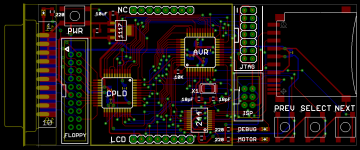
Whew! It took me a long time to do the board layout, but here it is! The board is about 4 x 1.75 inches, or roughly the size of an elongated credit card. The resistors, LEDs, and odd-sized capacitors are all labeled, so any other small rectangular surface-mount parts you see are 0.1 uF decoupling capacitors.
Anyone see any problems or have any suggestions for improvements, before I send this off to be manufactured?
Anyone see any problems or have any suggestions for improvements, before I send this off to be manufactured?
If you look at the photo in this thread's first post, the CPLD replaces the Altera board shown at the left. Its main purpose is to decode the register select signals from the Mac, and handle reading/writing of disk registers, because the AVR isn't fast enough to do it. It also performs serial-to-parallel conversion in both directions, so the AVR can work a byte at a time, without having to worry about the serial data timing requirements.
I'm using the same Xilinx CPLD as this demo board: http://dangerousprototypes.com/2011/03/29/new-prototype-xc9572xl-cpld-development-board/
I thought of one more possible layout improvement- it might be handy to run the 4 unused CPLD pins to a header somewhere, in case I need them later for anything unexpected. I'm not sure there's still space for that though.
I'm using the same Xilinx CPLD as this demo board: http://dangerousprototypes.com/2011/03/29/new-prototype-xc9572xl-cpld-development-board/
I thought of one more possible layout improvement- it might be handy to run the 4 unused CPLD pins to a header somewhere, in case I need them later for anything unexpected. I'm not sure there's still space for that though.
The chances are really good. As far as I am aware, this is all, or almost all of the hardware necessary to emulate an HD20. The biggest problem is cracking the code of the HD20 and figuring out how it works. From what I understand, it uses the same GCR encoding scheme as floppies, so even a lot of your code could probably be used for the HD20.
Thanks! 244 is a 74LVC244, which is acting here as a 5V to 3.3V level converter.
I think something like HD20 behavior is possible in time, though it might be easier to write an all-new driver for it than to reverse engineer the undocumented HD20 behavior. But I'm intentionally not thinking about that stuff yet... I just want to get standard floppy emulation debugged and working on the new hardware.
I think something like HD20 behavior is possible in time, though it might be easier to write an all-new driver for it than to reverse engineer the undocumented HD20 behavior. But I'm intentionally not thinking about that stuff yet... I just want to get standard floppy emulation debugged and working on the new hardware.
I just discovered this thread and I'm quite interested the more I skim around in it.
How are you accessing the SD card, are you using the SPI mode, or are you using one of the other native SD modes? I had understood at one point that SPI is easier yet much slower. These cards are fast enough to benefit from a USB 2.0 reader as opposed to USB 1.1, so if reading/writing to the SD card is a bottleneck even for 800k floppy emulation, maybe there are things that we can look into here to improve the speed instead of adding RAM.
If you are indeed using SPI, and wish to continue using it, it is not too uncommon for microcontrollers to have a built-in SPI subsystem. This will take care of all of the SPI serial stuff in parallel with the code you have running. Basically, you will have an SPI interrupt whenever the SPI subsystem is ready, and in this interrupt, you read or write the next whole byte in a register and exit the interrupt, for example. Then your code goes back about its business as the SPI subsystem sends/receives more SPI data.
edit:
I just looked at the ATMEGA1284 feature summary document and it looks like it does have an SPI subsystem. This is a pretty nice microcontroller, and at 20MHz, I think there is a lot of potential and flexibility to make this quite an awesome, expandable-to-HD-20-via-firmware-update gadget.
It's kinda funny the way things are nowadays, this microcontroller is WAY more powerful than, say, a Mac Plus processor.
Do hit me up if you would like me to try to find ways to make your firmware more efficient with buffering, interrupts and using subsystems and such.
How are you accessing the SD card, are you using the SPI mode, or are you using one of the other native SD modes? I had understood at one point that SPI is easier yet much slower. These cards are fast enough to benefit from a USB 2.0 reader as opposed to USB 1.1, so if reading/writing to the SD card is a bottleneck even for 800k floppy emulation, maybe there are things that we can look into here to improve the speed instead of adding RAM.
If you are indeed using SPI, and wish to continue using it, it is not too uncommon for microcontrollers to have a built-in SPI subsystem. This will take care of all of the SPI serial stuff in parallel with the code you have running. Basically, you will have an SPI interrupt whenever the SPI subsystem is ready, and in this interrupt, you read or write the next whole byte in a register and exit the interrupt, for example. Then your code goes back about its business as the SPI subsystem sends/receives more SPI data.
edit:
I just looked at the ATMEGA1284 feature summary document and it looks like it does have an SPI subsystem. This is a pretty nice microcontroller, and at 20MHz, I think there is a lot of potential and flexibility to make this quite an awesome, expandable-to-HD-20-via-firmware-update gadget.
It's kinda funny the way things are nowadays, this microcontroller is WAY more powerful than, say, a Mac Plus processor.
Do hit me up if you would like me to try to find ways to make your firmware more efficient with buffering, interrupts and using subsystems and such.
Good thoughts. Yes, it's using SPI to access the SD card. The native SD interface (4-wire) is supposed to be faster, assuming large data transfers to sequential addresses. But it requires money to license, and the protocol is reportedly pretty complex. I don't know of any low-end microcontrollers that support it in hardware. Unfortunately, I don't think it's a realistic option for hobbyists. But I think the SPI interface can be made fast enough to work.
The floppy emulator is using hardware SPI support in the AVR, but it doesn't help so much. There's no buffer, so the mcu has to do work after each byte sent or received. There are only 16 mcu clock cyles between each byte, which isn't enough to do anything else using an interrupt-driven approach. The real benefit of the hardware SPI support is that you don't have to manually toggle the SPI clock and data lines under program control, so SPI transfer speeds can be faster.
SPI is not used for the emulator-to-Mac communication-- that's handled by the CPLD. In theory it might be possible to do it from the mcu with SPI, assuming a mcu with multiple SPI interfaces, but there are some oddities involving synchronization that might make it difficult or impossible. Since I already needed the CPLD for the disk register read/writes, it was easiest to have it handle the Mac-side serial communication too.
If this sort of thing interests you, then you might enjoy reading some more detailed discussions of the Floppy Emu development from my blog: http://www.bigmessowires.com/category/macintosh-floppy-emu/
The floppy emulator is using hardware SPI support in the AVR, but it doesn't help so much. There's no buffer, so the mcu has to do work after each byte sent or received. There are only 16 mcu clock cyles between each byte, which isn't enough to do anything else using an interrupt-driven approach. The real benefit of the hardware SPI support is that you don't have to manually toggle the SPI clock and data lines under program control, so SPI transfer speeds can be faster.
SPI is not used for the emulator-to-Mac communication-- that's handled by the CPLD. In theory it might be possible to do it from the mcu with SPI, assuming a mcu with multiple SPI interfaces, but there are some oddities involving synchronization that might make it difficult or impossible. Since I already needed the CPLD for the disk register read/writes, it was easiest to have it handle the Mac-side serial communication too.
If this sort of thing interests you, then you might enjoy reading some more detailed discussions of the Floppy Emu development from my blog: http://www.bigmessowires.com/category/macintosh-floppy-emu/
I have to wonder if this might be exactly the sort of application the Propeller MCU would be good for. After all, it has eight simultaneously-executing cores which can be separately dedicated to bit-banging their own sets of I/O lines. Dedicate one thread to handling the SPI traffic, another one or two to Mac-side communication, etc. Also... It'd probably require dipping into Assembly rather than Spin but the performance of the Prop might just be just high enough to ditch the CPLD. (I can't say that definitively, but I've seen some multi-mhz sampling speed claims out of the Propeller forums.)
But of course going there would mean scrapping the whole thing and starting over from scratch...
But of course going there would mean scrapping the whole thing and starting over from scratch...
Steve,
I've been following your progress on the Floppy disk emulator on your blog ever since I stumbled upon it after searching for a "SD floppy disk emulator for Macintosh" on Google.
Keep up the good work and I look forward to the day when it is available for purchase!
I've been following your progress on the Floppy disk emulator on your blog ever since I stumbled upon it after searching for a "SD floppy disk emulator for Macintosh" on Google.
Keep up the good work and I look forward to the day when it is available for purchase!