
Thread
Routes to upgrade a B/W Powermac
Hey guys
I'm thinking of bringing my old B/W out the attic and having a play around with it. Back when it was my main system, I upgraded it to a G4 500 ZIF, dont recall the make. It was a massive improvement over the G3 350mhz, but I'm wondering if there is anything else I can do to improve it.
I know I can replace the motherboard with the second revision, which doesn't suffer with the bad IDE controller. It also gives me AGP, which would be an improvement on the PCI I'm currently stuck using.
However would the B/W case accept the mobo from a G4 powermac? I only wondered, as I was thinking I could pick up a dual core board or something.
I'm thinking of bringing my old B/W out the attic and having a play around with it. Back when it was my main system, I upgraded it to a G4 500 ZIF, dont recall the make. It was a massive improvement over the G3 350mhz, but I'm wondering if there is anything else I can do to improve it.
I know I can replace the motherboard with the second revision, which doesn't suffer with the bad IDE controller. It also gives me AGP, which would be an improvement on the PCI I'm currently stuck using.
However would the B/W case accept the mobo from a G4 powermac? I only wondered, as I was thinking I could pick up a dual core board or something.
Yep, a sil 3112 based sata card will work in these guys, but i did get some oddities (sometimes it will kp on boot and the controller is quite picky about hdd's) this might be because I am using a modified PC card, or it might be down to the G3
A wile ago i did a similar thing to my G3 b/w, 500mhz sonnet G4 CPU, sil 3112 based sata controller, as much ram as I could find and a 60GB sata hdd
A wile ago i did a similar thing to my G3 b/w, 500mhz sonnet G4 CPU, sil 3112 based sata controller, as much ram as I could find and a 60GB sata hdd
Hi haemoglobin,
Be warned about G4 processor-upgrades faster than 733MHz (I think it is). They cause the bus speed to reduce down to 66MHz. From what I have read, the sweet spot is about G4 700MHz.
As for speeding up your B&W G3, I would look for an ordinary G4 500MHz and set the jumpers accordingly. You will need a G4 heatsink. Actually, you've already done this.
Get 1GB RAM. Get a SATA-I card (mine is a SeriTek but the Acard 6880M work fine too - the former is 64-bit while the latter is 32-bit). A U160 SCSI card (Adaptec 19160, 29160 ATTO UL3D) together with an 80-pin U320 SCSI drive and adapter is also a good option. SATA gives you the option of SSDs and the quietness they bring.
Get yourself an ATi Radeon 9000 PCI card. The ATi Radeon 7000 and all of the 32MB nvidia GeForce2 are also OK. These cards have DVI ports and give crisper displays. They are also LCD friendly.
If speed and data throughput are important, then understand how your 4 PCI ports work. The small one is a 66MHz, 32-bit bus while the longer ones are 33MHz, 64-bit buses. As far as I know, the bus runs at the speed of the slowest card, so a 33MHz, 32-bit card will cause all cards to run at a maximum of 33MHz on a 32-bit bus.
all the best,
aa
Be warned about G4 processor-upgrades faster than 733MHz (I think it is). They cause the bus speed to reduce down to 66MHz. From what I have read, the sweet spot is about G4 700MHz.
As for speeding up your B&W G3, I would look for an ordinary G4 500MHz and set the jumpers accordingly. You will need a G4 heatsink. Actually, you've already done this.
Get 1GB RAM. Get a SATA-I card (mine is a SeriTek but the Acard 6880M work fine too - the former is 64-bit while the latter is 32-bit). A U160 SCSI card (Adaptec 19160, 29160 ATTO UL3D) together with an 80-pin U320 SCSI drive and adapter is also a good option. SATA gives you the option of SSDs and the quietness they bring.
Get yourself an ATi Radeon 9000 PCI card. The ATi Radeon 7000 and all of the 32MB nvidia GeForce2 are also OK. These cards have DVI ports and give crisper displays. They are also LCD friendly.
If speed and data throughput are important, then understand how your 4 PCI ports work. The small one is a 66MHz, 32-bit bus while the longer ones are 33MHz, 64-bit buses. As far as I know, the bus runs at the speed of the slowest card, so a 33MHz, 32-bit card will cause all cards to run at a maximum of 33MHz on a 32-bit bus.
all the best,
aa
Hey
Thank you for the info, I will be taking the B/W out of the attic tomorrow and giving it a brush down. Fingers crossed it will work all fine and dandy.
Question how easy would it be to source a CPU greater then 500mhz? I have a G4 550mhz for my pismo and after a look online. I concluded I'm pretty lucky to have it. Wasn't sure how easy they are to source.
Thank you for the info, I will be taking the B/W out of the attic tomorrow and giving it a brush down. Fingers crossed it will work all fine and dandy.
Question how easy would it be to source a CPU greater then 500mhz? I have a G4 550mhz for my pismo and after a look online. I concluded I'm pretty lucky to have it. Wasn't sure how easy they are to source.
I'm pretty sure it is a ATI Rage that i have in the G3, but for some reason I keep thinking I did something with a Voodoo card..I'll know more when I bring it down out the loft.
Atm I'd just like to give it a speed increase, atm a G4 500mhz will actually be about the same speed as my Pismo, actually a little bit slowly as the PB is running a G4 550mhz. The G3 1ghz route sounds good, though I bet those chips are hard as hell to find these days.
Atm I'd just like to give it a speed increase, atm a G4 500mhz will actually be about the same speed as my Pismo, actually a little bit slowly as the PB is running a G4 550mhz. The G3 1ghz route sounds good, though I bet those chips are hard as hell to find these days.
That's hard to say. Scour the country specific eBay sites (do *not* log in; search for within that country only) every day, When I was looking, I checked out the sites for the U.S., Canada, France, the U.K., Germany, Italy and Australia. Many sellers mark the sale as being within the country in question but, when asked, will ship overseas. What is a bigger problem in the U.K. and the States is eBay's Global Shipping Program. Here you will not get the option of the cheapest postage and you will have to pay customs (as against taking your chances with customs). eBay's Global Shipping Program is expensive and very buyer-unfriendly.
My Sonnet Crescendo 1000MHz G4 cost me almost $100 and that was before shipping and customs and then it slowed by bus-speed down by a third.
Go to the xlr8yourmac website. You'll find speed comparisons between the various G3 and G4 processors on the B&W G3 and on G4s. There isn't that much of a difference. You have a 500Mhz G4. I'd stick with that.
My Sonnet Crescendo 1000MHz G4 cost me almost $100 and that was before shipping and customs and then it slowed by bus-speed down by a third.
Go to the xlr8yourmac website. You'll find speed comparisons between the various G3 and G4 processors on the B&W G3 and on G4s. There isn't that much of a difference. You have a 500Mhz G4. I'd stick with that.
Thanks for the advice, the more that I have looked in to it. The more I've concluded I've got the best setup I can have, in terms of CPU.
Really if I'm after something that will be as quick as my 1.33ghz iBook, I should probably be looking towards a dual core G4 500 or single core 1ghz. If anyone is sat reading this and thinking, why not get a G5. The reason is because of its size, the G5 case as I recall it, is pretty damn big and will look out of place sitting on my desk. Where as the old B/W form factor is a little more manageable and really easy to work on!
Really if I'm after something that will be as quick as my 1.33ghz iBook, I should probably be looking towards a dual core G4 500 or single core 1ghz. If anyone is sat reading this and thinking, why not get a G5. The reason is because of its size, the G5 case as I recall it, is pretty damn big and will look out of place sitting on my desk. Where as the old B/W form factor is a little more manageable and really easy to work on!
I was never one for spending crazy money on single upgrades so one of my B&W G3's has a G3-400 or 500 and the other has a G4-450 from what I recall. Max RAM and Radeon 7000's plus misc cards work well. ZIF processors are hard to find these days and tend to be expensive once you get out of the stock models. You can get a fast G4 machine for what you would pay for a G3 upgrade for a B&W (at least for the moment).
Thanks for your posts, which I've read just in time. 
I still have my old PowerMac G3 b/w 350 in the cellar, which was replaced by the first G4 Mini, ten years ago.
So it's my beloved Mac, which I upgraded a little many years ago (SCSI card, USB 2.0 card, Stealth serial port instead of a modem - so I could use my US Robotics v.everything - the best and most expensive user modem at this time).
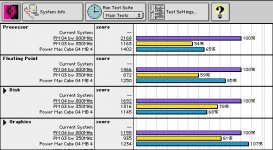
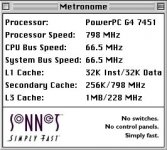
A half year ago I persuaded someone to sell me his Sonnet Encore/ZIF G4 800MHz (the 66MHz bus thing...) and now I have little time to blow the dust of my G3.
I've got 4x 256MB Ram, a new and silent harddisk and ordered a ATI Radeon 7000.
So I'm ready to read, what you'll write in this thread, what will be as usefull as the posts before.
I still have my old PowerMac G3 b/w 350 in the cellar, which was replaced by the first G4 Mini, ten years ago.
So it's my beloved Mac, which I upgraded a little many years ago (SCSI card, USB 2.0 card, Stealth serial port instead of a modem - so I could use my US Robotics v.everything - the best and most expensive user modem at this time).
A half year ago I persuaded someone to sell me his Sonnet Encore/ZIF G4 800MHz (the 66MHz bus thing...) and now I have little time to blow the dust of my G3.
I've got 4x 256MB Ram, a new and silent harddisk and ordered a ATI Radeon 7000.
So I'm ready to read, what you'll write in this thread, what will be as usefull as the posts before.
Just an offhand note: don't expect too much from a Radeon 7000. I have one in my old B&W and I think for OpenGL-ish things it ran... I dunno, maybe 30-ish% faster than the Rage 128?, with no significant difference I could see in desktop UI performance. Having it will let you play with enabling Quartz Extreme, but the general consensus is that doing so hurts more than it helps.
(The 7000, aka "Radeon VE/RV100" is a really stripped down card compared to the "real" R100 Radion or the improved RV200/Radeon 7500.)
Having the 7000 in the 66mhz slot and the Rage in one of the 33mhz slots did work fine for providing extra monitor support.
Well... I never actually got it to completely cooperate with my installation of 9, but I didn't try particularly hard. (I pretty exclusively used "Classic" to run older software.) Maybe in part my issues might have been due to the fact that my 7000 was a stripped down OEM model sold for use in Xserves, not the retail Mac Edition 7000?
(It was a long time ago, I just vaguely recall the particular ATI driver installer I tried not liking what it saw so I shrugged and moved on.)
(It was a long time ago, I just vaguely recall the particular ATI driver installer I tried not liking what it saw so I shrugged and moved on.)
So far as I'm aware the "Best" cards you can use with OS 9 are the Radeon 8x00/9x00 series and some models of Nvidia GeForce up to... the 4TI, although I'm not certain the PCI versions of the latter are compatible with the drivers. (Seriously, have no idea.) I think the last "official" OS9-compatible PCI Radeon Mac edition card was a 9200-based card; notably it's actually not that much faster than the "original" R100 Radeon.
If you're using OS X arguably the best "bang-for-buck" card is probably a flashed GeForce FX 5200. (The cards used to be dirt cheap even when new.) Supposedly they'll even support Core Image under Tiger; that may not necessarily be a good thing given the bus bandwidth, but it's good for shock value. Said cards are essentially worthless under OS 9, however.
If you're using OS X arguably the best "bang-for-buck" card is probably a flashed GeForce FX 5200. (The cards used to be dirt cheap even when new.) Supposedly they'll even support Core Image under Tiger; that may not necessarily be a good thing given the bus bandwidth, but it's good for shock value. Said cards are essentially worthless under OS 9, however.
Well it looks like what I though was in my Powermac and what is, are two totally different subjects lol
I have
G4 500mhz CPU
512mb Ram
ATI Rage 16mb
Ultra66 Adaptor
PCI USB card
Ralink Wifi Card
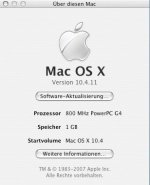
Think my first step will be to upgrade the ram, upgrade to 10.4.11 and look for a better video card.
I have
G4 500mhz CPU
512mb Ram
ATI Rage 16mb
Ultra66 Adaptor
PCI USB card
Ralink Wifi Card
Think my first step will be to upgrade the ram, upgrade to 10.4.11 and look for a better video card.
Thanks for the info, I'll keep that in mind. Today I've been swapping out ram modules trying to find a setup which does not lead to the machine crashing. I have 2 pairs of 256mb PC133, both from different manufacturers. The Powermac was having none of it, so I took the memory out and tried other configurations.
I've ended up with 2x256mb Crucial brand, 2x128mb inferion modules. So far it seems to be working, I'm typing on the machine as we speak. I really need to update to 10.4.11, so I can use TenFourFox. Currently using an old version of Firefox, which is struggling with the site. Having 768mb instead of 512mb has made a visible difference to performance.
I've ended up with 2x256mb Crucial brand, 2x128mb inferion modules. So far it seems to be working, I'm typing on the machine as we speak. I really need to update to 10.4.11, so I can use TenFourFox. Currently using an old version of Firefox, which is struggling with the site. Having 768mb instead of 512mb has made a visible difference to performance.
My G3 was topped out at a factory 450MHz with a rev 2 board and slightly faster Rev.2 Rage128 and 1Gb of RAM, with 7200rpm Seagate drives. My Yikes (which is essentially a B+W minus ADB and with firmware support for a G4 CPU) has basically the same setup but had a Sonnet 500MHz G4 ZIF upgrade in it and whilst a little faster it isnt hugely so... well at least wasnt until I stuck a n R7000 64Mb video card in it which did seem to slicken it up a fair bit. For what it's worth theyre still usable... in Panther they are slick and nice, in Tiger they lug a bit, especially the G3. Tiger really does benefit a lot from a better graphics card and Altivec it seems.
But yes, I have found this architecture to be very temperamental and particularly picky about RAM... basically its been a case of suck it and see. Cheap nasty PC-133 RAM that will work fine in my P133, and even my iMac's crashes my Yikes and B+W.
But yes, I have found this architecture to be very temperamental and particularly picky about RAM... basically its been a case of suck it and see. Cheap nasty PC-133 RAM that will work fine in my P133, and even my iMac's crashes my Yikes and B+W.
My B&W still only has the 640MB it came with when I ended up with it because none of the PC100/133 256MB DIMMs I had lying around, including some pretty expensive ones that worked *absolutely fine* in various Pentium II/III machines, would work reliably, causing heaps of kernel panics/freezes/other such nonsense.
These machines are also hideously picky about PCI cards in my experience. Mine hated three out of four USB cards I tried.
These machines are also hideously picky about PCI cards in my experience. Mine hated three out of four USB cards I tried.
I know that all the PCI cards in this machine are alright, it's just the memory. Mixing modules is always going to be hazard prone, which is why I've bought four matching 256mb modules. Hopefully this will work, they are PC100, so i'm hoping that will help.
I just want to get this machine running stable again, it used to be such a lovely little mac
I just want to get this machine running stable again, it used to be such a lovely little mac
So I have spent a good part of today, swapping the ram in and out of this machine. Then this evening after the final straw or was it the last kernal panic. I took all the memory out, put it to one side and picked up random chips from the pile i had on the floor. Two odd 256 modules, two odd 128mb and what do you know, it works! it's not crashed, kernal panic'd. Sod law!
I upgraded most of my PPC macs. Because of the issues of large SCSI hard drives, I purchased an IDE PCI card and put a 120 Gig 16Mb cache hard drive in. I then brought a 128 Mb AT graphic card. Then a firewire card then a huge ram upgrade where I managed to locate so big ram modules that take the ram up to 1.5 Gig
I also installed a Sonnet G4 800 MHz processor upgrade. And finally a Yamaha CD burner.
I also installed a Sonnet G4 800 MHz processor upgrade. And finally a Yamaha CD burner.
BTW: I upgraded my PowerBook G3 b/w RAM with 4 doublesided 256MB modules today and they worked immediately. I got them from fleabay:
http://pages.ebay.com/link/?nav=item.view&alt=web&id=271913467926&globalID=EBAY-AT
Second:
I swapped the ATI Rage 128 with a Radeon 7000 from here:
http://pages.ebay.com/link/?nav=item.view&alt=web&id=200710223413&globalID=EBAY-AT
which worked immediately in OS 9.2.2 and VGA mode.
A second Radeon 7000 from here
http://pages.ebay.com/link/?nav=item.view&alt=web&id=261435567084&globalID=EBAY-AT
did NOT work!
http://pages.ebay.com/link/?nav=item.view&alt=web&id=271913467926&globalID=EBAY-AT
Second:
I swapped the ATI Rage 128 with a Radeon 7000 from here:
http://pages.ebay.com/link/?nav=item.view&alt=web&id=200710223413&globalID=EBAY-AT
which worked immediately in OS 9.2.2 and VGA mode.
A second Radeon 7000 from here
http://pages.ebay.com/link/?nav=item.view&alt=web&id=261435567084&globalID=EBAY-AT
did NOT work!

PC133 compliant SDRAM should provide timings via the SPD EEPROM for at least 133 and 100MHz. Typical timings on a PC133 module are 3/3/3 at 133MHz, and 2/2/2 at 100MHz. I am aware of issues using some PC133 ram in the B&W G3s, but my experience has been that it works as long as modules aren't using higher density memory than the controller supports. PC133 is more recent than PC100, so you're more likely to run into 256Mbit chips on a DIMM. 128Mbit chips are the maximum supported, so 256MB modules must have 16 chips, no less.
Yes, single sided 256Mb Dimms won't work
And 3/3/3 PC133s cannot work at 2/2/2, thus if installed they will foce 2/2/2 dimms to work at 3/3/3 which could be problematic if not only slower. so i wouldn't mix CL2 PC100 & CL3 PC133.
there are CL2 PC100
http://eshop.macsales.com/MyOWC/Upgrades.cfm?sort=pop&model=41&type=Memory
there are CL3 PC133
http://eshop.macsales.com/item/Other World Computing/133SD256328/
best are CL2 PC133
http://eshop.macsales.com/item/Other%20World%20Computing/133SD2563282/
And 3/3/3 PC133s cannot work at 2/2/2, thus if installed they will foce 2/2/2 dimms to work at 3/3/3 which could be problematic if not only slower. so i wouldn't mix CL2 PC100 & CL3 PC133.
there are CL2 PC100
http://eshop.macsales.com/MyOWC/Upgrades.cfm?sort=pop&model=41&type=Memory
there are CL3 PC133
http://eshop.macsales.com/item/Other World Computing/133SD256328/
best are CL2 PC133
http://eshop.macsales.com/item/Other%20World%20Computing/133SD2563282/
About the 66Mhz PCI slot, I think that it is a different PCI controller than the lower two 33Mhz PCI slots ( like the PM 9600 that has two PCI "Bandit" controllers, one that works the 3 upper slots + motherboard SCSI & serial, another one that works the 3 lowers slots).
I'd stick with a 66Mhz Rage 128 in it, instead of a 33Mhz 9200 that will then work in 32 bits only.
An ATTO UL3 66 SCSI card will work great in the 66Mhz slot, and the 9200 Radeon will give its full power in one of the lower 33Mhz 64bits PCI slots.
I'd stick with a 66Mhz Rage 128 in it, instead of a 33Mhz 9200 that will then work in 32 bits only.
An ATTO UL3 66 SCSI card will work great in the 66Mhz slot, and the 9200 Radeon will give its full power in one of the lower 33Mhz 64bits PCI slots.
My memory's fuzzy but I think the B&W is slightly more (or less?) complicated than that. As I recall the 66Mhz slot is the on the "native" 32 bit-wide PCI bus provided by the MPC 106 ("Grackle") memory/PCI controller, while the 33mhz/64bit slots are all hanging on a PCI->PCI bridge that's essentially mapped into one of the native PCI controller's virtual card slots.
This is basically a bummer, because it means that aggregately the entire bus->memory/CPU bandwidth for all the slots is limited to essentially the best that a single 66mhz card can do, and it's shared between video and other functions. (A typical Pentium II/III PC of the era would have the AGP slot hanging directly off the "Northbridge", while the PCI controller would be in a "Southbridge" communicating with the NorthBridge over a proprietary bus. This, among other things, reduces contention between a video card that's fetching textures from RAM and other functions like the hard disk controller and whatever slots that are hanging off the PCI bus, even in cases where the Northbridge->Southbridge bus isn't any fatter than the B&W's PCI link. It's one of the reasons why it's of "questionable wisdom" to, for instance, use those hacks that enable Quartz Extreme over PCI on a B&W.)
Given that's a flaw in the machine you can't exactly fix it's not really worth losing sleep over or anything, but it does put real limits on how much improvement you can reasonably expect in upgrading one. The B&W basically took a 1996-era system design to its max out of the box; Sawtooth and later G4s have *substantially* better system architectures.
The Radeon 7000s I have work okay in the 66mhz slot; granted I have no idea if that applies to other models.
(Interestingly I did find something that says the original 128 *doesn't* run in one of the 33mhz slot, because those are keyed for 5v cards while the R128 supplied was 3.3v only. Part of me swears I put it one of the other slots, but I could be wrong thinking about it, as I don't think I ever put more than two heads on it and I had a pair of R7000s to do it with, both of which were dual-voltage tolerant.)
Pretty sure the 66mhz slot in the B&W has no capability to slow to 33mhz; a card stuck in it either has to be able to deal or it won't work. (I vaguely recall reading a tech note that specifically said the slot was PCI 2.1 compliant other than not supporting the speed selection mechanism.) Note that support for 66mhz PCI, at least for video cards, isn't that rare. Pretty sure the justification is so the cards can work in PCI-X systems without slowing them down excessively.
Edit: yes, the fixed speed thing is in the Apple service source document.
Edit: yes, the fixed speed thing is in the Apple service source document.
... a further note on this subject: it makes perfect sense that the 66mhz slot isn't capable of slowing down. Remember, it's not two independent PCI busses, the 64bit/33mhz slots are slaved off the 32bit/66mhz bus coming off the MPC 106 with a synchronous PCI bridge. (Do the math, of course, and you'll see that the theoretical total bandwidth of each type of slot is the same.) IF you were to force the 66mhz slot to slow to 33mhz you'd also halve the bandwidth available to the PCI bridge, so... what would happen in that case? Said bridge would either have to slow the slots down to 16mhz, which is out of spec, or disable the 64 bit extension.
Yes, Sonnet upgrades 800MHz/1GHz:
http://www.xlr8yourmac.com/g3CARDS/G3_1.1GHz_vs_G4_1GHz_review/index.html
http://www.xlr8yourmac.com/g3CARDS/G3_1.1GHz_vs_G4_1GHz_review/index.html