

Thread
How a $70 Conquest Became A Free Conquest
Yesterday evening I went out to go, and pick up an upgraded "Wallstreet" Powerbook G3 (it had a 500MHz Sonnet Crescendo G4 board installed). The unit was being advertised by the seller on Kijiji in "fine working condition," although that did not turn out to be the case upon attempting to boot the unit.
To make a long story short, the end result was the seller decided to give the computer, in addition to its accessories, for free. In his ad, he had originally asked for $75 (which he claimed was already reduced). I was later successful in knocking down the price by $5.
I documented this "wacky" conquest in a 14 minute Youtube video (
). From 0:00 to 8:12, I discuss what came included with the unit (it was a fairly decent package), and how it was ultimately given to me for free. The other half of the video is dedicated to explaining what the issues are with the unit (basically, it refuses to boot from the hard drive, also upgraded from 8GB to 20GB. The screen hinge is loose, and it shuts itself off after a couple of minutes. Also, the green indicator light does not remain lit when starting up the unit).
Enjoy, and as always, any help would be greatly appreciated in getting this unit up, and running.
To make a long story short, the end result was the seller decided to give the computer, in addition to its accessories, for free. In his ad, he had originally asked for $75 (which he claimed was already reduced). I was later successful in knocking down the price by $5.
I documented this "wacky" conquest in a 14 minute Youtube video (
Enjoy, and as always, any help would be greatly appreciated in getting this unit up, and running.
I recently traded JDW my spare working G3 300 for his G4 500. So, I have the same upgrade. I will warn you, it runs VERY hot.
Intermittent boot issue:
Check PRAM. Mine is dead as a doornail, with no issues (except losing time) and I assume they work at full power. Yours may be in a middle state. Try removing it.
Not booting from CD:
Mine also came (back in June) with a dead DVD drive. I purchased a CD drive from Tonyzzz on eBay and it has worked excellently since.
Intermittent boot issue:
Check PRAM. Mine is dead as a doornail, with no issues (except losing time) and I assume they work at full power. Yours may be in a middle state. Try removing it.
Not booting from CD:
Mine also came (back in June) with a dead DVD drive. I purchased a CD drive from Tonyzzz on eBay and it has worked excellently since.
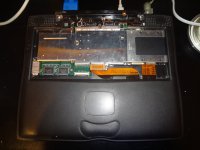
Thanks for the tips, Ted. The unit is currently disassembled, since I wanted to figure out what was wrong with the screen hinge. This pic reveals all:
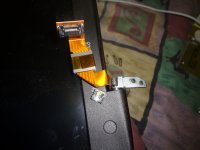 Are replacement parts available for that piece? Or am I better off replacing the entire LCD screen?
I also have included a pic of the Sonnet Crescendo G4 upgrade board (w. 256MB of RAM), and of the IBM Travelstar 20GB (which I'm presuming to be dead since the computer refuses to boot from it; more testing required of course at this point).
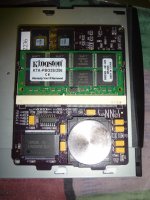
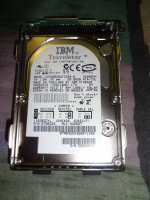
Are replacement parts available for that piece? Or am I better off replacing the entire LCD screen?I also have included a pic of the Sonnet Crescendo G4 upgrade board (w. 256MB of RAM), and of the IBM Travelstar 20GB (which I'm presuming to be dead since the computer refuses to boot from it; more testing required of course at this point).

true. I had a wallstreet 292MHz/14" it had all sorts of power up issues. Going to OSX added backlight issues as well(it worked fine with OS9). The worst powerbook I've ever owned, finally sold it for parts when the backlight failed completely.
been long enough I forget how I worked around the problems...
been long enough I forget how I worked around the problems...

Just a small update:
I returned home after work on Friday, and I swapped the 20GB IBM drive with my 40GB Hitachi drive from my long-deceased iBook G4. Despite this change, the Powerbook (now Halfbook, since the LCD, and keyboard have been removed for the time being) still refuses to boot directly from the HD. I end up getting this:
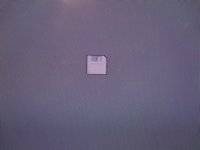
As a result, I tried booting from one of the OS 9 discs, and the Halfbook managed to get to the main desktop.
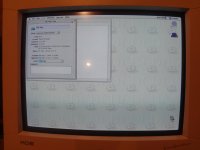 To my surprise, the HD icon also appeared on the desktop, and I was able to browse the files that were on it for about 30 seconds, or so before the system would hang (I haven't quite figured out why it is doing this).
I'm now thinking that either the logic board, or that stupid yo-yo adapter is at fault.
Thoughts?
I returned home after work on Friday, and I swapped the 20GB IBM drive with my 40GB Hitachi drive from my long-deceased iBook G4. Despite this change, the Powerbook (now Halfbook, since the LCD, and keyboard have been removed for the time being) still refuses to boot directly from the HD. I end up getting this:
As a result, I tried booting from one of the OS 9 discs, and the Halfbook managed to get to the main desktop.
To my surprise, the HD icon also appeared on the desktop, and I was able to browse the files that were on it for about 30 seconds, or so before the system would hang (I haven't quite figured out why it is doing this).I'm now thinking that either the logic board, or that stupid yo-yo adapter is at fault.
Thoughts?
Hmm so that's two drives that it refused to boot from, right? And it sounds like the 40 GB was fine last time it was used. Have you tried another ATA cable? If not then I might start to suspect the ATA controller on the board. I'd test the HD in another machine to see if it can boot, read, write etc fine there.
Hope this helps...
Hope this helps...
Meh, I should have looked at the manual on that one before suggesting the cable. Ignore that one. If I had to guess that 40 GB drive will work in another machine. But that's only a guess since it's odd both didn't work. Curious to know the results. Otherwise my logic says if it isn't the drive it's what it connects to. I've been up way too late to offer anything profound...about to go to bed.
PM about to be sent for one other item that may help.
PM about to be sent for one other item that may help.
The fact that the drive will can be seen from the OS 9 installer makes me question a problem with the drive connector.
I've never had an iBook G4... can they boot Classic? More to the point, what would be the behavior if the Mac OS ( drivers were not installed on the disk?
Personally, I'd be starting to look at borrowing or buying a CPU card, just to rule out issues with the G4 and memory.
I've never had an iBook G4... can they boot Classic? More to the point, what would be the behavior if the Mac OS ( drivers were not installed on the disk?
Personally, I'd be starting to look at borrowing or buying a CPU card, just to rule out issues with the G4 and memory.
Yes, they can dual boot into Classic. When I had my G4, I was running both Panther (later upgraded to Tiger), and 9.2.2.
The 40GB drive has not been erased, or tampered with since the logic board failed on my G4 in 2008. So all of the drivers required to dual boot into the Classic environment is still very much present on that HD.
The weird thing about this unit is the green indicator power lamp does not remain lit when the computer boots, and on a cold start (i.e., the computer has been powered down for a few hours), I hear the startup bong, but no activity from either the HD or the CD drive occurs until after about a minute.
I'm not convinced that the fault lies with these components, but rather, as you said, what they connect to.
In regards to the PM you sent me, I'm not sure how useful the Apple Service manual will be, but I guess there's no harm in giving it a try. I'll send you my e-mail address shortly.
I'm not convinced either, but if nothing else it's nice to have. The power adapter is a bit odd. Is the ring around the plug starting to separate at the seam? I only ask because I've had those die that way, but the ones on my 12" PowerBook G4 were worse. They'd always intermittently work before they died. Just digging into my experiences there.
Let's see what the other 68kMLA members have to say. Cause you know there's more collective Apple knowledge here then every Genius Bar in the world...
Let's see what the other 68kMLA members have to say. Cause you know there's more collective Apple knowledge here then every Genius Bar in the world...
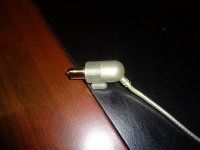
Upon inspecting the power adapter, I can verify that the ring around the plug shows no indication of separating. I have attached a pic of it below:
I've never doubted the knowledge of the members on this forum, and I'm sure they'll be able to provide some more insight as the days progress.
Sadly, Apple couldn't give a rats ass about the existence of this Wallstreet (and neither would any other manufacturer whose product is well passed their life cycle), so bringing it in to the Genius Bar would be an utter waste of time.
Btw, thanks for forwarding the Apple Service manual. I'll check it out, and see what good I can make from it.
You're certainly welcome on the manual. Agreed on the Genius Bar. Looking into the manual it seems to agree with what we've talked about.
As for the power problems, I'd say borrow or buy another known good compatible charger. Hopefully that fixes it. If not you've got yourself a spare compatible with the 1400-Pismo if I recall correctly, plus some (all?) Duos...that's off memory. Someone correct me if I'm wrong. If not it's time to start replacing on the inside.
That's what I've got for the moment! :b&w:
That was from "Internal hard drive does not spin" but the process seems logical for this situation. Didn't read every page, but saw another boot failure flow that had about the same to say.
As for the power problems, I'd say borrow or buy another known good compatible charger. Hopefully that fixes it. If not you've got yourself a spare compatible with the 1400-Pismo if I recall correctly, plus some (all?) Duos...that's off memory. Someone correct me if I'm wrong. If not it's time to start replacing on the inside.
That's what I've got for the moment! :b&w:
The long delay after the extended powerdown sounds like the PRAM battery, but also sounds pretty normal. I defer to the experts, but I think there is some kind of extended self-test going on.
The power light issue is somewhat interesting. My old Wallstreet would never show a power light (or charge its main battery or let me use the volume ad brightness buttons. I finally ended up replacing the topcase in order to replace the PMU. (Basically, the light, buttons and PRAM all come togeher in one board located under the wrist rest.) Everything worked great after that.
My interpretation is: there's nothing wrong with the HD or the cable - you can read and write to it when you booted from a CD. It's most likely that the System installed on the HD is simply not capable of booting a Wallstreet. Did you try starting it up with extensions off? (hold down shift while booting) If not, please do, and tell us what you find.
Next bet would be that you need a driver for the G4 upgrade. Download and install that and try again.
My second suggestion would be: Wallstreet is Old World ROM, and iBook is New World - it loads the ROM file from the HD into RAM on boot. Find the ROM file, and move it to the desktop (or anywhere else outside the System Folder), then try booting (with extensions off if it fails first go). It may be clashing with the motherboard ROM (I have no idea really, but worth a try).
If that fails, I suggest reinstalling OS 9 from CD to the HD while it is in the Wallstreet.
Next bet would be that you need a driver for the G4 upgrade. Download and install that and try again.
My second suggestion would be: Wallstreet is Old World ROM, and iBook is New World - it loads the ROM file from the HD into RAM on boot. Find the ROM file, and move it to the desktop (or anywhere else outside the System Folder), then try booting (with extensions off if it fails first go). It may be clashing with the motherboard ROM (I have no idea really, but worth a try).
If that fails, I suggest reinstalling OS 9 from CD to the HD while it is in the Wallstreet.
I haven't checked the PRAM battery yet, but that's another possibility.
I have no control over the brightness, and volume on either HD.
Perhaps. I was under the assumption that the 20GB IBM drive was dead, since I would hear it spin up, and down (and that delay didn't make a good first impression, either). I can swap the 40 with the 20 again, since that one has all of the drivers for the G4 card already installed, and has the latest version of Jaguar (if that makes a difference).
No, but I'll give it a try later tonight.
I can be wrong, as i have not booted my Wallstreet for a long period, but if i can remember the green indicator is only lit when the powerbook is on "sleep" status.(it's a sleep indicator indeed)
As for the battery, there is no indicator, except for the row of lights on the side of the battery.(four units)
My Wallstreet has the brightness trouble under 10.2, never had under Mac Os 9.2.
Can the G4 board be in fault ? (becoming hot and just shutting itself after a couple of minutes)
Concerning the HD, i agree with that
Last but not least, did you try to reset the Wallstreet (Shift-fn-Control-Power button) ?
You are correct. The light blinks during sleep and is off otherwise.
My G4 upgrade, the same one he has (the one I got from JDW) produces a lot of heat, but it doesn't affect the CPU. The heat gets the RAM so hot it starts getting memory errors and they eventually err on an OS occupied part of RAM and the system freezes.
Thanks for the clarification, bibilit. I've never owned a PB G3 laptop before, thus I had assumed that the green indicator lamp referred to the unit being powered up, and not in hibernation mode. I have a green power indicator lamp on my Thinkpad laptops, which remain on when the computer is running. Some Thinkpad models have a crescent-shaped moon indicator that lights up when the computer is in hibernation mode. It's unfortunate that the PBs didn't adopt a similar feature.
I can confirm that the Sonnet G4 card does generate quite a bit of heat in a brief amount of time, but I haven't had the computer running to the extent where the RAM modules start to overheat (interesting to note anyway).
As stated earlier, Bunsen suggested checking the PRAM battery, as that may be the cause of the intermittent boot issues. I did some searching around on Google after returning from work, and it appears that if the battery is dead, the computer will generate the same symptoms that I've documented in this thread. I've provided one link just as a reference: https://discussions.apple.com/thread/3421894?start=0&tstart=0
As a result, I'm going to remove the PRAM battery, and place in the 20GB drive that came with the unit. If it can boot without the presence of a PRAM battery, then this PB does have some hope after all. If not, I'll have to purchase a new PRAM battery from the 'Bay, and go from there.