

Thread
Clocking the IIsi
I had a spare IIsi board (the PSU went to Zuiko -a 68kmla member) so i decided to try to clock it to 25 mhz:
First step is to remove the 40 Mhz oscillator

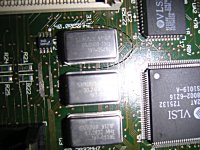
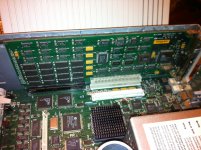
The oscillator is easy to spot, it's located near the bank of ram and the logic board says it's a 40.00mhz oscillator, removing it is not easy:

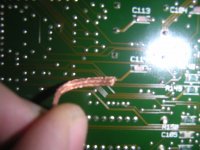
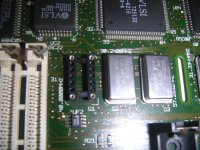
Next step is to clean the board and to solder a dip socket (you can revert to the original oscillator if things don't go the way you want)

Of course, you should have a new 50 Mhz oscillator:
Image
Put back everything together,the setup is bulky now, but once again you can get back to 40.00mhz if required with the old and now removed oscillator.

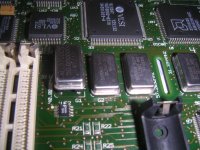
As you can see the 50.00 mhz is also easy to spot on the new item
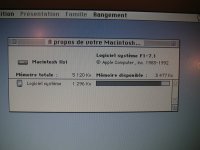
Next step is to boot the IIsi and to see how everything works (yes, this is a french system)

Done :lol: , the IIsi is more responsive, played two hours with it... the 68030 is running hot, but not much more than before, Ram doubler was properly set and i have now a spare upgraded logic board |)
I just spent one and a half removing and soldering the new items back, the best thing is that components were only a couple of $
First step is to remove the 40 Mhz oscillator
The oscillator is easy to spot, it's located near the bank of ram and the logic board says it's a 40.00mhz oscillator, removing it is not easy:
Next step is to clean the board and to solder a dip socket (you can revert to the original oscillator if things don't go the way you want)
Of course, you should have a new 50 Mhz oscillator:
Image
Put back everything together,the setup is bulky now, but once again you can get back to 40.00mhz if required with the old and now removed oscillator.
As you can see the 50.00 mhz is also easy to spot on the new item
Next step is to boot the IIsi and to see how everything works (yes, this is a french system)
Done :lol: , the IIsi is more responsive, played two hours with it... the 68030 is running hot, but not much more than before, Ram doubler was properly set and i have now a spare upgraded logic board |)
I just spent one and a half removing and soldering the new items back, the best thing is that components were only a couple of $

good info, i am running 7.6.1 right now on my IIsi and it's sluggish!(in 256 color) If i change it to Black and White it speeds right up,
i see your running OS 7.1, So Before and After, You said that it feels more responsive, on a percentage, how much faster?
also how would this OC effect the Math CO if installed?
i'm just trying to figure out exactly how much benefit is to gain from this,
Thanks.
i see your running OS 7.1, So Before and After, You said that it feels more responsive, on a percentage, how much faster?
also how would this OC effect the Math CO if installed?
i'm just trying to figure out exactly how much benefit is to gain from this,
Thanks.
i will say at least 15% more responsive than before, as i used a dip socket and managed to remove the old oscillator without any damage...i can try easily with the 40 Mhz and the 50 Mhz.
No Math CO installed.(not on this one at least, haven't tried with my other IIsi)
The inboard video is responsible for this (sharing the main system memory) and the fact that you are using SSW 7.6.1... 7.1 is pretty fast on the IIsi.
Also, what amount of memory are you using ?
As you have 5 units to play with, and parts to OC are really affordable (less than 5 $) it will be a shame not to have a try
i agree! i believe there is 4, 2mb Simms installed
well can you try a 64mhz oscillator?
maybe with HSF the cpu can be pushed faster?
Well sounds like i need a video card for this IIsi, looks like i could plug one in the riser, i would just have to relocate the network ports,
well can you try a 64mhz oscillator?
maybe with HSF the cpu can be pushed faster?
Well sounds like i need a video card for this IIsi, looks like i could plug one in the riser, i would just have to relocate the network ports,
60 Mhz should be a maximum :
http://homepage.mac.com/schrier/stats.html
I just tried the OC because i have a logic board to spare, and as far as i know the floppy drive doesn't like to be pushed too far.(you cannot boot from it anymore)
Was lucky enough to get a Raster Ops Paintboard LI with one of the IIsi's, huge difference !!
Which PDS NIC are you using? If it's the Asante with the removable ThickNet PassThru Board . . . you, sir, are in luck!Well sounds like i need a video card for this IIsi, looks like i could plug one in the riser, i would just have to relocate the network ports,
IIsiColorPivotII_PDS_Card_HackProject™
The Cards are dirt cheap from macmetex on eBay, you just need to build a cable, running wires from the jumpers (or their vacated thru-holes) on the Card to a Da-19 connector to bolt-up in place of the baled Thicknet DA-19 connector on the Asante Card. Using a DA-19 Gender changer is probably the easiest way to go, but I digress.
On the ASANTE Card, the ribbon cable connects to the Thicknet DaughterCard on a header. The Daughtercard connects to the identical header on the ThinNet/10baseT section. If you can unbolt the DA-19 and un-hook the DaughterCard, all you need do is hook the ribbon cable up to the remainder of the card in the same orientation as before and then you're left with the outlet for your Video Connector.
That's a NuBus Card, so it's no good to use with your PDS NIC, just with the IIsi NuBus Adapter.
Do you want to run a Mac FixedRes CRT, a MultiRes/MultiSync CRT or use it with a modern LCD?
For either of the first two, the Radius Color Pivot II/IIsi is just about perfect . . .
The 832 x 624 x 75 Hz @ 8 Bit - 16" Color (Fixed Res Mac Monitor Standard) is particularly sweet on my 15" KDS/Radius LCD.
. . . you'll need to find a similar compatible MultiSync LCD in lieu of a CRT . . .
. . . unless I successfully get the card to output 60 Hz from its native 66Hz/75Hz vertical scan rates by UNDERClocking a Video Card?????? }
. . . but that one's on the back burner ATM, there's more important IIsi fish to fry! [ ] ]'>
] ]'>
Do you want to run a Mac FixedRes CRT, a MultiRes/MultiSync CRT or use it with a modern LCD?
For either of the first two, the Radius Color Pivot II/IIsi is just about perfect . . .
The 832 x 624 x 75 Hz @ 8 Bit - 16" Color (Fixed Res Mac Monitor Standard) is particularly sweet on my 15" KDS/Radius LCD.
. . . you'll need to find a similar compatible MultiSync LCD in lieu of a CRT . . .
. . . unless I successfully get the card to output 60 Hz from its native 66Hz/75Hz vertical scan rates by UNDERClocking a Video Card?????? }
. . . but that one's on the back burner ATM, there's more important IIsi fish to fry! [
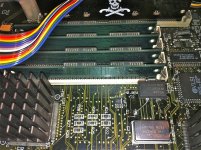
] ]'>Just got mine to 29 mhz.
Serials / Floppy (Boots Floppys) all works very smooth!
Benchmarks:
viewtopic.php?f=8&t=19375&p=198475#p198475
Serials / Floppy (Boots Floppys) all works very smooth!
Benchmarks:
viewtopic.php?f=8&t=19375&p=198475#p198475