

Thread
Magento-optical disks/drives
I heard about magneto-optical disks on a internet-curiosity spree.
Apparently, they were around just before the dawn of CDs, and are still around in Japan.
Any other details? Experiences? Long-term durability?
Seems like every long-term storage has major issues: DVD/CD, disk rot, jitter and dye deteroriation; hard disk and other magnetic media have issues with magnetic stability, driver board issues, spindle this or that; tapes get stretched, decay, separation of oxide layer etc etc. One person even advised (which seems the best overall) the concept of not storage, but movage; you upgrade and translate into the current primary working format, but that can be irrelevant for disk images, encoded archives, large volumes of text or word processing documents. (If I had 5K+ MacWrite documents, which I don't, I'd need some major motivation to copy all of them to modern formats.)
Note that floptical disks are not the same as magneto-optical disks.
Apparently, they were around just before the dawn of CDs, and are still around in Japan.
Any other details? Experiences? Long-term durability?
Seems like every long-term storage has major issues: DVD/CD, disk rot, jitter and dye deteroriation; hard disk and other magnetic media have issues with magnetic stability, driver board issues, spindle this or that; tapes get stretched, decay, separation of oxide layer etc etc. One person even advised (which seems the best overall) the concept of not storage, but movage; you upgrade and translate into the current primary working format, but that can be irrelevant for disk images, encoded archives, large volumes of text or word processing documents. (If I had 5K+ MacWrite documents, which I don't, I'd need some major motivation to copy all of them to modern formats.)
Note that floptical disks are not the same as magneto-optical disks.
MO are a dead end now, I don't think anyone is still making them. The last units I know about were 5.2GB drives and those were known to be buggy as hell.
The media itself is encased in a sturdy case and the stuff is supposed to last a very long time (look up the wiki). Its like CDR but with a phase change while you burn for added stability.
I have half a dozen 1.3GB (650MB/side you can flip them and use both sides) drives (5.25" SCSI with tons of media) and a 3.5" 230MB drive (single sided). Never seen a bad cart before.
Before MO was popular you also had WORM drives (recordable media in a strong case but not rewritable), I have a few drives for IBM PS/2 systems.
The media itself is encased in a sturdy case and the stuff is supposed to last a very long time (look up the wiki). Its like CDR but with a phase change while you burn for added stability.
I have half a dozen 1.3GB (650MB/side you can flip them and use both sides) drives (5.25" SCSI with tons of media) and a 3.5" 230MB drive (single sided). Never seen a bad cart before.
Before MO was popular you also had WORM drives (recordable media in a strong case but not rewritable), I have a few drives for IBM PS/2 systems.
MO disks seem to be pretty durable. Never had one go bad but I don't use them a lot nowadays. I use mine to back up the hard drives on IIgs's and IIe's. Nowadays I'm in need of multi-terrabyte backup. I fondly remember buying a CD burner in the early 1990s. I could backup my whole hard drive several time over on a single CD.
There's good reason to move forward. I've recovered old files for people that had the media but no drive to read it. Sometimes I've also had to convert the files to something a modern computer could use.
There's good reason to move forward. I've recovered old files for people that had the media but no drive to read it. Sometimes I've also had to convert the files to something a modern computer could use.
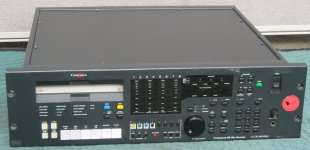
ISTR, it's some version of the Tahiti.
Back in the day, we had a bunch of them in Artecon enclosures and rand them under Solaris 6 using a special driver. For later versions of Sol, I recall that we had to change a jumper so the drive identified itself as a disk drive rather than an optical drive. I'm assuming that if I set the dip/jumper that way, then it should just work under Mac OS X with Disk Utility, no?
JR
Back in the day, we had a bunch of them in Artecon enclosures and rand them under Solaris 6 using a special driver. For later versions of Sol, I recall that we had to change a jumper so the drive identified itself as a disk drive rather than an optical drive. I'm assuming that if I set the dip/jumper that way, then it should just work under Mac OS X with Disk Utility, no?
JR
At 9.1GB, you may be looking at a DVD-RAM drive. I do not recall seeing any >5GB MO stuff. (In fact, >1.3GB MO stuff seems to be exceedingly rare.)
It would be interesting to hear what people do for backups on their old computers. I never bothered to backup my old Macs when I was using them, but I've been wanting to get back into the "actually using old machines for stuff" scene once I'm done with my classes, and have been thinking about the hardware investments I may need to make, in terms of data storage and data backup.
I know a lot of old UNIX machines had DAT/DDS drives, and some Macs had them, and MO seems popular for its almost legendary reliability.
As backups for modern machines go:
Another technology along the same kind of thought (optical disk in a cartridge) is Sony's Professional Disc. Unfortunately, these are very very expensive, and for 10x the cost, have the same capacities as BD-R and BD-RE. (Which, I priced it out six months or so ago, is the cheapest way to make a single backup of 6TB of data, not counting the costs of running machines or sitting in front of the machine swapping 100 disks in and out.
In a lot of cases, the easiest and cheapest way to "backup" (at least to have one working backup copy of info) is to back up onto another hard disk. (I've been having good luck with a 4TB Seagate external drive, it was "only" $250, and it holds most of the data I need to back up. I'd like to supplement it with one or two more when Windows 8 and storage pooling comes a little bit further along, or get Open Indiana or Solaris 11 or FreeBSD and some ZFS pools going.)
It would be interesting to hear what people do for backups on their old computers. I never bothered to backup my old Macs when I was using them, but I've been wanting to get back into the "actually using old machines for stuff" scene once I'm done with my classes, and have been thinking about the hardware investments I may need to make, in terms of data storage and data backup.
I know a lot of old UNIX machines had DAT/DDS drives, and some Macs had them, and MO seems popular for its almost legendary reliability.
As backups for modern machines go:
Another technology along the same kind of thought (optical disk in a cartridge) is Sony's Professional Disc. Unfortunately, these are very very expensive, and for 10x the cost, have the same capacities as BD-R and BD-RE. (Which, I priced it out six months or so ago, is the cheapest way to make a single backup of 6TB of data, not counting the costs of running machines or sitting in front of the machine swapping 100 disks in and out.
In a lot of cases, the easiest and cheapest way to "backup" (at least to have one working backup copy of info) is to back up onto another hard disk. (I've been having good luck with a 4TB Seagate external drive, it was "only" $250, and it holds most of the data I need to back up. I'd like to supplement it with one or two more when Windows 8 and storage pooling comes a little bit further along, or get Open Indiana or Solaris 11 or FreeBSD and some ZFS pools going.)
For 68k/ppc machines backup I use DAT drives and/or MO disks. Even older DAT drives can backup the whole HD of a 68K/early ppc and do it pretty fast using native SCSI and software. Mostly once I get a machine setup like I like it I just image the drive to tape to have incase I hose something up. All drivers and disk images are dumped onto my server which gets archived once in a while using DDS4 or AIT2 drives. It would be faster just to mirror a server drive with an external USB2 drive and put it on the shelf. I kick myself for not getting more 2TB HDs when they were under $70 before the flooding tripple prices for HDs.
There are more modern ways of doing backup, but I like using the older tech (which is dirt cheap anyway) with old machines. I just find the older tape drives interesting , same with removable carts. I have a bunch of WORM drives for my old IBM PS/2 systems (talk about pricey equipment back in the day) you can access in DOS. QIC drives are very reliable (before Travan anyway), and who doesn't like Syquest and Bournouli drives? I also dabble in DLT drives plus the million CDRW drives I have (quite a few SCSI externals which I seem to get in any larger hauls I find). You can fit a whole 68k driver archive on one 1.3GB MO disk.
There are more modern ways of doing backup, but I like using the older tech (which is dirt cheap anyway) with old machines. I just find the older tape drives interesting , same with removable carts. I have a bunch of WORM drives for my old IBM PS/2 systems (talk about pricey equipment back in the day) you can access in DOS. QIC drives are very reliable (before Travan anyway), and who doesn't like Syquest and Bournouli drives? I also dabble in DLT drives plus the million CDRW drives I have (quite a few SCSI externals which I seem to get in any larger hauls I find). You can fit a whole 68k driver archive on one 1.3GB MO disk.
For me, it''s about backup of irreplaceables, such as archives or older versions which are very hard to find. I try to make it a habit where every time (especially under Windows) I find a useful application, I backup the archive I downloaded, in case I might need it again or that version is suddenly replaced by a higher version which does the same thing but tweaks a few things and bumps up the OS requirement.
9.1 GB MO disks
Right now all my backups occupy about 170GB on disk, and that is before I should do other things like backup of CDs.
I don't know how all you lot are trifling with multi-terabyte disks I could probably backup every single thing I possibly have on 250GB.
9.1 GB MO disks
Right now all my backups occupy about 170GB on disk, and that is before I should do other things like backup of CDs.
I don't know how all you lot are trifling with multi-terabyte disks
I could probably backup every single thing I possibly have on 250GB.My text, schoolwork, downloaded documents, etc would probably fit in that area. In a former life, I was a photo major though, and I'm also mildly obsessed with keeping all of the data.I don't know how all you lot are trifling with multi-terabyte disks
It's much like the Allie Brosh meme -- CLEAN ALL OF THE THINGS!!
I also have like 220 gigs of music on one of my machines which I need to sort through (and admittedly, toss most of.)
The photos are actually an interesting spectacle. Previously, what i would do was sort them all into 4-gig (approximately) buckets and do all of my viewing/rating/tagging in Adobe Bridge. Then, twice every year (I'm coming up on the time when I would do it, I need to make a decision pretty soon) I would burn all of these folders to new DVDs.
This was both a change management technique, and a data continuity technique, because I don't really trust optical media.
Each time I do it, it takes forever, even though there's almost no work or thought to be done, and I almost always mess up somehow. (usually by mis-labeling a disk or burning the same stuff twice.)
My more recent strategy has been to keep the stuff on one of my laptop's auxiliary disks, and then back that up to a file server VM on my big server, and then back that up to the large external drive. That may or may not get refined in the next few months/years as I start to have more time to think about backup strategies. (Something I don't get to think about nearly as often as I'd like. [
] ]'>
I actually just bought a nice little SCSI MO drive on eBay with a bunch of 230MB disks. Works great for backing up software and booting up old machines like my Plus that lack a hard drive.
Formats just fine with any of the usual SCSI tools too. No special drivers needed.
Formats just fine with any of the usual SCSI tools too. No special drivers needed.
My experience with MO disks was great -- well worth the effort!
Purchased my first MO drive in 1996 (640 MB 3.5", compatible with 230 MB cartridges among others). After a couple of years, this unit became somewhat unreliable (but still usable!) so I purchased another one, Fujitsu branded -- working great last night.
MO media is absolutely reliable -- my first disks from 1996 have worn labels with almost unreadable lettering... but the contents read just fine, like day 1! The only problems I ever had were from the ocassional SCSI-termination issue, drive failure and an unfortunate system crash xx( that's why I keep the disks locked unless I need to write to them!
I mostly have backups on them, but also "large" (by the stantards of the day) files, like QT movies and big scans -- plus experimental / emergency systems. Most of my content is in DiskCopy images with checksum, so I can always verify data integrity
I like using the drive: compact, quiet and snappy performance -- seek times are slower than a HD, but still a lot faster than CDs. Another great thing is the plug-and-play feature: in the SE/30 or other computers without any driver installed, I just put a formatted disk in the drive, wait a few seconds for it to spin up, and then turn on the Mac -- driver from the disk is loaded at once. In fact, I'd like to get an OS X-compatible USB (or FireWire!) drive, it would make a convenient bridge between my modern and vintage computers.
Anyway, for your backup needs, I'd recommend a couple of HDs -- I'd never trust a single copy! (unless it's on MO, of course)
BTW, I'm currently in an altruist task as Sound Engineer wannabe, and I'm recording on... MiniDisc.
Purchased my first MO drive in 1996 (640 MB 3.5", compatible with 230 MB cartridges among others). After a couple of years, this unit became somewhat unreliable (but still usable!) so I purchased another one, Fujitsu branded -- working great last night.
MO media is absolutely reliable -- my first disks from 1996 have worn labels with almost unreadable lettering... but the contents read just fine, like day 1! The only problems I ever had were from the ocassional SCSI-termination issue, drive failure and an unfortunate system crash xx( that's why I keep the disks locked unless I need to write to them!
I mostly have backups on them, but also "large" (by the stantards of the day) files, like QT movies and big scans -- plus experimental / emergency systems. Most of my content is in DiskCopy images with checksum, so I can always verify data integrity
I like using the drive: compact, quiet and snappy performance -- seek times are slower than a HD, but still a lot faster than CDs. Another great thing is the plug-and-play feature: in the SE/30 or other computers without any driver installed, I just put a formatted disk in the drive, wait a few seconds for it to spin up, and then turn on the Mac -- driver from the disk is loaded at once. In fact, I'd like to get an OS X-compatible USB (or FireWire!) drive, it would make a convenient bridge between my modern and vintage computers.
Anyway, for your backup needs, I'd recommend a couple of HDs -- I'd never trust a single copy! (unless it's on MO, of course)
BTW, I'm currently in an altruist task as Sound Engineer wannabe, and I'm recording on... MiniDisc.
I tell you whats fun to backup, which is still an ongoing process, is the ZFS pool on the freenas server I have setup. its a 32bit system and ZFS keeps crashing and is shit-unstable on a 32bit system. Really designed for 64 as i was reading around.
There is almost 7tb of data stored on that server alone, plus I have a couple more 2TB drives i want to add to RAID along with replacing the motherboard/CPU/RAM so i have been in the process of backing all that data up. NOT FUN...
as far as the data is concerned, its a huge mixture of stuff, for example mostly backup copies of all our discs, and every time we get a machine in for setup/repair, I rip the restore images off the system and toss em up on the storage array for safekeeping. Then theres music and movie libraries. software libraries, list goes on and on. not to mention backups of other peoples backups during repair jobs, etc... Most of that can be flushed though as thats probably about 2TB alone.
We just parted out and tossed a Dell/EMC AX150N iSCSI SAN storage array because where we got it, we had to wipe the hard disk drives for data security before we could get it.
So, I did that and well that was dumb. I didnt realize that one of hte drives contained the system configuration and boot image. Once i wiped that, it became a very expensive paperweight and there was nothing EMC/Dell could do. lovely. So i pulled out all 12 250GB sata drives and used them elsewhere.
There is almost 7tb of data stored on that server alone, plus I have a couple more 2TB drives i want to add to RAID along with replacing the motherboard/CPU/RAM so i have been in the process of backing all that data up. NOT FUN...
as far as the data is concerned, its a huge mixture of stuff, for example mostly backup copies of all our discs, and every time we get a machine in for setup/repair, I rip the restore images off the system and toss em up on the storage array for safekeeping. Then theres music and movie libraries. software libraries, list goes on and on. not to mention backups of other peoples backups during repair jobs, etc... Most of that can be flushed though as thats probably about 2TB alone.
We just parted out and tossed a Dell/EMC AX150N iSCSI SAN storage array because where we got it, we had to wipe the hard disk drives for data security before we could get it.
So, I did that and well that was dumb. I didnt realize that one of hte drives contained the system configuration and boot image. Once i wiped that, it became a very expensive paperweight and there was nothing EMC/Dell could do. lovely. So i pulled out all 12 250GB sata drives and used them elsewhere.
Well, what I am thinking at the moment is that the best backup is a file that doesn't exist.
I don't do computer boot images, if I need a emergency boot disk set aside then a separate external HDD would be just fine.
Let's see here:
Free space on 250GB FAT32 volume: 77.53GB. If I put copies of OS X install DVDs, which would be nice since I have no confidence in Apple's future plans to maintain machine-specific 10.4.6 install disks for this machine, I'd best do it myself. Or 10.5 disks, but those should be around for awhile.
I'm thinking a stack of 15 MO disks should cover me just fine. Some of that stuff should ~really~ be backed up solid, that's what I figure the MO discs would be used for: the classic Mac stuff, archives, images, documents, et cetera.
*: This was before I learned that SP1 will not work properly in a 'mini
**: Everything I find useful for Windows gets backed up. Fortunately that isn't much, but as I have to spend lots of time finding stuff for Windows that works, I find it best to backup that which I find works so I don't have to hunt all over again for it.
I don't do computer boot images, if I need a emergency boot disk set aside then a separate external HDD would be just fine.
Let's see here:
- Archives (usually OS 9+, like 10.5.8 Combo, 10.2.8 Combo, older iTunes downloads, old Handbrake versions, the lot) ~14GB
- Book library (mostly PDFs, and kludgy image dumps rather than OCRd stuff) ~11GB
- Documents ~2.5GB
- Games.dmg (mostly older stuff my 'mini won't even run) ~1.3GB
- iTunes backup (Music+audio book=~1.7GB, rest is iOS backups, as I backup old versions of .ipas, it has been useful a couple of times) ~21GB
- Movies (various) ~91GB
- Classic Mac archives (system folder images, this and that) ~4GB
- Pictures ~2GB
- Slipstreamed XPSP2 .iso backups* and Windows archives of everything useful I find for Windows** 4GB
Free space on 250GB FAT32 volume: 77.53GB. If I put copies of OS X install DVDs, which would be nice since I have no confidence in Apple's future plans to maintain machine-specific 10.4.6 install disks for this machine, I'd best do it myself. Or 10.5 disks, but those should be around for awhile.
I'm thinking a stack of 15 MO disks should cover me just fine. Some of that stuff should ~really~ be backed up solid, that's what I figure the MO discs would be used for: the classic Mac stuff, archives, images, documents, et cetera.
*: This was before I learned that SP1 will not work properly in a 'mini
**: Everything I find useful for Windows gets backed up. Fortunately that isn't much, but as I have to spend lots of time finding stuff for Windows that works, I find it best to backup that which I find works so I don't have to hunt all over again for it.