

Thread
LC I/II/III - Q605, Pizza box collection complete?
They all work, Also, Once I get the full 040 from my buddy on here, I'm going make the Q605 into a web server, i'm looking forward to it 
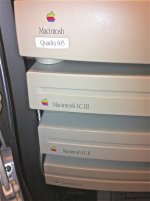
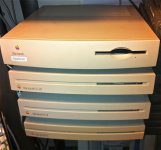
My buddy said i can throw it into his locker at the colo,
My buddy said i can throw it into his locker at the colo,
What about the Performas 450 and 475? Auto-Inject LC III? There's even a manual-inject variation of the P475. [ ] ]'>
] ]'>
] ]'>
Looks like you have them in a server rack! What an idea indeed...
To be obsessively complete, there's a few missing as Cory started to list. I've never seen an old-style auto inject Performa 475. I have a newer style manual Performa and LC 475 though. Despite this I've always kind of wanted a Quadra 605. I suppose just for the fact that it says Quadra on the front. That and I have a 610, 650, 700 and 950 at least. I swear there was a 660av but I can't find it. All I would need is a 605, 630 and 8XX to have one of each Quadra case. Not that this is an actual goal at the moment.
Here's the list of the ones besides the LC, LC II, LC III, and Quadra 605. Add to it if I left something out...
Manual Inject LC III
LC III+
LC 475
Performa 400
Performa 405
Performa 410
Performa 430
Performa 450
Performa 460
Performa 466
Performa 467
Performa 475
Performa 476
Of course this was back when Apple thought having slightly different software or specs, or who they were selling it to deserved a different model name. The polar opposite of today where there have been more computers simply named iMac than I care to try to start listing... 14 years. One name. Not that I'm complaining...it makes it simple when looking at the current offerings. When it comes time to talk about old computers we're forced to start saying things like iMac G5 20" iSight or iMac 27" Late-2009. Still simpler than being an expert on a model of car that's been around for a few decades or more and memorizing each model year's changes along with the options and such.
Anyway, back on topic...it would be really cool to see one of every Pizza Box Mac lined up. A geeky kind of cool.
Here's the list of the ones besides the LC, LC II, LC III, and Quadra 605. Add to it if I left something out...
Manual Inject LC III
LC III+
LC 475
Performa 400
Performa 405
Performa 410
Performa 430
Performa 450
Performa 460
Performa 466
Performa 467
Performa 475
Performa 476
Of course this was back when Apple thought having slightly different software or specs, or who they were selling it to deserved a different model name. The polar opposite of today where there have been more computers simply named iMac than I care to try to start listing... 14 years. One name. Not that I'm complaining...it makes it simple when looking at the current offerings. When it comes time to talk about old computers we're forced to start saying things like iMac G5 20" iSight or iMac 27" Late-2009. Still simpler than being an expert on a model of car that's been around for a few decades or more and memorizing each model year's changes along with the options and such.
Anyway, back on topic...it would be really cool to see one of every Pizza Box Mac lined up. A geeky kind of cool.
is the only difference between a III and III+ 8mhz and a new model number? model no.: M1254 ?
also with the LC II, someone use a engraver on the front , its not too bad but it says M.C.A. STATE on the front.
also with the LC II, someone use a engraver on the front , its not too bad but it says M.C.A. STATE on the front.
You guys are also forgetting about the manual inject LCII.
Manual inject LC II? Never heard of or seen such a beast. I knew they transitioned with the LC IIIs...did they maintain production of the LC II as a cheaper alternative for schools?
LC 475 -| Jumper J18 (located just behind the hard drive) will identify the computer as a Quadra 605 (ID 94 @ 25 MHz) if it is ON, and as an LC475/Performa 47x
Performa 400 -| LCII
Performa 405 -| LCII
Performa 410 -| LCII
Performa 430 -| LCII
Performa 450 -| LCIII
Performa 460 -| LCIII+ ?
Performa 466 -| LCIII+ ?
Performa 467 -| LCIII+ ?
Performa 475 -| Jumper J18 (located just behind the hard drive) will identify the computer as a Quadra 605 (ID 94 @ 25 MHz) if it is ON, and as an LC475/Performa 47x
Performa 476 -| 476 is identical to the Performa 475, except that the 476 shipped with a 230 MB hard drive.
I can see why they Performa line made people a little confused
i have a Performa 6116CD.
I've added a cache simm, i could even OC it...
That Performa Sticker on the front, just makes it seem like a lesser machine
Performa 400 -| LCII
Performa 405 -| LCII
Performa 410 -| LCII
Performa 430 -| LCII
Performa 450 -| LCIII
Performa 460 -| LCIII+ ?
Performa 466 -| LCIII+ ?
Performa 467 -| LCIII+ ?
Performa 475 -| Jumper J18 (located just behind the hard drive) will identify the computer as a Quadra 605 (ID 94 @ 25 MHz) if it is ON, and as an LC475/Performa 47x
Performa 476 -| 476 is identical to the Performa 475, except that the 476 shipped with a 230 MB hard drive.
I can see why they Performa line made people a little confused
i have a Performa 6116CD.
I've added a cache simm, i could even OC it...
That Performa Sticker on the front, just makes it seem like a lesser machine
Yep. I remember when I switched primary schools in 1996, the new school had a couple of them. They were standard LCIIs, but with the manual inject drive and lid. A few years later I did work experience at a local AASP, and they had a few of 'em. Should've probably nabbed one...I imagine if they're not already a collector's item, they will be someday.
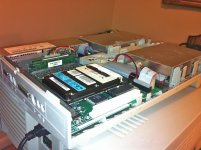
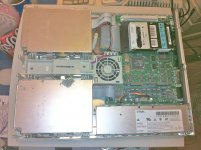
Nice mod...how does it go in regards to heat?
Also - here's a pic of a manual inject AND auto inject LCII, just to prove that I am telling the truth

Also - here's a pic of a manual inject AND auto inject LCII, just to prove that I am telling the truth
I saw that about an hour ago, came across the nicely laid out website!
The mod is phony, wrong adaptor, it's an ide adaptor not a scsi one...
but i think could be done, i would want to mount it over towards the ram away from the 68020,
The mod is phony, wrong adaptor, it's an ide adaptor not a scsi one...
but i think could be done, i would want to mount it over towards the ram away from the 68020,
@LCGuy: That's the first manual inject LC II I've ever seen, thanks for sharing the picture. Anyone have more information, or own one? I thought there was a month of overlap or so in production of the LC II to the LC III and the design change came after the LC II was discontinued. Geez, you think you've got your facts straight and then it turns out the world is round after all...
@uniserver: I like the dual hard drive hack idea. That's pretty slick. Never seen that one before either.
@uniserver: I like the dual hard drive hack idea. That's pretty slick. Never seen that one before either.
ISTR hearing once that Apple actually did keep producing the LCII and LCIII in small amounts through 1994 for the education market, they may have even still been building them in 1995.
That seems to be what would make the most sense. Mactracker shows the LC II being discontinued as of March 1993, but these sort of obscure facts can be overlooked in it. The lids and floppies being replaced after the fact wouldn't make sense...offering yesterday's technology for less money to schools and updating them slightly to use new parts would.
oh that was a dual floppy LC /w laptop scsi drive, but again the mod is phony because i do not have a 2.5 to 3.5 scsi adaptor, the one in the picture is a 2.5 to 3.5 IDE adaptor, no the machine is not on..
Just a little ?? :beige:
Oh man, that's what I wanted to do with my LC. I couldn't figure out how to mount my 2.5" SCSI drive, though. Is yours mounted, or is it just sitting on the motherboard?
Also, I was going to install an MO drive in the second floppy spot. So I'd have a 2.3GB MO drive, floppy drive, and SCSI drive.
Also, I was going to install an MO drive in the second floppy spot.
So I'd have a 2.3GB MO drive, floppy drive, and SCSI drive.Centris 610
Quadra 610
Quadra 660AV
PowerMac 6100
Just sayin' [] ]'>
Quadra 610
Quadra 660AV
PowerMac 6100
Just sayin' [
] ]'>@olePigeon,
its just sitting there, i have some nylon screws that i would screw into the bottom, then i would apply a dab of e6000 on the the 4 screw heads and set it where i like it and forget it i am a big fan of e6000, AKA Household Goop,
its just sitting there, i have some nylon screws that i would screw into the bottom, then i would apply a dab of e6000 on the the 4 screw heads and set it where i like it and forget it
i am a big fan of e6000, AKA Household Goop,I found this, by the way. 2.5" SCSI adapter. Seems to be the only company that sells them right now. If you order it through their eBay store it's free shipping and no tax, and is cheaper than their normal store front.
wow thanks, heck good fair price too! Free Shipping, that should be all i need,,, well that and a longer scsi cable so i can mount the drive near the ram!
Grabbed one myself. I'm also work on my LC hack. :approve:
I'm also work on my LC hack. :approve: Hey uniserver, check this out. I got my adapter in practically next day. Very fast shipping! Oh man, it's like it was built for this mod. Fits perfectly. I got a couple plastic screws, and put those on the back 2 screw holes. They nestle in right next two a couple ICs, doesn't even move around. The edge of the adapter rests level on top of 2 oscillators. The power runs just to the side of the fan and can snake over to the power cable, and there's plenty of room to run the ribbon cable. My only concern is covering the fan with the ribbon cable. I'm going to try and split the ribbon cable so it's individual wires, then bundle them and snake it around just like the power cable.
That's a Presto 040 installed, so it fits just between the upgrade and the VRAM. An LC ethernet card is about the same width, so it'll fit with an ethernet card or cache card installed as well.
I was going to put in my MO drive which is perfect fit with a couple spacers, but I realized I need an additional 5v. I was thinking it might not work, but then again, it's a laptop HDD and an MO drive. It might be powerful enough to run both. I'll need to get a molex Y cable and give it a try.
My only criticism of the adapter is that the ribbon cable doesn't fit with the power cable plugged in. I may have to modify the power cable, use my Dremel to nip the corner near the connector. Should be fine, though.


I got my adapter in practically next day. Very fast shipping! Oh man, it's like it was built for this mod. Fits perfectly. I got a couple plastic screws, and put those on the back 2 screw holes. They nestle in right next two a couple ICs, doesn't even move around. The edge of the adapter rests level on top of 2 oscillators. The power runs just to the side of the fan and can snake over to the power cable, and there's plenty of room to run the ribbon cable. My only concern is covering the fan with the ribbon cable. I'm going to try and split the ribbon cable so it's individual wires, then bundle them and snake it around just like the power cable.That's a Presto 040 installed, so it fits just between the upgrade and the VRAM. An LC ethernet card is about the same width, so it'll fit with an ethernet card or cache card installed as well.
I was going to put in my MO drive which is perfect fit with a couple spacers, but I realized I need an additional 5v. I was thinking it might not work, but then again, it's a laptop HDD and an MO drive. It might be powerful enough to run both. I'll need to get a molex Y cable and give it a try.
My only criticism of the adapter is that the ribbon cable doesn't fit with the power cable plugged in. I may have to modify the power cable, use my Dremel to nip the corner near the connector. Should be fine, though.
So close yet so far away. I found a longer SCSI ribbon cable and I folded it a few times and made it fit well. I then put the floppy drive on the other side of the LC just to test it, and found that the floppy cable just barely fits over the power plug. A little snug, but it works.
Unfortunately my little 2.5" SCSI drive that I pulled form a non-working PowerBook is dead. HDSC Setup says the drive has problems after it makes weird noises. Shucks. Fortunately, I do have a known working PowerBook 190cs at work. I think it uses a SCSI drive. Next week I'll extract the HDD and give it another go. Dual floppy LC is on the verge of life. I'll take more pics when I get it all together.
Actually, I'll just make a new thread. I didn't mean to hijack this one. Sorry. It was just motivation for me to get mine working.
Unfortunately my little 2.5" SCSI drive that I pulled form a non-working PowerBook is dead. HDSC Setup says the drive has problems after it makes weird noises. Shucks. Fortunately, I do have a known working PowerBook 190cs at work. I think it uses a SCSI drive. Next week I'll extract the HDD and give it another go. Dual floppy LC is on the verge of life.
I'll take more pics when I get it all together.Actually, I'll just make a new thread. I didn't mean to hijack this one. Sorry. It was just motivation for me to get mine working.
If you have the SCSI Dock cable (like a normal Powerbook SCSI cable, but with a switch at the Powerbook end for docking mode) you can use the 190 as a bootable external drive without dismantling it.
One thing I have heard discussed as a possibility, but not tried myself, is to find a matching IDE drive - same exact size, same manufacturer, same everything - and swap the controller boards over. I have vague memories of that working for someone, but, of course, at your own risk/further research is encouraged/YMMV etc.
I managed to fix a working 160MB Quantum SCSI PowerBook drive by swapping boards with another identical drive many years ago. Actually worked great up until about 18 months later when it started getting bad sectors. Never tried swapping between SCSI and IDE though. I've been wondering about it for years.
You'll have to use that 190 in SCSI Disk Mode, as it has an IDE drive inside, not a SCSI HDD that you can remove and hook up to your LC.
Back in the pre-Zip Drive day, I used SCSI Disk Mode constantly for transfering all kinds of files to all kinds of places with my PB100 . . . especially font collections! }
Back in the pre-Zip Drive day, I used SCSI Disk Mode constantly for transfering all kinds of files to all kinds of places with my PB100 . . . especially font collections! }
heck yeah, looks like you have the right idea! As they say another day in paradise! Little bit of tweaking and your enjoying your custom hard drive goodness!