

Thread
The ultimate System 6 box
I hope to make my Mac II an 'ultimate System 6' box. Since System 7+ is so common I would like to focus on finding hardware and software that did not run well or at all with System 7.
I know that the Apple Scanner (first version) and PC Compatibility Drive and Card are good places to start.
Recommendations for hardware and software?
I know that the Apple Scanner (first version) and PC Compatibility Drive and Card are good places to start.
Recommendations for hardware and software?
Good luck with getting a PC Compatibility Card to work with System 6.x, AFAIK it will only work with System 7.x.
Cheers!
Cheers!
8*24*GC is a very fast video card and they do better under System 6. It should rock a Mac II's world.
i think this is a good idea, with a 68000 OS6 runs smooth and snappy!
i want to follow this to see what machines and hardware get mentioned!
were talking 6.0.8 correct?
i want to follow this to see what machines and hardware get mentioned!
were talking 6.0.8 correct?
He specified the PC Compatibility Drive, not the PC Compatibility Board. This isn't the one with the Intel chip that runs DOS, this is the one that lets you use an external 360 KB 5.25" PC floppy disk drive.
Ah, that is a very good idea and there is a System 6 driver for it. Anyone have one of these? :wink:
Correct.
You are correct. The PC Compatibility Drive hardware and the Apple Scanner gave me the idea since neither of them are very happy in a System 7+ world. From what I understand the PC Compatibility Drive won't even run on a Mac that has FDHD ROMs!
Not much of a challenge is it if you're gonna simply ask for the correct drivers!
Go forth and seek!
You 'know it alls' make me laugh. Not only do you pick me up on 'potentially' misinterpreting what someone has said, you don't even know yourself what the item he's referring to is called, which is even funnier!
First off, there's no such thing as a PC Compatibility Drive. Is this some term you just made up?
You must be referring to the Apple PC 5.25 Drive, as shown in the picture of my manual for it.
There is also of course a PC Compatibility Card, also as shown in the picture of my manual for it.
You Sir, stand corrected!
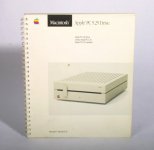
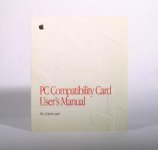
They journey/challenge has only begun. :b&w:
I had already found the Apple PC 5.25 Drive and Apple Scanner (with manuals) before this project started but I assume there will be much more to add and plan for as people offer suggestions.
I didn't expect the proper name to be that important.
 Also, to be fair some Nubus PC Cards (Orange386 IIRC) did use the same drive connector. It looked the same at least, I am not sure if the pinouts matched what the Apple PC 5.25 Drive expected.
Incorrect.
I have both working on my Absolutely Apple IIfx system which runs 7.1. The PC Compatibility drive (Apple 5.25" Floppy Disk Drive) is purely software driven and does not even need an extension. The scanner does however require an extension but behaves well enough both with the Apple software and Photoshop.
Ah, I was misinformed. That's good to know. Thanks!
I found where I got the (incorrect) bit of info about the FDHD ROMs:
http://vintagemacworld.com/drives.html
All of the other references about using the drive pointed to System 6. I guess it was perhaps because once users got into the System 7 era the need for a 360K 5.25" drive was fading a bit. Now that I look at this page having planned this project it does make me wonder more about the Orange and AST PC cards. It would be cool to have a DOS compatibility card running on "the ultimate system 6" machine. :ii:
That is also good to know about the Apple Scanner. The software that comes with the scanner itself is not system 7 compatible. I found that Apple did release new drivers for System 7 although those only work in 24-bit addressing mode (which for an old Mac isn't a bit deal).
I found where I got the (incorrect) bit of info about the FDHD ROMs:
http://vintagemacworld.com/drives.html
All of the other references about using the drive pointed to System 6. I guess it was perhaps because once users got into the System 7 era the need for a 360K 5.25" drive was fading a bit. Now that I look at this page having planned this project it does make me wonder more about the Orange and AST PC cards. It would be cool to have a DOS compatibility card running on "the ultimate system 6" machine. :ii:
That is also good to know about the Apple Scanner. The software that comes with the scanner itself is not system 7 compatible. I found that Apple did release new drivers for System 7 although those only work in 24-bit addressing mode (which for an old Mac isn't a bit deal).
Huh. I wonder what they mean by the incompatibility. I wonder if they mean for the adapter they also released for the SE systems.
They are the same pinout. The Mac286 will also work with the Apple 5.25" drive.didn't expect the proper name to be that important.
Supposedly, there is also a 3.5" 720K drive from IBM that will work with the Mac286 and Orange 386. I don't know if it works with the Apple card.
IBM also has a 360k external floppy drive that uses the same connector however it needs to be repinned as it has its own power supply, where the Apple version draws power from the Mac itself.
Proper nomenclature is always preferable, but the give and take here, regarding such, is a journey of discovery for all involved.
Wasn't there an OrangePC (286?) Card that had an ISA slot built into it?
Wasn't there an OrangePC (286?) Card that had an ISA slot built into it?
I'm pretty sure it was a 386.
What do you mean by "ultimate"?
If by "ultimate" you mean blazing and badass, then a Mac II isn't going to be it with 6.0.8.
If by "ultimate" you mean most flexible and backwards compatible, then a Mac II can be that, but you have to plan in those terms.
From a software point of view, the real "strength" of System 6 is the ability to play nice with application software that isn't 32-bit clean. Moreover, since you're talking about a Mac II, you're dealing with a platform that predates System 6.0 by a year and 6.0.8 by four years. Its real strength is backwards compatibility.
IMO, it can be the "ultimate" 6.0.8 system in the same sense that a late G4 PowerMac can be the ultimate Leopard system. Both predate the system software by several years and both have a slower processor than the models that were current when the system software came out, but both can boot in earlier versions of system software and run legacy software that the newer machines can't. And in the Mac II's favor, I doubt it will take the same kind of relative performance hit in System 6 against say, a Iici, as a late G4 in Leopard would against a quad core Mac Pro.
Another thing to keep in mind is that System 6 didn't change that much from 6.0 to 6.0.8. Most of the various releases were compatibility releases modified to include support for newer machines as they were introduced. (Apple tried to avoid these kinds of compatibility releases with System 7 by releasing specific system enablers for new machines instead.) So unless there are features of 6.0.8 you specifically want like better printer or networking compatibility with System 7, you might be better off with an earlier version like 6.0.2 instead. It all depends what you want.
If I were you, I'd probably put System Software 5.1 or 6.0 or 6.0.2 on it try to make it into the ultimate Mac workstation circa 1987-1988 when it was the $10,000 beast, not the aged champ of yesteryear circa 1991 when 6.0.8 and System 7 came out.
If by "ultimate" you mean blazing and badass, then a Mac II isn't going to be it with 6.0.8.
If by "ultimate" you mean most flexible and backwards compatible, then a Mac II can be that, but you have to plan in those terms.
From a software point of view, the real "strength" of System 6 is the ability to play nice with application software that isn't 32-bit clean. Moreover, since you're talking about a Mac II, you're dealing with a platform that predates System 6.0 by a year and 6.0.8 by four years. Its real strength is backwards compatibility.
IMO, it can be the "ultimate" 6.0.8 system in the same sense that a late G4 PowerMac can be the ultimate Leopard system. Both predate the system software by several years and both have a slower processor than the models that were current when the system software came out, but both can boot in earlier versions of system software and run legacy software that the newer machines can't. And in the Mac II's favor, I doubt it will take the same kind of relative performance hit in System 6 against say, a Iici, as a late G4 in Leopard would against a quad core Mac Pro.
Another thing to keep in mind is that System 6 didn't change that much from 6.0 to 6.0.8. Most of the various releases were compatibility releases modified to include support for newer machines as they were introduced. (Apple tried to avoid these kinds of compatibility releases with System 7 by releasing specific system enablers for new machines instead.) So unless there are features of 6.0.8 you specifically want like better printer or networking compatibility with System 7, you might be better off with an earlier version like 6.0.2 instead. It all depends what you want.
If I were you, I'd probably put System Software 5.1 or 6.0 or 6.0.2 on it try to make it into the ultimate Mac workstation circa 1987-1988 when it was the $10,000 beast, not the aged champ of yesteryear circa 1991 when 6.0.8 and System 7 came out.
[emphasis mine] Good point, this is exactly what I am going for!
I would like to build a system that has (some of) the best pre-7 hardware and software. It seems that so many people run for System 7, even on 8MHz Macs, and in doing so exclude some of the early Mac apps that weren't fully compatible with it. I would like to build a machine that showcases those apps.
Perhaps I should have referred to it as "The last stand pre-System 7 Mac II". This Mac would be able to run legacy software (and hardware) that newer Macs and newer OSes can't run.
Indeed. I did focus a bit on compatibility because there are a few apps that ran on early OSes but work fine with System 7. Since these apps/hardware work fine with later OSes they are not as quite exciting to see back in operation. Having said that, it does not need to be exclusive.
So what apps and hardware would make a 1987-1990 Mac person envious? :ii:
Well, my perfect build is an 86-87 Mac Plus setup, so I'll start with what's similar to mine.
A CD drive, definitely an AppleCD SC, which was their first. I have the drivers, if you need them.
A printer, definitely a LaserWriter, probably the LaserWriter II series, which were top-of-the-line in 1988. In a pinch, go with an ImageWriter II.
A modem. The Apple Personal Modem (1985) would do, but an Apple Fax Modem (1987) or Apple Data Modem 2400 (1989) would be better.
Depending on what your II has, you might want an external HDD like an AppleHD 40SC or some such.
Also consider an FDHD, although I'm not sure that's the right one.
There's also the tape backup drive like in CelGen's IIfx setup, and the scanner, and the external floppy drives. There's going to be some overlap between yours and his.
What monitor you pick is important for your setup, whether color or big monochrome. I'd talk to CelGen; he knows what's up.
InfoWorld magazine's complete run in the 80s is archived in Google books and can be read online. They had lots and lots of Mac business software/hardware reviews and advertisements. You're definitely talking a big professional setup, so see what was hot in 87 and 88 and choose accordingly. You will overlap with CelGen, but the idea is to peg it pretty precisely to a certain date range so you've got some historical authenticity. I, for example, have a ThunderScan instead of a flatbed scanner and an HD20 instead of an HD 20SC. That's in keeping with my 1986ish range.
Also checkout Macworld from 86-88 if you can get your hands on them. Try interlibrary loan. Very helpful resources.
Have fun!
A CD drive, definitely an AppleCD SC, which was their first. I have the drivers, if you need them.
A printer, definitely a LaserWriter, probably the LaserWriter II series, which were top-of-the-line in 1988. In a pinch, go with an ImageWriter II.
A modem. The Apple Personal Modem (1985) would do, but an Apple Fax Modem (1987) or Apple Data Modem 2400 (1989) would be better.
Depending on what your II has, you might want an external HDD like an AppleHD 40SC or some such.
Also consider an FDHD, although I'm not sure that's the right one.
There's also the tape backup drive like in CelGen's IIfx setup, and the scanner, and the external floppy drives. There's going to be some overlap between yours and his.
What monitor you pick is important for your setup, whether color or big monochrome. I'd talk to CelGen; he knows what's up.
InfoWorld magazine's complete run in the 80s is archived in Google books and can be read online. They had lots and lots of Mac business software/hardware reviews and advertisements. You're definitely talking a big professional setup, so see what was hot in 87 and 88 and choose accordingly. You will overlap with CelGen, but the idea is to peg it pretty precisely to a certain date range so you've got some historical authenticity. I, for example, have a ThunderScan instead of a flatbed scanner and an HD20 instead of an HD 20SC. That's in keeping with my 1986ish range.
Also checkout Macworld from 86-88 if you can get your hands on them. Try interlibrary loan. Very helpful resources.
Have fun!
If you want to keep it really authentic, System 6 came out in 1988 and the last release was 1991. That put it past the Plus by a few years however puts it in the SE or SE/30 if you are into compacts and the II or IIx if you are into full NuBus. This also means that again you are in the SWDL realm so you're like me again when it comes to finding the components. Some things like the scanner and modem were excessively annoying to get hold of.
Note that I deliberately wrote in that piece: "According to Apple, the drive and controller cards are not compatible with Macs with FDHD ROMs."
Presume my words to mean "that's what Apple say". Without exhaustive testing on a variety of hardware, it is impossible to say whether any device is compatible. When System 7 launched, Apple dropped support for some legacy hardware -- in order to avoid testing -- and declared it to be incompatible. That doesn't mean that it will fail to work all of the time.
The only time that you should totally accept advice about compatibility is when it is accompanied with words about blue smoke or data loss.
AST/Orange PC cards for System 6:
The AST 286 and Orange versions should work fine in a System 6 Mac II. They are very limited, but that is a challenge in itself.
The Orange NuBus 386 card -- perhaps not all versions -- is the one with an ISA slot which I used for my experiments here: http://www.vintagemacworld.com/O386.html I didn't get it working well with System 6, but others may be more successful.
The AST 286 and Orange versions should work fine in a System 6 Mac II. They are very limited, but that is a challenge in itself.
The Orange NuBus 386 card -- perhaps not all versions -- is the one with an ISA slot which I used for my experiments here: http://www.vintagemacworld.com/O386.html I didn't get it working well with System 6, but others may be more successful.
Understood. :b&w:
Your writeup on the Orange card is very nice and it was where I first discovered that these cards existed. The ISA slot was something that was exciting to me at first but after reading your writeup I became much less interested in the card. It seemed like you had to build a full PC inside the Mac to get VGA, etc. The later PC Compatibility cards do a much better job of making those features seamless. If the Orange card had onboard VGA and you could use the ISA slot for a SoundBlaster card or something then that would be a bit more cool.
My adventures were my adventures. Somebody smart will always spot a way to abuse the Orange NuBus cards in ways that I failed to imagine.
The later DOS/PC compatibility cards have oodles more functionality. Getting them to run at all or to run them on an unsupported system can give an interesting story.
Well, now I'm glad I never went out of my way to find one of those ISA enabled boards back in the day. I'd wanted to run the ISA interface card from my Font Emulator project installed in my IIx/RocketLaunchPad. Thanks for clearing that one regret about my collection of production gear from the Rocket Era. The guy I spoke to at Sun Remarketing talked me into buying the IIx instead of the somewhat less expensive Mac II with the upgrades required for the Rocket.
The other two regrets will never go away, I'd lusted after the original FPD Card/Monitor combo for my SE/Radius16 and a less expensive alternative. That would have been the 12" Monitor inside a Sun Remarketing Mac XL case . . . OOPSIE!!!! [:O] ]'>
I just love it when info like this appears on such a regular basis here.
From my notes:
*** Orange Micro 386 and 486 NuBus Cards
The Orange386 card was launched in early 1991. The card has a soldered 386SX processor running at 16MHz or 20MHz with a socket for an optional 387 fpu. Four SIMM sockets are provided which must be filled as pairs, using 256KB, 1MB or 4MB SIMMs. The 386SX processor is essentially a 16 bit design which limits RAM expansion to 16MB. For expansion, the card has one 8 bit ISA slot and one 16 bit ISA slot, which take standard PC cards. An optional peripheral kit provides serial, parallel and floppy drive ports via a cable connected to the card.
Other PC functionality is provided by hardware on the host Mac. Built-in graphics is only CGA standard, and is displayed in a Windows on the Mac desktop. Alternatively, an ISA graphics card can be installed for use with a dedicated monitor, but this combination occupies a lot of space inside the Mac. **Detailed information about this card is available online at http://www.vintagemacworld.com/.
The original 386 card was revised in 1993 and rebranded OrangePC. Three versions were offered initially: basic 386SX, enhanced 386SX and an Intel 486 version. Unfortunately, the press release for the 386 cards does not define "basic" or "enhanced", but I believe that the enhanced version had an ISA slot. In December 1993, Orange Micro announced a fourth version with a Cyrix 486SLC2 processor. These were the last PC compatibility cards that had an ISA slot and which used 30 pin SIMMs.
*** OrangePC NuBus 200 Series
With the NuBus 200 Series, Orange adopted a "pick and mix" approach to features and processor speed. Depending on your budget, you could buy a 486 card with VGA or SVGA graphics, real serial and parallel ports and a PCMCIA expansion connector. The VGA/SVGA chip is provided by Video 7. The PCMCIA connector, which replaced the ISA slot on previous NuBus cards, was intended for a sound or network card, but other devices may work. Orange Micro advised users to use monolithic network drivers, rather than installing Card Bus or PCMCIA management drivers. Almost everyone who managed networked PCs in the early 1990s will agree with this recommendation. The cards have a single 72 pin SIMM slot and the processor can be upgraded. Orange Micro specified 32MB as the largest SIMM but it would be worth trying a 64MB or 128MB SIMM if you have one lying around.
The 210 is the entry level model with limited graphics capability (VGA) but a real serial and parallel port. The 250 has better graphics (SVGA) and a PCMCIA connector, but no serial or parallel ports. The 290 is the top of the range model with all of the functionality provided by cheaper models. A 220 model later appeared with similar functionality to the 210 but with SVGA graphics. Orange Micro's cards were more expensive than an Apple Houdini card of the same period, but had more PC compatibility (eg the ability to support software protection dongles).
The 200 series cannot use a separate monitor and video is displayed in a window on the Macintosh desktop or, for best performance, in full screen mode. A multiscan monitor that supports 640x480 and 800x600 resolution is required.
*** OrangePC NuBus 300 Series
The last NuBus PC compatibility cards were the 300 Series. The only version for which I could find a detailed specification is the OrangePC 340. It uses faster 486 or 5x86 processors, and has two 72 pin SIMM slots (officially, the maximum SIMM size was 32MB). New functionality that would appeal to games players was added. In addition to two serial ports and a parallel port, the cards acquired a SoundBlaster module with separate audio in/out connectors and a games controller port. The PCMCIA option from the 200 series was discontinued.
*** Orange Micro 386 and 486 NuBus Cards
The Orange386 card was launched in early 1991. The card has a soldered 386SX processor running at 16MHz or 20MHz with a socket for an optional 387 fpu. Four SIMM sockets are provided which must be filled as pairs, using 256KB, 1MB or 4MB SIMMs. The 386SX processor is essentially a 16 bit design which limits RAM expansion to 16MB. For expansion, the card has one 8 bit ISA slot and one 16 bit ISA slot, which take standard PC cards. An optional peripheral kit provides serial, parallel and floppy drive ports via a cable connected to the card.
Other PC functionality is provided by hardware on the host Mac. Built-in graphics is only CGA standard, and is displayed in a Windows on the Mac desktop. Alternatively, an ISA graphics card can be installed for use with a dedicated monitor, but this combination occupies a lot of space inside the Mac. **Detailed information about this card is available online at http://www.vintagemacworld.com/.
The original 386 card was revised in 1993 and rebranded OrangePC. Three versions were offered initially: basic 386SX, enhanced 386SX and an Intel 486 version. Unfortunately, the press release for the 386 cards does not define "basic" or "enhanced", but I believe that the enhanced version had an ISA slot. In December 1993, Orange Micro announced a fourth version with a Cyrix 486SLC2 processor. These were the last PC compatibility cards that had an ISA slot and which used 30 pin SIMMs.
*** OrangePC NuBus 200 Series
With the NuBus 200 Series, Orange adopted a "pick and mix" approach to features and processor speed. Depending on your budget, you could buy a 486 card with VGA or SVGA graphics, real serial and parallel ports and a PCMCIA expansion connector. The VGA/SVGA chip is provided by Video 7. The PCMCIA connector, which replaced the ISA slot on previous NuBus cards, was intended for a sound or network card, but other devices may work. Orange Micro advised users to use monolithic network drivers, rather than installing Card Bus or PCMCIA management drivers. Almost everyone who managed networked PCs in the early 1990s will agree with this recommendation. The cards have a single 72 pin SIMM slot and the processor can be upgraded. Orange Micro specified 32MB as the largest SIMM but it would be worth trying a 64MB or 128MB SIMM if you have one lying around.
The 210 is the entry level model with limited graphics capability (VGA) but a real serial and parallel port. The 250 has better graphics (SVGA) and a PCMCIA connector, but no serial or parallel ports. The 290 is the top of the range model with all of the functionality provided by cheaper models. A 220 model later appeared with similar functionality to the 210 but with SVGA graphics. Orange Micro's cards were more expensive than an Apple Houdini card of the same period, but had more PC compatibility (eg the ability to support software protection dongles).
The 200 series cannot use a separate monitor and video is displayed in a window on the Macintosh desktop or, for best performance, in full screen mode. A multiscan monitor that supports 640x480 and 800x600 resolution is required.
*** OrangePC NuBus 300 Series
The last NuBus PC compatibility cards were the 300 Series. The only version for which I could find a detailed specification is the OrangePC 340. It uses faster 486 or 5x86 processors, and has two 72 pin SIMM slots (officially, the maximum SIMM size was 32MB). New functionality that would appeal to games players was added. In addition to two serial ports and a parallel port, the cards acquired a SoundBlaster module with separate audio in/out connectors and a games controller port. The PCMCIA option from the 200 series was discontinued.
Thanks Bunsen. I had forgot all about that site. A lot of the links are dead now but it at least gives me directions to start looking.
Wow, Charlieman ... that is some awesome info!
Wow, Charlieman ... that is some awesome info!
Has anyone managed to track down the drivers for the OrangePC 290 card? I've been looking quite a bit, but I can't find anything.
Thanks!
- Alex
Thanks!
- Alex