

Gah! Booting with extensions off!? Duh!
I am SO out of practice with pre-OS X troubleshooting. Back in the day, the extensions-off reboot was as natural as breathing.
I'll try it after I reinstall the OS 9 software. I wiped the partition in anticipation of trying something else.
In other news, I've been running Apple Hardware Test 1.2.6, which I believe is the disk for the original MDDs.
Everything passes fine except my memory.
The FW800 board came with two 256mb sticks, a PC2100 stick which is incompatible with the new, 167mhz board, and a PC2600 stick.
The MDD board came with four 512mb sticks, all PC2700.
Using the MDD board, the FW800 RAM behaves as expected. I get a fail test on the PC2100 stick, and the PC2600 stick passes and functions fine.
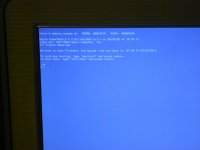
But when I install the PC2700 RAM, Apple Hardware Test won't even boot successfully. I get the error screen below. I've tried with one stick, two sticks, and four sticks, and I get the same grey screen every time. Of course, running the computer in Panther, Tiger, and Leopard, I haven't noticed any problems at all. Only when trying to boot AHT 1.2.6.
I haven't spent too much time swapping sticks around because the machine came stock with 256MB, and I've got a working 256MB stick to play with until I get OS9 running, which is the immediate goal. But eventually, I'm going to want a problem-free install of max RAM as well.
I am SO out of practice with pre-OS X troubleshooting. Back in the day, the extensions-off reboot was as natural as breathing.
I'll try it after I reinstall the OS 9 software. I wiped the partition in anticipation of trying something else.
In other news, I've been running Apple Hardware Test 1.2.6, which I believe is the disk for the original MDDs.
Everything passes fine except my memory.
The FW800 board came with two 256mb sticks, a PC2100 stick which is incompatible with the new, 167mhz board, and a PC2600 stick.
The MDD board came with four 512mb sticks, all PC2700.
Using the MDD board, the FW800 RAM behaves as expected. I get a fail test on the PC2100 stick, and the PC2600 stick passes and functions fine.
But when I install the PC2700 RAM, Apple Hardware Test won't even boot successfully. I get the error screen below. I've tried with one stick, two sticks, and four sticks, and I get the same grey screen every time. Of course, running the computer in Panther, Tiger, and Leopard, I haven't noticed any problems at all. Only when trying to boot AHT 1.2.6.
I haven't spent too much time swapping sticks around because the machine came stock with 256MB, and I've got a working 256MB stick to play with until I get OS9 running, which is the immediate goal. But eventually, I'm going to want a problem-free install of max RAM as well.