
Thread
Dual Drive LC
I forgot about a non-working PowerBook 180c that I had, so I took the HDD out of it. I got a Y adapter cable for the power. I was afraid it wouldn't work, but I had hoped that since it was a laptop HDD and the other basically a floppy, that it wouldn't strain the power too much. So far, so good. 
I need to work on cable management, but it does work! LC with GigaMO 2.3 GB MO drive in one drive, floppy in the other, and 180 MB HDD.
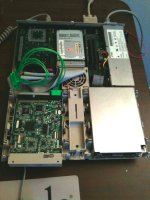
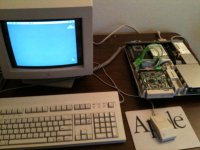
I need to work on cable management, but it does work! LC with GigaMO 2.3 GB MO drive in one drive, floppy in the other, and 180 MB HDD.
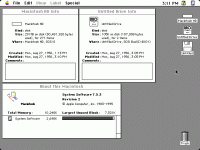
Shucks. It fits, but there's too much distance to get the MO disk to go in. I have to use a screw driver to push it all the way in. Ejects OK. I think I'll go back to my original idea and put a 2nd floppy.
However, the concept is proven to work. I'm surprised the little 5v connector could drive both without any issues. Might work for a Zip drive, but I don't know if a Zip disk'll fit in the slot.
However, the concept is proven to work. I'm surprised the little 5v connector could drive both without any issues. Might work for a Zip drive, but I don't know if a Zip disk'll fit in the slot.
It has a full 25Mhz 68040 installed. 
I'm just as surprised as you are about that bitty power supply. :lol: To tell you the truth, I really didn't expect it to work. I think it's just lucky because of circumstances with the relatively low power requirements of a laptop HDD and MO disk drive.
I'm gonna scour eBay for another SCSI MO drive, one that I can hack up a bit and make it fit in the LC. I'll see if I can get a 1.2GB or 640MB drive on the cheap. The 2.3GBs are usually pretty expensive (I simply lucked out big time with mine.) I'm sure it'll work once I remove some of the protruding metal. The extra metal is only there to hold on the plastic face plate which isn't needed anyway. I really wanna make this work.
As for coolest machine, hah, thanks. Don't forget CelGen's "Absolutely Apple Macintosh IIfx" rig. That setup is a site to behold. :approve:
I'm just as surprised as you are about that bitty power supply. :lol: To tell you the truth, I really didn't expect it to work. I think it's just lucky because of circumstances with the relatively low power requirements of a laptop HDD and MO disk drive.
I'm gonna scour eBay for another SCSI MO drive, one that I can hack up a bit and make it fit in the LC. I'll see if I can get a 1.2GB or 640MB drive on the cheap. The 2.3GBs are usually pretty expensive (I simply lucked out big time with mine.) I'm sure it'll work once I remove some of the protruding metal. The extra metal is only there to hold on the plastic face plate which isn't needed anyway. I really wanna make this work.
As for coolest machine, hah, thanks.
Don't forget CelGen's "Absolutely Apple Macintosh IIfx" rig. That setup is a site to behold. :approve: I found a 230MB external MO drive at the surplus store today. I took it apart and I was happy to see that the physical drive mechanism is flush, no protruding metal. I installed it, and got it as close as possible to the plastic bezel of the LC. I still have to push my finger in pretty far, but, the disk does go into the drive! It also ejects just fine.
Only problem is that I don't have any 230MB MO discs with which to test. I'm gonna grab a pack of 128s I saw that surplus store on my way home from work. I'm uncertain if this drive actually works or not, it was in the "As-Is" section of the store with no power supply.
I stuck a 640MB disc in, but nothing happened. I'm hoping it's just because it didn't recognize the disc. I'll give it another go tomorrow. If it works, I'll borrow my brother's iPhone and make a little video so you guys can see it in action.
I also had to do some crazy folding of the SCSI cable, origami style. I know you're not supposed to crease the ribbon cables, but I didn't have a choice. Only way to get the cabe to fit inside.
Only problem is that I don't have any 230MB MO discs with which to test. I'm gonna grab a pack of 128s I saw that surplus store on my way home from work. I'm uncertain if this drive actually works or not, it was in the "As-Is" section of the store with no power supply.
I stuck a 640MB disc in, but nothing happened. I'm hoping it's just because it didn't recognize the disc. I'll give it another go tomorrow. If it works, I'll borrow my brother's iPhone and make a little video so you guys can see it in action.
I also had to do some crazy folding of the SCSI cable, origami style. I know you're not supposed to crease the ribbon cables, but I didn't have a choice. Only way to get the cabe to fit inside.
I think it might be pulling too much juice. When I use the LC, I get that horrible smell like electrolytic goo being heated (like when I'm recapping.) I can't tell if it's residue being heated, or if the only can still on there is getting cooked. Either way it doesn't look (or smell) good.
olePigeon,
I know this is going to make me sound like a n00b, but how did you get the laptop hdd connected to the 50-pin cable? (Drive adapter, etc.?) If it was an adapter, that would be the first time I've ever heard of one for 50-pin SCSI. Now to go back to my lair of the rock I'm hiding under.
73s de Phreakout. :rambo:
I know this is going to make me sound like a n00b, but how did you get the laptop hdd connected to the 50-pin cable? (Drive adapter, etc.?) If it was an adapter, that would be the first time I've ever heard of one for 50-pin SCSI. Now to go back to my lair of the rock I'm hiding under.
73s de Phreakout. :rambo:
It's an adapter. I bought one of these:
http://www.ebay.com/itm/270840619638?ssPageName=STRK:MEWNX:IT&_trksid=p3984.m1439.l2649#ht_500wt_912
$15.50 with free shipping, it's not a bad deal. It's also the only place I know that sells them.
http://www.ebay.com/itm/270840619638?ssPageName=STRK:MEWNX:IT&_trksid=p3984.m1439.l2649#ht_500wt_912
$15.50 with free shipping, it's not a bad deal. It's also the only place I know that sells them.