
Thread
Using the iie emulator card
Hello. I'm thinking about picking one of these up and have a couple of options at cards, but without the adapter cable. We all know the cable is rare as hen's teeth, comparatively, but I'm inclined to get the card now and keep an eye out for the cable. In the meantime, is there any use for the card without the cable? Can I "acquire" Apple ii floppy images from the web and use these with the iie card? I vaguely recall reading somewhere of a guy who had set up some kind selfcontained system in a disk image that he used with the card (no cable) but I can't remember any details.
S
S
Oddly enough I was reading up about one of those the other day! This site is interesting and informative -
http://www.vectronicsappleworld.com/appleii/appleiiecard.html
http://www.vectronicsappleworld.com/appleii/appleiiecard.html
You can use the card without the cable, you just won't get a 5.25" or 3.5" disk aside from an internal SuperDrive, and joystick/paddles are outside your league.
Check back later today...
Check back later today...
Awesome. Thanks for that!

Yeah, I probably wouldn't be using it for games so the lack of a joystick wouldn't be too much of a bummer. What I'd like to use it for is reading ye olde Apple II diskmags!
If you don't have the cable, try mounting a 3.5" ProDos image in MacOS. There are a bazillion options (I exaggerate, probably three) to do that.
See also the cable options that I posted years ago: http://www.vintagemacworld.com/lc_card_faq.html You can make your own cable or you can assemble a community to do it.
See also the cable options that I posted years ago: http://www.vintagemacworld.com/lc_card_faq.html You can make your own cable or you can assemble a community to do it.
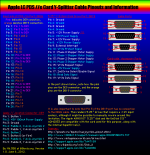
I have the port drawings in AppleWorks. I was going to originally post it yesterday but I confused the male/female nuts on the wrong ports. I also was going to upload a .jpg of the ports I reverse-drew but somehow someone (PhotoBucket or .jpg compression) decided that ~10 colors alone wasn't hardcore or "technical" enough, so it polluted the colors. But after two hours of fixing it's okay, so if anybody wants the .cwk versions I can upload them here.
Tested with a personally owned // splitter cable. Ironically, it was on my FS thread for $5 and nobody snagged it. Hello, eBay?
It really shouldn't be too hard to make one. DigiKey had a DB26 male port last time I checked, just wire one of those and and secure it down to a prefabbed bare board type thing, and and take a DE9 cable of any sort along with a DB19 cable, cut it with something suitable, expose the wires, and go to town. I could probably make one in about a day or two, put it in a nice little plastic box or something.
Thanks for that guys. Building a cable is probably outside of my skill-set, not to mention patience threshold... anything fiddly and twiddly with wires drives me potty! But have archived that info for future reference.
Now, if someone can get a deal on the connectors and can churn the cables out, there's money to be had!
Now, if someone can get a deal on the connectors and can churn the cables out, there's money to be had!
Also, just because the pedantic geek in me is annoyed - it's not an emulator card. It is an "Apple IIe Card". It is exactly what the name says. It is essentially a complete Apple IIe on a card.
Cough, Apple IIe Workstation Card.
Brain failure on my part.
My own photo identifies it as Apple IIe Card (For the Macintosh LC)
http://www.vintagemacworld.com/lc_card/photos/box1a.jpg
The Apple II Workstation Card was the LocalTalk board for the II.
My own photo identifies it as Apple IIe Card (For the Macintosh LC)
http://www.vintagemacworld.com/lc_card/photos/box1a.jpg
The Apple II Workstation Card was the LocalTalk board for the II.
Isn't it more accurate to call it a hardware emulator? Seeing as its not strictly a iie on a card?
I hold my hands up to the mealy mouthed thread title though!
S
I hold my hands up to the mealy mouthed thread title though!
S
Updated to 1.1 below.
Removed the "(s)" from "Superdrive(s)" because no Mac compatible with the //e card can have more than one internal Superdrive (nor do they have floppy ports, from my research). Changed an error referencing "DB15" to "DB19".

Removed the "(s)" from "Superdrive(s)" because no Mac compatible with the //e card can have more than one internal Superdrive (nor do they have floppy ports, from my research). Changed an error referencing "DB15" to "DB19".

Not true, the original LC has 2 internal floppy ports and the SCSI HD connector. Technically you could have two superdrives and an internal HD plus the IIe card with the floppy drives connected to it.
I never owned an LC so I couldn't say for sure...
But how would you fit two floppy drives inside an LC?
Shall I revert to the (s)?
But how would you fit two floppy drives inside an LC?
Shall I revert to the (s)?
only by not having the hdd

I don't want to de-rail the thread, but I was wondering, if there were IIe cards for machines OTHER than the lc-pds style? More specifically, I was hoping there was a "standard" nubus version. I'm working on "pimping out" an 840av and I would very much like to fill one of its slots with one of these cards.
The LCs were heavily marketed to schools, which had amassed loads of Apple II educational software. Hence the
Lcpds card in question.
Anything with a Nubus slot was effectively a professional machine. Hence no IIe nubus cards were made. The Nubus equivalent was a DOS card, a full 2/3/486 machine in a Mac.
Lcpds card in question.
Anything with a Nubus slot was effectively a professional machine. Hence no IIe nubus cards were made. The Nubus equivalent was a DOS card, a full 2/3/486 machine in a Mac.
Nope. Exactly one model of IIe card was ever made.
BAH. That's lame. And here I had the foolish thought I could have one mac that would "do it all"
And here I had the foolish thought I could have one mac that would "do it all" Ahem.

Shenanigans!  That's pretty cool though
That's pretty cool thoughWhere'd you get that scsi adapter?
That's pretty neat.
I'll just leave it that way as is because I doubt anybody is going to be doing that en-masse.
I'll just leave it that way as is because I doubt anybody is going to be doing that en-masse.
Bought the SCSI adapter on eBay for $15. Seller still has a bunch. The expensive part (if you don't already have one) is the 2.5" SCSI drive.
http://www.ebay.com/itm/2-5-Laptop-50-Pin-w-Molex-Power-Cable-to-SCSI-Hard-Drive-Adapter-CablesOnline-/270840619638
http://www.ebay.com/itm/2-5-Laptop-50-Pin-w-Molex-Power-Cable-to-SCSI-Hard-Drive-Adapter-CablesOnline-/270840619638
These IIe cards do still amazingly work in many machines!
( from wikipedia )
Host system compatibility [edit]
The card plugs into the PDS slot in many of the LC-series Macintoshes, but not all models and system software combinations are supported. Apple's Tech Info Library article #8458 lists the following models as Apple IIe Card-compatible: Color Classic, LC, LC II, III & III+; LC 475, 520, 550, 575; Quadra 605 and Performa 4XX, 52X, 55X, 56X, and 57X. However, other models that have an LC-compatible PDS slot and support 24-bit memory addressing are compatible with the Apple IIe Card but are not officially supported. Systems 7.0 through 7.5.5 support both 24- and 32-bit addressing on suitable Macintosh models. (From System 7.6 onwards, Macintosh system software does not support 24-bit addressing.) To enable 24-bit addressing on supported systems, use the Macintosh Memory control panel.
( from wikipedia )
Host system compatibility [edit]
The card plugs into the PDS slot in many of the LC-series Macintoshes, but not all models and system software combinations are supported. Apple's Tech Info Library article #8458 lists the following models as Apple IIe Card-compatible: Color Classic, LC, LC II, III & III+; LC 475, 520, 550, 575; Quadra 605 and Performa 4XX, 52X, 55X, 56X, and 57X. However, other models that have an LC-compatible PDS slot and support 24-bit memory addressing are compatible with the Apple IIe Card but are not officially supported. Systems 7.0 through 7.5.5 support both 24- and 32-bit addressing on suitable Macintosh models. (From System 7.6 onwards, Macintosh system software does not support 24-bit addressing.) To enable 24-bit addressing on supported systems, use the Macintosh Memory control panel.
Hello, I am a new member...I have so many things I want to talk about and ask about but I thought I should start with this:
I recently came into a Mac LC with the IIe Card (and fortunately it has the infamous Y-cable). However, I can't get it to work. Every time I start the IIe Startup program the machine freezes at the loading screen. I do not have an Apple II disk drive attached, but shouldn't it at least boot without that attached?
I have replaced the PRAM battery in this LC. I also deleted the IIe Startup software and installed 2.2.1 fresh from the Apple site. As a final step I also removed and reseated the IIe Card.
This LC was suffering from a bad power supply when I got it, which I have since replaced. Is it possible this IIe Card is damaged? Or is there something else I'm missing?
I recently came into a Mac LC with the IIe Card (and fortunately it has the infamous Y-cable). However, I can't get it to work. Every time I start the IIe Startup program the machine freezes at the loading screen. I do not have an Apple II disk drive attached, but shouldn't it at least boot without that attached?
I have replaced the PRAM battery in this LC. I also deleted the IIe Startup software and installed 2.2.1 fresh from the Apple site. As a final step I also removed and reseated the IIe Card.
This LC was suffering from a bad power supply when I got it, which I have since replaced. Is it possible this IIe Card is damaged? Or is there something else I'm missing?
Assuming you haven't already done it, I'd bet money that your LC's logic board needs to be recapped and so does the IIe card.
its funny last night i was setting up a aztechmonster in a non collection LC-II
this LC-II is in my ( working available for trade pile ) it was one of the machines that worked that never got any new caps.
Anyways,
well in the middle of using it last night, flipped it off, flipped it back on and all I now get is bars that are slightly pink, no boot.
My point is, currently working or not, if you have not had a set of new caps installed in the PSU / Main-board / IIe Card expect them to go out at any moment.
or act strange, or partially work
this LC-II is in my ( working available for trade pile ) it was one of the machines that worked that never got any new caps.
Anyways,
well in the middle of using it last night, flipped it off, flipped it back on and all I now get is bars that are slightly pink, no boot.
My point is, currently working or not, if you have not had a set of new caps installed in the PSU / Main-board / IIe Card expect them to go out at any moment.
or act strange, or partially work
LCs with bad caps will sometimes get a high pitched squeal coming out of the speaker. It's like the poor little thing is dying.
Yeah I like when you are sitting there and you can hear the pitch of the squeal Ascend and Descend.
sounds like its trying to ET Phone home.
Is this the connector?
http://www.digikey.com/product-search/en?mpart=180-026-173L000&vendor=37
I have been wanting to build up one of these, but haven't started yet since I was able to get a set of 3 CIB cards, but now I think I am going to end up with another card w/o cable.
I suppose any of these would work, depends on your preferred type etc.
http://www.digikey.com/scripts/dksearch/dksus.dll?FV=fff40016%2Cfff8051c%2C7004be%2C934001d&k=db26&mnonly=0&newproducts=0&ColumnSort=0&page=1&stock=0&pbfree=0&rohs=0&quantity=&ptm=0&fid=0&pageSize=25
http://www.digikey.com/product-search/en?mpart=180-026-173L000&vendor=37
I have been wanting to build up one of these, but haven't started yet since I was able to get a set of 3 CIB cards, but now I think I am going to end up with another card w/o cable.
I suppose any of these would work, depends on your preferred type etc.
http://www.digikey.com/scripts/dksearch/dksus.dll?FV=fff40016%2Cfff8051c%2C7004be%2C934001d&k=db26&mnonly=0&newproducts=0&ColumnSort=0&page=1&stock=0&pbfree=0&rohs=0&quantity=&ptm=0&fid=0&pageSize=25