

Thread
A rescued relic (Macintosh Classic)
Alright, to start this story off, a little introduction. I've been working at Goodwill in a training program for about two months now. The reason this seemingly useless information is important to my story is because of something this goodwill in particular does... Any piece of computer hardware that crosses through the donation door, no matter how new nor how old, is promptly bundled up, stacked against a wall and sent to a program called "Dell Reconnect" where Dell will melt everything in the computer down to make new parts for their own machines... I couldn't hate this fact more. I've seen a few newer PC laptops, some number of G3 towers... And I hate to say it, but I think even an Apple II got sent into this horrific program, because for the longest time there was an Apple II monitor (The kind on the metal stand) sitting in the corner for months and months. I had almost worked up the courage to ask a higher-up what had become of the rest of the system, but the "I might lose my job if I do this" jitters got the better of me. This was over the introductory training, during spring break.
Fast forward a few months. I'm out of school and Goodwill wants me back for a three month training program. A few weeks in, I'm working in the wares department, specifically cleaning the large wares. (swingsets and cribs and the like.) I decide to take a short pause from my cleaning and look around the room to gather my senses... I turned my head to the right, (Which is where the electronics area is) and something caught my eye... A small splash of a grey color among all the black television sets that had been stacked against the wall. (As no one was there to do anything with them at the time.) I thought to myself... "Maybe it's just an oddly small TV set?" I had to investigate further... I asked the lady I was working with (As trainees aren't allowed to work alone) if she minded me going over to look at it... She said she wouldn't mind. So I walk over and as I approach, the small grey "TV set" starts looking more and more like a compact Mac... And indeed, as I drew closer, my suspicions were confirmed... Dwarfed by the rather large TV behind it sat a Macintosh Classic, the case, if dirty, in rather excellent condition not counting the large "scraped up" area on the back of the system. Normally Goodwill employees aren't allowed to buy anything from the store they work at, but it had to be mine... There was no way on earth I was going to let a perfectly good vintage Mac go to waste like that...
So I went back and told the lady I was working with that it was something I had been looking for for quite some time now. She called over one of the managers, who then talked it over with the ladies that run the training program... And at the end of the work day, I walked out of that store with a complete, (sans mouse) working Macintosh Classic for the grand sum of seven US dollars.
The only issues I've had with it so far (aside from it not currently having a mouse) were the power cord that came with it once failing (But I swapped that out with the one I used to keep on my Gateway Essential desktop) and a single experience of a "checkerboard" on startup. (I've read that this may mean that your mac needs to be cleaned, but I think it's just because I had shut it off and turned it back on too fast.) I turn it on and let it run for a few minutes every day before work, and I'm currently in talks with a guy about buying an SE that comes with a keyboard and two mice. (I told him that I needed one for my Classic, he said he had two.) I also own a G3 Dual USB iBook 12", which I rarely use since the yo-yo charger that came with it is broken and to top it off I have OS X 10.1 installed on it and can't find any legal way to get OS 9, and even if I tried to do it the other way I couldn't make a bootable install CD. coughcoughItriedcough
So yeah... Went a little off-tangent there, but that's the story of how I got my seven dollar classic. Hope you enjoyed it! : D
Fast forward a few months. I'm out of school and Goodwill wants me back for a three month training program. A few weeks in, I'm working in the wares department, specifically cleaning the large wares. (swingsets and cribs and the like.) I decide to take a short pause from my cleaning and look around the room to gather my senses... I turned my head to the right, (Which is where the electronics area is) and something caught my eye... A small splash of a grey color among all the black television sets that had been stacked against the wall. (As no one was there to do anything with them at the time.) I thought to myself... "Maybe it's just an oddly small TV set?" I had to investigate further... I asked the lady I was working with (As trainees aren't allowed to work alone) if she minded me going over to look at it... She said she wouldn't mind. So I walk over and as I approach, the small grey "TV set" starts looking more and more like a compact Mac... And indeed, as I drew closer, my suspicions were confirmed... Dwarfed by the rather large TV behind it sat a Macintosh Classic, the case, if dirty, in rather excellent condition not counting the large "scraped up" area on the back of the system. Normally Goodwill employees aren't allowed to buy anything from the store they work at, but it had to be mine... There was no way on earth I was going to let a perfectly good vintage Mac go to waste like that...
So I went back and told the lady I was working with that it was something I had been looking for for quite some time now. She called over one of the managers, who then talked it over with the ladies that run the training program... And at the end of the work day, I walked out of that store with a complete, (sans mouse) working Macintosh Classic for the grand sum of seven US dollars.
The only issues I've had with it so far (aside from it not currently having a mouse) were the power cord that came with it once failing (But I swapped that out with the one I used to keep on my Gateway Essential desktop) and a single experience of a "checkerboard" on startup. (I've read that this may mean that your mac needs to be cleaned, but I think it's just because I had shut it off and turned it back on too fast.) I turn it on and let it run for a few minutes every day before work, and I'm currently in talks with a guy about buying an SE that comes with a keyboard and two mice. (I told him that I needed one for my Classic, he said he had two.) I also own a G3 Dual USB iBook 12", which I rarely use since the yo-yo charger that came with it is broken and to top it off I have OS X 10.1 installed on it and can't find any legal way to get OS 9, and even if I tried to do it the other way I couldn't make a bootable install CD. coughcoughItriedcough
So yeah... Went a little off-tangent there, but that's the story of how I got my seven dollar classic. Hope you enjoyed it! : D

Hehe, yeah. I've brought this up with them several times, but their argument is that no one would buy computers from Goodwill, whereas the only real problem with that is advertising. If people knew Goodwill was selling computers at low prices, people would flock to the stores. I mean, there's not really a legitimate reseller of used computers anywhere near where I live, and there's plenty of life left in most of these computers. It would probably be preferable when the kids ask for a computer to go to Goodwill and spend fifty bucks on a tower from '06 rather than go to a retail store and pay upwards of $200 for even the most basic model.
Congrats, the Classic is a nice machine, it was indeed my first conquest (the starting point of what i have collected so far)
Hehe, thanks! My first was an iBook G3 DualUSB I bought when my old Dell D610 died. I went into the shop thinking it was a G4 and paid $120 for it, even after giving the shop my Toshiba Sattellite and the pieces of my D610 for store credit. (Shouldn't have done that, my everyday laptop now is another D610 I traded an Xbox for. D: ) About a week after I bought it, the torn and frayed yo-yo charger finally got to the point where I couldn't take it anymore. Now it's sitting in my desk on top of the Compaq my engineering teacher gave me as a graduation present.
Where is your charger frayed ? those are easy to fix
I can still power the iBook on, I just have to lay the power cord down in a very particular way, and can NEVER move it. The frayed area isn't on the cord itself, rather on the hard part where the somewhat cylindrical item that plugs into the computer meets the hard plastic area that tapers down to the soft part of the cord. I would take a picture for you, but sadly my Latitude is refusing to see my webcam... Here's an illustration of it though, using an image I found on Google.
What's even worse is, I think I may have killed the battery because the first week or so I had the system I accidentally pressed the PMU management button thinking it had something to do with music thanks to the logo... Now if I fiddle with it, I can get it to "see" the battery, but it says it's 0% charged and has 0hrs and 0mins to full charge... Any way to fix this? D:
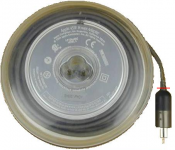
What's even worse is, I think I may have killed the battery because the first week or so I had the system I accidentally pressed the PMU management button thinking it had something to do with music thanks to the logo... Now if I fiddle with it, I can get it to "see" the battery, but it says it's 0% charged and has 0hrs and 0mins to full charge... Any way to fix this? D:
I think that's the part that bibilit had in mind. This is a very common problem with these (and other similar) chargers, apparently.
That's also common, especially if the battery is original to the computer (the newest of which would be at least 12 years old now).
The only way to fix your particular problem, I've found is to replace the cells in the battery, or replace the whole thing. I've had a similar problem, and I think it's due to individual cells in the battery going bad over time.
I rebuilt one of mine, and it worked well for awhile. Until I left it unused for a month or two. Back to square one...
There's also a possibility that the computer itself is the problem. For example, I couldn't get the aforementioned rebuilt battery to charge at all in a Tangerine iBook I had, but then I swapped out the logic board with another I had on hand, and it worked perfectly. A "beyond dead" battery is much more likely, though.
c
Here in NC, BADwill started recycling all computer equipment donated, I am soooooo teed off at them! There are just a few independent thrifts around who recycle by re-use in the area.
Yes, if you are comfortable with a soldering iron, this is pretty easy to fix, you can find several links to do so.
As far as i know, the battery will only be charged if the battery is showing a minimum amount of voltage.
Well, the battery worked when I bought it... The computer also came with 10.3, but like an idiot I took the 10.1 disc the warehouse owner gave me with the computer and installed that over it, so that could have something to do with it as well. I believe it used to be a school computer since it has "RMS 159" scraped into the bottom. (I think my Classic might have also been, considering the main drive is labeled "LEARN". XD)
As for the soldering iron... In all honesty, I've never used one, but next paycheck I might see about getting one if I can find them at the local walmart.
As for the soldering iron... In all honesty, I've never used one, but next paycheck I might see about getting one if I can find them at the local walmart.
Sorry for interrupting the flow here, I just saw this thread and there are a few fairly pressing points I'd like to make about the first post or two:
Dell actually doesn't make components, so they're running this program (at a loss to them, if I remember correctly) because it's the right thing to do. Recycling computers correctly requires a lot of time and effort, and the fact that Dell is willing to take that load off of Goodwill (and potentially other places) is kind of nice.
Hundreds of thousands, nay, millions, of some of these things (various old computers) were built. It's only natural that some of them will eventually need to be recycled.
Goodwill is a place where people from all walks of life can go to rummage through other people's old stuff. It's also a place where people who are down on their luck or just dont' make much can go to get things they need.
I would argue that the ability to buy a computer from 1992 is somewhat counter to this point of existence. A computer from 1992 isn't really going to help anybody get a job or learn math, unless you're ridiculously lucky and it's already loaded with software, or the Goodwill folks are willing to basically fill an in-person version of the role of this forum, in rehabilitating old machines and finding free/open/public-domain software to put on those machines.
It's a lot of effort that's best left to places that have that as their specific purpose. Shops like RePC and programs like FreeGeek, where those exist, are a way better way to "recycle by reuse" old computers. -- especially isnce new computers that come with everything somebody would need to get started on the Internet are so inexpensive these days. Why, just the other day I saw that there's a 11.6-inch laptop with a relatively good CPU, GPU, 2 gigs of ram, and a 320GB hard disk on sale for less than $300 at Target. There's a previous-generation version available for $245, too. That machine, barring somebody smashing it, should last several years. I'd trust a $100 Goodwill computer to last about six months.
Yes, it would be nice if there were some way for machines of interest to get held back from these programs to feed into the collections of people like us. If only there were some peer to peer e-commerce web site that allowed you to post something for sale, let other people decide its value (auction style) and then help you co-ordinate the physical transfer of that good to the next owner. It would be like a large bay, and this is the internet so we have to tack an "E" on somewhere.
One more thought about reusing old computers -- I've come accross this too. I actually really hate when hobbyists and cheap people try to tell me what to do with my old machines. I recently bought a new machine and am in the process of cascading all of the machines down into new roles and a few machines are about to fall off the back of the truck, as it were. These machines, which are all a decade old and all have broken parts, are for all intents and purposes, useless. I was feeling pretty happy with my accomplishment (I have a small hoarding problem, much smaller than the hoarding problem most people on this site have, but it is still something I accomplish stuff against from time to time) so I went online to tell some people about it, and IMMEDIATELY I experienced pushback. I should spend my time and effort cleaning, maybe fixing, and then donating or selling these machines locally, ultimately at an even greater loss than even keeping so long would have been, instead of donating them.
Recycling computers (for actual productive use by somebody who isn't a computer hobbyist) by reuse is a lot of work -- work that I tend to think is better put somewhere else.
Dell actually doesn't make components, so they're running this program (at a loss to them, if I remember correctly) because it's the right thing to do. Recycling computers correctly requires a lot of time and effort, and the fact that Dell is willing to take that load off of Goodwill (and potentially other places) is kind of nice.
Hundreds of thousands, nay, millions, of some of these things (various old computers) were built. It's only natural that some of them will eventually need to be recycled.
Goodwill is a place where people from all walks of life can go to rummage through other people's old stuff. It's also a place where people who are down on their luck or just dont' make much can go to get things they need.
I would argue that the ability to buy a computer from 1992 is somewhat counter to this point of existence. A computer from 1992 isn't really going to help anybody get a job or learn math, unless you're ridiculously lucky and it's already loaded with software, or the Goodwill folks are willing to basically fill an in-person version of the role of this forum, in rehabilitating old machines and finding free/open/public-domain software to put on those machines.
It's a lot of effort that's best left to places that have that as their specific purpose. Shops like RePC and programs like FreeGeek, where those exist, are a way better way to "recycle by reuse" old computers. -- especially isnce new computers that come with everything somebody would need to get started on the Internet are so inexpensive these days. Why, just the other day I saw that there's a 11.6-inch laptop with a relatively good CPU, GPU, 2 gigs of ram, and a 320GB hard disk on sale for less than $300 at Target. There's a previous-generation version available for $245, too. That machine, barring somebody smashing it, should last several years. I'd trust a $100 Goodwill computer to last about six months.
Yes, it would be nice if there were some way for machines of interest to get held back from these programs to feed into the collections of people like us. If only there were some peer to peer e-commerce web site that allowed you to post something for sale, let other people decide its value (auction style) and then help you co-ordinate the physical transfer of that good to the next owner. It would be like a large bay, and this is the internet so we have to tack an "E" on somewhere.
One more thought about reusing old computers -- I've come accross this too. I actually really hate when hobbyists and cheap people try to tell me what to do with my old machines. I recently bought a new machine and am in the process of cascading all of the machines down into new roles and a few machines are about to fall off the back of the truck, as it were. These machines, which are all a decade old and all have broken parts, are for all intents and purposes, useless. I was feeling pretty happy with my accomplishment (I have a small hoarding problem, much smaller than the hoarding problem most people on this site have, but it is still something I accomplish stuff against from time to time) so I went online to tell some people about it, and IMMEDIATELY I experienced pushback. I should spend my time and effort cleaning, maybe fixing, and then donating or selling these machines locally, ultimately at an even greater loss than even keeping so long would have been, instead of donating them.
Recycling computers (for actual productive use by somebody who isn't a computer hobbyist) by reuse is a lot of work -- work that I tend to think is better put somewhere else.
Any job where you frequently fear being fired is a job you should quit, on good terms if at all possible. Just tell them you found another job, thank you for the opportunity, have a nice day.
Yeah, e-Bay. I know, it exists and that's where most people go to get their stuff but I'm not like most people. I make minimum wage and don't even have a bank account, so there's no way I can use PayPal. In addition, you forgot all about the large grey cloud labeled "reserve price" always hovering over our heads, and the fact that most systems on this website go for premium, which even if I wanted to pay, I don't currently have the ability to. Donating computers to services like this cuts severely into the supply of cheap, local machines that less-well-off hobbyists like myself strive to find. With more and more of these vintage and unique systems going to the crusher, the retrocomputing hobby will become exclusive to the upper class.
As for places like Freegeek, I don't have anything like that nearby. I live in rural Georgia.
Alternatively, just sell them on here. If the price is right I'm sure someone would take them, heck, if they were up for free plus shipping I'd take 'em, broken or not.
Well, it's really more of a training program that I'm in. I'm trying to ride it out so I can get enough money to move to California to live with my boyfriend, so I can't really leave it.
Right! As far as I can tell, the little "computer" inside the battery expects all the cells to be a minimum of 1.6 volts before it'll allow the main computer (iBook itself) to charge them. What happens when the batteries become un-chargeable, I've found, is that one or more of those cells dips below that minimum voltage, which deactivates the circuitry, and manifests to the user as a battery that won't take any charge (the computer will try, as indicated by the indicator light glowing amber for awhile), doesn't charge at all (the computer won't even try, and the light stays green to reflect this), or isn't even recognized (indicated by a battery icon with an 'X' through it in the OS).
In California, I've never seen soldering irons in any Walmart stores I've been to (I haven't even looked, honestly, mainly because I've never needed one except occasionally, and I never thought to look around Walmart to get it). Perhaps over there in Georgia, Walmart does carry such things.
c
Hmm... Maybe Hobby Lobby carries them?
I've worked pretty close to minimum wage before, and that didn't stop me from having a bank account. You should probably get one, especially if you live in a remote location where there isn't much to buy locally.
To be blunt, collecting things, especially things that tend to be large and require parts and maintenance, is a luxury. I'm sure some people have managed to maintain old computer collections on minimum wage, but it's not an entitlement. People who don't have much money and want a computer these days are going to Best Buy or Wal-Mart, not Goodwill, so it's not hard to understand why they are doing this. The idea of donating old computers to people who can't afford a new one used to be a huge thing, when computers were more expensive and standards weren't progressing quite as quickly, but that model doesn't work anymore, and these days giving an old computer to someone who isn't into them for their own sake is doing them a disservice. Goodwill is primarily in the business of helping the less fortunate, not helping hobbyists, so it is no surprise that they are getting the computers out of the way so they can focus on their mission.
I'm sorry, but what a load.
If you wanted to find these machines, you'd be able to.
Plus, nothing about working minimum wage (a place EVERYBODY has been) prevents you from having a bank account or opening a paypal account.
Electronics recycling goes on not to keep you out of a hobby (which you should consider leaving if you can't ever afford to consider paying for some of the material needs of that hobby) but to save the earth. These systems have dangerous and harmful chemicals in them, and if not stored properly or recycled, they can have a massive impact on the physical environment. This combined with the fact that most people who are already in the hobby aren't just collecting, they're hoarding, means that there really is plenty to go around if you ask nicely enough.
Plus, there's places other than thrift stores to get machines. You could post on the local freecycle, trawl the local freecycle, or do the same with craigslist.
There's no evil empire or machine to rage against here.
You might point out that in several locations, Goodwill actually has dedicated computer stores called ComputerWorks. http://www.austincomputerworks.org/ for example.
That doesn't mean it's a good idea in your area, but Goodwill can sell used computers at least some of the time.
So whatever, let's get that behind us. I saved this particular example from a very untimely death and that's all I'm trying to get at. I'm sorry, but I really don't care about how "green" something is, and I'd rather not have this topic turn into debate hall on the ethics of computer recycling.
As for the bank account situation, I'd like to play the blame game and point a finger at my current legal guardians. I currently don't have a driver's license (I do have a car, however) and despite my constant requests, they still haven't taken me to start one, and it's an eight mile walk to town so I'm practically stranded here.
As for the stores, I've thought about suggesting an age cutoff for machines that get processed, but I doubt they would take the suggestion D:
Again, no offense guys, but I'd like to get back to the meat of the topic. I've found a piece of hardware that plugs into the back of my laptop that has an ADB port in the back of it. I also found a black cable that appears to be an ADB cable. Is there any way I could install something that lets my laptop (Dell Latitude D610 running XP SP3) interact with my Classic? Maybe through Mini vMac? Any info is appreciated!
As for the bank account situation, I'd like to play the blame game and point a finger at my current legal guardians. I currently don't have a driver's license (I do have a car, however) and despite my constant requests, they still haven't taken me to start one, and it's an eight mile walk to town so I'm practically stranded here.
As for the stores, I've thought about suggesting an age cutoff for machines that get processed, but I doubt they would take the suggestion D:
Again, no offense guys, but I'd like to get back to the meat of the topic. I've found a piece of hardware that plugs into the back of my laptop that has an ADB port in the back of it. I also found a black cable that appears to be an ADB cable. Is there any way I could install something that lets my laptop (Dell Latitude D610 running XP SP3) interact with my Classic? Maybe through Mini vMac? Any info is appreciated!
Like a docking station or a video output dongle? That's probably an S-video port. It's meant for displaying analogue video out from your computer onto a television.
The cable, presuming it is a properly wired S-Video cable, will work as an ADB cable in a pinch, however proper ADB cables have better sheilding. (I've used one this way long-term before, proper ADB cables are way too short to reach from the top of a desk to a Quadra sitting on a floor.)
Even so, ADB can't be used to transfer data, only keyboard/mouse signals.
The cable, presuming it is a properly wired S-Video cable, will work as an ADB cable in a pinch, however proper ADB cables have better sheilding. (I've used one this way long-term before, proper ADB cables are way too short to reach from the top of a desk to a Quadra sitting on a floor.)
Even so, ADB can't be used to transfer data, only keyboard/mouse signals.
Not to get all technical, but I seem to recall you starting it. I'm here to present facts.
It's not my place to talk about how other people raise their children, but while you're legally under the care of other people, it's important to understand why they're doing what they're doing, and what the effects are on you. Generally, when I was but a wee young person, I didn't have a lot of money either. That's the natural state of being young and too far away from anything to get a job.
Hmm... I know it's not much different from emulation, but could the s-video cable hooked from my laptop into my Classic send the proper signals for a mouse somehow? I really doubt it can since it's not very practical, but if it were at all possible...
Also, I've always thought Quadra was such an interesting name... Kind of makes me wonder, "quad" means four, doesn't it? Makes me think, maybe the Quadra was meant as a continuation off the numeric series of Apple computers (I, II, ///), considering it ended at three, but that's a conspiracy theory for another topic on another day. XP
Also, I've always thought Quadra was such an interesting name... Kind of makes me wonder, "quad" means four, doesn't it? Makes me think, maybe the Quadra was meant as a continuation off the numeric series of Apple computers (I, II, ///), considering it ended at three, but that's a conspiracy theory for another topic on another day. XP
No.
Quadras have 040 processors in them, which is part of why they took Quadra as the name. If anything, '030 based Mac IIs may have been Mac IIIs if Apple had introduced the '020 earlier in its life cycle, and changed more things between the initial '020 model and the follow-ons.
Then, the Quadra could have been called Quadra, Mac IV or even "Mac 4" -- which could have given them an interesting opportunity to shake things up a bit, design-wise.
There was no Mac III because "III" was considered bad luck at Apple for many years following the Apple III's failure.
No 68K Mac series began with "3". We had the 200s (Classics), 400s (LCs), 500s (AIOs), 600s (various), 700s (one Quadra model), 800s (performance), and 900s (performance). In the laptop line, there were 100s, 200s, and 500s--but no 300s.
The rules were finally broken with the LC III (only other Apple to use the Roman numeral) and PowerBook 3400.
Even now, there is officially no "iPad 3". Perhaps a nod to history?
No 68K Mac series began with "3". We had the 200s (Classics), 400s (LCs), 500s (AIOs), 600s (various), 700s (one Quadra model), 800s (performance), and 900s (performance). In the laptop line, there were 100s, 200s, and 500s--but no 300s.
The rules were finally broken with the LC III (only other Apple to use the Roman numeral) and PowerBook 3400.
Even now, there is officially no "iPad 3". Perhaps a nod to history?
Dell probably started that recycling deal to keep slightly old machines out of the refurb market so they could sell more DELL machines. Around here the refurb market is flooded with DELL and Emachines systems plus a few macs. If DELL repositions itself as a service company and makes tons of money doing that they will probably cancel the free recycling deal. From my information (at a scrapper forum I frequent) there is around $11 per tower in money to be made in recycling (depending on what commodity prices are) and local scrappers generally pay $4-5 for a complete tower which they then break down. So it could be DELL isn't exactly losing money doing the recycling. There is also money in recycling cell phones and cell batteries among other things. Doesn't seem like there is much money at all in recycling laptops (maybe the battery).
Yeah, I went to the God Will store by me thinking they were going to have shelves of vintage computer gear for garage sale prices, but they had nothing. It was 90% clothes, 5% houshold crap, and 5% old VHS tapes. No hardware of any kind. Bummer. I checked out their website and it looks like the only ones that sell tech are in California.
Citation, on Apple's extreme nervousness about the number 3, Scott?
There's the Powerbook 3*00 series -- which was Apple's high end laptop in like 1996/1997 or so.
I really think part of the reason there's no 3 series once Apple started numbering things is because they already had too many tiers. The 6000 and 5000 series were basically at the same tier, but different form factors, same with the 7000 and 8000 series, the 4000 series should probably just not have existed (in favor of selling a 6000 or a 7000).
I really suspect it had more to do with the '020's relatively short life in the desktop Mac, and Apple not wanting to create confusion by renaming the product every year, than with superstition about the number 3.
As far as Dell moving to a services model and abandoning the recycling service -- If you were to look at dell's home page, you'd see that they're committed to the PC industry. (Even though they are known for exiting unprofitable segments which arguably should never have existed to begin with, such as netbooks for consumers.)
Dell is trying to move into services, but a lot of that is services based around hardware they sold, such as the V-Start virtualization appliances (which is a pre-configured rack with vmware ESXi or Hyper-V, shared storage, and a management console, that organizations can use to jump-start a virtualization deployment.)
There's the Powerbook 3*00 series -- which was Apple's high end laptop in like 1996/1997 or so.
I really think part of the reason there's no 3 series once Apple started numbering things is because they already had too many tiers. The 6000 and 5000 series were basically at the same tier, but different form factors, same with the 7000 and 8000 series, the 4000 series should probably just not have existed (in favor of selling a 6000 or a 7000).
I really suspect it had more to do with the '020's relatively short life in the desktop Mac, and Apple not wanting to create confusion by renaming the product every year, than with superstition about the number 3.
As far as Dell moving to a services model and abandoning the recycling service -- If you were to look at dell's home page, you'd see that they're committed to the PC industry. (Even though they are known for exiting unprofitable segments which arguably should never have existed to begin with, such as netbooks for consumers.)
Dell is trying to move into services, but a lot of that is services based around hardware they sold, such as the V-Start virtualization appliances (which is a pre-configured rack with vmware ESXi or Hyper-V, shared storage, and a management console, that organizations can use to jump-start a virtualization deployment.)
I know this probably isn't the best time nor place to ask this, but what was the last laptop Apple sold in white? Because I was under the assumption that they were only available in the aluminum coloration, which really is what put me off about Intel Macs. Alternatively, which white Macbook or other Apple laptop is common and old enough to be generally inexpensive today while still being useful? Thanks in advance! :3
Answer A) Apple never sold a good laptop. Buy a new Latitude, ThinkPad, or if you hate money, HP Elite. Mac OS X runs on desktops.
Answer B) (probably the answer you want) The "MacBook" with no Air or Pro on the end was an Intel system all the way from its introduction in 2006 to its discontinuation in 2009 or 2010.
If you absolutely MUST have a white laptop, I would go for the newest MacBook (unibody) that you can find. The directly previous model that was still discrete-bodied but had the GeFORCE 9400m graphics should also have a bit of life left in it, and has the advantage of a swappable battery, which can be nice if you plan on keeping the machine a very long time.
When shopping for Macs, keep in mind that there's about a three year window between when a machine was first sold and when it's really considered to be a good choice for anybody who wants to keep up with the Mac platform. Honestly, even if you can find a Penryn unibody Macbook from 2009 or 2010, it'll be a good computer for a while, but it wont' be a good Mac for very much longer. Mountain Lion, coming out in a few weeks, is likely to be the last version of the OS that supports these machines. Plus, Mac laptops are famously finnicky, especially pre-unibody machines, and having a warranty (or just having one that somebody hasn't done who-knows-what to) is the way I'd prefer to do it, if you can swing it.
Answer C) (when budget is the most important concern) Please do not buy an iBook. There's no reason to have an iBook here in 2012 unless you need Classic Mode for OS 9 applications, or you have one of the very first models, 500MHz, or 600MHz with ATi Rage graphics. (Every other white iBook had significant manufacturing defects or design flaws.)
Answer B) (probably the answer you want) The "MacBook" with no Air or Pro on the end was an Intel system all the way from its introduction in 2006 to its discontinuation in 2009 or 2010.
If you absolutely MUST have a white laptop, I would go for the newest MacBook (unibody) that you can find. The directly previous model that was still discrete-bodied but had the GeFORCE 9400m graphics should also have a bit of life left in it, and has the advantage of a swappable battery, which can be nice if you plan on keeping the machine a very long time.
When shopping for Macs, keep in mind that there's about a three year window between when a machine was first sold and when it's really considered to be a good choice for anybody who wants to keep up with the Mac platform. Honestly, even if you can find a Penryn unibody Macbook from 2009 or 2010, it'll be a good computer for a while, but it wont' be a good Mac for very much longer. Mountain Lion, coming out in a few weeks, is likely to be the last version of the OS that supports these machines. Plus, Mac laptops are famously finnicky, especially pre-unibody machines, and having a warranty (or just having one that somebody hasn't done who-knows-what to) is the way I'd prefer to do it, if you can swing it.
Answer C) (when budget is the most important concern) Please do not buy an iBook. There's no reason to have an iBook here in 2012 unless you need Classic Mode for OS 9 applications, or you have one of the very first models, 500MHz, or 600MHz with ATi Rage graphics. (Every other white iBook had significant manufacturing defects or design flaws.)
The website osxlatitude is dedicated to installing OSX on Dell Latitudes. I plan to try it one of these days with my D430. The D430 is a nice little laptop, if somewhat underpowered (1.3 GHz Core2Duo) by today's standards.
Alright!~ It was moreso a matter of design than anything else, but I do really need an upgrade. My current laptop is a Dell Latitude D610, and it won't even play Minecraft. I'll look into PCs too though.
Also, I already have an iBook G3 DualUSB I paid out the nose for thinking it was a G4. XD
Also, I already have an iBook G3 DualUSB I paid out the nose for thinking it was a G4. XD
On the laptop front, I can't give enough reccomendation for ThinkPads. In the past several years, I can think of only one model specifically worth avoiding, the T61p, only because it suffered from the Quadro version of the GeFORCE 8600m GT GPU failure.
A regular T61 would be a great starting point, and the Dell version, the Latitude D630, is likewise a decent enough machine.
I personally just migrated away from a Penryn Core2 machine, the ThinkPad T400 (equivalent to the Latitude E6400) and am generally in the habit of recommending that people who are looking for used machines go for something about that age (late 2008, early 2009) or newer, since they'll use inexpensive ram, cheap hard disks, and the current versions of Dell's or Lenovo's power adapters. (Plus, it's fast enough at regular Windows or linux tasks. I started noticing some issues if I wanted to play games or do something crazy like play a game and listen to music at once, which was why I switched to a newer machine.)
I've heard that a good source for Latitudes, just as an aside, is dfsdirectsales.com -- They've got a variety of relatively modern machines which will be complete and have an OS for decent prices.
A regular T61 would be a great starting point, and the Dell version, the Latitude D630, is likewise a decent enough machine.
I personally just migrated away from a Penryn Core2 machine, the ThinkPad T400 (equivalent to the Latitude E6400) and am generally in the habit of recommending that people who are looking for used machines go for something about that age (late 2008, early 2009) or newer, since they'll use inexpensive ram, cheap hard disks, and the current versions of Dell's or Lenovo's power adapters. (Plus, it's fast enough at regular Windows or linux tasks. I started noticing some issues if I wanted to play games or do something crazy like play a game and listen to music at once, which was why I switched to a newer machine.)
I've heard that a good source for Latitudes, just as an aside, is dfsdirectsales.com -- They've got a variety of relatively modern machines which will be complete and have an OS for decent prices.
Yeah, I actually do enjoy the chunky, simplistic design of the thinkpad series, as well as the look of the colorful IBM logo on the simple, black background. No glazed over "smooth" metallic shell that smudges up easy, but rather a nice, matte finish. I'll keep the Thinkpad in mind for sure. :3
Okay, I had to post here. A couple of years ago, the Goshen Rotary Club (in KY) got me involved in taking a pallet of old donated computers, refurbishing them, and loading WIndows back on there (they all had XP COAs). These computers were collected, and I went to Goodwill. There, they were having Graduation Day for some of the students in a non-profit GED preparation course, and the graduates passed the GED exam. The coordinator of Goodwill of KY and I surprised the graduates with computers for each of them. I've never seen so many people get so excited about computers that they were in tears. These were old PIII machines running Windows XP, nothing to brag about, but SO many people were so thankful to have these machines, they cried. I saw a big, tall man break down in tears and hug me because he finally had a computer.
I asked the coordinator why Goodwill doesn't accept computers anymore, and she told me (at least in KY) that unfortunately it's cheaper to recycle the computers instead of fixing them and hiring someone to refurb them (and to load software). I keep asking about extra parts -- which she doesn't have much of anymore -- and she returns begging me to make more computers work for more people.
It appears that they state on their site now that they DO NOT accept computers any longer. I really need to email her again and see what I can do to help.
The other thing I thought of was getting someone to help buy a large chunk of Raspberry Pi machines to donate to low income families too since they work with composite TV output.
I asked the coordinator why Goodwill doesn't accept computers anymore, and she told me (at least in KY) that unfortunately it's cheaper to recycle the computers instead of fixing them and hiring someone to refurb them (and to load software). I keep asking about extra parts -- which she doesn't have much of anymore -- and she returns begging me to make more computers work for more people.
It appears that they state on their site now that they DO NOT accept computers any longer. I really need to email her again and see what I can do to help.
The other thing I thought of was getting someone to help buy a large chunk of Raspberry Pi machines to donate to low income families too since they work with composite TV output.
We all love your sweeping declarations. Ok, I'll stop posting to 68kmla using my iBook G4 (recently refurbished this summer).

There's a time and a place for a decade old computer, or a poorly built computer on an abandoned architecture. Almost never is "my main computer" an appropriate time and place for it.
I mean, heck. I've got a Pentium IIIm and a Pentium 4m running Vista and 7 respectively that I pull out for specific tasks, but I would do everything in my power to avoid using them as main computers. (Although I'd sooner use my P4m as my main computer in some kind of extremely dire emergency than a PowerPC machine.)
Finding something that'll run current software, which will still receive security patches, and probably be faster than even the fastest iBook/PowerBook G4s in maxed configuration with lots of money dumped into restoration and newer/faster parts, isn't very expensive at all -- even for a good business notebook from a reputable vendor which sold in epic quantities and for which spare parts and service manuals are super easily available.
I mean, heck. I've got a Pentium IIIm and a Pentium 4m running Vista and 7 respectively that I pull out for specific tasks, but I would do everything in my power to avoid using them as main computers. (Although I'd sooner use my P4m as my main computer in some kind of extremely dire emergency than a PowerPC machine.)
Finding something that'll run current software, which will still receive security patches, and probably be faster than even the fastest iBook/PowerBook G4s in maxed configuration with lots of money dumped into restoration and newer/faster parts, isn't very expensive at all -- even for a good business notebook from a reputable vendor which sold in epic quantities and for which spare parts and service manuals are super easily available.
Computers for he most part have not been in major second hand chains for more than five years now.
In all fairness @ Cory & Dog Cow, I do regret getting the iBook G4 to use as my main computer, and plan on selling it as soon as I get a MacBook. On the other side of the coin, I find the iBook G4 to be a great machine for its time, it just hasn't aged well is all. It's that PowerPC processor, it's cool having something so different from the rest of the pack but at the same time it's no fun not being able to participate in all the fun things my friends with Intel machines do. (And then having to explain to them why I can't do these things.)
But the iBook is very well built, and if it were capable of doing things a comparable Wintel machine can do today I'd be perfectly fine with it.
But the iBook is very well built, and if it were capable of doing things a comparable Wintel machine can do today I'd be perfectly fine with it.
Sure, but if you can access this web site, you can go to eBay or dfsdirectsales.com, or geeks.com, or newegg, or tigerdirect.
The unfortunate thing is that that's a very big "if."
Yeah, it's really frustrating how I can't run Youtube and Facebook at the same time and not have the computer lag out like I had 20 windows open.
Something like this should have no problem with a modern browser like Chrome with 50-60 tabs open, especially once it had a new disk and was brought up to 4 gigs of ram.
Buying good machines from the tail end of "modern" (things that'll realistically do just as well as some new machines for most tasks, especially if you can swing an upgrade to a solid state disk in the next few years) can be pretty inexpensive. Here is a machine that already has a fast processor and a discrete graphics processor. Each of those will run Windows NT 6.x (Vista/7/8) or linux/bsd quite well.
Incidentally, Dell Latitudes are generally some of the most physically reliable laptops you can buy. (They're up there with ThinkPads and HPQ's NC-Series and Elite notebooks.) A Latitude E6400 built in late 2008 or early 2009 and bought today in early 2013 will probably last until 2016 or so, at least.
Buying good machines from the tail end of "modern" (things that'll realistically do just as well as some new machines for most tasks, especially if you can swing an upgrade to a solid state disk in the next few years) can be pretty inexpensive. Here is a machine that already has a fast processor and a discrete graphics processor. Each of those will run Windows NT 6.x (Vista/7/8) or linux/bsd quite well.
Incidentally, Dell Latitudes are generally some of the most physically reliable laptops you can buy. (They're up there with ThinkPads and HPQ's NC-Series and Elite notebooks.) A Latitude E6400 built in late 2008 or early 2009 and bought today in early 2013 will probably last until 2016 or so, at least.
Yeah The Dell D610-630 and the 810-830 are SUPERB machines. I got a few of them from a company that traded up. They really are excellent machines, and I used to have one at work and loved it. Honestly, as long as you take care of it (keep the dust out of the heatsink), a Compaq 8510p is also excellent and the screen has a super resolution. I also had one of those at work. What I use as my daily machine now is a not really expensive hp elitebook 8560p with a i7 in it. Honestly, as long as youtube isnt in your "normal daily" category, I would have been fine with something like a G3/G4 something. As a web developer though, I need something with a little more juice.
Ok. This iBook G4 (still posting on it right now!) is not my main computer. That's a 2008 Mac mini. But this iBook G4 is my only working laptop. It even has 256 MB more RAM than the Mac mini!
OS X 10.5.8 is current enough for me. My Mac mini still runs 10.5.8. This laptop meets my needs, even though it is 8 years old. I have told people who were curious about it (wow your laptop is really thick!), and I said that I wouldn't recommend for them to buy an 8 years old laptop, however for me, I can because I know exactly what I need and I can maintain it too.
Wow... I might very well look into the Latitude series again, I mean, I'm really REALLY torn between getting one of those or an '08 MacBook or a ThinkPad. Honestly though, I've had bad experiences with D610 Latitudes in the past, I've owned two and both had soldering problems. One one the charger port came unsoldered from the mainboard and on the other it was the power button. :s
That's a key factor that most people, even a lot of people here on this forum, don't have. iBooks aren't maintenance-free now that the vast majority of them ever built are eight or more years old -- and truth be told, most of them were built poorly anyway, suffering from a variety of board issues in various generations. iBook maintenance skills are something I don't presume everybody who looks at this forum has, which is why I tend to recommend slightly newer wintel laptops that are designed to be hauled back and forth across the globe by salespeople. They do very well in the hands of all people, because they're built to withstand almost anything.
Also, for somebody who already has an iBook and it works, sure, keep it and keep using it -- but for somebody who doesn't already have an iBook and doesn't have iBook repair experience? Stay away, because the iBook was meant to be a short-lived consumer computer.
That's just a cute fluke, and a 2008 Mac Mini can still be upgraded to hold 3 gigs of ram. (Which I'm surprised you haven't done, but that's just me and I tend to want as much memory as I can get in every computer I have.) I once had a Quadra 840av with 48 megabytes of ram, and a 233MHz iMac with 32MB of ram. The iMac was still faster even though the Quadra had more ram. Likewise, I bet a whole slew of factors lead up to your mini being faster (at everything) even though it has less ram.
That's unfortunate. Everything I've heard about the D-series Latitudes is that this is a fluke, but I'll admit to having used relatively few 600s and 610s over the years. The 620s and the 630s that have integrated graphics are completely rock solid. (The 630s with discrete graphics have the nVidia graphics with the bad soldering -- not bad machines, but they'll potentially need to be repaired in their lifetimes.)
The E-series is also solid, from everything I've heard.
This all presumes the barest modicum of respect for the machine, of course. Any laptop is going to have its power connector fall off the board if you exert enough pressure on the power connector, and any laptop is going to develop issues if you put it on a carpet and never clean dust and fibers out of its ventilation ducting, and any laptop is going to develop a bad disk if you drop it on the floor enough times.
Without considering software at all, my recommendation is almost always a Latitude or a ThinkPad -- they're more flexible systems in terms of expansion and options, they're often available for less than a Mac notebook, especially if you're looking at used/refurbished/off-lease machines such as from geeks.com or dfsdirectsales, and there's often a way to get a better LCD panel, not to mention nice little things like the epic ThinkPad keyboards or the ThinkLight, which I still prefer over a backlit keyboard any day of the week.
But if Mac OS X is a top priority for you, then buy a MacBook, but be aware that you're comparing a budget-conscious consumer laptop (with relatively well-documented issues with its casing) to the top tier of corporate fleet laptops, often with no known defects or weaknesses, just depending on the model and vendor you go with.
Another option if you're just looking for something to run modern apps is to get a desktop -- if you're not taking a bunch of in-person classes or roaming around the world with your computer, a desktop is almost always going to be cheaper, faster, more durable, longer-lasting, and easier to repair if something does go wrong. Even I'm guilty of not giving the desktop quite enough credit, in this modern world of going to a cafe and using somebody else's horrible Internet connection, or taking your laptop to the sofa.
Yeah, I usually would keep the D610s on my bedside table, and I treated them fairly well. I would usually carry them around in my backpack at the very back behind all my books. If memory serves I actually got both laptops with the issues present already. With the charger issue I could usually just stick a book or a Gameboy or something under the tip of the power cable and it would charge, but it stopped working after a few months. As for the one with the power button issue, you would have to apply so much pressure to it to get it to turn on, and as such I rarely ever turned it off. By the time I gave up on it the power button (The inner part, the physical button fell off ages beforehand) had become so scarred and marked up from where I kept stabbing it with a pen to get it to turn on that I was surprised it hasn't cracked in half. (I would have to use both hands to apply enough pressure.)
I'd consider another D610 if I could find one in decently cared for condition, I really do like the feel of the laptop (just big enough, just heavy enough, not to little, not too much) but I'm looking for something with at leas a core duo and a decent graphics card.
Yeah, personally I'm leaning toward ThinkPad. My budget is about $250. As for Mac OS, the funny thing is it's not that at all, honestly looking over the specs of comparably priced laptops, I really can't justify buying a MacBook to myself anymore, but there's still something there, some strong, questionable desire. I guess the design might be part of it, especially the black ones, or maybe it's just my inner hipster crying for attention and wanting to be different, but there's something there. Still in all likelihood, I'm not getting a MacBook unless I find a decent one for under $250.
As for getting a desktop, I've considered doing that but at the time I have to have a laptop because I don't have home internet and I have to be able to lug whatever I'm using to the library.
Just curious, what laptop would you suggest for these needs? I'm looking for something under $250 with at least a dual core processor, upgradeable to 4GB of RAM, and I'd prefer a non-integrated video card since some games I like to play don't work on those, like Worms Armageddon and Minecraft.
The Dell D630, E6400, or Lenovo T61 or T400 would do all of that just fine. In all of these cases, I recommend integrated graphics, just because on the D630 and T61, the discrete graphics has the potential to be unreliable, and on the T400, the discrete graphics is very weird and you will be permanently limited to Windows Vista or 7, in order to take full advantage of the hardware.
Worms Armageddon is a very old game and will require approximately no graphics horsepower at all, and Minecraft is a Java monstrosity that will almost certainly benefit more from having a reasonably nice 2GHz Core2Duo CPU than a particularly good graphics card. Plus, the drivers for the Intel GMA X3100 and X4500m graphics have updated in the past year or so, improving OpenGL performance on Windows a lot anyway.
If you still consider discrete graphics to be mandatory, the Dell E6400 is probably the way to go, and if Minecraft is really your only graphics-intensive application, this should be all the better, because the E6400 was available with OpenGL-focused Quadro graphics.
The EliteBook 6930p is of the same generation as the E6400 and the T400, as well. http://www.geeks.com/details.asp?invtid=6930P-C2D226-MAR-R&cat=NBB
You can also go a generation or so back, this machine probably has the 945 chipset and it does say it has a discrete graphics card, but I can't imagine you'll like the graphics it has (GMA x3100 or 4500 would be better, on a machine with 965 or 4-series chipsets) but it'll take 4 gigs of ram (and use about "3.something" gigs of that) and will run all of the programs you want at a decent clip. http://www.geeks.com/details.asp?invtid=6910P-C2D18-MAR-B&cat=NBB
One quick note on the E6400/Elite6930/T400, which are all based around the Core2 Penryn generation of processors. I only just stopped using mine (a ThinkPad T400) this past summer, and only for reasons totally unrelated to the performance of the computer. That machine still does everything I need/want on my home computer, and probably would for a while longer, but it started having an odd sound issue. (Sources online point to it having been in the software, one of my roommates is using it now, so I'll have to retrieve it and see if a reinstallation of Windows helps it at all, which will be nice because he uses it for wow, audio conferencing, and listening to podcasts in iTunes.) The machine has the discrete graphics option, but we run it with the GMA, because I think it also needs a new heat pad, or to be cleaned out of dust.
I don't know how long it'll be before desktop application software leaves computers from 2008-2010 (ish) behind, but right now, anything made in the past six to seven years does really fine, and with a solid state disk (which I have added to my T400), many tasks are indistinguishable between something of the Penryn generation from 2008/2009 and the Sandy Bridge generation from this year, even though Penryn to Sandy Bridge was in many cases an actual doubling of CPU performance, both integer and floating point.
I also have a ThinkPad T42p, a fairly high end Pentium M computer that shipped at about the same time the D610 did -- it does competently at a lot of the things my T400 does, but with only a gig and a half of ram and a quite old 128mb discrete graphics chip, it does fewer of them at once, and with a spinning disk (which would be exceedingly expensive to replace with a solid state, because it is IDE) it takes longer to launch applications and boot up. WoW runs, although this is nearing the older edge of playable -- GMA x4500 is significantly faster than the ATi FireGL T2 (Unsurprising, the T2 is about equivalent to a Radeon 9700/9800.) The main reason to go for something that old would be you're sure you're not going to be doing all that much at once (limiting the number of tabs you've got open) and favoring software that's slightly less compute-intense (The Zune media playback software, is fairly compute/graphics intense, and at its core, does the same stuff that bog-standard Windows Media Player, or Winamp does.) -- Also, the 15-inch 1600x1200 IPS display is really gorgeous, although a 14-incher would be far more portable. (Sidenote: That display is also available on the T60, and you can swap T61 motherboards into the T60 that has that display, but you'd end up spending a fair chunk of money to do that, since they're well-liked and you'd essentially have to buy the better part of two computers.)
"one more thing" to consider is that most of the machines (well, all of them) mentioned in this post have docking connectors, and at least the Dell and the Lenovo systems had docks available with PCI Express connectors in them. I don't have the information handy, but both of these vendors supported a few desktop level discrete graphics cards in the docking station, which may be something to look into if you just want a fast CPU today, and in a year or so want to upgrade the GPU so you can play a few more games. These would have to be games you can play offline, however, because the docks are not very mobile, they take up a huge amount of desk space and you would need a desktop monitor to display the output from a graphics card in the dock.
Hopefully some of this was even vaguely helpful.
Worms Armageddon is a very old game and will require approximately no graphics horsepower at all, and Minecraft is a Java monstrosity that will almost certainly benefit more from having a reasonably nice 2GHz Core2Duo CPU than a particularly good graphics card. Plus, the drivers for the Intel GMA X3100 and X4500m graphics have updated in the past year or so, improving OpenGL performance on Windows a lot anyway.
If you still consider discrete graphics to be mandatory, the Dell E6400 is probably the way to go, and if Minecraft is really your only graphics-intensive application, this should be all the better, because the E6400 was available with OpenGL-focused Quadro graphics.
The EliteBook 6930p is of the same generation as the E6400 and the T400, as well. http://www.geeks.com/details.asp?invtid=6930P-C2D226-MAR-R&cat=NBB
You can also go a generation or so back, this machine probably has the 945 chipset and it does say it has a discrete graphics card, but I can't imagine you'll like the graphics it has (GMA x3100 or 4500 would be better, on a machine with 965 or 4-series chipsets) but it'll take 4 gigs of ram (and use about "3.something" gigs of that) and will run all of the programs you want at a decent clip. http://www.geeks.com/details.asp?invtid=6910P-C2D18-MAR-B&cat=NBB
One quick note on the E6400/Elite6930/T400, which are all based around the Core2 Penryn generation of processors. I only just stopped using mine (a ThinkPad T400) this past summer, and only for reasons totally unrelated to the performance of the computer. That machine still does everything I need/want on my home computer, and probably would for a while longer, but it started having an odd sound issue. (Sources online point to it having been in the software, one of my roommates is using it now, so I'll have to retrieve it and see if a reinstallation of Windows helps it at all, which will be nice because he uses it for wow, audio conferencing, and listening to podcasts in iTunes.) The machine has the discrete graphics option, but we run it with the GMA, because I think it also needs a new heat pad, or to be cleaned out of dust.
I don't know how long it'll be before desktop application software leaves computers from 2008-2010 (ish) behind, but right now, anything made in the past six to seven years does really fine, and with a solid state disk (which I have added to my T400), many tasks are indistinguishable between something of the Penryn generation from 2008/2009 and the Sandy Bridge generation from this year, even though Penryn to Sandy Bridge was in many cases an actual doubling of CPU performance, both integer and floating point.
I also have a ThinkPad T42p, a fairly high end Pentium M computer that shipped at about the same time the D610 did -- it does competently at a lot of the things my T400 does, but with only a gig and a half of ram and a quite old 128mb discrete graphics chip, it does fewer of them at once, and with a spinning disk (which would be exceedingly expensive to replace with a solid state, because it is IDE) it takes longer to launch applications and boot up. WoW runs, although this is nearing the older edge of playable -- GMA x4500 is significantly faster than the ATi FireGL T2 (Unsurprising, the T2 is about equivalent to a Radeon 9700/9800.) The main reason to go for something that old would be you're sure you're not going to be doing all that much at once (limiting the number of tabs you've got open) and favoring software that's slightly less compute-intense (The Zune media playback software, is fairly compute/graphics intense, and at its core, does the same stuff that bog-standard Windows Media Player, or Winamp does.) -- Also, the 15-inch 1600x1200 IPS display is really gorgeous, although a 14-incher would be far more portable. (Sidenote: That display is also available on the T60, and you can swap T61 motherboards into the T60 that has that display, but you'd end up spending a fair chunk of money to do that, since they're well-liked and you'd essentially have to buy the better part of two computers.)
"one more thing" to consider is that most of the machines (well, all of them) mentioned in this post have docking connectors, and at least the Dell and the Lenovo systems had docks available with PCI Express connectors in them. I don't have the information handy, but both of these vendors supported a few desktop level discrete graphics cards in the docking station, which may be something to look into if you just want a fast CPU today, and in a year or so want to upgrade the GPU so you can play a few more games. These would have to be games you can play offline, however, because the docks are not very mobile, they take up a huge amount of desk space and you would need a desktop monitor to display the output from a graphics card in the dock.
Hopefully some of this was even vaguely helpful.
Having taken all of this into account, I started looking on my local Craigslist at some lower level laptops and these two came up.
http://atlanta.craigslist.org/atl/sys/3463962181.html
http://atlanta.craigslist.org/nat/sys/3512697608.html
Now, I pick the Thinkpad over the Dell because it's only $5 (and a bit of a longer trip) more for a whole other gigabyte of RAM, Windows 7, 40GB more hard drive space and a fingerprint reader. (Seriously, if that isn't the coolest...)
On the other hand, the Dell has a slightly faster processor (1.60 GHz vs 1.83 GHz) and actually has a phone number in the ad. (I despise having to wait on reply emails, they never come. :c)
Now, I've got a few questions. First and foremost, what model of Thinkpad is that? I'm pretty sure I have it pegged as an R61, but that seems a bit too recent to be selling for $75, plus I read the R61 has a webcam and I'm not entirely sure I see one on there. Second, in the event that the owner of the Thinkpad doesn't contact me by wednesday (My cutoff date) does the D620 take the same kind of RAM as the D610?
http://atlanta.craigslist.org/atl/sys/3463962181.html
http://atlanta.craigslist.org/nat/sys/3512697608.html
Now, I pick the Thinkpad over the Dell because it's only $5 (and a bit of a longer trip) more for a whole other gigabyte of RAM, Windows 7, 40GB more hard drive space and a fingerprint reader. (Seriously, if that isn't the coolest...)
On the other hand, the Dell has a slightly faster processor (1.60 GHz vs 1.83 GHz) and actually has a phone number in the ad. (I despise having to wait on reply emails, they never come. :c)
Now, I've got a few questions. First and foremost, what model of Thinkpad is that? I'm pretty sure I have it pegged as an R61, but that seems a bit too recent to be selling for $75, plus I read the R61 has a webcam and I'm not entirely sure I see one on there. Second, in the event that the owner of the Thinkpad doesn't contact me by wednesday (My cutoff date) does the D620 take the same kind of RAM as the D610?
Interesting machines.
It's worth noting that the ThinkPad is one generation newer than the Latitude, and you're right, it's probably a T61 or R61/R61i. The T61 and the R61 are nigh-on identical, to the point where most models used the exact same motherboards, but there are a few other R-series variants, including the R-series model that does not have a docking connector. (It has a type-code that begins with a 7, I used to have an R61i of the 8932 type, if I remember correctly.)
So I'd go with the ThinkPad.
Also, webcams are usually a configurable option, My R61i didn't have it, but if I'd bought one online I could have added one in. Also, the processors on ThinkPads (T and R series for sure) are socketed, so you could install a T9300 (2.5GHz from the Merom generation) if you really wanted to.
Unfortunately, the D610 and the D620 do not use the same type of ram, 620/630 will take DDR2 memory, and the 610 will take DDR1.
I would be suspicious of both machines, but if they work and have the stuff you need to use them, that's a really great deal.
It's worth noting that the ThinkPad is one generation newer than the Latitude, and you're right, it's probably a T61 or R61/R61i. The T61 and the R61 are nigh-on identical, to the point where most models used the exact same motherboards, but there are a few other R-series variants, including the R-series model that does not have a docking connector. (It has a type-code that begins with a 7, I used to have an R61i of the 8932 type, if I remember correctly.)
So I'd go with the ThinkPad.
Also, webcams are usually a configurable option, My R61i didn't have it, but if I'd bought one online I could have added one in. Also, the processors on ThinkPads (T and R series for sure) are socketed, so you could install a T9300 (2.5GHz from the Merom generation) if you really wanted to.
Unfortunately, the D610 and the D620 do not use the same type of ram, 620/630 will take DDR2 memory, and the 610 will take DDR1.
I would be suspicious of both machines, but if they work and have the stuff you need to use them, that's a really great deal.
The E Series is da bomb! It's my work laptop now, and it's awesome (except for running some uber-locked down ultra-secure non-admin image of Win7). If you enjoy warm a warm pepsi, with all of the scanning processes going in the background, your cold pepsi from the machine turns warm in about 15 minutes.
Actually, the D610 and D620 both take DDR2. The only question is whether the memory from the 610 will be too slow for the 620.
That said, I have a D630 from $WORK that I love... nice machine to travel with.
+1 for the E-series. I have a pair of E6410s (one from work, one for personal use) with the i5-560m (2.5Ghz). Both have been rock solid reliable, with the only issues being caused by software. My personal machine has the nVidia NVS3100m discrete graphics card, and while it won't be able to run the latest games with all graphics options on, it does a decent job with almost everything I throw at it. One other thing I like about the E6410 is that unlike the HP 8440p the E6410 still has a 16:10 aspect ratio screen rather than the squashed 16:9 that is now so popular.
Alright guys, this is it, the final showdown.
I called a guy yesterday about a computer and I'm going Sunday to pick one up. These are my options, the guy is bringing both for me to look at.
Sony Vaio FE570, 1.60GHz, 160GB, 1GB
Lenovo Thinkpad T60, 1.83GHz, 80GB, 4GB, NO BATTERY
(He also has a T500 and a T61p I think. No battery in either but I guess I could keep my iBook for portability until I could buy a new one?)
$100 takes it, which one do you guys think I should choose?
I called a guy yesterday about a computer and I'm going Sunday to pick one up. These are my options, the guy is bringing both for me to look at.
Sony Vaio FE570, 1.60GHz, 160GB, 1GB
Lenovo Thinkpad T60, 1.83GHz, 80GB, 4GB, NO BATTERY
(He also has a T500 and a T61p I think. No battery in either but I guess I could keep my iBook for portability until I could buy a new one?)
$100 takes it, which one do you guys think I should choose?
Get one of the ThinkPads -- I bought a replacement ThinkPad battery for my own T400 for like $30 on eBay, and it has been doing great.
I would personally lean toward something 14-inch, but a T500 will be a very competent machine, even if it is bigger than I'd buy. (And who knows what sizes the T60/61p are.
As mentioned above, I'd stay away from the 61p just because the BGA holding the GPU in place is eventually going to fail.
I would personally lean toward something 14-inch, but a T500 will be a very competent machine, even if it is bigger than I'd buy. (And who knows what sizes the T60/61p are.
As mentioned above, I'd stay away from the 61p just because the BGA holding the GPU in place is eventually going to fail.
Yeah, I guess I could just keep the iBook for when I need to walk around with my laptop until i can get the battery.
My grandpa has the exact same model Vaio as the one I was looking at from this guy, and I'm not sure if I like it or not. The design is okay, but the lower chassis has some pretty bad flex and it feels generally cheap in that area, and in addition I don't really like the latch mechanism considering you have to push it into place yourself and on top of that it's not a very tight close.
Maybe since I'm trying to get rid of some stuff I could just swap something for a Thinkpad battery?
My grandpa has the exact same model Vaio as the one I was looking at from this guy, and I'm not sure if I like it or not. The design is okay, but the lower chassis has some pretty bad flex and it feels generally cheap in that area, and in addition I don't really like the latch mechanism considering you have to push it into place yourself and on top of that it's not a very tight close.
Maybe since I'm trying to get rid of some stuff I could just swap something for a Thinkpad battery?
ThinkPad batteries really aren't that expensive -- I'd be totally unsurprised to find out you can get one for less than $30 on eBay. I think my 9-cell battery for the T400 was like $22 or so.
Go with the ThinkPad. I was never impressed with a Vaio, they seem to have a lot of flex to them, even in the screen part. All of those ThinkPads listed have tough cases. (I know the T6x has a magnesium frame, not sure if the T500 switched to Carbon Fiber)
The T500 is ideal over the 60/61p. You get a last-gen Core 2 machine with DDR3 RAM.
The T500 is ideal over the 60/61p. You get a last-gen Core 2 machine with DDR3 RAM.
I've recently found with Vaios that the overall durability depends a lot on when you buy it, and partly on how you treat it. In every generation they are less durable than ThinkPads, but in some generations, they hold their own against other consumer laptops more than usual. Some of the newest ones seem okay, and supposedly the flexion in the display if you open it from one point is intentional -- but some of the older fat vaios with plastic everywhere are worrisome, like they're going to become the PowerBook 520 of the mid-2000s. Plus, Sony has built a lot of very ugly computers over the years. (Some very pretty, and some of their more creative form factors are cool to look at and think up use cases for, but sometimes, it's just ugly.)
(Sidenote: I own a Sandy Bridge based Vaio VPC-SC, 13-inch. It's classified as an impulse buy for sure, but it does what I need, which is to be quite small and run the apps/games I want quickly.)
(Sidenote 2: Although I might be replacing it faster than I replaced my T400, because I'm finding that a life without TrackPoint is not very fun.)
Useful information: If you have a ThinkPad, grab this tool: http://support.lenovo.com/en_US/detail.page?LegacyDocID=TVSU-UPDATE
It grabs all of the driver updates available for your machine for you, in one swoop. It's one of the best things about ThinkPads.
(Sidenote: I own a Sandy Bridge based Vaio VPC-SC, 13-inch. It's classified as an impulse buy for sure, but it does what I need, which is to be quite small and run the apps/games I want quickly.)
(Sidenote 2: Although I might be replacing it faster than I replaced my T400, because I'm finding that a life without TrackPoint is not very fun.)
Useful information: If you have a ThinkPad, grab this tool: http://support.lenovo.com/en_US/detail.page?LegacyDocID=TVSU-UPDATE
It grabs all of the driver updates available for your machine for you, in one swoop. It's one of the best things about ThinkPads.