

Thread
SuperMac Spectrum/24 Project
The dearth of information on these cards on LowendMac is apalling.
Spectrum/24 Series III
Spectrum/24 Series IV
Spectrum/24 Series V
Spectrum/24 PDQ
Spectrum/24 PDQ+
My card has the Spectrum24 Version 1.0 ROM c1989 . . .
. . . the standard 64MHz Oscillator (Crystal Can) on board for use with the FixedRes SuperMac 19" Monitor . . .
. . . a DIN8 connector on the back
Presumably the connector is intended for serial comms with a High End MultiSync like my . . .
. . . Radius PrecisionView 2150 with HD-15, BNC and DIN8 (specified as serial) connections . . .
. . . MAG M21XF which has HD-15, DA-19 and DIN8 (presumably serial) connections.
The Spectrum/24™ User's Manual that came with the card is c1989 . . .
. . . The Control Panel/Driver setup is Version 2.7 from 1990 . . .
The LowendMac info mentions the Spectrum24 Series IV card as having a Version 1.6 ROM and the Series V as having a Version 3.0 ROM (PPC Compatible)
Presumably, mine would be the Series III variant . . .
Here are the screen shots of from my card set up and running in the pet IIfx:
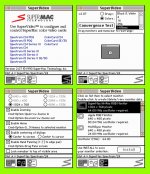
There's no mention of the Virtual Desktop, Zoom or Hand Panning capabilities of this series on LowendMac. A few things came immediately to mind when reading the manual. (YEP! I'm a RTFMin' Wooly Rhino from the Paleolithic CPM Era! [ ] ]'> ) If this thing does virtual desktops of 4096x1536x24bit and supports custom monitor settings as explained in the manual, this just may be a 1600x1200x24bit@60Hz Silver Bullet from the IIci era!
Not to mention the possibilities for 60Hz output at 480, 720 or even 1080p, all well under the 4096 x 1536 Virtualized Desktop capability of the card. Depending upon how, and how much, memory blocking is done/works for the expanded desktop virtualization, the tools are right there in the software to make the attempt to spec all those resolutions as custom monitor settings.
I think I need to get a 24MHz Crystal for playing around with the MultiSyncs and setting up some custom monitor settings. :approve:
The VRAM on board is TC524256Z-10 and there are six banks of 4 SIPs ea. 24 in total. That info alone ought so tell the tale of the maximum pixel count possible in 24 bit or 16bit modes, but I never did figure out how to do the conversions. What are the VRAM induced limitations of my pixellated dreams for this lil' puppy?
Has anyone already played around with one of these cards already? :?:
Spectrum/24 Series III
Spectrum/24 Series IV
Spectrum/24 Series V
Spectrum/24 PDQ
Spectrum/24 PDQ+
My card has the Spectrum24 Version 1.0 ROM c1989 . . .
. . . the standard 64MHz Oscillator (Crystal Can) on board for use with the FixedRes SuperMac 19" Monitor . . .
. . . a DIN8 connector on the back
Presumably the connector is intended for serial comms with a High End MultiSync like my . . .
. . . Radius PrecisionView 2150 with HD-15, BNC and DIN8 (specified as serial) connections . . .
. . . MAG M21XF which has HD-15, DA-19 and DIN8 (presumably serial) connections.
The Spectrum/24™ User's Manual that came with the card is c1989 . . .
. . . The Control Panel/Driver setup is Version 2.7 from 1990 . . .
The LowendMac info mentions the Spectrum24 Series IV card as having a Version 1.6 ROM and the Series V as having a Version 3.0 ROM (PPC Compatible)
Presumably, mine would be the Series III variant . . .
I can test this easily enough when I get the chance, no mention of ROM rev requirements in the Series III article, so we'll see.
Here are the screen shots of from my card set up and running in the pet IIfx:
There's no mention of the Virtual Desktop, Zoom or Hand Panning capabilities of this series on LowendMac. A few things came immediately to mind when reading the manual. (YEP! I'm a RTFMin' Wooly Rhino from the Paleolithic CPM Era! [
] ]'> ) If this thing does virtual desktops of 4096x1536x24bit and supports custom monitor settings as explained in the manual, this just may be a 1600x1200x24bit@60Hz Silver Bullet from the IIci era!Not to mention the possibilities for 60Hz output at 480, 720 or even 1080p, all well under the 4096 x 1536 Virtualized Desktop capability of the card. Depending upon how, and how much, memory blocking is done/works for the expanded desktop virtualization, the tools are right there in the software to make the attempt to spec all those resolutions as custom monitor settings.
I think I need to get a 24MHz Crystal for playing around with the MultiSyncs and setting up some custom monitor settings. :approve:
The VRAM on board is TC524256Z-10 and there are six banks of 4 SIPs ea. 24 in total. That info alone ought so tell the tale of the maximum pixel count possible in 24 bit or 16bit modes, but I never did figure out how to do the conversions. What are the VRAM induced limitations of my pixellated dreams for this lil' puppy?
Has anyone already played around with one of these cards already? :?:
Looks like it'll do 1600 x 1200 x 24bit without a problem.
http://www.themacintoshguy.com/mactips/archive/tip16.shtml
I know this is old hat for a lot of you, but it might be useful for others so I'm going to go through the exercise in public . . .
. . . so please correct me when I put my foot in it.
Research results:
 it looks like I ought to, at the very least, be able to get QuickDraw accelerated 720p out of a 23 year old NuBus VidCard! 8-o
It looks like 1080p with 8% more pixels than 1600 x 1200, may be too many pixels for 6MB of VRAM . . .
. . . dunno, gotta tweak the spreadsheet to find out, I'm getting a result of 600k for the example quoted above thus far . . .
960 x 540 x 24bit ought to work just fine, as that's about 1/4 of the pixel total of 1600 x 1200 . . .
I'll call this pixel-halved 1080p/68kMLAp, for 1/2 scale, Pixel-Doubled 1080p SuperMac Spectrum/24 output.
Man, I really hope this works! [ ] ]'>
] ]'>
. . . to be continued.
http://www.themacintoshguy.com/mactips/archive/tip16.shtml
I know this is old hat for a lot of you, but it might be useful for others so I'm going to go through the exercise in public . . .
. . . so please correct me when I put my foot in it.
Research results:
There was a caveat posted later that this formula is good only for 2D resolutions, which is fine by me . . .
This is way
it looks like I ought to, at the very least, be able to get QuickDraw accelerated 720p out of a 23 year old NuBus VidCard! 8-o It looks like 1080p with 8% more pixels than 1600 x 1200, may be too many pixels for 6MB of VRAM . . .
. . . dunno, gotta tweak the spreadsheet to find out, I'm getting a result of 600k for the example quoted above thus far . . .
960 x 540 x 24bit ought to work just fine, as that's about 1/4 of the pixel total of 1600 x 1200 . . .
I'll call this pixel-halved 1080p/68kMLAp, for 1/2 scale, Pixel-Doubled 1080p SuperMac Spectrum/24 output.
Man, I really hope this works! [
] ]'>. . . to be continued.
Just the Crystal needs to be changed to 24Hz in order to use this card with MultiSync Monitors. With 6MB of VRAM it'll do 1600x1200x24bit and 720p. It's shy .06MB to do 1080p at 24bit, but I'll bet I can get it to do 1080p at 16bit!, not bad for a card from 1989!
I've got the manual for the card, which documents computing the timings necessary to spec any custom resolution that requires up to 6MB of VRAM. [] ]'>
I've got the manual for the card, which documents computing the timings necessary to spec any custom resolution that requires up to 6MB of VRAM. [
] ]'>I'm going to try to explain the project again. Our cards have socketed 64MHz crystals so they work with the SuperMac Hi-Res RGB Monitor at its Fixed Resolution at a 24bit Color Depth.
From the Manual, it appears that this card shipped with three Crystal Cans, 64MHz, 30.24MHz for use at 640x480x24bit with the Apple FixedRes RGB Monitors and a 24MHz Crystal for use it with MultiScan Monitors.
6MB of VRAM is insanely cool for a card of this vintage, it's on there to support extended desktops for CAD etc. Now that we've got HDTV LCD Monitors with insanely cool wide screen pixel counts, this card is coming into its own again.
Set the timings for whatever you want while you're in standard mode and switch to the custom timing settings and the card tells you what value crystal you need to install to get it up and running!
From the Manual, it appears that this card shipped with three Crystal Cans, 64MHz, 30.24MHz for use at 640x480x24bit with the Apple FixedRes RGB Monitors and a 24MHz Crystal for use it with MultiScan Monitors.
6MB of VRAM is insanely cool for a card of this vintage, it's on there to support extended desktops for CAD etc. Now that we've got HDTV LCD Monitors with insanely cool wide screen pixel counts, this card is coming into its own again.
Set the timings for whatever you want while you're in standard mode and switch to the custom timing settings and the card tells you what value crystal you need to install to get it up and running!
CORRECTIONS:
I found the tech specs. in the friggin' introduction!
It came with two crystals, not the 24MHz crystal for MultiSync support.
Bad news, the card supposedly has only 3MB of VRAM, dunno how that works with 24 256KB SIPs, or is it 24 256kb SIPs?????
Whatever, my spreadsheet says 720p @ 24bit is doable as is 1080p @ 8bit. Good enough!
The built in interpolation algorithms (hardware based?) for displaying 720p on a 1080p LCD probably look a lot better than just halving the resolution of 1080p would, on second thought.
So 720p seems to be the sweet spot, 1600 x 1200 x 8bit is a semi-sweet resolution and 1152x870x24bit should just fit into the 3MB of VRAM as well.
I found the tech specs. in the friggin' introduction!
It came with two crystals, not the 24MHz crystal for MultiSync support.
Bad news, the card supposedly has only 3MB of VRAM, dunno how that works with 24 256KB SIPs, or is it 24 256kb SIPs?????
Whatever, my spreadsheet says 720p @ 24bit is doable as is 1080p @ 8bit. Good enough!
The built in interpolation algorithms (hardware based?) for displaying 720p on a 1080p LCD probably look a lot better than just halving the resolution of 1080p would, on second thought.
So 720p seems to be the sweet spot, 1600 x 1200 x 8bit is a semi-sweet resolution and 1152x870x24bit should just fit into the 3MB of VRAM as well.
Holy crap! 8-o I just googled myself . . . indirectly of course. There's no information about me anywhere on the WWW that's not a matter of public record! [} ] ]'>
] ]'>
Here's a scoundrel . . . an interesting notion for trying the hawk the price I paid for this card last year.
http://www.worthpoint.com/worthopedia/supermac-spectrum-24-apple-mac-nubus-171272057
] ]'>Here's a scoundrel . . . an interesting notion for trying the hawk the price I paid for this card last year.
http://www.worthpoint.com/worthopedia/supermac-spectrum-24-apple-mac-nubus-171272057
I struck silver mining data for the project during a bit of down-time at work yesterday!
First, here's the spreadsheet data, bit depth has been adjusted to keep within the 3MB VRAM limitation:
I'm still looking for gold, but wikipedia strikes again . . .
I found this gem in the "Further reading" links:
http://www.tinyvga.com/vga-timing
It looks like this 1989 card should equal the pixel counts and, possibly, better one of the bit depths of the Radius Thunder IV GX 1152 . . .
. . . if not its acceleration rates . . . see data above . . .
. . . here are the timings for the three resolutions of interest to me:
http://www.tinyvga.com/vga-timing/1152x864@60Hz @ 24bit (Mac 1152 x 870 would be nice, but this ought to be more LCD friendly)
http://www.tinyvga.com/vga-timing/1280x1024@60Hz @ 16bit (AFAIK, the Radius Thunder IV GX 1152 will only do this one at 8bit!)
http://www.tinyvga.com/vga-timing/1600x1200@60Hz @ 8bit (which equals the Radius Thunder IV GX 1152)
Terms for researching any other resolution timings:
http://en.wikipedia.org/wiki/Computer_display_standard
Striking gold will be finding the timing data for these analog standards for HD-15 input:
_720p = HD 720
1080p = HD 1080
I'll need to edit in the screen shots of the Custom Monitor Setup windows. Suffice it to say,the timing tables linked above look like a spot-on match for the dialog box or about as close to it as will be possible to find. It's time to plug in some values, read off the card's oscillator requirements and then order a few Crystal Cans! [] ]'>
This is one crazy VidCard for 1989! :approve:
First, here's the spreadsheet data, bit depth has been adjusted to keep within the 3MB VRAM limitation:
Code:
VRAM Calculator.00

H	V	Pixels 	Bit	________	________	VRAM

640	480	307200	16	4915200	614400	600
704	480	337920	24	8110080	1013760	990
1280	720	921600	24	22118400	2764800	2700
1920	1080	2073600	8	16588800	2073600	2025
960	540	518400	24	12441600	1555200	1518.75
1600	1200	1920000	8	15360000	1920000	1875

352	285	100320	24	2407680	300960	293.90625
320	240	76800 	24	1843200	230400	225
640	480	307200	24	7372800	921600	900
800	600	480000	24	11520000	1440000	1406.25
824	632	520768	24	12498432	1562304	1525.6875
1024	768	786432	24	18874368	2359296	2304
1024	768	786432	24	18874368	2359296	2304
1152	870	1002240	24	24053760	3006720	2936.25
1280 1024 1310720 16 20971520 2621440 2560I found this gem in the "Further reading" links:
http://www.tinyvga.com/vga-timing
It looks like this 1989 card should equal the pixel counts and, possibly, better one of the bit depths of the Radius Thunder IV GX 1152 . . .
. . . if not its acceleration rates . . . see data above . . .
. . . here are the timings for the three resolutions of interest to me:
http://www.tinyvga.com/vga-timing/1152x864@60Hz @ 24bit (Mac 1152 x 870 would be nice, but this ought to be more LCD friendly)
http://www.tinyvga.com/vga-timing/1280x1024@60Hz @ 16bit (AFAIK, the Radius Thunder IV GX 1152 will only do this one at 8bit!)
http://www.tinyvga.com/vga-timing/1600x1200@60Hz @ 8bit (which equals the Radius Thunder IV GX 1152)
Terms for researching any other resolution timings:
http://en.wikipedia.org/wiki/Computer_display_standard
Striking gold will be finding the timing data for these analog standards for HD-15 input:
_720p = HD 720
1080p = HD 1080
I'll need to edit in the screen shots of the Custom Monitor Setup windows. Suffice it to say,the timing tables linked above look like a spot-on match for the dialog box or about as close to it as will be possible to find. It's time to plug in some values, read off the card's oscillator requirements and then order a few Crystal Cans! [
] ]'>This is one crazy
VidCard for 1989! :approve: Update: In the lower right hand corner of the screenshot is the dialog box for setting timing parameters for custom monitors . . .
View attachment 16458
The window shows the timings for the 640 x 480 resolution I used as atarting point (saved as per the instructions in order to get a new choice) so when I figure out substitutions for those timings in the boxes from . . .
http://www.tinyvga.com/vga-timing/1600x1200@60Hz
. . . the SuperVideo software, according to my reading of the Docs, will display the new resolution derived from the timings in the resolution list window and spec the oscillator frequency required to pull this off. Maybe I'll be able to start building a spreadsheet to translate the timings from the VESA data to the settings for the SuperVideo entries tomorrow.
Meanwhile, has anyone got a notion for searching out the timings for 720p and 1080p over an analog VGA connection? :?:
p.s. I seem to be talking to myself in here again, gang. :-/ Has anybody got suggestions, WAGs or experience bases opinions about how practical this project may be?
View attachment 16458
The window shows the timings for the 640 x 480 resolution I used as atarting point (saved as per the instructions in order to get a new choice) so when I figure out substitutions for those timings in the boxes from . . .
http://www.tinyvga.com/vga-timing/1600x1200@60Hz
. . . the SuperVideo software, according to my reading of the Docs, will display the new resolution derived from the timings in the resolution list window and spec the oscillator frequency required to pull this off. Maybe I'll be able to start building a spreadsheet to translate the timings from the VESA data to the settings for the SuperVideo entries tomorrow.
Meanwhile, has anyone got a notion for searching out the timings for 720p and 1080p over an analog VGA connection? :?:
p.s. I seem to be talking to myself in here again, gang. :-/ Has anybody got suggestions, WAGs or experience bases opinions about how practical this project may be?
Interesting . . . THX, got linkage?
Does it break out the front porch, back porch timings etc?
I've got the USB2 in Classic under X on the QS'02 project going, but I've mislaid the OS 9.2.2 CD so that's been on hold. I've got a 32" 720p FlatScreen I run off VGA sometimes, that's the target display, if I can snag the timings off that it would be great.
If I don't find that blasted 9.2.2 CD soon, I can load just X on one of the drives temporarily to get the 720p timings.
Does it break out the front porch, back porch timings etc?
I've got the USB2 in Classic under X on the QS'02 project going, but I've mislaid the OS 9.2.2 CD so that's been on hold. I've got a 32" 720p FlatScreen I run off VGA sometimes, that's the target display, if I can snag the timings off that it would be great.
If I don't find that blasted 9.2.2 CD soon, I can load just X on one of the drives temporarily to get the 720p timings.
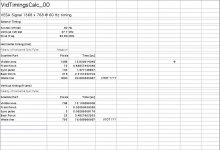
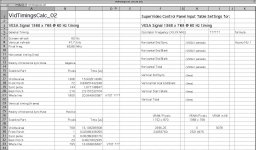
iCrap! :-/ The card's 3MB of VRAM is .078MB short of doing 1368 x 768 at 24bit.
Looks like I have to find the VESA timings for Analog 720p to get a 24bit widescreen resolution on my 1080p display after all.
But that's what I need for my 32" 720p flatscreen anyway.
Does anyone know of a source for the timing info for Analog VGA 720p & 1080p? :?:
Google time! Couldn't find it before, but I wasn't all that serious then and VESA is another good search term! [
] ]'>The first good hit mentions two available timing calculators: http://www.vesa.org/vesa-standards/standards-faq/
Interesting, but no cigar: http://ez.analog.com/thread/10588
BINGO!!!!!!! Anybody else wanna read the 50MB/564 page Information Display Measurements Standard? :lol:
Found lots of glossary/comparative spec. articles re: other formats, but nothing specific about front porch, back porch etc, timing specs. for VGA analog input found as yet.
Most of the links there, and elsewhere, refer to digital input when they have any timing info available at all. :-/
Most of the links there, and elsewhere, refer to digital input when they have any timing info available at all. :-/