

Thread
Mac Classic giving me an unexpected checkerboard.
The hdd in my Classic died a few weeks ago. I've been so busy with other projects that I just haven't had the time to open it up and swap the drive. Last night I had to make some System 7 disks from some images on my external hdd. Since I was already doing something on my Color Classic, I figured for quickness I'd just connect the external to the Classic and do it on that since the external is bootable. I hooked it up and turned the Mac on.
It made a weird distorted beep sound and gave me this:
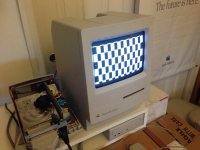
What?! Totally unexpected. This machine has been a sold performer since I got it. Now I'm wondering if the internal hard drive is dead after all or if it was just signs of things to come. Bummer.
I'll have to open it up and give it a cleaning and see if there's any leaky caps.
The HD20 I scored on eBay is "out for delivery" and should be on my doorstep when I get home from work. I was hoping to tinker with that. Hopefully the Classic isn't a disaster and I can tackle both. If not, there's always the weekend.
It made a weird distorted beep sound and gave me this:
What?! Totally unexpected. This machine has been a sold performer since I got it. Now I'm wondering if the internal hard drive is dead after all or if it was just signs of things to come. Bummer.
I'll have to open it up and give it a cleaning and see if there's any leaky caps.
The HD20 I scored on eBay is "out for delivery" and should be on my doorstep when I get home from work. I was hoping to tinker with that. Hopefully the Classic isn't a disaster and I can tackle both. If not, there's always the weekend.
I'm afraid it's recapping time for your Classic, both the logic board and analog board.
The capacitors on the logic board will definately all be dead ( high or infinite ESR reading ).
As for the Analog board: when I did mine a few months ago, I noticed there were several capacitors leaking at the bottom but one could only see the leakage after removal since they are so close to eachother.
The capacitors on the logic board will definately all be dead ( high or infinite ESR reading ).
As for the Analog board: when I did mine a few months ago, I noticed there were several capacitors leaking at the bottom but one could only see the leakage after removal since they are so close to eachother.
yeah it seems like the Classic and Classic II's they have the most cap issues.
maybe because apple was trying to shave off nickels and dimes when they made these.
i do like the "command-option-x-o" option, i thought that was slick!
maybe because apple was trying to shave off nickels and dimes when they made these.
i do like the "command-option-x-o" option, i thought that was slick!
Yeh, I wish that was an option on every model.
Well, maybe with Dougg's work ...
Cracked open the Classic ...and yes.....leaky caps galore!
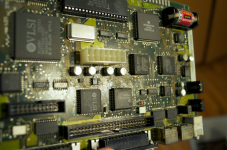
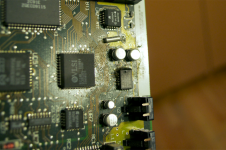
What a mess!
I took some Q tips with some alcohol and cleaned off the gunk. I put everythign back together and tried it out. The machine booted with a floppy.
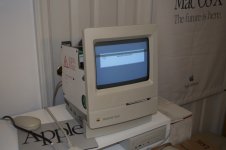
Seems to not want to pick up the hard drive. (But I think that is dead anyway.) It got to a desktop, but the keyboaed and mouse don't work. I powered cycled it and the checkerboard came back.
Looks like I'm going to have to replace all 7 of the 47 µf caps.
What a mess!
I took some Q tips with some alcohol and cleaned off the gunk. I put everythign back together and tried it out. The machine booted with a floppy.
Seems to not want to pick up the hard drive. (But I think that is dead anyway.) It got to a desktop, but the keyboaed and mouse don't work. I powered cycled it and the checkerboard came back.
Looks like I'm going to have to replace all 7 of the 47 µf caps.
Check the pram battery too. My c II gave me checkers and all it needed was a new battery.
That was part of the cleanup too. I did change the battery.
Get the tantalum caps... You can get them from Mouser for 37 cents each... I'd go ahead and replace every single capacitor you find, that way, you're good to go for a long time.
-J
-J
I just ordered the caps. I also picked up some for my Color Classic. I figured I'd do that too while I'm at it since it's also been giving me some trouble.
Got my caps in. I just finished recapping the whole board. I did a god job of cleaning all the gunk off the board too. Sadly, I still get a checkerboard:
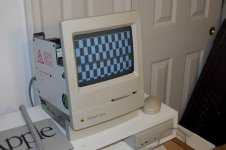
Any ideas?
Any ideas?
Ram trouble maybe ??
I thought of that. I pulled the 2 extra RAM sticks I have on the RAM board. Instead of getting the double high checkerboard you see up top, I get this one:
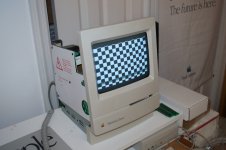
Unless it's the onboard RAM that's bad.
Unless it's the onboard RAM that's bad.
The caps are still suspect(or I should say solder joints). Also must rue lean solder areas of flux, it's a residue acting like the leaky cap stuff.
Good luck
Good luck
depending on the flux, flux is not conductive. ive seen flux messes on the boards and has done nothing. However, if the flux mixes with something, then.... and only then.... it could be bad.
Soldered looking joints can hold when not actually soldered and be "stuck" to the spot with flux is what I meant. I work the night shift and just didn't get the right explanation out. Sorry about that.
Did you try to wash the board ??
Have you recapped the Analog board as well ? The capacitors used on the Analog boards of the Classic I and II are from poorer quality than those of earlier Macs. They tend to leak at the bottom.
What are the voltages of the +5, +12 and -12v lines ?
I would test all the SMD capacitors on the logic board for shorts and trace back both leads of each soldered capacitor so there are no broken traces.
If you don't find any failures then the board is likely beyond repair.
What are the voltages of the +5, +12 and -12v lines ?
I would test all the SMD capacitors on the logic board for shorts and trace back both leads of each soldered capacitor so there are no broken traces.
If you don't find any failures then the board is likely beyond repair.
I'm reading voltage accross all the caps, so they're making contact with the board. However, I took a voltage measurement at the floppy connector and I'm only gettign 4.79V and 11.57V.
Also, if I power it up without the RAM board in, I get the slightest hint of a normal screen at the top.
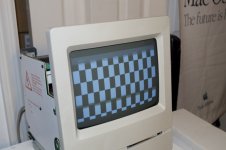
Any ideas?
Also, if I power it up without the RAM board in, I get the slightest hint of a normal screen at the top.
Any ideas?
The +5v and +12v are really way too low for a successfull boot.
These numbers show your Analog board needs recapping asap: the capacitors are definately degraded, probably most of them have already failed.
Try disconnecting the power of the HDD to reduce the load.
While it's not a solution in the long term you can increase the output voltage of your Analog board.
In the middle of the analog board ( component side ) there's a small white plastic screw. Turn it clockwise gently to increase the voltage.
However I strongly recommand this as a short term solution.
It's possible that adjusting the voltage pot isn't enough to get the voltage back in specs because too many capacitors are failing.
These numbers show your Analog board needs recapping asap: the capacitors are definately degraded, probably most of them have already failed.
Try disconnecting the power of the HDD to reduce the load.
While it's not a solution in the long term you can increase the output voltage of your Analog board.
In the middle of the analog board ( component side ) there's a small white plastic screw. Turn it clockwise gently to increase the voltage.
However I strongly recommand this as a short term solution.
It's possible that adjusting the voltage pot isn't enough to get the voltage back in specs because too many capacitors are failing.
Wow, you think it's the analog board too? I even pulled the analog board out and looked at it. There's no signs of any leaky caps.
Yes, probably not getting enough V's to get it working, have you removed the Floppy and Hard Drive to test at a minimum load ?
Yes, still does it.
Have you a spare analog board for a test ??
No. No spares.
I'm not too familiar with the Classic board, but if the ROM is socketed, try reseating the chips or any other socketed chips.
Did you try adjusting the voltage pot. on the analog board?
Replace the caps on the analog board as the guys in here are suggesting, it will do good. Don't rely on adjusting the voltage pot, the caps are getting worse and worse over time.
Replace with the same micro farad rating, and same voltage rating (or higher). Low ESR and 105 degrees celcius tolerance is recommended.
Replace with the same micro farad rating, and same voltage rating (or higher). Low ESR and 105 degrees celcius tolerance is recommended.
Not suggesting kyre "rely" on adjusting a pot, but if the voltages can be temporarily placed at closer to nominal and the checkerboard is still happening, it may indicate the problem is with the logic board.
I adjusted the pot until I got 12V and 5V and boom! It booted right up.
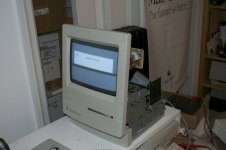
It did seem to take forever to boot off the System 7.5.3 floppy that I forgot was in the drive, but at least it works. Even the keyboard and mouse worked once it got to the Finder. I restarted it again and the screen went black. I shut it off and then attempted to try it again with a System 6.0.8 disk to see if that booted faster. I don't know if the painfully slow boot has something to do with the machine or if that's just how slow System 7.5.3 is.
In any case, the second attempt just gave me another checkerboard again. But I guess this proves that the logicboard is good and it is indeed a failing analog board?
It did seem to take forever to boot off the System 7.5.3 floppy that I forgot was in the drive, but at least it works. Even the keyboard and mouse worked once it got to the Finder. I restarted it again and the screen went black. I shut it off and then attempted to try it again with a System 6.0.8 disk to see if that booted faster. I don't know if the painfully slow boot has something to do with the machine or if that's just how slow System 7.5.3 is.
In any case, the second attempt just gave me another checkerboard again. But I guess this proves that the logicboard is good and it is indeed a failing analog board?
Not really. Caps heat up on board parts a they are the same age and cascade failure. My classic boots but no chime, I have 3 analog boards and 5 motherboards, only one motherboard boots.
Just have both recapped, one test then recap the other. That way you will know if one helps more than the other.
Cross your fingers as if I do we'll recapping mine ill flood the boards with classic motherboards lol, all with full ram cards.
Just have both recapped, one test then recap the other. That way you will know if one helps more than the other.
Cross your fingers as if I do we'll recapping mine ill flood the boards with classic motherboards lol, all with full ram cards.
Did you crack up the voltage as I suggested ? Gently turn the screw clockwise while you are measuring the +5 Volts line.
If you are unable to get +5V and +12V volts then you need to recap the Analog board first.
If you are unable to get +5V and +12V volts then you need to recap the Analog board first.
Yes, read two posts up for results.
Yes, please do recap both the analog and digital board. And by that I mean *all* the electrolytic caps. If you don't have the caps you need, get them.
And yes, System 7.5.x on a floppy boots extremely slow on a Classic (I've tried it before).
And yes, System 7.5.x on a floppy boots extremely slow on a Classic (I've tried it before).
I have a Plus which used to start-up to the checkerboard and if I left it alone for about five minutes or so, it would suddenly chime and boot properly. So heating up can definitely have an effect.
Yeah, I saw that trick in another thread. This doesn't fix itself once it's been on for a while.
Here's an update.
Macdrone sent me a new analog board. He tested it in his machine and it boots. Unfortunately, it doesn't work in mine. It's actually worse.
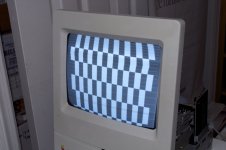
I was able to eliminate the horizontal lines by adjusting the brightness knob, but the display is seriously warped and there's a lot of scattered noisy pixels. The warping moves down the display.
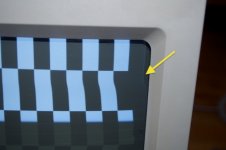
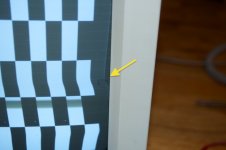
I tried adjusting the pot on the board to 12 and 5V, but it won't go that high. It maxes out at a little over 11 and 4 volts.
I'm already in the hole $30 for the caps and the board. I think I'll chalk this one up as a loss since I think it's a combination of the two boards not working. At this point, it might be easier (cheaper) to just keep my eye out for a new machine all together. Maybe finally get a Classic II or an SE/30.
Macdrone sent me a new analog board. He tested it in his machine and it boots. Unfortunately, it doesn't work in mine. It's actually worse.
I was able to eliminate the horizontal lines by adjusting the brightness knob, but the display is seriously warped and there's a lot of scattered noisy pixels. The warping moves down the display.
I tried adjusting the pot on the board to 12 and 5V, but it won't go that high. It maxes out at a little over 11 and 4 volts.
I'm already in the hole $30 for the caps and the board. I think I'll chalk this one up as a loss since I think it's a combination of the two boards not working. At this point, it might be easier (cheaper) to just keep my eye out for a new machine all together. Maybe finally get a Classic II or an SE/30.
Seriously the board didn't work? I did try it out, maybe the shipping did it in.
Good luck on finding a replacement Mac, I am truly sorry it didn't get the job done.
Good luck on finding a replacement Mac, I am truly sorry it didn't get the job done.
Hi,
My Classic II has similar symptoms, except it has solid vertical bars across the screen.
I tried recapping the analog board, and it didn't fix a thing-- I can get it to boot, however, if I disconnect the hard drive and floppy drive and let it warm up. The voltage slowly rises from about 4.2~4.35 volts until it chimes at about 4.6~4.75 volts, then it'll boot from an external, self-powered disk drive (a ZIP drive in this case), although the screen artifacts are still present, and things are very erratic and unstable. Have you tried disconnecting the drives? I saw that you did that before, but how about with the new analog board?
Good luck!
c
My Classic II has similar symptoms, except it has solid vertical bars across the screen.
I tried recapping the analog board, and it didn't fix a thing-- I can get it to boot, however, if I disconnect the hard drive and floppy drive and let it warm up. The voltage slowly rises from about 4.2~4.35 volts until it chimes at about 4.6~4.75 volts, then it'll boot from an external, self-powered disk drive (a ZIP drive in this case), although the screen artifacts are still present, and things are very erratic and unstable. Have you tried disconnecting the drives? I saw that you did that before, but how about with the new analog board?
Good luck!
c
He said my board that I sent him was way worse voltage wise than the one he had, and had artifacts so I'm sure it won't do that at all at this point.
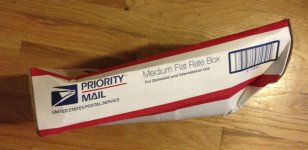
@macdrone. It could have very well been damaged in shipping. The box was trashed when I got it.
Measure your voltages directly on the PCB of the Analog board after recapping, the measurement at the external floppy drive connector isn't always reliable.
I see the picture is distorted: this is normal as you have to adjust brightness, contrast, V-size, H-size, V-centering, H-centering, focus on the Analog board.
Then probably the centering rings on the Yoke of the CRT. This is standard procedure after replacing the analog board.
However this will not solve your problem: if you tried a good recapped analog board where the voltages were within specs, your logic board is likely beyond repair. A short or wrongly positioned capacitor on the logic board can pull down the output voltage of the analog board.
Therefore it's best to measure voltages directly on the analog board with the logic board disconnected.
A simply test: disconnect the logic board and measure the +5 and +12 line at the HDD connector with a drive connected. What does this give ?
Forget fiddling with the voltage screw on the analog board: this is usefull for quick testing but not a solution.
After recapping the voltage of the analog board should be spot on. Don't waist your time with non-recapped analog boards as the capacitors used on the Classic I/II series are from very poor quality.
I see the picture is distorted: this is normal as you have to adjust brightness, contrast, V-size, H-size, V-centering, H-centering, focus on the Analog board.
Then probably the centering rings on the Yoke of the CRT. This is standard procedure after replacing the analog board.
However this will not solve your problem: if you tried a good recapped analog board where the voltages were within specs, your logic board is likely beyond repair. A short or wrongly positioned capacitor on the logic board can pull down the output voltage of the analog board.
Therefore it's best to measure voltages directly on the analog board with the logic board disconnected.
A simply test: disconnect the logic board and measure the +5 and +12 line at the HDD connector with a drive connected. What does this give ?
Forget fiddling with the voltage screw on the analog board: this is usefull for quick testing but not a solution.
After recapping the voltage of the analog board should be spot on. Don't waist your time with non-recapped analog boards as the capacitors used on the Classic I/II series are from very poor quality.
I am so sorry, when I get a paid again ill send that other board and you can just swap or pull off that plastic connector. Ill ups it.
Cool. Thanks.
have you poped the rom's out and poped them back in?
Hum. No. I'll have to try that when I get home.
I still suspect the logic board/ROM as well.
No dice. Not the ROM. Same behavior after being reseated.
look really close at your cap job,,, also look for solder bridges, little bits of solder can land and cause issues,
Might have to get real close with a bright light.
Also i think there are other caps on that board as well other then just 16v/47
i think its funny how you got it to work before the cap job… and after the cap job, no dice.
Might have to get real close with a bright light.
Also i think there are other caps on that board as well other then just 16v/47
i think its funny how you got it to work before the cap job… and after the cap job, no dice.
As I wrote earlier, there's probably a short circuit on the logic board, probably near the replaced capacitors.
If not, then the logic board is beyond repair. Long term undervoltage can cause other components to fail.
If not, then the logic board is beyond repair. Long term undervoltage can cause other components to fail.