
Thread
Macintosh LC III Overclocking, 25Mhz to:===>33Mhz
I found several posts on forums on what to do,
I found its really easy so i just made a simple graphic, and because google loves
68kmla so much it will probably end up being top hit.
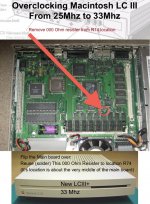
I found its really easy so i just made a simple graphic, and because google loves
68kmla so much it will probably end up being top hit.
Cool. I should try that with my LCIII. Although, it's tucked away right now. About a year ago it was giving me problems about powering on. Half the time it was hit or miss so I ended up cannibalized it for the hdd and floppy drive. I've been thinking about pulling it out of the closet and having another go at it. Maybe this hack will give me an excuse to resurrect it.
oh yeah, have some fun!
If one of you guys do this, could you post some before and after benchmark screen shots.
i forgot to do the before benchmark.
i forgot to do the before benchmark.
you should replace the light brown caps in the PSU, and maybe the caps on the main board too :-D
the LC III is worthy of your TLC

then do the OC
viewtopic.php?f=9&t=19978
viewtopic.php?f=9&t=19776&p=188206#p188206
I've had my LCIII sitting around for about 10 years now and just had time to do this neat little mod yesterday. Big improvement. My biggest complaint about that machine is that the video performance is a bit slow when clicking on menus and stuff...not any more!
One thing to note, if you are running 7.1 like I am, you need System Enabler 003 version 1.1 BEFORE you overclock it. System 7.1 will not boot without it afterwards.
One thing to note, if you are running 7.1 like I am, you need System Enabler 003 version 1.1 BEFORE you overclock it. System 7.1 will not boot without it afterwards.
Good tip! I was using 7.5.5, and I tell you what... after the OC 7.5.5 seemed so much more responsive!
Was lazy, I installed 7.5.5 for 2 reasons, one. so it would automatically make my NIC card work, with it's built in driver goodness.
Two, So i could hack OT 1.3 in, that way I could just type in an IP in chooser.
Oh really? So does that mean this method ends up changing the Gestalt ID? What shows up in About This Macintosh? LC III or LC III+?
over clocking always seems to mess with that Gestalt ID
Uniserver, i believe you should have stuffed the factoid about the enabler in your picture. :approve:
Awesome that the LCIII is as easy as the LC475 to speed up.
Awesome that the LCIII is as easy as the LC475 to speed up.
Pretty common occurrence with over clocking mac's. + wasn't aware of that factoid until just now.
Wrong. It's easier.
Well, it's not in the picture, but it's in the top post now
Cheers, uni.
I did not check the ID but it definitely changed something. It said "Macintosh LCIII" before, and "Macintosh" with no picture.
I am running 7.1 for no particular reason... my LCIII's only mission is to run my Apple IIe card, it's a pretty lightweight operating system for that machine which is nice because I don't need the features that 7.5 would give me. The 160mb hard drive is a bit of a limit too.
Hey uniserver, you happen to know if this will work on the Performa 450? It's an LC III clone, so I don't think there would be a reason why not. Thoughts?
Yeah, as you said its the same board
Bump it, The extra speed does make a difference.
Bump it, The extra speed does make a difference.
Sounds like fun, I'll just need to get my hands on a good soldering iron. Now another question: would this 450 after OC beat out my Performa 631CD or LC 575?
No sir.
lol Thought I'd ask. I know it sounds dumb but since I'm at work atm, I can't whip out Mactracker and compare speeds. Sorry about the dumb question. :scrambled:
Man I love this OC!
I like it when you can feel the difference afterwards, and when your click snappin the through the finder to get to the benchmarking app,
you already know its way faster.
I like it when you can feel the difference afterwards, and when your click snappin the through the finder to get to the benchmarking app,
you already know its way faster.
The other day, thanx to uniserver's tips and faith, I sucessfully OC'd three Macintosh LC III's all to 33 mhz and boy let me tell you...You really can see and feel the difference with everything. Robotron is 10x faster than before, tech tool pro loads quicker as well as the machine boots and shuts down faster. Its just faster all the way around.
It is so easy to do and is much worth it! Cant believe it took me this long to work up the courage to attempt this mod. Next.....the LC475 and Q605.
It is so easy to do and is much worth it! Cant believe it took me this long to work up the courage to attempt this mod. Next.....the LC475 and Q605.
great job nicknick
I also did the Overclocking on my LC III, it seems to working, but have some side effects, and finally i'm not sure to keep it overclocked:
- When powering on the machine, just after a few seconds it "restarts" one time, i mean it gongs 2 times before booting.
- Some Benchmark apps, and the system itself doesn't recognize the machine (Unknown model)
To be honest, i'm only aware of the first issue, i really don't like this boot with 2 gongs... Anyone experienced the same issue?
- When powering on the machine, just after a few seconds it "restarts" one time, i mean it gongs 2 times before booting.
- Some Benchmark apps, and the system itself doesn't recognize the machine (Unknown model)
To be honest, i'm only aware of the first issue, i really don't like this boot with 2 gongs... Anyone experienced the same issue?
It might be possessed by a demon.
try preforming a séance, ask the spirits to help.
- what os are you running?
- so like if you restart it 5 times in a row… it will double bong every time?
- your pram battery is installed? and reading 3.6v?
- what size ram you have in there?
- how much vram?
- what is video resolution are you running?
- temps? any extra ordinary temperatures your seeing across any of the I/C's?
- solder work, were you extra careful and didn't get solder on anything else?
- 7.5.3+ Most of the time says Just |Macintosh| anyways with most models.
- i only get something like this with like 8.1 on my zip disk, when i boot it with a 68k, then boot it with a PPC machine… it will boot .. quickly reboot bong again.. and then boot.
that is only because i think its making a change in the system folder for that specific architecture.
- I'v personally over-clocked about 40 now, never had your issue.
- if you don't like it, then by all means reverse it.
- however, my experience, the bump in CPU and VIDEO performance has always totally been worth it.
try preforming a séance, ask the spirits to help.
- what os are you running?
- so like if you restart it 5 times in a row… it will double bong every time?
- your pram battery is installed? and reading 3.6v?
- what size ram you have in there?
- how much vram?
- what is video resolution are you running?
- temps? any extra ordinary temperatures your seeing across any of the I/C's?
- solder work, were you extra careful and didn't get solder on anything else?
- 7.5.3+ Most of the time says Just |Macintosh| anyways with most models.
- i only get something like this with like 8.1 on my zip disk, when i boot it with a 68k, then boot it with a PPC machine… it will boot .. quickly reboot bong again.. and then boot.
that is only because i think its making a change in the system folder for that specific architecture.
- I'v personally over-clocked about 40 now, never had your issue.
- if you don't like it, then by all means reverse it.
- however, my experience, the bump in CPU and VIDEO performance has always totally been worth it.
My stock Performa 460 (LCIII) does that when I boot it without a PRAM battery.
Like it resets the PRAM then reboots the machine.
Like it resets the PRAM then reboots the machine.
Thanks for the help guys, it was the missing PRAM battery. Unfortunately after succesfully booted my Mac (with single gong), i went to eat, and when i came back, my 540MB HDD died
One last issue: A just replaced the HDD with the one in my LC, and MacsBug 6.5.3 isn't loaded in my Overclocked LC III. (As i didn't tested it before OC, i don't know if this case is related to the LC III itself, or the OC caused it). (System 7.5.3)
One last issue: A just replaced the HDD with the one in my LC, and MacsBug 6.5.3 isn't loaded in my Overclocked LC III. (As i didn't tested it before OC, i don't know if this case is related to the LC III itself, or the OC caused it). (System 7.5.3)
Me again, i can now confirm, that applying this OC will prevent MacsBug to load at boot time. I liked a lot the additional speed, but as i want to use these machines for development, the OC is not an option for me. Tested OS, 7.5.3, 7.5.5, 7.6, 7.6.1
What is MACSBUG?
Also the re-clock we'll call it, makes it a LC-III+
witch is a legitimate model.
are you sure you are not doing something odd?
Also the re-clock we'll call it, makes it a LC-III+
witch is a legitimate model.
are you sure you are not doing something odd?
MacsBug is a debug console on the Mac, invoked by NMI (command-power btn) http://en.wikipedia.org/wiki/MacsBug
R14 soldered out, and soldered on the empty place R74... I tested the solderings, and as everything was ok finally (except macsbug, and model type recognition) i think the OC was done correctly.
If you have a flat PRAM battery, or no PRAM battery and you're running 7.6, the double-boot is normal - the first boot puts the Mac into 32 bit mode (required for 7.6 or later), and reboots it.
If its a 000 ohm resistor, would that not mean in fact its not really one at all? Basically a wire link. I know other Macs where instead of moving small resistors one could just create a solder bridge instead. The "resistor" was used simply because it was an easy part to drop in on the board when different combinations of connections applied to different speeds.
I'm wondering is it possible to make an internal switch, so it would be possible any time to switch OC on/off...
Yes, if its a 0 ohm resistor you could add a switch. They makes switches with multiple contacts that would effetely break one connection and make another in one flick.
double throw, double pull will do it.
http://www.mouser.com/ProductDetail/TE-Connectivity-Alcoswitch/A103SYCQ04/?qs=sGAEpiMZZMvudeGI7i40XE%2fMmrHHHc8pUQGytYsMK0I%3d
flip 25mhz
flip 33mhz
as they are saying, 000 ohms is the same as a solder bridge, just its machine loadable when they are populating boards.
just use some wire wrap to connect the pads to the switch.
http://www.mouser.com/ProductDetail/TE-Connectivity-Alcoswitch/A103SYCQ04/?qs=sGAEpiMZZMvudeGI7i40XE%2fMmrHHHc8pUQGytYsMK0I%3d
flip 25mhz
flip 33mhz
as they are saying, 000 ohms is the same as a solder bridge, just its machine loadable when they are populating boards.
just use some wire wrap to connect the pads to the switch.
Eww... keep those wire leads short if you use a big switch like that, otherwise youll end up with clock skewing and other weirdness.
your right… i was being cheap and going by price…
this switch is going to work out much better
http://www.mouser.com/ProductDetail/Mountain-Switch/10TC415/?qs=sGAEpiMZZMvudeGI7i40XFvpMq5YRs7w6zlonyB%252bgAs%3d
this switch is going to work out much better
http://www.mouser.com/ProductDetail/Mountain-Switch/10TC415/?qs=sGAEpiMZZMvudeGI7i40XFvpMq5YRs7w6zlonyB%252bgAs%3d
it doesnt specify the maximum frequency at which you can apply through that switch before leakage becomes a concern.