Thread
Outbound 125...
So I admit it, I was who bought the Outbound 125 that was on eBay. 
At $900 I probably paid far too much, but it's such a special machine after much deliberation with myself I couldn't resist... hopefully I've not made a huge mistake! :O
At $900 I probably paid far too much, but it's such a special machine after much deliberation with myself I couldn't resist... hopefully I've not made a huge mistake! :O
If it makes you happy, good for you! That's a special machine and one on my watch list.
Let's see some pics!
Let's see some pics!
I think it's great you got it!!!!! I recapped mine.... I did the small power supply in the bottom which was a pain in the ass to do.. Hard to remove and replace.. and of course the caps on the main board.. battery is easy to find.. it's an old camcorder type..
Ha thanks. The first thing I'll do when I get hold of it will be a proper clean up and recapping.
It'll probably arrive whilst I'm away so no pictures until at least November, sorry chaps.
It'll probably arrive whilst I'm away so no pictures until at least November, sorry chaps.
Look at it this way, when was the last time you saw one come up for auction (let alone in excellent working condition)?
They are neat machines. Dont forget that is needs a good keyboard battery to boot (I think PRAM too?). So if it ever fails too boot, thats why. And no, having the keyboard connected via cable is not a way to get around a bad battery. It needs them, period. I think two half AAs or something like that.
Yes that is right.. The keyboard takes a little odd looking battery.. You can still buy them on fleebay... I forgot the exact model and voltage but I would place an order now for that battery and probably the main battery.. I forgot the model.. I'll look it up and if I can find it let you know.. When I got my Outbound Notebook I ordered the battery and they came in at the same time! Nothing like getting a new toy and no working batteries to power it up....
Or if you have a Batteries Plus (and Bulbs) in your area, they have both at very, very reasonable prices. In fact I stopped buying on eBay and just buying batteries from them.
Oh nice, thanks for the tips guys.
I'm in the UK, and batteries like that aren't quite as easy to get hold of, but I'll order some in.
I'm in the UK, and batteries like that aren't quite as easy to get hold of, but I'll order some in.
Oh and apparently the guy I bought it off is sending it Fedex and it could arrive next week!
Keyboard works with a pair of easily found affordable 'n' size batteries in place of the original. Perfect fit and voltage.
I think you'll like the mouse bar. I really liked it, when I was fiddling with an Outbound. It's a pretty nifty design, I would never had thought to do something like that.
Also, I think the laptop uses standard camcorder batteries that you can still find online. RadioShack used to sell new ones, maybe you can get a good deal on old RadioShack surplus.
Also, I think the laptop uses standard camcorder batteries that you can still find online. RadioShack used to sell new ones, maybe you can get a good deal on old RadioShack surplus.
Great thanks for the tips! I've gotten a new camcorder style battery but was having trouble with the keyboard battery
Oh I forgot to ask - does anyone have access to a manual? Ideally a PDF that they can send, but physical would be awesome too, that I could buy/borrow/scan.
Thanks!
Thanks!
Whilst researching this machine, I've found some fascinating articles, including these two reviews of it when it came out:
http://www.nytimes.com/1990/08/14/science/personal-computers-a-9-pound-mac-clone.html
http://articles.chicagotribune.com/1990-08-05/business/9003050639_1_macintosh-clone-outbound-systems-portable
I need to find out what happens when I hook it up to another Mac!
Oh and I've got it all up and running. Seems to have lots of Outbound-specific software installed, version 1.2.1
http://www.nytimes.com/1990/08/14/science/personal-computers-a-9-pound-mac-clone.html
http://articles.chicagotribune.com/1990-08-05/business/9003050639_1_macintosh-clone-outbound-systems-portable
I need to find out what happens when I hook it up to another Mac!
Oh and I've got it all up and running. Seems to have lots of Outbound-specific software installed, version 1.2.1
I could never get 7.0 or 7.1 installed on mine... It would freeze on boot up... I had to use the Silicon disk.. (RAM drive memory) since I had no external way of booting.. So I would install 7.0 or 7.1 on the silicon disk and after it failed to boot I would to flip back to the hard drive by taking out the pram battery to wipe out the silicon disk.. James what OS version are you running??
James this is my thread of my fooling around with mine...
https://68kmla.org/forums/index.php?/topic/23704-outbound-125/?hl=outbound
https://68kmla.org/forums/index.php?/topic/23704-outbound-125/?hl=outbound
I have not seen an Outbound in person since they were current models. Ironically I could walk to their old location from my current apartment. But businesses come and go so frequently in Boulder that I doubt there would be any traces of Outbound left to see today.
You have to use a special enabler provided by Outbound for the laptop to boot correctly.
To connect the Outbound to a Plus or SE as described in the article you need a docking card installed in the host machine. I've been hoping to find one of those docking cards for 20 years now. Chances are slim. A Mac with the docking card installed can't boot unless connected to the Outbound (no ROMs) so anyone finding a Plus or SE with a docking card installed is likely to trash it as a non working machine, unless they have more than a casual interest in the machine.
All that said, with the SCSI adapter, one can boot the Outbound in disk mode and it will look like an external hard drive to a Mac connected through the SCSI port. Not ad cool as the docking card but the earliest example of disk target mode on a Mac.
All that said, with the SCSI adapter, one can boot the Outbound in disk mode and it will look like an external hard drive to a Mac connected through the SCSI port. Not ad cool as the docking card but the earliest example of disk target mode on a Mac.
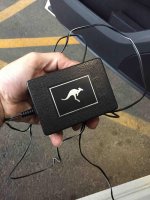
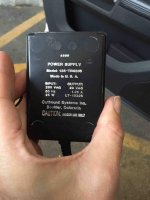
James this is the European power supply I have... per the message I sent you.. Won't work here in the U.S.