
Thread
Found a Mac Rescue board in a 512k
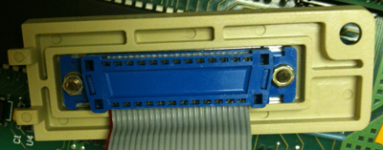
Been weeding through my compact mac collection, taking the batteries out so they won't blow up on me, and came across something weird. This 512k had a big blue D'SUB 25F connector where the battery door was supposed to be.
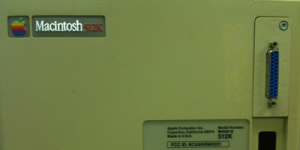
It's been a while, so forgive me for getting my genders reversed, but I assumed it was a parallel port so it could be attached to a PC printer circa 1988. I took the screw out, but couldn't budge the plate with the port on it, and I was curious to see what kind of shenanigans were necessary to get a printer port on a Mac 512k, so I popped the case.
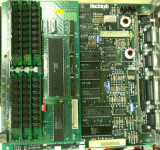
This is what I found:
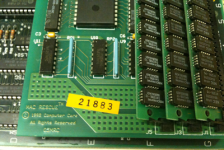
It is a very professional upgrade. I haven't tried to unseat it to find out but it looks like a riser was soldered into the 68000's spot on the logic board, and this daughter board plugs directly into that with the 68000 re-seated on the daughter card.
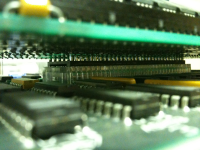
(The rest of the pics in the next post.)
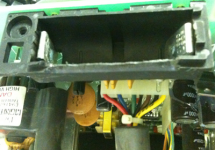
The only slightly kludgy thing is the way the battery box was shaved to make room for the portholder/battery cover. That cover is very nicely done; the machining is obviously not a hobbyist's work, and the plastic matches perfectly (even UV-aged the same).
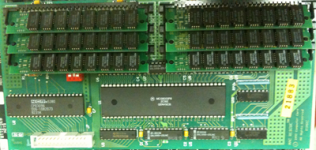
A quick Google search told me that a Mac Rescue board adds a SCSI port and allows for up to 6MB of RAM (4MB for memory and 2 for a dedicated RAM disk, for which I assume there is software I'll have to locate). Looks like mine is sporting (6 x 256k) 1.5MB at the moment, assuming it ignores the 512k on the logic board.
All in all a fun find out of the blue. The caps on the AB look good, and I cleaned up the floppy while I was in there, so I'll have to hook it all back up, toss in a 6.0.8 Disk Tools floppy, and see what can be seen. I'll report back after Thanksgiving.
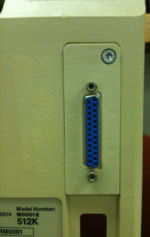
It's been a while, so forgive me for getting my genders reversed, but I assumed it was a parallel port so it could be attached to a PC printer circa 1988. I took the screw out, but couldn't budge the plate with the port on it, and I was curious to see what kind of shenanigans were necessary to get a printer port on a Mac 512k, so I popped the case.
This is what I found:
It is a very professional upgrade. I haven't tried to unseat it to find out but it looks like a riser was soldered into the 68000's spot on the logic board, and this daughter board plugs directly into that with the 68000 re-seated on the daughter card.
(The rest of the pics in the next post.)
The only slightly kludgy thing is the way the battery box was shaved to make room for the portholder/battery cover. That cover is very nicely done; the machining is obviously not a hobbyist's work, and the plastic matches perfectly (even UV-aged the same).
A quick Google search told me that a Mac Rescue board adds a SCSI port and allows for up to 6MB of RAM (4MB for memory and 2 for a dedicated RAM disk, for which I assume there is software I'll have to locate). Looks like mine is sporting (6 x 256k) 1.5MB at the moment, assuming it ignores the 512k on the logic board.
All in all a fun find out of the blue. The caps on the AB look good, and I cleaned up the floppy while I was in there, so I'll have to hook it all back up, toss in a 6.0.8 Disk Tools floppy, and see what can be seen. I'll report back after Thanksgiving.
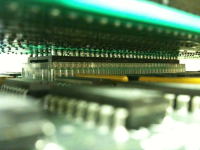
Promised pics.
i think that is pretty cool!
I like mods like this, that have a proper aesthetic touch. I guess the only thing that seems off, is the blue plastic in the scsi port on the back, its not a mac like color.
That is a slip on upgrade for the CPU. It is just clipped on the ends. I have one. It says se on mine haven't tried it in anything older.
That's called a Killy Klip, if you have the correct type of 68000 package, it clips on very cleanly and securely. if you don't have the compatible Proc package type, you have to do it the ugly way, by soldering a Dip Socket's pins directly to every leg on the 68000. Upgrade cards were made to plug directly into one or the other. That, guys, is a VERY direct 68000 PDS connector slot.
BTW, that's a SCSI port, not a PC printer port if you haven't figured that out already.
The blue isn't out of place at all, most IDC ribbon cable connectors were that color back in the day. There should be a SCSI HDD Cable plugged in at all times, so the color doesn't matter! [ ] ]'>
] ]'>
BTW, that's a SCSI port, not a PC printer port if you haven't figured that out already.
The blue isn't out of place at all, most IDC ribbon cable connectors were that color back in the day. There should be a SCSI HDD Cable plugged in at all times, so the color doesn't matter! [
] ]'>Yeah, I realized it was SCSI once I Googled it.
Tried a few System floppies (7.0.1 & 6.0. 8) and couldn't get it to boot. It gave me the smiley face and then about three seconds of disk chugging later it would eject and give me the ? Icon again.
I had to wander off at that point, and I don't have any earlier Systems on floppy. I'll make a 4 floppy and see what I can accomplish.
Did 512ks have 800k floppies? Just thought of that. Maybe I'll clean up an external 800 and try that.
Tried a few System floppies (7.0.1 & 6.0. 8) and couldn't get it to boot. It gave me the smiley face and then about three seconds of disk chugging later it would eject and give me the ? Icon again.
I had to wander off at that point, and I don't have any earlier Systems on floppy. I'll make a 4 floppy and see what I can accomplish.
Did 512ks have 800k floppies? Just thought of that. Maybe I'll clean up an external 800 and try that.
If they did that many upgrades, I would bet the drive has issues, dirty or the like. I mean after a couple of decades most tape players die.
400k FDD = 512k
800k FDD = 512ke
I think you'd need the ROM upgrade to use an external 800k FDD.
interesting, in from LEM: http://www.atarimagazines.com/compute/issue117/p17_specific5_MAC.php
800k FDD = 512ke
I think you'd need the ROM upgrade to use an external 800k FDD.
interesting, in from LEM: http://www.atarimagazines.com/compute/issue117/p17_specific5_MAC.php
The way I read the very sparse info I could find on the web, the Mac Rescue board required a ROM upgrade, but not necessarily an 800k FDD. Wouldn't it have to have the bigger ROM to use the SCSI port?
From your pics, it seems clear that the linked info about the Plus ROMs being located on the upgrade card is in error, but their being required makes sense. Check the sizes of the ROMs on the MoBo. If they're 32k each, they're original and nothing should work quite right if the article is correct in part. If they're both 64k, they've been upgraded to 512ke or Plus ROMs and you're good to go, AFAIK.
< tangential info that might prove useful mode >
I installed a similar NewLife board in my 512k, but I don't recall if it needed a ROM upgrade or not with any certainty. I think I remember buying the 800k FDD upgrade kit, which included the Plus ROMs by that point, that was the only way to get the ROMs at a reasonable price at the time. Check the FDD for info as to capacity, that might be how the ROMs were sourced for your MacRescue card. Hopefully someone else can verify the 800k FDD upgrade kit contents, be it internal or external FDD. That bit of info would support the linked article and my hazy memories of that first foray into Mac hacking about twenty years ago. I never used the original MoBo, BTW. I bought a used 128k MoBo for that test of my soldering skills, keeping the original as borked board backup. I was probably hoping the 128k board would be Killy Klip friendly, but it didn't turn out that way.
My card had RAM expansion, SCSI and TTL Video, which wasn't supported by the shipping drivers when I bought it. The upgraded board was destined for a Cat Mac when the Video Software was released if it didn't support spanning. I planned for it to stay in the 512k if it did. I think NewLife went under before getting the Video drivers to work, but the extra RAM was nice 2.5MB after NYMUG acquaintance at TekServe threw in four Keychains at no charge when I had the board troubleshot for some reason (likely my poorly developed soldering skills) or other. I don't remember hooking a hard drive up to it before I loaned it out to an aunt in law, but ISTR it having a second (800k?) external FDD. I can nail down the date I bought the the used MoBo, I saw the receipt for it and the original purchase of the used 512k/ImageBanger WC combo riffling through the files last night.
Basically, I spent $900 to get the BIG ImageWriter to use bi-fold size paper with ThunderScan back when scanners cost more than new Macs. The 512k for me to use at home was a very nice bonus. This wasn't excessive at the time, as I was waiting for a $10k vertical market MacSignMaker/SE/20/Radius_16 package to be delivered. My partner didn't have more than a passing qualm about the added expense of the 512k. The ImageBanger WC/ThunderScan combo had already figured into the budget and the 512k enabled me to do scanning and rough bitmap editing at home in the evening, to be vectorized the next morning.
I'll have another look at the file to see if I can find an invoice for the 800k FDD upgrade kit, that will nail that bit of info down quite nicely.
< /tangential info that might prove useful mode >
Anyway, I hope this somewhat OT rambling puts a few bits of info into perspective to help you in your MacRescue research.
< tangential info that might prove useful mode >
I installed a similar NewLife board in my 512k, but I don't recall if it needed a ROM upgrade or not with any certainty. I think I remember buying the 800k FDD upgrade kit, which included the Plus ROMs by that point, that was the only way to get the ROMs at a reasonable price at the time. Check the FDD for info as to capacity, that might be how the ROMs were sourced for your MacRescue card. Hopefully someone else can verify the 800k FDD upgrade kit contents, be it internal or external FDD. That bit of info would support the linked article and my hazy memories of that first foray into Mac hacking about twenty years ago. I never used the original MoBo, BTW. I bought a used 128k MoBo for that test of my soldering skills, keeping the original as borked board backup. I was probably hoping the 128k board would be Killy Klip friendly, but it didn't turn out that way.
My card had RAM expansion, SCSI and TTL Video, which wasn't supported by the shipping drivers when I bought it. The upgraded board was destined for a Cat Mac when the Video Software was released if it didn't support spanning. I planned for it to stay in the 512k if it did. I think NewLife went under before getting the Video drivers to work, but the extra RAM was nice 2.5MB after NYMUG acquaintance at TekServe threw in four Keychains at no charge when I had the board troubleshot for some reason (likely my poorly developed soldering skills) or other. I don't remember hooking a hard drive up to it before I loaned it out to an aunt in law, but ISTR it having a second (800k?) external FDD. I can nail down the date I bought the the used MoBo, I saw the receipt for it and the original purchase of the used 512k/ImageBanger WC combo riffling through the files last night.
Basically, I spent $900 to get the BIG ImageWriter to use bi-fold size paper with ThunderScan back when scanners cost more than new Macs. The 512k for me to use at home was a very nice bonus. This wasn't excessive at the time, as I was waiting for a $10k vertical market MacSignMaker/SE/20/Radius_16 package to be delivered. My partner didn't have more than a passing qualm about the added expense of the 512k. The ImageBanger WC/ThunderScan combo had already figured into the budget and the 512k enabled me to do scanning and rough bitmap editing at home in the evening, to be vectorized the next morning.
I'll have another look at the file to see if I can find an invoice for the 800k FDD upgrade kit, that will nail that bit of info down quite nicely.
< /tangential info that might prove useful mode >
Anyway, I hope this somewhat OT rambling puts a few bits of info into perspective to help you in your MacRescue research.
The Mac is at my office, and I'm... not, so I'll check the ROMs when I get back on Monday, and I'll google the model number difference between 400k and 800k FDDs so I can quickly check that.
Somewhere in my piles I have a SCSI Zip100 drive and disk that I used to use as the HD for a Plus. If I can find that I'll try booting from it. I may also drop in 6MB of RAM, because why wouldn't I?
I'm getting to the point where I'm going to want more RAM for my SE/30, so I will soon have eight 1MB sticks to be used in this and another Plus that has only 2MB. I need to pop open my dead Q900 and see what kind of RAM is in it.
Somewhere in my piles I have a SCSI Zip100 drive and disk that I used to use as the HD for a Plus. If I can find that I'll try booting from it. I may also drop in 6MB of RAM, because why wouldn't I?
I'm getting to the point where I'm going to want more RAM for my SE/30, so I will soon have eight 1MB sticks to be used in this and another Plus that has only 2MB. I need to pop open my dead Q900 and see what kind of RAM is in it.
Afaik the compacts up to the plus will only accept 4 Meg's of ram.
Yep, 4MB max right up to everything but the Classic II, the SE/30 was a Mac_IIcx in sheep's clothing and the CC is anything but a Compact.
The 512 on your MoBo is ignored, or the top end of the four above the floor/whatever. It might be cool to try that board in a Plus if it turns out to be compatible. I'm wondering if CompactVirtual could be persuaded to work in that config, like they used to do for the additional memory slots on some of the later SE accelerators.
The 512 on your MoBo is ignored, or the top end of the four above the floor/whatever. It might be cool to try that board in a Plus if it turns out to be compatible. I'm wondering if CompactVirtual could be persuaded to work in that config, like they used to do for the additional memory slots on some of the later SE accelerators.
My Plus has a Novy Mac20 MX installed in a very similar fashion. It too has it's own RAM SIMM slots, IIRC the original SIMM sockets on the motherboard are empty.
Very cool, My 128k->Daystar->Plus->MicroMac'030 uses a Killy Klip as well, but it doesn't have any SIMM slots. :-/
Dunno the actual order of the DayStar/Plus upgrades, it just has the DayStar "D" (assumed) branded onto the 128k frontspiece, for all I know it might have been 128k->Plus->Daystar'020->MicroMac'030. But I like it!
Dunno the actual order of the DayStar/Plus upgrades, it just has the DayStar "D" (assumed) branded onto the 128k frontspiece, for all I know it might have been 128k->Plus->Daystar'020->MicroMac'030. But I like it!
IIx and IIcx differences, IIcx has 3 less slots, no rom slot in the IIcx?,
SE/30, has no nubus, but a PDS slot, however its like a IIcx, then the IIsi, that has one slot that is NuBus or PDS, depending on the adaptor?
8-o
hard to keep track of all this.
the IIx,IIci,IIsi,SE/30 all have ROM slots, i'm not sure why they skipped the IIcx,
SE/30, has no nubus, but a PDS slot, however its like a IIcx, then the IIsi, that has one slot that is NuBus or PDS, depending on the adaptor?
8-o
hard to keep track of all this.
the IIx,IIci,IIsi,SE/30 all have ROM slots, i'm not sure why they skipped the IIcx,
Dunno about the IIcx, never had one, but it had Dirty ROMS, so it probably had a SIMM Slot for the upgrade that Apple's buying Mode32 from Connectix prevented. The SE/30 was based on the IIcx and released in the same product cycle, IIRC. The magazines/reviews touted it as a IIcx in an SE case. The /30's all NuBus architecture in any case.
There's no room in in the compact form factor for a NuBus implementation, so Apple went PDS as in the SE precedent.
The later released IIsi was based upon the SE/30 and the IIci, with which it was released, if memory serves. Could be off on that, check all the intro dates over on LEM for confirmation/refutation.
The Mac IIsi was saddled with limited expansion options, slottage and memory this time, as the LEMacII. It was neither fish nor fowl, however fouled up Apple designed it. [] ]'>
There's no room in in the compact form factor for a NuBus implementation, so Apple went PDS as in the SE precedent.
The later released IIsi was based upon the SE/30 and the IIci, with which it was released, if memory serves. Could be off on that, check all the intro dates over on LEM for confirmation/refutation.
The Mac IIsi was saddled with limited expansion options, slottage and memory this time, as the LEMacII. It was neither fish nor fowl, however fouled up Apple designed it. [
] ]'>i bet the sales would have been lots more if...

< mutters: lower case . . . : >
>
>
Just noticed in my own pictures that this was an M0001 E, so it should have the 128k ROMs and 800k FDD.

I'll have to dig out my Zip100 drive and hope it still works, or cobble together an external SCSI drive from parts and pieces lying about. I'll try a System 4.whatever disk first though.
I'd really like to get this thing up and running tomorrow.
I'll have to dig out my Zip100 drive and hope it still works, or cobble together an external SCSI drive from parts and pieces lying about. I'll try a System 4.whatever disk first though.
I'd really like to get this thing up and running tomorrow.
FWIW, I just got 2 of these in my big haul of compacts.
That "connector" is TERRIBLE. Don't touch it. It's incredibly delicate. Just inserting and removing the board from the case can cause contacts to come out of alignment and the machine to not boot. It's kind of unthinkable that was actually a viable product design.
That "connector" is TERRIBLE. Don't touch it. It's incredibly delicate. Just inserting and removing the board from the case can cause contacts to come out of alignment and the machine to not boot. It's kind of unthinkable that was actually a viable product design.
How do they act when they don't boot because of the board being askew?
Right now I get a :b&w: when it recognizes the disk, and then about 3 seconds later i get the :?: again.
Can I reseat the board somehow?
Never mind. I dug out a keyboard and mouse, and wonder of wonders, it boots now. Duh.
Right now I get a :b&w: when it recognizes the disk, and then about 3 seconds later i get the :?: again.
Can I reseat the board somehow?
Never mind. I dug out a keyboard and mouse, and wonder of wonders, it boots now. Duh.
Had several thoughts while reading this thread and they're all gone now. Poof. Fortunately, jt covered many of them.
I think that CompactVirtual required the active CPU to have a PMMU, which excludes everything before the 68030.
However, when inserting and removing the upgrade equipped board, do not try to slide it in and out of the rails as you would do with a non-modified board. Get a flat head screw driver and pry the rails on one side away from the logic board until that edge of the logic board pops out of the rail. Then remove the board directly in the bottom direction with a slight maneuver to the side to free the other edge of the logic board from the other rail.
If you do the popping-the-rail trick, you're much less likely to disturb the Killy Clip connection. This is the installation/removal technique recommended in the NewLife manual and works well for any of the daughter board upgrades.
With the Newlife upgrade the logic board 512K was added to the upgrade RAM, unless the upgrade RAM was expanded to a full 4MB, in which case the logic board RAM was ignored. I don't know how the MacRescue works.
I think that CompactVirtual required the active CPU to have a PMMU, which excludes everything before the 68030.
The IIsi was released with the LC and the Classic. The three of them shared the cover of both MacUser and MacWorld that month, IIRC. The new models were hailed as "affordable" but I would rather point to it as the beginning of Apple producing intentionally crippled machines -- all three of them. The cost savings were not commiserate with the crippling.The later released IIsi was based upon the SE/30 and the IIci, with which it was released, if memory serves. Could be off on that, check all the intro dates over on LEM for confirmation/refutation.
The Mac IIsi was saddled with limited expansion options, slottage and memory this time, as the LEMacII. It was neither fish nor fowl, however fouled up Apple designed it. [
The connection using the Killy Clip was rather delicate. I much preferred to solder on a pair of header strips, the process for which is described in another thread around here somewhere in detail. Searching on trag as author and Killy in the content can't turn up that many posts...
However, when inserting and removing the upgrade equipped board, do not try to slide it in and out of the rails as you would do with a non-modified board. Get a flat head screw driver and pry the rails on one side away from the logic board until that edge of the logic board pops out of the rail. Then remove the board directly in the bottom direction with a slight maneuver to the side to free the other edge of the logic board from the other rail.
If you do the popping-the-rail trick, you're much less likely to disturb the Killy Clip connection. This is the installation/removal technique recommended in the NewLife manual and works well for any of the daughter board upgrades.
I did have to do the pop out instead of slide out to get the LB out.
Well, sometimes it works, and sometimes it displays the HappyMac/eject/flashing question mark behavior.
Not sure why. It happens between restarts, without physically jostling the machine. It worked, then after a restart, weird behavior.
Anyway... when it works it looks like this: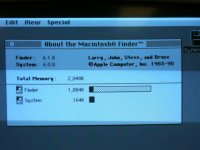
The 2M of RAM raises the question of whether it sees the original 512k on the board, because there are (as far as I can tell) six 256k SIMMs. Should read 1536k if it only sees the SIMMs.
Could also be that it automatically sets aside the last 2 SIMM slots for its purported RAM disk ability, and I have six 512k SIMMs in there, but I was pretty sure they were 256ks.
I'll try again with two known 1M SIMMs and see if it shows 2048k or 2560k.
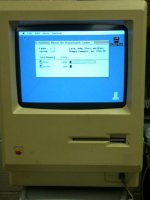
Not sure why. It happens between restarts, without physically jostling the machine. It worked, then after a restart, weird behavior.
Anyway... when it works it looks like this:
The 2M of RAM raises the question of whether it sees the original 512k on the board, because there are (as far as I can tell) six 256k SIMMs. Should read 1536k if it only sees the SIMMs.
Could also be that it automatically sets aside the last 2 SIMM slots for its purported RAM disk ability, and I have six 512k SIMMs in there, but I was pretty sure they were 256ks.
I'll try again with two known 1M SIMMs and see if it shows 2048k or 2560k.