
Thread
Macintosh IIci
Hey there! Have an odd question and am wondering if it is at all possible. I have a dead Macintosh IIci that has been recapped but still does not want to boot. Gives half of a chime and turns off. It keeps doing this. Anyways I was wondering if it would be a possibility to remove the FPU from the MoBo and use it for one of my LC iii's as they all have the socket for that chip. I have a hot air station gun that removes chips. Thank you for your time.
Have you checked the PSU? It sounds like it's failing.
Try recapping it if you haven't already (if you have, then I guess it's time to look for another one). Uniserver can probably do it for you if you can't/don't feel confident enough to do it yourself.
If that doesn't work, then maybe there's some cap goo on the logic board somewhere that's still causing problems. Try giving it a thorough cleaning.
c
Try recapping it if you haven't already (if you have, then I guess it's time to look for another one). Uniserver can probably do it for you if you can't/don't feel confident enough to do it yourself.
If that doesn't work, then maybe there's some cap goo on the logic board somewhere that's still causing problems. Try giving it a thorough cleaning.
c
If it is the exact same chip and you don't bend anything and the chip works, then yes.
Thanks for the replies! Much appreciated! I did swap out power supplies as I have another IIci as well as a Quadra 700 and a IIcx. All three PSU's exhibit the same symptoms when in that Machine.......Maybe I should put the MoBo through the dish washer as I swear that this machine did work at one point but then did this.....Before I rip chips off of it I will give that a go.
I believe they are the same chips... I will look more closely at what is required for the mac LCiii...
I believe they are the same chips... I will look more closely at what is required for the mac LCiii...
Have you tried the oven reflow procedure? I've done it before and haven't suffered any ill effects. That said, it didn't solve my problem either! 
<Uniserver>Sounds like maybe some residual cap goo on the board? Time to grab the acetone and a toothbrush and scrub under and around those ICs. Then a rinse in a tub of hot water with some dawn dish soap. Then compressor dry. Make sure to blow out all water from under the chips... it likes to hide under there </Uniserver>
Thank you for the replies. Well I did put it through the dish washer, twice, and still the same results. I let it dry out fully in the sun for eight hours before I tested it. I think the board is toast unfortunately.
But also, I did remove the FPU chip and put it in the LC iii. It worked perfectly, easy to remove and popped right into the socket of the LC iii. It for sure makes a difference in the speed of the machine.
But also, I did remove the FPU chip and put it in the LC iii. It worked perfectly, easy to remove and popped right into the socket of the LC iii. It for sure makes a difference in the speed of the machine.
Glad to hear it. About 6 months ago, I bought an FPU chip when they were going on eBay for what I now realise was probably a bit much. However, I dropped one in my LC III and was pleased to have essentially upgraded to a full 040. That said, I don't know if the speed effect is a bit of a placebo, because unless I'm attempting to render complex images or something of that nature, I'm not sure that there's any real ACTUAL difference to having the FPU in most cases. Is it called into play within the GUI at all? Games?
Anyway, I'm glad you made use of it, but I'm sorry to hear that a IIci met its end. That's probably one of my favourite machines - it's visually one of the most good-looking Macs.
Anyway, I'm glad you made use of it, but I'm sorry to hear that a IIci met its end. That's probably one of my favourite machines - it's visually one of the most good-looking Macs.
To me what I noticed the most was it is allowing me to do more than one thing at a time with out massive stuttering. For instance. I can now have a song playing from movieplayer and opening up the control panel window as well as some control panels itself, like mouse and sound, with virtually no lag. Guess I should mention that This LCiii is speed bumped to 33 MHz and has max ram too.
HAHAHA MJ!! love it...
the issue is right here.
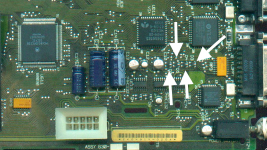
here is some residual information to help you.

the issue is right here.
here is some residual information to help you.
Hi !
I own also a Mac IIci and I was able after a long time of "no use", to start into Mac OS 7. A starting chime sound was not produced, but I can use the Mac OS desktop and click on anything with success, except there is no sound/beep generated, regardless of what I try.
I switched the computer off (by a menu entry), and after that, I tried to restart the computer again.
But the Mac IIci generates now repeating switch on switch off noise (a clicking noise, but very low/quiet, lasts 1/4 sec per switch on try and is repeated 1/4 sec again and again) and it does not start at all.
After another try, it even does not make clicking noise, just the the 3 led's are blinking in the same manner (while the power on key is pressed).
If I wait for more than an hour, it works again one time.
Any suggestions what is dead - capacitors ? Also the three diodes in row ? A replacement of the power supply did not help.
I own also a Mac IIci and I was able after a long time of "no use", to start into Mac OS 7. A starting chime sound was not produced, but I can use the Mac OS desktop and click on anything with success, except there is no sound/beep generated, regardless of what I try.
I switched the computer off (by a menu entry), and after that, I tried to restart the computer again.
But the Mac IIci generates now repeating switch on switch off noise (a clicking noise, but very low/quiet, lasts 1/4 sec per switch on try and is repeated 1/4 sec again and again) and it does not start at all.
After another try, it even does not make clicking noise, just the the 3 led's are blinking in the same manner (while the power on key is pressed).
If I wait for more than an hour, it works again one time.
Any suggestions what is dead - capacitors ? Also the three diodes in row ? A replacement of the power supply did not help.
If you haven't replaced the capacitors on the board, now's the time.
Really ALL capacitors ? There are bigger ones (blue, like a tube), smaller silver "pot-alike" ones and very small ones (orange, rectangular)...
I have examined the whole board (upper and lower side), I found only one unusual spot, see attached picture...
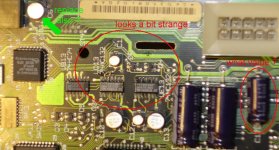
I have examined the whole board (upper and lower side), I found only one unusual spot, see attached picture...
Yes, sir. Here's a good pic of all the ones to replace. (not sure which little orange ones you mean, but just check out the pic for the ones that gotta go)
http://maccaps.com/MacCaps/Capacitor_Reference/Entries/1989/9/20_Macintosh_IIci.html
http://maccaps.com/MacCaps/Capacitor_Reference/Entries/1989/9/20_Macintosh_IIci.html
You dont need to worry so much about the small flat orange caps as they have a pretty much indefinite lifespan, but ALL the electrolytic capacitors should be replaced... surfacemounts, axials and radials. These do have a finite lifespan, and most are well past the point where they can be expected to remain in spec and servicable. Age alone can cause them to degrade albeit slowly, and they are generally rated for a certain number of operational hours in a given temperature range... and the hotter they are during operation, the shorter the life. Eventually they will leak or blow, but even before they degrade to this point, they still can fall out of specification electrically after they surpass their rated life and cause operational faults.
As for that photo above, it appears that one or a number of the trio of surface mount caps have leaked and when the electroyte dries out it leaves a gummy residue that is conductive and is likely shorting pins on that pair of IC's adjacent them. If left, the goo can corrode components and even damage the PCB itself.
As for that photo above, it appears that one or a number of the trio of surface mount caps have leaked and when the electroyte dries out it leaves a gummy residue that is conductive and is likely shorting pins on that pair of IC's adjacent them. If left, the goo can corrode components and even damage the PCB itself.
Hi Z80.
I just unearthed my awesome IIci project from the 80's and it is exhibiting the exact same symptoms. So before I "run it through the dishwasher" or "replace every capacitor on the board" and other broad brush approaches that seem to defy all logic, let's dig into this and narrow it down. Wow, the diagram of the startup circuit for these things from uniserver is an awesome start, no! Let's figure out why the power circuit/power supply is doing this rather than starting the dishwasher and warming up the soldering iron. So here is my story with troubleshooting steps etc:
1. First time starting up with MB-based video, all good. 80 megs of RAM, System 7.5, internal 2 gig SCSI hard drive, a bunch of my old files, all good, 16 bit Missile Command with trackball, Pagemaker, Asante nic (I may try to get online with this using Netcrape 2.0), etc etc. Good Times.
2. Shut down to change my video card, restarted, clickety click power supply issue, no start.
3. Pulled Power Supply. Opened, fuses good fan spinning. Put it back in, started.
4. Shut down, popped in my Raster Ops 1988 "Millions of Colors" Nubus card, Excellent! back in business. Here's a pic: (tried to cut and paste a jpeg in, even after reducing it to 10% 68kMLA grumbled let me know how to bring in pics)
5. Now to test external SCSI with my custom external drive and 2x CD-Rom. Shut Down.
6. Attached external SCSI and terminated, set to SCSI 1, etc. Clickety Click issue, no start.
7. Pulled and reseated power supply, no change. Turned off power at power strip for 5 min, back on, no change.
8. Walked away to get on with my life and came back. Fired right up.
9. The CMOS battery (call it whatever you want, think different, it's still a CMOS battery) is completely dead, ie the date was 1901, and the time/date keeps changing etc. Please someone define the use of this battery (specifically for the IIci) beyond saving parameters at the base level (window settings, time, date, etc) A CMOS battery just like anything else that needs power to save volatile memory just like a PC, game console, etc etc etc. It is my understanding that this battery is only for this purpose and has nothing to do with whether the machine will boot or not.
10. Bring me into the know on the use of capacitors (on this model only IIci) to store and relay power. So is the unit in some sort of standby mode still pulling in power and these caps regulate that and keep it ready to boot??
11. We'll figure this out!! I need my xlnt example of Cupertino engineering to start every time I press the keyboard button, just like in the 80's.
Thanks in advance!
I just unearthed my awesome IIci project from the 80's and it is exhibiting the exact same symptoms. So before I "run it through the dishwasher" or "replace every capacitor on the board" and other broad brush approaches that seem to defy all logic, let's dig into this and narrow it down. Wow, the diagram of the startup circuit for these things from uniserver is an awesome start, no! Let's figure out why the power circuit/power supply is doing this rather than starting the dishwasher and warming up the soldering iron. So here is my story with troubleshooting steps etc:
1. First time starting up with MB-based video, all good. 80 megs of RAM, System 7.5, internal 2 gig SCSI hard drive, a bunch of my old files, all good, 16 bit Missile Command with trackball, Pagemaker, Asante nic (I may try to get online with this using Netcrape 2.0), etc etc. Good Times.
2. Shut down to change my video card, restarted, clickety click power supply issue, no start.
3. Pulled Power Supply. Opened, fuses good fan spinning. Put it back in, started.
4. Shut down, popped in my Raster Ops 1988 "Millions of Colors" Nubus card, Excellent! back in business. Here's a pic: (tried to cut and paste a jpeg in, even after reducing it to 10% 68kMLA grumbled
let me know how to bring in pics)5. Now to test external SCSI with my custom external drive and 2x CD-Rom. Shut Down.
6. Attached external SCSI and terminated, set to SCSI 1, etc. Clickety Click issue, no start.
7. Pulled and reseated power supply, no change. Turned off power at power strip for 5 min, back on, no change.
8. Walked away to get on with my life and came back. Fired right up.
9. The CMOS battery (call it whatever you want, think different, it's still a CMOS battery) is completely dead, ie the date was 1901, and the time/date keeps changing etc. Please someone define the use of this battery (specifically for the IIci) beyond saving parameters at the base level (window settings, time, date, etc) A CMOS battery just like anything else that needs power to save volatile memory just like a PC, game console, etc etc etc. It is my understanding that this battery is only for this purpose and has nothing to do with whether the machine will boot or not.
10. Bring me into the know on the use of capacitors (on this model only IIci) to store and relay power. So is the unit in some sort of standby mode still pulling in power and these caps regulate that and keep it ready to boot??
11. We'll figure this out!! I need my xlnt example of Cupertino engineering to start every time I press the keyboard button, just like in the 80's.
Thanks in advance!
MJ313, thanks for the info on the caps . . . I will look closer for leakage, but everything seems to look OK. Bad caps doesn't defy logic by the way, I'm taking that back. Just trying/hoping for a solution that doesn't involved beating on my mother board.
Cheers
Cheers
Excellent explanation/picture - THANKS.
I am expecting the problem only in the area of the startup circuit area, so I will start will the smaller silver ones in that area first, will then test it, but will not stop to replace the other caps even if the board is working then.
Unfortunately there likely isnt one... and even if you can get a temporary fix, you will still be needing to change those old caps if you want the machine to last. Apple used some cheap, nasty caps in some machines in that era, and as explained before, electrolytic caps have a finite life regardless of rating or quality. The original caps have likely well exceeded their rated lifetime in a lot of cases (many caps are rated to only 1000-2000hrs of use before failure... If a computer is used for 6 hours each day, every day for a year, then that equates to just shy of 2200hrs over the course of that year. That isnt even an unreasonable scenario in an office environment. Even with less intense use, say in a private home, it would not be unreasonable to say that the caps reach their projected end of life in say 5 years from the date of manufacture... the IIci is now 23 years old and running the original caps which are now almost guaranteed to be approaching or well past their rated hour life.
Even if the caps look fine, theres a good chance they arent or wont be for long... Uniserver some time ago put up a post where he took a couple of semi-functional logic boards and removed all the caps and tested them to prove this point that old electrolytics arent to be trusted even if they look fine. The caps looked externally ok, but some were no longer of the correct specification and some were either open circuit or short. And well, in spec or not, if they havent leaked yet, they will eventually and they can rot chips, traces and the board itself.
Whilst it might seem tempting to try and find an easy solution to a flakey machine, it's not worth taking the shortcuts... at worst you will borrow some time before your computer starts decomposing, at best, you will chase your tail and get nowhere. You really should replace all your caps, and its likely that many issues will disappear if further damage hasnt already occurred.
Schmo those are some excellent explanations as to what goes wrong and why. Saving those for future cut 'n pasting. 
Meanwhile I've changed all capacitors above or equal 10µF on my Mac IIci board - no change, still the same problem. Seems to be that exchanging the capacitors does not solve all problems, eh ?
Still working for the first time, but after shutting down and restart try, it makes only a "clicking noise" while pressing the power button on the keyboard
P.S.: The battery is also dead. Does the battery really influence this ?
Still working for the first time, but after shutting down and restart try, it makes only a "clicking noise" while pressing the power button on the keyboard
P.S.: The battery is also dead. Does the battery really influence this ?
Before I go any further, I must call a point of order...I cannot help but to detect a hint of passive-aggressive, sarcastic scoffing in the tone of the above post. I am unsure as to whether you meant it to be condescending in nature or not, but it certainly does have a rather derisory air which really is unneccessary and quite unwelcome.
This forum exists as a place for enthusiasts to discuss their common hobby and support one another, and there are many people here more than willing to impart their knowledge and/or experience and to provide possible solutions when help is sought.
The nature of the beast is that there are any number of possible causes for any given failure or ailment that may afflict a given machine... whilst these may not be simple aging and wear of electronic components, in m any cases these are a direct cause, or part of the state of dilapidation which is as a whole preventing the machine from functioning. There is EVERY chance that something else is still wrong, but it does not mean that those who suggested you start at basics were wrong or should be denounced because their initial suggestions alone did not solve a problem which is further reaching than simple out of spec caps or electrolyte shorts across connections.
There is also every possibility that these issues caused other damage, or that multiple faults exist in the system. The older the machine gets, the higher the likelihood of multiple concurrent faults developing in different systems and subsystems within that machine becomes. My 7600 for instance had a faulty RAM module, a faulty hard drive, and a power supply that blew up in my face, all of which had to be rectified before it would successfully boot... even now, it has a graphics artifact that requires further investigation to identify and correct what is obviously another fault in one of the machine's systems. The IIci predates it by a good 5-6 years so imagine how many things things could be wrong with it due simply to age and degradation.
Anyway, I'm not here to pick fights or get upon a moral pedestal, I am here because of old Macs. Furthermore I am not going to sit and hold a grudge based upon a disagreement, or get into a heated dispute over whom is right or wrong, or engage in a shitslinging contest, sohaving called my point of order, at this point I shall return to the subject matter at hand... a badly behaved IIci.
The battery should not make a huge deal of difference to the power-on sequence of a IIci, but if you feel that it could be the grail you seek in the quest for IIci goodness, by all means it will do no harm to replace it, as brand new units are cheaply and readily available on fleabay for very little money... My adivce would be to go with the Saft or Varta brand as a known reasonable brand. There are other far cheaper brands from Asian distributors and manufacturers that might seem tempting due to their miniscule pricetags, but personally, I wouldnt be one to trust them.
From what you are describing, it almost sounds as though the power supply has failed... I have had a number of different Mac's behave similarly shortly before failing to power on at all or having the PSU go bang. What portion of the unit has failed if this is the cause is entirely anybodies guess... the obvious course of action before anything, if you are 150% confident that all components on your logic board are servicable and that your solder work is sound, would be to open the PSU and see what you can see... if there are any obviously burned or blown out components, this is likely where your problems lie. Even if not, PSU caps fail just like any other electrolytic caps, so it would not hurt to replace them all as well, because like the ones you just replaced on the logic board, they are quite likely already failing and falling out of spec even if they don't yet appear physically damaged.
Ideally, to identify definitively whether you are dealing with further logic board problems or a power issue , you would be best served to get hold of a known working power supply and see if the machine functions differently... If not, you could be looking at electrolyte contamination, electrolytic rot of chips, or any other number of component failures on the logic board, or even the possibility of a bad joint on your new soldered components or even stray slag causing a short... Now I know one might be tempted to take offence to the mere suggestion that one's solder work is anything but exemplarary, but the reality of the situation is, solder is difficult to negotiate sometimes, and we are all human. None of us are perfect, and I have even seen highly skilled technicians pull their hair out for hours over faults that turned out to be a simple case of stray solder causing a short in a place that wasnt at first obvious. It could even be a broken or corroded circuit trace... just one is all it takes, and it's not hard to sever once with an accidental slip of a screwdriver.
This forum exists as a place for enthusiasts to discuss their common hobby and support one another, and there are many people here more than willing to impart their knowledge and/or experience and to provide possible solutions when help is sought.
The nature of the beast is that there are any number of possible causes for any given failure or ailment that may afflict a given machine... whilst these may not be simple aging and wear of electronic components, in m any cases these are a direct cause, or part of the state of dilapidation which is as a whole preventing the machine from functioning. There is EVERY chance that something else is still wrong, but it does not mean that those who suggested you start at basics were wrong or should be denounced because their initial suggestions alone did not solve a problem which is further reaching than simple out of spec caps or electrolyte shorts across connections.
There is also every possibility that these issues caused other damage, or that multiple faults exist in the system. The older the machine gets, the higher the likelihood of multiple concurrent faults developing in different systems and subsystems within that machine becomes. My 7600 for instance had a faulty RAM module, a faulty hard drive, and a power supply that blew up in my face, all of which had to be rectified before it would successfully boot... even now, it has a graphics artifact that requires further investigation to identify and correct what is obviously another fault in one of the machine's systems. The IIci predates it by a good 5-6 years so imagine how many things things could be wrong with it due simply to age and degradation.
Anyway, I'm not here to pick fights or get upon a moral pedestal, I am here because of old Macs. Furthermore I am not going to sit and hold a grudge based upon a disagreement, or get into a heated dispute over whom is right or wrong, or engage in a shitslinging contest, sohaving called my point of order, at this point I shall return to the subject matter at hand... a badly behaved IIci.
The battery should not make a huge deal of difference to the power-on sequence of a IIci, but if you feel that it could be the grail you seek in the quest for IIci goodness, by all means it will do no harm to replace it, as brand new units are cheaply and readily available on fleabay for very little money... My adivce would be to go with the Saft or Varta brand as a known reasonable brand. There are other far cheaper brands from Asian distributors and manufacturers that might seem tempting due to their miniscule pricetags, but personally, I wouldnt be one to trust them.
From what you are describing, it almost sounds as though the power supply has failed... I have had a number of different Mac's behave similarly shortly before failing to power on at all or having the PSU go bang. What portion of the unit has failed if this is the cause is entirely anybodies guess... the obvious course of action before anything, if you are 150% confident that all components on your logic board are servicable and that your solder work is sound, would be to open the PSU and see what you can see... if there are any obviously burned or blown out components, this is likely where your problems lie. Even if not, PSU caps fail just like any other electrolytic caps, so it would not hurt to replace them all as well, because like the ones you just replaced on the logic board, they are quite likely already failing and falling out of spec even if they don't yet appear physically damaged.
Ideally, to identify definitively whether you are dealing with further logic board problems or a power issue , you would be best served to get hold of a known working power supply and see if the machine functions differently... If not, you could be looking at electrolyte contamination, electrolytic rot of chips, or any other number of component failures on the logic board, or even the possibility of a bad joint on your new soldered components or even stray slag causing a short... Now I know one might be tempted to take offence to the mere suggestion that one's solder work is anything but exemplarary, but the reality of the situation is, solder is difficult to negotiate sometimes, and we are all human. None of us are perfect, and I have even seen highly skilled technicians pull their hair out for hours over faults that turned out to be a simple case of stray solder causing a short in a place that wasnt at first obvious. It could even be a broken or corroded circuit trace... just one is all it takes, and it's not hard to sever once with an accidental slip of a screwdriver.
no changing the dead caps does not always solve the problem… but the dead caps are certainy the cause of your problems, in one way or another.
Excuse me for being sarcastic, but very often almost all problems which can occur are reduced to "capacitor" problems only.
Many (almost all?) forgot, that there are also semiconductor stuff in it, and that thermal load will shorten lifetime of these components, too.
Also, I suspected also the dead battery, because someone here already asked what dependancy are related to the batterty / what function is covered by the battery also.
And finally, it is not necessary to be the upholder of moral standards, I agree that this board should be used for exchanging information and (sometimes) fun only, yes.
I wrote already that I replaced for test purposes the power supply and the bad "start" behaviour did not changed, so I can exclude the power supply itself as a reason.
Last but not least for further examination, I need a schematic diagram, or even better, test points with voltage values or oscilloscope screen images (can be often found for monitors also).
I fear test points with voltage values and/or oscilloscope screen images (for comparison purposes) will not exist, and I'm unsure if I am able to use a schematic diagram for diagnostic purposes (I studied computer science, not electrical engineering). Finding a contamination with weak acids from a bad capacitor should be easy if the circuit traces are (visually) affected, but I am not an expert in circuit traces.
May be the hint about the diodes (the ones in row) is important too, will look for these also.
z80.eu: Schmoburger, MJ313, Uni and others have provided some very useful information on this thread (not to mention the forums altogether). I think the general argument is that in replacing all of the caps, you will have eliminated bad caps as your culprit. The fact of the matter is, those electrolytic caps will (or have) fail(ed). The IIci, from what I've read, is notoriously bad in this respect, though all Macs of a certain age will have this problem (and it applies to the motherboard, power supply, analogue board, etc.).
Basically, you either sit on two sides of an argument regarding the collection of old Macs: you either think they should be left how they are, which might mean they degrade, caps leak and they cease functioning OR you acknowledge that maintenance is required in order to get them running. There's no inherently wrong position, but if you're in the first camp and also expect the Mac to continue functioning, you might be setting yourself up for disappointment.
I come at this from a position of being relatively new to the restoration of old machines (Uni can attest to my amateurish cap replacement style). What I will say is that in a single case in which bad RAM was my problem, every non-functional or semi-functional machine I own has been made operable by removing old caps, thoroughly cleaning the board (usually with 99% isopropyl alcohol and, in one case, the dishwasher), and replacing the old caps with tants or ceramic ones. New electrolytics are useful for the PSUs and analogue boards and the occasional axial replacement. The only machine I haven't got working using this method is an SE/30, which I totally screwed up during a bad recap session. So, that's my fault. Could you have another issue? Sure. Why not? It's a piece of nearly 30 year-old technology. It's worth putting at least some stock in what these people are suggesting, though, because experience is on their side. When you've replaced all of the caps on the motherboard (and cleaned it), and arguably those in the PSU, then maybe come back with whatever problems your machine is still exhibiting. Hope it goes well!
Basically, you either sit on two sides of an argument regarding the collection of old Macs: you either think they should be left how they are, which might mean they degrade, caps leak and they cease functioning OR you acknowledge that maintenance is required in order to get them running. There's no inherently wrong position, but if you're in the first camp and also expect the Mac to continue functioning, you might be setting yourself up for disappointment.
I come at this from a position of being relatively new to the restoration of old machines (Uni can attest to my amateurish cap replacement style). What I will say is that in a single case in which bad RAM was my problem, every non-functional or semi-functional machine I own has been made operable by removing old caps, thoroughly cleaning the board (usually with 99% isopropyl alcohol and, in one case, the dishwasher), and replacing the old caps with tants or ceramic ones. New electrolytics are useful for the PSUs and analogue boards and the occasional axial replacement. The only machine I haven't got working using this method is an SE/30, which I totally screwed up during a bad recap session. So, that's my fault. Could you have another issue? Sure. Why not? It's a piece of nearly 30 year-old technology. It's worth putting at least some stock in what these people are suggesting, though, because experience is on their side. When you've replaced all of the caps on the motherboard (and cleaned it), and arguably those in the PSU, then maybe come back with whatever problems your machine is still exhibiting. Hope it goes well!