

Ok got a hard-drive for the Macintosh SE. It's a Seagate ST-157N. Appears to be a 40MB drive.
It spins up and I can hear the head moving. However it won't boot from it. The floppy disk icon still comes up. Though it does appear to be "trying" to access the drive as I hear the drive head click on a repeating pattern (it only does this while on the floppy disk screen) with the flashing question mark icon occasionally being delayed.
It's either not on the right drive ID or the drive is dead. I booted from my floppy and the drive does not show up on the desktop and it never asks to initialize it. But since I don't have a mouse at the moment it will be difficult to diagnose the problem. I've enclosed some photos below. Perhaps the jumper setting is just wrong. At least I hope that's the problem.
Photos of the drive:
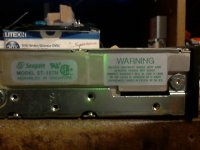
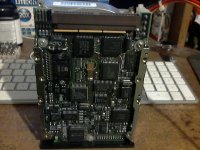
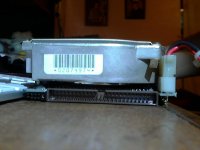
Currently the jumper is on the pins closest to the SCSI connector. I did not move them. That's how it was when it arrived. The guy that sent it to me said it used to be in a SE/30, so I would have to assume the jumper was already correct?
I'm not hearing any unusual noises from the drive. It's kinda loud, but that's to be expected of a drive of this age. Not sure what the head noise pattern for this drive on startup is supposed to sound like.
Perhaps I can try and record audio of it if that helps.
It's odd this thing was in an SE/30. It doesn't appear to have originally came from a compact mac. There is no LED connector (that I'm aware of) and there's a black plastic bazel cover on the front where the drive LED is. I had to cut some plastic off the power connector to get it to go in without putting too much stress on the power connector on the hard-drive.
I don't think it's a power issue otherwise the drive wouldn't spin up or it would spin down due to failed drive startup test. I would think the drive at least pasts it's self-power on test as it remains spinning during the time I have the Macintosh powered up.
Maybe it's just not initialized? But the guy told me he did have MacOS 7 on it and a some programs installed. So it's not looking good.
EDIT:
Ok found some info on the jumper settings. The current jumper in the position it is in enabled "Parity Check". Should that be disabled? The second position past that jumper is "unused" while the next 3 set drive ID. Since there is no additional jumper installed the drive is already on drive ID 0.
It spins up and I can hear the head moving. However it won't boot from it. The floppy disk icon still comes up. Though it does appear to be "trying" to access the drive as I hear the drive head click on a repeating pattern (it only does this while on the floppy disk screen) with the flashing question mark icon occasionally being delayed.
It's either not on the right drive ID or the drive is dead. I booted from my floppy and the drive does not show up on the desktop and it never asks to initialize it. But since I don't have a mouse at the moment it will be difficult to diagnose the problem. I've enclosed some photos below. Perhaps the jumper setting is just wrong. At least I hope that's the problem.
Photos of the drive:
Currently the jumper is on the pins closest to the SCSI connector. I did not move them. That's how it was when it arrived. The guy that sent it to me said it used to be in a SE/30, so I would have to assume the jumper was already correct?
I'm not hearing any unusual noises from the drive. It's kinda loud, but that's to be expected of a drive of this age. Not sure what the head noise pattern for this drive on startup is supposed to sound like.
Perhaps I can try and record audio of it if that helps.
It's odd this thing was in an SE/30. It doesn't appear to have originally came from a compact mac. There is no LED connector (that I'm aware of) and there's a black plastic bazel cover on the front where the drive LED is. I had to cut some plastic off the power connector to get it to go in without putting too much stress on the power connector on the hard-drive.
I don't think it's a power issue otherwise the drive wouldn't spin up or it would spin down due to failed drive startup test. I would think the drive at least pasts it's self-power on test as it remains spinning during the time I have the Macintosh powered up.
Maybe it's just not initialized? But the guy told me he did have MacOS 7 on it and a some programs installed. So it's not looking good.
EDIT:
Ok found some info on the jumper settings. The current jumper in the position it is in enabled "Parity Check". Should that be disabled? The second position past that jumper is "unused" while the next 3 set drive ID. Since there is no additional jumper installed the drive is already on drive ID 0.