

Noticed this from a recent eBay listing of a Macintosh SE:
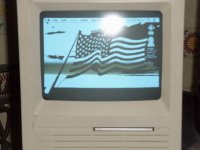
It appears to have a "wallpaper" set. However "Desktop Patterns" is the only Control Panel I know that can place graphics on the background (beyond basic patterns from the General Settings control panel) and it won't work on an SE (I tried. That and it can really only do tiling of small images. Nothing like the single large image being displayed on that photo)
But appearently there is other ways of doing this as that SE has a graphic in the background. Perhaps a special application, extension, or control panel can do this. It would be cool to have a background for my desktop. Any ideas on what was used on that SE to do that? (The seller doesn't appear to be aware of how either as he has no keyboard/mouse and can't do anything but boot it up)
All I can easily tell is that this SE is a SuperDrive like mine, but has two floppies instead of a hard-drive and floppy. The OS appears to be MacOS 7+ as the Finder Help icon is visible on the top right corner.
There is however an extra arrow icon beside the Apple Menu and that appears to be something added by a third party app. Can't be too complicated all that fits on a single floppy.
EDIT: Another interesting bit is that he appears to have a unit with 2 floppies and a hard-drive. I just noticed he only has one floppy inserted and there's two drive icons on the desktop. That and the floppy he inserted was for a "Crash and Burn" game which I doubt would be a bootable disk. He didn't mention having any external devices.
It's got that clock control panel added and I can already tell it probably still has the original PRAM battery as one with a missing/dead battery will always boot up showing Friday. I forget the exact time and date it resets to, but that date is always on a Friday.
It appears to have a "wallpaper" set. However "Desktop Patterns" is the only Control Panel I know that can place graphics on the background (beyond basic patterns from the General Settings control panel) and it won't work on an SE (I tried. That and it can really only do tiling of small images. Nothing like the single large image being displayed on that photo)
But appearently there is other ways of doing this as that SE has a graphic in the background. Perhaps a special application, extension, or control panel can do this. It would be cool to have a background for my desktop. Any ideas on what was used on that SE to do that? (The seller doesn't appear to be aware of how either as he has no keyboard/mouse and can't do anything but boot it up)
All I can easily tell is that this SE is a SuperDrive like mine, but has two floppies instead of a hard-drive and floppy. The OS appears to be MacOS 7+ as the Finder Help icon is visible on the top right corner.
There is however an extra arrow icon beside the Apple Menu and that appears to be something added by a third party app. Can't be too complicated all that fits on a single floppy.
EDIT: Another interesting bit is that he appears to have a unit with 2 floppies and a hard-drive. I just noticed he only has one floppy inserted and there's two drive icons on the desktop. That and the floppy he inserted was for a "Crash and Burn" game which I doubt would be a bootable disk. He didn't mention having any external devices.
It's got that clock control panel added and I can already tell it probably still has the original PRAM battery as one with a missing/dead battery will always boot up showing Friday. I forget the exact time and date it resets to, but that date is always on a Friday.