

Thread
MacSE (Maxine) Internal Zip100 (I had to.)

Since I was the recipient of an internal zip100 SCSI, from a trade with J.R.,
I thought this needed to be done, sooner than later.
First I had to make a new pigtail as this drive uses floppy power.


Then I just re-used the HDD bracket. All I had to do was bend the LED holder out of the way (didn't get a pic), and notch two holes right in the front to line up with the zip's screw holes.

And (besides the scsi cable being oriented just-so-annoyingly-wrong) I had to (Steal jt's filing idea AND IT WORKED, obviously.) I'm not going to widen the floppy, however. So, it looks a little funny. But I'm excited how it turned out, and it worked.

 ) ) )
) ) ) Go ahead and widen the floppy a bit to match, it'll look just right again and nobody will know the difference! Nice hack! :approve:
It was MinerAl's hack, he did the ZippieCC over ten years ago. We're all following his lead.
It was MinerAl's hack, he did the ZippieCC over ten years ago. We're all following his lead.
Hi,
I think it looks good as is, if not a bit unusual. It allows one to differentiate which is which at a glance (perhaps even a stick-on ZIP identifier next to the slot to further identify it).
Keep up the good work, MarkyB!
c
I think it looks good as is, if not a bit unusual. It allows one to differentiate which is which at a glance (perhaps even a stick-on ZIP identifier next to the slot to further identify it).
Keep up the good work, MarkyB!
c
Thanks guys!
I looked up MinerAl's tutorial so let me say thanks for pioneering such a thing!
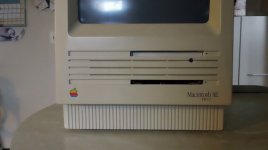
I opened the slot a little more this morning, made the hole bigger for the ejector, (unfortunately, fugly), and widened the floppy to match. It really didn't look right not lined up.
:b&w:
I looked up MinerAl's tutorial so let me say thanks for pioneering such a thing!
I opened the slot a little more this morning, made the hole bigger for the ejector, (unfortunately, fugly), and widened the floppy to match. It really didn't look right not lined up.
:b&w:
Sweet! 
Very nice. Try removing the door from the Zip, the contrast of the (FDD matching) black rectangle will take the eye off the hole for the eject button. :beige:
Meanwhile, I'll nose around the excess plastics for a matching button. If the hole is still the right height, a rectangular eject button from a DOA CD or a PC Floppy drive might look right at home on the Maxine's (Hallmark's Maxine?) bezel.
Meanwhile, I'll nose around the excess plastics for a matching button. If the hole is still the right height, a rectangular eject button from a DOA CD or a PC Floppy drive might look right at home on the Maxine's (Hallmark's Maxine?) bezel.
Personally I would have not made the hole for the eject button.
Probably shouldn't have, but it looked Real weird with the green LED flashing behind the grille..
Now there's a thought...
The name Maxine came from -> MacSE -> Maxy? Nope.. Maxine.. LOL
) 

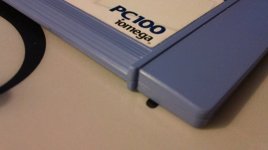
Now before you say, wait, that's blue and it will look dumb..
:beige:
so maxine was a real girl what would she look like?
this:

this:

Perhaps,

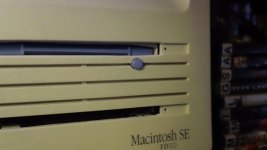

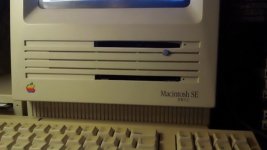
Zip drive is mounted to the cage a little crooked right now so I'll open her up tomorrow and fix. I'm all out of will for the day.
congrats on the awesome work markyb! Looks cool!
Thank you!
I forgot to mention how I got the eject button in and permanent.
First I had to use a 5/16" drill bit to make the hole smooth. I did not use a drill, I just slowly rotated the bit by hand so that I could control it the best. I started with a very small one and worked my way up.
Next, The button I had is from my IBM Aptiva case. It was a little long so I measured how long it needed to be and filed it down accordingly.
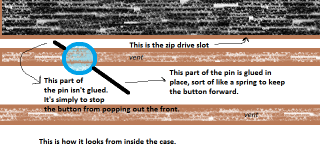
Then I got a safety pin and heated it up with a candle hot enough to poke through the end of the button (The end that will be inside the Mac.) I then cut off the part of the pin I did not need. Here's a drawing of how it turned out (and how it is mounted)
First I had to use a 5/16" drill bit to make the hole smooth. I did not use a drill, I just slowly rotated the bit by hand so that I could control it the best. I started with a very small one and worked my way up.
Next, The button I had is from my IBM Aptiva case. It was a little long so I measured how long it needed to be and filed it down accordingly.
Then I got a safety pin and heated it up with a candle hot enough to poke through the end of the button (The end that will be inside the Mac.) I then cut off the part of the pin I did not need. Here's a drawing of how it turned out (and how it is mounted)
Your Mac has a blue ball onna' front! 
almost sticks out like a mouse on the thinkpad keyboard
Yeah, we had another name for the Trackpoint back then ...
" the super clever joy-button mouse " ?
Or just sharpie the dust door black.
Sorry to resurrect a weeks over thread. Just came back to admire your work again.
No problem :beige:
I'm actually thinking about removing the front of the drive to get the zip to sit as far forward as possible. Then it will really match the floppy :approve:
I'm actually thinking about removing the front of the drive to get the zip to sit as far forward as possible. Then it will really match the floppy :approve:
I've seen somewhere that that works