

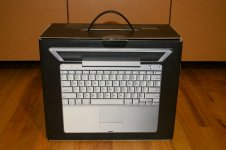
I received the PowerBook in the mail over the weekend. Much to my surprise, the PowerBook came shipped in the original box. No mention of that was in the auction, so that was a nice bonus.
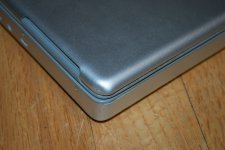
Looking at the laptop, I see that one corner by the display is a little dinged up, but nothing that you would think would kill the laptop as the seller described. The auction was listed as "hasn't worked since I dropped it years ago".
I powered it up and was thrilled to see it boot right to the OS X login screen! Naturally, I didn't have the seller's login, so I popped in my Tiger install DVD and gave it a fresh install. I hopped on my Wifi, pulled down some updates and was off to the races.
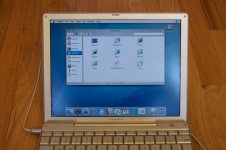
Looks like a perfectly functional PowerBook to me. I wonder what the seller thought was wrong with it. Perhaps the drop knocked something loose which fixed itself in shipping. The only thing I noticed is that the display always starts off dimmed at power up. You have to wait until you're at a login for the brightness keys on the keyboard to work. Is that a defect, or some sort of setting? Once I'm at a log in, I can bump the brightness all the way up and the display is fine. Maybe the guy didn't know that and he thought he damaged the back light? The battery also reports a runtime of 19 hours. So maybe a PMU reset is in order. Other than that, the SuperDrive works, as well the AirPort.
I can't believe I got it for $25 bucks!
I would like to replace that top assembly with one that's not dented.
@CC_333
Did you have a top cover and bezel to spare that's free of dents?
Looking at the laptop, I see that one corner by the display is a little dinged up, but nothing that you would think would kill the laptop as the seller described. The auction was listed as "hasn't worked since I dropped it years ago".
I powered it up and was thrilled to see it boot right to the OS X login screen! Naturally, I didn't have the seller's login, so I popped in my Tiger install DVD and gave it a fresh install. I hopped on my Wifi, pulled down some updates and was off to the races.
Looks like a perfectly functional PowerBook to me. I wonder what the seller thought was wrong with it. Perhaps the drop knocked something loose which fixed itself in shipping. The only thing I noticed is that the display always starts off dimmed at power up. You have to wait until you're at a login for the brightness keys on the keyboard to work. Is that a defect, or some sort of setting? Once I'm at a log in, I can bump the brightness all the way up and the display is fine. Maybe the guy didn't know that and he thought he damaged the back light? The battery also reports a runtime of 19 hours. So maybe a PMU reset is in order. Other than that, the SuperDrive works, as well the AirPort.
I can't believe I got it for $25 bucks!
I would like to replace that top assembly with one that's not dented.
@CC_333
Did you have a top cover and bezel to spare that's free of dents?