

Thread
17" Cinema Display LCD ADC
Went to my local recycling/resale joint and saw this over in a corner with no price sticker. So I asked the tech guy if it works and how much.
"Yeah it works but you have to have the right video card for it. You can have it for $5. I'm tired of looking at it."
Heh.
"Yeah it works but you have to have the right video card for it. You can have it for $5. I'm tired of looking at it."
Heh.
... and you don't even have to have the right video card if you are prepared to make a VGA adapter.
I found myself with a G3 PowerMac with VGA, plus a 17" Studio ADC. I decided to build an adapter to go inside the PowerMac.
Here's my blog on the project
Rick
I found myself with a G3 PowerMac with VGA, plus a 17" Studio ADC. I decided to build an adapter to go inside the PowerMac.
Here's my blog on the project
Rick
$5 is a very good deal, actually.
It happens I do have an MDD with ADC. So this will serve the actual purpose of ADC and reduce some cord clutter and replace an old scratched 17" Viewsonic monitor too.
If it works, I'm very happy with my $5 investment. If not, I guess I'm out one coffee at Starbucks.
If it works, I'm very happy with my $5 investment. If not, I guess I'm out one coffee at Starbucks.
Nice, did you get the right color?
I've lucked into one for the G-4/QS'02, but I don't use it . I need to take off the coating as it's damaged and the LCD is dim. I've been thinking about sticking the non-pivot HP17 in there.
I've lucked into one for the G-4/QS'02, but I don't use it . I need to take off the coating as it's damaged and the LCD is dim. I've been thinking about sticking the non-pivot HP17 in there.
As far as I know, the ADC Studio displays only came in one color: graphite, with white-ish and chrome accents over lay-ed on a mostly clear easel like enclosure.
I think I got the description right??
Anyway, you may have been thinking of the older Studio displays which came in blueberry/teal AND graphite (there was also an ADB/DA-15 version which is compatible (without adapters) with the beige G3).
c
Depending on the vintage, the LCD ADC displays came with graphite Apple logos instead of chrome.
Aren't those only the 20" and bigger models with the chrome logo? I believe the chrome's had DVI right? Or ADC? I forget.
This 17" is graphite. The LCD's a bit dim, but it's usable for sure!
I have a couple of 17" Studios with chrome Apple logos. They changed about the time that the iMac G4 came out, IIRC (MDD era).
Hi,
Do you have pictures, mcdermd?
c
Do you have pictures, mcdermd?
c
Here's the box image:
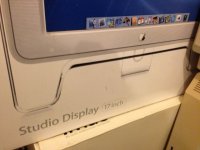
Here is the back of the monitor:
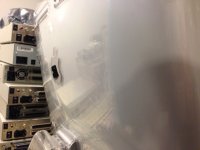
The copyright dates are ©2003
Here is the back of the monitor:
The copyright dates are ©2003
Ah, so the later 17" have the chrome. Is it ADC or DVI mcdermd?
The only acrylic Studio/Cinema displays that are DVI are the original 22" Cinema Display from 1999. All the rest of the acrylics were ADC. There was a DVI, graphite-colored, 15" plastic Studio Display similar to the preceding 15" ADB and VGA displays. All matte, Aluminum models are DVI until the aluminum and glass mini displayport displays.
Ah, ok. Good to know.
Oops. I've been calling it a Cinema Display. It's a Studio Display. Sorry.
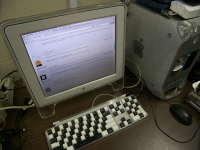 This one says Copyright Apple 2001 on the back. No wonder it's a little dim.
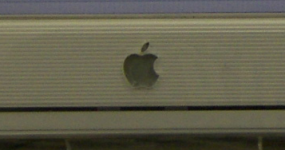
This one says Copyright Apple 2001 on the back. No wonder it's a little dim.I have the 15" version of that display. I have it sitting next to my Cube, since I bought it for it. But it matches my Sawtooth (although needs the DVI to ADC adapter to work).
Looks like a Quicksilver one to me, not Graphite.
Graphite has the blueish grey logo (like the original G4). Usually they were 15" ones.
Quicksilver has the silver grey logo (like the Quicksilver G4) - were available in 17" and 22"
And the mirror logo models - 17" and 20"
Graphite has the blueish grey logo (like the original G4). Usually they were 15" ones.
Quicksilver has the silver grey logo (like the Quicksilver G4) - were available in 17" and 22"
And the mirror logo models - 17" and 20"
Correction to my earlier post (too late to edit).
Of course my adapter is DVI+USB+Power to ADC, not VGA.
One hazard with the Studio Displays, as they age, is that the control chips inside the display unit can start to dement. Often the extended USB ports and the remote power switch fail, and also the ability to control brightness etc via the ADC data path. All these functions use a single data channel on ADC, so perhaps it was a bit of over-design. You can have a good quality visual display but reduced control over it, and without the ability to daisy-chain the keyboard/mouse through it. This is a pity , since the design intention was to deliver a clean desktop with only a single ADC cable to the tower under the desk.
If you've got one with all those functions working for $5, you've really cracked the jackpot.
Rick
Of course my adapter is DVI+USB+Power to ADC, not VGA.
One hazard with the Studio Displays, as they age, is that the control chips inside the display unit can start to dement. Often the extended USB ports and the remote power switch fail, and also the ability to control brightness etc via the ADC data path. All these functions use a single data channel on ADC, so perhaps it was a bit of over-design. You can have a good quality visual display but reduced control over it, and without the ability to daisy-chain the keyboard/mouse through it. This is a pity , since the design intention was to deliver a clean desktop with only a single ADC cable to the tower under the desk.
If you've got one with all those functions working for $5, you've really cracked the jackpot.
Rick
Your link appears to be dead, Rick. "Database Error"
I love your KeyCap hack, Al. It'd confuse the schiznit outta my fingers though, does it look a lot better the way you did it than in Mavis Beacon mode?
I'll have to hook mine up again to test the ADC brightness control issue, it's a bit dark. How does one go about tweaking the brightness setting internally? :?:
I'll have to hook mine up again to test the ADC brightness control issue, it's a bit dark. How does one go about tweaking the brightness setting internally? :?:
@Bunsen
Rick
The link is OK but that server went down late yesterday. It's not my server so I don't know how long they'll take to get it back up. Shouldn't be long - I edited another post on that blog yesterday.
Rick
I love your chequer keyboard.
I think I should have an equal set to make one.
The fun part of that keyboard project is, when you're done swapping, you get two zebra keyboards!
This is actually the "other" one that was in storage for years. The main one's whites are badly UV yellowed now. It'll supply my first retrobrite test pieces.
This is actually the "other" one that was in storage for years. The main one's whites are badly UV yellowed now. It'll supply my first retrobrite test pieces.
ISTR that someone on Applefritter modified an ADC display to DVI-D too. The signals are all present, it was just a case of getting the pinout right.
The blog server is now back up again
http://www.vintage-computer.com/vcforum/entry.php?370-Wrangling-an-Apple-ADC-Studio-Display-onto-a-G3-Powermac-DVI-(Part-1)
Rick