

Thread
LC shows blank screen
 Hello,
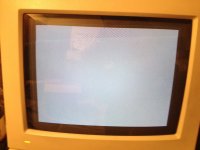
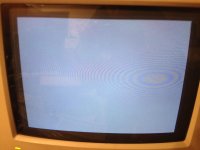
I just aquired a Macintosh LC II and its 12 inch monitor from a friend of mine who got it at an estate sale. When I hooked everything up and turned on the LC, I saw that the screen was dark. So I waited a little while and then suddenly an image came up. It was just a gray blank screen (I have attached a photo of what it looks like). There is no floppy icon or no question mark visible. So here I am stuck with trouble shooting. I can't tell if it is the monitor's issue or the computer. Here are my findings on each:
The monitor:
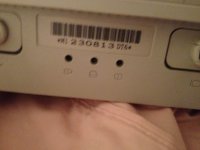
It seems to function correctly, however on the back end of the monitor, there are three little holes with little pictures underneath it describing how their function would help center the image. There were no knobs there, I don't know if they were broken off or what? I also have included a picture of what this looks like. Is there anyway to test if this monitor is working properly? I was wondering if I could hook it up to my pc and via a DB-15 to VGA adaptor to see if it will get any image. Will that work? I don't want to risk damaging the monitor by sending it incorrect signals.
The LC II:
When this gray screen first appears, you see the screen flicker with a horizontal line. At the same time that this is happening I hear a little "tick" sound coming from the computer. I turn off the monitor to confirm that it was not making the noise and sure enough it was coming from the speaker. I unplugged the speaker to confirm this and the screen still flickered, but there was no "ticking" sound. Each "tick" was associated with a flicker on the screen. In other words, they were synced up. Now, after a while of leaving the computer on, the ticks disappear, and so do the flickers and it is just a gray screen. Note that when I turned on the computer I heard no chime. Just for the heck of it, I was curious if the monitor would still show a gray screen if the VRAM was taken out, and surely it did.
So I am confused as to what to do. Has anyone had this problem before? Anyone got any suggestions on what to do? What do you guys think is the culprit? The monitor, or the LC II? Also, is there anyway to enter into the Mac's bios like on a PC by pressing certain keys on the keyboard? (sorry I'm a little new to macs).
Any input is much appreciated!
First I would definitely try disconnecting the hard drive. I've come across a few faulty SCSI HDs that result in a gray screen/cursor in every Mac that I've tried them in.
If you still get a gray screen after this then I would suspect that the motherboard capacitors may be an issue.
If you still get a gray screen after this then I would suspect that the motherboard capacitors may be an issue.
I've already removed the hard drive. You think it is worth recapping? Or to just get another one? Could there be other reasons this is not working?
I would say it's worth recapping. Even if you don't have much prior experience, it's something you can learn with a little patience. The materials won't be too much either. Trag on these forums sells capacitor kits and Uniserver does excellent work recapping if you don't feel comfortable doing the repair.
There is an excellent recapping guide here:
http://www.classicmac.net/reference/caps/
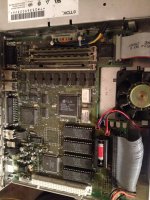
Looking at your pic of the motherboard again, there seems to be an area where the caps have leaked already, so I would strongly suspect that it's the caps. If you don't want to recap yet, I would suggest grabbing an old toothbrush and some rubbing alcohol (as pure as you can find). You should be able to see the areas on the motherboard where the caps have leaked; they will have lost their shine and have a Coke-like substance on them. Clean all of these areas with your alcohol dipped toothbrush carefully, and hopefully it'll boot up. Recapping is the only long-term solution, however.
There is an excellent recapping guide here:
http://www.classicmac.net/reference/caps/
Looking at your pic of the motherboard again, there seems to be an area where the caps have leaked already, so I would strongly suspect that it's the caps. If you don't want to recap yet, I would suggest grabbing an old toothbrush and some rubbing alcohol (as pure as you can find). You should be able to see the areas on the motherboard where the caps have leaked; they will have lost their shine and have a Coke-like substance on them. Clean all of these areas with your alcohol dipped toothbrush carefully, and hopefully it'll boot up. Recapping is the only long-term solution, however.
Don't recap until you try the usual tests:
- Flick the power switch on and off and on again, quickly
- New PRAM battery
- Switch RAM
- Clean dust and other crud off board
- Flick the power switch on and off and on again, quickly
- New PRAM battery
- Switch RAM
- Clean dust and other crud off board
Yes in the bottom right corner.
You can also give the board a wash and wait for a couple of days until the board is dry.Remove the PRAM battery as this is the famous red bomb.
Have a look at the RAM connectors, and also try another set.
But removing isn't enough, it should be replaced. Some macs refuse to boot without a proper battery. They can usually be tricked into booting by quickly turning the mac off and on again.

And never forget, after playtime, when you put your LC into storage, take the battery out. :approve:
The screen you're seeing normally indicates that the machine's doing its startup RAM check. I don't know if the LC's got onboard RAM, but you could try removing the RAM SIMM, as it could be a large one (large memory, such as 128MB or more, tends to result in a very long RAM check  ).
).
If that doesn't help, then I suspect that it's the capacitors. Bad capacitors can cause memory corruption (hence failing the memory check) and also weird flickers and ticks like those that you have described. They can also cause a lack of (or an exceptionaly quiet) startup chime. Finally, they can additionaly cause corrosive goo to form on the logic board, which subsequently damages it.
It's certainly not the monitor. In your picture asking about the lack of knobs, there should certainly not be any knobs there-mine hasn't got any either.
).If that doesn't help, then I suspect that it's the capacitors. Bad capacitors can cause memory corruption (hence failing the memory check) and also weird flickers and ticks like those that you have described. They can also cause a lack of (or an exceptionaly quiet) startup chime. Finally, they can additionaly cause corrosive goo to form on the logic board, which subsequently damages it.
It's certainly not the monitor. In your picture asking about the lack of knobs, there should certainly not be any knobs there-mine hasn't got any either.
caps caps caps caps… you can see they have leaked all over.
Yep. Look at all the greasy mess in that picture. Dead.
Hello everyone,
Thanks for all your input. So looks like I need to replace the caps. So here are a few questions I have:
1. What should I do about the mess that is one the motherboard? Someone suggested taking a tooth brush to it using some pure alcohol. Is that the best way? Are there any other ways?
2.Will the discharge from the leaky capacitors permanently damage the motherboard?
3. Where is a good place to buy PRAM batteries at an affordable price?
Thanks for all your input. So looks like I need to replace the caps. So here are a few questions I have:
1. What should I do about the mess that is one the motherboard? Someone suggested taking a tooth brush to it using some pure alcohol. Is that the best way? Are there any other ways?
2.Will the discharge from the leaky capacitors permanently damage the motherboard?
3. Where is a good place to buy PRAM batteries at an affordable price?
1 . wash it once the caps are removed
2. if there is any damage, it has already been done. lots of times i will take a dental pick and clean any corrosion bridges.
3. Ebay is the best place it seems
4. If you want me to re-cap that for you I can. LC-II is alot of work, and quite annoying at that.
I'v done many of them, is not much of a issue for me. You can PM if interested.
i know that mainboard /wo Ram /wo vram is under 13 OZ's and will be only a little over 3 bucks to ship first class in a padded envelope.
2. if there is any damage, it has already been done. lots of times i will take a dental pick and clean any corrosion bridges.
3. Ebay is the best place it seems
4. If you want me to re-cap that for you I can. LC-II is alot of work, and quite annoying at that.
I'v done many of them, is not much of a issue for me. You can PM if interested.
i know that mainboard /wo Ram /wo vram is under 13 OZ's and will be only a little over 3 bucks to ship first class in a padded envelope.
I like to use a bottle of isopropyl alcohol and a medium toothbrush to clean. Works well.
Right, consume the alcohol, walk through a car wash and use the toothbrush to remove the brush fibers from your teeth. :lol:
I use mild liquid hand washing soap and a small sponge to clean everything. Then i give it a good rinse in the shower and pour a bit of alcohol over it to replace the water, from top to bottom. I use paper towels to dry it as good as i can and let it dry in an airy spot for a few days.
Cleaning isn't the problem, i do it with everything that enters my dungeon, leaky or not. The problem i always have are corroded soldering pads. It's hard to get a good solder on them again. It seems uniserver is the man with the golden hands when it comes to that. I am not.
I use mild liquid hand washing soap and a small sponge to clean everything. Then i give it a good rinse in the shower and pour a bit of alcohol over it to replace the water, from top to bottom. I use paper towels to dry it as good as i can and let it dry in an airy spot for a few days.
Cleaning isn't the problem, i do it with everything that enters my dungeon, leaky or not. The problem i always have are corroded soldering pads. It's hard to get a good solder on them again. It seems uniserver is the man with the golden hands when it comes to that. I am not.
Thanks for the input, I just can't get over the fact that it is okay to wash a motherboard! All my life I have been told to keep electronics away from water! But I guess it works for a lot of people!
Also, does anyone know what those three holes on the back of the monitor is?
Also, does anyone know what those three holes on the back of the monitor is?
Probably to stick a flat screwdriver in and tune a setting by twisting. If your picture isn't the right geometry, or not as sharp as CRTs should be, try them.
Edit #1: On second thought, it looks like you can move the picture left/right, up/down and make it larger/smaller. The other settings might or might not be hidden inside the case.
Edit #1: On second thought, it looks like you can move the picture left/right, up/down and make it larger/smaller. The other settings might or might not be hidden inside the case.
100% Correct! :approve:
Everyone does it. Pop it in the dishwasher, then let it dry for a good few days (preferably in a warm place) before powering it up. (If anything starts to smell/smoke, then turn it off IMMEDIATELY and let it dry some more!!!)
I agree with that, but only when electronics are powered... i mean, nobody advised to wash the board still connected :beige:
It's a bit scary in the first place, but as far as you wait long enough, everything will be fine, i have washed and saved a couple of boards that way.
Hi,
I've found that turning the dishwasher's drying mode to "heated" dries the boards out quite well (and I haven't noticed any heat related damage when I've done it), and usually they're ready to go right then and there.
c
I've found that turning the dishwasher's drying mode to "heated" dries the boards out quite well (and I haven't noticed any heat related damage when I've done it), and usually they're ready to go right then and there.
c
you are all set, good as new...
Works great, ill let it run my typical (over night burn-in) of Missile Command
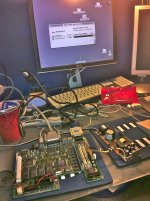

viewtopic.php?f=9&t=19776&p=197378#p197378
enjoy
Works great, ill let it run my typical (over night burn-in) of Missile Command
viewtopic.php?f=9&t=19776&p=197378#p197378
enjoy
Is this the same board from the first post? Because if it is, it looks awesome! 8-o
Yes sir. thanks!
I had this blank screen issue happen to me a couple days ago, with my LC II. I thought maybe it was the fault of the cable I was trying to use with my scsi zip drive (a DB25 M/M cable, somewhat thicker than a normal parallel cable but unlabeled), because it happened after that. I tried booting the computer with the hd, floppy or both disconnected and I got the same problem though, which made me wonder about a different cause. I got some unusual extra sounds after the startup chime, too. However, after unplugging it and turning it off, I plugged both drives back in and left it unplugged. The next day it started up just fine...
Is this blank screen thing reliably connected to capacitors on the board and power supply? There might be a little gunk on the logic board, but I couldn't be 100% sure it was leakage -- the board in my LC II is a little dusty to begin with.
If it's helpful, I can take a couple pictures of the board, although there's nothing out of place that I can see.
P.S.
I bought a nice LCIII board to swap out with this one the other day, but if this is a power supply issue, I'd rather get that fixed...
Is this blank screen thing reliably connected to capacitors on the board and power supply? There might be a little gunk on the logic board, but I couldn't be 100% sure it was leakage -- the board in my LC II is a little dusty to begin with.
If it's helpful, I can take a couple pictures of the board, although there's nothing out of place that I can see.
P.S.
I bought a nice LCIII board to swap out with this one the other day, but if this is a power supply issue, I'd rather get that fixed...
I can take care of that PSU and LC-II logic board for you sir,
PM sent.
Charles
PM sent.
Charles