
Thread
Finally, a LUNCHBOX!
I've been wanting a nice LunchBox portable for the longest time, looks like I got a doozey, with expansion chassis:

Check the profile in the pics, it looks like a double-stuffer Oreo lunchbox. Six full slots and room for a pile of racked test modules on the backside! }

Tekelec Chameleon Open Analyzer
Middle little bro may know a bit about this one. I'm hoping the case is top notch, because that's the rep of the gang he started to work with a little after this piece of test equipment was made.
Chameleon Open was GonzoBUCK$$$ back in the day.

Just to have this Alps Mechanical KeySwitch beauty will be nice!
http://geekhack.org/index.php?topic=21119.0
Check the profile in the pics, it looks like a double-stuffer Oreo lunchbox. Six full slots and room for a pile of racked test modules on the backside! }
Tekelec Chameleon Open Analyzer
Middle little bro may know a bit about this one. I'm hoping the case is top notch, because that's the rep of the gang he started to work with a little after this piece of test equipment was made.
Chameleon Open was GonzoBUCK$$$ back in the day.
Just to have this Alps Mechanical KeySwitch beauty will be nice!
http://geekhack.org/index.php?topic=21119.0
Wow. Kaypro flashback!
That looks like a very unique design. Never saw one quite like it.
Actually, I really wish the Ebay poster's pictures weren't so blurry and muddy because it's really hard to tell *what* is going on on the backside of that thing. It's odd that it has all those cover plates with individual screws above the power supply/parallel/serial port cluster but I'd be really surprised if there is any sort of expansion backplane under there. My *tentative* guess is those panels are there so vertical market re-sellers of the OEM case have a place to screw custom patch panels for "built-in" ports that internally are cabled to interface cards in the standard PC expansion slots (which Tekelec didn't do), and most of the space behind them is used for shock-mounting the internal hard drive bay(s). But it'll certainly be interesting to see what's inside when you get it.Check the profile in the pics, it looks like a double-stuffer Oreo lunchbox. Six full slots and room for a pile of racked test modules on the backside! }
It's slightly irritating that the listing doesn't delve into the specs of the computer, but given the size of the LCD and the copyright date you can see on the screen for the analysis software I'm going to guess it's a 486. Might be interesting to see if it includes something exotic like VESA local bus, but the LCD is probably driven by a 512k CHIPS AND TECHNOLOGIES-based ISA card, that was the go-to solution for these things. The fit and finish looks somewhat inferior to the DOLCH lunchboxes you often see utilized for these old network analyzers so... I'd be willing to bet a nickel or two that if you had access to a mid-1990's issue of "Computer Shopper" magazine you could find the same OEM case for sale from several clone builders. A dead giveaway that it's "generic Taiwan OEM" sourced is how the keyboard connects via the motherboard's original DIN connector on the side, underneath the expansion slots; DOLCH machines hide that internally and run it to a proprietary RJ-11 (or was it RJ14?) connector that's positioned so you can stow the cable and close the box without unplugging the KB. Pretty sure they've done that since the 80286 era.
So what are you plans for the thing? Before I decided to give it away to someone who had a good use for it as-is (DOS machine to run an EPROM burner) I was pondering the idea of finding a widescreen aspect-ratio LCD that as-much-as-possible filled up the front bezel space on my Pentium-based DOLCH and completely modernizing it by junking all the internal components. Upon reflection I decided I didn't have the handycrafting skills to pull it off as a completely "stealth" upgrade and didn't really need such a thing anyway.
... and holy cow, I just noticed what they did with the "?/" key on the keyboard for that thing. That's a crime against nature right there. Yeah, not a DOLCH.
I'd rather have the cursor pyramid intact! :lol:
DOLCH got Alps? :?:
I've got a 19" 1080p that might just fit. It was headed into the side of the Compaq Portable II . . .
. . . so we'll see. }
DOLCH got Alps? :?:
I've got a 19" 1080p that might just fit. It was headed into the side of the Compaq Portable II . . .
. . . so we'll see. }
What the heck is that thing???
OOM:
It is an 80486 desktop PC repackaged to be a portable computer. This one seems to have a card to test fiber optic networks by my guess looking at the connector, which matches the ones on my Nortel switches for fiber connection.
Trash, I hope that Compaq Portable II that was going to receive the LCD mod is dead - I assume they are quite rare in working condition. (Were the huge luggable CRT portables ever popular to begin with?) That lunchbox PC is pretty cool, I like the shade of grey they used on the casing. Hopefully it will have an Active Matrix LCD panel in it!
Let us know exactly what the tester is designed to do when you get it.
It is an 80486 desktop PC repackaged to be a portable computer. This one seems to have a card to test fiber optic networks by my guess looking at the connector, which matches the ones on my Nortel switches for fiber connection.
Trash, I hope that Compaq Portable II that was going to receive the LCD mod is dead - I assume they are quite rare in working condition. (Were the huge luggable CRT portables ever popular to begin with?) That lunchbox PC is pretty cool, I like the shade of grey they used on the casing. Hopefully it will have an Active Matrix LCD panel in it!
Let us know exactly what the tester is designed to do when you get it.
man, i'm jealous. that thing is awesome.
I want one!
Looks a tad bit proprietary, I wonder if its running dos or unix?
to me that thing is Coooooool!
PORTS?

I want one!
Looks a tad bit proprietary, I wonder if its running dos or unix?
to me that thing is Coooooool!
PORTS?
The Dolch had Cherry MX Blue, actually. It was *awesome*, Alps ain't got nuttin' on it.
The face of the Dolch pretty much would have topped out at a 15.2" laptop screen. (I briefly considered sticking the guts of a PowerBook G4 in it.) 19" ain't happening. There are a few 1366x768-ish res. 14" monitors out there that would probably be appropriate. *Maybe* you could get a 17" in there if you completely rebuilt the front end to have a *very* thin bezel. For scaling purposes I doubt the original monitor is bigger than 11" or so. My Dolch was newer and sported a 12". (and of course being a 4x3 monitor that made it about as tall as a 14" widescreen. On the Dolch height was the serious limiting factor because the design sported a "front porch" to hold the keyboard cable.)I've got a 19" 1080p that might just fit. It was headed into the side of the Compaq Portable II . . .. . . so we'll see. }
They almost always run DOS. Or at least boot DOS and then load a big fat DPMI binary that completely takes over the machine.
Neat score! I've always wanted a luggable.

Yup! Even out here in BFE South Dakota they were pretty common. A friend still has his IBM 5155:
The blue/red tagging on the box indicates it was for testing FDDI cables and networks. Essentially fiber optic token ring.
Everything will most likely have at least one or two proprietary cards to drive the frame for the modules and external hardware buth otherwise it will be purely common parts down to the Baby AT motherboard.
I would stuff an Asus P5A-B in that with a flash disk, half a gig of ram and a decent AMD processor and call it a day though you have the potential of running an LCD panel on that which is NOT VGA and would require modification to replace.
It will be DOS. there was no reason why you would anything else back then.
Everything will most likely have at least one or two proprietary cards to drive the frame for the modules and external hardware buth otherwise it will be purely common parts down to the Baby AT motherboard.
I would stuff an Asus P5A-B in that with a flash disk, half a gig of ram and a decent AMD processor and call it a day though you have the potential of running an LCD panel on that which is NOT VGA and would require modification to replace.
"in the day". Remember you paid $15 for it. All the value now is in the proprietary parts and software.
Yep . . . and my bone stock IIfx cost a large percentage of that 10-20k$SSS with just MacWrite and MacPaint on it 4-5 years earlier! ;D
They're all junk! Lovely stuff!
Let's just say that it was liberated from on top of a garbage can outside of a Thrift Shop in such a state that they apparently weren't willing to accept it for sale as was . . . I left it pretty much untouched until about 5 years ago, The KBD/cable attachment was a lost cause and I didn't feel any pressing need to rehabilitate such a junker at the time . . .
. . . I have no regrets now, functional CPqPIIs don't go for enough on eBay to bother selling one like this was in today's market, but I've kept the system boards safe . . .
. . . this is way more fun. }
As for the Tekelec . . . :lol:
They're all junk! Lovely stuff!
Ahem! :
Let's just say that it was liberated from on top of a garbage can outside of a Thrift Shop in such a state that they apparently weren't willing to accept it for sale as was . . . I left it pretty much untouched until about 5 years ago, The KBD/cable attachment was a lost cause and I didn't feel any pressing need to rehabilitate such a junker at the time . . .. . . I have no regrets now, functional CPqPIIs don't go for enough on eBay to bother selling one like this was in today's market, but I've kept the system boards safe . . .
. . . this is way more fun. }
As for the Tekelec . . . :lol:
Oh man, I has a serious jealous now.
The local telcoms test gear recycler had a cutedorable tiny alalyzer like that for sale for $35 - I forget the brand, I will search for pics in a bit. It had an amber gas-plasma display (seriously love those) barely taller than the 3.5" floppy drive mounted vertically in the front face beside it, showing a 386 BIOS boot test.
Now it seems they've tested it out, found it working, and relisted it for $300
/ETA/ Ah, here it is:
Wandel & Goltermann DA-30 Protocol Analyzer

Later colour version:
(Image removed because resize fail, but you can click thru to the original)
The local telcoms test gear recycler had a cutedorable tiny alalyzer like that for sale for $35 - I forget the brand, I will search for pics in a bit. It had an amber gas-plasma display (seriously love those) barely taller than the 3.5" floppy drive mounted vertically in the front face beside it, showing a 386 BIOS boot test.
Now it seems they've tested it out, found it working, and relisted it for $300
/ETA/ Ah, here it is:
Wandel & Goltermann DA-30 Protocol Analyzer
Later colour version:
(Image removed because resize fail, but you can click thru to the original)
That's got a ginormous cuteness index! :approve: Did it have an O-Scope fraternal twin brother?  )
The Tekelec, on the other hand, has a nicely padded out bustle on its ginormous tuschie with a thin surround:

. . . making it just right for a two-faced vintage/modern rendition.
Eyeballing it from the size of the KBD, I'm pretty sure it'd need to be a closer approximation of Kim Kardashian's booty to house the 17" wide 18.5" AOC 1080p LCD 's metal rims. But I just had to bid on the TekelecTrunk™ cuz middle lil' bro still works for them . . .
. . . and it looks kinda like a DuoDockPortable™
) The Tekelec, on the other hand, has a nicely padded out bustle on its ginormous tuschie with a thin surround:
. . . making it just right for a two-faced vintage/modern rendition.
Eyeballing it from the size of the KBD, I'm pretty sure it'd need to be a closer approximation of Kim Kardashian's booty to house the 17" wide 18.5" AOC 1080p LCD 's metal rims. But I just had to bid on the TekelecTrunk™ cuz middle lil' bro still works for them . . .
. . . and it looks kinda like a DuoDockPortable™
Customer Recall: This event indicates that an Express Mail Hold For Pickup item was recalled by the sender.
Dang! I wonder WTHeck this means about the delivery date? :-/
Dang! I wonder WTHeck this means about the delivery date? :-/
I would contact the seller straight away. Why is he recalling the package?
Never saw that in 7 years of using eBay and getting packages via USPS. I did not even know you could recall a package after its sent!
Knowing the USPS, the package will be recalled 1 month after you have received it. They will come to your door asking for it. :lol:
Never saw that in 7 years of using eBay and getting packages via USPS. I did not even know you could recall a package after its sent!
Knowing the USPS, the package will be recalled 1 month after you have received it. They will come to your door asking for it. :lol:
man i shouldn't of messaged him telling him i would pay double what ever you paid
LOL
Just kidding.
LOL
Just kidding.
awesome awesome awesome! MY GOD those had to of been so expensive!!!!!!! Super cool!
Seller said the package went in the mail Friday and all is well. He didn't even know what I was talking about, but I don't think the "Customer Recall?" subject line showed up at his end.
Or he just shanked you out of your money.
shanked for 15 bucks, doubtful.
Messing up his 100% positive feedback wouldn't be worth it.
Messing up his 100% positive feedback wouldn't be worth it.
Not shanked, great communications, he's going to check it out at the PO. He seems more upset than I was, definitely confused about it.
Yeah, I shudder to think what they went for originally.
If you check out the rear images on the auction, you can see that it's a slot-based system that you load up with specific test interface cards. I would hazard a guess those slots are possibly ISA, electrically and data-wise, if not physically. They could of course be some other industrial slot type altogether.
/nitpick/ had to have been /n/
Update time:
I was checking this baby out today to see if I could load Win98 on it for use with a cheap Chinese ROM burner which may show up on my doorstep. No go, or no easy go of it. It ain't DOS or Windows!
This box has to be the most industrially bit of plunder in my collection.
There's a BIN for one with fabulous pics of it on eBay right now, it seems like it may be the whole kit:
http://www.ebay.com/itm/Tekelec-Chameleon-Open-ATM-Network-Analyzer-Telecom-Test-Set-Probe-Cables-Bag-/161125408058
I wonder if it comes with a password, mine needs one. :
What I've found out watching the .TXT scroll by during boot:
Computer Model: HMS 486 (Mosquito) HMSystems © 1993
BIOS: American Megatrends 1992
BIOS Settings:
Processor: 486DX or 487SX (whatever the heck that means?)
Video: VGA/PGA/EGA
Memory: 16MB
OS:
INTERACTIVE UNIX Operating System
System V NFS Release 3.2.5
Lachman Associates
1-2 user license
Neat stuff:
1) ESDI Controller, I've never had any ESDI stuff!
2) Token Ring Monitor Board
Cool beans, I guess I can stash it back under the shelf for now, I'm still not ready to muck about inside this sucker yet.
I'll probably upgrade the Dell Pentium from 95 to 98 if I don't lash together another system with a more modern MoBo that's been gathering dust for a while now.
edit: oh yeah, the '96 versions of this sucker went for 22k Simoleans! :O
edit 2: here's a bunch of crap about it that makes zero sense to me, other than the '94 pricing. 47 large! 8-o
technical gobbledegook
edit last: Had to hook it up to the Sony MultiSync on the bench, it mirrors the display on the LCD, when I get a chance I'll hook it up to the MAG MultiSync with the resolution/frequency readout panel to see what this BEAST is cranking out.
YAWWWWWNNNNNNNNNNNNNNNN!!!!!!!!!!!!!!!!!!!!!!!!!!!!!!!!!!!!! |)
I was checking this baby out today to see if I could load Win98 on it for use with a cheap Chinese ROM burner which may show up on my doorstep. No go, or no easy go of it. It ain't DOS or Windows!
This box has to be the most industrially
bit of plunder in my collection.There's a BIN for one with fabulous pics of it on eBay right now, it seems like it may be the whole kit:
http://www.ebay.com/itm/Tekelec-Chameleon-Open-ATM-Network-Analyzer-Telecom-Test-Set-Probe-Cables-Bag-/161125408058
I wonder if it comes with a password, mine needs one. :
What I've found out watching the .TXT scroll by during boot:
Computer Model: HMS 486 (Mosquito) HMSystems © 1993
BIOS: American Megatrends 1992
BIOS Settings:
Processor: 486DX or 487SX (whatever the heck that means?)
Video: VGA/PGA/EGA
Memory: 16MB
OS:
INTERACTIVE UNIX Operating System
System V NFS Release 3.2.5
Lachman Associates
1-2 user license
Neat stuff:
1) ESDI Controller, I've never had any ESDI stuff!
2) Token Ring Monitor Board
Cool beans, I guess I can stash it back under the shelf for now, I'm still not ready to muck about inside this sucker yet.
I'll probably upgrade the Dell Pentium from 95 to 98 if I don't lash together another system with a more modern MoBo that's been gathering dust for a while now.
edit: oh yeah, the '96 versions of this sucker went for 22k Simoleans! :O
edit 2: here's a bunch of crap about it that makes zero sense to me, other than the '94 pricing. 47 large! 8-o
technical gobbledegook
edit last: Had to hook it up to the Sony MultiSync on the bench, it mirrors the display on the LCD, when I get a chance I'll hook it up to the MAG MultiSync with the resolution/frequency readout panel to see what this BEAST is cranking out.
YAWWWWWNNNNNNNNNNNNNNNN!!!!!!!!!!!!!!!!!!!!!!!!!!!!!!!!!!!!! |)
I'm curious as to what motherboard its using, it is a standard baby-AT form factor case. I would be surprised if it really was ESDI. Any 486 was well into the era of standard IDE drives. Windows 98 will run on it, but more memory is recommended. Otherwise stick with Windows 95.
OS/2 would be a much better match for that industrial beast than Windows!
I had to look this one up... Wikipedia has a short blurb on the 487SX. It was aparently a math coprocessor (actually a full CPU replacement) for systems with the i486SX CPU (which had no floating point hardware). Specifically, it was targeted for systems which had soldered 486SX chips and a compatible socket.
Blech... I forgot what a mess things were those days.
I wonder if the CPU is socketed? If so, you could probably drop in a 486DX/2 for double the speed, double the fun.
Hey! My dad had one of those for work. I played Hack & Rogue on it.IBM 5155:
I assume it's asking for a password once it's fully booted? You should be able to break into the BIOS and get it to boot from a floppy instead if you want to get DOS or whatnot on it. I am also curious about the "ESDI drive" statement; do you actually see an ESDI controller/drive in it, or is that just what the BIOS says? Some older BIOS-es identified IDE drives in "translating" mode (IE, most of them) as ESDI. If it *is* IDE I'd suggest pulling the disk that has the magical proprietary network sniffer OS on it out and subbing another one for DOS/Windows/whatever. A "deep hacking" solution for getting into the sniffer software *could* be sticking the disk in a Linux machine and seeing if you can mount it; in theory you might be able to edit /etc/passwd to break in, for instance, but I'd image the whole disk to a backup before changing anything on it.Update time:
I was checking this baby out today to see if I could load Win98 on it for use with a cheap Chinese ROM burner which may show up on my doorstep. No go, or no easy go of it. It ain't DOS or Windows!
(snip)
I wonder if it comes with a password, mine needs one. :
(Windows 98 is going to be tough. Does it have a CD-ROM drive, or were you thinking of floppies? A machine that old will probably not boot from a CD-ROM drive, you'll have to make a DOS boot floppy with an appropriate driver/mscdex.exe set up on it. You might be able to find a disk image that'll already work once written to a floppy, otherwise it's time for some semi-arcane DOS hackery)
Win98 will run "okay" on a 486DX for something specific like driving an EPROM burner, but you really will want more RAM if at all possible. Keep it off the Internet, though.

I'll crack the BEAST open and see what I've got here, I've been dying to since it arrived, but there's been no room at all to do it. My apartment looks like somebody tossed a couple of concussion grenades into uni's trailer ATM.
That's a tale on its own, let's see: while configuring the Beige_G3 as a temporary replacement for the recently deceased QS'02, after the diagnostics and od said '02, I managed to nuke the '02s big HDD in the large partition hostile G3 in the process. Then I tore up a couple of other setups to re-stuff the Beige with ATA-133, SCSI2 and USB/FW cards so I can back up the borked HDD. As an alternate, I've been setting up the Pismo500 as teh replacement graphics machine on the KVM setup with HP_Maxi in the bedroom, tearing it and the PDQ up after nuking the up Pismo's Classic deprived 10.4.11 trying to upgrade it to 9.2.1 in the process, (thanks again eudi. [] ]'> ) finally winding up with the PDQ's 9.2.1 HDD in the Pismo, happily discovering clamshell mode while researching the schiznit out of the hobbled Pismo.
It's been an interesting month or so. :
Forgot to mention, I've got to repack and re-stack close twenty different project boxes, finish reconfiguring the dining area HackLab and take the excess furniture and pile of accumulated junk to Goodwill. Luckily I'm bachin' it for the week before Thanksgiving!
IOW, it'll be a while before the internal piccie update. :lol:
@ NJRoadfan: I'm just going by the scrolling UNIX bootup .TXT and its mention of ESDI. Maybe there was some advantage in using ESDI under UNIX in 1994? More likely this Lunchbox iteration of Tekelec's diagnostic system was developed from an earlier Sewing Machine based system from the ESDI age?
Macht nichts für mich, the point of this evolution was configuration of one of my parallel port boxen with Win98 to run the ROM Burner. The only other licenses I have for Windows are 3/3.1, 7 on the Parallel port deprived Pavilion dm1 Netbook. There's the questionable transfer of the Win95 install on the Dell Pentium, but 95 and 7 inconveniently bookend the minimum requirements for said ROM Burner. The dedicated XP-Home3 for HP-Mini is way too new for the old boxen, even if I could manage to hoodwink the restore CD into installing on a different machine.
Add to that the very inconvenient loss of my Win98 package and the $60 support manual for it down the storage room whirlpool. The license didn't disappear, I just need to locate that legal backup of the media I vaguely recall making to the cloud ( . . . before it existed . . . erm . . . became popular . . . [}] ]'> ) back in the day.
@ Blinkenlightz: OS/2 8-o GAAHHHH!!!!!! I'm unloading my Sun collection rather than delving into yet another Neolithic OS, I gave up on Debian back in the day, I've managed to avoid loading AU/X to this point and there's no freakin' way I'm going to get start playing with OS/2, especially since it won't run the ROM Burner!
< wonders if crosses, garlic a/o wooden stakes might lay such evil time-suckers to rest? >
I've barely scratched the surface of ubuntu and I've been running it for over four years on HP_Mini for cripe's sake!
@ jr: cool beans! maybe if I can score a DX-2 this would run '98 acceptably for my purposes. I've got 32MB of PC RAM sitting on the old Rocket . . .
. . . and I'll go pretty far out of my way to keep that friggin' DIMENSION XPS D333 off my electronics bench. Blech!
I also like NJR's suggestion of a possible, if highly unlikely, Baby-AT refurb, but the config is all wrong. the BEAST is a cutting edge eight slot (seven accessible) chassis for a $47k industrial workstation. PCI came out in '93 so it's unlikely to be ISA and I've always wanted a Dual Voodoo-2 gaming rig. [] ]'>
That's a tale on its own, let's see: while configuring the Beige_G3 as a temporary replacement for the recently deceased QS'02, after the diagnostics and od said '02, I managed to nuke the '02s big HDD in the large partition hostile G3 in the process. Then I tore up a couple of other setups to re-stuff the Beige with ATA-133, SCSI2 and USB/FW cards so I can back up the borked HDD. As an alternate, I've been setting up the Pismo500 as teh replacement graphics machine on the KVM setup with HP_Maxi in the bedroom, tearing it and the PDQ up after nuking the up Pismo's Classic deprived 10.4.11 trying to upgrade it to 9.2.1 in the process, (thanks again eudi. [
] ]'> ) finally winding up with the PDQ's 9.2.1 HDD in the Pismo, happily discovering clamshell mode while researching the schiznit out of the hobbled Pismo.It's been an interesting month or so. :
Forgot to mention, I've got to repack and re-stack close twenty different project boxes, finish reconfiguring the dining area HackLab and take the excess furniture and pile of accumulated junk to Goodwill. Luckily I'm bachin' it for the week before Thanksgiving!
IOW, it'll be a while before the internal piccie update. :lol:
@ NJRoadfan: I'm just going by the scrolling UNIX bootup .TXT and its mention of ESDI. Maybe there was some advantage in using ESDI under UNIX in 1994? More likely this Lunchbox iteration of Tekelec's diagnostic system was developed from an earlier Sewing Machine based system from the ESDI age?
Macht nichts für mich, the point of this evolution was configuration of one of my parallel port boxen with Win98 to run the ROM Burner. The only other licenses I have for Windows are 3/3.1, 7 on the Parallel port deprived Pavilion dm1 Netbook. There's the questionable transfer of the Win95 install on the Dell Pentium, but 95 and 7 inconveniently bookend the minimum requirements for said ROM Burner. The dedicated XP-Home3 for HP-Mini is way too new for the old boxen, even if I could manage to hoodwink the restore CD into installing on a different machine.
Add to that the very inconvenient loss of my Win98 package and the $60 support manual for it down the storage room whirlpool. The license didn't disappear, I just need to locate that legal backup of the media I vaguely recall making to the cloud ( . . . before it existed . . . erm . . . became popular . . . [}
] ]'> ) back in the day.@ Blinkenlightz: OS/2 8-o GAAHHHH!!!!!! I'm unloading my Sun collection rather than delving into yet another Neolithic OS, I gave up on Debian back in the day, I've managed to avoid loading AU/X to this point and there's no freakin' way I'm going to get start playing with OS/2, especially since it won't run the ROM Burner!
< wonders if crosses, garlic a/o wooden stakes might lay such evil time-suckers to rest?
>I've barely scratched the surface of ubuntu and I've been running it for over four years on HP_Mini for cripe's sake!
@ jr: cool beans! maybe if I can score a DX-2 this would run '98 acceptably for my purposes. I've got 32MB of PC RAM sitting on the old Rocket . . .
. . . and I'll go pretty far out of my way to keep that friggin' DIMENSION XPS D333 off my electronics bench. Blech!
I also like NJR's suggestion of a possible, if highly unlikely, Baby-AT refurb, but the config is all wrong. the BEAST is a cutting edge eight slot (seven accessible) chassis for a $47k industrial workstation. PCI came out in '93 so it's unlikely to be ISA and I've always wanted a Dual Voodoo-2 gaming rig. [
] ]'>Well, that would be a modern era system, though big and without the charm of the lunchbox. It's pretty much the alternate universe counterpart to your beige G3. Digression: my favorite of that era was the Dimension L-series; small, almost cute, with a look like a correctly proportioned 6400.
Personally, I think you need to find yourself one of the old C-series Latitudes (P-III based) or something like a ThinkPad 600E or 600X.
If I had to guess, ESDI vs. IDE was probably about performance. It's possible the drive is still IDE since, IIRC, a lot of older disk drivers just treated MFM/ESDI/IDE all the same (emulation of some early WD controller).
Oh, the case is just fine, that's why I bought the turd . . . possible stealth PExBOX. :lol:
I'd bet three shiny new nickels it's IDE. ESDI was pretty much dead meat by the 486 era. (And yes, from a software standpoint IDE looks basically like a ESDI drive, both of which emulate (with extensions) the WD1003 used in the original IBM AT.)
AT motherboards have 8 slots ATX motherboards only have 7.
ATX motherboards only have 7.I've got a Pentium 3 gateway laptop laying around if you want a small machine that will boot 98 with a parallel port?
Thanks for the offer, comrade, but I can probably snag something suitable for less than the cost of shipping at a thrift in the area. What I'd really like to do is get the Tekelec or a nice Mobo I snagged off eBay a couple of years back up and running.
Well, I cleaned off a work surface to take some pics for the bigmess . . .
. . . and curiosity got the best of me. :lol:
I victimized myself with some sloppy thinking, was a bit disappointed that it's not PCI. It was actually the custom DSP and I/O cards that made this baby a heavy duty, high dollar diagnostics workstation. So it made exactly zero sense for Tekelec to have switched over to a PCI Architecture when simply downsizing the Chameleon Open from an AT Sewing Machine to to the Lunchbox form factor.
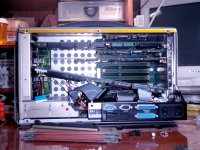
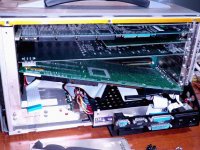
Nine slot passive backplane and a really nifty, upgradeable socketed 486 SBC in there though! [] ]'>
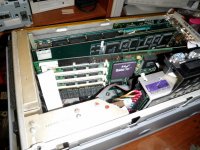
Three empty SIMM slots for what I hope to heck isn't custom RAM modules. It's odd that there doesn't appear to be a ninthe chip for parity, but the SIMM is undoubtedly meant only for the OS, the DSP and I/O cards would have any necessary memory on their own side of the AT Bus.
What kind of upgrades are available for that CPU socket, jr? [] ]'>
. . . and curiosity got the best of me. :lol:
I victimized myself with some sloppy thinking, was a bit disappointed that it's not PCI. It was actually the custom DSP and I/O cards that made this baby a heavy duty, high dollar diagnostics workstation. So it made exactly zero sense for Tekelec to have switched over to a PCI Architecture when simply downsizing the Chameleon Open from an AT Sewing Machine to to the Lunchbox form factor.
Nine slot passive backplane and a really nifty, upgradeable socketed 486 SBC in there though! [
] ]'>Three empty SIMM slots for what I hope to heck isn't custom RAM modules. It's odd that there doesn't appear to be a ninthe chip for parity, but the SIMM is undoubtedly meant only for the OS, the DSP and I/O cards would have any necessary memory on their own side of the AT Bus.
What kind of upgrades are available for that CPU socket, jr? [
] ]'>Dunno brother, I'd say it looks like that card don't fit too good in der… lol
I bet if you get the manufacture/model numbers off the board you'll be able to Google up, if not a whole manual, at least a spec sheet for that board showing the jumper values, etc. (There are at least two *very large* databases of that sort of thing floating around.)What kind of upgrades are available for that CPU socket, jr? [
Just looking at it, being a non-ZIF socket, I'd say if you're talking about just a bare chip you'd be *probably* be limited to a 486-DX2. The faster 486 variants (DX4, AMD 5x86) use a 3.3v core voltage instead of 5v, which means *poof* if you plug them into a socket that doesn't support that. (They sold upgrades which sandwiched a voltage regulator board in-between the upgrade CPU and the socket, you could use one of those or, if you did track down the SBC's manual, see if it supports split-voltage CPUs.)
Anything faster than a DX will need a heat sink. Is there clearance for it in the slot the SBC was plugged into? (Or would the backplane allow you to move the SBC to another slot, IE, is it *completely* passive or does the slot the CPU card goes into have additional connectors on it beyond the 16 bit ISA plugs?)
(Of course, your other option in theory would be to replace the whole SBC with a faster one. It looks like they still make boards with ISA card edges on them *today*, with Atom CPUs. They are *not* cheap, however, and... how does the internal monitor wire up to that thing? Is there a VGA card it's connected to or is it connected to the SBC?)
Actually, it's not as bad as I thought. This one is "only" $320 for a dual-core 1.8Ghz model. That's surprisingly reasonable. Has a built-in LVDS monitor plug, so if you could find a higher-res panel with the same physical dimensions as the one that's in it you could really go nuts modernizing your lunchbox and have it be completely stealth.
 a MilSpec LAN party rig!
@ eudig: The white ribbon cable on the far left appears to carry the LCD and front panel signals, at least there are way too may lines to just be for the front panel bells-n-whisltes. The contrast slider obviously connects to the LCD, so it looks like there are plenty of lines for a monochrome LCD. Gotta count lines though, there's no telling what's going on under the cover panels of the BEAST..
The VGA connector on the backplane plate of the SBC appears to connect only to the VGA port on the back of the case. Since the setup verbiage lists three different Graphics standards, I'm hoping for spanned external monitor support, but mirrored would be fine. I'll be in the market for a True-Color 1600x1200 ISA VidCard. [
] ]'>Can't see the model number or name on the SBC yet, but the name Bustronic on the backplane looks like I'm in luck. [
] ]'>Ah. So it's likely the board has onboard a TTL LCD controller. That makes it a bit complex to use it with something newer. (That same place that has the ATOM card does still sell an SBC with a 300Mhz SOC on it that includes a TTL connector, you might be able to wedge that in there and use the original screen... I'd still say look for a higher-res LCD with the same dimensions as the original, though.
It's really unlikely in an ISA box that it supports anything other than mirroring (PC's *really* didn't meaningfully support multiple video cards before PCI, unless you count running a monochome text card alongside a graphics card), although it may support a higher resolution than the internal panel supports externally. Does the BIOS say how much RAM the VGA has? I'm betting no more than 512k.The VGA connector on the backplane plate of the SBC appears to connect only to the VGA port on the back of the case. Since the setup verbiage lists three different Graphics standards, I'm hoping for spanned external monitor support, but mirrored would be fine. I'll be in the market for a True-Color 1600x1200 ISA VidCard. [
1600x1200x24 in an ISA card is a pretty tall order; that's 6MB of video RAM. ISA cards with more than 2MB are rare as hen's teeth. (And heck, cards with more than 1MB aren't common.) And to do high/true color with many ISA video cards you have to create a "Memory hole" in bottom 16MB of address space because the cards won't do true color unless the chip is in "linear framebuffer" mode, which with many BIOS/hardware setups translates to not being able to use more than 12MB of RAM. Also keep in mind that 6MB of video RAM on an ISA card translates to about a second and a half per frame if you're updating the whole screen with a straight-up RAM-to-VRAM copy. (There's a lot of reasons ISA was clearly not a viable place to put video cards after about 1990.) If you want a graphics workstation you'd probably better look elsewhere.
(Or swap the CPU card for one with better video built in.)Wishful thinking about 1600 x 1200, wasn't really holding my breath. ISA got nice cards for 800 x 600 @ 24bit? :?:
I got those ^*+&^%^$!!! boards out . . .
SBC ID blurb:
© 1993 HM SYSTEMS INC
UNITED COMPUTER TECHNOLOGY, LONDON
HMS-486 D
Proc: A80486DX-33, so a 486DX/2 66 will be nice enough.
There are four chips on the back of the SIMM, parity?
SIMM tag says: AVED4M36 LSM-70
The little ribbon cable turned out to be for the FDD.
Pics in the AM, if and when my eyes uncross. |)
< kicks self for strewing parts from yet another bronze age computer about the place. : >
I got those ^*+&^%^$!!! boards out . . .
SBC ID blurb:
© 1993 HM SYSTEMS INC
UNITED COMPUTER TECHNOLOGY, LONDON
HMS-486 D
Proc: A80486DX-33, so a 486DX/2 66 will be nice enough.
There are four chips on the back of the SIMM, parity?
SIMM tag says: AVED4M36 LSM-70
The little ribbon cable turned out to be for the FDD.
Pics in the AM, if and when my eyes uncross. |)
< kicks self for strewing parts from yet another bronze age computer about the place. :
>800x600 24bit isn't happening without something like VLBus. ISA is just too slow to push any serious screen data. The fastest CPU that you can pop in there is a AMD 5x86-133Mhz with a 3.3v adapter in the CPU socket. Most of the CPU accelerator companies had kits that was plug-n-play that included the CPU and voltage adapter in one package.
Somehow I knew that would be the answer. No wonder the Mac was the 800 lb. gorilla of the graphics world in that era. I thought it would be cool to have the BEAST set up on the KVM'd 1600 x 1200 LCD along with HP_Maxi and the Pismo. But now that I think about it, that KBD ain't happenin' on this tiny desk.
I've got the day off, maybe I'll see if I can get to the HDD, swap in the Dell's Win95 drive and try that just to see what I've got. :-/
I've got the day off, maybe I'll see if I can get to the HDD, swap in the Dell's Win95 drive and try that just to see what I've got. :-/
Remember the machine's target market. Graphics weren't important. Your average circa 1993 486 usually had a VLBus graphics card with 1MB of RAM. High end machines came with 2MB (which can do 800x600x24bit). The cards performance on a local bus usually put the performance of EISA/MCA/Nubus cards to shame simply because they weren't bottle necked by the host bus.
The SBC showed remarkable stubbornness and voiced its displeasure with two beeps when summoned to boot in slot 6, so I'll be wrestling with that #V<&!^% VGA loopback cable just to get SBC out of and back into Slot 8 for something as simple as upgrading the memory . . .
. . . the VGA out connector has also been confirmed to be a B&W mirror of the LCD . . .
. . . such is life! :-/
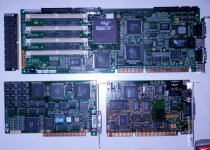
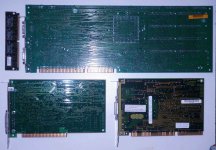
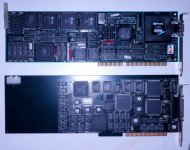
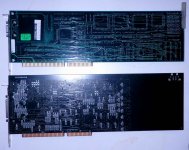
Did I mention that I haven't managed to put the BEAST down by poking around in there with my grubby little paws yet?
But I do have 17mm of clearance for a 486DX/2's heat sink, but right now it's time to see if Windows 95 can this thing!
. . . the VGA out connector has also been confirmed to be a B&W mirror of the LCD . . .
. . . such is life! :-/
Did I mention that I haven't managed to put the BEAST down by poking around in there with my grubby little paws yet?
But I do have 17mm of clearance for a 486DX/2's heat sink, but right now it's time to see if Windows 95 can this thing!
Gah!!!! : I figured out why I got the "no operating system" error from the BEAST with the HDD from the Dell from hell hooked up to it. It's password protected! Thank goodness the blasted thing (Dell PII) defiled my MacHackStation™ only long enough to figure that one out.
The open backed back is back on the BEAST . . . sort of. After hooking the UNIX drive back up and testing it, all is as well as it can be in the world of password protected $47,000 proprietary vertical market ISA UNIX boxen from 1993.
The four expansion cards, an appreciable percentage of the sheet metal and what feels like at least a quarter of the screws from the box are sorted out and stored in a file drawer. Now to find that dratted Win95 HDD so I can test and button the BEAST back up before I forget where all the screws go.
GAWD I hope I don't have to take the nauseating (if much easier) route and use the Win95 drive in that freakin' Dell to run the ROM burner.
Bleh!
I figured out why I got the "no operating system" error from the BEAST with the HDD from the Dell from hell hooked up to it. It's password protected! Thank goodness the blasted thing (Dell PII) defiled my MacHackStation™ only long enough to figure that one out.The open backed back is back on the BEAST . . . sort of. After hooking the UNIX drive back up and testing it, all is as well as it can be in the world of password protected $47,000 proprietary vertical market ISA UNIX boxen from 1993.
The four expansion cards, an appreciable percentage of the sheet metal and what feels like at least a quarter of the screws from the box are sorted out and stored in a file drawer. Now to find that dratted Win95 HDD so I can test and button the BEAST back up before I forget where all the screws go.
GAWD I hope I don't have to take the nauseating (if much easier) route and use the Win95 drive in that freakin' Dell to run the ROM burner.
Bleh!
I tried Windows 95 on a 486 someone gave me. Previously, all my experiences of 95 have been good overall, even a 300 MHz AMD K6 (aka NEC Ready 230T) seemed relatively speedy. But the 486, My Gosh! That thing was sooo sloww! I never believed Windows 95 could be that slow.
Anyway, I have a box full of old Windows 95 OSR 1 or 2 disks (complete with licenses; a local school was dumping them in preparation for moving to a new campus, and the computer lab aide rescued them for me).
If you can't find (or have lost) your disk/license, feel free to PM me, and I can send you one free for shipping.
By the way, in defense of the Dell, I also had a Dimension XPS D333, and it was a decent machine until the power supply died a few years ago (I got it at a yard sale back in 2007 for something like $15, so I think I got my money's worth out of it). I had fun with Windows NT Workstation 4.0 (of which I happened to have a valid license, which was bundled with a copy of Visual Basic 4 (or 5 or 6)). Sadly, I scrapped it, not knowing what else to do with it (I tried converting it to a regular motherboard/power supply, but I couldn't get it to fit properly, and I couldn't figure out how to connect the front panel lights and switches).
Managed to keep the nice 17" CRT, though.
c
Anyway, I have a box full of old Windows 95 OSR 1 or 2 disks (complete with licenses; a local school was dumping them in preparation for moving to a new campus, and the computer lab aide rescued them for me).
If you can't find (or have lost) your disk/license, feel free to PM me, and I can send you one free for shipping.
By the way, in defense of the Dell, I also had a Dimension XPS D333, and it was a decent machine until the power supply died a few years ago (I got it at a yard sale back in 2007 for something like $15, so I think I got my money's worth out of it). I had fun with Windows NT Workstation 4.0 (of which I happened to have a valid license, which was bundled with a copy of Visual Basic 4 (or 5 or 6)). Sadly, I scrapped it, not knowing what else to do with it (I tried converting it to a regular motherboard/power supply, but I couldn't get it to fit properly, and I couldn't figure out how to connect the front panel lights and switches).
Managed to keep the nice 17" CRT, though.
c
Thanks for the offer, but I'm only looking for the Win95 HDD for testing, I'll need anything from Win98 through XP to run the ROM Burner. Win98 is the only version for which I've got a license. Bought the OEM version along with the Socket 7 upgrade MoBo and stuffings for the 386 Mid-Tower under the Rug Rat's desk back in the day.
Dog slow '98 on a 486DX/2 in the BEAST for reading and burning ROMs ought to be plenty fast enough for me!
Back to the belly of the Beast: does that SIMM look like anything special? I can't imagine it's not a standard memory type. :?:
Dog slow '98 on a 486DX/2 in the BEAST for reading and burning ROMs ought to be plenty fast enough for me!
Back to the belly of the Beast: does that SIMM look like anything special? I can't imagine it's not a standard memory type. :?:
I ran IE3 on top of Windows 95 and it was adequate. I had a 75 Mhz DX4 though - maybe you had just a DX?
Don't know why you keep calling it a "UNIX box", Trash80. What you described way back at the start sounded like a perfectly normal PC BIOS startup.
Huh? :?:
Maybe I shouldn't have called them "BIOS Settings" on a Unix Box, could that be the confusion?
My mistake. I read the seemingly normal bootup stuff at the top and moved on.
I kind of figured as much. This thing is way cool. I need to hook it up to the 21" Mag test CRT with the resolution/frequency readout panel.
It appears that this LCD might be running off an HD-15 Analog VGA output. If it is really doing that, I can watch for a more current PCI architecture SBC and a backplane to install in this sucker! Heck, I can just feed the loopback cable from a VGA card in another computer and see what graphics might look like on the stock LCD. [}] ]'>
It appears that this LCD might be running off an HD-15 Analog VGA output. If it is really doing that, I can watch for a more current PCI architecture SBC and a backplane to install in this sucker! Heck, I can just feed the loopback cable from a VGA card in another computer and see what graphics might look like on the stock LCD. [}
] ]'>I dunno, I used to have an IBM PS/2 486SX unit with 16MB of RAM, and windows 95 floppy version flew on that thing, didnt have any lack of speed whatsoever. it even had a SCSI bus. not ESDI.
I'm wondering about that ESDI part, I tried an IDE drive on the bus and came up with absolutamente nada! I need to look for my ISA SCSI controller, I've got a freakin' sack full of those teensy weensy little SCA server drives and a larger one of adapters!
Ugh, Windows 95, I wouldn't wish that on my worst enemy. That thing was more a conglomeration of bugs held together with tape than an actual OS.
Windows ME was the only MS OS to beat 95 in terms of how bad it was. At least they actively worked to fix 95, ME was just left to flop around like a 1/2 dead fish. I always laughed when people complained about Vista. I was like "Until you've had to deal with the first release of Win 95, or Windows ME, you have no idea what bad really is!"
Windows ME was the only MS OS to beat 95 in terms of how bad it was. At least they actively worked to fix 95, ME was just left to flop around like a 1/2 dead fish. I always laughed when people complained about Vista. I was like "Until you've had to deal with the first release of Win 95, or Windows ME, you have no idea what bad really is!"
You'd know if you had an ESDI drive when you saw it, the cabling is completely different from IDE.
By any chance do you know what the brand/model number of the disk that's in it is? Also... did you try going into the BIOS setup, or did you just plug the new drive in and assume it would be autodetected? To digress quite a long way, well... you know the phrase "SCSI Voodoo"? When you're dealing with a machine as old as this you're going to encounter quite a bit of "IDE Voodoo". Amongst which:
A: Just to be certain, you have the drive you're trying hard-jumpered as "master", not "cable-select"?
B: The BIOS may not do autodetect, at least completely automatically. You'll probably have to drop into the BIOS and either:
1: Tell it to Autodetect (some BIOSes which *can* do it don't do it unless told), which may or may not work (* I'll get back to that), or if you're really unlucky:
2: Manually enter a C/H/S (cylinders/heads/sectors) sequence to describe the capacity of the drive you connected. I say "C/H/S" and not just an LBA capacity because:
C: This BIOS *will* have problems with drives larger than X, X being a number that could vary anywhere between 528MB and 8GB. A lot changed between about 1993 and 1998, a system produced between those years could have its personal limit stuck anywhere in that range; for a 486DX the most likely numbers are 528MB and 2.1GB. It's possible the BIOS in your system is so old it doesn't even know how to meaningfully detect a drive (IE, it doesn't know the "Geometry" command at all, and therefore drive setup is completely manual), or it could be running the command against whatever drive you plugged in and getting an answer that makes it wet its pants. (How large of a drive did you try?)
(Edit: A history of BIOS drive size limits )
There are solutions for running big drives in systems like this; the most common is to use a "Disk Manager"; a common one was "EZ Drive", which used to be included with Maxtor and Western Digital drives on a floppy. They way they work is you set the BIOS up for the biggest size it supports (in your case, probably 528MB), and then use disk manager to install in the boot sector area a BIOS extension that gets loaded and "fixes" the problem (IE, it queries the disk's real size and sets up its substitute INT13 driver to use it) before booting an OS. Minus a disk manager your options are probably limited to using a drive smaller than the BIOS limit or using a larger drive and accepting that you won't be able to use part of it. (Note that the second case may only be an option if the larger-size drive doesn't crash the autodetection, if present. *If* it does then try disabling autodetect and manually punching in a size.)
Back in the day EZ Drive was great, and let you do all sorts of horrible off-the-radar things. I used it once, a copy that was provided with a new Maxtor drive, to set up a 486DX/33 with a really OLD bios to drive *three* castoff hard disks. All the disks were smaller than 528MB, but the old BIOS only supported a single IDE port. (IE, two drive maximum) The EZ Drive BIOS extension was smart enough to look for drives at secondary and tertiary ports, so I was able to hang the third HD off the IDE port on a Soundblaster card. The resulting Frankenstein machine even worked under OS/2. It looks like it's possible to download a copy of EZ Drive from Western Digital support, the one thing I'd worry about is if they since brain-damaged it so it only works with WD hard drives.
A system like this *would* probably be a good candidate for an IDE->Compactflash adapter, teamed up with a 2GB or smaller CF card. (Or heck, a 512MB card would be perfect.) Most CF cards still support C/H/S mode so it should be pretty much plug-and-play.
I've actually witnessed Windows 95 on a 20mhz 386SX with 8MB of RAM. Just poking around the UI it honestly didn't seem... any worse than Windows 3.1, but that really isn't saying anything. I'm sure actually running anything significant would have torpedoed it.
Thanks for the help, g. I've done the manual C/H/S dance back in the day and I still have Upgrading and Repairing PCs on the bookshelf. IDE did hook up to the cable with no problem, so you were right about the setup sequence report being a red herring.
No way I can get the &^%$^%#%$ HDD out of the box without major surgery, heck I could barely get the cable off it, the PSU wire terminators are in the way and that motherloving MOLEX connection fit is so tight that I've excavated a splitter and tossed it into the thing for installation during next evolution in this campaign.
I'm loving that compact flash suggestion. There's also the SCSI option, but I haven't relocated my ISA controller as yet.
I've backburnered taming the BEAST for now. I dug a good Win98 candidate for the ROM burner build out of the MoBo box! ;D
No way I can get the &^%$^%#%$ HDD out of the box without major surgery, heck I could barely get the cable off it, the PSU wire terminators are in the way and that motherloving MOLEX connection fit is so tight that I've excavated a splitter and tossed it into the thing for installation during next evolution in this campaign.
I'm loving that compact flash suggestion. There's also the SCSI option, but I haven't relocated my ISA controller as yet.
I've backburnered taming the BEAST for now. I dug a good Win98 candidate for the ROM burner build out of the MoBo box! ;D
It looks like you need to somehow take off the case plastics, at least on the side nearest the HDD. That probably leaves either an opening or screws which hold the drive bracket in place.
Ahem, getting the plastics off would be the major surgery I'm talking about, I've gotta find a take-apart to download. [] ]'>
] ]'>You know, The funny thing is I never had any issues with any version of 95. Yea, it had quite a few BSODs or illegal operations, but that was pretty rare for me. And Win98 had about the same number of those for me as well. Win ME, I had absolutely no issues with when I used it, Surprisingly. But I didnt do a whole lot with it, other than browsing the web and burning CDs, plus using the old Scour media exchange, I also have 2 pressed beta CDs from when I was in the Win ME Beta program. Even got my win2000 beta CD too. lol. Back in those days, you had to be invited in to do the Beta stuff. I got the WinME Beta invite, my buddy got the Win2K and Win2K3 Server invite.
Windows 95 as bad as ME?
Windows 98 has Internet Explorer integrated. It started the "internetizing" of Windows which made it more buggy and less productive.
You can't get a '404 page not found' while browsing your hard drive in Windows 95, lol.
Windows 98 has Internet Explorer integrated. It started the "internetizing" of Windows which made it more buggy and less productive.
You can't get a '404 page not found' while browsing your hard drive in Windows 95, lol.
This is true.
However, it would seem that by the time Windows XP had matured (about when Service Pack 2 was released, I think), the concept of an integrated web browser actually began to sort of work OK in practice (i.e., it wasn't as bug ridden as in previous releases, though it could've still used some improvement; hence Windows Vista (in my opinion the most XP like of the various post-XP versions) and later Windows 7 (probably the best Windows to date, and finally a valid improvement over XP (Vista was basically, at first, a badly executed interim release; however, in its defense, it did mature into a decent OS.)).
I'm not trying to defend the "internetization" of Windows per se- I for one think that Microsoft didn't do anyone any favors by doing it (by way of intentionally (if I recall correctly) blocking Netscape from running on 98 (and unscrupulously usurping the various third party technologies it perceived as competing with Windows* (the so called anti competitive behavior)).
Be that as it may, I actually like Windows 98 okay (though 95 is arguably better due to its simpler interface; if it were to include an NT kernel, it would, in principle, be relatively more stable and reliable I think (wait, we already have that: Windows NT 4! Too bad it didn't have all the niceties that 2000 had (minus the webby interface, of course.))).
So, that being said, I will now bow out before I get myself stuck in a hole.
c
*Apple isn't a saint here, either, though they weren't so anti competitive and unscrupulous as MS, anyway (case in point: The acquisition of NeXTStep, which evolved into the OS X we know today, wouldn't have happened if Apple hadn't bought the company that produced it (NeXT); their attempt at an in-house solution (Copeland) was a disaster, and it most certainly would've put Apple out of business if it had floundered much longer than it did).
I don't know that I would be that kind regarding Apple and how it treated its competition. Remember what they did to the Apple clone market. They used a legal loophole to destroy all the Apple clones in one fell swoop. If that isn't anti-competitive, I don't know what is.
After messing with Ankylosaurus the other Parallel Port ROM HackStation candidate a bit too long and way too much hardware cannibalization later, I suffered a middling vicious case bite on my leg . . .
. . . YOWCH!!!!! 8-o
An alcohol swabbing and Bacitracin schmear later, I decided it was time to bolt a lot of nasty sheet metal back together and clean up the work area and made a possible breakthrough for both ROMstation candidate systems in the process, especially the BEAST from Tekelec.
I found the Zip-Loc with the setup floppy/partitioning kit from one of my Western Digital HDDs therein . . .
. . . but I'm still gonna' clean up and organize the considerable heaps of digital offal surrounding the MacHackStation before going any farther with this lunchbox beauty.
. . . YOWCH!!!!! 8-o
An alcohol swabbing and Bacitracin schmear later, I decided it was time to bolt a lot of nasty sheet metal back together and clean up the work area and made a possible breakthrough for both ROMstation candidate systems in the process, especially the BEAST from Tekelec.
I found the Zip-Loc with the setup floppy/partitioning kit from one of my Western Digital HDDs therein . . .
. . . but I'm still gonna' clean up and organize the considerable heaps of digital offal surrounding the MacHackStation before going any farther with this lunchbox beauty.
You misunderstand the purpose of antitrust legislation. It is to prevent anti-competitive practice by monopolies and near-monopolies, where their market dominance can be abused to distort the market itself. It doesn't apply without that dominance. Comparing MS's practices and Apple's is thus irrelevant.
This has zero to do with anti-competitive practices, and I fail to see how it's in any way unethical or questionable. Their in-house OS development stalled, yes; so what? They acquired an outside solution, including the company that produced it; so what?